AI Social Media Content Generator: A Complete Guide

Discover how an AI social media content generator can transform your workflow. This guide explains capabilities, use cases, and how to get started.
Every social team hits the same wall. The calendar is full, the channels keep multiplying, and content that looked manageable on Monday becomes a scramble by Thursday. One post turns into six deliverables, then revisions, then resizing, then captions, then scheduling, then a last-minute request to “make it feel more native for Reels.”
That's why the ai social media content generator category matters. Not because it replaces strategy, and not because it lets you publish without thinking. It matters because it removes the repetitive production drag that burns out creators, social managers, and small teams.
Used well, these tools don't just write captions. They help turn one idea into platform-ready assets faster, with fewer handoffs and less context switching. Used badly, they flood your feed with generic copy, stale hooks, and the kind of content people can spot as machine-made in seconds.
The workflow represents the true shift. Fragmented AI stacks save time in one step and waste it in three others. Unified systems are where the gains become practical.
Escaping the Social Media Content Treadmill
A typical week looks the same for a lot of teams. Someone pulls trend ideas on Monday. A writer drafts captions on Tuesday. A designer asks for clearer direction on Wednesday. Video edits slip into Thursday. Scheduling gets pushed to Friday. Then the cycle restarts before anyone has learned much from the last round.
That's the social content treadmill. You're moving constantly, but not always building a system.
The worst part isn't the volume. It's the fragmentation. Every extra handoff creates another opportunity for delays, mismatched tone, wrong aspect ratios, missing subtitles, or posts that feel disconnected from the campaign they came from. Creators often think they have a content problem when they really have a workflow problem.
I've found that AI helps most when it acts as a co-pilot for production, not as an autopilot for publishing. The win isn't “the machine made my post.” The win is “I stayed in one working flow long enough to make the post good.”
That's why a lot of creators start by looking for broader marketing automation solutions for creators. The useful shift is seeing automation as operational support. It should reduce mechanical work so you can spend more time on angle, hook, pacing, and distribution.
What burnout usually looks like
- Too many disconnected tools: One app for captions, another for images, another for video, another for scheduling.
- Approval bottlenecks: Drafts move between chat threads, docs, and editing tools with no clean source of truth.
- Weak repurposing: A strong idea gets published once, then dies because adapting it feels like extra work.
- No feedback loop: Teams post regularly but don't build a repeatable process from what performs.
Practical rule: If your AI setup creates more exporting, pasting, and reformatting, it's not solving the real problem.
The ai social media content generator is useful when it helps you produce consistently without turning every publish day into a fire drill.
What an AI Social Media Content Generator Really Is
Many marketers still think of an ai social media content generator as a caption writer with a few extra templates. That's too narrow. The more useful way to think about it is an all-in-one digital creative team inside one system.
One part behaves like a strategist. It helps shape the angle, platform fit, and content format. Another acts like a writer, turning a topic into hooks, scripts, captions, and call-to-action variants. A third handles visual production. A fourth helps package and schedule the final asset.
That matters because production rarely fails at ideation alone. It fails in the gap between idea and publish.
More than a text bot
Text-only AI tools can be helpful, but they solve one slice of the job. A modern generator should connect several stages of creation so your output stays coherent from concept to distribution.
Think of the difference like this:
| Tool type | What it does | Where it breaks |
|---|---|---|
| Basic AI writer | Generates captions or post drafts | You still need visuals, editing, and publishing elsewhere |
| Scheduler with AI | Suggests copy and queues posts | Limited control over media creation |
| Unified generator | Connects writing, visuals, editing, and publishing | Stronger if you need high-volume, multi-format output |
The underlying technology is straightforward at a practical level. These tools use natural language processing and machine learning to interpret prompts, patterns, prior content, and platform context. In practice, that means they can take a rough brief and return something closer to production-ready output.
According to Hashmeta's review of AI social media content generator capabilities, advanced systems can deliver a 60-70% reduction in content creation time, maintain over 90% semantic similarity after being fine-tuned on a brand's prior posts, and use engagement feedback loops that improve future post performance by 20-30% iteratively.
What that looks like in real work
A capable system should be able to:
- Read your intent: Topic, audience, offer, and desired tone.
- Adapt for channel context: LinkedIn copy shouldn't sound like TikTok narration.
- Preserve voice: Not perfectly by default, but better after reviewing prior content and examples.
- Learn from output: Good tools let performance data shape the next round of drafts.
The closer your tool gets to understanding your past content, the less time you spend rewriting from scratch.
A strong ai social media content generator isn't magic. It's infrastructure. The goal is simple. Fewer disconnected steps, more usable drafts, and a cleaner path from idea to publish.
Core Capabilities of Modern AI Content Tools
The modern stack goes far beyond caption generation. If you're evaluating tools seriously, look at the whole production chain, not just the writing box.
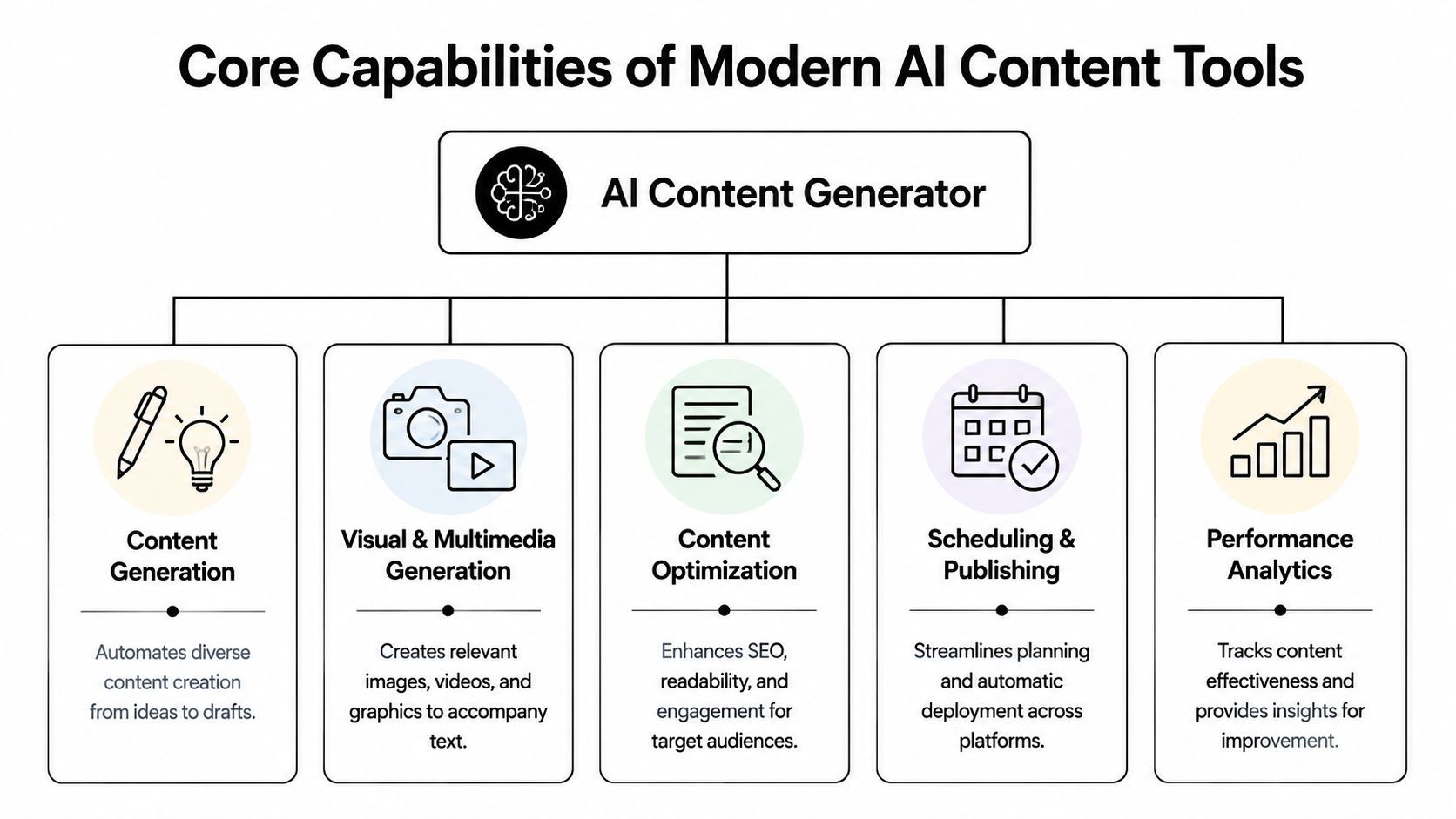
Script and copy generation
This is still the front door for most users. You enter a topic, offer, product angle, or talking point, and the tool returns scripts, captions, hooks, headlines, CTAs, and often platform variations.
What works is specificity. The better your brief, the stronger the output. Generic prompts produce generic posts. Good prompts include audience, tone, desired outcome, and format. If you sell skincare, “write an Instagram post” is weak. “Write a short Reel script for first-time retinol users who are worried about irritation” is usable.
Visual and asset creation
The category has changed fast. As of 2026, 71% of images shared on social media are AI-generated, and businesses using these integrated tools report 15-25% higher engagement rates on their social posts, according to SQ Magazine's AI in social media statistics roundup.
That doesn't mean every generated visual is good. It means AI visuals are now common enough that teams need standards, not novelty. Good tools help create thumbnails, background assets, product mockups, scene imagery, and supporting graphics that match the post concept.
Video assembly and repurposing
Many teams still lose time. They can generate text quickly, but turning that text into platform-ready video is another matter.
Useful platforms connect script segments to scenes, B-roll, image generation, layout presets, and subtitle timing. That's especially important if you repurpose long-form assets. Teams handling webinars, podcasts, or interviews often benefit from tools focused on software that extracts clips from webinars because clipping is one of the fastest ways to feed a short-form pipeline without starting from zero.
Voiceovers and narration
AI voice has become practical when used with restraint. It helps for faceless channels, explainer content, ad variants, and multilingual adaptations. The key issue isn't whether the voice sounds human enough. It's whether it matches the pacing and intent of the script.
A robotic voice can sink an otherwise solid video. Good tools make it easy to swap voices, adjust delivery, and re-time scenes without rebuilding the whole asset.
Editing and format adaptation
The features that save the most time are often the least glamorous:
- Captions and subtitle generation: Fast subtitle creation is now table stakes.
- Resize options: Vertical, square, and horizontal versions should be simple to create.
- Scene swaps: You need to replace weak visuals quickly without restarting.
- Brand kits: Fonts, colors, logos, and recurring layouts should apply consistently.
Working standard: If editing small details feels slow, scaling volume will feel impossible.
Scheduling and analytics
The final mile matters. If your content generator ends at export, your workflow is still incomplete. Strong tools let you organize drafts, queue posts, and track what lands.
That feedback loop is where teams stop “making more content” and start making better content.
A Unified Workflow From Idea to Published Post
Most creators don't need more isolated features. They need one clean path from rough idea to finished post. That's where a unified workflow changes the day-to-day experience.
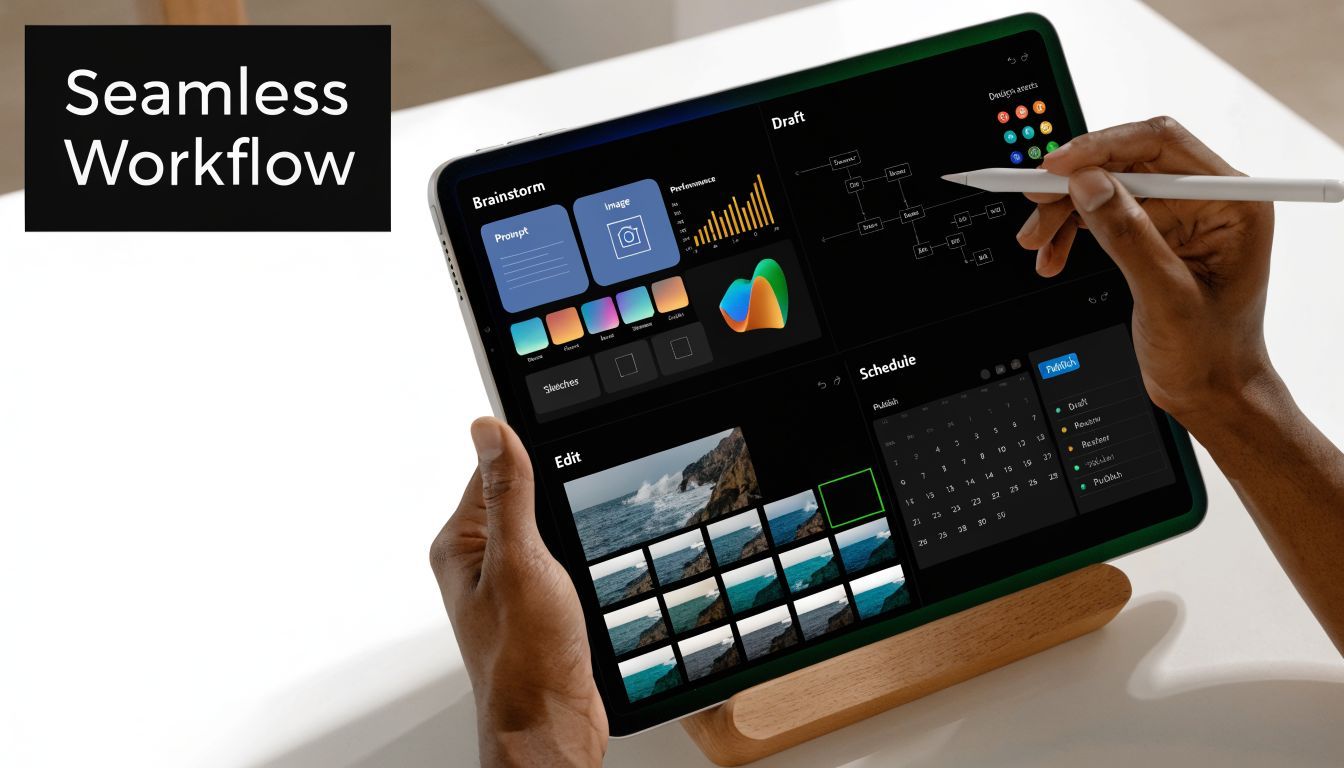
The common failure mode looks like this. You write a script in one tool, paste it into another for voiceover, export audio into a video editor, hunt for visuals, burn captions, resize manually, then upload the finished file into a scheduler. Nothing there is impossible. It's just expensive in attention.
According to ShortGenius on AI-generated content workflows, the biggest problem is the friction between separate text, image, and video tools. The same source notes that unified platforms with API integrations can reduce production time from hours to minutes.
How one idea becomes a campaign
Start with a simple input. A product update, customer question, trend angle, or short teaching point is enough. In a unified system, that idea doesn't stop at “draft caption.” It becomes the seed for the full asset.
Here's a practical flow I'd use for a short-form campaign:
-
Set the angle Pick one clear idea. For example, “three mistakes people make when launching their first paid social ad.”
-
Generate the script Ask for a short video script first, not a caption. A script gives you structure, beats, and a stronger narrative spine.
-
Create narration Turn the script into voiceover. Listen for pacing problems before touching visuals.
-
Build scenes Match each beat to imagery, stock clips, generated visuals, screenshots, or simple text-led slides.
-
Apply brand controls Add your fonts, colors, recurring intro, outro, logo treatment, and subtitle style.
-
Edit for channel Tighten the opening, trim dead air, change cover text, and tailor captions by platform.
Why unification matters
The value isn't just speed. It's continuity. When the script, visuals, voice, and publishing live together, the content usually feels more coherent. You spend less time reinterpreting your own work across tools.
One platform in this category is ShortGenius, which combines scriptwriting, image generation, video assembly, voiceovers, editing controls, and scheduling in one workflow. That kind of setup is especially useful for teams publishing frequent short-form video across multiple channels.
A unified workflow doesn't remove creative judgment. It protects it by cutting the repetitive tasks that usually drain it.
This is also where teams get more mileage from one idea. A single script can become a TikTok video, an Instagram Reel, a YouTube Short, and a text-led LinkedIn adaptation without rebuilding everything from scratch.
A quick example helps. Say you're publishing a founder tip about pricing mistakes. In a fragmented setup, each platform version becomes a new mini-project. In a unified one, you duplicate the asset, swap the hook, change scene pacing, adjust subtitle density, and queue each version.
The process is easier to see in action here:
Where teams still go wrong
Even with a good platform, there are common mistakes:
- They start with formatting instead of angle: Strong workflow can't rescue a weak idea.
- They over-automate the final cut: First drafts are for speed. Final versions need review.
- They publish identical assets everywhere: Native adaptation still matters.
- They ignore the library effect: Organizing content by series or theme makes future production easier.
The practical win is simple. One system, one source of truth, fewer production leaks.
How to Evaluate and Choose the Right AI Generator
The market is crowded, and most tools sound similar until you use them. The easiest mistake is choosing based on one flashy demo feature. A better approach is to judge the tool by how well it fits your real publishing workflow.
If you're managing multiple brands, approval layers, or frequent short-form output, you'll need more than a clever caption writer. If you're solo, you may care more about speed and simplicity than deep collaboration.
Evaluation Criteria for AI Content Generators
| Criterion | What to Look For | Why It Matters |
|---|---|---|
| Range of capabilities | Writing, visuals, video, voice, editing, scheduling in one place or tightly connected | More coverage means fewer handoffs and less context switching |
| Output quality | Scripts that sound usable, visuals that fit the brief, voices that don't distract | Fast output is worthless if you rewrite or rebuild everything |
| Brand control | Brand kit support, tone guidance, reusable templates, prior content references | Consistency matters more than raw novelty |
| Editing flexibility | Caption edits, scene swaps, trim controls, resize options | You need to fix details quickly without starting over |
| Platform integrations | Publishing options for the channels you actually use | A missing connection creates manual work later |
| Team workflow | Shared libraries, approvals, asset organization, role access | Important for agencies and multi-person teams |
| Reporting loop | Clear performance visibility tied to created content | Better systems improve future output, not just current drafts |
Questions worth asking before you commit
Don't ask only, “Can this generate posts?” Ask tougher questions.
- Can it handle the formats you publish most often? A text-first tool may be enough for LinkedIn-heavy teams, but weak for short-form video.
- How much cleanup does the output need? The ultimate test is your second hour with the product, not the first five minutes.
- Does it reduce tool switching? If not, the time savings may be overstated.
- Can it support your next stage? Solo creator needs differ from agency needs, but migration pain is real.
If you run client accounts or team-based approvals, it helps to look at adjacent categories too. Reviews of top-rated agency and AI management tools can clarify which platforms are built for collaboration versus solo production.
Match the tool to the job
The right choice usually falls into one of three buckets:
- Solo creators: Need low friction, fast generation, simple editing, and easy scheduling.
- Brand teams: Need consistency, brand controls, and repeatable output.
- Agencies: Need organization, approvals, reusable systems, and account-level separation.
Buy for the bottleneck you actually have, not the feature list that looks longest.
If your bottleneck is turning ideas into video quickly, favor unified production. If your bottleneck is approvals across many accounts, prioritize workflow management. If you want a practical reference point, review platforms that combine multiple stages in one place, including options such as ShortGenius, and compare them against your current production gaps.
Ethical Considerations and Maintaining Authenticity
The biggest mistake teams make with AI isn't using it. It's using it lazily.
Audiences usually don't care that software helped produce the content. They care when the result feels flat, repetitive, or manipulative. The problem isn't AI itself. The problem is obvious automation with no editorial judgment.

According to BusySeed's analysis of generative AI social content and user trust, posts detected as low-effort AI can see a 20-30% drop in shares, and brands that drift into “spammy” territory can lose 15-25% of their followers.
What audiences notice fast
People notice patterns before they notice tools. They see the same hook formula, the same cadence, the same empty confidence, the same recycled framing. Once your content starts sounding interchangeable, trust drops.
That's why human review stays essential. Someone needs to ask:
- Does this sound like us, or like a generic assistant?
- Is there a real point here, or just polished filler?
- Would a follower save, share, or reply to this?
- Does the video pacing feel human, or purely assembled?
How to keep AI output believable
A few habits make a big difference:
- Use real source material: Feed the tool customer questions, product objections, founder notes, support logs, and past winners.
- Keep the first draft rough: Don't force polish too early. Good content often needs a human pass to sharpen it.
- Vary your structure: Different hooks, different visual pacing, different sentence rhythm.
- Edit the opening manually: Most AI-generated weak spots show up in the first lines.
- Leave room for imperfection: Not every post should feel machine-smoothed.
If every post is optimized the same way, none of them feel distinctive.
Authenticity doesn't mean doing everything by hand. It means the final output still carries judgment, taste, and a point of view. AI can accelerate that. It can't replace it.
Your Action Plan to Get Started Today
The easiest way to get value from an ai social media content generator is to keep the first test small. Don't rebuild your whole content operation in one afternoon. Pick one recurring content task and tighten that workflow first.
A simple starting sequence
-
Choose one content goal
Pick a narrow use case. Short product explainers, weekly educational Reels, founder tips, webinar clips, or paid social variations all work. -
Use one unified workflow
Don't mix five trial tools at once. Test one system from idea through publish so you can judge the workflow, not just the output. -
Create one finished asset
Go all the way through. Script, visuals, voice, edits, caption, and scheduling. Partial tests are misleading. -
Review where the friction remains
Was the script too generic? Did the voice sound off? Were edits easy? Did publishing feel clean? -
Build one repeatable template Once one piece works, turn it into a series. That's when AI stops being a novelty and starts providing significant operational benefits.
What success looks like early on
You're not looking for perfection. You're looking for a setup that makes the second and third post easier than the first. That's the sign the system is doing useful work.
A strong start usually means fewer tool switches, faster iteration, cleaner repurposing, and better consistency across channels. If that happens, keep going. If it doesn't, the issue is often the workflow design, not the category itself.
The key win isn't just faster content. It's a process you can sustain.
If you want one place to test that end-to-end workflow, ShortGenius (AI Video / AI Ad Generator) lets you move from script to visuals, voice, editing, and scheduling inside a single system, which makes it a practical option for creators and teams trying to produce short-form content at a consistent pace.