What Is an Automated Workflow for Content Teams

Discover what is an automated workflow and how it transforms content production. Learn to build scalable video and ad pipelines with practical examples.
A content team can lose an entire morning moving the same project between a brief, a writing tool, an image generator, an editor, a captioning app, a shared drive, and several social platforms. Someone copies the script into a new document. Someone else checks whether the video uses the right aspect ratio. A manager asks for an approval update, then discovers the post was scheduled before the final brand review.
That isn't a creativity problem. It's a coordination problem. The practical answer to what is an automated workflow starts with the handoffs between creative tasks, not with a single automation button. A well-designed workflow connects production steps, moves information between systems, routes decisions to the right person, and records what happened.
Defining the Automated Workflow in Modern Production
A production manager opens the day with an approved brief, several assets in progress, and deadlines spread across channels. The team can complete every creative task correctly and still lose time checking file versions, approval status, and publishing details. An automated workflow controls that movement by using software to transfer information, trigger actions, and route work according to explicit rules.
Its roots reach back to task automation in the 1950s and 1960s, when automated calculations supported scalable bill-of-materials processing and material-requirements planning, as described in research tracing task automation to the 1950s. The historical detail matters because it separates two ideas that creative teams often combine.
Task automation completes one operation, such as generating a caption, resizing an image, or sending a notification. Workflow automation coordinates the connected process around that operation, including conditions, approvals, handoffs, and records.
From isolated tasks to connected production
A captioning tool can add subtitles automatically. It cannot determine whether the script passed legal review or whether the exported file belongs to the correct campaign. A workflow can receive the brief, check required fields, send it to scriptwriting, collect assets, apply brand settings, request approval, publish the approved version, and record completion.
That makes the workflow the operating layer around creative work. It handles predictable movement between writing, editing, directing, reviewing, and publishing. Human judgment remains responsible for decisions that depend on context, taste, audience, or risk.
Practical rule: Automate the handoff before you automate the creative judgment.
During the 1990s, workflow management systems developed around the control flow connecting tasks, decisions, approvals, and handoffs, according to a history of 1990s workflow management systems. A single tool can save clicks. A coordinated workflow makes production repeatable while showing where a person must intervene.
For ShortGenius users, the useful model is a pipeline linking creation, editing, organization, and multi-channel distribution. Shared briefs, asset identifiers, approval states, and publishing details reduce copy-and-paste errors and give the team a clearer view of unfinished work.
The Core Components of Workflow Architecture
A workflow is a software-defined execution path that coordinates tasks, data, people, and external systems after a trigger occurs. Its technical foundation combines process logic, routing rules, work-item state, integrations, and runtime monitoring, as described in IBM's overview of workflow automation.
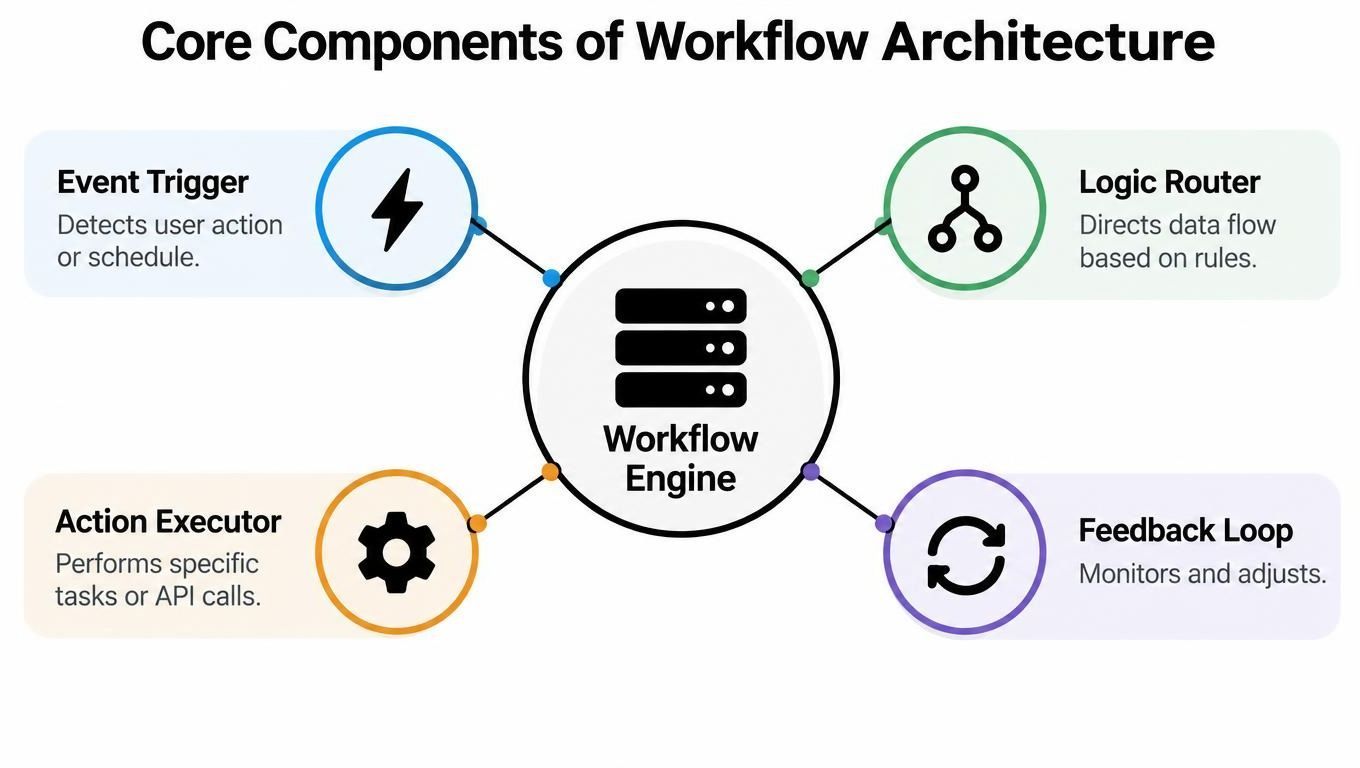
The architecture usually begins with an event trigger. A new brief, completed form, uploaded asset, approval decision, scheduled time, or API event creates or updates a work item. The system then evaluates the item's data against rules. If required information is missing, it can return the brief for completion. If the brief is valid, it can route the work to the next service or person.
How the engine moves work
The logic router determines what should happen next. It might check the campaign type, target platform, language, approval status, or asset format. A fixed pipeline follows a predictable order, such as brief validation, script generation, media assembly, captioning, export, and scheduling.
An adaptive workflow branches when reality disrupts that sequence. A voice-rendering service might time out, a brand check might fail, or a platform-specific format might be missing. Instead of stopping without warning, the workflow can retry within defined limits, assign a correction task, or escalate the item with its existing context.
The action executor performs the work through integrations, API calls, events, or messages. It might create a script, request an image, render a video, update a project record, or schedule a post. The feedback loop monitors execution and updates the work-item state so operators can see whether the item is complete, waiting, failed, or under review.
A useful orchestration layer should make these states visible across tools rather than forcing the team to inspect every application separately. For teams connecting campaign production to broader commercial goals, a practical guide to a revenue-driven automation strategy can help frame workflows around outcomes instead of isolated actions.
The architecture only works when every stage has a clear input, output, owner, and failure path. Without those definitions, a workflow may appear automated while still depending on hidden manual fixes.
The Boundary Between Automation and Human Judgment
Automation doesn't mean autonomy. A workflow can execute rules without making every decision, and content production needs that distinction because many important judgments depend on context rather than a complete set of predictable conditions.
Operational data makes the boundary clear. In a 2025 SANS survey, 66% of organizations used at least some automated response, while only 13% reported full automation, down from 16% the previous year. Manual monitoring remained relevant for 63% of respondents (SANS survey figures summarized by cflowapps).
Those figures describe a pattern content leaders recognize. Teams automate the normal path, but people remain responsible for ambiguity, risk, and exceptions. A system can generate a draft script, render a voiceover, apply a brand kit, and prepare platform exports. It shouldn't independently approve a factual claim, decide whether copyrighted material is safe to use, or determine whether a sensitive topic fits the brand.
Three levels of decision ownership
A useful workflow separates three responsibilities:
- Automatic execution: Software handles predictable operations, such as moving a completed brief, generating a draft, adding captions, or creating an export.
- Human review: A designated person checks factual accuracy, tone, rights, safety, or strategic fit before the workflow advances.
- Human override: An operator can pause, reject, reroute, or revise an item when the predefined rules don't fit the situation.
This structure keeps automation from becoming a black box. Each approval should have a clear reason, a named owner, and an explicit next action. If an approver rejects a script, the workflow should return it to a defined revision stage instead of leaving the team to reconstruct what happened in chat.
The safest content workflow automates execution and preserves human ownership of consequential decisions.
The review process itself benefits from structure. Teams that document how creators plan their content can use that planning discipline to define inputs, review gates, and publishing responsibilities, as illustrated in this guide to how creators plan their content.
The wrong approach is to automate every step just because a tool can perform it. That creates fast, low-quality output and pushes risk into the final review queue, where a tired person must inspect an expanding volume of work. The better approach is to automate repeatable mechanics while making human intervention deliberate, visible, and easy to invoke.
Automated Workflows in AI Video and Ad Production
A campaign brief can move from idea to published variants without a producer rebuilding the project in several applications. Start with the subject, audience, offer, tone, destination platforms, required format, and approval owner. Treat that structured brief as the shared work item, so each production stage receives the same source information.
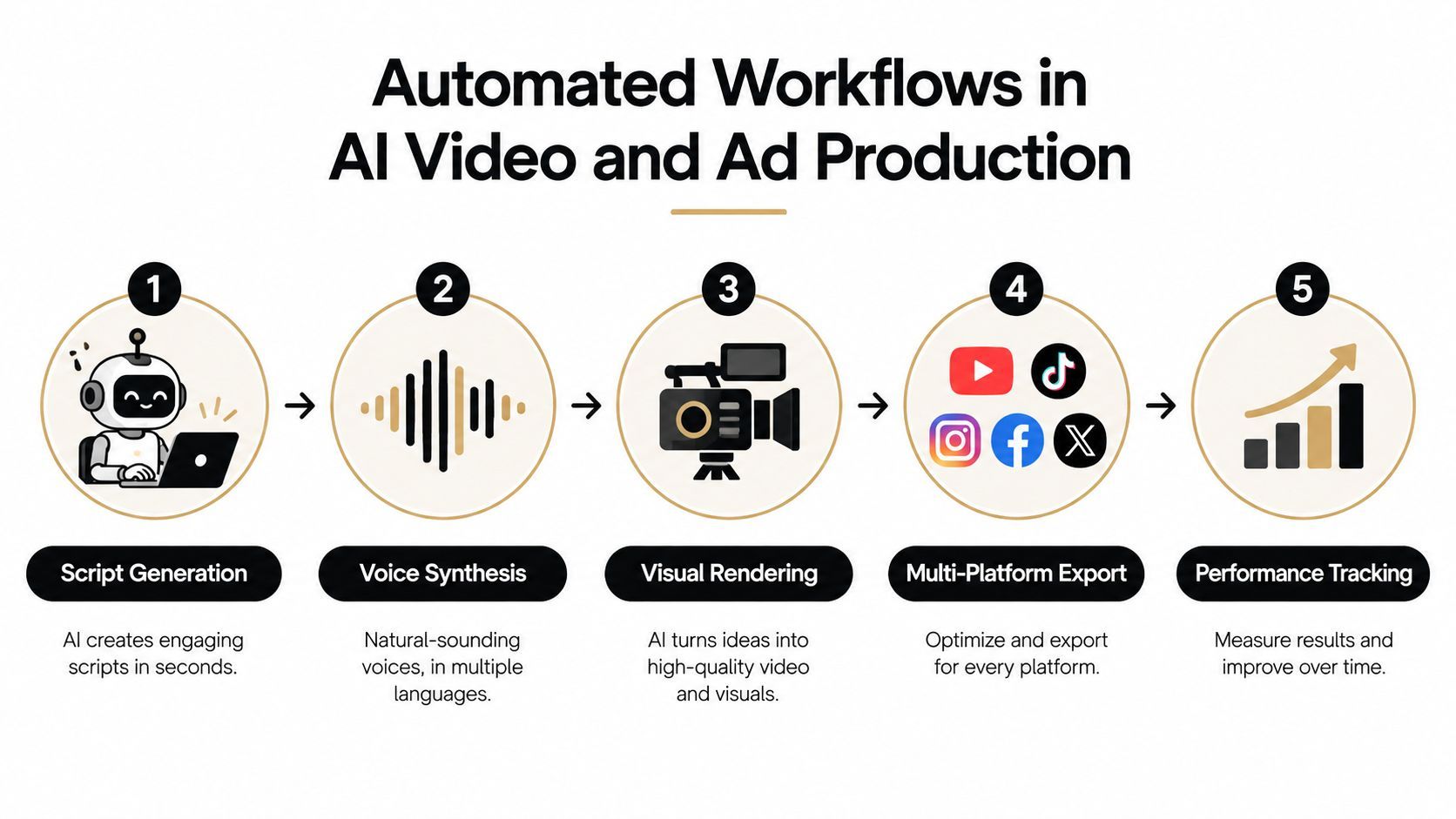
A practical sequence looks like this:
- Script generation: A language model turns the approved brief into a hook, structure, spoken script, and scene direction. Required fields and length rules can be checked before production begins.
- Voice synthesis: A voice engine creates narration from the selected voice, pronunciation guidance, and language settings. Rendering failures should create a recorded retry or review task.
- Visual rendering: Image and video engines generate scenes, b-roll, thumbnails, and related assets. The workflow applies the selected visual style and keeps asset identifiers with the brief.
- Editing and packaging: The assembled video receives captions, cuts, transitions, aspect-ratio variants, and brand settings. A reviewer inspects the result before distribution.
- Distribution and tracking: Approved versions are exported for their intended channels, scheduled, and attached to the campaign record for later analysis.
In ShortGenius, the same brief can drive scriptwriting, scene generation, voiceover, captions, and scheduling. That keeps the brief as the working reference from draft through publication, rather than scattering decisions across separate tools.
Every creative decision still needs a human. What changes is that the approved brief travels through writing, media production, editing, and distribution without a producer manually recreating the project at each stage. Automation handles the handoffs and repeatable production work, while people judge whether the result fits the brand, audience, and campaign.
Here is a visual walkthrough of the production concept:
Platform-specific exports still need inspection. Captions can cover a key visual, a voice can mispronounce a brand term, and a generated scene can conflict with the brief. Put those checks inside the workflow, with a clear review point before scheduling, so quality control is part of production rather than rushed cleanup at the end.
Measuring the Operational Impact on Creative Teams
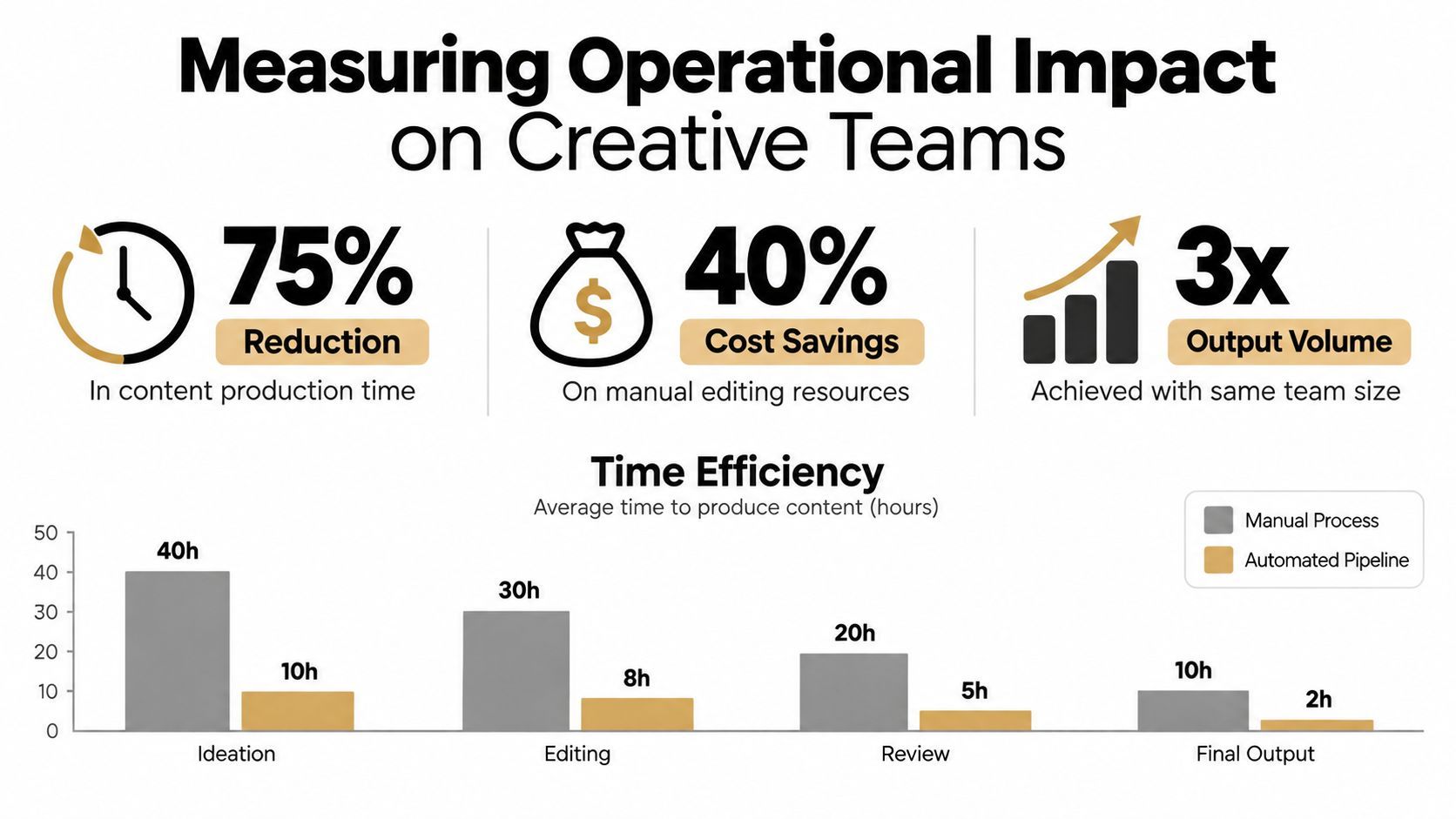
The strongest business case for workflow automation isn't the number of buttons removed. It's the effort recovered from repetitive coordination and redirected toward creative judgment, quality control, and exception handling.
McKinsey survey figures reported in secondary compilations indicate that 66% of organizations had automated processes in at least one business function. The same compilation reports that roughly 60% of employees could save about 30% of their time by automating routine tasks (McKinsey figures summarized by Coworker).
Those estimates don't mean a content team should remove every manual step. They show why routine coordination deserves attention. A producer who no longer has to chase asset status can review stronger concepts. An editor who isn't repeatedly exporting the same variants can spend more time on pacing. An agency account lead can focus on client decisions rather than copying approvals between systems.
Measure the process, not just the output
A workflow should expose whether it improves operations or merely relocates work. Track the path from intake to publication, then inspect where time and attention accumulate.
Useful measures include:
- End-to-end cycle time: How long an approved brief takes to become a published asset.
- Step-level latency: Which stage creates the longest wait, such as review, rendering, or export.
- Retry and failure patterns: Which integrations fail and whether repeated retries resolve the issue.
- Human-intervention rate: How often people must correct, reroute, or manually complete work.
- Duplicate-publication incidents: Whether retries or unclear states create unintended distribution.
- Exception queue size: Whether unresolved work is growing faster than the team can review it.
A mature workflow creates a record for each work item, including its status, responsible person, inputs, outputs, and approval evidence. That visibility helps managers distinguish a genuine throughput improvement from a pipeline that produces more drafts while overwhelming reviewers.
The trade-off is straightforward. Automation can reduce variable coordination effort, but designing, testing, governing, and maintaining the workflow requires deliberate operational work. Teams get the best return when they automate stable, high-volume steps first and keep the judgment-heavy stages visible.
Designing Robust Pipelines and Handling Exceptions
A workflow that works only when every service responds perfectly isn't production-ready. Real pipelines encounter missing fields, expired permissions, malformed assets, timeouts, duplicate events, and reviewers who reject an output.
Start by defining the contract for every stage. A well-defined workflow specifies the inputs, outputs, owner, authorization requirements, completion state, and failure state for each step. IBM's workflow documentation also emphasizes persisted execution state, identifiers and evidence attached to work items, business rules, and idempotent actions that can be safely retried without repeating side effects (IBM workflow automation capabilities).
Build the normal path and the exception path separately
The normal path should be easy to understand. For example, a valid brief moves to script generation, then media creation, review, export, and scheduling. The exception path should be equally explicit:
- Validation failure: Return the work item to the brief owner with the missing field identified.
- Service timeout: Trigger a bounded retry, then escalate with the error context if the retry fails.
- Brand or factual rejection: Send the asset to a defined revision stage rather than restarting the entire pipeline.
- Permission failure: Pause the item and notify the system owner instead of repeatedly calling the unavailable service.
- Duplicate event: Check the work-item identifier before creating a new asset or publication job.
Idempotency is especially important for publishing. If a scheduling request is retried after a network interruption, the system should recognize the existing request instead of creating another post. Every asset and action needs a stable identifier so the workflow can tell a retry from a new instruction.
A failure should produce a visible state, a responsible owner, and a recoverable next action.
Teams building custom integrations may need engineering support for API contracts, authentication, queues, logging, and monitoring. If you're assessing external capacity, guidance on how to hire developers in Latin America can help you evaluate a distributed development option, but the workflow requirements should come first.
Finally, monitor the exception queue as carefully as the success path. If automation completes the routine work but sends every difficult case to one overloaded reviewer, the team hasn't removed burnout. It has concentrated it.
Implementing Your First Content Automation Strategy
Start with the process your team repeats often, not the process that sounds most impressive. Map one content item from brief to publication and record every handoff, file transfer, approval, correction, and status update. The map should show what happens, including the work people perform in chat or from memory.
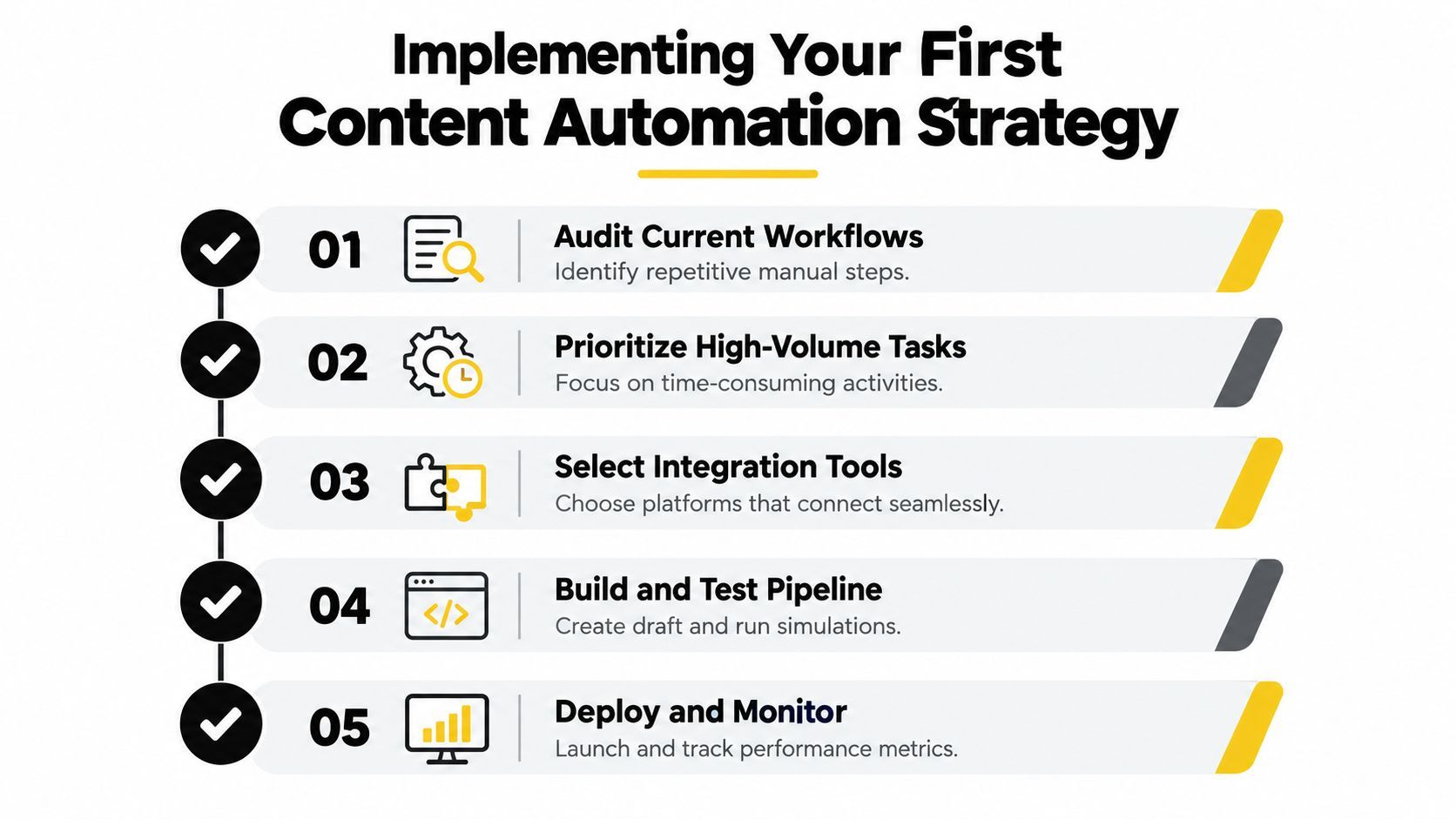
Use this practical sequence:
- Audit the current workflow. Identify repeated transfers, duplicated data entry, manual reminders, recurring exports, and approval delays. Separate predictable operations from decisions that depend on brand context or subject expertise.
- Prioritize a contained use case. Choose a high-volume path with stable inputs and a clear owner, such as turning an approved brief into a captioned, platform-ready draft. Avoid starting with a workflow that spans every team and system.
- Define the control points. Write down which steps run automatically, which require approval, and who can override the process. Specify what happens when a required field is missing or a service fails.
- Select the orchestration layer. Look for integrations, shared work-item state, approval routing, retries, logs, role controls, and monitoring. A collection of disconnected automations may complete individual tasks while leaving the coordination problem intact.
- Test before production. Run sample briefs through the normal path and deliberately test missing data, rejected content, failed rendering, duplicate events, and interrupted publishing requests.
- Deploy with a baseline. Record current cycle time, intervention points, revision causes, and publishing errors before launch. After deployment, compare the same measures and inspect whether exceptions are becoming easier or harder to resolve.
Choose the right level of automation
A solo creator may need a simple brief-to-publish sequence. An agency may need client-specific approval paths, campaign identifiers, brand kits, and separate distribution rules. The architecture should match the operational reality, not force every team into the same template.
Keep the first workflow narrow enough to maintain. Add complexity only when the existing path is stable and the team understands its failure modes. A workflow that nobody can diagnose will eventually become another manual system, only harder to change.
The practical definition of an automated workflow is therefore simple: software coordinates a repeatable process, while people retain responsibility for judgment and exceptions. Start by removing avoidable handoffs, preserve the review gates that protect quality, and measure the entire path from brief to published result.
ShortGenius (AI Video / AI Ad Generator) brings scriptwriting, image and video creation, voiceovers, editing, captions, brand settings, and multi-channel scheduling into one content production workflow. Visit ShortGenius (AI Video / AI Ad Generator) to turn a repeatable brief-to-publish process into a more manageable production system.