Video Watermark Remover: A Guide to Clean Edits in 2026

Need a video watermark remover? Learn how to ethically avoid or carefully remove watermarks with AI, cropping, and other methods. Understand the risks.
You've got a clip that would fit perfectly in your edit, ad, or repost. Then you notice the watermark. Maybe it's a corner logo from an AI video tool. Maybe it's a baked-in app mark from a free mobile editor. Maybe it's a creator tag that shifts position as the video plays.
That's where many individuals search for a video watermark remover and stop at the first tutorial that promises a one-click fix. The problem is that watermark removal isn't just an editing task. It's also a judgment call about ownership, licensing, platform rules, and whether the result will look clean enough to publish.
Why Everyone Is Talking About Video Watermarks
Watermarks used to be a niche annoyance. Now they're routine. AI video tools, social platforms, stock libraries, and freemium editing apps all add some kind of branding, export mark, or source label. For editors who repurpose clips across channels, that creates friction at the exact moment speed matters most.
The scale of that shift is hard to ignore. By 2024, over 68% of professional video creators reported using AI watermark removal tools to meet content licensing standards, and adoption rates had risen 42% annually since 2021. A 2023 McKinsey study also found that 55% of influencer teams in the U.S. now integrate watermark removal into their editing workflows, reducing production time by an average of 27 minutes per video. Those figures appear in the verified data provided for this article.
Why the problem keeps growing
A few things changed at once.
First, more creators now build with AI-generated footage, which often arrives with visible branding. Second, editors rarely publish to just one platform anymore. A vertical clip might go to TikTok, YouTube Shorts, Instagram Reels, paid social, and marketplace pages. Third, many teams need content that looks native to their own brand, not to the tool that generated it.
That's why a watermark isn't only cosmetic. It can interfere with composition, lower perceived quality, and create publishing issues when a platform sees another platform's branding on the file.
Practical rule: If a watermark sits in a dead corner and your use rights are clear, the fix may be simple. If the watermark moves, covers faces, or the license is unclear, the job gets complicated fast.
The real decision is not just technical
There are several ways to deal with a watermark, and they don't all carry the same risk.
Some are low-risk and professional, like starting with properly licensed assets or exporting from tools that don't stamp your final file. Some are harmless editorial adjustments, like cropping or covering a static bug with your own lower-third. Others involve AI inpainting and can work surprisingly well, but they can also introduce flicker, texture smearing, or edges that give the cleanup away.
Then there's the part most tutorials skip. Sometimes removing the watermark is a smart post-production fix. Sometimes it's a bad idea that can create legal or platform problems.
A responsible workflow starts with the easiest and most ethical option first, then only moves into heavier removal methods if you have the rights to do it.
Start Clean How to Avoid Watermarks in the First Place
A creator finishes a strong cut, exports the final file, and then notices a platform logo baked into the corner. At that point, every fix costs something. Time, image quality, or legal certainty. Preventing the watermark at the source preserves all three.
Editors usually have more control here than they think. The cleanest workflow starts before post-production, with the right file, the right license, and the right export settings. That matters because removing branding later can be technically possible while still being a bad production decision.
Get the clean file before you start editing
If a clip is headed for a paid campaign, client delivery, marketplace listing, or monetized channel, use a licensed export from the beginning. Free plans and preview downloads are fine for testing concepts. They are a poor foundation for final delivery.
That pattern shows up across several tool categories:
- Mobile editing apps that place a logo on exports from free tiers
- Stock media libraries that overlay previews until the asset is licensed
- AI video tools that restrict clean exports to paid plans or approved use cases
- Ad builders and template platforms that brand the final render unless the account level allows removal
The practical reason is simple. Once the watermark is baked into the image, every later fix becomes a compromise. A proper export avoids that trade-off.
Choose tools that leave brand control with your team
A reliable production stack lets your team decide what appears on screen. It does not force platform branding into the final render and ask you to clean it up later.
Good systems usually share a few traits:
- Clear usage rights for generated or licensed media
- Editable timelines or scenes so overlays are not permanently baked in too early
- Brand controls for logos, fonts, colors, and end cards
- Direct exports in the formats you need so you are not re-downloading from another platform with added branding
For creators building short-form content at volume, ShortGenius video creation workflows are one example of a setup designed to keep creation, editing, branding, and publishing in the same place.
This also matters for commerce teams. If your job includes optimizing Amazon video content, a visible third-party watermark can weaken trust, create review friction, and make the asset look unfinished even when the edit itself is solid.
Prevention is the lower-risk choice
Watermark removal is sometimes justified. I have seen legitimate cases involving internal archives, old project files, or licensed footage delivered in the wrong format. But those are exceptions, not a workflow to build around.
The legal side is where many tutorials fall short. Removing a watermark from content you do not own, or from media you have not properly licensed, can violate terms of service, trigger copyright disputes, and create client risk that far outweighs the value of the clip. Even when a tool can remove the mark cleanly, that does not mean you have the right to do it.
Use a simple rule. If you control the source, have the rights, and can export cleanly, do that first. It is faster, safer, and it keeps the picture intact.
Simple Fixes Cropping Covering and Retiming Your Video
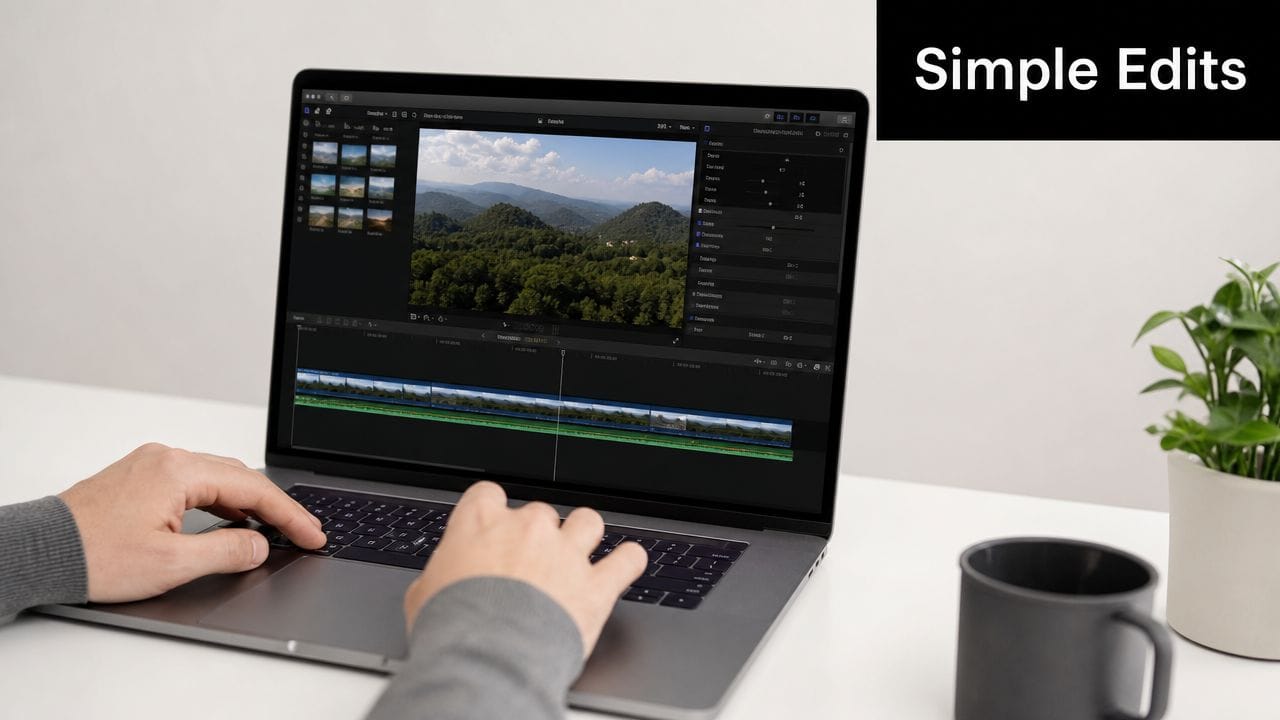
Not every watermark problem needs AI. A lot of them can be handled with ordinary editing moves if the watermark is small, static, or only appears at certain points.
That matters because automated tools have become faster. Since 2022, video watermark removal tools have processed over 1.2 billion AI-generated video files globally, and the average processing time per video dropped from 14 minutes in 2022 to 2.3 minutes in 2024, thanks to algorithmic improvements. Those figures appear in the verified data for this article. But faster isn't always better. If a manual fix preserves the image and takes less effort, use it.
Crop when the composition can survive it
Cropping is the first thing I'd try on a static corner watermark.
If the logo sits in the top-right or bottom-left and the subject is centered with safe margin around them, a slight crop can solve the issue cleanly. On vertical video, that might mean scaling up a touch and reframing. On horizontal footage, it might mean trimming one edge and adjusting your graphics package to match.
Cropping works best when:
- The watermark stays in one corner and doesn't move
- The shot has excess headroom or side space
- The delivery format is flexible, such as turning 16:9 into a tighter 9:16 crop
- No critical text or action sits near the edge
The trade-off is obvious. You lose image area. If the shot is already tight, cropping can make it feel cramped or amateur.
Cover it with something intentional
If cropping would damage the shot, the next option is to cover the watermark with a graphic that belongs there.
That could be:
- Your logo in a corner bug placement
- A lower-third if the watermark sits near a speaker ID area
- A subtitle block if the placement feels natural
- A sticker or product callout in more playful social edits
This method works when the cover feels motivated by the edit itself, not when it looks like a bandage. If the overlay is too big, too opaque, or awkwardly placed, viewers notice the patch.
A useful rule is to match the visual language of the rest of the piece. If your video already includes branded text callouts, adding one more to cover a watermark won't feel strange. If the clip is otherwise clean and cinematic, a random sticker will look like damage control.
For teams working across product pages and marketplaces, a related discipline is optimizing Amazon video content, where framing, overlays, and brand-safe edits matter because cluttered visuals can hurt clarity more than they help.
Edit around the problem
Some watermarks only appear during intros, outros, or exported transition segments. In that case, don't remove them. Cut around them.
You can:
- Trim the opening seconds if the mark only appears during an app splash
- Use a jump cut to skip a branded beat in a talking-head clip
- Retime the section if the watermark appears during a brief pause
- Replace the affected portion with B-roll, screen text, or a reaction cut
That approach is especially useful on short-form video, where pacing is already aggressive.
Here's a walkthrough that shows common editing approaches and what they look like in practice:
When manual fixes stop working
Manual methods break down when the watermark moves, changes opacity, crosses faces, or sits over detailed motion like hair, water, smoke, or handheld camera movement.
At that point, you're no longer hiding the problem. You're reconstructing missing image data. That's where AI tools enter the picture, and where expectations need to get more realistic.
How AI Video Watermark Remover Tools Actually Work
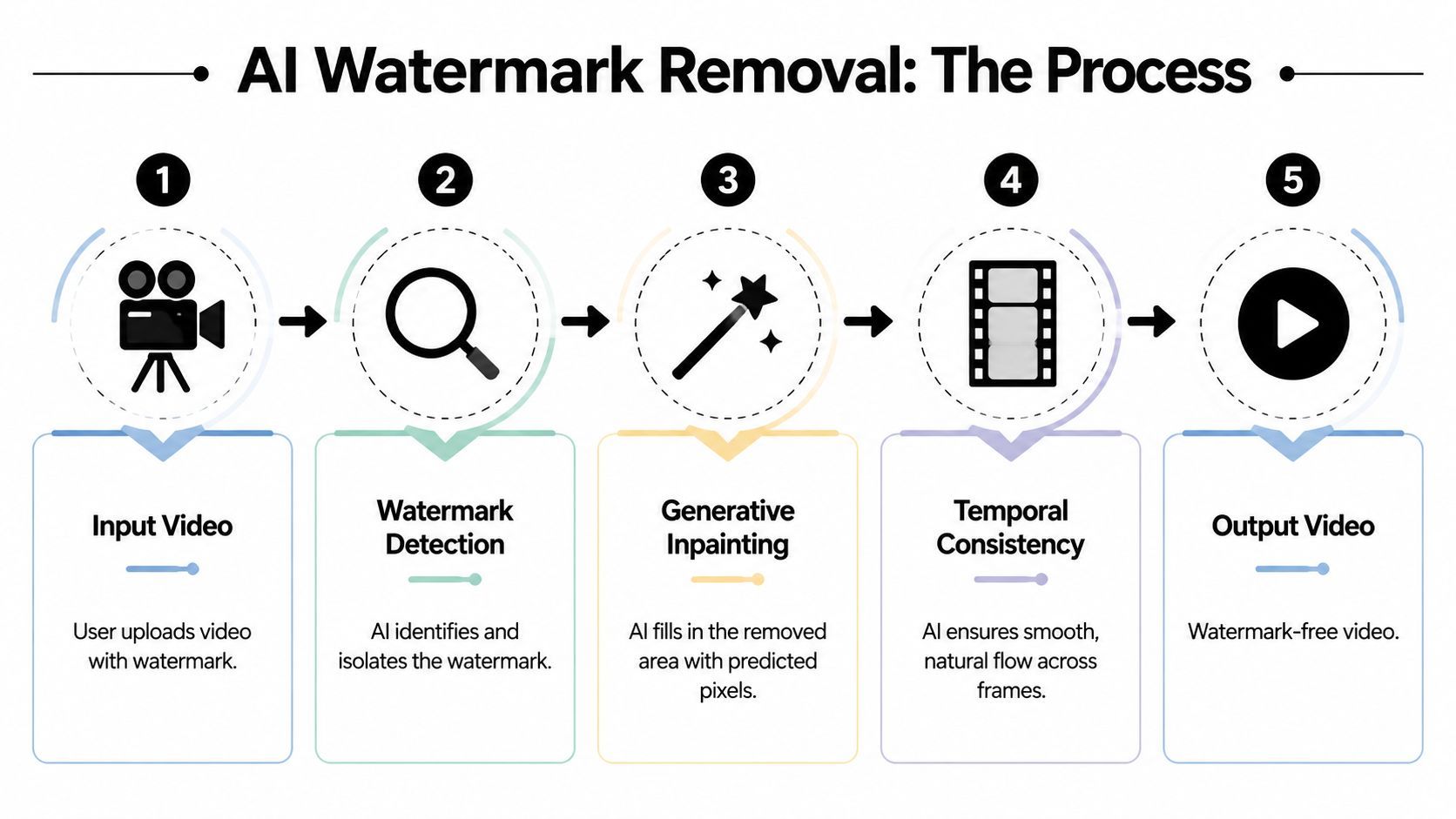
A lot of creators expect AI removal to behave like an erase tool. It does not. The software has to detect the watermark, estimate what belongs behind it, then rebuild those missing pixels in a way that holds up from frame to frame.
Most tools use a two-step process. First, they detect the watermark and create a mask around it. Then they run inpainting on that masked area to synthesize background detail that looks consistent with the surrounding shot. The benchmark notes linked at the WatermarkRemover-AI repository describe this workflow as detection followed by generative reconstruction.
Detection comes first
Detection quality sets the ceiling for the final result.
A static corner logo is usually easier to isolate than a faint overlay spread across the frame. Semi-transparent marks are harder because the model has to separate branding from real image detail underneath. Moving watermarks raise the difficulty again, because the mask has to track position, scale, blur, and opacity across time.
In practice, clean edges help. Soft edges, glow effects, motion blur, and compression noise hurt.
Inpainting does the reconstruction
Once the mask is built, the tool predicts what should be visible behind that blocked area. In a single image, that means matching texture, color, and edges. In video, it also has to preserve temporal consistency so the repaired patch does not flicker, drift, or change shape every few frames.
Performance varies a lot by watermark type. Small static marks in a corner tend to be the easiest case. Large preview overlays, repeated text, and semi-transparent graphics that cross faces or hands are the cases where these tools break down fast.
“Good AI cleanup does not remove a watermark so much as rebuild the shot around the missing area.”
Why one clip cleans up well and another looks fake
Background complexity matters more than many demos admit.
If the watermark sits over sky, a wall, defocused bokeh, or a soft gradient, AI often produces a usable patch. If it sits over hair, skin detail, typography, reflections, water, smoke, or handheld motion, the repaired area is easier to spot because the model has less reliable context.
The most common failure patterns are:
- Temporal flicker, where the patch shifts subtly from frame to frame
- Texture smearing, especially on fabric, foliage, and detailed surfaces
- Edge mismatch, where lines or contours no longer connect cleanly
- Ghosting, where part of the original watermark remains faintly visible
Manual masking can improve results. Editors who tighten the mask by hand usually get fewer artifacts than editors who rely on auto-detection alone.
What I would try first in a real edit
The decision is less about whether AI can run, and more about whether the repaired shot will survive normal viewing on the target platform.
| Situation | Likely result | Better choice |
|---|---|---|
| Static corner logo on simple background | Usually strong | AI or crop |
| Small watermark over blurred area | Often strong | AI |
| Moving logo over face or hands | Mixed | Test AI, expect manual cleanup |
| Large repeated preview watermark | Weak | Get licensed source instead |
| Watermark appears briefly | Don't remove | Cut around it |
That last row matters for legal reasons as much as technical ones. A watermark often signals ownership, licensing limits, or export restrictions. AI can rebuild pixels. It cannot give you permission to use footage you do not own or have rights to modify.
Before You Remove That Watermark Read This
This is the part many tutorials avoid because it's less exciting than a quick demo. It's also the part that matters most.
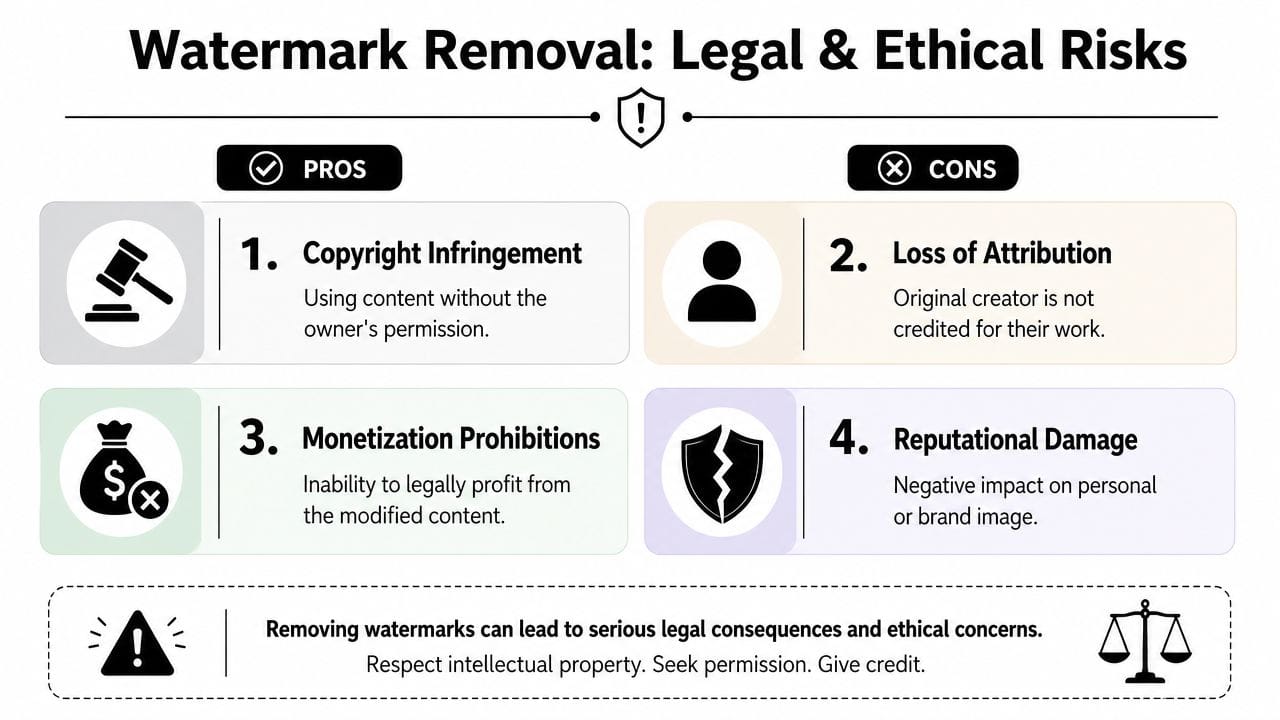
A watermark usually exists for a reason. It may indicate ownership, licensing status, source platform, attribution, or export limitations tied to a product plan. Removing it without permission can create legal problems, platform issues, or both.
Most guides leave this out
The gap is well documented in the verified material for this article. According to the source provided, over 90% of existing content about watermark removal focuses on technical steps but omits warnings about copyright or platform Terms of Service. The same verified source also states that a 2025 study found 68% of users attempting watermark removal were unaware of legal consequences, even as platforms like YouTube update policies to flag watermark-stripped clips as “low-quality” or “unoriginal” in policy contexts referenced by PixBim's risk discussion.
A simple way to judge the risk
Ask one question before anything else: Do you own this clip, or do you have explicit rights to modify and publish it without the watermark?
If the answer is yes, removal may be fine. If the answer is no, the technical success of the cleanup doesn't protect you.
Here's the distinction that matters:
- Low-risk scenario: You licensed a stock video but only have an old comp file with a preview mark, and your license allows use of the clean asset.
- Medium-risk scenario: You made the footage yourself in a tool that stamped the export, and your paid plan or agreement allows watermark-free use, but you no longer have the original project.
- High-risk scenario: You downloaded someone else's TikTok, Instagram Reel, or paid stock preview and want to strip branding before reposting or using it in ads.
Platform rules matter even when copyright feels fuzzy
A lot of creators think in terms of “Will I get sued?” That's too narrow.
The more common consequence is platform enforcement. A channel can lose monetization eligibility, have uploads suppressed, or face strikes based on reused or low-originality content rules. If a platform sees obvious repurposing or branded-source stripping, your video may fail quality checks even if the image looks clean.
Editorial rule: If the watermark belongs to another creator or another platform, don't treat removal as an editing technique. Treat it as a rights question first.
Ethical use is narrower than many people think
There are legitimate reasons to use a video watermark remover:
- Cleaning your own exports
- Restoring branded drafts from internal archives
- Removing overlays from footage you've licensed and are allowed to modify
- Eliminating obsolete branding from assets your team owns
There are also uses that may be technically possible but ethically weak:
- Stripping creator attribution from reposted clips
- Removing source marks to make reused footage look original
- Cleaning stock previews instead of licensing the asset
- Using watermark-free versions of someone else's work in commercial ads
The hard truth is simple. If removal is helping you hide the origin of content you don't control, you're probably making the wrong call.
Your Video Watermark Questions Answered
Can you remove a moving watermark effectively
Sometimes, yes. A moving watermark is much harder than a static corner logo because the tool has to track it across frames and rebuild a changing background underneath. If the movement is slow and the background is simple, AI can do a decent job. If it crosses faces, hands, product details, or fast motion, the repair often looks unstable.
What's the best free video watermark remover
Free tools are useful for testing, but they usually come with limits. The common limitations are export restrictions, lower quality, shorter clip support, queue delays, or another watermark added during output. For serious work, free tools are best used to evaluate feasibility before you move to a paid workflow or a manual fix.
Does removing a watermark always reduce video quality
Not always, but it can. Cropping reduces visible area. Covering changes the design of the frame. AI removal can preserve the overall composition, but it may introduce artifacts in the repaired region. The final quality depends on where the watermark sits, how complex the background is, and whether the cleanup survives playback at full speed.
Is it illegal to remove a TikTok watermark before reposting a video
It can be, depending on who owns the video and what rights you have. If it's your own content and you're repurposing it within the rules of the platforms and tools involved, the risk is different. If it's someone else's content, removing the watermark before reposting can create copyright, attribution, and platform-policy issues. When ownership isn't clear, don't assume an editing trick makes the use legitimate.
Should you crop, cover, or use AI
Use the lightest method that solves the problem cleanly.
- Crop when the watermark is static and the composition can handle it.
- Cover when a graphic naturally belongs in that location.
- Retiming or cutting is best when the mark appears briefly.
- AI makes sense when you have rights to the footage and need to preserve the frame.
What's the safest professional workflow
Start with properly licensed media or watermark-free exports. If you still have a branded file, try a manual fix first. Only use AI removal when you're confident you have the right to alter and publish the clip. If you can't answer the rights question clearly, stop there.
If you want to avoid watermark headaches at the source, ShortGenius (AI Video / AI Ad Generator) is worth a look. It helps creators and teams generate, edit, brand, and publish video in one workflow, which makes it easier to produce clean final assets without patching watermarks after the fact.