Video Asset Management Software: video asset management software for teams

Discover how video asset management software can streamline your media workflows, boosting efficiency and helping you pick the right solution.
Ever tried to find a specific ten-second clip from a project you shot two years ago? If you’re like most creators, it’s a nightmare. You're stuck scrolling through endless, vaguely named folders on Google Drive or Dropbox, previewing file after file, and slowly losing your creative spark. This digital scavenger hunt is exactly the problem that video asset management software was built to solve.
What Is Video Asset Management Software
At its core, a video asset management system (VAMS) is a central hub for all your video content. But calling it "storage" is like calling a professional kitchen a place to just keep food. It's so much more than that. It's an intelligent platform designed to store, organize, find, and share your video files with almost zero friction.

Think of it as the difference between a messy garage where tools are everywhere and a professional workshop where everything has a place. A VAMS transforms your chaotic digital library into a smart, searchable archive, making every asset instantly available to you and your team.
It's Not Just Cloud Storage
This is where many people get confused. Isn't this just a fancier version of Google Drive? Not at all. Standard cloud storage treats your video files like any other document—big, dumb files. A VAMS, on the other hand, understands the unique DNA of video.
To make it clear, here’s a quick breakdown of how they stack up.
Standard Cloud Storage vs Video Asset Management Software
| Feature | Standard Cloud Storage (e.g., Google Drive) | Video Asset Management Software |
|---|---|---|
| Search | Relies on file names and folder structures. | Deep search using AI-powered metadata, tags, and even spoken words. |
| Previews | Slow, basic playback for web-friendly formats only. | Fast, high-resolution previews and frame-by-frame scrubbing for professional codecs. |
| Collaboration | Simple file sharing and basic comments. | Robust review/approval workflows, version control, and time-stamped feedback. |
| File Handling | Treats all files the same, struggles with large video formats. | Optimized for large video files, with automatic renditions and proxy creation. |
| Distribution | Requires manual downloading and re-uploading to other platforms. | Direct integrations for seamless publishing to social media, websites, and other channels. |
As you can see, a VAMS is built with a video-first mindset.
Capabilities That Matter for Video Teams
What this really means is that a VAMS gives you powerful, video-specific tools that simple storage just can't match.
- Smart Metadata & Tagging: Instead of relying on a file name like
Campaign_Final_v3_Final_ForReal.mp4, you can tag clips with keywords, project details, talent names, or even specific moments within the video. - True Version Control: Track every revision and edit. This ensures your team is always working from the latest approved version, eliminating costly mistakes.
- Frictionless Collaboration: Provide tools for your team and clients to leave time-stamped feedback and give approvals right on the video, without ever downloading a file.
As video production explodes, this level of organization is no longer a luxury—it’s a necessity. A modern VAMS can handle everything from polished marketing campaigns to raw footage and user-generated content (UGC) videos. By creating a structured environment, it prevents assets from getting lost in a digital black hole and makes repurposing old content incredibly simple.
The industry demand reflects this shift. The global market, valued at USD 11,670.6 million in 2024, is projected to skyrocket to USD 40,933.7 million by 2033. This massive growth, detailed by industry analysts at Grand View Research, shows just how critical these tools have become for any serious content creator or brand.
What Really Makes a Great Video Asset Management System?
A top-tier video asset management software (VAMS) isn't just a glorified cloud folder. Think of it less like a digital filing cabinet and more like the central nervous system for your entire creative operation. The best systems are built around a core set of features that work in concert to get rid of frustrating bottlenecks, claw back wasted hours, and truly unlock the value hidden in your video library.

It all starts with a centralized asset library. This is your team's single source of truth for every video file you own—from raw camera footage and B-roll to finished commercials and social media clips. Everything lives in one place.
This simple concept instantly solves the "digital black hole" problem. You know the one—where priceless assets vanish onto someone's personal hard drive or get buried in an old project folder, never to be seen again. When everyone knows exactly where to find what they need, a search that once took hours can now take seconds.
The Power of Smart Metadata and Search
Once all your videos are in one place, the real work begins. This is where advanced metadata comes in. Think of metadata as a super-detailed digital ID card for each video, packed with information that goes way beyond a simple filename. A good VAMS lets you attach all sorts of data to your files, making them findable in ways you just can't replicate with a standard folder structure.
This data can include just about anything you can think of:
- Descriptive Tags: Simple keywords like "testimonial," "product demo," or "summer campaign."
- Project Details: Client names, internal project codes, or campaign IDs.
- Technical Specs: Resolution, frame rate, codec, and other file properties.
- Usage Rights: Critical information like license expiration dates or regional use restrictions.
This rich layer of metadata is what powers the intelligent search functionality. Instead of just searching for "Campaign_Final_v2.mp4," your team can ask complex questions like, "Show me all 4K testimonial clips from our Q3 campaign that are cleared for social media." Many modern systems even use AI to automatically tag objects, people, or spoken words within the video itself, turning your entire archive into a frame-by-frame searchable database.
A great video asset management software doesn’t just store your files; it understands them. By layering intelligent data on top of your content, it turns a passive archive into an active, searchable resource that accelerates content creation at every step.
Control, Collaboration, and Delivery
Managing a video library with a team demands strict controls to prevent expensive mistakes. That's why version control is an absolute must-have. A VAMS meticulously tracks every revision of a file, so you can be confident that everyone is always working from the latest, approved cut. No more worrying about an editor using an old clip or a marketer publishing the wrong version.
Just as important are granular permissions and access controls. You get to decide exactly who can see, download, edit, or share specific assets. This is essential for a few key reasons:
- Protecting Sensitive Content: You can easily restrict access to unreleased product footage or confidential internal videos.
- Managing Freelancer Access: Grant external partners temporary, project-specific access without opening up your entire library.
- Ensuring Brand Compliance: Prevent unauthorized users from messing with or distributing official brand assets.
Finally, a VAMS has to make distribution simple. With automated transcoding and renditions, the system can take a single master file and automatically spit out all the different versions you need. For instance, it can create a high-res version for YouTube, a square crop for Instagram, and a small proxy file for quick previews—all on its own. This feature alone saves editors countless hours of manual exporting.
When you pair that with direct integrations, you can publish finished videos straight to your social media channels, CMS, or ad platforms without ever leaving the VAMS. It’s that final step that connects your organized library directly to your audience. We're even seeing platforms evolve to bridge the gap between creation and management, with modern tools now including features like text to video generation alongside their powerful organizational capabilities.
Real-World Benefits for Modern Content Teams
It’s easy to get lost in the technical features of video asset management software (VAMS), but those features are just tools. The real story is how a VAMS changes the day-to-day reality for creative teams, turning major points of friction into a smooth engine for getting things done.
For marketing teams, the biggest win is pure agility. Imagine a social media trend blows up overnight. Instead of a mad scramble to shoot something new, your team can instantly search your VAMS for every B-roll clip of a specific product, find an approved customer testimonial, and tack on a branded outro. What used to take days of digging through folders and coordinating with multiple people now takes minutes. You can join the conversation while it's actually happening.
This kind of speed gets your campaigns to market faster, plain and simple, giving you a clear advantage over slower competitors.
Empowering Agencies and Protecting Brands
For creative agencies, a VAMS acts as the central hub for client work and project security. It’s a secure space where clients can review works-in-progress, leave time-stamped feedback, and sign off on final versions. This cuts out the endless email chains and "which version are we looking at?" confusion, drastically shortening the revision cycle.
This structured workflow is also a lifesaver for enterprise brands that live and die by consistency and compliance. When you're a global company, a VAMS ensures every team—from North America to Southeast Asia—is using the correct, on-brand, and legally cleared assets. It’s your best defense against diluting your brand or stumbling into legal trouble.
Think about this scenario: a global CPG brand launches a huge campaign. A month later, they find out a regional marketing team used a video with a music track that was only licensed for use in the US. That one mistake could easily lead to a six-figure lawsuit. A VAMS prevents this by embedding rights management data right into the asset, making it almost impossible for someone to use it incorrectly.
Modern content creation relies heavily on effective teamwork, especially with the rise of remote work. Seeing how different collaboration tools for remote teams support virtual success helps highlight why a VAMS is so critical for centralizing video assets and keeping everyone on the same page.
Measurable Impacts on Productivity and ROI
So, what does all this add up to in business terms? The impact is concrete. One of the most immediate benefits is the radical drop in time people spend just looking for files. Studies show that creative professionals can waste hours every week on this alone. A VAMS can cut that search time by up to 90%.
That reclaimed time creates a ripple effect on productivity:
- More Content, Faster: When editors and creators aren't hunting for files, they're creating. This naturally leads to a higher output of finished content.
- Lower Production Costs: Finding and reusing existing footage is suddenly easy. This means you don't have to shoot new material for every single project, which saves a ton of money.
- Rock-Solid Brand Integrity: With centralized control over brand kits, logos, and approved footage, you can be confident that every video published looks professional and on-brand.
A VAMS also breathes new life into your archives. That footage from a campaign two years ago isn't just taking up server space; it's a goldmine of B-roll, testimonials, and clips you can repurpose into fresh content. As brands hunt for ways to scale up their video output, the ability to quickly transform existing assets is key. For teams wanting to get the most out of their library, seeing how an image to video tool can turn static pictures into dynamic new videos is a natural and powerful next step.
How to Choose the Right VAMS for Your Team
Picking the right video asset management software (VAMS) can feel like a huge, overwhelming project. But it doesn't have to be. The secret isn't finding some mythical, one-size-fits-all platform. It's about finding the right partner that truly understands your team's workflow, fits your budget, and can keep up with your ambitions.
If you break the decision down into a few common-sense steps, you can cut through the noise and make a choice with confidence.
So, where do you begin? The best place isn't with a flashy demo or a feature comparison chart. It's by looking in the mirror and mapping your current workflow. Seriously, grab a whiteboard and trace the entire journey of a video in your organization, from a simple idea to a published asset.
Document every single touchpoint. Who briefs the project? Where does raw footage live? How do you handle edits, reviews, and those chaotic approval threads? This exercise will immediately shine a spotlight on your biggest headaches. Wasting hours digging for B-roll? Is your approval process a tangled mess of emails and Slack messages? Those frustrations are gold—they're your non-negotiable feature list.
Evaluate Scalability and Future-Proofing
Once you know what you need today, it’s time to think about tomorrow. A VAMS is a long-term relationship, not a quick fix. The platform you choose has to be able to grow right alongside your team.
You need to ask vendors some tough questions about scalability:
- Storage and User Growth: What happens when our video library doubles and we add five more creators? How predictable are the costs as we expand?
- Feature Roadmap: What's on your development roadmap for the next 18 months? Are you building tools for things like AI-powered transcription and tagging, better analytics, or new integrations?
- Integration Capabilities: How easily does your platform talk to the other tools we live in every day, like Adobe Creative Cloud, Slack, or our project management system? A robust API is a great sign that the platform is built for the future.
Choosing a VAMS that can't scale is like buying a starter home when you're planning a big family—you'll be forced into a costly and painful move much sooner than you'd like. You’re looking for a partner that isn’t just solving today's problems but is already thinking about where you'll be in two or three years.
Demystify Pricing and Calculate Your Return
Okay, let's talk about money. Understanding the price tag is obviously a huge part of the equation. Video asset management software pricing is all over the map; some vendors charge per user, others by storage, and many offer a hybrid model.
Don't let sticker shock scare you away. The subscription fee is only part of the story. The real calculation is your return on investment (ROI), which you can figure out by looking at time saved, fewer mistakes, and lower production costs.
Think about it this way: if a VAMS saves each of your five team members just three hours a week they used to spend searching for files, that’s 60 hours a month you get back. That's a week and a half of pure creative time reclaimed. Suddenly, the cost starts to look a lot more reasonable.
We're seeing a massive shift in the industry right now. A 2024 study showed that over 70% of organizations are finally ditching their messy shared drives for proper digital asset management platforms. This wave was kicked off by a huge jump in content creation—a 56.7% increase in the year after generative AI tools became widely available. You can dig into the numbers yourself in the full industry research on globenewswire.com.
Your VAMS Selection Checklist
To keep your evaluation process organized and ensure you're comparing apples to apples, a simple checklist is your best friend. It forces you to ask every vendor the same questions based on what matters most to you.
Here’s a template to get you started.
VAMS Selection Checklist
| Category | Evaluation Question | Your Priority (High/Medium/Low) |
|---|---|---|
| Workflow Fit | Does this VAMS solve our top 3 workflow pain points? | High |
| Usability | Is the interface intuitive for both tech-savvy and non-technical users? | High |
| Integrations | Does it connect with our essential tools (e.g., Adobe Creative Cloud, Slack)? | Medium |
| Scalability | Can this platform support a 5x increase in assets and users? | High |
| Security | What measures are in place for access control and data protection? | High |
| Support | What level of customer support is included? Is onboarding assistance provided? | Medium |
| Pricing | Is the pricing model transparent, predictable, and within our budget? | High |
By taking a disciplined approach—mapping your needs first, planning for the future, and understanding the real financial impact—you turn a daunting task into a smart, strategic decision. This process ensures the video asset management software you choose won't just be another tool, but a central engine for your team's creativity for years to come.
Getting Your VAMS Up and Running (and Migrating Your Library)
Alright, so you’ve decided on a new video asset management software (VAMS). That’s a huge step. But now comes the part that can feel a little daunting: actually moving your entire video library into it.
Don't panic. It might seem like a monumental task, but with a bit of a game plan, it's entirely manageable. Think of it less like a chaotic house move where you just throw things in boxes, and more like setting up a professional kitchen—everything needs a logical place so you can find it instantly when you need it. The whole process really breaks down into three phases: planning, the technical move, and getting your team on board.
Phase 1: Plan Your New Content Universe
Before you even think about uploading a single file, you need a blueprint. This is the single most critical step, and skipping it is a recipe for creating a new, more expensive mess. Start with a content audit.
Get a clear picture of everything you have. Where does it all live right now? On someone's laptop? In a labyrinth of Dropbox folders? Take stock of it all. This initial inventory is what will help you build your taxonomy design—the logical framework that will make your library a dream to search.
Get your team in a room and hash out the details:
- What does your folder structure look like? Should you organize by client, campaign name, the quarter it was filmed, or the type of video (e.g., "Testimonials," "Product Demos")?
- What is your metadata standard? This is your tagging system. Decide on the non-negotiable tags every single video must have. This could include the project name, usage rights expiration dates, talent featured, or the final platform it was meant for.
Your taxonomy is the backbone of the entire system. A good one means finding a clip in seconds. A bad one means you’ve just built a prettier version of the chaotic shared drive you were trying to escape. Seriously, take your time here.
Phase 2: The Technical Migration
Once your blueprint is solid, it's time to start moving the files. This is the process of getting your videos from their scattered homes—local hard drives, old servers, basic cloud storage—into the VAMS.
For smaller libraries, a bulk upload might be as simple as dragging and dropping folders directly into the new platform. It’s straightforward and gets the job done.
For those with massive, terabyte-sized libraries, most VAMS platforms offer more powerful, automated tools. Some even partner with migration specialists who can handle the heavy lifting for you, often applying all that metadata you just defined as the files are moved. The really advanced systems can even use AI to scan your footage during upload, automatically tagging objects, transcribing dialogue, and identifying people.
The diagram below gives you a bird's-eye view of how this whole process, from selection to implementation, comes together.
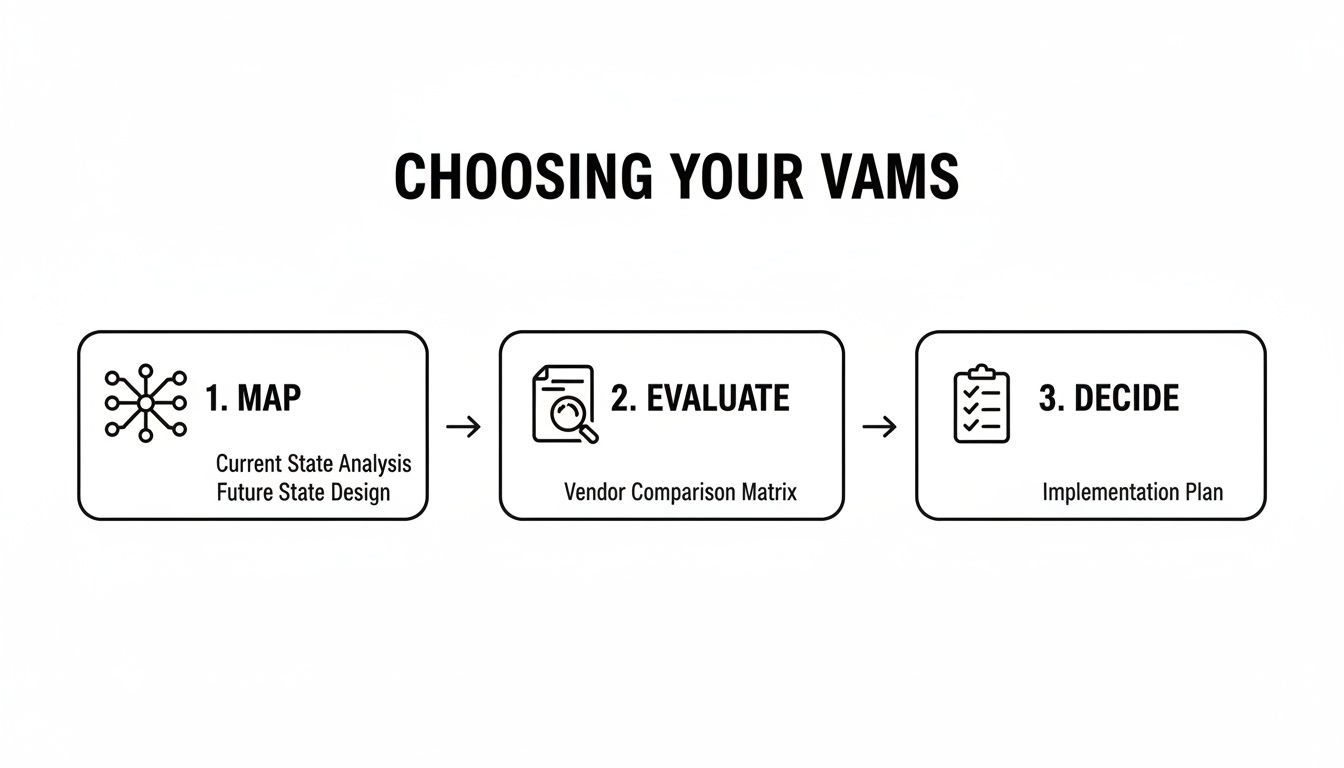
Mapping your needs and evaluating your options first makes the final decision and implementation feel much less like a leap of faith and more like a logical next step.
Phase 3: Get Your Team On Board
This is the final, and arguably most important, piece of the puzzle. A brilliant piece of software is completely worthless if no one on your team uses it, or worse, doesn't know how to use it properly.
Don't just send out a link and hope for the best. You need to actively drive adoption.
Start by creating simple, easy-to-follow guides on the new workflows. Show them exactly how to upload, how to apply the right tags, how to search, and how to share a file for review. Run a few training sessions and focus on the "what's in it for me." Point out how much time they'll save not having to hunt for that one clip from six months ago. When people see how the VAMS makes their day-to-day work easier, you won't have to convince them to use it—it will naturally become the core of your creative process.
Unifying Creation and Management with ShortGenius

Knowing the theory behind video asset management software is one thing. Seeing how it can actually work within your creative process is something else entirely. For too long, creating and managing have been two separate jobs, forcing teams to jump between different tools—one set to make the video, another to organize it.
This constant back-and-forth is where the friction happens. It doesn't just slow you down; it’s how great ideas and crucial assets get lost in the digital shuffle. ShortGenius was built to fix this exact problem by bringing the entire content lifecycle under one roof. It’s more than just a video generator; it’s a complete system where creation and management happen in the same workspace.
A Seamless Workflow from Idea to Archive
Think about your current process. You probably use an AI tool to brainstorm a script, then move to a video editor, and finally, you have to download all those files and upload them to a separate storage or management platform.
Now, imagine this instead: you generate a script, create a video from it, and every single asset—the script, B-roll clips, audio files, and the final cut—is automatically saved and organized in one central library. No more downloading and re-uploading. That's the power of an integrated platform.
The ShortGenius library becomes your single source of truth, keeping everything tidy and accessible:
- Scripts and Ideas: Every concept is stored and automatically linked to the video it became.
- Brand Kits: Your logos, fonts, and brand colors are always on hand to ensure consistency across every video.
- Generated Clips: All the individual scenes and stock footage are saved, tagged, and ready to be searched or reused.
- Final Videos: Finished projects are filed away, ready for you to schedule, distribute, or repurpose down the line.
This isn't about just tidying up your files. It’s about removing the tedious, manual steps that get in the way of producing AI-driven content at scale.
Built for the Future of Content
This integrated approach is exactly where the industry is heading. The video management system market is on track to hit USD 63.92 billion by 2031, growing at a compound annual rate of 21.95%. This explosive growth is fueled by demand for smarter, cloud-based, and AI-powered workflows that just make sense. You can dive deeper into this trend by reading the full market analysis from Mordor Intelligence.
By combining AI generation with built-in asset organization, platforms like ShortGenius give creators the power of an enterprise-level VAMS without the complexity or cost. It’s a workflow built not just for creating a single video, but for building an entire content engine.
At the end of the day, it all comes down to spending less time on administrative busywork and more time on what actually matters: being creative. To see how this unified workflow can change the way you produce content, you can explore the features of ShortGenius here.
Frequently Asked Questions About VAMS
Jumping into the world of video organization often brings up a few common questions. It’s a big step, and you want to be sure you're making the right move before committing to a new piece of software.
We hear the same questions from creators and teams all the time. To help you get a clearer picture, we've put together answers to the most frequent ones we encounter, covering everything from system differences to cost.
What Is the Difference Between a DAM and a VAMS?
This is easily the most common point of confusion. The best way to think about it is with a library analogy. A Digital Asset Management (DAM) system is like a general public library—it has a section for everything, from images and documents to audio files and videos.
A Video Asset Management Software (VAMS), however, is like a specialized film archive. It’s built from the ground up just for video, which means it has very specific tools that a general DAM usually lacks.
A VAMS is designed to handle the unique demands of video, helping you:
- Generate lightweight proxy files so your team can review and edit footage smoothly in a web browser without downloading massive source files.
- Create automatic transcripts of spoken dialogue, making your content searchable and easier to repurpose.
- Add time-stamped comments and metadata, letting you tag a specific moment (like at 01:32) to give feedback or find a perfect soundbite later.
While a DAM can definitely store your video files, a VAMS is built to work with them, streamlining every step of your video production workflow.
Do I Really Need a VAMS as a Solo Creator?
It’s easy to think a VAMS is only for big teams, but that's a common misconception. For a solo creator, adopting a system with good asset management isn't about managing a team—it's about building a scalable foundation for your brand. As your library of B-roll, final cuts, and raw footage grows, a system is what stands between efficiency and hours wasted searching for "that one clip from last year."
It’s less about your current team size and more about your content volume and ambition to work efficiently. An organized library is a professional one, regardless of how many people are on your payroll.
An integrated platform like ShortGenius gives you these organizational tools without the hefty price tag of an enterprise system, making it a perfect fit for ambitious creators planning for growth.
How Much Does Video Asset Management Software Cost?
The cost of video asset management software can be all over the map. At the high end, enterprise-level systems can easily run into thousands of dollars per month, with pricing often based on the number of users, storage limits, and advanced features.
Thankfully, the market has changed. You no longer need a massive budget to get organized. Many modern platforms now offer tiered plans aimed at smaller teams and even individuals, with some starting under $100 per month.
Better yet, a new wave of tools, including ShortGenius, bundle asset management directly into a content creation subscription. This gives you a single, cost-effective solution for both making and managing your video content.
Ready to stop wasting time searching for files and start creating more content? ShortGenius unifies AI-powered video creation with smart asset management, giving you a seamless workflow from idea to final post. Start building your organized content engine today at shortgenius.com.