TikTok Video Optimization: The Complete 2026 Playbook

Master TikTok video optimization with proven hooks, editing tactics, SEO strategies, and scheduling workflows. Includes actionable checklists and AI tools.
The first 2 seconds decide over 70% of viewer retention on TikTok, and that's the starting point for tiktok video optimization, not follower count or trendy editing tricks. One 2025 statistics roundup also says videos under 10 seconds get 27% more completions than longer clips, while the average TikTok video watch time is 8.4 seconds. In practice, that means the platform rewards clips that front-load value, keep pacing tight, and earn attention fast, especially when posting windows can also matter, since publishing between 6 and 9 PM can gain 23% more views on the same roundup.
Why TikTok Video Optimization Changed in 2026
The old version of TikTok optimization was simple, at least in theory. Make the first second punchy, ride the For You Page, and hope the algorithm liked your vibe. That model still matters, but it's no longer enough because TikTok now behaves like a search surface as well as a discovery feed.
An Adobe-linked 2026 update reported that 49% of US consumers had used TikTok as a search engine, up from 41% in the 2024 report, and 65% of Gen Z respondents said they had used TikTok as a search engine in the 2026 study according to the update summary. The same summary says TikTok search queries grew 174% year-over-year, and brands optimizing for TikTok SEO reported 3.1x more organic impressions than those relying solely on the For You algorithm in that same research brief. Those numbers matter because they change the job of a video. It's not just about earning a swipe-stop, it's also about being findable when someone already knows what they want.
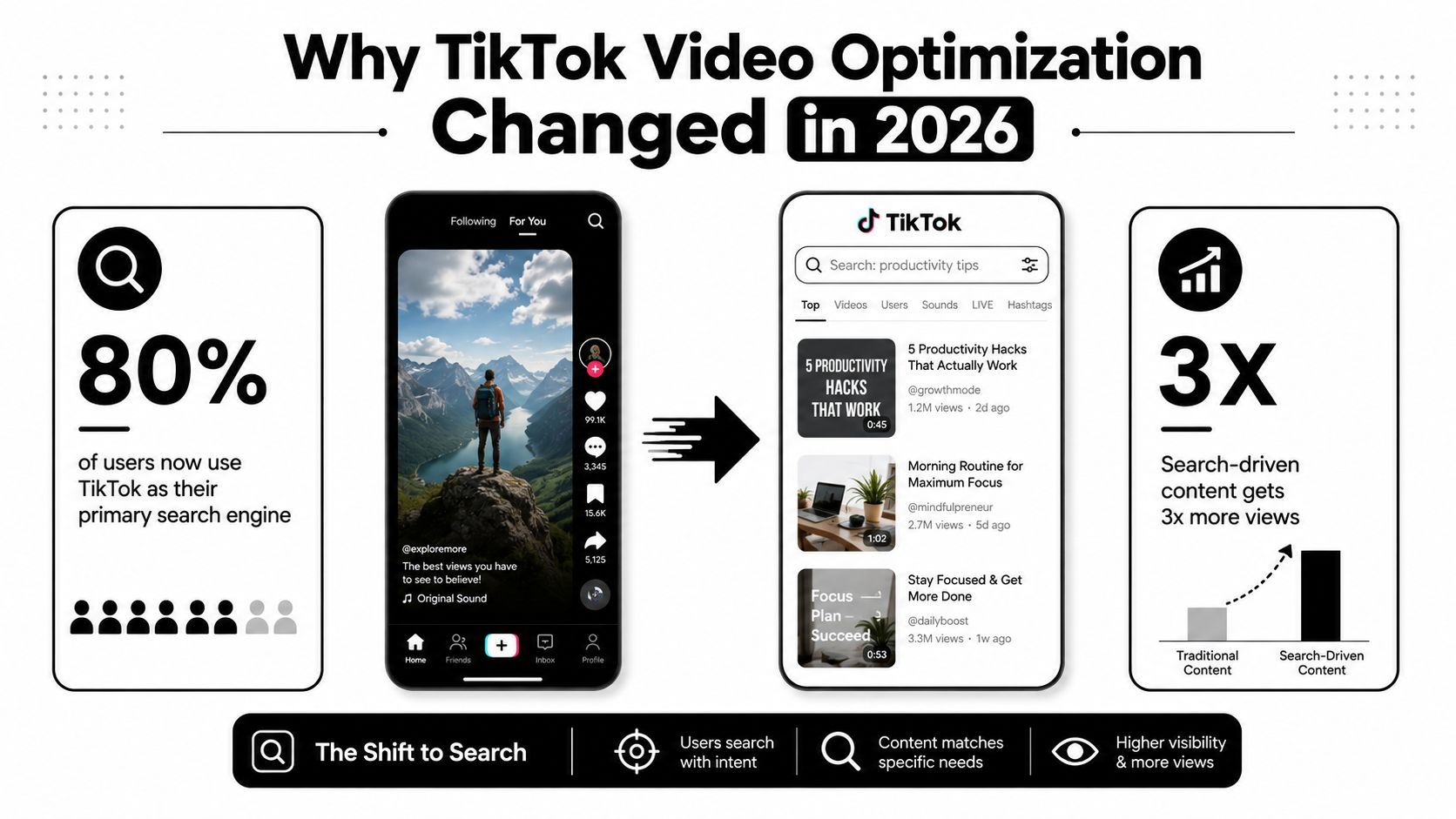
FYP optimization and search optimization are different jobs
FYP optimization is about interruption. You're trying to create enough curiosity, motion, or emotional tension that someone stops scrolling. Search optimization is about relevance. You're trying to make the platform understand exactly what the video answers, then match it to a query.
That split changes creative decisions. A pure entertainment clip can live or die on pattern interruption and replay value. A searchable clip needs clearer topic framing, stronger verbal keywords, and a more disciplined title, caption, and on-screen text stack. If you force every video into the same mold, you usually get muddled results, because the content isn't serving one clear discovery path.
Practical rule: assign one dominant intent to each clip. If the video is built for search, keep the topic narrow and descriptive. If it's built for FYP reach, prioritize the opening beat and emotional payoff.
The best teams don't choose one lane forever. They split their calendar. Search-driven videos answer questions people already ask. FYP videos create brand memory, introduce new angles, or ride formats that don't need explicit search demand. That's the shift in 2026, optimization is now a hybrid of creative editing and search engineering.
Building Hooks That Stop the Scroll
The hook isn't a slogan. It's the first proof that the viewer won't waste time. If the opening doesn't deliver a clear reason to stay, everything else in the edit becomes irrelevant, no matter how strong the middle or ending is.
A lot of creators still treat hooks like clever one-liners. That's too vague. The better approach is to think in layers, visual, verbal, and textual, all working inside the first few seconds. The search-friendly part matters too, because a hook that names the topic early tends to help both retention and discoverability.
Build the opening around one promise
Start with the result, the problem, or the contradiction. Don't start with context-building that delays the point. If the video is about a workaround, say the workaround first. If it's about a mistake, state the mistake immediately.
Examples that work better than generic openers:
- Result-first: “Here's the edit that keeps dropping out of the swipe zone.”
- Problem-first: “Most TikTok videos fail before the caption even matters.”
- Specific promise: “This is the hook structure I'd use for a product demo.”
- Contradiction: “A longer script can still outperform a flashy opener if the first line is sharper.”
Short clips benefit most from this discipline because the average watch window is tiny. The source data above says videos under 10 seconds get 27% more completions than longer clips, so every extra beat of setup has a cost on the 2025 roundup. If the clip is longer, the hook still needs to act like a contract. It tells the viewer what kind of payoff to expect, then the edit needs to pay that off quickly.
Test hooks like a production variable, not a creative opinion
A hook fails for a few predictable reasons. The visual is flat. The spoken line buries the point. The on-screen text says something different from the voiceover. Or the opening promises a payoff the rest of the clip never delivers.
Use this simple diagnosis:
- If the first frame is weak, fix the visual energy before you rewrite the script.
- If the spoken line is vague, lead with the outcome or problem.
- If the text overlay is cluttered, shorten it to the core phrase.
- If the payoff arrives too late, cut the intro and move the answer up.
The best hook testing isn't mystical. It's a controlled change to one variable at a time. Keep the topic, length, and editing rhythm stable, then swap just the first sentence or opening visual. That gives you a cleaner read on whether attention loss came from the idea or the execution.
The Multi-Layer Keyword Strategy
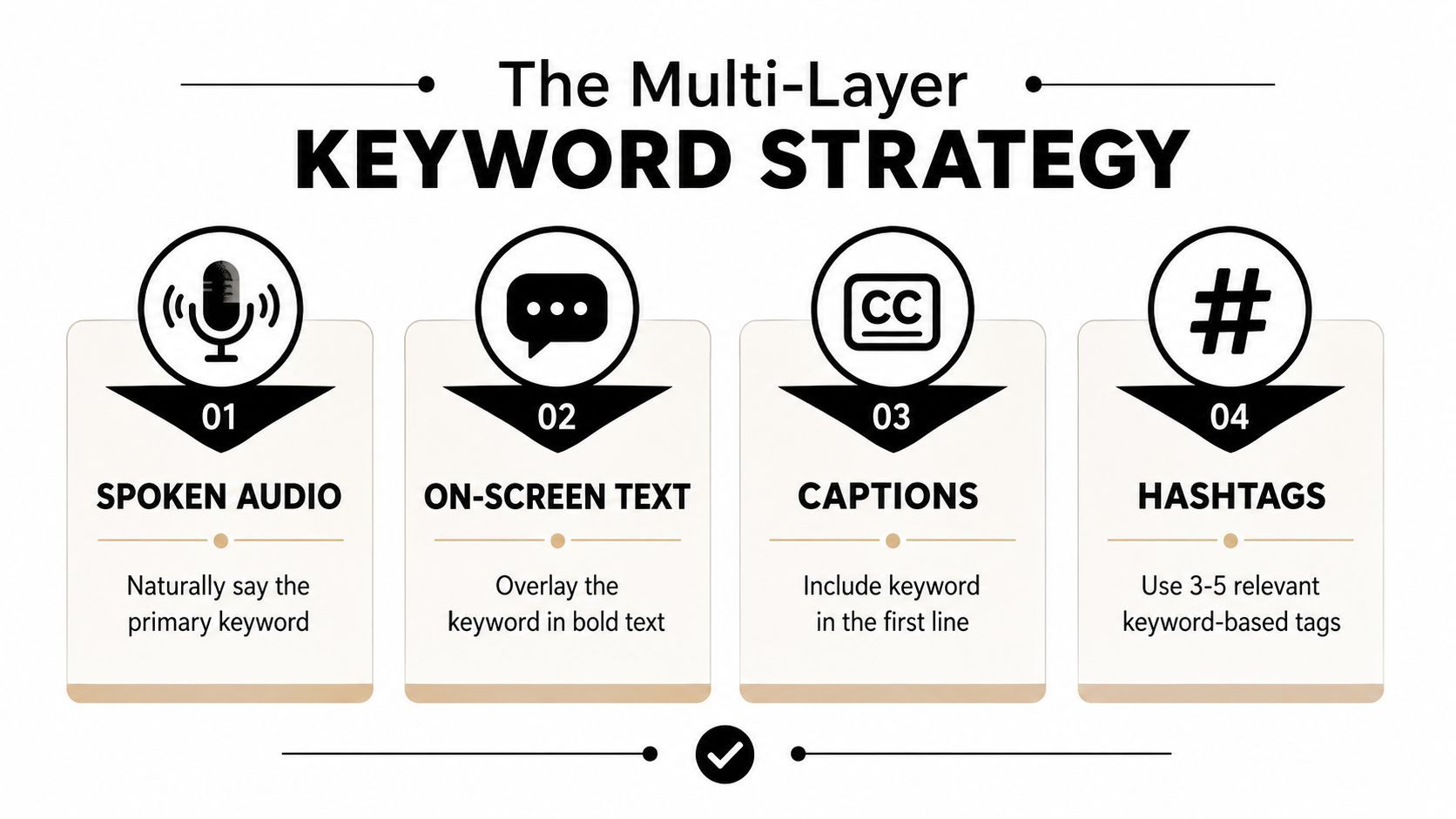
TikTok SEO works best when the keyword isn't trapped in one place. A caption alone won't carry a video if the spoken hook and on-screen text say something unrelated. The strongest guidance converges on a multi-layer keyword strategy, where the same primary phrase appears naturally in the voiceover, overlay, caption, and hashtags as outlined in this TikTok SEO guide.
Choose a single search theme before you script
The biggest mistake is trying to rank for three unrelated ideas in one clip. That usually creates a soft, mushy video that's hard for both viewers and TikTok to categorize. A cleaner workflow is to pick one search theme per clip, then build the rest of the video around it.
Use 2 to 3 target keywords per video, not a cloud of loosely related terms as recommended in the same guide. One should be the main phrase, one can be a close variation, and one can cover the user's likely phrasing. Keep the keyword choice honest. If people search for the topic, use it. If they don't, don't force the video into search packaging just because SEO sounds productive.
Place the keyword where TikTok can read it
Say the primary keyword in the first few seconds. Put it on screen. Put it in the caption's opening line. Use it in a small set of relevant tags. That's the layering that helps the platform and the viewer understand the same thing at the same time.
The reason this matters is simple. The same guide recommends front-loading the main phrase in the first part of the caption and keeping the hook within the first 1 to 3 seconds to maximize retention and search relevance per the source. The practical takeaway is not “stuff keywords everywhere.” It's “repeat the same topic in multiple formats without making the content sound machine-written.”
Don't turn a searchable clip into a keyword list with footage attached. The video still has to feel like a person solved a real problem or answered a real question.
Technical Specs That Actually Matter
A strong idea can still fail if the file itself is sloppy. TikTok optimization isn't only creative, it's also operational, and poor export settings can cut watchability on mobile. That's why the technical layer deserves the same discipline as scripting.
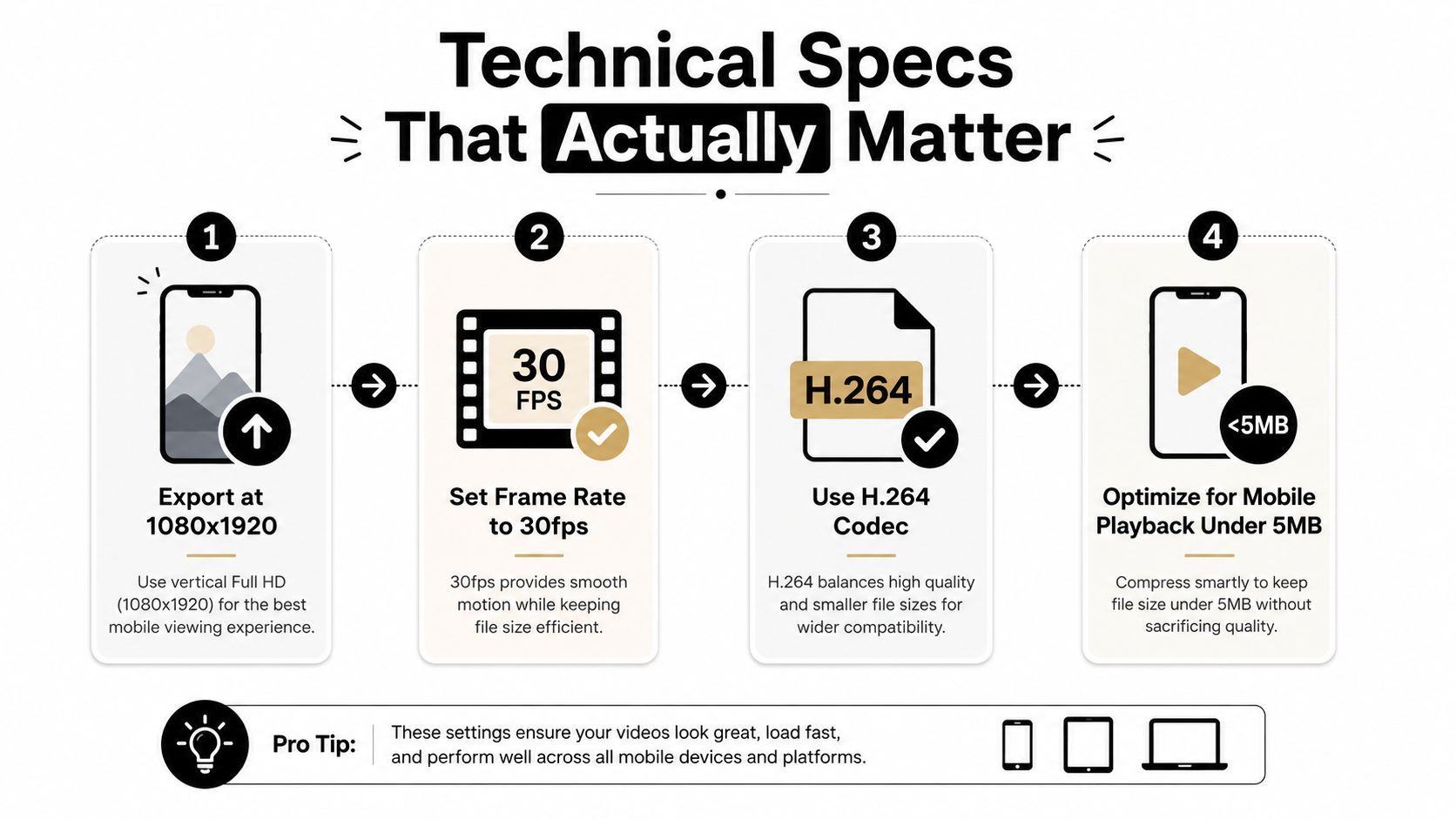
The clean baseline is a 9:16 vertical format, ideally 1080×1920 at 30 fps or 60 fps, saved as .MP4 or .MOV before upload per the technical quality guide. The same guide notes that TikTok's compression makes 4K often inefficient compared with a clean 1080p master according to the source. In plain English, you're usually better off exporting a sharp, stable Full HD file than chasing a bigger file that the platform will compress anyway.
Export for the device, not the desktop preview
The content will be consumed on a phone, often in bad lighting, on weak signal, with captions competing against notifications. That means the export needs to preserve readability and motion clarity in the actual environment where the clip gets watched.
Use readable text in the safe zone, avoid black bars, and make sure your audio stays clear after upload. Independent mobile-optimization guidance also emphasizes 1080p vertical video, 24 to 30 fps, moderate bitrate, stable Wi‑Fi on upload, and captions that remain visible inside the safe zone as summarized in the mobile guide. You don't need to obsess over technical purity. You do need to make sure the file doesn't sabotage the creative.
Separate content problems from delivery problems
When a clip underperforms, don't blame the idea too fast. First ask whether the video was hard to watch. Grainy export, tiny captions, awkward crop, or text too close to the edge can all make a decent concept feel weaker than it is.
A useful troubleshooting sequence looks like this:
- If the audience drops immediately, inspect the opening frame and first spoken line.
- If the clip feels blurry or cramped, check export size, crop, and compression.
- If the message is clear on desktop but weak on mobile, review text size and safe-zone placement.
- If audio feels off after upload, compare the master file to the posted version.
The point is to diagnose the failure correctly. Creative teams waste time rewriting good ideas when the actual problem is export hygiene.
Scaling Production with AI Workflows
一個能穩定產出的 TikTok 團隊,通常不是靠靈感撐住節奏,而是靠流程。創意還是核心,但真正決定你能不能把好點子持續變成可發佈內容的,是剪輯前後的分工、審核節點、素材管理,以及每次測試都能回收的資料。
AI 最有價值的地方,不是替你寫出看起來像內容的東西,而是把原本卡住產線的步驟拆開。先用系統把主題、腳本、版本、排程接起來,再保留人工判斷在最後一關,才不會因為速度變快,內容判斷變慢。
一個實用的做法,是把趨勢監測、草稿生成、多平台版本輸出,和發佈前審核串成固定流程。這類 n8n 工作流會先從 RSS 監測趨勢,再用 AI 分流和生成草稿,接著同時輸出部落格、Instagram 和短影音版本,最後把內容送進 Slack 做核准,再進入儲存流程 in the published workflow example。這種結構的重點很直接,草稿速度和最終判斷被拆成兩件事,團隊才不會在趕量時把品質一起犧牲掉。
Build the workflow around reusable assets
高產出的團隊,不會每支影片都從零開始。它們會先建立主題池、固定系列、視覺樣式、語氣規則和單一路徑的審核機制,讓內容往外擴張時,品質不會跟著飄。
實際上,這樣的工作流可以拆成幾個穩定模組:
- Ideation: 從趨勢來源或內容待辦清單抓主題。
- Drafting: 生成腳本、開頭鉤子和標題選項。
- Branding: 套用相同的視覺套件、文案格式和語氣規則。
- Editing: 使用預設剪段、場景替換和字幕疊加。
- Review: 在排程前先核准或退回。
- Distribution: 依平台與格式發佈到對應管道。
如果你想把這套流程做得更順,像 ShortGenius 這類工具可以放在中間作為製作樞紐,處理腳本、影片組裝、字幕、尺寸調整、場景替換、語音替換、品牌套件和跨渠道排程。價值不在花俏功能,而在把重複工序固定下來,讓團隊每次交付的標準更一致。
Use AI to expand throughput, not to flatten judgment
AI 產能的目標,不是讓你做出更多看起來差不多的影片,而是讓你能夠測更多鉤子、主題和格式,不必把團隊耗空。這也是為什麼預設庫、品牌套件和模組化編輯模板有用,它們讓內容變體維持在可控範圍內,而不是把整個帳號推向雜亂。
你也可以把前面工作流例子裡的核准邏輯,直接套到 TikTok 的內容支柱上。創意方向由人來定,AI 負責加速腳本初稿、格式整理、字幕準備和版本生成,這樣才能增加可測試的素材數量,同時保留帳號的聲音一致性。這種做法也和這篇 real estate video posting strategy 提到的 AI 影片生成流程一致,先把產線固定好,再讓內容輸出變快。
Your Complete Optimization Checklist
Optimization works best when it's treated like a production system, not a set of random best practices. If one clip is built for search and another is built for pure attention, they should still follow the same technical standard, the same review process, and the same measurement habits.
Pre-production
Start with intent. Decide whether the clip is mainly for search or FYP discovery, then choose one topic and one primary keyword. If the topic is searchable, build the hook so the keyword appears naturally in the opening line and visual.
Filming and editing
Keep the first seconds clean, readable, and fast. Remove setup that doesn't earn its place, and make sure the video still makes sense with sound off. If your edit is cluttered, the problem is usually not more effects, it's less hesitation.
Export and post
Use 1080×1920, vertical, with a stable frame rate and a file format TikTok handles cleanly as noted in the technical guide. Then write the caption like a search asset, not an afterthought. If the post has a timed window, remember the source data showing a lift for 6 to 9 PM posting from the 2025 roundup, but don't force every account into one calendar. Test against your own audience.
Track what changed
Don't ask whether a video “did well” in the abstract. Ask which variable moved. Was it the hook, the keyword placement, the export, or the posting time? That's the only way to separate noise from repeatable patterns.
The cleanest strategy is simple. Use search optimization for videos that answer questions, use FYP optimization for videos that sell the brand or entertain fast, and keep the production system stable enough that you can tell which lever moved performance.
If you want a workflow that helps turn these tactics into repeatable output, ShortGenius (AI Video / AI Ad Generator) can help you script, assemble, caption, resize, and schedule short-form videos without rebuilding the process every time. It's built for creators and teams who need cleaner production systems around TikTok video optimization, not just faster editing. Visit it, test it against your current workflow, and see whether it shortens the gap between idea, export, and publish.