How to Split by Scene in Video Editing for Faster Workflows

Master how to split by scene using both automatic AI detection and manual techniques. Learn practical tips for short-form video workflows and faster editing.
You've got a long interview, podcast, webinar, or vlog sitting on your drive. The useful moments are in there, but finding them means scrubbing through hours of footage, logging every camera change, and rebuilding clips one cut at a time. By the time you've found the strongest sections, your editing energy is gone.
Split by scene changes that workflow. Instead of treating one long recording as a single timeline, you turn it into a collection of manageable clips first. Automation finds likely boundaries, then you decide which cuts preserve the story and which need adjustment. That combination is what makes scene splitting useful for short-form repurposing, not just faster timeline cleanup.
Why Scene Splitting Changes Everything for Creators
Scene splitting is an automated segmentation step. Editing software scans a source file and creates separate clips when it detects meaningful visual changes, such as motion shifts, camera changes, brightness changes, or recording-time boundaries. A major editing manual describes detection through either DV recording time or frame content, with adjustable scanning sensitivity and a list of detected scenes for review. Corel's documentation on working with clips also notes that detected scenes can later be merged back into a single clip when needed.
That distinction matters. Trimming removes unwanted material from a clip you've already understood. Scene splitting helps you understand the material in the first place. A two-hour interview becomes a sequence of camera angles, topic changes, pauses, demonstrations, and cutaways that you can inspect without dragging the playhead through the entire recording.

The practical gain is better organization
Scene splitting doesn't decide which moments are good. It gives you a better starting structure. Once the software has created separate units, you can label clips, discard obvious false positives, and move promising sections into a short-form assembly sequence.
A creator repurposing a recorded conversation might use the first pass to separate:
- Speaker changes, especially when a production switches between wide and close camera angles.
- Visual demonstrations, such as screen recordings, product handling, or whiteboard explanations.
- Topic transitions, which often coincide with a new shot, location, or lighting setup.
- Potential short-form openings, including a direct answer, surprising statement, or visible action.
The same logic applies to travel videos, online classes, product reviews, and event recordings. Scene splitting turns a linear archive into an editable inventory. That makes it easier to work in batches, compare candidate clips, and keep the original material available for later use.
Creators who are exploring automated production more broadly may also find useful ideas in resources starting with AI music video tools, especially when they're building workflows that combine footage, generated visuals, and structured scene planning.
Practical rule: Let detection create the map. Don't ask it to make the creative decisions.
How to Use Automatic Scene Detection
Automatic detection works best as a controlled first pass, not as a button you press and accept blindly. The software looks for changes in visual content, then creates boundaries where the change appears strong enough to represent a new shot or scene.
Start with a duplicate of the source or a short test section. This protects the original edit and lets you compare settings without waiting for a full scan each time.

A reliable first-pass process
- Import the source video into your editor and place it on a timeline or in the media bin.
- Choose scene detection or split-scene analysis. In some applications, the action appears in a clip menu. Others expose it directly on the timeline.
- Set sensitivity or threshold. A lower threshold usually reacts to smaller visual differences, while a higher threshold waits for stronger changes. FFmpeg-based workflows commonly express cut detection through a scene threshold such as
select='gt(scene,0.4)'. The FFmpeg scene-detection workflow shows how content-based thresholds can identify candidate cuts for separate processing. - Run the scan on a representative sample. Include a talking-head section, a fast-cut section, and any fades or dissolves that appear in the actual project.
- Review the boundary list. Check whether the editor is creating useful clips or merely reacting to every camera movement.
- Merge or remove false boundaries before exporting or sending clips into the next stage.
Sensitivity needs context. A static interview with clean camera changes can tolerate a more responsive setting. A sports montage, music video, or handheld vlog may produce too many cuts because motion and exposure changes happen constantly. If the tool creates a clip for every small movement, reduce sensitivity or add a minimum-duration rule. If it fails to separate clear location changes, increase sensitivity and test again.
Watch fades and fast edits closely
Fades are difficult because the image changes gradually rather than at a hard cut. A detector may place the boundary too early, too late, or nowhere at all. Fast edits create the opposite problem. Several brief shots may be interpreted as useful standalone scenes even though they work only as one rhythmic sequence.
Don't judge a scan by the number of clips it creates. Judge it by whether the resulting clips are useful for the next editing decision. A good first pass reduces search time while leaving enough context for manual review.
The following demonstration shows how scene-based editing can fit into a broader production process:
For short-form work, export detected clips only after reviewing their first and last moments. Automated boundaries often land on the visual change but not on the cleanest editorial point. You may need to extend a clip slightly so a sentence isn't cut off, or trim a pause that the detector correctly identified as a separate visual state.
Manual Scene Splitting vs Automatic Detection
Automatic detection is efficient because it handles repetitive scanning. Manual splitting is precise because an editor understands context, intent, and pacing. Neither method wins in every project.
For a long interview being repurposed into several social clips, automatic detection usually provides the better starting point. For a tightly scripted sequence where every cut supports a deliberate rhythm, manual work may be faster than correcting a noisy automated pass.
| Method | Speed | Accuracy | Best For |
|---|---|---|---|
| Automatic scene splitting | Fast for long, continuous footage | Strong at visible cuts, weaker with subtle continuity | Interviews, webinars, vlogs, archives, and first-pass clip discovery |
| Manual scene splitting | Slower across large source files | High when the editor understands the story | Scripted edits, music sequences, narrative pacing, and delicate transitions |
| Hybrid workflow | Fast initial organization with targeted review | High after boundary refinement | Short-form repurposing and multi-camera content |
Where automation earns its place
Use automation when the footage contains clear visual differences and the goal is to create an editable inventory. It can identify likely shot boundaries across a long file without requiring the editor to monitor every second. That makes it valuable before selecting highlights, especially when the source contains repeated camera setups or distinct visual segments.
Automation also works well when the cost of a false positive is low. If a detector creates an extra clip, you can merge it. If it misses a boundary, you can add one during review. The first outcome is usually easier to fix.
Where manual control matters more
Manual splitting becomes essential when the meaning continues across a visual cut. A close-up and reverse shot may belong to one conversation. A reaction shot may interrupt the main angle but still form part of the same narrative moment. Cutting these into isolated files can make a later clip feel abrupt or incomplete.
The most dependable workflow is simple:
- Run automatic detection on the full source.
- Review the generated boundaries in context.
- Merge shots that belong to one narrative unit.
- Move the first and last points to natural speech or action beats.
- Export only the scenes that are strong enough for editing or repurposing.
Automation should remove mechanical work, not remove editorial judgment.
Building a Production-Grade Scene Pipeline
A detector can flag every visual change in a two-hour interview. The editorial question is harder: does this change represent a new scene, or only a new shot inside the same scene?
That distinction affects interviews, documentaries, tutorials, and narrative work. A camera may move from a wide shot to a close-up while the subject, location, and dramatic purpose remain unchanged. Treating each shot as a separate scene gives downstream clip generation fragments instead of complete moments.
Detect candidate shot boundaries
Start with visual segmentation to identify likely cuts. Models such as TransNetV2 and AutoShot can suggest shot boundaries from frame-level changes. Treat these results as a broad first pass. The detector collects possibilities, while editorial review decides whether each boundary has meaning.
This approach saves time across long source files, especially when repeated camera setups create many cuts. It also keeps automation in its proper role: finding candidates quickly rather than deciding what belongs in the final edit.
Constrain the raw output
Group neighboring shots with a classifier or a defined rule set. Reviewing nearby clips together reduces fragmentation because the system can consider a sequence rather than judge every boundary in isolation. Close-ups, reverse shots, and reaction shots may then stay together as one conversational unit.
Set practical constraints at this stage. Minimum-duration rules suppress very short detections. Merge rules prevent rapid visual changes from becoming a list of unusable micro-clips. These settings should reflect the source. A fast-paced music video needs different limits from a talking-head tutorial.
Refine by meaning
Apply semantic refinement after the visual pass. Visual similarity helps, but it cannot determine whether a scene has ended. Several visually different shots may share the same location, participants, topic, and narrative purpose. Transcript cues, speaker continuity, and surrounding context help merge those shots into one coherent scene.
The workflow described in this practical scene-segmentation paper follows this sequence: identify visual boundaries, cluster neighboring shots, then refine the result semantically. That structure gives creators a practical point for manual review. Trust clear boundaries, and adjust the ones where meaning continues across the cut.
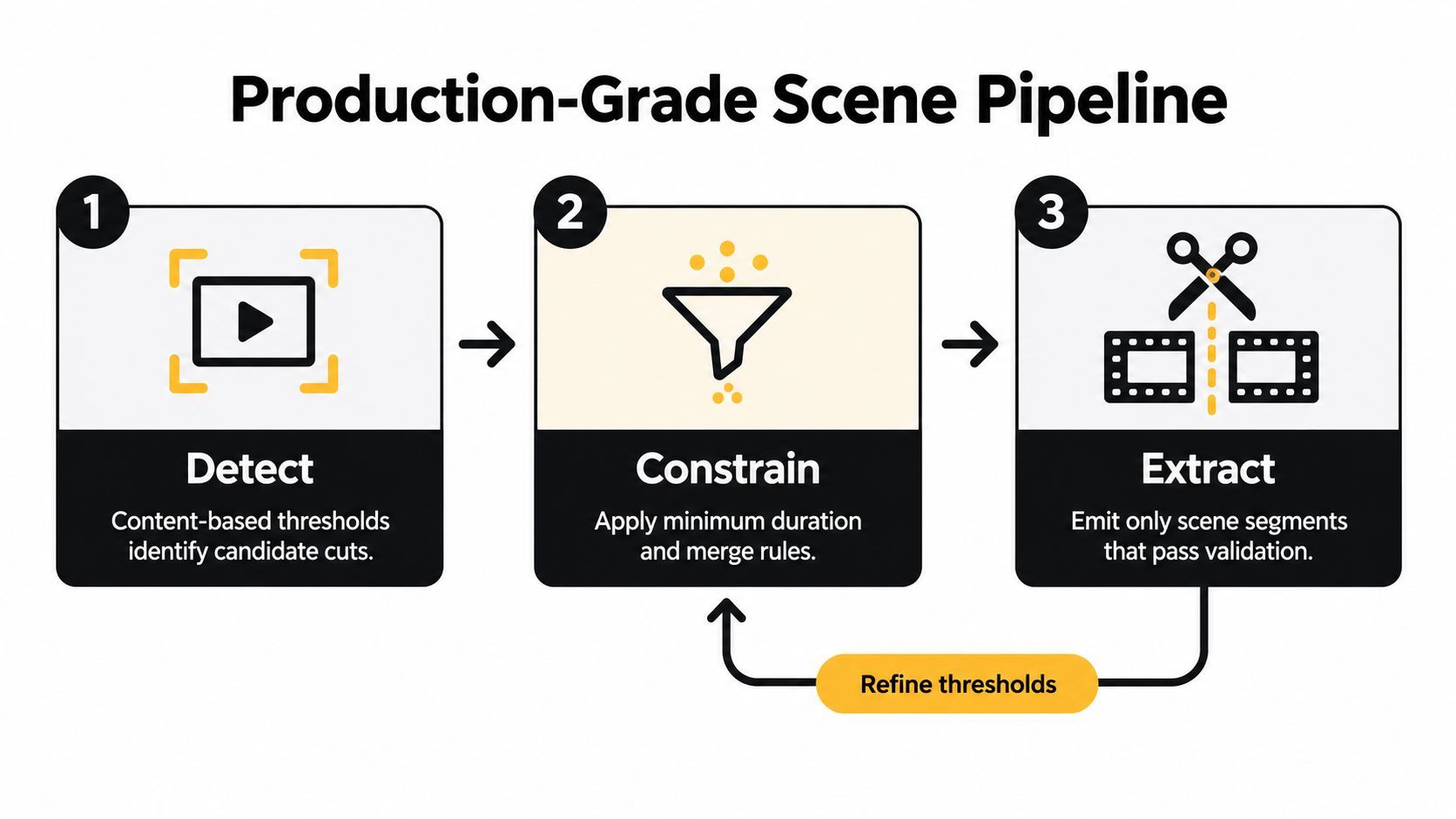
Validate before extraction
Do not send every detected segment to a clip generator. Use a validation pass that checks:
- Boundary quality, including whether speech starts or ends mid-word.
- Narrative completeness, including a clear setup, point, and resolution where appropriate.
- Visual continuity, particularly across close-ups and reverse shots.
- Audio continuity, since a clean visual cut can still create an obvious sound jump.
- Reuse potential, including whether the segment works alone without missing context.
The production roles stay distinct. Detection finds possibilities. Constraint rules control fragmentation. Semantic refinement protects meaning. Manual validation decides whether extraction is ready. That combination lets automation remove repetitive work while keeping editorial judgment in the pipeline.
Using Scene Splits in Short-Form Workflows
A long interview can contain several publishable moments, yet finding them by scrubbing the full recording wastes editing time. Scene splitting creates workable units early, so each candidate can move through captioning, reframing, voiceover, branding, and scheduling without reopening the entire source for every output.
A practical short-form workflow is:
- Source preparation: Detect candidate boundaries and remove unusable material.
- Scene review: Merge related shots and refine start and end points.
- Clip selection: Choose scenes with a clear idea, useful action, or strong opening.
- Format adaptation: Reframe selected scenes for the destination channel.
- Finishing: Add captions, voiceover, music, overlays, and brand elements.
- Distribution: Export approved versions or send them into a publishing workflow.
Automation should handle the first pass. Manual review should decide whether a scene works as a standalone short. Trust clean boundaries when the subject, action, and audio resolve together. Refine them when a cut interrupts the thought or removes the setup an audience needs.
Use duration controls to reduce noise
Minimum-duration settings help with flash frames, rapid cuts, and brief exposure changes. Mux documents a minimum scene duration setting of 15,000 milliseconds, which can suppress false positives from extremely short visual events. Mux's scene-detection guidance also treats segmentation as a constrained extraction task rather than a blind cutting process.
For long source files, the same research describes overlapping 15-minute segments for global narrative construction and finer 5-minute scenes for detailed semantic extraction. Those boundaries are reference points, not rules for every project. Keep enough surrounding material for the system to understand the story, then use smaller analysis windows when detailed extraction matters.
A tool such as ShortGenius can follow the review stage with scene-level assembly, captions, resizing, voiceovers, and platform-oriented publishing workflows. Working from individual scenes lets editors build several outputs without reconstructing each one from the original recording.
Preserve context before making a clip
A strong scene may need a short lead-in. Watch the selected segment with its neighboring scenes available before exporting. Add setup when viewers need to know who is speaking, what prompted the answer, or why the action matters. Remove that setup only when the opening already makes the subject clear.
The productive workflow is the one that produces usable, understandable scenes, not the one that creates the most fragments. Scene splitting supplies the candidates. Editorial judgment determines which candidates deserve a final short.

Common Pitfalls and How to Fix Them
Scene splitting usually fails for two reasons: it creates too many fragments, or it separates shots that belong to one continuous idea. Both problems waste editing time, but they need different fixes. Automation should identify candidates. Manual review should resolve meaning, pacing, and context.
Too many tiny clips
Rapid edits, camera movement, flashing lights, and exposure changes can trigger boundaries that have little editorial value. The result is a crowded media bin and a repair job that takes longer than reviewing a cleaner scene list.
Adjust the settings before rerunning the full source:
- Raise the minimum duration so brief visual events are less likely to become standalone scenes.
- Reduce sensitivity when ordinary movement produces repeated boundaries.
- Merge neighboring clips when they share the same speaker, location, and purpose.
- Test a representative section before applying new settings to the complete recording.
Keep short clips that serve a clear purpose. A brief reaction, product detail, trailer beat, or social-media moment may work perfectly on its own. Duration is not the problem. A short clip becomes a problem when it has no setup, payoff, or usable editorial role.
A scene feels disconnected
A detector may identify a genuine cut while still placing the boundary in the wrong editorial position. One camera angle can end halfway through a sentence, while the next angle contains the speaker's conclusion. Exporting those shots separately produces an awkward clip even though the original sequence feels natural.
Use transcript cues alongside visual detection. If the same speaker continues the same thought, review the shots as one narrative unit before deciding whether to merge them. Manual checking matters when the sequence depends on dialogue, off-screen action, or a visual payoff that appears after the cut.
Efficiency settings can miss subtle transitions
Production systems often reduce processing load by scanning fewer or smaller frames. The verified research uses 2 FPS and 256 × 144 frame resizing as efficiency settings, while warning that visual-only processing can miss semantic continuity. The agentic editing research supports combining visual signals with text cues and post-merge logic rather than relying on one threshold.
Apply the same division of labor in a practical editing pipeline. Use the detector to find boundaries, transcripts to preserve meaning, and manual review to approve the final scene. If the output looks wrong, diagnose the failure before changing sensitivity. The cause may be motion, duration, missing dialogue context, or a narrative relationship that the visual scan could not recognize.
The export contains the cut, but not the story
A technically accurate scene can still make a weak short-form clip. It may open with an unexplained pronoun, stop before the answer, or depend on a visual shown in the previous scene. Review each candidate as a viewer will encounter it, not only as a segment inside the original timeline.
For short-form repurposing, check the opening, context, payoff, and ending before sending a clip into captions, resizing, or publishing. This manual pass is where automatic detection becomes a useful production system instead of a folder full of fragments.
ShortGenius (AI Video / AI Ad Generator) can turn reviewed scene splits into edited, captioned, resized videos with voiceovers and brand elements for multi-channel publishing. It lets editors move from organized scenes to finished short-form outputs without rebuilding every version from the full recording.