How to Create Viral Short Videos on YouTube in 2026

Learn how to make viral short videos on YouTube with our 2026 guide. Get expert tips on scripting, editing, and growth tactics to master YouTube Shorts.
If there's one thing I've learned about growing on YouTube in 2026, it's this: you simply cannot afford to ignore Shorts. What started as a trendy feature has become the absolute core of YouTube's discovery engine, and it’s single-handedly responsible for some of the most explosive channel growth I've ever seen.
For creators, this isn't just about grabbing a few extra views. It's a fundamental shift in how your content reaches people, offering a direct line to audiences you'd otherwise never find.
Why YouTube Shorts Are Your Best Growth Tool
The numbers driving this shift are truly mind-boggling. YouTube Shorts now attracts over 2 billion monthly users and racks up an astonishing 200 billion views every single day.
But here's the statistic that should really grab your attention: a massive 74% of those views come from people who are not subscribed to the creator. Think about that. The algorithm is built from the ground up to introduce you to new fans. For more details on these figures, check out the analysis from LoopexDigital.
Dominating the Short-Form Landscape
Let’s be clear, the competition in short-form video is fierce. But YouTube has leveraged its massive, pre-existing user base to pull ahead of the pack. The platform isn't just competing; it's setting the pace.
To put this into perspective, let's look at how the major platforms stack up side-by-side in 2026.
YouTube Shorts vs Competitors in 2026
| Platform | Monthly Active Users | Daily Views | Non-Subscriber View Rate |
|---|---|---|---|
| YouTube Shorts | 2 Billion+ | 200 Billion+ | 74% |
| TikTok | 1.8 Billion | 150 Billion | 68% |
| Instagram Reels | 1.5 Billion | 140 Billion | 65% |
As the table shows, YouTube's scale gives your content a larger potential audience right from the moment you upload. The sheer volume and the algorithm's focus on non-subscriber reach make it an unparalleled discovery tool.
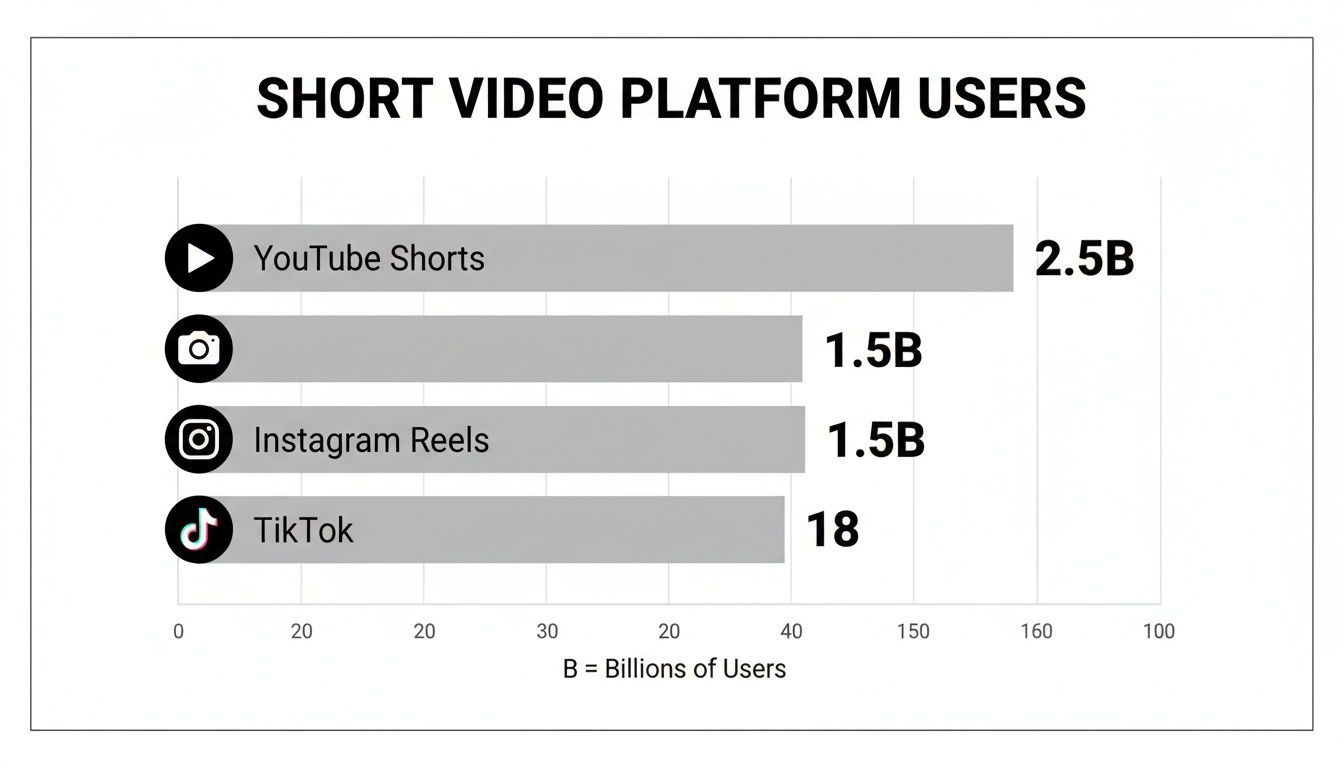
The chart above really drives the point home. With more monthly active users than both TikTok and Instagram Reels, YouTube is simply the biggest pond you can fish in for short-form video.
The real magic of Shorts is its integration. A viewer who discovers you through a 30-second clip is just one click away from your entire library of long-form videos. It’s the most direct funnel for building a genuine, loyal community.
The Psychology of the Shorts Feed
So, why is this format so ridiculously effective? It's all about the psychology of the endless scroll, but with a uniquely "YouTube" twist. The algorithm isn't just serving up random viral clips; it's connecting viewers with content that aligns with their deeper viewing history across the entire platform.
This creates a powerful dynamic for creators, offering a few key advantages:
- Powerful Algorithmic Push: Your content is actively served to viewers who are statistically most likely to enjoy it, even if they have no idea who you are.
- Low Barrier to Entry: You don't need a fancy studio. A smartphone and a good idea are all it takes to create a Short that can reach millions.
- Instant Feedback Loop: You can test ideas, see what sticks, and adjust your content strategy in near real-time based on performance data.
Honestly, using short videos on YouTube is no longer an optional tactic—it's the most efficient and effective strategy for audience growth available on the platform today.
Scripting Shorts That Hook Viewers Instantly
The best Shorts feel spontaneous, but they almost never are. A truly viral Short is built on a solid script that snags attention from the first second and doesn't let go. While you can't guarantee a hit every time, you can stack the odds in your favor by moving past brainstorming and into a deliberate scripting process.
It’s about finding that sweet spot where current trends meet your unique voice. A great way to do this is by tapping into pop culture. Weaving in a few popular meme templates that your audience will instantly recognize can create a quick, easy connection.
Crafting the Perfect Hook
You have about three seconds. That's it. That’s your entire window to convince someone to stop scrolling. If the first few frames don't immediately interrupt their swiping pattern, you've lost them.
Your mission is to create an open loop. You can do this by highlighting a common mistake, asking a provocative question, or just showing something visually jarring. A fitness creator might open with, "Stop doing your push-ups like this." A baker could show a hilariously burnt cake with the caption, "This is what happens when you ignore one simple step." Both hooks create an itch the viewer needs to scratch by watching the rest.
A powerful hook doesn't just get a view; it earns the viewer's focus. It makes a promise that the rest of the video must fulfill, building trust and encouraging them to watch until the end.
Once you have their attention, the script needs a clear path to follow. The most effective short videos on YouTube tell a mini-story, even if it’s only 15 seconds long.
Proven Scripting Frameworks
There's no one-size-fits-all formula, but a few tried-and-true frameworks can give your ideas the structure they need to land with an audience. Think of these as blueprints for a tight, engaging narrative.
- Problem-Agitate-Solution (PAS): Start by calling out a pain point your audience knows all too well. Next, poke at that frustration a bit to make it feel real. Finally, present your video as the perfect solution. This is a go-to for tutorials and educational content.
- Hook-Story-Offer (HSO): Kick things off with a powerful hook, transition into a quick and relatable story, and end with an "offer." The offer doesn't have to be a sale—it can be a simple prompt to subscribe, a link to a longer video, or a final takeaway thought.
- The Unexpected Twist: This one is a classic for a reason. You set up a familiar situation that your viewers think they understand, building on their expectations. Then, right at the end, you pull the rug out from under them with a punchline or a surprising reveal. It’s perfect for comedy sketches and entertainment.
Of course, writing these from scratch can be a grind. Using an AI scriptwriter can help you quickly generate a bunch of different hooks for a single idea, letting you test angles fast. Some tools can even take your concept and flesh it out into a full script. If you want to see how that works, you can check out this guide on AI text-to-video generation. It’s a workflow that can turn a simple idea into a video built for retention.
Filming and Editing Shorts That Look Professional

The gap between a fuzzy, amateur-looking Short and one that looks sharp and professional has surprisingly little to do with your budget. It's all about getting a few key fundamentals right. In fact, the smartphone in your pocket is probably all you need to capture incredible-looking video.
The secret is knowing how to control your environment before you ever hit record.
Getting the Shot: Lighting and Audio First
Let's talk about the two things that instantly signal quality: light and sound.
Good lighting is your top priority. Forget about fancy, expensive kits for now—just find a window and face it. Natural light is soft, flattering, and does a far better job than the harsh overhead light in most rooms. It’s the oldest trick in the book for a reason.
Next up is audio. Viewers are surprisingly forgiving of video that isn't perfectly crisp, but they have zero patience for muffled, echoey sound. A cheap lavalier microphone that clips onto your shirt can be found for under $20 and will make you sound a hundred times better than your phone’s built-in mic. It’s the single best investment you can make.
Simple Filming Tricks for a Polished Look
Once your lighting and audio are sorted, a few simple framing techniques will make your short videos on YouTube look incredibly polished.
- Follow the Rule of Thirds: Picture a tic-tac-toe grid on your phone screen. Instead of sticking your face right in the middle, try aligning your eyes with one of the top horizontal lines. It’s a subtle shift that makes your shot feel more balanced and professional.
- Stay Steady: Nothing screams "amateur" like a shaky camera. You don’t need a fancy gimbal to start. Just prop your phone on a stack of books, use a cheap tripod, or even brace your elbows against your body. A stable shot is a confident shot.
- Shoot Vertically (9:16): This one is non-negotiable. YouTube Shorts are designed for a vertical, 9:16 aspect ratio. Filming this way from the start ensures your video fills the entire screen, creating an immersive experience that stops people from scrolling.
These aren't complicated techniques. They're small habits that, once you start using them, become second nature and elevate everything you create.
An Editing Workflow That Actually Works
Editing is where the magic really happens. This is your chance to inject energy, set the pace, and tell a compelling story that holds a viewer's attention from the first second to the last.
The key is to be ruthless with your cuts. For a 30-second Short, you should aim for 10-15 different clips or camera angles. This might sound like a lot, but this rapid-fire pacing is what prevents visual boredom and keeps the viewer locked in.
A professional edit isn't about flashy effects. It's about clarity and momentum. Every cut, every text overlay, and every sound effect should serve one purpose: to keep the viewer engaged until the very end.
Using B-roll (any supplemental footage that illustrates what you’re talking about) is also a fantastic way to keep things interesting. Talking about a new recipe? Show quick, close-up shots of the ingredients. Giving business advice? Cut to a quick clip of a laptop or a person nodding.
If you need B-roll fast, you can find great tools to help. For example, our guide on AI-powered image-to-video generation explains how you can create dynamic video clips from a single static image.
Manual vs AI-Powered Editing Workflow
This is where you can reclaim a huge chunk of your time. Manually performing all the small, repetitive editing tasks is what leads to burnout. An AI-powered workflow automates the most tedious parts, letting you stay in the creative zone.
| Editing Task | Manual Workflow Time | AI Workflow Time | Key Benefit |
|---|---|---|---|
| Transcription & Captions | 30-60 minutes | 1-2 minutes | Instant, accurate animated captions |
| Finding Relevant B-Roll | 20-45 minutes | 3-5 minutes | AI suggestions based on your script |
| Applying Brand Colors | 5-10 minutes | Instant | Consistent branding on every video |
| Trimming Silence | 10-15 minutes | Instant | Automatically creates a faster pace |
As you can see, the time savings are massive. Instead of spending an hour painstakingly animating captions or searching stock footage sites for the perfect B-roll clip, a platform like ShortGenius does it for you in minutes.
This isn't about replacing your creativity; it's about amplifying it. By handing off the grunt work to AI, you can focus on what truly matters: telling a great story and publishing high-quality Shorts consistently.
Getting Your Shorts Noticed by the YouTube Algorithm
 Let's be real: a great video that nobody sees is just a file on your phone. The real challenge isn't just making the Short; it's getting it in front of the right eyeballs. To do that, you have to play nice with the YouTube algorithm.
Think of it as speaking the algorithm's language. You're giving it clear, simple clues about what your video is and who would love it. Get this right, and YouTube will do the heavy lifting for you, connecting your content with a hungry audience.
Crafting Titles and Descriptions that Actually Work
Your title has to pull double duty. It needs to be interesting enough to make a human stop scrolling, but also clear enough for the YouTube algorithm to understand. Forget vague titles like "My Morning Routine." Instead, get specific: "My 5-Minute Productivity Hack for Mornings." See the difference? One is a diary entry; the other is a solution.
The description is your secret weapon. Most viewers will skip it, but the algorithm reads every word. Use this space to add a couple of sentences that build on your title. Sprinkle in related keywords and phrases that feel natural.
Optimization isn't just about stuffing in keywords. It’s about building context. Your goal is to give YouTube a complete picture—using your title, description, and hashtags—so it knows exactly who will find your Short valuable.
For instance, if your Short is about baking sourdough, a title like "Easy Sourdough Hack for Beginners" is a great start. In the description, you could mention "no-knead bread," "baking tips for home," and "sourdough starter guide." These terms create a strong signal. If you're looking for inspiration on how to write for short-form video, checking out how brands write their AI UGC ads can give you some great ideas.
Using Audio and Hashtags to Catch a Wave
Trending audio is one of the biggest shortcuts to discovery for short videos on YouTube. When you use a sound that’s blowing up, the algorithm often slots your video into a feed with thousands of others using that same audio. It’s like a free ticket to a much larger audience.
You can spot these trending sounds right inside the YouTube Shorts editor. Look for the little arrow icon and a high number of videos already using the sound.
Hashtags work in a similar way, helping to sort your video into the right digital bin. I’ve found a simple formula works best:
- 1-2 Broad Tags: You have to include
#shorts. It's non-negotiable. I also like to add one other big, relevant tag like#fitnessor#cooking. - 2-3 Specific Tags: This is where you narrow it down. Use tags that describe exactly what’s in the video, like
#kettlebellworkoutor#veganrecipes. This helps you attract viewers who are looking for exactly what you’re offering.
Schedule Your Posts for Maximum Impact
Posting sporadically is a surefire way to tell the algorithm you're not a serious creator. Consistency wins on YouTube. But that doesn't mean you need to be chained to your phone, manually publishing every single day.
That’s what scheduling tools are for.
Batch-record your Shorts on one day, then use a scheduler to drip them out over the week. You can set them to post when your audience is most active, giving every single video its best shot at getting that crucial initial traction. It’s a simple system that turns random uploads into a real, sustainable growth engine.
Using Data to Grow, Not Just Go Viral
Chasing viral hits is a fast track to burnout. I’ve seen countless creators get a taste of big numbers, then exhaust themselves trying to catch lightning in a bottle again. Sustainable growth on YouTube Shorts comes from something far more reliable: building a system.
That system is fueled by data. Instead of just celebrating a video that pops off, you need to dig into your YouTube Analytics and figure out why it worked. The data tells you the real story behind your views.
The goal isn't to get lucky once. It's to build a repeatable process for making videos you know your audience wants to see. Your analytics are the instruction manual for that process.
This is the shift from just making content to building a genuine content strategy. It’s how you stop guessing and start creating with intention.
The Metrics That Actually Matter for Shorts
Your YouTube Analytics dashboard can feel overwhelming. The good news? For Shorts, you can ignore most of it and focus on just a few key metrics that tell the algorithm what to do.
The single most important number for any Short is Viewed vs. Swiped Away. This is a straightforward, brutal percentage that shows how many people stuck around versus how many swiped away immediately. A high percentage (you're aiming for over 60%) is a massive signal to YouTube that your hook is grabbing attention and the video is worth pushing to more people.
Beyond that one number, a couple of other data points will give you your roadmap:
-
Audience Retention: This graph is your best friend for diagnosing problems. Is there a huge drop-off in the first 3 seconds? Your hook isn't working. Do people leave right before your call-to-action? You might need to tighten up the ending. Use this to see exactly where you're losing people's attention.
-
High-Performing Videos: Head into your analytics and filter for your top Shorts over the last 90 days. Lay them out and look for the patterns. Is it the topic? The editing style? The audio choice? Find the common threads and double down on them.
Building Your Content Ecosystem
The most successful creators don't see their Shorts in isolation. They build a powerful content ecosystem where their short-form and long-form videos feed each other in a continuous growth loop.
Think of your Shorts as your discovery engine. They are out there finding new viewers who have never heard of you. For example, a 30-second Short on a "quick kitchen hack" could easily pull in thousands of views from non-subscribers.
Once you have that validation, you can create a longer 10-minute video titled "10 Kitchen Hacks That Will Change Your Life," knowing there's already an audience for it. This is how you convert fleeting views into a loyal community.
This feedback loop also works in reverse. Got some great long-form videos already? Use a tool like ShortGenius to scan them for the most shareable moments and automatically repurpose them into Shorts. To really sharpen your instincts, a broader understanding of social media analytics can help you spot trends that apply beyond just YouTube. This approach turns every single piece of content you make into an asset that can find you a new audience.
Answering Your Top Questions About YouTube Shorts
Alright, even with the best strategy, you're going to have questions as you start creating Shorts. It's totally normal. Getting the right answers from the get-go can be the difference between spinning your wheels and seeing real, tangible growth.
So, let's dive into some of the most common questions I hear from creators. These are the details that truly matter in the Shorts ecosystem.
How Long Should My Shorts Be for Best Results?
You have up to 60 seconds to play with, but honestly, the sweet spot is much shorter. The data I've seen over and over points to the 15 to 30-second range for maximum impact.
Why? Because your main goal isn't just a single view—it's a re-watch. Getting someone to immediately watch your Short a second time is one of the most powerful signals you can send to the YouTube algorithm. Shorter, punchier videos make that happen.
Of course, if your idea absolutely needs 45 or even 60 seconds, go for it. Just know that your hook has to be incredible and the pacing can't let up for a second. The best way to know for sure is to check your "Audience Retention" graph in YouTube Analytics. If you see a massive drop-off at the 10-second mark, that's your sign to deliver the goods much faster next time.
Can I Make Money from Short Videos on YouTube?
Yes, absolutely. Monetizing Shorts is no longer a side-note; it's a legitimate income stream for creators in the YouTube Partner Program (YPP).
Here’s the simple breakdown of how it works:
- All the ad revenue from ads shown in the Shorts feed is collected into a "Creator Pool."
- This pool is then divided among all monetizing creators based on their share of the total views.
- Essentially, the more views you get, the bigger your slice of the pie.
To qualify for the YPP specifically through Shorts, you need 1,000 subscribers and 10 million valid public Shorts views within the last 90 days.
Should I Create a Separate Channel for My Shorts?
For 99% of creators, the answer is a hard no. In fact, YouTube has been very clear that channels mixing both Shorts and long-form videos tend to see faster overall growth.
Think of your Shorts as the friendly greeters at the front door of your channel. They bring in a huge wave of new people who have never heard of you. A good portion of those viewers will get curious, click on your channel, and discover your longer, more detailed videos.
Keeping all your content on one channel creates a powerful feedback loop. Shorts bring in new viewers, and your long-form content turns them into a loyal community. This integrated strategy is the key to sustainable growth.
The only time a separate channel might make sense is if your Shorts are about something completely different from your main content (like a gaming channel suddenly posting cooking Shorts). But for most everyone, keeping it all under one roof is the winning play.
How Is the Shorts Algorithm Different from TikTok or Reels?
While they all feed on engagement, the YouTube Shorts algorithm has a secret weapon: it's plugged into the entire YouTube universe. It doesn't just look at what Shorts you watch; it considers your entire YouTube history—every video you've searched for, watched, and subscribed to.
This means it's exceptionally good at matching your niche content with the right audience, even if it's not a viral, trending topic.
Unlike the fast-burning trends on TikTok, the YouTube algorithm is built to help evergreen content find an audience over the long haul. It's less about chasing one viral hit and more about rewarding you for consistently creating quality videos, making it the perfect place to build a lasting channel.
Ready to stop wasting time and start creating high-quality short videos on YouTube at scale? ShortGenius automates the entire process, from scripting and editing to scheduling and publishing. Turn your ideas into a consistent stream of content in minutes. Give ShortGenius a try and see the difference for yourself.