Short Form Video Creator Skills, Workflows, and AI Tools

Become a short form video creator with the right skills, workflow, monetization playbook, and AI tools like ShortGenius that turn ideas into daily posts.
YouTube Shorts reached 200 billion daily views globally in 2026, up from 70 billion in March 2024, according to Kapwing's 2026 short-form video statistics. That scale changes the job. A short-form video creator isn't someone who records clips for social media. They're building a repeatable publishing system that turns ideas into attention, audience relationships, and eventually revenue.
The creators who last aren't always the ones with the most expensive cameras or the most elaborate edits. They're the ones who can choose a useful angle, write a strong opening, capture clear footage, edit for retention, publish natively, and learn from the response. This guide breaks that work into practical skills, a manageable workflow, retention decisions, monetization options, and an honest comparison between manual production and AI-assisted tools.
What a Short Form Video Creator Actually Does
A short-form video creator operates a small publishing system, alone or with a team. The job is to develop, produce, and distribute vertical videos for TikTok, Instagram Reels, YouTube Shorts, Snapchat Spotlight, and Pinterest Idea Pins. Each video is usually concise and built for discovery, so the creator must turn one idea into a clear promise, an engaging viewing experience, and a platform-ready post.
The role differs from traditional videography. A videographer may spend weeks refining a small number of polished productions. A short-form creator manages a continuing stream of content units, each designed to inform, entertain, or create an emotional response. A long-form YouTuber may build extended research, narrative development, and viewing sessions. Television-style brand videography prioritizes commercial polish. Short-form work prioritizes content density, meaning a dependable flow of useful videos that can be produced and learned from repeatedly.
The creator as a small publishing system
One video contains several connected parts:
- Script: The promise, explanation, story, or argument.
- Scene: The talking-head shot, demonstration, image, or B-roll that supports the idea.
- Voice: Natural delivery, narration, or a deliberately selected synthetic voice.
- Caption: On-screen text that helps viewers follow the message without sound.
- Post: The caption, cover, hashtags, timing, and platform-specific version.
These parts work like stations on an assembly line. If they are handled as unrelated chores, editing becomes a bottleneck. If they are designed as one system, the creator can reuse formats, batch similar tasks, and see whether the delay comes from writing, recording, editing, or publishing. A platform such as ShortGenius can connect script, scene, voice, and scheduling in one workflow, reducing the handoffs that make manual production take hours. The trade-off is control: manual work offers closer creative direction, while AI-assisted production offers speed and consistency but still needs human judgment.
The same system can adapt one idea for top video-sharing apps like TikTok, instead of forcing the creator to rebuild every video from the beginning.
What success looks like day to day
A typical day may include scanning feeds for recurring questions, narrowing a broad topic into one promise, writing a compressed script, recording several takes, trimming pauses, adding captions, adjusting the frame, publishing, and reviewing analytics. Comments then supply new questions, which can become the next group of scripts.
The useful mental shift is to build a repeatable unit of publishing, not chase one perfect upload. The creator's advantage comes from connecting decisions across the workflow, then improving the system each time a video reveals what viewers understood, ignored, or wanted next.
Core Skills Every Short Form Video Creator Needs
Short-form creation rests on four connected skill clusters: Concept, Capture, Edit, and Publish. The technical foundation is a 9:16 portrait frame at 1080×1920 pixels, generally exported as MP4 with H.264 video, AAC audio, and 30 fps, according to vertical video guidance from UK Journo Hub. A 60 fps export can make sense when motion clarity matters, such as gaming or sports. For most beginners, the standard portrait profile is the safer default across TikTok, Reels, and Shorts.

Concept
Start with the problem before the effect. A beginner should drill:
- Hook writing: Express the viewer's tension, curiosity, or desired result in the opening line.
- Angle selection: Give one video one clear job. “Three ways to improve your desk setup” is harder to follow than “Fix this desk mistake before buying new equipment.”
- Compression: Reduce the idea to a few beats. Every sentence should either establish context, deliver the payoff, or move the viewer forward.
Trend scanning helps, but copying a trend without a distinct angle produces interchangeable content. Use a popular format as a container, then fill it with a specific observation from your niche.
Capture
You don't need a cinema rig to learn the fundamentals. Practice stable framing, face a light source, record clean audio before worrying about elaborate visuals, and keep the subject large enough to read on a phone. A small LED can help in a dim room, but placement and consistency matter more than the price of the light.
The highest capture drills are:
- Delivery: Record the same opening with three different levels of energy.
- B-roll planning: Capture supporting shots that illustrate the exact nouns and verbs in the script.
- Continuity: Keep camera height, background, and lighting consistent when recording multiple clips.
Edit
Editing should clarify the message, not advertise the editor. Learn jump cuts, silence removal, readable captions, basic sound balancing, and purposeful pattern interrupts. Export from a stable preset rather than changing technical settings for every post.
A polished edit can't rescue a vague opening. That's why editing skill needs to develop alongside retention analysis, not in isolation.
Publish
Distribution includes platform-native captions, search-aware wording, covers, hashtags, scheduling, and analytics review. Track which openings hold attention, which topics earn saves or shares, and which videos create profile visits or conversations. A creator who understands distribution can improve a plain but useful video, while a creator who ignores it may bury excellent footage behind a weak hook.
Practical rule: Treat publishing data as creative feedback, not as a verdict on your ability.
The End-to-End Short Form Video Production Workflow
A reliable workflow turns a blank screen into a scheduled post without asking you to make every decision from scratch. The sequence below works for a creator adapting content across TikTok, Instagram Reels, YouTube Shorts, Snapchat Spotlight, and Pinterest Idea Pins. The time ranges are planning estimates, not verified industry statistics, so use them as a starting point and adjust them to your niche and production style.

Start with a narrow idea
Trend scan, about 15 to 20 minutes. Review platform feeds, accounts in your niche, recurring comments, and relevant audio. Don't collect trends for their own sake. Ask what viewer problem, question, or emotion gives the trend a useful purpose.
Concept and hook, about 10 to 15 minutes. Choose one angle and write the first sentence before writing the rest. A good hook might challenge a familiar assumption, promise a clear result, or open a question that the video resolves.
Script and shot list, about 15 to 25 minutes. For a 60 to 90 second piece, write a short opening, a sequence of body beats, and a direct call to action. Mark where the viewer needs a demonstration, screen recording, close-up, or cutaway. The shot list protects you from discovering during editing that the script has no visual support.
Capture, assemble, and queue
Capture, about 20 to 30 minutes. Record several on-camera takes, then capture three to five B-roll inserts that match the script. Batch similar shots while the setup is ready. This reduces the friction of repeatedly moving between planning, filming, and editing.
Edit and caption, about 30 to 60 minutes. Remove dead space, place the strongest take first, add captions, balance audio, and use sound design only where it improves comprehension or mood. Make separate exports when framing, text placement, or the opening needs to change by platform.
For practical guidance on recording, audio, editing, and delivery, use video production best practices for 2026 as a reference point, then test those principles against your own audience.
Schedule and publish, about 10 to 20 minutes. Write a platform-native caption, select relevant hashtags, check the cover, queue the post, and log the topic, hook, runtime, and result in a simple sheet. The log matters because memory tends to remember viral outliers and forget ordinary lessons.
Manual production can easily consume roughly 90 to 180 minutes of focused work for one finished piece when research, filming, editing, and distribution are all included. The exact total varies, but the bottleneck is clear. If every video requires a fresh search for footage, captions, exports, and scheduling, consistency becomes difficult even when you have plenty of ideas.
Retention Hooks and Runtime Decisions
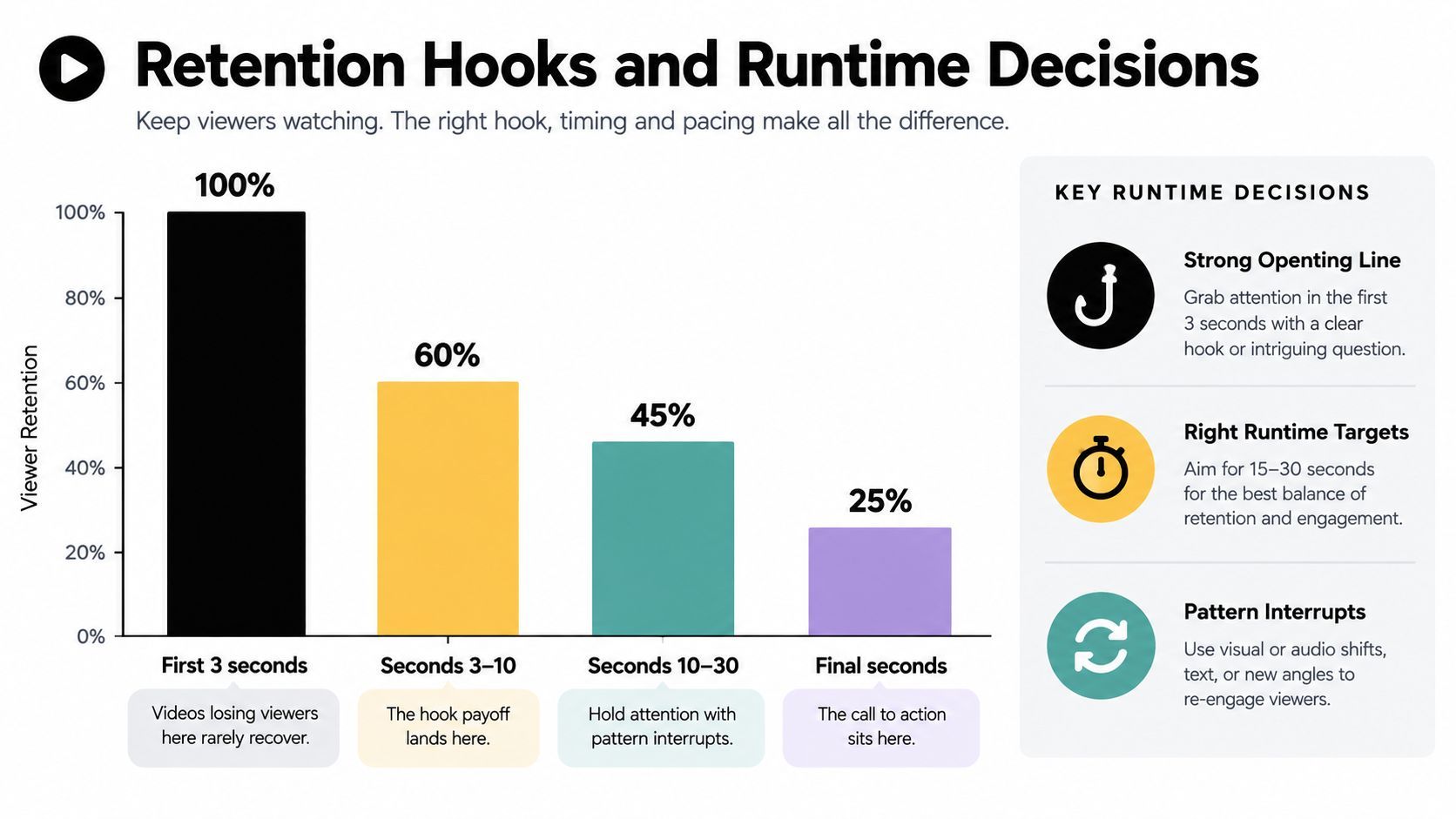
Retention is the point where creative judgment meets distribution. Kinovela's retention benchmarks report TikTok retention at around 60% to 70% for clips under 15 seconds, 50% to 60% for clips from 15 to 30 seconds, and roughly 40% to 50% for clips from 30 to 60 seconds. The same source reports YouTube Shorts and Instagram Reels at around 40% to 50% once clips exceed 30 seconds.
Read the opening as a promise
The first one to three seconds should answer the viewer's silent question: “Why should I stay?” Four hook patterns are especially practical:
- Pattern interrupt: Begin with an unexpected visual, movement, or statement.
- Open loop: Introduce an unresolved question and make the payoff specific.
- Visual contradiction: Show an outcome that conflicts with the viewer's expectation.
- Spoken promise: State what the viewer will learn, avoid, or achieve.
A sharp drop at the beginning usually means the promise was unclear, too slow, or mismatched with the audience's expectation. A steady decline through the middle may indicate repetition or weak structure. A late drop can mean the payoff arrived too early, the ending dragged, or the call to action interrupted the experience.
Choose runtime by the job
Use the shortest format that can deliver the idea without making it feel rushed. A punchline may need only a brief clip. A single practical tip can work in a compact tutorial. A mini-story needs room for setup, tension, and resolution, while a longer narrative should earn every additional beat.
The benchmarks support a useful principle: runtime is a distribution lever, not a personality trait. Shorter videos can make completion easier, but compression isn't automatically better. If removing context makes the viewer confused, the shorter edit may create a fast exit rather than a satisfying finish.
A strong ending gives the viewer a next reason to care. Invite a follow for a related series, point to the next step, or ask a question that belongs naturally to the topic. Don't fade out simply because the script ended.
Review completion, retention curves, replays, shares, saves, and profile actions together. A short clip with strong completion may build awareness, while a slightly longer explanation may create more qualified conversations. Your job isn't to maximize one graph. It's to match the format to the outcome you want.
Monetization Paths for a Short Form Video Creator
Views can create visibility, but visibility isn't the same as revenue. A sustainable short-form business usually combines audience growth with an offer, relationship, or distribution channel that the creator controls more directly.
Serialized content is becoming a meaningful commercial format. Deloitte projects that in-app revenue for micro-series will rise from US$3.8 billion in 2025 to US$7.8 billion in 2026, as reported in its 2026 technology, media, and telecommunications predictions. That projection doesn't mean every creator should produce a micro-series. It does show why recurring formats can be more valuable than isolated clips, especially when each episode creates a reason to return.
Choose revenue by audience relationship
Creator funds and platform programs can provide an accessible starting point, but they depend heavily on platform rules, eligibility, and high-volume distribution. They may suit creators who prioritize reach and can tolerate uncertain payouts.
Brand partnerships trade some creative independence for a direct fee or campaign relationship. A niche creator with a clear audience can make a stronger case than a generalist whose viewers don't share a clear buying context. Build a media kit around audience fit, examples of useful integrations, and the actions viewers take after watching.
Affiliate content works when the product solves the problem in the video. Demonstrations, comparisons, and setup walkthroughs tend to give the link a natural role. Disclose the commercial relationship and explain who the product is for, rather than presenting every item as universally necessary.
Owned products and series include prompt packs, templates, mini-courses, paid communities, newsletters, and serialized entertainment. They require more preparation, but they let you build an offer around a repeated audience need instead of relying entirely on platform payouts.
| Path | Typical Earnings | Prerequisite | Best For |
|---|---|---|---|
| Platform programs | Variable and dependent on platform rules, eligibility, and qualified views | Eligible account and compliant content | Creators focused on reach |
| Brand deals | Negotiated per campaign, with value shaped by audience fit and deliverables | Clear niche, portfolio, and professional pitch | Creators comfortable with sponsorships |
| Affiliate links | Commission varies by merchant and product | Relevant product, disclosure, and conversion path | Tutorial and review creators |
| Digital products | Direct sales revenue, shaped by price, demand, and delivery | A defined problem and useful product | Educators and specialists |
| Serialized content | Revenue can come from subscriptions, in-app models, sponsorships, or related offers | Repeatable story or teaching format | Creators building return visits |
Engagement quality matters more than follower count alone. A smaller audience that responds, asks questions, and trusts recommendations can be commercially stronger than a larger group that scrolls passively. Measure comments, saves, replies, clicks, and sales alongside views before deciding which path deserves more effort.
How AI Tools Like ShortGenius Speed Up Production
A short-form video creator often loses time between decisions, not during creative work. One topic may pass through a brief, script document, visual search, voice recording, editing timeline, caption tool, resizing process, and scheduler before it reaches an audience. Each handoff works like a toll booth. The more tools involved, the more often a file needs renaming, exporting, checking, or rebuilding.
A unified platform changes the shape of that process. ShortGenius brings scriptwriting, image generation, video assembly, voiceovers, captions, resizing, scene swaps, voice swaps, brand-kit settings, project organization, and scheduling into one workspace. A creator can begin with a topic, prompt, product URL, link, or reference video, then review one assembled draft instead of moving information between separate applications. The platform also supports themed series and scheduling for TikTok, YouTube, Instagram, Facebook, and X. You can examine the ShortGenius AI video and ad generator to see whether its workflow matches your production requirements.

What the system removes
A manual workflow asks you to solve the same production problem repeatedly. Find footage for each script beat, record or generate narration, line up scenes, add captions, resize the edit, and prepare separate uploads. AI-assisted production can connect those steps. A topic becomes a draft with narration, scenes, captions, and pacing, while AI B-roll selection reduces the time spent searching for a visual match.
Repurposing also becomes easier. A vertical source video can be adapted for square placements without rebuilding the entire edit, and scene or voice changes can happen inside the same project. That matters for a creator publishing across several channels, because each platform may require a different format while the central idea remains the same.
A six-hour production routine can become a much shorter review-and-schedule session, depending on the subject, source material, revisions, and quality standard. The time is not guaranteed. AI may produce a usable first draft quickly, but a published video still needs human review for factual accuracy, visual relevance, pronunciation, caption timing, pacing, and brand fit.
Where human judgment remains essential
AI handles repeated assembly well. It has less context about why a viewer should care, which example feels credible, or whether a joke suits a specific audience. Synthetic narration can miss the warmth and timing of a creator's natural delivery. Generic scenes can weaken a personal brand, and automated hooks may sound interchangeable when the subject needs a sharper point of view.
Use the system for production work that follows clear rules, then keep these decisions with the creator:
- Audience insight: Turn a recurring question or comment into a focused topic.
- Point of view: Choose the claim, example, or recommendation the video will defend.
- Quality control: Remove unsupported claims, awkward visuals, incorrect pronunciations, and misleading edits.
- Relationship building: Reply to viewers and use their language to shape future scripts.
- Final publishing judgment: Decide whether the video feels useful, accurate, and recognizably yours.
The practical benefit is a better allocation of attention. AI can reduce file management and repetitive assembly, while the creator spends more time improving the idea, checking the message, and learning from audience response. That division keeps speed from becoming the only measure of production quality.
Your 30-60-90 Day Plan to Launch as a Short Form Video Creator
A staged launch keeps you from adding tools before you understand your audience. Start with a manual workflow, learn which ideas create meaningful response, and automate the parts that repeatedly consume your time.
Days 1 to 30
Choose one niche and write a short description of the person you serve. Collect questions from comments, forums, search suggestions, and conversations, then turn them into 50 evergreen topic ideas. Publish 20 posts across two platforms using a simple phone, editing app, caption preset, and tracking sheet.
Log the topic, opening line, runtime, completion or retention signal, saves, shares, comments, and profile actions whenever the platform makes those metrics available. Advance when you can identify recurring themes in the posts that earn the strongest audience response, not when every post performs well.
Days 31 to 60
Add a third platform only after your recording and editing routine feels repeatable. Test three series formats, such as “mistake and fix,” “one question per episode,” and “behind the process.” Keep the subject consistent while changing the structure, then compare retention curves and audience actions.
Automate one repetitive step, perhaps caption generation, resizing, scheduling, or B-roll selection. Keep the rest manual so you can see whether the automation improves speed without weakening clarity or authenticity.
Days 61 to 90
Add a monetization experiment that matches your niche. Apply for relevant platform eligibility where available, create an affiliate pathway or small digital product, and send one focused brand pitch with examples of your work. Track clicks, replies, signups, or sales separately from reach.
At the end of the period, keep the topics and series that produce both audience response and a plausible business path. Drop formats that consume time without teaching you anything or moving viewers toward a useful next action.
ShortGenius (AI Video / AI Ad Generator) helps turn a topic, product link, or script into short-form video with scenes, voiceover, captions, resizing, and multi-channel scheduling in one workflow. If you want to reduce repetitive production work while keeping control over hooks, review, and publishing, visit ShortGenius (AI Video / AI Ad Generator) and test it with one series from your launch plan.