Script for Pictures: Write Visual Scripts That Convert

Learn how to write a script for pictures that drives results. Discover practical tips, formats, and examples for captivating visual storytelling in 2026.
You've got the brief open, the copy is half-written, and the problem isn't the words. It's that the visuals still live in your head instead of on the page. That's where a script for pictures earns its keep, because once the camera language is clear, the edit stops feeling like guesswork and starts feeling like assembly.
A lot of guides get stuck on prompts and captions. That works for a single still, but it falls apart the moment you need angle changes, continuity, or a sequence that holds attention. The job is to script what the viewer sees, in what order, and from which vantage point, so every frame serves the same idea.
Why Most Picture Scripts Fail Before Production Starts
The classic mistake is simple. Someone writes polished copy, then leaves the visuals as vague placeholders like “show product” or “add b-roll.” By the time the team gets into production, nobody knows whether the scene needs a wide shot, a tight crop, a close-up on hands, or a cutaway.
That's why the old scripting model matters so much. In R, a script is just a plain text file you can save and run with source("hello.R"), which makes the same steps repeatable instead of forcing you to type them by hand every time. The practical lesson translates cleanly to visual work, because a script for pictures should do the same thing, lock the visual decisions in place so the team can repeat them across takes, channels, and revisions. The basic shift is from improvising shot by shot to building a reusable plan.
A script is a visual order of operations
A strong picture script doesn't begin with copy. It begins with what the viewer needs to understand first, second, and third. When the image plan is vague, pacing gets messy, transitions feel accidental, and editors spend too long trying to manufacture structure from fragments.
That's especially painful when you're making more than one image. A single hero frame can survive a loose brief because the art direction can absorb ambiguity. A sequence cannot. If one shot establishes a countertop product demo and the next shot behaves like a lifestyle scene, the whole piece feels stitched together instead of designed.
Practical rule: if a scene can't be sketched in one sentence, it probably isn't ready to shoot or generate yet.
The best scripts make the visual beat obvious before anyone opens an editor or image model. That's not a creative constraint, it's a time saver. You spend less effort fixing mismatched footage later because the structure was already clear on page one.
Building Your Script with the Two-Column Format
The most usable format I've seen for a script for pictures is still the two-column layout, VIDEO on one side and AUDIO on the other. Georgetown's production-planning guidance uses that structure, with each row representing one scene, and it keeps the work honest because every visual beat has to earn its place next to narration, music, or sound design Georgetown's two-column script guidance.
A clean way to start is to write the title and concept at the top, then break the piece into rows. In the VIDEO column, describe the shot, the on-screen text, and the main action. In the AUDIO column, write what the viewer hears, whether that's voiceover, dialogue, a music cue, or a sound effect.
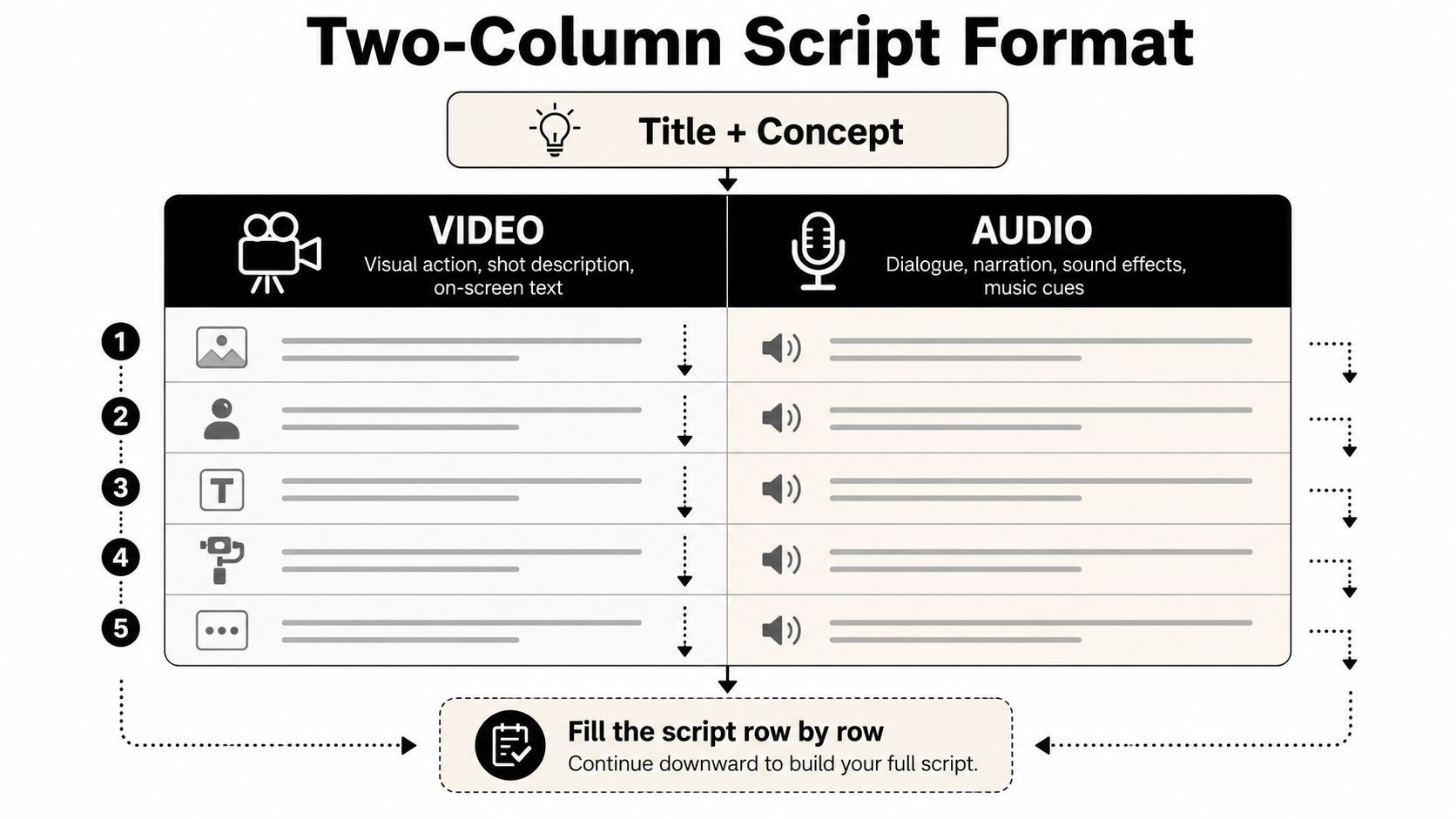
The point is not to storyboard every possible frame. Strong scripts use a short, prioritized image set so the sequence stays focused instead of bloated. For output specs, that same guidance points to about 300 dpi for print and 72 dpi for screen, so the script should match the final medium instead of pretending every asset lives in one universal format. The practical difference shows up fast in editing, because a print-first layout and a screen-first layout do not ask the same things from framing, crop space, or text placement.
A 30-second product explainer in practice
Here's the pattern I'd use for a short product ad.
| VIDEO | AUDIO |
|---|---|
| Close-up of a messy desk, coffee ring, scattered notes | “Your desk shouldn't slow down your day.” |
| Hand drops the product into frame, centered and clean | “This is built to replace the clutter.” |
| Tight shot of the main feature in use | “You get one action, one result, no friction.” |
| Lifestyle shot of someone walking away with the product in a bag | “It fits the routine instead of interrupting it.” |
That format works because each row is a beat, not a sentence stuffed with decoration. If the image doesn't advance the message, cut it. If the audio repeats what the picture already shows, trim it back.
The temptation is to overbuild. Don't. A lean script gives the editor room to pace the cut and gives the generator less chance to wander off course. It also makes multi-shot continuity easier to control later, which matters if the brief has to hold up across AI-generated pictures, motion inserts, or versioned ads. For teams building those prompts into a broader workflow, the prompt engineering guide 2026 is a useful reference point for how to translate intent into repeatable instructions.
Writing Image Prompts That Control Camera Angle and Framing
Most prompt advice focuses on what to ask for, but leaves camera control unaddressed. That gap matters when you're directing AI imagery, because an “interior shot” and a “high-angle over-the-shoulder medium close-up” send the generator toward very different frames, even when the subject stays the same.
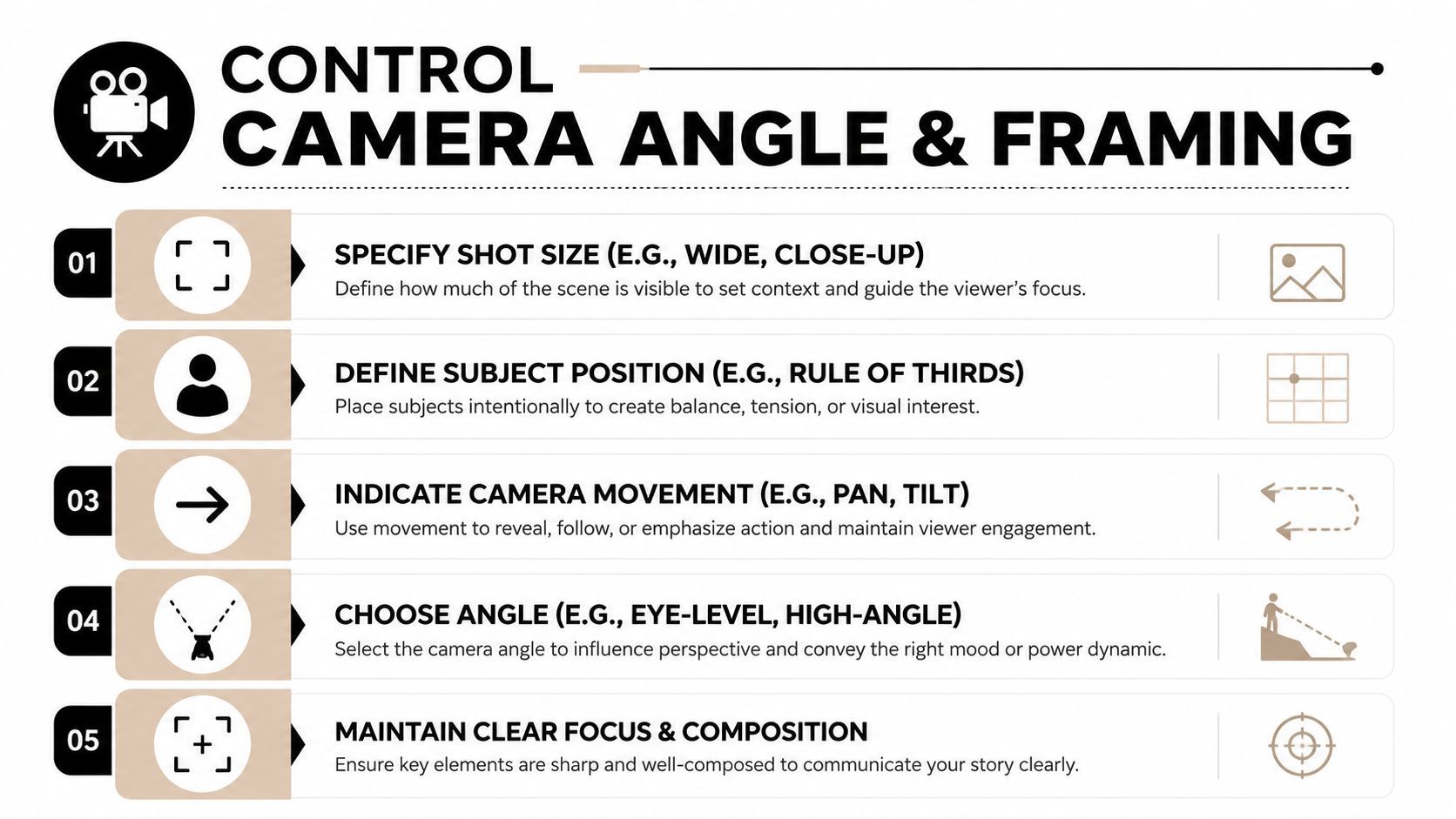
Community discussions around Stable Diffusion point to the same practical frustration, unusual angles often need a reference image or ControlNet-style conditioning when prompt text alone doesn't hold the framing reliably Stable Diffusion angle discussion. A script for pictures should treat angle control as part of the brief, not as a detail added later in the prompt box.
Build the angle into the sentence
Start with shot size, then subject position, then angle, then movement if there is any. If the instructions fight each other, the model often splits the difference and gives you a frame that only works by chance. One clean instruction usually beats four competing ones.
Use language a camera operator would understand. Wide shot, close-up, eye level, high angle, three-quarter view, and over-the-shoulder give the model a better chance of landing in the right visual neighborhood than vague mood words do. If the scene depends on a specific perspective, state it in the script before you draft the prompt.
A useful reference here is Mallary.ai's prompt engineering guide 2026, especially if you're trying to turn one brief into a repeatable visual output pipeline.
The trade-off is control versus flexibility. More structure usually means less surprise, but it also means fewer wasted generations. If you're producing ads or storyboards, that is usually the better deal.
Scripting Multi-Angle Sequences for Video and Ads
A single image prompt can survive a little ambiguity. A sequence cannot. Once you need a master shot, a cut-in, a reaction, and a closing frame, the script has to protect continuity, or the whole piece starts to feel like separate assets from different campaigns.
Cinematography guidance for script analysis describes traditional coverage for a two-person dialogue as a master shot, two medium shots, and two close-ups, while simpler scenes can compress to a two-shot plus one insert to reduce coverage overhead ASC shot-craft guidance. That logic still matters in AI work, because the viewer does not care whether the frame came from a camera or a generator. They care whether the sequence holds together.
Keep the same subject logic across every shot
The easiest way to lose continuity is to change too many things at once. If the subject's position shifts, the background changes, and the angle flips in the same edit, the viewer has to work too hard to reorient. In a commercial, that is usually where attention drops.
Write each shot so it preserves the subject while changing one main variable. The first shot can establish the room with a wide frame, the next can isolate the action with a medium shot, and the third can land the proof with a close-up. That progression feels intentional because the camera language is doing real work.
Here is where the old “lining” habit still helps. Draw shot marks through each action or dialogue block so every camera setup is explicit, and you do not leave a transition dangling in the middle of a beat. For AI video, that discipline is even more useful because the model needs a clean sequence of visual intentions, not a loose paragraph full of nice ideas. That same shot-craft guidance keeps the cuts from wandering.
The 180-degree rule still matters, even if you are not on a physical set. If a sequence keeps flipping perspective without justification, the audience feels lost. AI tools can generate the frames, but they will not always protect spatial logic for you.
Ready-to-Use Script Templates for Social Video and Ads
The fastest way to turn theory into output is to reuse proven structures. A good template keeps your work from feeling generic by giving it a stable spine for visuals, timing, and voiceover, so the pieces do not drift every time you start from scratch.
Here are three formats I'd keep in a working folder.
| Script Template Type | Duration | Structure | Best For |
|---|---|---|---|
| Hook-driven short video | 15 seconds | Hook, visual proof, quick payoff | TikTok, Reels, Shorts |
| Problem-agitation-solution ad | 30 seconds | Problem, tension, solution, call to action | Product promos, direct response |
| Educational reel | 60 seconds | Open, explain, show, summarize | Coaching, tutorials, thought leadership |
Hook-driven short video
VIDEO: Fast close-up of the problem, then a hard cut to the product or result.
AUDIO: “If this keeps happening, you need a faster fix.”
Transition: Use a jump cut that lands on the answer immediately.
This format works because it gets to the point before the scroll wins. The visual has to earn the hook in the first beat, not after a warm-up, and the frame should tell the viewer what to notice before the voiceover finishes the sentence.
Product ad with problem-agitation-solution
VIDEO: Scene one shows the friction. Scene two makes the cost visible. Scene three shows the product in use.
AUDIO: “The mess gets worse. The delay gets longer. Then this solves it.”
Transition: Cut from tension to relief with a visible before-and-after contrast.
A tool like ShortGenius fits naturally here, since it combines scriptwriting, image generation, video assembly, and natural voiceovers in one workflow. Use it when the brief is already clear and you want the scenes, captions, and timing pulled into one production path. It helps with speed, but it still needs human direction on framing, pacing, and the order of visual beats.
Educational reel
VIDEO: Start with a strong visual example, then alternate between explanation and demonstration.
AUDIO: “Here's the rule, here's why it matters, here's how to use it.”
Transition: Use simple scene swaps so the pacing stays clean.
A lot of teams also use a table like this to compare draft versions while keeping the shot list under control. That matters when you are checking whether a script holds together across different angles and cuts, not just whether the individual images look good on their own.
Script Template Comparison by Format
| Template Type | Duration | Structure | Best For |
|---|---|---|---|
| Hook-driven short video | 15 seconds | Hook, proof, payoff | Fast social attention |
| Product ad | 30 seconds | Problem, agitation, solution | Conversion-focused campaigns |
| Educational reel | 60 seconds | Teach, show, summarize | Authority-building content |
If you keep the template lean, you can swap in different products, angles, or offers without rewriting the entire piece. That also makes it easier to keep continuity across a sequence, because the template gives each shot a fixed job instead of leaving the model or editor to guess the order.
Scaling Your Visual Script Workflow Across Channels
A strong visual script should not be disposable. It should become the system you reuse across TikTok, YouTube, Instagram, Facebook, and X, especially when the team needs to keep output consistent without rebuilding every frame from zero. A unified platform helps with that kind of reuse, because it keeps themed series, scheduling, and multi-channel publishing in one place.
The practical upside is straightforward. Once the script already defines the visual beats, you can adapt it faster, keep brand tone steadier, and catch weak shots before they reach production. It also makes consistency easier to protect when you are reviewing generated assets at scale, and tools like protect your brand with AI Image Detector can fit into a broader review process when you are checking whether the visuals still match the brief.
Keep the workflow repeatable
Before production, check three things. Visual beats need to be clear. Camera language needs to be specific. Continuity needs to survive the edit. If one of those is fuzzy, the final piece usually takes more time than it should, and the problem usually shows up as awkward cuts or shots that do not line up across versions.
- Group scripts by series: Keep related hooks, angles, and offers together so the team is not rebuilding framing choices every week.
- Standardize shot labels: Use the same shot terms across writers, editors, and generators, so nobody has to decode the brief.
- Store winning structures: Save the templates that already perform well, then adapt them instead of rewriting from scratch.
- Plan for distribution early: Write with the platform cut in mind, so you are not forcing a horizontal sequence into a vertical frame at the last second.
A script for pictures works best when it is treated like a production asset, not a one-off document. The teams that get the most from it are the ones that make visual planning boring in the best way, because boring is what lets scale hold together.
If you want a faster way to turn briefs into angle-aware scripts, scenes, captions, and voiceovers, ShortGenius (AI Video / AI Ad Generator) gives you one place to build the whole sequence. It fits the workflow covered here, from visual planning to multi-shot output. Use it if you want to test your next script as a full ad or short-form video instead of a loose prompt.