Master AI Product Demo Video Maker: High-Conversion Guides

Create persuasive demos fast with an AI product demo video maker. Learn scripting, generation, editing & publishing for high-conversion results.
You're probably dealing with one of two demo problems right now.
Either your current product demo takes too long to make, with screen recordings, retakes, patch edits, and one more version request right before publishing. Or you can make demos quickly, but they look disposable and don't hold up on a landing page, in a sales email, or across social channels.
That's why the modern product demo video maker matters. It isn't just an editing shortcut. It changes how you build the asset in the first place. Instead of recording first and fixing later, you can start with the idea, shape the story, generate scenes and narration with AI, and then turn one master demo into a campaign.
Why Your Old Demo Workflow Is Costing You
The old workflow usually breaks in the same place. You open a recorder, try to talk and click at the same time, make one small mistake, restart, then spend far too long trimming pauses and covering rough transitions. By the time the video looks presentable, the team already wants a shorter version for the homepage and another cut for LinkedIn.
That isn't just annoying. It slows down a content format that buyers already respond to. According to Ngram's summary of product demo video data, 85% of buyers are persuaded by demo videos, and shoppers who watch a demo are 1.81x more likely to purchase. The same source notes that the AI video generator market is projected to reach $946.4 million in 2026 and grow at a 20.3% CAGR through 2033, which tells you this category is no longer a niche add-on.
What manual production gets wrong
A manual demo workflow usually creates four problems:
- It ties quality to performance on recording day. If the presenter rushes, clicks the wrong thing, or explains too much, the final video inherits all of it.
- It makes updates painful. One UI change can force a partial re-record or a full rebuild.
- It encourages feature dumping. Teams try to justify the effort by showing everything in one take.
- It blocks distribution. After the “main” demo is done, nobody wants to make channel-specific versions.
A demo should behave like a campaign asset, not like a one-time screen capture.
AI-native tools fix this by separating the parts that should be flexible from the parts that should stay stable. The message, structure, voice, visuals, aspect ratio, and CTA can all be adjusted without rebuilding from scratch. That's the core upgrade. Speed matters, but editability matters more.
From Idea to Script Planning a High-Impact Demo
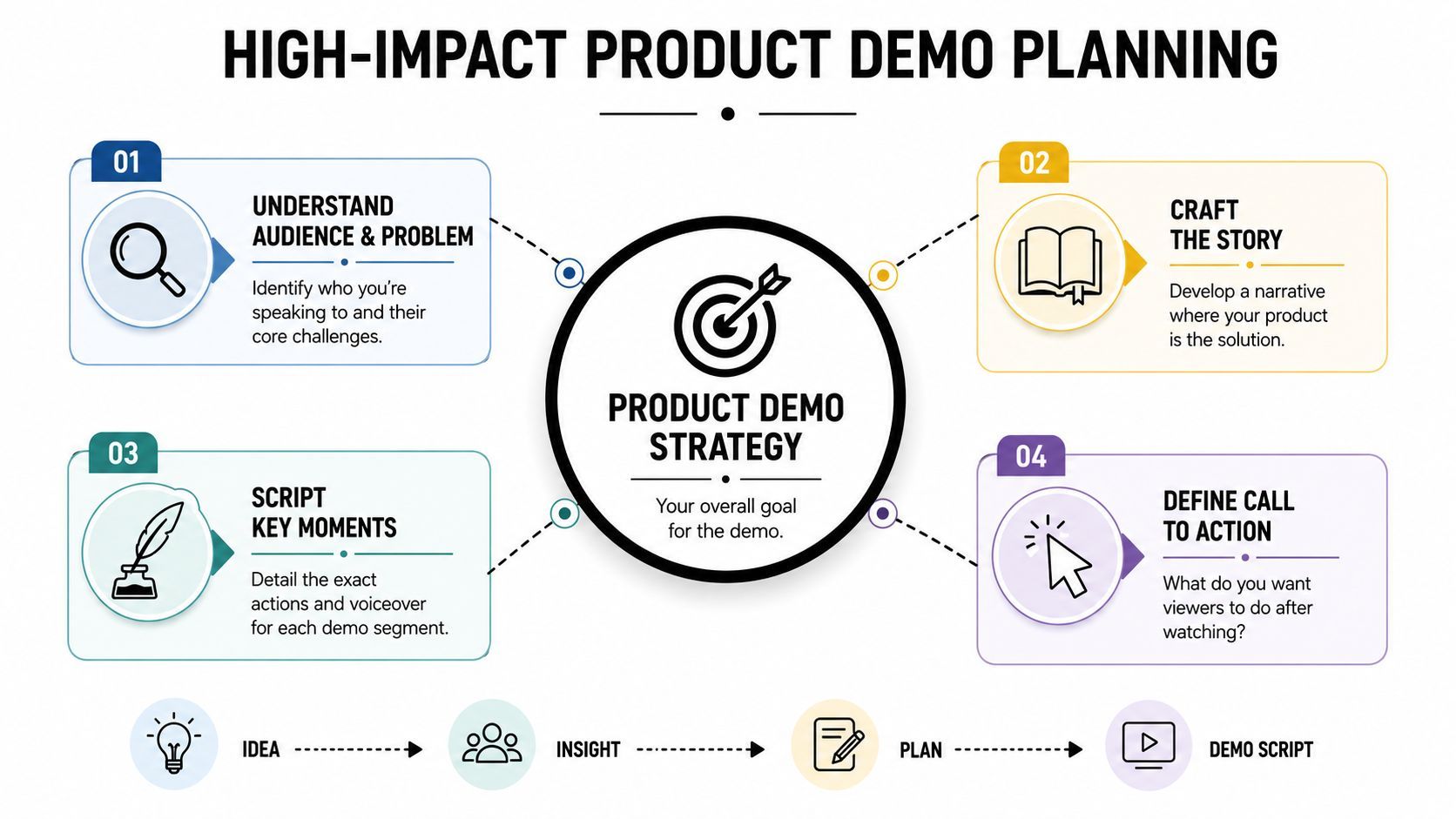
Most weak demos don't fail in editing. They fail in planning. The team starts with the product instead of the buyer, so the video turns into a tour of buttons instead of a clear argument.
The strongest demos stay narrow. Guidance collected in this product demo breakdown on YouTube recommends focusing on one workflow or 1 to 3 key features, with 2 to 5 minutes working well for website demos and 60 to 90 seconds fitting social placements better. That constraint helps more than many anticipate.
Pick the hero workflow
If you're using a product demo video maker, start by choosing the one moment that makes the product click.
Not the whole product. Not the full onboarding path. One workflow.
A good test is simple: if a viewer remembers only one part of your product after the video, what should it be? For a scheduling tool, that might be “book meetings without back-and-forth.” For an editing app, it might be “turn raw clips into ready-to-post content without timeline work.” That becomes the spine of the demo.
Here's the practical filter I use:
- Choose the workflow with obvious before-and-after value.
- Prefer visible actions over abstract claims.
- Skip setup details unless the setup itself is the value.
Define the viewer before the script
A founder, a product marketer, and an end user don't watch the same demo the same way. One wants strategic payoff. Another wants implementation clarity. Another just wants to know, “Can I do my job faster with this?”
That's why a useful script starts with a sentence like this:
“This demo is for [specific person] who is frustrated by [specific problem] and needs [specific outcome].”
If you can't complete that sentence cleanly, the demo scope is still too broad.
Write a problem-solution script
The script should feel like a guided resolution, not a narrated click trail. Keep it lean:
| Demo part | What it should do |
|---|---|
| Hook | Name the pain point fast |
| Setup | Show the context in one or two lines |
| Action | Walk through the exact workflow |
| Benefit | Tie each action to a real outcome |
| CTA | Tell the viewer what to do next |
A few scripting habits make an immediate difference:
- Lead with friction: Start with the problem the viewer already recognizes.
- Narrate outcomes, not interface labels: Don't say “Click analytics tab.” Say what that click gives the user.
- Write for spoken rhythm: Short sentences survive voiceover better than dense prose.
- End with one action: Start a trial, book a demo, watch the full walkthrough, or reply to the email. Pick one.
Practical rule: If a line of narration explains something the screen doesn't support, cut it. If the screen shows something important and the narration ignores the value, rewrite it.
Generating Scenes and Voiceovers with AI
Here, the workflow changes from “record everything manually” to “assemble intent into scenes.”
The category has moved away from long, manual screen recordings. HowdyGo's guide to product demo production notes that demo completion rate can rise from 40% to 80% when a demo has fewer than 10 steps, and it recommends keeping demos ideally under 3 minutes. That lines up with what you see in practice. Viewers stay with a clear progression. They drop when the video starts wandering.
Build scenes from the script, not from raw footage
A lot of teams still treat AI as a faster editor for an old recording workflow. That's useful, but it misses the bigger opportunity. The better approach is to feed the platform a structured script, product URL, screenshots, or a rough storyboard and let it draft the visual sequence.
That gives you more control over persuasion because you're deciding scene purpose first:
- Opening scene: pain point and context
- Middle sequence: the workflow in action
- Support scenes: callouts, close-ups, benefit captions
- Closing scene: CTA and brand cue
When a tool can generate visuals, subtitles, transitions, and narration from the script, you stop over-investing in “perfect” first recordings. You get a usable first draft much faster, then refine what matters.
Prompt for clarity, not spectacle
Most bad AI-generated demos fail because the prompt is too vague. “Make a cool product video” produces filler. A better prompt tells the model what role the scene plays.
Use prompts with constraints like these:
- Scene goal: explain, compare, reassure, convert
- Visual focus: dashboard, mobile app, customer message, chart, checkout
- Tone: confident, calm, direct, premium, instructional
- Motion preference: subtle zoom, interface emphasis, no flashy transitions
- On-screen text: one message only
If you're also polishing narration workflows, a solid companion resource is this review of speech-to-text solutions from Voice Control Pro. It's helpful when you want cleaner transcripts for script cleanup, caption prep, or repurposing spoken notes into a tighter voiceover draft.
Use AI voiceover like a producer would
AI voiceover is most effective when you stop treating it as a novelty and start directing it.
Good voiceovers for product demos usually share three traits:
- They sound paced for comprehension. Fast enough to keep momentum, slow enough for interface changes to register.
- They avoid ad-style hype. Product demos need trust more than theatrics.
- They leave room for the screen. Silence between key lines can be useful.
A common improvement loop is simple. Generate two voice styles, one more conversational and one more controlled. Then play both over the same scene sequence. You'll usually hear immediately which one supports the product better.
Editing and Refining Your AI-Generated Video
AI gets you to draft speed. Editing gets you to conversion.
That distinction matters because a product demo can look polished and still underperform. One industry summary cited by LocalEyes on software demo video performance says 69% of people report that product demo videos help them decide to buy. The same source makes the more important point for practitioners: measure view-through rate, click-through rate, and demo-to-trial conversion. Those are the signals that tell you whether the video is doing its job.
A capable editor inside a platform like ShortGenius is useful here because you can trim, caption, resize, and swap scenes or voices without rebuilding the whole piece. That flexibility is what lets you iterate against performance instead of settling for version one.
Edit for retention first
The first pass shouldn't be cosmetic. It should answer one question: where does attention sag?
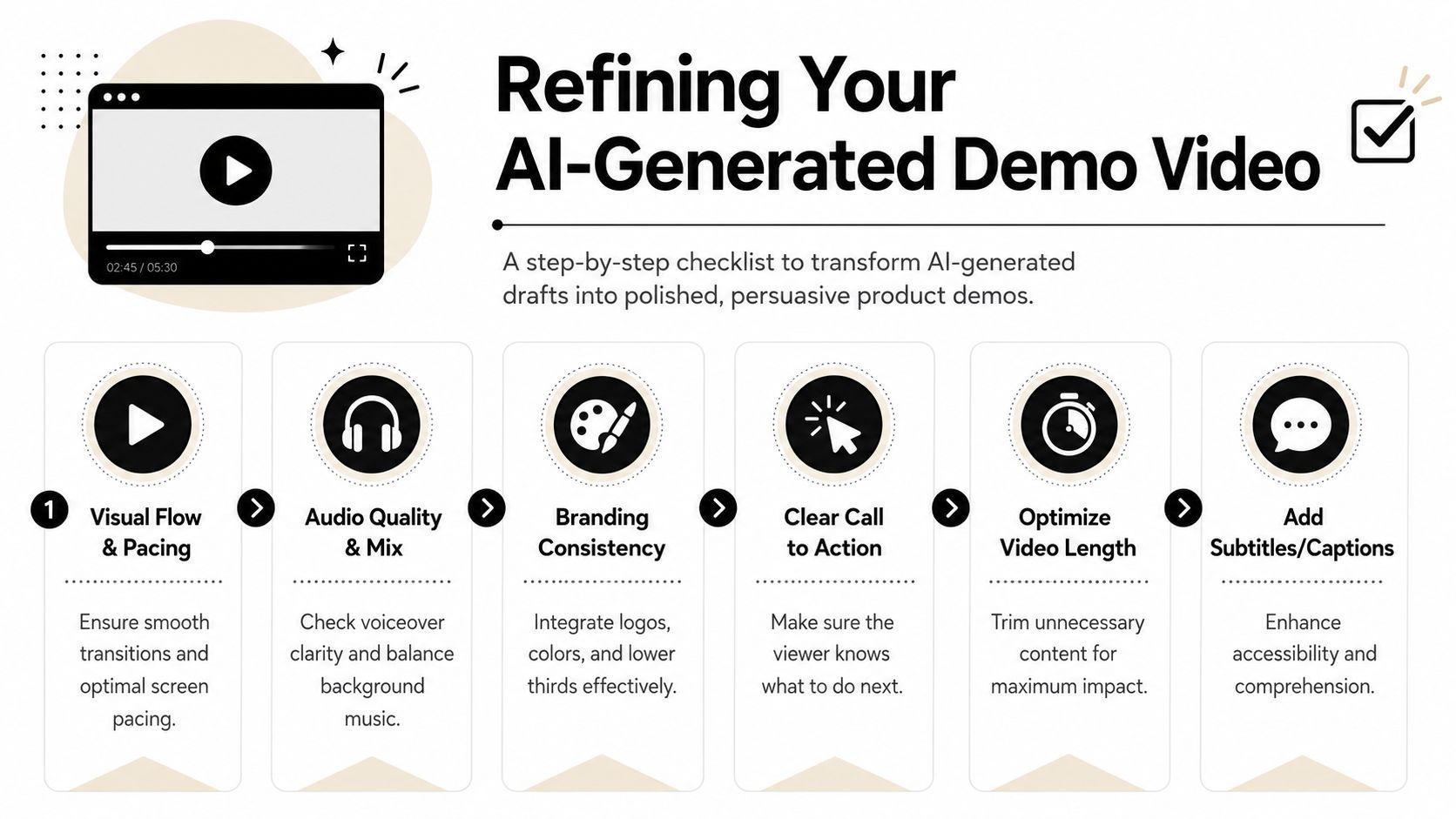
The biggest gains usually come from cutting, not adding:
- Trim setup lag: If the first useful moment arrives too late, the opening isn't working.
- Shorten transitions: Fancy movement often steals time without adding understanding.
- Compress repetitive clicks: Show the proof once, then move on.
- Cut duplicate narration: If the caption and the visual already make the point, the voiceover can be lighter.
If a scene doesn't increase understanding, trust, or momentum, it's probably taking space from a scene that could.
Add captions that do more than transcribe
Captions aren't just for accessibility or silent autoplay. In demos, they also control emphasis. The best caption treatment doesn't mirror every word mechanically. It highlights the idea the viewer should retain.
Use captions to reinforce:
- the pain point
- the promised outcome
- the action taking place
- the CTA
That usually means shorter on-screen phrases, cleaner line breaks, and selective emphasis. Dense subtitles can make a demo feel harder to follow, not easier.
A quick visual reference helps when you're reviewing pacing and structure:
Swap scenes and voices instead of starting over
This is one of the most useful AI-era editing habits. Don't scrap a demo because one section feels off. Replace the weak layer.
Try swaps when:
| Problem | Better move |
|---|---|
| The opening feels generic | Replace the first scene and hook |
| The narration sounds too stiff | Swap voice style, keep visuals |
| The visuals feel abstract | Replace stock-like shots with product-led scenes |
| The CTA gets ignored | Test a different end card and placement |
This is also where metrics become practical. A weak view-through rate usually points to pacing or relevance. A weak click-through rate often points to CTA clarity, timing, or visual hierarchy. Weak demo-to-trial conversion can mean the video attracted attention but didn't align with the next action.
Common polish mistakes
A refined demo usually looks simpler than the rough draft, not more elaborate.
Watch for these traps:
- Too much motion: Constant movement makes the product harder to understand.
- Caption overload: Viewers can't absorb UI, voiceover, and full transcript at once.
- Music that competes with narration: Background audio should support rhythm, not claim attention.
- A late CTA: If the next step appears only after the value peak has passed, many viewers won't see it.
Editing a demo is closer to conversion writing than to filmmaking. The right cut removes doubt. The right caption sharpens the takeaway. The right voice swap makes the product sound easier to trust.
Applying Your Brand and Final Touches
Branding a demo isn't about stamping a logo in the corner and calling it done. It's about making the video feel like it came from the same product experience the viewer is considering.
When branding is weak, the demo feels assembled. When branding is consistent, the product feels more mature, even if the feature set is unchanged.
Use a brand kit as a decision filter
A brand kit helps because it removes dozens of tiny choices that dilute the final piece. Fonts, colors, logo treatment, lower-thirds style, intro card, outro card, and CTA formatting should already be decided before you start polishing scenes.
That matters for more than appearance.
A consistent visual system tells the viewer that your team is deliberate. If the UI looks one way, the captions look another, and the CTA card looks like it came from a different company, trust drops. People notice inconsistency even when they don't name it.
Match tone across voice, visuals, and CTA
This is the finishing step many teams rush. They get the scenes right, then pair them with music that doesn't fit, a voice that sounds off-brand, or a CTA that shifts into aggressive ad language.
Keep the ending aligned with the rest of the video:
- If the demo is instructional, the CTA should feel clear and low-friction.
- If the demo is sales-led, the CTA can be more direct, but it still needs to match the product's tone.
- If the product targets premium buyers, avoid noisy visual effects that make the video feel cheaper than the software.
The final seconds shape the memory of the whole demo. Don't spend all your effort on the middle and then attach a generic ending.
Final review before publishing
Before exporting, check the demo like a buyer would:
- Can I understand the core value without audio?
- Is the product shown clearly enough to build confidence?
- Does every scene support the same message?
- Is the next step obvious and credible?
A strong finish doesn't add more information. It removes the last bits of friction.
Publishing and Scheduling Your Demo Across Platforms
Most demo guides stop too early. They show you how to make the video, then leave distribution as an afterthought. That misses one of the most useful shifts in modern workflow.
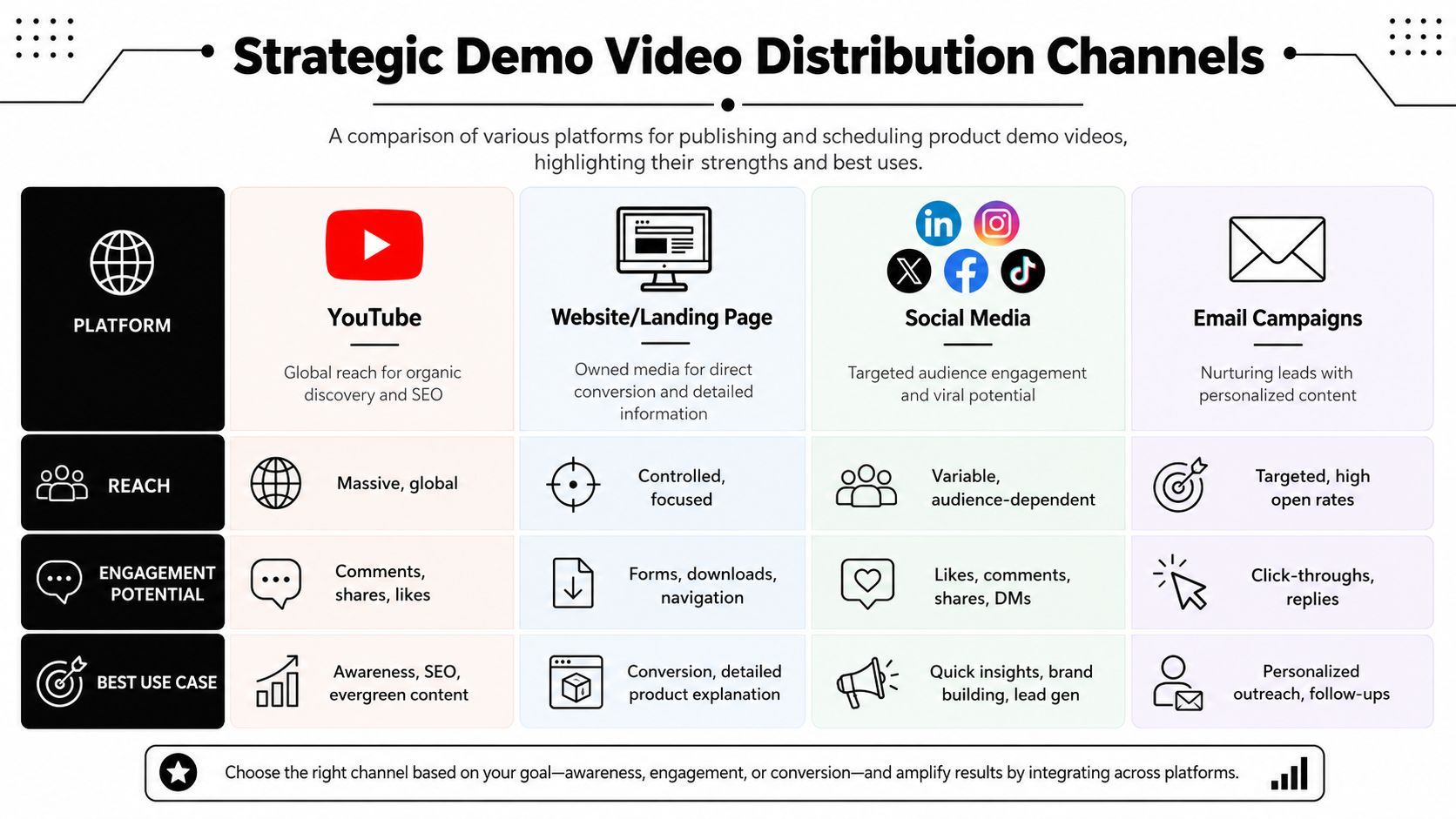
As noted in Demio's guide to mastering product demo video, a major gap in most demo content is distribution. Teams get advice on scripting and recording, but much less on turning one demo into versions for landing pages, sales emails, LinkedIn, or TikTok. In practice, that's where a lot of the return comes from.
One master demo, several jobs
Don't publish the same file everywhere and hope context does the work. Build one master version, then create channel-specific cuts.
A practical repurposing model looks like this:
- Website version: cleaner pacing, fuller explanation, stronger product proof
- Sales email version: shorter, faster hook, explicit next step
- LinkedIn version: early pain point, captions first, tighter ending
- Vertical social version: one feature, one benefit, one CTA
- Onboarding version: slower pacing, more instruction, less persuasion
Resize, rewrite, and schedule
The production shortcut isn't just resizing from horizontal to vertical. It's adjusting the message to fit the moment.
For each channel, change at least one of these:
| Channel | What to change |
|---|---|
| Landing page | Keep more product detail and clearer CTA |
| Sales outreach | Personalize the opening problem |
| Front-load the value in the first seconds | |
| Short-form social | Reduce to one claim and one action |
| Onboarding | Remove promotional framing and emphasize clarity |
Publishing tools inside an AI-native product demo video maker can help by keeping these variants connected. That matters when you need to swap a scene, update branding, or refresh a CTA across multiple destinations without producing every version by hand.
The demo isn't finished when it exports. It's finished when each audience has a version that fits where they're watching.
The payoff is simple. You stop treating demo creation as a single deliverable and start treating it as a reusable content system.
If you want one workflow that handles scripting, scene generation, voiceover, editing, resizing, and publishing, ShortGenius (AI Video / AI Ad Generator) is built for that AI-native approach. It's useful when you need to turn one product demo idea into multiple channel-ready versions without bouncing between separate writing, editing, captioning, and scheduling tools.