Making Your Own Film: A Practical 2026 Blueprint

Your guide to making your own film is here. Learn to plan, script, shoot, edit, and distribute your movie with a step-by-step blueprint for indie creators.
A lot of filmmakers start in the same place. You've got a scene in your head, a character voice you can hear clearly, maybe even a whole ending that won't leave you alone. What you don't have is a studio, a crew van, or a neat answer to the question that hits right after the excitement wears off. How do you make the thing?
Making your own film feels huge because film combines writing, design, logistics, directing, sound, editing, and distribution into one project. It's art built on scheduling. It's emotion carried by checklists. That's why people stall. They think they need a miracle, when what they really need is a process.
The good news is that the process already exists. You don't have to invent filmmaking from scratch. You just have to scale it to your real life, your real budget, and the people who'll show up.
From Dream to Document An Introduction
A first film usually begins as a loose idea. A breakup in one apartment. A thriller in a parking garage. A quiet character piece built around a friend who can act. Then the idea immediately collides with reality. Where do you write it? What do you shoot first? How many people do you need? When do you think about editing, sound, and release?
The cleanest answer is to stop thinking of a film as one giant task. Film production is typically divided into five major stages: development, pre-production, production, post-production, and distribution, according to this overview of the filmmaking process. That same practical reference also notes that one minute of finished film may take more than five hours to film and may require 20 to 40 separate shots to plan well. That doesn't make filmmaking impossible. It makes it legible.
Practical rule: Confusion drops fast once every problem has a home. Story problems belong in development. Scheduling problems belong in pre-production. Coverage problems belong in production and post.
For solo creators, this matters even more. You're not delegating everything to departments. You're carrying multiple jobs at once, so you need a structure that prevents chaos from spreading across the whole project. If your script is fuzzy, your shot list gets worse. If your location plan is sloppy, your sound suffers. If your edit is disorganized, distribution slows down because you still haven't even locked the cut.
AI can help, but it helps most when it fits inside that classic workflow instead of replacing it. If you want a quick orientation to the broader context before you start, this guide to generative AI video is useful for understanding where AI can assist with planning, assets, and output without pretending the hard parts of filmmaking disappear.
That's the mindset that makes making your own film realistic. Not magic. Not gear obsession. A roadmap.
Phase One Development and Scripting
The film starts on the page, even if you plan to improvise parts of it later. If the story is weak, no camera package fixes that. If the scenes don't turn, no color grade saves them. Development is where you find out whether your idea is cinematic or just interesting in conversation.
Start with a filmable premise
The strongest indie concepts are usually simple to pitch and practical to produce. That doesn't mean small ideas. It means ideas with controllable variables. A story with a limited cast, repeatable locations, and scenes built around conflict instead of spectacle gives you more control once real-world constraints hit.
Write your idea as a logline first. One or two sentences. Who is the protagonist, what do they want, what stands in the way, and why now? If you can't answer that cleanly, the script usually isn't ready.
Then build a rough beat sheet:
- Opening situation: What world are we entering?
- Inciting problem: What forces movement?
- Escalation: What gets harder?
- Crisis: What breaks?
- Resolution: What changes, or fails to?
That's enough to test whether the story can sustain a short or feature before you spend weeks drafting scenes that don't belong.

Draft fast, rewrite slow
Most first drafts fail for one of two reasons. They're overwritten, or they're vague. Overwritten scripts explain feelings instead of creating playable scenes. Vague scripts avoid concrete behavior, so actors and editors have nothing to work with.
A better workflow is:
- Draft for momentum. Get the full story down.
- Rewrite for behavior. Replace exposition with actions, interruptions, choices, silence.
- Rewrite for production reality. Merge locations, cut extras, simplify scene transitions, remove anything you can't stage well.
If you're working alone, every page has to earn its cost. A scene with three locations hidden inside it is not a cheap scene just because the dialogue is quiet.
Use AI as a sparring partner, not an author
AI is best early in development when you need volume, contrast, and speed. It can help generate alternate loglines, scene variants, dialogue passes, and character contradictions. That's useful when you're stuck and dangerous when you're lazy.
Use it for prompts like these:
- Give me five ways this scene could turn without adding a new character.
- Rewrite this dialogue so each speaker wants something different.
- Suggest lower-budget alternatives to this set piece.
- Compress this scene into visual action instead of explanation.
If the AI output sounds polished but generic, throw it out. The right result is not “good enough.” The right result triggers your next better idea.
The test is simple. After using AI, does the script sound more like your film or less? If less, you're outsourcing judgment. Don't.
Format matters because production reads scripts differently than writers do
A readable script isn't just about professionalism. It's about execution. Your future self will turn that screenplay into a breakdown, shot list, schedule, and edit plan. Clear scene headings, concise action lines, and playable dialogue make every later stage easier.
When you finish a draft, read it aloud. Then read only the scene descriptions. Then read only one character's dialogue. You'll find dead weight fast. Good scripts survive multiple kinds of reading. Great low-budget scripts survive reality.
Phase Two Pre-Production and Planning
Pre-production is where wishful thinking either becomes a workable plan or dies for good. Most films don't get sunk by ambition alone. They get sunk by vague planning, missing paperwork, bad assumptions about time, and scripts that were never translated into an actual shoot.
One useful benchmark comes from a filmmaker describing a self-made feature in this practical No Film School breakdown. The total came to about USD $15,500, with actors at $100 per day and locations under $245. The same account notes that a larger version of that approach could reach about USD $115,000, which is a wide but realistic reminder that independent production planning lives on a spectrum, not in a fantasy of “free.”
Build the film backward from what you can control
Budgeting starts with constraints, not dreams. Ask three questions.
| Decision area | What to lock first | Why it matters |
|---|---|---|
| Story scope | Cast size, location count, scene complexity | These drive almost every other cost and delay |
| Shoot design | Number of days, interior vs exterior, day vs night | This affects schedule stress and technical risk |
| Recovery plan | Backup audio, weather alternatives, pickup options | This is what keeps small problems from becoming disasters |
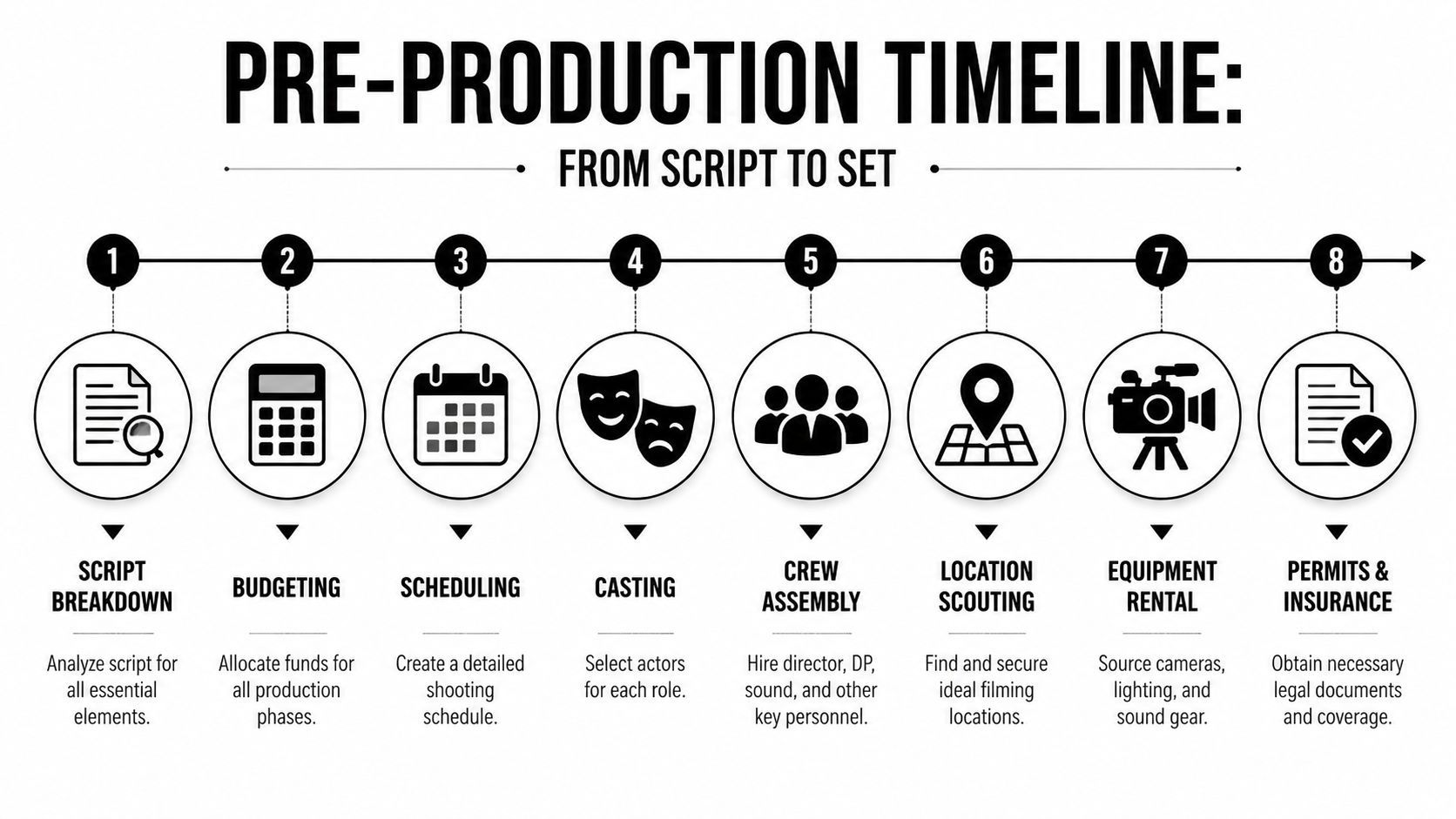
A smart low-budget budget usually protects a few categories harder than beginners expect. Sound. Food. Transportation. Location certainty. Data backup. Those aren't glamorous line items, but they prevent bad production days.
Break the script into shootable pieces
A script isn't a schedule until you break it down. Go scene by scene and mark:
- Cast needed
- Wardrobe continuity
- Props
- Location requirements
- Time of day
- Special sound risks
- Must-have coverage
This is also where solo creators save themselves in the edit. Don't just ask, “How do I make this look cinematic?” Ask, “How will I cut this if one take is soft, one line is flubbed, and one angle has a continuity problem?” That question leads to sane shot lists.
A practical production binder, digital or physical, should include your script, breakdown, call sheets, contact list, shot list, maps, permits, release forms, backup plan, and post notes. If that sounds excessive, try shooting without one. You'll make one on the second project.
Here's a solid overview to keep nearby while planning your prep timeline:
Casting, locations, and what actually works
Friends can absolutely act in a microbudget film. Friends who can't take direction usually can't. Cast for reliability, listening skills, and emotional clarity, not just enthusiasm. One dependable actor is worth more than three maybe-someday favors.
Locations are similar. The best location isn't the most visually impressive one. It's the one you can control. Control means sound, access, power, timing, and repeatability. A beautiful café that gives you one hour and no sound control is often worse than a plain apartment you can use all weekend.
The real pre-production win is not finding perfect options. It's removing uncertainty before uncertainty becomes footage.
Use AI to reduce clerical drag
AI won't do your location recce for you, but it can remove the admin pile that slows small productions down. It's useful for:
- Turning a script into a first-pass breakdown
- Generating draft call sheets and shot-list templates
- Summarizing scene objectives for actors
- Creating storyboard prompts for visual planning
- Organizing props, wardrobe, and continuity notes into shared docs
The caution is obvious. Auto-generated prep documents still need human correction. But they can get you from blank page to editable structure much faster, which is exactly where small teams often stall.
Phase Three Production and Shooting
Production is where beginners usually overvalue image quality and undervalue everything that keeps footage usable. The camera matters. It just doesn't matter as much as people think once you're already working with a modern device capable of clean images. What destroys small films is not usually “the sensor wasn't cinematic enough.” It's bad sound, unstable logistics, flicker, continuity drift, and losing time to setups that were never thought through.
That's why one of the most useful no-budget reminders comes from this practical filmmaking video on hidden bottlenecks. The point is simple: most beginner guides fixate on cameras, but production failures are often bad audio, unexpected flicker, or not having the right location permits. The cheapest film is the one that avoids reshoots.
Protect sound before you chase style
A decent microphone is not an optional upgrade. It's one of the first pieces of gear to treat seriously. Audiences will forgive a lot visually if they can hear and follow the scene. They won't stay with a film that sounds thin, distorted, roomy, or inconsistent.
Build your shoot around audio discipline:
- Scout with your ears: HVAC, traffic, refrigerators, echoes, birds, nearby construction.
- Monitor live: Don't assume the recorder is fine because levels are moving.
- Record room tone: It helps during editing more than most first-timers realize.
- Control clothing noise: Lav rustle can ruin otherwise strong takes.
- Watch for flicker sources: Mixed practical lighting can look fine to your eye and fail on camera.
Small crews need simpler setups, not heroic ones
A solo creator or tiny team wins by reducing complexity per setup. That means fewer moving parts, cleaner eyelines, and lighting that can be reset quickly. Natural light can work beautifully if you stop fighting it. Shoot when it matches the scene. Shape it with curtains, bounce, or practical lamps instead of building a fragile plan around constant weather.
For camera work, consistency beats novelty. If you can repeat framing logic, maintain screen direction, and hold stable exposure, the footage will cut better. A lot of beginner “cinematic” work creates editing problems because each shot belongs to a different visual language.
Good production days feel boring in the right places. The team knows where things are, when meals happen, what the next setup is, and who's checking sound.
Permits, movement, and the trap of fake efficiency
People skip permits because they think paperwork slows them down. Sometimes skipping permits slows them down much more. Getting shut down, rushed, or forced to abandon a location is not guerrilla glamour. It's lost footage.
The same goes for overcomplicated blocking. A single ambitious moving master can eat half a day. Breaking action into smaller, cleanly executed shots often gives you more control, more performance focus, and more options later.
If you're building visual elements with AI for promo shots, concept tests, or previsualization during this stage, this mastering AI video creation resource is worth reviewing. It helps clarify where AI-generated motion or visuals can support planning and marketing without confusing those assets with actual principal photography.
What works on set
The production habits that consistently save films are rarely glamorous:
- Front-load difficult scenes when actors are fresh and daylight is predictable.
- Back up media immediately and verify files before you wipe anything.
- Keep continuity photos for hands, props, wardrobe, and frame height.
- Cut optional shots early if the day is slipping. Protect story-critical coverage first.
- End with a pickup check so you don't discover missing inserts weeks later.
Making your own film gets much easier when you stop asking how to mimic a large crew and start designing a shoot that a small crew can win.
Phase Four Post-Production and Editing
Post is where discipline gets exposed. If your folders are a mess, if your file names mean nothing, if your audio wasn't logged, if your coverage is inconsistent, editing becomes punishment. The fix is to treat post-production as decision-making, not just software operation.
A common challenge when shooting alone is maintaining continuity and coverage that cuts. This no-budget cinematography guide from Noam Kroll makes an important point: more, smaller shots can be faster because each setup is simpler and easier to match in post. That's a contrarian idea until you've tried to rescue a scene covered in only one complicated angle.
Organize before you touch the timeline
Before the edit starts, sort everything.
- Create folders for video, audio, stills, music, graphics, and exports.
- Rename clips so they mean something.
- Sync audio and camera files.
- Mark obvious bad takes, technical failures, and standout performances.
- Save continuity references where you can see them quickly.
This stage feels slow, but it pays you back every hour after. Editors don't lose time because editing is hard. They lose time because retrieval is hard.
Build the cut in passes
A strong workflow usually moves through distinct passes instead of trying to perfect everything at once.
Assembly cut
Place the scenes in order. Keep momentum. Don't obsess over finesse yet. You're checking whether the story exists in footage form.
Rough cut
Trim scenes to their dramatic purpose. Remove explanations, repeated beats, and indulgent transitions. Through these actions, pacing starts to appear.
Fine cut
Refine performance choices, reaction shots, scene transitions, and rhythm. Then lock picture before doing detailed sound and color work.
Sound, color, and the stuff that makes footage feel finished
A rough visual cut with clean sound usually plays better than a beautiful image sequence with weak audio. Dialogue cleanup, ambience, room tone, effects, and music shaping all affect whether scenes feel intentional or amateur.
Color correction comes after your story decisions are stable. Start by matching shots. Exposure, white balance, and skin consistency matter more than stylized looks. A heavy grade won't hide mismatch. It often makes mismatch louder.
Here's a simple post checklist:
| Post task | What to look for | Common mistake |
|---|---|---|
| Dialogue edit | Consistent clarity and tone | Leaving abrupt room changes between cuts |
| Scene pacing | Enter late, leave early when possible | Holding on redundant setup |
| Visual match | Exposure and color consistency | Grading before basic correction |
| Export review | Audio peaks, subtitles, compression artifacts | Uploading without full watch-through |
Edit the scene you shot, not the scene you hoped to shoot. The film gets better the moment you stop mourning missing coverage and start solving with what you have.
Where AI helps most in post
This is the stage where AI tools can save serious time, especially for solo creators handling both the film and its release assets. Useful applications include:
- Auto-generating captions
- Creating transcript-based edit references
- Suggesting trims by identifying pauses or repeated beats
- Resizing trailers and clips for vertical, square, and widescreen platforms
- Swapping voiceover drafts during promo production
- Generating thumbnail and key-art variations
The right use of AI in post is not “let the machine edit my movie.” It's “remove repetitive labor so I can spend more attention on rhythm, performance, and emotional clarity.”
Phase Five Distribution and Marketing
Finishing the film isn't the end of the job. It's the point where the project changes shape. Up to now, you've been making the film. From here on, you're packaging attention around it.
A lot of filmmakers still treat distribution like a lottery ticket. Festival, miracle, deal. That path exists, but it's not the only one and it isn't the smartest assumption for most indie work. Better to build a release strategy that matches the film you made, the audience it serves, and the energy you can sustain after post.
Match the path to the film
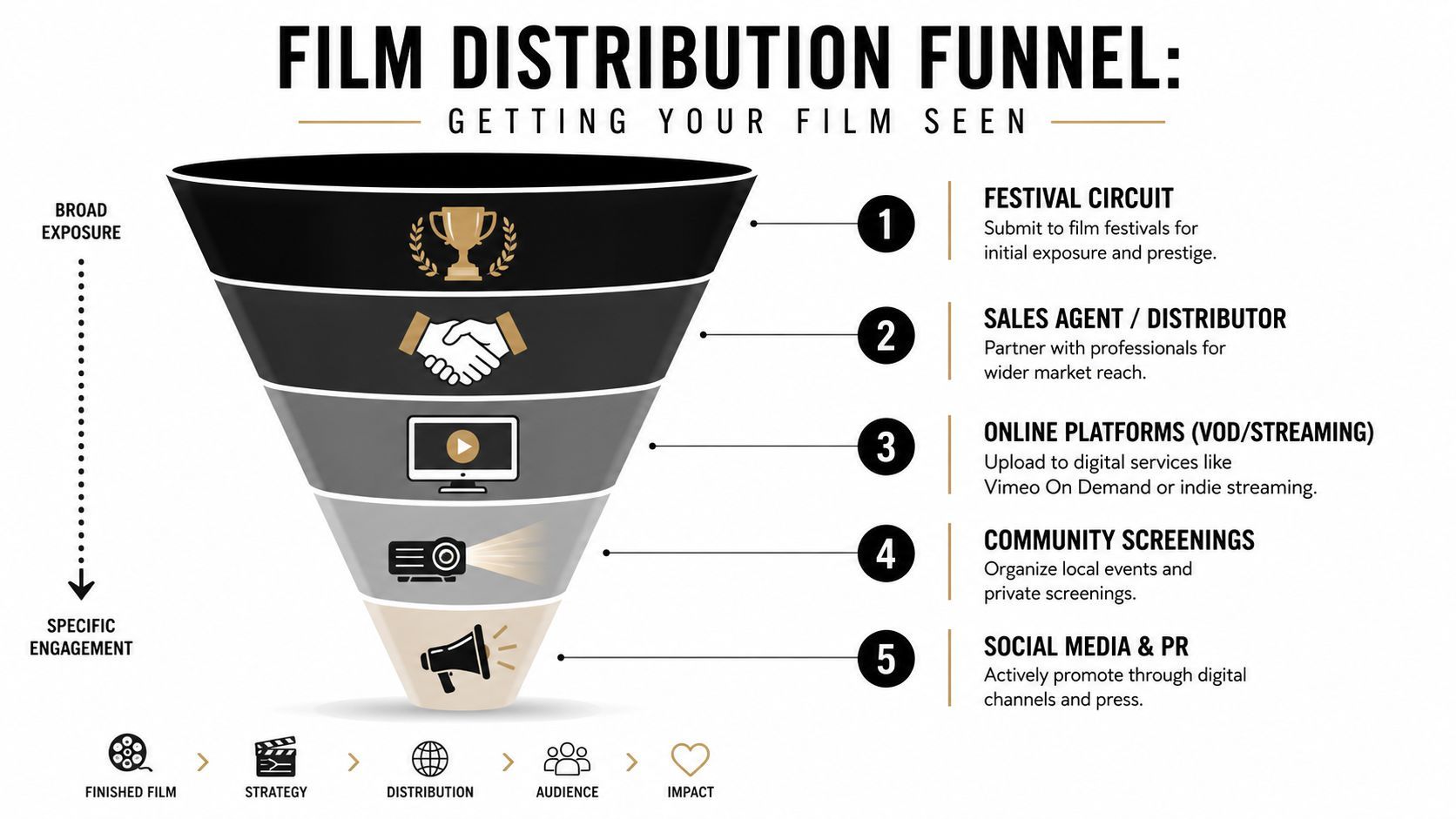
A contained drama may do better with targeted festivals, community screenings, and filmmaker Q&As than with a broad online dump. A short genre film might benefit from a sharper trailer, horror-specific communities, and strategic clips released over time. A documentary or issue-based project often needs partnerships, outreach, and funding-aware positioning. If that's your lane, this roundup of top film funding for documentaries is a useful reference when you're mapping the financial side of future work.
Think in layers:
- Festival layer: Submit where your genre and scale make sense.
- Direct audience layer: Use YouTube, Vimeo, or event screenings if that fits your goals.
- Promotional layer: Cut trailers, character clips, behind-the-scenes snippets, and stills.
- Relationship layer: Build an email list, collaborators network, and press contacts for the next release.
Marketing is part of the creative work
The trailer is not a lesser form of filmmaking. The poster is not admin. The social clips are not beneath the “real” film. They're often the first thing anyone sees, and they shape whether the film gets a chance at all.
For solo creators, AI can help turn one finished film into a whole campaign package. It's useful for transcript extraction, teaser variations, subtitle generation, format resizing, scheduling, and repurposing scenes into platform-specific edits. The point isn't to flood every channel. It's to stay consistent long enough for the work to travel.
A quiet, deliberate release beats a chaotic launch followed by silence. Making your own film includes making a path for people to find it.
Your Filmmaking Journey Starts Now
The first film teaches you how many jobs sit inside one movie. You develop the idea, shape the script, turn pages into a plan, survive the shoot, rescue and refine the footage, then push the finished work into the world. That sounds like a lot because it is. It's also manageable when you handle it as a chain of concrete decisions instead of one giant creative crisis.
Start smaller than your ego wants and more seriously than your fear suggests. Shoot one scene with clean audio. Write one short script built around a location you can control. Edit one sequence until the pacing feels right. That's not playing small. That's building real skill.
Making your own film has never been easy. It has become more accessible for people who can plan well, simplify aggressively, and use modern tools without letting the tools take over the work. The filmmakers who finish are rarely the ones with the fanciest setups. They're the ones who keep solving the next problem.
Your film doesn't need perfect circumstances. It needs a start.
If you want a faster way to turn ideas into scripts, videos, trailers, captions, resized promos, and scheduled multi-platform posts, ShortGenius (AI Video / AI Ad Generator) is worth a look. It's built for creators who need one workflow for planning, producing, editing, and publishing without juggling a pile of disconnected tools.