Make A Lyric Video: AI Tools & Publishing Success

Learn to make a lyric video from concept to multi-platform publishing. Our guide covers AI tools (ShortGenius), design tips, & scheduling for TikTok/YouTube.
You finished the song. The mix is bounced, the cover art is done, and release day is close. Then the hard question lands. How do you give the track a visual life without disappearing into a week of editing?
That is where a lyric video stops being a fallback and starts acting like infrastructure. If you make a lyric video well, you do more than publish a single asset. You create the center of a repeatable content system that can feed YouTube, Shorts, TikTok, Reels, teasers, snippets, and scheduled posts from one song.
Why Every Musician Needs a Lyric Video Strategy
A lot of artists still treat lyric videos like the cheaper version of a “real” music video. That view is outdated. A lyric video works best when you use it as the first visual layer of a release campaign.
The format has deep roots. The history of lyric videos traces back to Bob Dylan’s 1965 “Subterranean Homesick Blues,” widely recognized as the first lyric video, and the modern format now sits inside a music industry projected to reach $65.45 billion by 2025, while social platforms generate 29 billion daily video views and some AI-generated pre-release lyric videos have reached 8 million views (UIST 2023 lyric video research reference).

One song should create more than one post
The old workflow looked like this. Upload the song. Post the cover art. Maybe cut one trailer. Then scramble for more content after release.
A better workflow starts with the lyric video as the master asset. From that master, you can build:
- A full-length YouTube upload for search, comments, and watch time
- Vertical cutdowns for TikTok, Reels, and Shorts
- Hook-first teaser clips that spotlight the strongest lyric
- Silent-feed versions with on-screen text designed for autoplay
- Scheduled follow-up posts that keep the song active after launch day
That matters because modern discovery is fragmented. People hear a chorus on TikTok, search the title on YouTube, then share a clip in Stories. One horizontal export is not enough anymore.
Why lyric videos keep winning
They are fast to produce compared with a full shoot. They let fans connect with the words. They work before, during, and after release. They also fit artists who have strong songwriting but limited production resources.
A lyric video is often the most practical way to turn a finished song into a multi-platform release system without waiting on locations, actors, or a larger budget.
The mistake is stopping at the export. The artists getting the most out of the format build for distribution from the first draft, not at the end when they are already tired of the project.
Laying the Foundation Before You Create
Bad lyric videos usually go wrong before editing starts. Not in the animation. In the prep.
Creators tend to open Premiere Pro, CapCut, or After Effects too early. Then they fix sync issues, lyric errors, and visual mismatches inside the timeline, where every small correction takes longer.
Start with assets that will not fight you
Use the cleanest audio file you have available. If you have a WAV or FLAC master, use that. A heavily compressed file can still work, but it makes timing checks and final polish less pleasant.
Lyrics need the same care. Put them in a simple text document first. Read every line against the final audio, not against the draft you wrote a month ago.
A few things to check before any upload:
- Spelling and phrasing: Studio takes often change words, repeats, or ad-libs
- Line breaks: Break long lines where a viewer can read them comfortably
- Version control: Lock the final mix before syncing lyrics to it
- Naming: Label files clearly so you do not sync to the wrong export
Clear rights before you publish
If the song is original and you control it, the path is straightforward. If it is a cover, remix, or collaboration, sort permissions first.
Platforms can flag music use, monetization rights, or ownership disputes. That can slow the release, mute sections, or block your upload. None of that is fun to solve after you have already cut every platform version.
A practical rule works well here. If there is any doubt about who owns the song, the master, or the artwork, pause and clarify it before editing.
Choose a visual direction on paper first
A lyric video looks more professional when its design choices follow one mood. That does not mean every frame needs complexity. It means the elements agree with each other.
Ask a few direct questions:
| Decision | What to choose |
|---|---|
| Song mood | Dark, romantic, aggressive, dreamy, playful |
| Background style | Album art, abstract motion, stock footage, textured loop |
| Text behavior | Static lines, word-by-word emphasis, kinetic typography |
| Brand feel | Minimal, polished, handmade, futuristic |
The fastest way to make a video look scattered is mixing too many visual ideas. Neon glitch text over a soft acoustic ballad usually feels wrong. Slow serif typography over a frantic dance track often feels sleepy.
Plan for multiple outputs early
Do not design only for a single 16:9 frame if you already know you want TikTok and Reels later. Leave safe space for crops. Keep critical words away from edges. Avoid placing lyrics where platform UI will cover them.
If you want one song to become a content system, your composition choices need to survive horizontal, square, and vertical formats from the start.
That single planning decision saves a lot of rework later.
Mastering the Visuals Typography and Design
The biggest quality difference between a forgettable lyric video and one people finish is usually not the background footage. It is the text.
Expert guidance on lyric video production calls typography the biggest factor, emphasizing “clean, concise, and effective typography” and noting that music video viewing on mobile devices accounts for 60-70% of consumption, which makes readability essential (Andy’s process of a lyric video).

Font choice decides whether people stay or leave
A good font does two jobs at once. It stays readable at a glance, and it supports the emotional tone of the song.
For most lyric videos, I would rather use a simple, strong typeface than an expressive one that becomes annoying by the second chorus. Fancy fonts often look good in a thumbnail and fail in motion.
A practical way to choose:
- Sans serif fonts usually suit modern pop, rap, electronic, and clean branded visuals
- Serif fonts can work for cinematic, reflective, or singer-songwriter material
- Heavy weights add urgency and work well for emphasis
- Lighter weights can feel elegant, but they disappear quickly on busy backgrounds
Do not pair three or four fonts unless you know exactly why. One font family with weight variation usually looks more deliberate than a pile of unrelated styles.
Backgrounds should support the lyric, not compete with it
Many beginners overbuild the backdrop. They add stock footage, particles, texture overlays, lens flares, gradients, and blur passes, then wonder why the words feel hard to follow.
Use this quick comparison when deciding:
| Background type | Best use | Common mistake |
|---|---|---|
| Static cover art | Minimal songs, quick turnaround | Leaving it completely lifeless |
| Subtle motion loop | Most genres | Motion that drags attention away from text |
| Stock footage | Narrative or mood-driven tracks | Literal footage that feels cheesy |
| Abstract visuals | Electronic, experimental, stylized releases | Too much contrast behind lyrics |
If you need custom art for scenes or backgrounds, AI image generation can help shape a consistent visual world. A tool like ShortGenius text-to-image is useful when you want multiple visuals that share the same tone instead of pulling random stock clips that never quite match.
Kinetic typography works when it serves the song
Words that move through the frame can add punch. They can also make a mess fast.
The best kinetic typography follows the rhythm and the emotional spikes of the track. It does not animate every line equally. It saves stronger motion for a hook, a beat switch, a repeated phrase, or a lyric worth emphasizing.
Good motion choices often include:
- Small position shifts for verse lines
- Scale changes on key words in the chorus
- Fade and blur transitions for softer moments
- Directional movement that matches song energy
Bad motion usually looks the same every line, or it moves so much that viewers read slower than the song progresses.
Preview your lyric video on a phone before final export. Desktop readability can hide problems that become obvious on a smaller screen.
That mobile test catches weak contrast, cramped line breaks, and timing issues more reliably than another hour of tweaking on a large monitor.
How to Make Your Lyric Video with AI in Minutes
Manual editing still has a place. If you want frame-by-frame control in After Effects, you can get a beautiful result. You can also lose half a day adjusting keyframes, replacing backgrounds, and fixing small sync errors.
AI changes that trade-off. It does not remove taste or judgment, but it cuts a lot of repetitive work.
One reason many creators hesitate is cost confusion. Some AI lyric video tools use variable point systems where a single 3-minute video can cost 2700-6000 points, which makes budgeting unpredictable (YouTube overview of AI lyric video pricing).
A simpler workflow matters when you want to make a lyric video regularly instead of treating every upload like a special event.
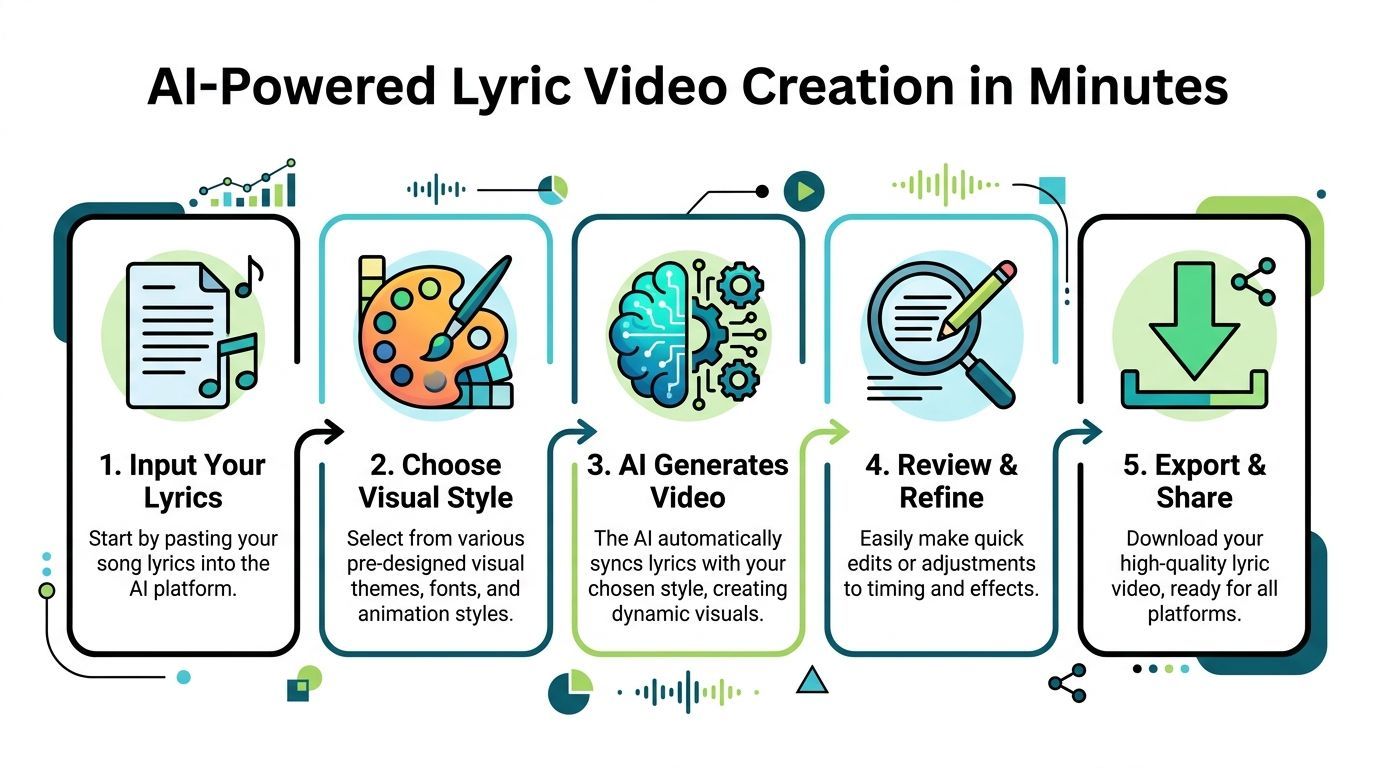
The practical AI workflow
Most AI lyric video workflows become painless when you keep the order tight.
-
Upload the final song file
Start with the exact master you plan to release. Swapping audio later can throw off timing. -
Paste clean lyrics
Use the corrected text file, not a rough draft. AI sync is faster when the input is already accurate. -
Choose a visual direction
Pick a theme that matches the track. Minimal. Grunge. Dreamy. Bold kinetic. This choice matters more than people think. -
Generate the first pass
Let the system handle the base sync, timing blocks, scene suggestions, and text animation. -
Refine only what matters
Fix any misheard lyric, tighten line breaks, and adjust the chorus moments where stronger motion will help. -
Export a master version
Keep one clean source version before resizing and cutting derivatives.
What AI should automate and what you should still control
AI is great at the mechanical part. It can align text, suggest visual pacing, generate backgrounds, and build a usable first draft quickly.
You still need to control:
- Lyric accuracy
- Font and contrast decisions
- Which words deserve emphasis
- Where scenes should simplify
- Whether the final output feels like your artist identity
That last point matters. Fast does not excuse generic. A good AI workflow gives you an advantage, not an excuse to stop caring.
Use presets as a base, not a crutch
Preset libraries are helpful because they solve common problems fast. A clean lower-third style, a punchy chorus effect, a subtle camera drift, or a hook intro can all save time.
But presets should get you to a strong first version. They should not dictate every creative decision. If every section uses the same animation, the song starts to feel flat.
For creators who want to generate visuals as well as motion, a platform such as ShortGenius text-to-video fits this kind of workflow because it handles scene generation and assembly without forcing you back into a stack of disconnected tools.
Watch a real example of the workflow
This breakdown shows the kind of AI creation process many creators now prefer when they want speed over manual assembly.
Where creators waste time
The biggest time losses usually happen in the same places:
- Correcting messy lyric inputs after generation
- Trying too many visual styles instead of committing to one
- Over-editing verses that should stay simple
- Exporting before checking mobile readability
- Building platform variants manually instead of planning for reuse
If your goal is to make one polished lyric video, manual tools can still be satisfying. If your goal is to release consistently, AI is usually the better production system.
Beyond the Export Button Multi-Platform Publishing
Most lyric video tutorials stop at export. That is a big reason so many videos underperform after they are finished.
The missing piece is distribution design. A polished YouTube upload alone does not cover how people discover music now. Short-form platforms need native formatting, stronger hooks, and faster follow-through.
Existing lyric video tutorials often ignore this stage, even though vertical video drives 40% higher engagement on TikTok and Reels, while 70% of creators say manually re-exporting for each platform takes 2-4 hours per video (DIY Musician discussion of lyric video workflow gaps).
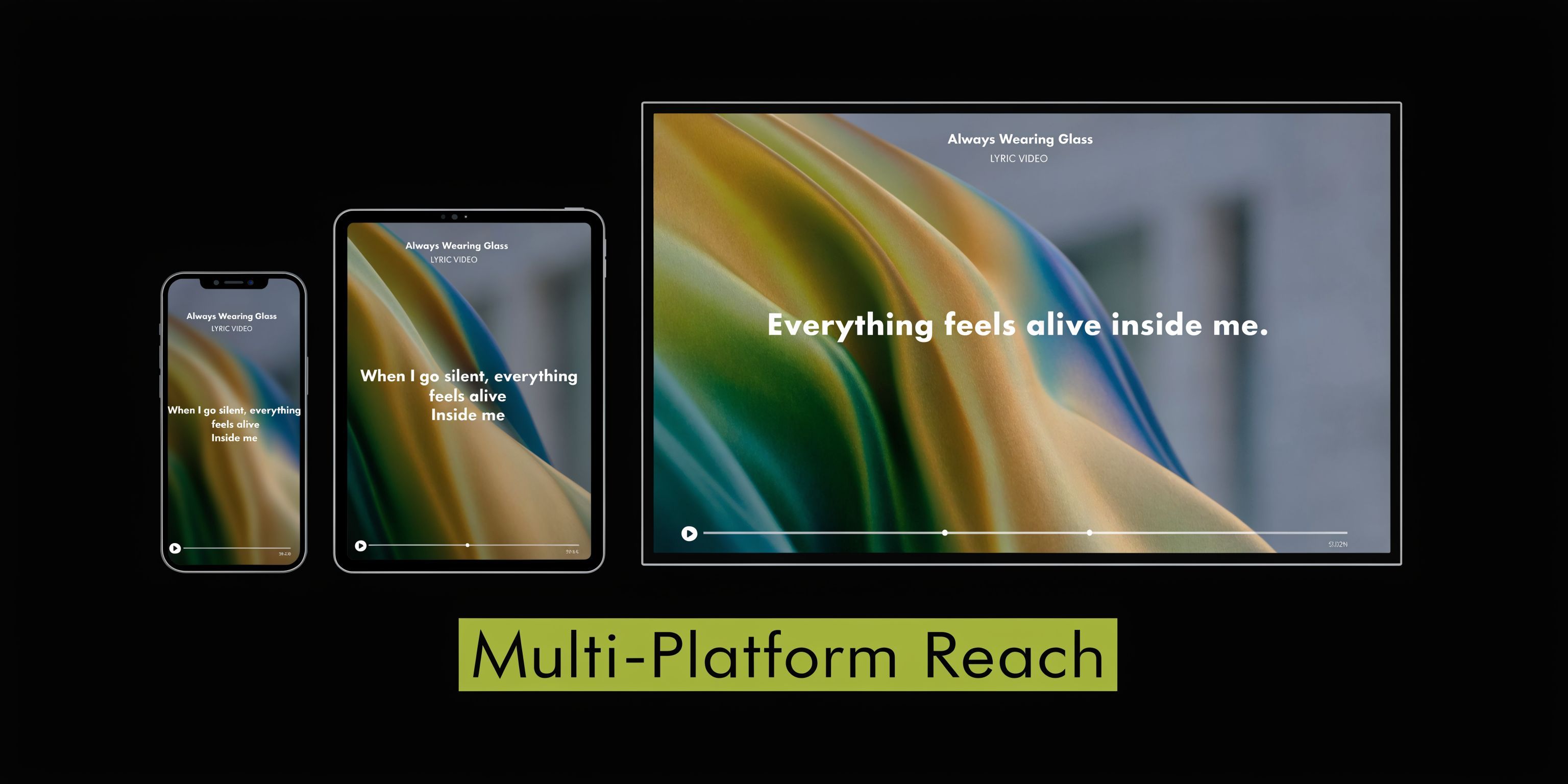
One master video should become a release pack
Think like a publisher, not only an editor. Your master lyric video is raw material for a week or more of content.
A strong release pack usually includes:
- Full horizontal version for YouTube
- Vertical full or partial version for TikTok and Reels
- Hook clip built around the strongest lyric
- Chorus-only cut for fast social testing
- Captioned teaser for silent autoplay feeds
These are not duplicate posts. They are different delivery formats for different viewing habits.
Resizing changes more than the frame
Creators often assume resizing is just cropping. It is not. Once you move from horizontal to vertical, lyric placement, font size, safe zones, and pacing all need another look.
Platform UI can cover lower captions. Tight line breaks become unreadable. Background footage that looked balanced in 16:9 can feel empty or awkward in 9:16.
That is why an AI publishing workflow matters. A tool built for resizing, scene swaps, and output management does more than save clicks. It keeps the creative intent intact across platforms. If you need this kind of multi-output adaptation inside a broader campaign workflow, ShortGenius AI ad generator sits in the same ecosystem of content repurposing and publishing.
Auto-captions and scheduling are not extras
On social feeds, many people encounter your video with sound off. On-screen lyrics help, but social captions still matter for context, accessibility, and platform-native behavior.
Scheduling matters just as much. Uploading manually to every channel sounds manageable until release week gets busy. Then one missed post becomes three, and momentum drops.
A better release routine looks like this:
| Asset | Best use |
|---|---|
| Full lyric video | YouTube search and audience retention |
| Vertical teaser | TikTok and Reels discovery |
| Chorus clip | Repeat posting over several days |
| Captioned snippet | Silent-feed viewing and shares |
The export is not the finish line. It is the point where your video should split into platform-specific assets and scheduled posts.
This is the workflow gap that most “how to make a lyric video” guides never solve. They teach editing, then leave creators alone with resizing, recropping, retitling, and manual uploads.
If you want consistent output from every song, publishing has to be part of creation. Not an afterthought.
Advanced Tips to Make Your Lyric Video Go Viral
A lot of creators think the hard part is making the video. It is not. The hard part is packaging it so people stop scrolling and give it a chance.
With 29 billion daily video views across major social platforms and strong hype-building potential for teaser clips in a music market projected to reach $65.45 billion by 2025, lyric videos can travel far when the release details are handled well (MyKaraoke discussion of lyric video reach and promotion).
Your title and thumbnail do real work
Do not upload with a vague title and hope the algorithm figures it out. Use a clear naming format people search for.
Good examples usually follow a pattern like:
- Song Title + Artist Name + Official Lyric Video
- Song Title + Lyric Video
- Artist Name + Song Title + Lyrics
Thumbnails need the same discipline. Use high contrast. Keep text minimal. Make sure the image still reads at a very small size.
Teasers deserve their own strategy
The best short clips are not mini versions of the whole video. They isolate the strongest moment.
That may be:
- The first memorable line in the chorus
- A lyric with emotional punch
- A visually striking phrase paired with a beat drop
Lead with the hook. Do not spend the first few seconds slowly setting context like you would in a full YouTube version.
Use the comment section like a marketer
A pinned comment can direct attention without feeling pushy. Keep it simple.
Examples that work well:
- Stream links
- A question about a favorite lyric
- A prompt asking listeners which line hit hardest
- A note about the song story
If you want more interaction, give viewers something easy to answer. “Which lyric should go on a tee?” invites more response than “Thoughts?”
Cut what weakens rewatch value
A lyric video goes further when it feels intentional on repeat. Remove long dead zones. Trim intros that take too long to get moving. If a visual gag only works once, it is probably not helping the song.
The strongest releases usually share one trait. Every choice supports the lyric, the mood, or the hook. Anything else is decoration.
Your Next Step in Visual Music Promotion
To make a lyric video that works, you need more than synced text on a background. You need preparation, readable typography, disciplined visual choices, and a publishing workflow that turns one song into multiple assets.
That shift is what separates a one-off upload from a repeatable release system. Manual tools still matter when you want deep control. AI workflows matter when you want speed, consistency, and enough output to stay visible across platforms.
If you have a finished song sitting on your drive, do not wait for the perfect production window. Build the lyric video, cut the platform versions, schedule the posts, and give the track a real chance to travel.
ShortGenius makes that workflow practical. You can turn lyrics, audio, visuals, edits, resizing, and multi-platform publishing into one efficient system with ShortGenius (AI Video / AI Ad Generator).