A Creator's Guide to Mastering Lip Sync AI

Discover how lip sync AI transforms video creation. Learn what it is, how it works, and how to use it to create perfectly dubbed content for a global audience.
Ever wanted to speak any language in your videos, with your mouth perfectly matching every single word, even if you don't know the language? That’s exactly what lip-sync AI makes possible. At its core, this technology takes a separate audio track and automatically animates a person's mouth—or an avatar's—to sync up with it flawlessly.
This isn't just a neat party trick; it's a massive leap forward, making content creation and localization accessible to everyone.
Why Lip Sync AI Matters for Creators
Think of lip-sync AI as a digital puppeteer for your videos. For the longest time, getting realistic lip synchronization was something only high-budget film studios with dedicated VFX teams could pull off. It meant painstakingly animating mouth movements frame by frame. Now, that same power is in the hands of creators everywhere, and it’s completely changing how video is made for platforms like YouTube, TikTok, and Instagram.
The main job of this AI is to close the gap between what you see and what you hear, creating a completely seamless and believable experience for the viewer. Forget those old, clunky dubs where the audio is painfully out of sync. This tech ensures a speaker's mouth moves in perfect harmony with a new audio track, whether that's a different language, a re-recorded voiceover, or even a script read by an AI voice.
Expanding Your Reach and Saving Time
The impact on content creators is huge. You’re no longer limited to your native language or stuck with the hassle of expensive reshoots just to fix a small audio mistake.
This technology gives you the power to:
- Shatter Language Barriers: Instantly dub your videos into multiple languages. You can open up your content to massive international audiences without ever needing to speak a word of Spanish, Japanese, or Hindi.
- Scale Content Effortlessly: Take one video and repurpose it for different global markets. All you have to do is swap the audio file and let the AI handle the rest.
- Elevate Production Value: Create professional-sounding voiceovers for your ads or social media videos and make sure your on-screen talent or avatar looks completely natural and authentic.
This isn't just a technical novelty; it's a strategic advantage. Lip sync AI allows solo creators and small teams to compete on a global scale, producing multilingual content that was once only possible for large media companies.
Ultimately, this tool is all about working smarter, not harder. By automating what was once a grueling post-production task, it frees you up to focus on what you do best: coming up with great ideas. To really see the big picture, it helps to understand the broader world of AI Powered Content Creation and how tools like this are reshaping the entire industry. Lip-sync AI is a key piece of that puzzle, giving you the ability to connect with more people in a much more authentic way.
How Lip Sync AI Actually Works
Ever wonder what’s going on under the hood of a lip-sync AI? It’s not just a digital puppet show moving a mouth up and down. Think of it more like a sophisticated translation service, but instead of converting words from one language to another, it translates sounds into incredibly precise facial movements.
Let's use an analogy. If you were teaching a robot to speak, you wouldn’t just show it the alphabet. You’d teach it how each letter sounds. Lip-sync AI does something very similar by breaking down your audio track into the smallest units of sound, which are called phonemes. For instance, the word "hello" is broken down into distinct sounds like "h," "eh," "l," and "ow."
Once the AI has identified these phonemes, it gets to work on its main task: mapping each sound to the exact mouth shape a person makes when saying it. These visual mouth shapes are called visemes. The AI has been trained on mountains of data, so it knows instinctively that the "f" sound means the top teeth should touch the bottom lip. It’s a lightning-fast translation from audio to visual.
This diagram breaks down how a piece of content goes from a simple recording on your end to a video that’s ready for a global audience.
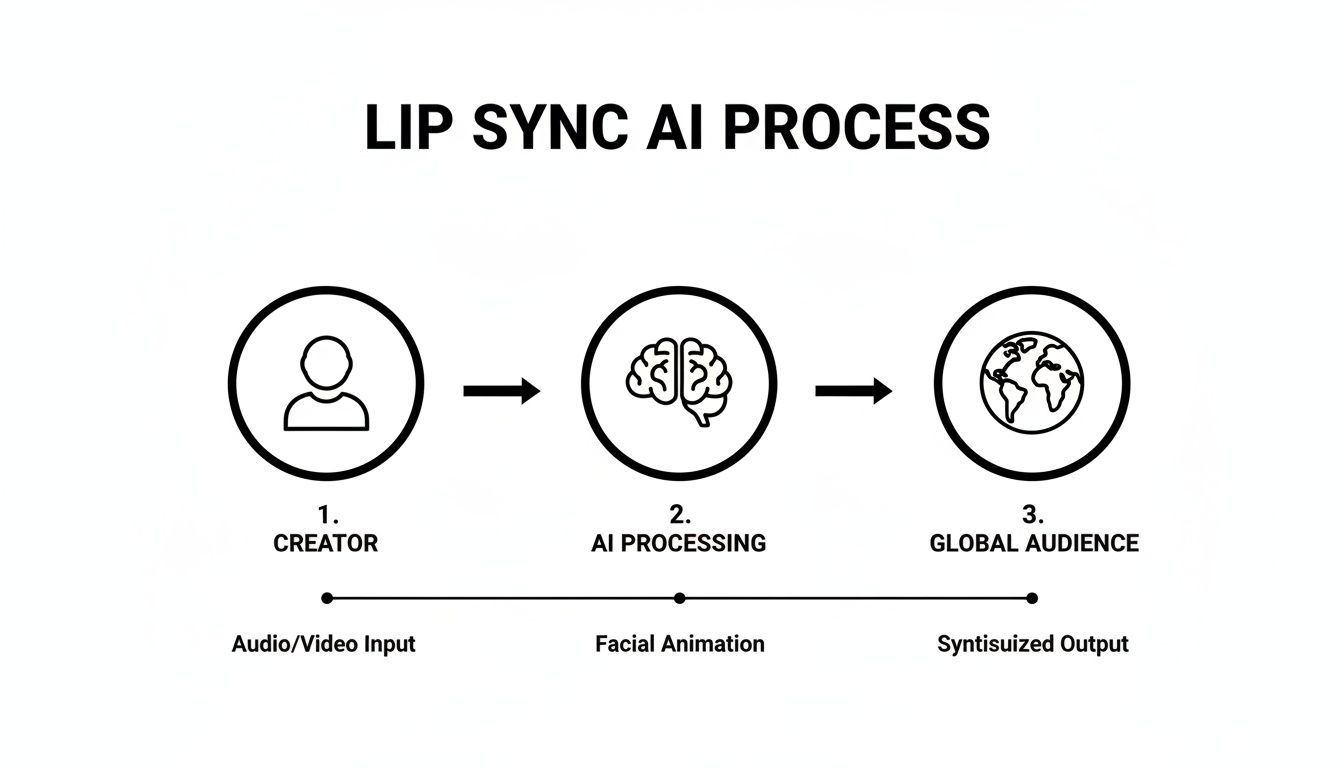
As you can see, the creator provides the raw materials, the AI does the heavy lifting, and the result is polished content that connects with viewers anywhere.
The Two Core Ingredients
To pull off this digital magic, the AI really only needs two things from you. This simplicity is a huge part of what makes tools like ShortGenius so useful for creators who need to work fast.
- The Audio File: This is your blueprint. It could be a voiceover you just recorded, a professionally dubbed audio track for a new language, or any other recording of someone speaking. The cleaner the audio, the better. Crisp, clear speech gives the AI a much easier set of phonemes to work with, which always leads to a more accurate and believable result.
- The Video or Avatar: This is your canvas. You can use a video of a real person or even a static image of an AI-generated avatar. The AI uses this visual base to generate and overlay the new, perfectly synchronized mouth movements.
But modern deep learning algorithms don't stop there. They go a step further by analyzing the nuances in the audio—the tone, the emotion, even the speed of the speaker. This helps make the final animation feel far more natural. At its heart, lip-sync AI is all about the expert ability to sync audio video so seamlessly that the viewer never even thinks about it.
The bottom line is this: It's not just about moving lips. It's a deep analysis of sound that translates speech into realistic facial expressions, catching the small details that make a performance feel truly human.
This level of automation is fueling some serious industry growth. The global market for lip-sync technology is on track to jump from USD 1.12 billion in 2024 to an estimated USD 5.76 billion by 2034. The fact that audio-driven machine learning already commands a 40.7% market share shows just how vital this tech has become for taking content global.
This same technology is a key ingredient in many AI video tools. It's what allows a creator to turn a single still photo into a compelling, dynamic video. You can dive deeper into how this works by checking out our guide on how to transform images into video with AI.
Practical Applications for Creators and Marketers
Knowing the technical details of lip sync AI is one thing, but the real magic happens when you see how it opens up new creative and business doors. For creators and marketers, this isn't just a novelty; it's a serious tool for scaling content, tapping into new markets, and genuinely connecting with audiences around the world.
The most obvious and powerful use case is content localization. Let's say you have a TikTok that's going viral or a YouTube tutorial you poured your heart into. Instead of being limited to just English speakers, you can now create versions for Spanish, Hindi, or Japanese audiences almost instantly. The AI doesn't just slap on a new audio track—it carefully reanimates your lip movements to match the new language, making the final video feel completely natural.
This completely rewrites the playbook for global expansion. The old way of localizing a video campaign involved hiring voice actors for each language, booking expensive studio time, and slogging through weeks or months of post-production. Now, that entire workflow is faster and far more affordable.
From Global Ads to AI Avatars
Beyond just translating videos, lip sync AI unlocks a whole range of strategies for building brands and creating compelling ads. At its core, every application takes advantage of the ability to separate what someone is saying from how they look while saying it.
Here are a few game-changing ways this technology is being used right now:
- Creating Engaging AI Avatars: You can take a single image—of a mascot, a founder, or a virtual influencer—and bring it to life. Just feed it a text-to-speech voiceover, and you have an endless supply of social media content without anyone ever having to get in front of a camera.
- Localizing Ad Campaigns: A brand can produce one fantastic, high-budget ad and then use AI to adapt it for dozens of international markets. This keeps the branding consistent while making the message feel local and personal. This approach is a lifesaver for ad platforms that demand a steady stream of fresh creative. You can see how this works in a broader strategy by checking out our guide on creating effective AI UGC-style ads.
- Effortless Audio Corrections: We've all been there. You finish a perfect video edit, only to notice a mistake in the voiceover. Instead of a frustrating reshoot, you can just record the corrected audio line and let the AI seamlessly patch it in, matching your lips perfectly.
The real power here is decoupling the visual from the audio. This gives creators immense flexibility to experiment, correct mistakes, and adapt content for different platforms and audiences without starting from scratch every time.
To show how these ideas come to life, here’s a quick breakdown of how creators and brands are putting lip sync AI to work.
Lip Sync AI Applications for Creators and Brands
| Use Case | Primary Benefit | Example Application |
|---|---|---|
| Global Content Distribution | Audience Growth | A YouTuber translates their top-performing video into 5 new languages to reach a global audience, tripling their potential viewership. |
| Multilingual Ad Campaigns | Increased ROI | A D2C brand creates 10 localized versions of a single ad for different countries, improving ad relevance and conversion rates. |
| AI Influencers & Avatars | Content Scalability | A company uses its animated mascot to create daily social media updates without needing a video team for every post. |
| Post-Production Fixes | Time & Cost Savings | A filmmaker corrects a misspoken line in a crucial scene without having to reshoot, saving thousands of dollars. |
This isn't just a minor improvement—it’s a fundamental shift in how video is made.
The AI video dubbing market was valued at $31.5 million in 2024 and is expected to rocket to $397 million by 2032. This explosive growth is all thanks to the incredible time and money it saves. A multilingual campaign that once demanded a huge budget and months of work can now be turned around in less than a week for under $2,000, putting a global reach in the hands of solo creators. You can learn more about the evolving economics of AI lip sync technology and see how it’s changing the entire creator economy.
How to Choose the Right Lip Sync AI Tool
With a flood of new tools hitting the market, picking the right lip sync AI can feel like a shot in the dark. But not all platforms are built the same, and the wrong choice can leave you with robotic, awkward-looking videos that repel viewers instead of engaging them. You need a simple checklist to cut through the marketing fluff.
The absolute number one factor is the quality of the sync itself. Does the final video look natural, or does it dip into that creepy "uncanny valley"? A great tool understands the tiny, subtle movements of a real mouth—how it forms around different sounds and connects to the speaker’s expression.
A cheap or poorly trained AI might just flap the mouth open and closed, which is an immediate giveaway that something’s fake. The best way to judge this is to take the same short audio clip and run it through a few different tools. Put the results side-by-side and trust your gut.
Evaluating Key Features and Performance
Beyond pure realism, you’ve got to think about your specific creative needs. The perfect tool for a multilingual corporate trainer is probably overkill for a meme creator. Nailing your evaluation process upfront will save you a world of headaches later on.
Here are the essential things to look for:
- Language and Accent Support: This is a deal-breaker if you're trying to reach a global audience. Find out how many languages the tool supports and, just as important, how well it handles different accents and dialects. A tool that can nail a Glaswegian accent is a lot more impressive than one that only works with a generic, robotic voice.
- Processing Speed: How long will you be staring at a progress bar for a one-minute clip? In the world of short-form content, speed is everything. Some platforms can turn around a video in minutes, while others will have you waiting for what feels like an eternity.
- Ease of Use: A tool with a million features is worthless if the interface is a nightmare. Look for a clean, simple design that lets you upload your video and audio, then apply the lip sync in just a few clicks. Platforms like ShortGenius aim to make this step a seamless part of a much larger video creation pipeline.
The ultimate goal is to find a solution that fits into your existing process without creating new bottlenecks. The right tool should feel like an extension of your creative toolkit, not another complicated piece of software you have to learn.
Considering Integration and Market Trends
Finally, think bigger picture. How does this lip sync AI fit into your workflow? Does it play nice with the video editors you already love? Can it handle the video formats and resolutions you need? Smooth integration is just as critical as technical performance.
The explosive growth in this space tells you everything you need to know. The market for AI in media, which includes lip-sync tech, is expected to balloon from USD 8.21 billion in 2024 to USD 51.08 billion by 2030. That kind of rapid expansion means sophisticated audio-visual AI is quickly becoming a core part of any modern content strategy. You can get more details about the AI media market on datainsightsmarket.com.
By picking a tool that's well-supported and constantly getting better, you aren't just solving a problem for today—you're investing in your ability to create amazing content for years to come.
A Step-by-Step Guide to Your First Lip Sync Video
Alright, let's get our hands dirty. Making your first video with lip sync AI isn't as complicated as it sounds. We can break it down into a simple, four-step process that takes you from a rough idea to a finished video ready to share.
This is the basic workflow you'll find in platforms like ShortGenius, which puts this powerful tech right at your fingertips.
Step 1: Prepare Your Audio Track
Everything starts with the audio. Think of it as the blueprint for your video—the AI needs a clean, clear track to figure out which mouth shapes to create. You can record your own voice or use a quality text-to-speech generator for a consistently crisp narration.
For the best outcome, make sure your audio has little to no background noise. Speaking clearly also makes a huge difference. The more distinct your words are, the better the AI can match the lip movements. Getting this first step right sets you up for a much more believable result.
Step 2: Select Your Video or Avatar
Next up, you need to choose who (or what) will be doing the talking. This can be a video clip you already have of someone speaking or even just a static image of an AI avatar you've created. The key here is a clear shot of the face.
Here’s a pro tip: A straight-on, front-facing angle works best. The AI needs a direct, unobstructed view of the mouth to generate realistic movements. If the face is turned away or something is blocking the view, the final animation will look a bit off.
The quality of your inputs directly determines the quality of your output. A sharp, well-lit video and clean audio provide the AI with the best possible material to work with, minimizing errors and ensuring a more lifelike result.
Step 3: Apply the Lip Sync AI
This is where the real fun begins, and it's usually just a matter of clicking a button. Once you've uploaded your audio and video files to the tool, you just apply the lip sync feature. The AI then gets to work, breaking down the sounds in your audio and creating brand new mouth movements on your video subject to match.
The whole process is surprisingly fast, often taking just a few minutes. While the AI is doing the heavy lifting, you can get ready for the last and most important step.
Step 4: Review and Refine the Output
No AI gets it perfect every single time, so a final check is crucial. Watch the generated video and pay close attention to the timing. Does the sync look natural? Are there any weird twitches or moments where the lips don't quite match the audio?
Most good tools give you options to make small tweaks. Sometimes, just nudging the audio timing slightly or re-running a specific section can smooth out any kinks. Once you're satisfied, your video is ready to export. This entire process is a core part of many AI video workflows, and you can see how it fits into the bigger picture by reading our guide on text-to-video AI models.
Got Questions About Lip Sync AI? We've Got Answers.
Jumping into any new tech brings up a few questions. That's completely normal. Let's tackle some of the most common ones I hear from creators about lip sync AI so you can get straight to making great content.
How Does Lip Sync AI Handle Different Languages?
This is a big one. The good news is that most top-tier AI models are trained on gigantic datasets filled with countless hours of multilingual speech. This means they're surprisingly adept at handling not just different languages, but different accents, too. It’s not just about words; it's about learning the specific mouth shapes—the technical term is visemes—that go with each unique sound.
Of course, not all tools are built the same. You'll find that performance can really vary from one platform to another, which is why I always recommend running a short test clip in your target language before committing to a big project. The best systems will capture those subtle nuances, making the speaker look like a native, rather than applying a generic, "one-size-fits-all" mouth movement that just feels off.
What's the Difference Between Lip Sync and Dubbing?
It's easy to mix these two up, but they're really two sides of the same coin, working together to make a video feel authentic in a new language.
Think of it this way:
- Video Dubbing: This is all about the audio. It’s the process of swapping out the original voice track for a new one, usually in another language.
- Lip Sync: This is the visual follow-up. Once that new audio is laid down, the AI gets to work, digitally altering the speaker’s mouth movements to perfectly match the new dialogue.
When you combine them, you get a completely localized video. The sound is right, and the visuals match. One handles what you hear, the other handles what you see.
This one-two punch is what lets a creator take a single video and make it feel native to audiences anywhere in the world, without that distracting, out-of-sync feeling that immediately pulls a viewer out of the experience.
How Can I Avoid That Creepy "Uncanny Valley" Effect?
Ah, the "uncanny valley." It’s that weird, unsettling feeling when something looks almost human, but a few subtle things are just not quite right. It's a real concern with lip sync AI, but you can absolutely steer clear of it.
First off, always start with high-quality source material. A crisp, well-lit video or a polished avatar gives the AI a much cleaner canvas to work with. If you feed it blurry or low-res footage, you’re practically asking for a weird result.
Next, focus on your audio quality. Use a high-quality AI voice that sounds natural, or better yet, a clean recording of a human voice actor. A robotic, flat voice paired with realistic lip movements is a recipe for instant creepiness.
Finally, remember to add those subtle human touches. An AI-generated scene can feel a bit sterile on its own. Adding small things like natural head movements, realistic blinking, or even just an interesting background can make the entire video feel more grounded and alive, pulling it right out of the uncanny valley.
Ready to create stunning, multilingual videos without the hassle? ShortGenius integrates powerful AI lip sync capabilities into a complete video creation workflow. Produce professional ads and social content in minutes. Start creating for free on shortgenius.com.