Master AI Instagram Story Video Editor

Ditch manual editing. Create stunning videos fast with an AI Instagram Story video editor. Learn script-to-video, captions, voiceovers, & scheduling.
You’re probably staring at the same problem most social teams hit by midweek. You need another Story up today. It has to look intentional, sound clean, fit the frame, carry the brand, and not eat half your afternoon.
That’s why the search for a better instagram story video editor has shifted. The old workflow was clip first, edit second, captions third, publish last. The newer workflow is idea first, then let AI assemble the rough cut, handle the repetitive parts, and leave you with a short list of decisions that matter.
The End of Manual Instagram Story Editing
A lot of Story production still looks like this. Someone records a vertical clip, trims dead air in one app, adds text in another, fixes framing after export, realizes the subtitle style is off-brand, re-exports, then forgets to schedule it. That process works for occasional posts. It breaks when Stories are part of your daily content rhythm.
The pressure is worse because video is no longer optional on Instagram. Search demand reflects that shift too. Google Trends shows searches for “AI Instagram story editor” are up 245% year over year since April 2025, while top results still mostly point people to manual editing apps, which leaves a clear gap between what creators want and what most guides recommend, as noted in this AI Instagram story editor trend summary.
Why manual editors slow teams down
Manual tools are still useful. I use them when I need a highly custom sequence or a one-off visual treatment. But for everyday Story output, they create the same drag points over and over:
- Too many micro-decisions: Every text box, transition, cut, and audio fix asks for attention.
- No continuity across a series: Yesterday’s Story doesn’t automatically inform today’s style.
- Publishing stays disconnected: Editing gets done, but scheduling still sits in a separate step.
- Rework multiplies fast: A small script change can mean rebuilding half the post.
Manual editing isn't the hard part. Repeating manual editing every day is.
That’s where an AI-first workflow changes the job. Instead of opening a blank timeline, you start with a topic, a script, or even a rough idea. The system generates the first version, lays out visuals, adds narration, and gives you something usable immediately. You stop spending your best energy on assembly.
What changed in practice
The biggest shift isn’t that AI can “edit.” It’s that it can remove the dead time between concept and draft. For creators building direct-response content, educational Stories, product demos, or quick behind-the-scenes updates, that speed matters more than frame-by-frame perfection.
If you’re also producing customer-style creative, this pairs well with a broader AI workflow for short-form content. AdCrafty’s guide on how to make AI UGC videos is useful because it shows the same principle in another format: script, structure, performance cues, then fast iteration.
The better model for Stories is simple. Let AI create the first pass. Keep your time for positioning, brand fit, and final judgment.
From Idea to First Draft in 60 Seconds
A good Story usually starts in a rushed moment. The offer changed, a product is back in stock, or a client result just came in and you want it live before the audience scrolls past the moment. In that situation, an instagram story video editor only helps if it removes setup, not if it gives you more controls to manage.
The fastest workflow starts before generation. Build repeatable series inside your ShortGenius Story creation workspace so daily tips, launches, FAQs, testimonials, and promo drops each have their own style rules, script patterns, and output settings. That one step cuts a surprising amount of friction because the system is pulling from a known format instead of guessing what today's Story should look like.

Instagram favors strong vertical video habits, and Stories benefit from the same fast, clear viewing behavior that drives Reels. That is why I set the production rules once, then reuse them. AI works best when the format is already constrained.
Set the format once
Before you generate anything, lock three decisions:
-
Choose 9:16 output
Stories need full-screen vertical framing. Save that as the default so you never crop manually. -
Keep the structure narrow
One hook, one message, one action. Stories lose force when they try to teach, sell, and explain at the same time. -
Define the job of the Story
Tell the AI exactly what this post needs to do. Announce a launch, answer a question, show a result, or push a tap-through.
Prompt quality matters here. “Make an Instagram Story about my product” gives you filler. “Create a 15-second Story about our new serum, focus on hydration, use a confident tone, end with shop now” gives the model enough direction to build a usable first pass.
Use script-to-video for speed, not perfection
A rough outline is usually enough to get the draft started:
- Hook: “Why your skin still feels dry after moisturizing”
- Core point: “Most products sit on the surface. Ours is built for barrier support”
- CTA: “Tap to shop”
That is enough for AI to assemble scenes, voiceover, and pacing in one pass. The goal is not a final cut in 60 seconds. The goal is a first draft that already has structure, motion, and a clear message, so your time goes into decisions that affect performance.
This is the part manual editors still handle poorly. CapCut-style workflows are fine when you want full control, but they still start with a blank timeline. For Stories, blank timelines are expensive. AI closes the gap between idea and draft, which matters more than frame-level control when you are posting daily.
Check the draft like a manager, not an editor
The first review should stay high level. Do not start fixing fonts, transitions, or word timing yet. Check whether the draft is usable.
| Check | What you're looking for |
|---|---|
| Opening | Does the first line earn the next second of attention? |
| Scene match | Do the visuals support the claim, offer, or point being made? |
| Pacing | Does each beat move fast enough for Story viewing? |
| Voice fit | Does the narration sound right for your audience and brand? |
If those four pieces work, the draft is doing its job.
A live demo helps if you want to see the speed difference in action:
Practical rule: Approve the structure first, then edit details.
Teams lose time when they start polishing a draft that was never strategically right. The better approach is simple. Generate fast, judge the concept, then refine only the version worth keeping.
Refining Your AI-Generated Video
Once the draft exists, the job changes. You’re no longer “making a video.” You’re making fast corrections to get the draft aligned with your brand, offer, and audience.
That distinction matters because it keeps you from slipping back into manual-editor behavior. If you start polishing every second as if you built the whole thing from scratch, you lose the advantage.
Tighten timing first
The first pass should always be timing. Stories need clean rhythm. If a scene hangs too long, viewers feel it immediately. If the opening line takes too long to land, they move on.
Use the timeline to make only three kinds of cuts:
- Remove slow intros: If the first visual doesn’t support the hook, cut it.
- Trim pauses between beats: AI narration often benefits from slightly tighter spacing.
- Shorten overexplained scenes: One visual idea per beat is usually enough for Stories.
I usually tell teams to leave transitions alone until timing feels right. Fancy movement won’t rescue a slow sequence.
Swap scenes with intent
Scene replacement is one of the highest-value edits in an AI workflow. The generated visual may be technically relevant but strategically wrong. A generic laptop shot might fit the script, but a branded product close-up or creator selfie clip will usually perform better.
A simple before-and-after mindset helps:
| Before | Better replacement |
|---|---|
| Generic office footage | Your own behind-the-scenes clip |
| Abstract stock shot | Product demo in hand |
| Wide lifestyle scene | Tight crop on the key visual |
| Random person talking | Founder clip or customer-style footage |
The point isn’t realism for its own sake. It’s alignment. Every visual should either increase clarity or increase trust.
If the AI picks a scene that explains the topic but not your brand, swap it.
That’s especially true for Stories tied to offers, launches, or audience objections. Viewers don’t need cinematic variety. They need fast context.
Fix the audio without overworking it
Audio is where many drafts become usable. You have a few smart options, and the right one depends on the content type.
If the draft is educational, a calm, neutral voice often works. If it’s sales-driven, a more energetic read may fit better. If the message depends on personal authority, upload your own voiceover instead of forcing AI to mimic intimacy.
Background music should support pacing, not dominate the piece. For Stories, I keep it low and choose tracks that don’t fight with the captions or spoken message.
A practical refinement sequence looks like this:
- Approve or replace the voice
- Balance music under narration
- Cut dead air
- Review the opening three seconds again
That order prevents wasted work.
Why cloud speed changes the edit loop
Cloud editors can make these small revisions much less painful. WebAssembly-based cloud editors can render up to 4x faster than desktop peers on equivalent hardware, and a 60-second Story can render in an average of 12 seconds, according to Flixier’s Instagram Story video maker overview.
That kind of speed matters because refinement is iterative. You try a tighter cut, test a different voice, swap one scene, and preview again. If every change requires a slow export cycle, you stop experimenting. If previews come back quickly, you make better decisions because you’ll test alternatives.
Keep the refinement threshold low
The biggest trap in AI editing is perfectionism. For Stories, the standard is not “would this win an editing award.” The standard is “does this communicate clearly, look clean, and match the brand.”
That’s enough.
If your rough draft is doing the messaging work and your edits improve pace, visual relevance, and sound, you’ve already beaten the manual workflow prevalent in the field.
Adding Polish with Captions and Branding
A Story can be structurally sound and still feel forgettable. That usually happens when the post looks unclaimed. No visual identity. No consistent caption treatment. No recognizable color logic. It could belong to anyone.
That’s why polish isn’t a cosmetic extra. It’s the layer that tells the viewer this content came from a specific brand, creator, or business with a point of view.
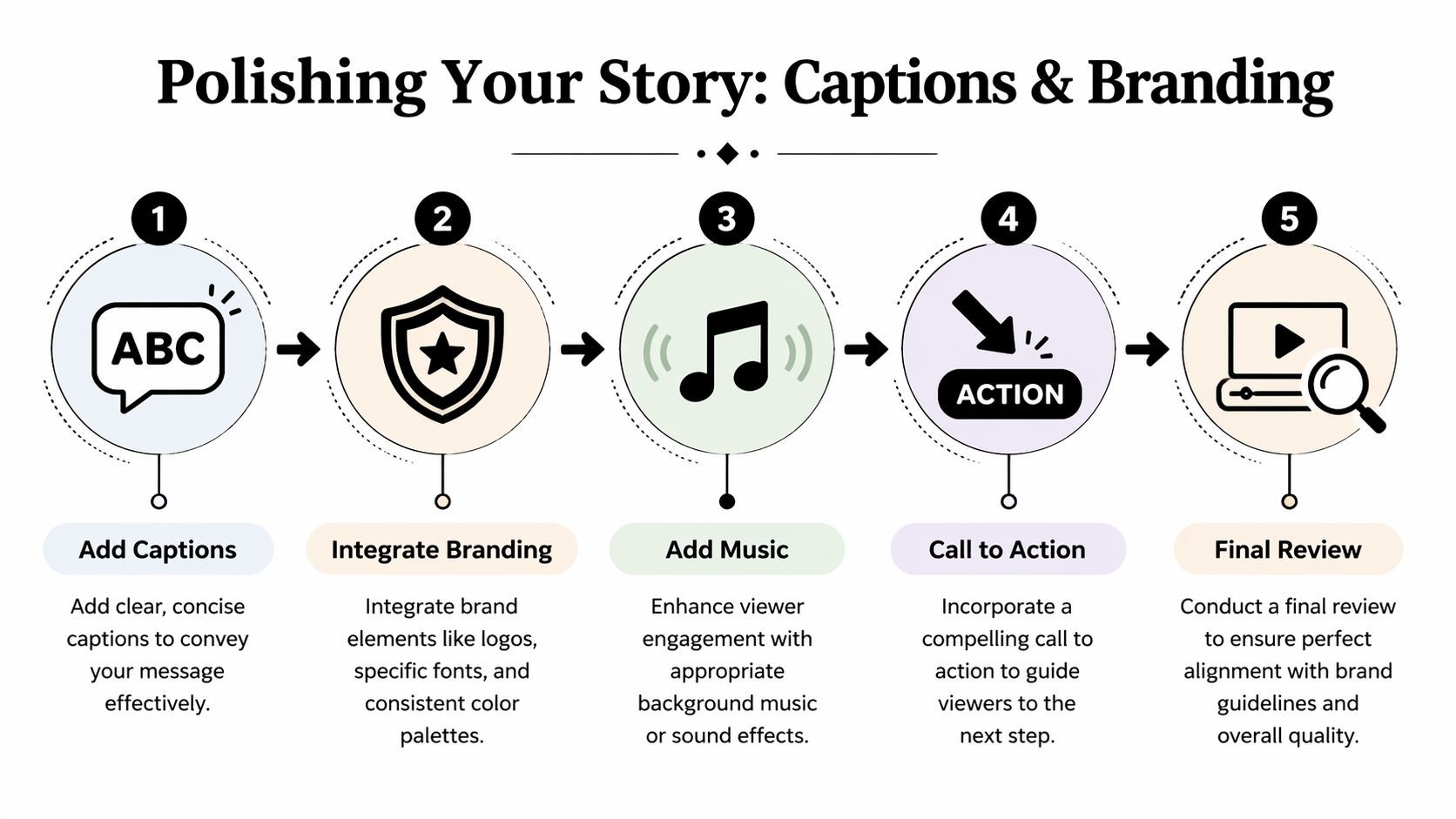
Captions do more than add accessibility
Auto-captions are one of the first things I check in any instagram story video editor because they affect comprehension, retention, and pace. A lot of Story viewing happens with sound low or off, especially during work hours, commuting, or casual scrolling.
Captions work best when they’re edited for emphasis, not dumped in as full transcripts. Good caption styling usually means:
- Short phrase grouping: Break speech into readable chunks.
- Strong contrast: Use text treatments that stay legible over movement.
- Intentional emphasis: Highlight the keyword, objection, or CTA.
- Consistent placement: Don’t let captions wander all over the frame.
Instagram’s own ecosystem shows how strongly creators value integrated tools. Business Insider reported that about half of all people watching Reels on Instagram are viewing content created using the Edits app, citing Instagram VP of Design Brett Westervelt in this report on Edits adoption. That says a lot about demand for native efficiency. It also reveals the gap. Integrated editing is attractive, but brand-heavy teams still need stronger caption styling and identity controls than most native tools provide.
Branding is what makes scale possible
When teams skip brand setup, every Story becomes a fresh debate. Which font? Which intro style? Which color treatment? Where does the logo go? That isn’t creative freedom. It’s repeated operational drag.
A proper brand kit solves that by standardizing:
| Brand element | Why it matters |
|---|---|
| Fonts | Keeps educational, promotional, and testimonial Stories visually related |
| Colors | Creates instant recognition even before the viewer reads |
| Logo use | Adds ownership without overpowering the frame |
| Text styles | Speeds production because headline and subtitle treatments are already defined |
A polished Story feels faster to watch because the viewer doesn't have to decode the design.
That’s one reason dedicated AI tools can outperform simpler native workflows for professional accounts. The editor isn’t just producing content. It’s preserving visual continuity at speed.
Presets should support the message
Effects, animations, and camera movement are useful when they reinforce hierarchy. They hurt when they become the main event.
Good preset use usually looks like this:
- Subtle motion on static scenes to avoid dead visual space
- Headline animation that pulls attention to the core claim
- CTA movement that directs the eye at the end
- Minor zoom or pan on product and lifestyle shots
If you need inspiration before building brand templates, Sup Growth’s collection of Instagram Story layout ideas is helpful because it shows how different structural layouts change the feel of the same message.
The practical standard for polish
I judge polished Stories by five questions:
- Does the text read instantly?
- Does the visual style clearly belong to the brand?
- Does motion guide attention instead of distracting from it?
- Is the CTA obvious without being clumsy?
- Would this still look good if posted three times this week in different variations?
If the answer is yes across all five, the Story is ready. That’s what matters in real production. Not endless tweaking. Recognizable quality delivered repeatedly.
Exporting and Scheduling Your Story Like a Pro
The final step is where a lot of otherwise good Stories get damaged. The edit is done, but the export is wrong, the frame is slightly off, the text sits too close to the edge, or someone plans to post “later” and never does.
A solid instagram story video editor should reduce that risk by making the final handoff boring. That’s a compliment. Boring exports are reliable exports.
Use platform-safe output settings
For Stories, the practical export goal is straightforward. You want vertical output that uploads cleanly, preserves readable text, and avoids compression problems caused by mismatched settings.
The safest route is to use an Instagram-ready preset instead of tuning technical settings manually every time. If you want a deeper reference on dimensions and format expectations, AdStellar AI’s Ultimate Guide to Instagram Story Specs for 2026 is a useful checklist to keep handy.
One of the most common mistakes in manual workflows is layout sloppiness. Buffer notes that ignoring Instagram safe zones can crop essential visuals on up to 18% of devices, and exporting with unnormalized audio can also hurt the final result, which is why Story presets matter in tools built for this format, as explained in Buffer’s guide to using Instagram Edits.
A clean export checklist
Before sending anything to Instagram, run through this short list:
- Check vertical framing: Make sure your focal subject and text stay inside safe viewing areas.
- Review subtitle placement: Captions near the bottom can compete with Instagram interface elements.
- Listen once on phone speakers: Audio that sounds balanced on desktop can feel harsh on mobile.
- Export with the Story preset: Let the tool handle the technical defaults.
- Preview the final file: Don’t trust the timeline preview alone.
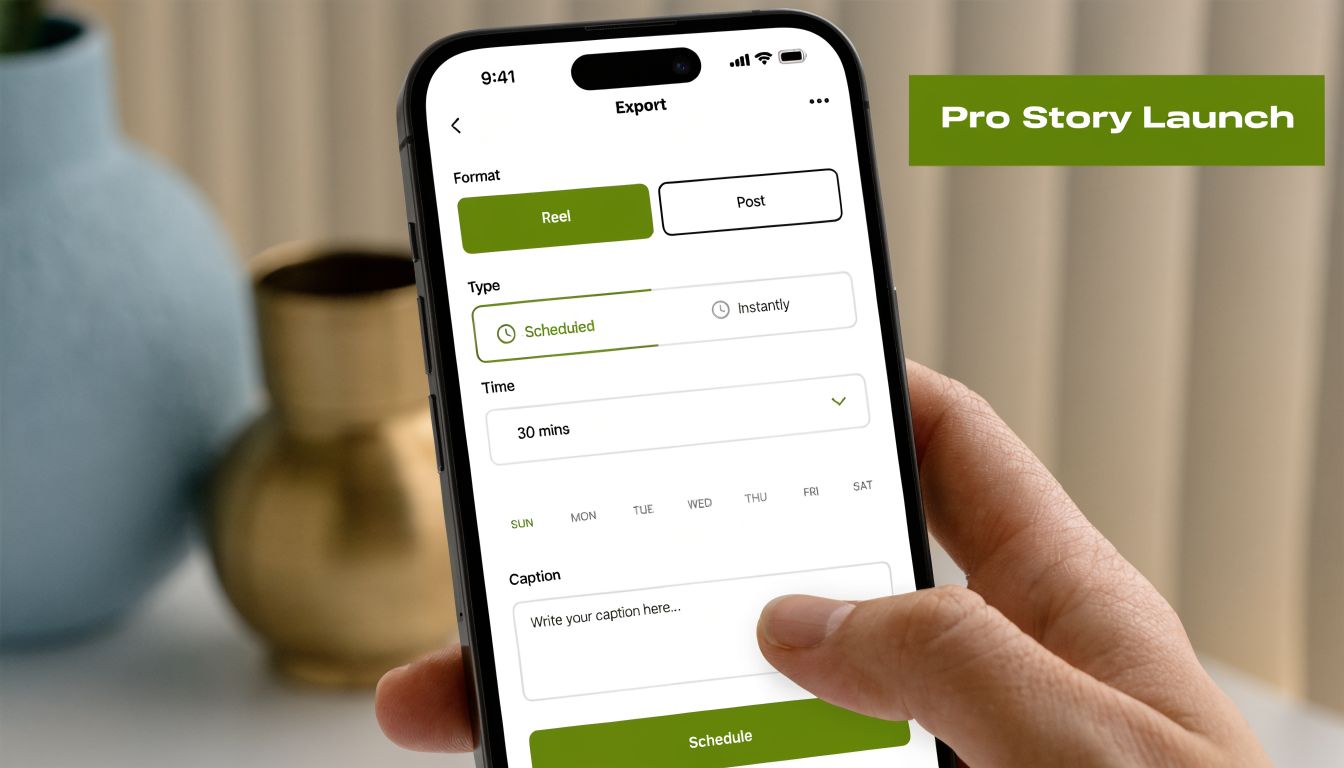
Scheduling is the real time saver
The best part of an AI-first workflow isn’t just fast creation. It’s that publishing no longer becomes a separate admin task.
When your editor includes direct scheduling, use it. Connect the account once, set the post time while the Story is still fresh in your mind, and move on. That matters most for batch production. If you create several Stories in one sitting, scheduling them immediately turns a content sprint into an actual system.
Schedule while you still remember why the Story exists. Waiting until later usually means writing weaker captions, skipping review, or missing the post window.
A practical batch rhythm looks like this:
| Stage | Best practice |
|---|---|
| Drafting | Generate several Story ideas in one session |
| Editing | Refine all selected drafts together for consistency |
| Exporting | Use the same preset across the batch |
| Scheduling | Assign publish times before closing the project |
That’s how creators get ahead instead of recreating urgency every day. The Story isn’t finished when it exports. It’s finished when it’s queued to publish correctly.
Frequently Asked Questions about AI Story Editors
Can you use your own footage with AI-generated content
Yes. In fact, that is usually the fastest way to get a Story that still feels like your brand.
In ShortGenius, AI handles the first assembly pass. It gives you structure, pacing, captions, and a usable scene sequence in minutes. Then you swap in the clips that matter most, such as product footage, selfie clips, customer results, screen recordings, demos, or behind-the-scenes shots. That saves time without publishing a Story that looks borrowed.
For service businesses and creators, this hybrid workflow usually beats both extremes. Full manual editing takes longer than is often feasible for daily Stories. Fully generic AI visuals are fast, but they often miss context your audience notices right away.
How does the AI choose visuals for a script
It matches visuals based on the words, topic, and intent in the script.
That process is fast, but it is still pattern matching. If the script says "quick client win," the tool will look for scenes that fit success, progress, or business context. If the script is vague, the visual choices usually get vague too. Better inputs produce better first drafts.
A simple fix is to write with concrete nouns and clear actions. "Showing a skincare routine with two product shots and a founder clip" gives the editor more to work with than "talking about our brand story."
Will AI-made Stories all look the same
They do if you leave the draft untouched.
Teams run into sameness when they use generic prompts, keep stock footage in every scene, and accept default text styling. The tool did its job. It made a fast draft. Your job is to shape it into something recognizable.
Use a repeatable cleanup process:
- Add your brand colors, fonts, and logo
- Replace filler visuals with owned clips
- Tighten the opening line so the first second earns attention
- Adjust caption styling for readability on mobile
- Trim scenes that feel slow or overly polished
That is the trade-off with AI story creation. You save time on assembly, then spend a few focused minutes on differentiation.
What about copyright and uniqueness
Review every asset before publishing. That includes visuals, music, voice output, and any uploaded media from your own library.
The safer workflow is to treat the AI draft as production support, not the finished creative. Rewrite lines that sound generic. Replace broad stock scenes with owned footage. Use your own voice or approved brand narration where needed. Those changes make the Story more distinct and reduce the chance of posting something that feels interchangeable with everyone else's content.
Is an AI editor better than CapCut or another manual app
For Stories, it often is. The answer depends on what you need to optimize.
If the job is high-volume Story production, AI has the advantage because it handles scripting, scene selection, captions, voice, and scheduling in one workflow. If the job is a one-off edit with custom motion, layered transitions, and frame-level control, a manual editor still gives you more precision.
Here is the practical split:
| Need | Better fit |
|---|---|
| Daily Story production | AI-first workflow |
| Highly custom one-off edits | Manual editor |
| Fast script-to-video drafts | AI-first workflow |
| Fine-grain motion design | Manual editor |
| Batch creation and scheduling | AI-first workflow |
For most social teams, the better default is the one that removes repetitive production steps. Manual editors still have a place. They just should not be the starting point for every Instagram Story.
If you want a faster way to turn ideas into publish-ready Stories, ShortGenius is built for that exact workflow. It helps creators and teams go from script to video, refine scenes and voiceovers, apply captions and branding, then schedule posts from one place instead of stitching together separate tools.