Image to Video AI Generator: A Complete Guide for 2026

Discover how an image to video AI generator turns static photos into dynamic clips. Explore top tools, use cases, and tips for 2026.
You have a finished product photo, a thumbnail, or a polished illustration. The problem is that tomorrow's campaign needs video, and there's no time for a shoot, a crew, or a complicated edit. An image to video AI generator addresses that gap by turning an existing still image into a short moving clip, while preserving as much of the original visual as possible.
That sounds simple, but a usable result depends on more than smooth movement. Before you publish, you need to check whether the source image stayed accurate, whether the motion makes sense, whether adjacent frames remain stable, and whether the video still communicates the intended message.
What an Image to Video AI Generator Actually Does
A solo creator finishes a product photo late at night. The lighting is right, the packaging is visible, and the brand colors are approved. Then the brief changes: the team needs a short vertical ad by morning. An image to video AI generator can take that still image, accept a direction such as “slow camera push toward the bottle with soft reflections,” and produce a short animated clip.

In plain language, the software starts with a picture and predicts what could happen next. The model may add a camera move, flowing fabric, a blinking subject, shifting light, or another small action. The image provides the visual identity, composition, and starting state. The generated video supplies the movement.
This makes image-to-video different from three nearby categories:
- Text-to-video starts with an idea written in words and invents the scene, subject, and setting.
- Traditional motion graphics moves layers, text, and illustrations according to explicit keyframes or timeline instructions.
- Stock footage gives you recorded material, but it may not show your exact product, character, or branded artwork.
Image-to-video is usually the fastest route when the asset already exists and the missing ingredient is motion. Three common situations fit especially well:
- Animating a product shot, such as adding a slow rotation or a controlled camera move.
- Turning a thumbnail into a teaser, giving a static title card enough movement to attract attention.
- Adding subtle motion to an illustration, such as drifting particles, blinking lights, or a gentle parallax effect.
It's also useful to pair animated visuals with a broader asset workflow. For example, a portrait creation platform can help produce a consistent portrait source before you animate it. The key question is simple: do you already have the visual you want to preserve? If yes, image-to-video is probably the right starting point.
How the Technology Turns One Image Into Motion
Start with a simple analogy. Give a still photograph to a film director and ask for a short shot. The director might choose a slow zoom, move the camera sideways, add a breeze, or have the subject make a small gesture. An image-to-video model performs a similar act, but it predicts the movement computationally.
The process uses three main ingredients:
- A source image, which anchors the subject, layout, colors, and visible details.
- A text prompt, which describes the desired action, camera behavior, mood, or style.
- A motion and audio layer, which may come from generated movement, sound effects, music, or voiceover added during finishing.
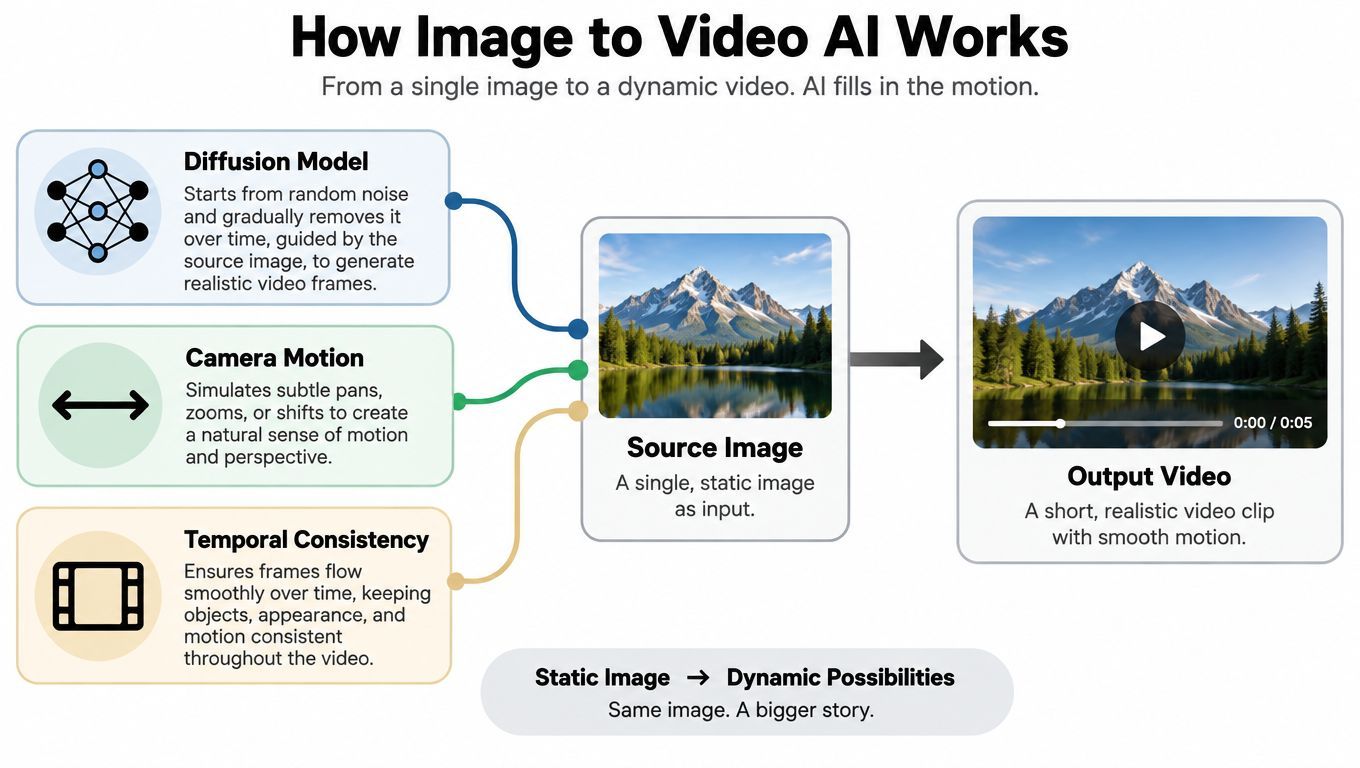
Modern generative video systems commonly use diffusion-based generation. These systems progressively denoise randomly generated data until it forms a coherent sequence of frames. The source image conditions that process, so the model isn't starting from an empty canvas. It has a visual reference for what should remain recognizable.
The research path toward current systems included several important milestones. In 2016, Reed and colleagues demonstrated a generative-adversarial-network approach for producing natural images from text descriptions. In 2018, Li and colleagues extended this direction to video in Video Generation from Text. The Video Diffusion Model, introduced in 2022, marked a major transition toward diffusion-based video synthesis and improved fidelity and temporal coherence compared with earlier approaches. These milestones primarily concern text-to-video, but they helped establish methods that underpin modern image-to-video systems. The research history is summarized here.
The hardest part is temporal consistency, meaning the subject, background, and visual meaning should remain stable from frame to frame. AIGCBench measures this by calculating CLIP similarity between adjacent generated frames and averaging the results. That exposes problems a single attractive frame can't reveal, including identity drift, texture flicker, and abrupt background changes. AIGCBench explains this evaluation approach.
A clip can therefore fail even when its opening frame looks excellent. The face may subtly change, a logo may warp, or a product edge may shimmer as the video progresses.
Inside the Image to Video Workflow
A reliable workflow begins before you press Generate. The model can only preserve what the source image shows clearly, and it can only interpret a prompt as well as the prompt defines the intended action.
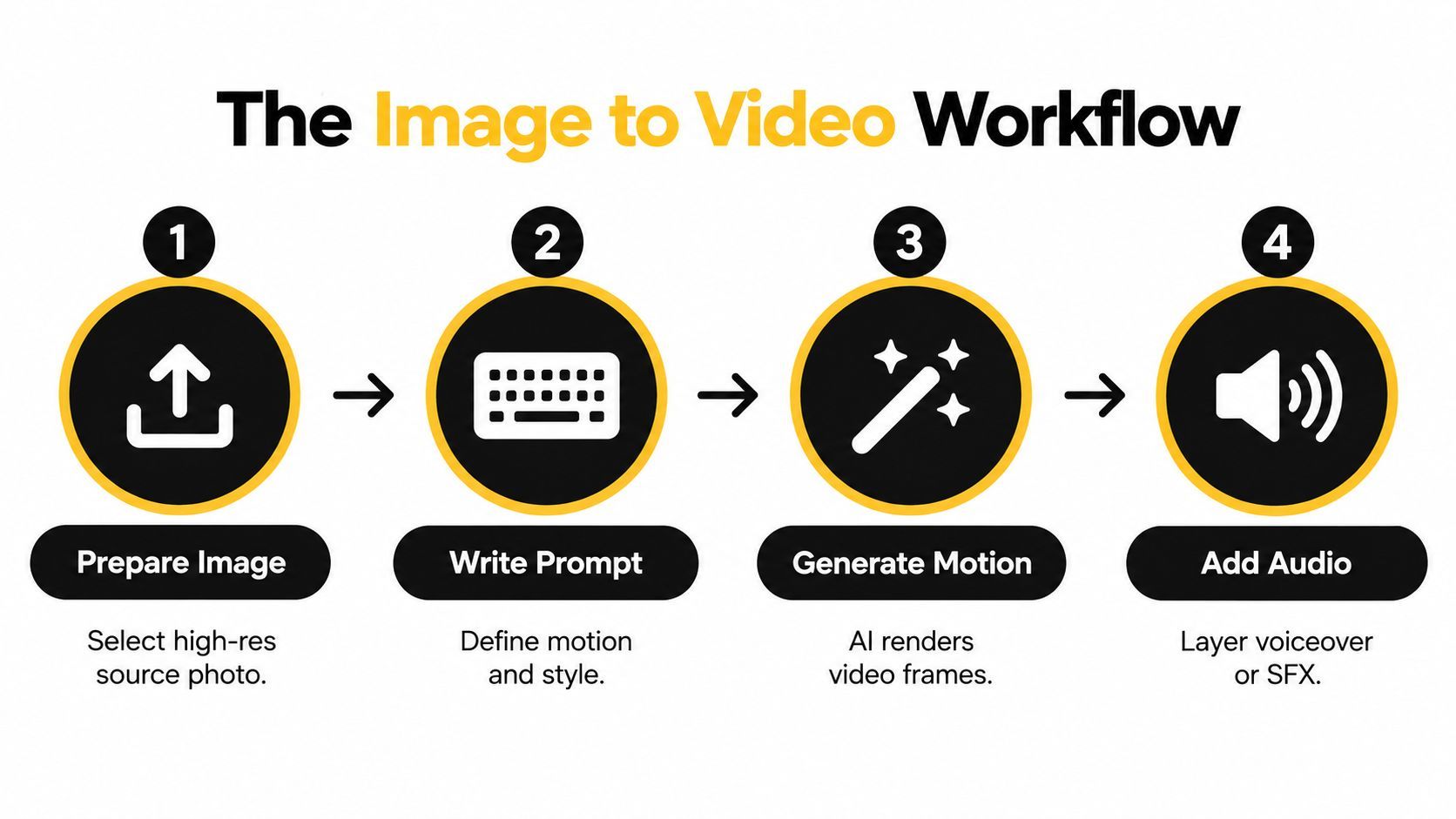
Start with a deliberate source image
Choose an image with a clear subject, readable composition, and enough resolution for the intended crop. A product photographed against a clean background gives the model fewer ambiguous edges than a crowded lifestyle scene. Check the placement of packaging text, hands, faces, and logos before upload.
The source image determines the first frame and strongly influences what the model tries to preserve. If a label is already blurred, distorted, or partly hidden, generation won't reliably reconstruct the missing detail.
Write for motion, not description
A weak prompt repeats what the image already shows: “a blue bottle on a table.” A more useful prompt describes a change over time: “slow forward camera movement, soft light passing across the bottle, stable label, restrained motion.”
Include the subject, action, camera behavior, speed, and restrictions when they matter. “Keep the packaging geometry unchanged” is more useful than “make it realistic” because it gives the system a specific preservation target.
Generate, inspect, and adjust
The first output is a draft, not evidence that the workflow has succeeded. If the motion is too aggressive, reduce the movement and ask for a slower camera path. If the background bends, simplify the scene or use a cleaner source. If the subject drifts, regenerate with stronger preservation language or revise the image itself.
Run-to-run variation is normal. The same prompt may produce different motion paths, so save promising outputs and compare them instead of judging only the latest result.
Finish the communication layer
Motion alone doesn't make an ad understandable. Add a voiceover, music, sound effect, captions, logo treatment, or call to action according to the channel and campaign. Keep those elements separate from the generated scene when you need reliable brand control.
Practical rule: Treat the generated clip as raw creative material until it passes a human review. A smooth animation can still show the wrong product detail.
Your checklist should include the source image, motion prompt, preferred aspect ratio, audio direction, caption text, and final publishing destination. That same checklist can map onto tools such as ShortGenius, regardless of which model creates the underlying frames.
Image to Video vs Text to Video and Traditional Animation
The starting material determines the best production method. If you already have the exact product, person, character, or illustration, image-to-video gives the model a visual anchor. If you only have a concept, text-to-video gives you a faster route from words to an invented scene.
| Criterion | Image to Video AI | Text to Video AI | Traditional Animation |
|---|---|---|---|
| Starting point | An existing image plus optional prompt | A written concept or prompt | Artwork, layers, storyboard, or timeline |
| Main strength | Preserves a chosen visual while adding motion | Creates a scene from an idea | Provides precise choreography and repeatable control |
| Best use | Product shots, thumbnails, portraits, illustrations | Original concepts and speculative scenes | Scripted sequences, exact brand layouts, frame-level edits |
| Main risk | The subject or details may drift | The output may not match a specific reference | Production can require more manual work |
| Control style | Prompt and motion guidance | Prompt and model interpretation | Keyframes, layers, timing, and direct edits |
Image-to-video works well for a product team with an approved bottle image that needs a moving ad. Text-to-video is more suitable for a request such as “a surreal city made of folded paper at sunrise,” where no existing image needs to remain exact.
Traditional animation still has an important role. A designer can specify the exact position of every logo, caption, object, and transition. That matters for regulated claims, complex demonstrations, or campaigns that require a frame-by-frame match to a storyboard.
Use this decision rule:
- Start from an asset, choose image-to-video.
- Start from an idea, choose text-to-video.
- Need exact choreography, choose traditional animation or motion graphics.
You can also combine them. A team might generate an abstract background with text-to-video, then animate an approved product image separately and assemble both in a conventional editor. The right question isn't which technology is universally superior. It's which one gives you the right balance of control and speed for this particular asset.
Real Use Cases for Image to Video AI Generation
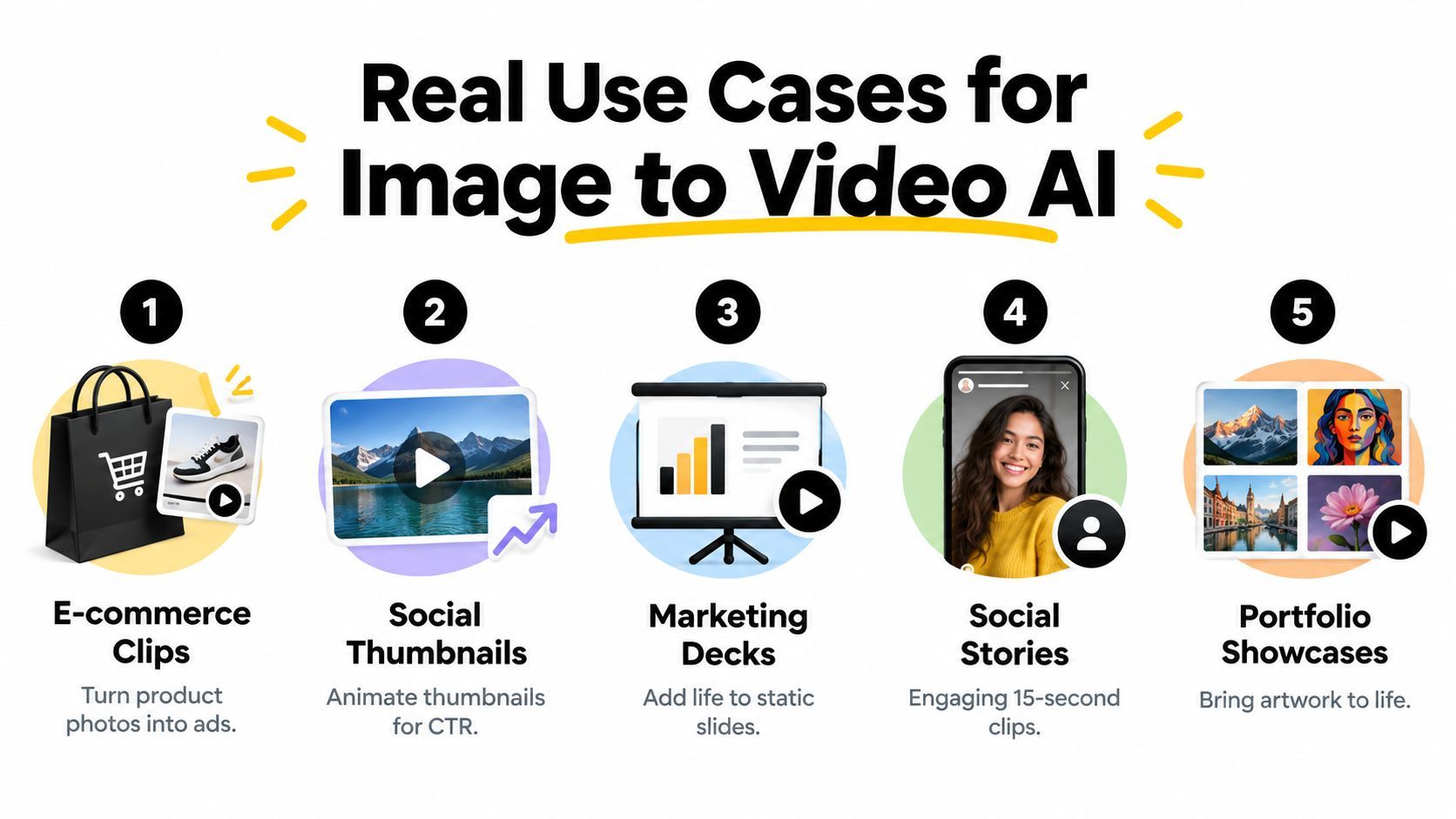
Image-to-video is most valuable when teams have a library of still assets but need more variations for social, advertising, or commerce. The broader AI-video category has moved toward commercial adoption. A 2026 industry estimate placed the global AI-video-generator market between approximately $847 million and $946 million, with projected annual growth of about 18% to 20% toward roughly $3.3 billion to $3.4 billion by 2033 to 2034. Because market definitions differ, these estimates are directional rather than perfectly comparable. The market estimates and adoption context are discussed here.
Product photography for commerce
Animate a clean product photo with a controlled push-in, reflective light, or gentle rotation. The payoff is a more active product presentation without arranging a new shoot. The failure mode is identity drift, especially in labels, lids, edges, and packaging geometry.
Social thumbnails and teasers
A static thumbnail can become a short teaser with moving text, a subtle camera shift, or animated background elements. This gives a creator more visual versions to test. The danger is off-brand motion, where a dramatic effect competes with the title or makes the message harder to read.
Surreal scroll stoppers
Illustrations and campaign artwork can become strange, highly stylized clips with floating objects, impossible environments, or transformation effects. The format suits attention-led creative exploration. The trade-off is weak narrative clarity, so the visual idea still needs a simple reason for the viewer to continue watching.
Educational and coaching snippets
A diagram, portrait, or lesson graphic can receive small movements while narration explains the concept. This keeps the visual connected to the teaching point rather than requiring a full shoot. Review the clip for semantic errors, especially when the animation changes arrows, labels, body positions, or other instructional details.
Rapid DTC ad iteration
A brand can create several motion treatments from one approved image and compare them across creative concepts. The production advantage comes from faster experimentation, not from assuming every generated variant is ready for paid distribution. Check each version through the four quality gates before it enters an ad set.
How ShortGenius Implements Image to Video Generation
ShortGenius treats image to video as one step inside a larger production chain, not as a black box that spits out motion. A team might start with a product photo, a rough script, or a campaign idea, then assemble the voiceover, captions, scene order, and brand styling around that source in the same AI Video and AI Ad Generator workspace. That matters because a usable clip has to clear four gates before publish. The source still needs to look right, the motion needs to feel believable, frames need to stay stable, and the final scene still needs to say what the marketer meant.
The workflow usually runs in five parts.
-
Define the concept. Decide the job of the shot first. One image might serve as the hero visual, a transition, a teaser frame, or a full short scene. This is the semantic anchor. If the role is unclear, review gets messy later because no one is judging the same outcome.
-
Choose the source. Upload a product photo, logo, illustration, or other prepared asset. This is the fidelity anchor. A clean source gives the model less room to invent new shapes, labels, or textures.
-
Select motion. Pick a camera move, a stylized effect, or describe the movement in natural language. This is the plausibility gate in practice. Small moves often behave like a careful editor nudging a still image, while aggressive moves ask the system to invent more between frames.
-
Build the full clip. Add lifelike voiceover, captions, music, scene changes, and brand kit styling. Keeping these editorial controls separate from the generated motion helps a team change narration or text without rebuilding the visual core.
-
Review and publish. Trim the output, swap a voice or scene, resize for each placement, and schedule distribution across supported social channels.
This setup keeps the project together. Teams do not have to export the animation, move to a separate voice tool, rebuild captions, and prepare each channel version by hand.
ShortGenius also groups work into themed series, links image and video generation at the scene level, and includes a unified library, scheduling, ads workflow, secure payments, and an API. Its role is practical. It gives creators and teams one place to turn a source image into a finished, branded clip while keeping review in the loop.
What to Check Before You Publish an Image to Video Clip
A sharp clip isn't automatically a good clip. Score every output through four gates:
- Source-image fidelity: Does the product, person, logo, color, and composition still match the approved source?
- Motion plausibility: Does the movement make physical and visual sense, or does the camera move through objects and surfaces?
- Temporal stability: Do adjacent frames remain steady, without flicker, identity drift, or sudden background changes?
- Semantic alignment: Does the clip still communicate the intended product, use, claim, and relationship between objects?
Research benchmarks treat video quality as multidimensional, separating visual quality, prompt alignment, motion quality, and temporal consistency. Broader frameworks also examine object consistency, background consistency, motion smoothness, and dynamic range. The evaluation framework is described in this benchmark research.
A product video can pass the first frame and fail commercially if the label changes, the cap gains a new shape, or the camera movement implies an impossible use. Newer evaluation work also tests whether systems understand image content, including spatial relationships, attributes, categories, and implicit reasoning. UI2V-Bench provides this semantic evaluation perspective.
Trust adds another review layer. A 2025 survey of UK and US consumers reported that only 0.1% correctly identified every real and deepfake example, while participants were 36% less likely to detect fake videos than fake images. The survey context and related findings are discussed by iProov. If you want a practical resource for recognizing synthetic footage, use this guide to uncovering deepfake videos.
Before publishing, verify the product and claims, retain the original source asset, disclose synthetic elements when appropriate, obtain consent for people shown, and inspect the clip at the target platform's frame rate. Don't present a generated testimonial or demonstration as recorded evidence when it isn't.
Bringing It All Together
A good image-to-video clip usually starts with a simple goal. You already have the frame you want people to remember. Now you need motion that supports it, the way a camera move or a small gesture can make a still product shot feel alive without changing what made the original useful.
Run every output through the four gates from the previous section: fidelity, plausibility, stability, and alignment. Then do something more practical. Look for first-week failure patterns. A bottle label may stay correct for the opening second, then soften as motion increases. A face may hold up in a close crop, then drift when the background gets busier. A prompt may describe the right action, but the final clip changes the meaning of the scene. Those are different problems, and they need different fixes.
That is why the workflow order matters. Start with the source image. Add a motion prompt that says what should move, what should stay fixed, and how strong the movement should feel. Generate a few versions. Review them where they will appear, because a clip that looks fine in an editor can feel wrong in a feed.
ShortGenius combines image-to-video animation with scriptwriting, image generation, video assembly, lifelike voiceovers, editing, brand kits, and multi-channel scheduling. Start with one real asset, score a few outputs, keep the strongest one, and learn which gate breaks first.