How to Use AI Image Generator Tools for Better Visuals

Learn how to use AI image generator tools to write better prompts, dial in settings, handle rights, and plug images into video and ad workflows.
You need a visual for tomorrow's post. The stock photos look familiar, the design queue is full, and your first AI-generated image looks polished until you notice the strange hands, awkward crop, and nowhere to put the headline.
Learning how to use AI image generator tools means learning to direct and evaluate, not just describe. A useful image needs a clear purpose, controlled revisions, and a route into production. It also needs a publication check, because an attractive download isn't automatically an asset you should publish.
How AI Image Generators Turn Text Into Images
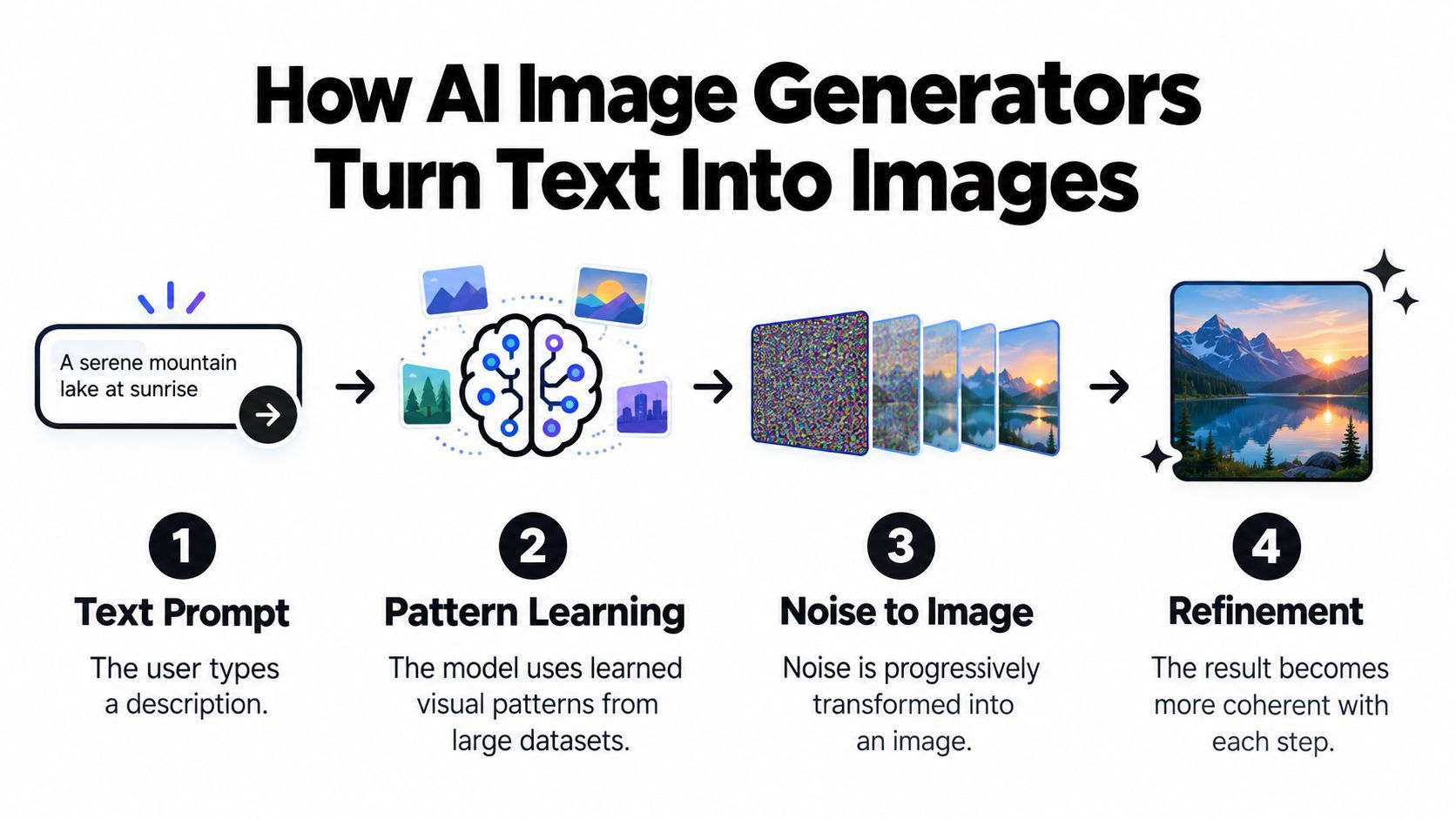
An image generator predicts visual patterns; it doesn't draw with human intent. In modern diffusion-based workflows, the system uses learned patterns to progressively transform noise into an image guided by your instructions. That's why refinement belongs in the process rather than being treated as evidence that you've failed.
The technical history helps explain the distinction. GANs, introduced in 2014, paired a generator with a discriminator that evaluated its output; foundational diffusion research followed in 2015, and latent diffusion, published in December 2021, reduced computational demands by working in a compressed representation, helping enable Stable Diffusion's public release in August 2022, as outlined in the history of AI image generation.
Direct the visible decisions
You don't need to understand the mathematics to write useful instructions. You need to identify the visual decisions you'd otherwise leave to the model.
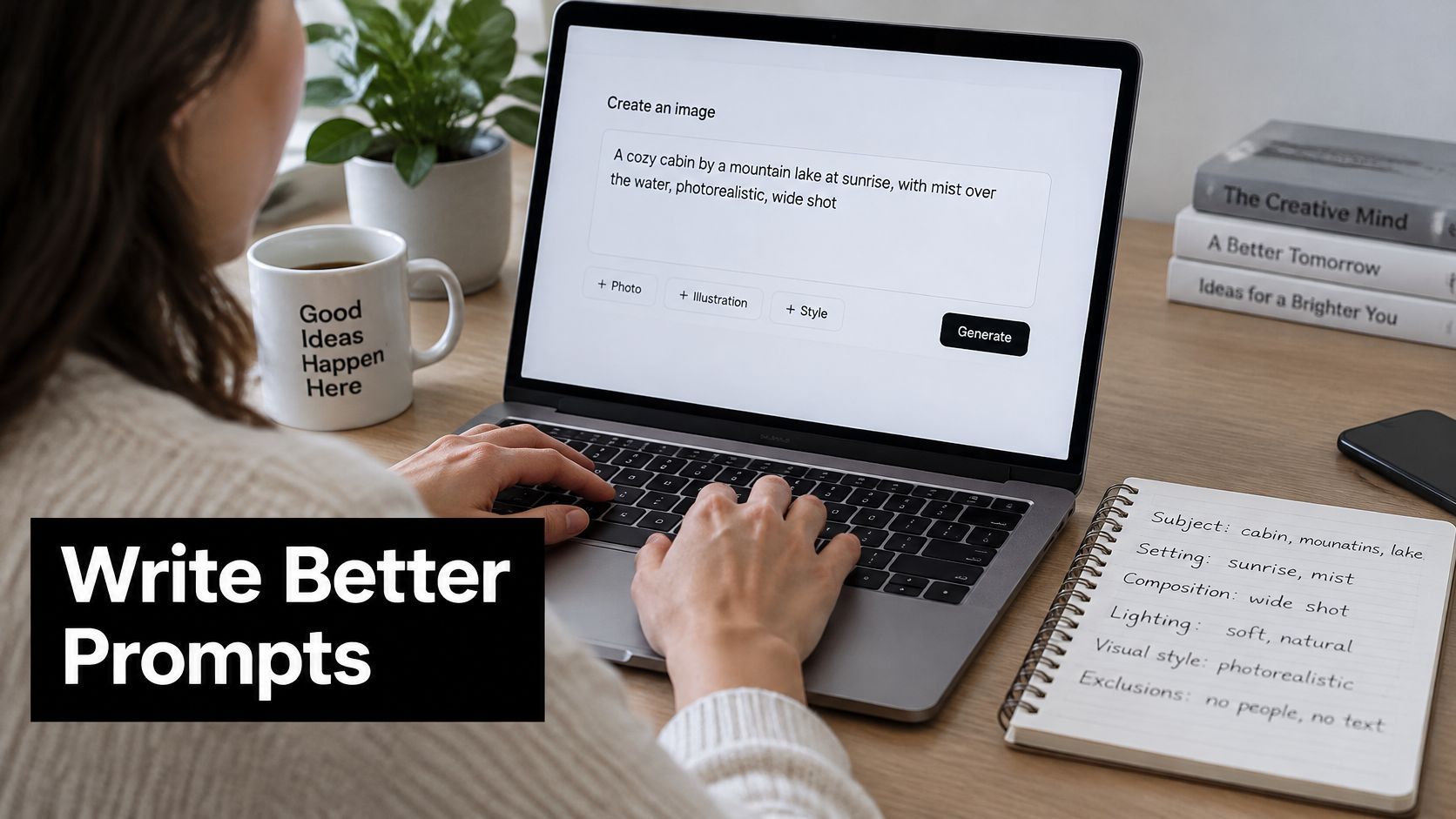
- Subject and setting: Name what matters and where it belongs, rather than requesting a broad theme.
- Composition: Specify the viewpoint, subject placement, and space needed for headlines or captions.
- Lighting and style: Describe visible qualities, such as soft window light and editorial photography.
- Format and exclusions: Choose the intended shape and identify unwanted elements, such as background crowds or decorative lettering.
The process below separates your creative direction from the model's generation process.
Judge the image against its job
A beautiful image can still be wrong. A tightly framed portrait might work as an avatar but fail as an advertising background because there's nowhere to place the offer.
Before generating, finish this sentence: “This image needs to help the viewer understand…” Then define the visible evidence that would accomplish that. For a desk-organizer ad, that might mean a tidy working surface and clearly separated compartments, not an elaborate office scene.
That small brief gives you something concrete to evaluate. Instead of asking whether you like the result, ask whether the subject, hierarchy, and framing support the intended message.
Writing Prompts That Get the Image You Want
Start with the shot you need, not a pile of impressive-sounding adjectives. “Beautiful, cinematic, stunning, award-winning” gives you less actionable direction than a clear description of placement and light.
Treat the prompt box like a compact creative brief.
Rewrite a vague idea into a usable shot
Consider this starting point:
A dog in a park.
There's nothing wrong with it. It leaves the breed, action, camera position, background, lighting, and intended use undecided.
A more directed version would be:
Editorial photograph of a golden retriever resting beside a park bench on a quiet autumn morning. Eye-level camera, dog positioned toward the left, open grass on the right for a headline. Soft side lighting, natural colors, gently blurred background, vertical composition. No people, visible lettering, or accessories.
This isn't better because it's longer. It's better because each detail answers a production question. The empty grass serves the headline, the viewpoint establishes the relationship with the animal, and the exclusions remove distractions.
Use this adaptable formula:
Subject + action + setting + composition + lighting + visual style + destination format + exclusions.
Don't fill every slot automatically. A simple background may need little description, while an educational illustration may need precise relationships between objects. Give the most space to what would make the image unusable if the model got it wrong.
If you're struggling to translate an idea into visual language, you can find prompts for professional AI images at MyImageUpscaler. Treat examples as vocabulary to adapt, not instructions to copy regardless of your brief.
Describe people with context and judgment
When people appear in the image, specificity should serve accurate representation, not decorative diversity. Describe the activity, environment, clothing, and relevant cultural context instead of expecting a generic demographic label to communicate all of that.
Research on AI image creation documents frustration from repeated generation attempts and stereotypes involving race, gender, sexuality, and culture; it also identifies accessibility barriers alongside opportunities for multilingual creation without prior artistic training, as discussed in this study of participation and accessibility in AI image creation.
Turn that concern into a review habit:
- Check roles and agency: Who is shown leading, assisting, working, or observing?
- Review cultural details: Ask a knowledgeable reviewer to assess clothing, objects, and setting when those details matter.
- Compare variations: Look for repeated assumptions rather than approving the most attractive result automatically.
A prompt can express your intent, but it can't replace judgment about whether the result represents people fairly.
For a supplementary walkthrough, use the video below alongside your own project brief.
Before generating, remove conflicting directions. “Full-body portrait” and “tight facial close-up” ask for incompatible framing. Choose the priority instead of hoping the model will reconcile it.
Adjusting Settings and Iterating on Results
The expensive habit is changing everything after a disappointing result. If you rewrite the prompt, switch styles, and alter the framing together, you can't tell which change helped.
Change a single variable per test. Keep a short note beside each candidate describing what changed and whether it solved the specific problem.
Set the frame before polishing
Choose the aspect ratio for the intended placement before spending time on detail. For a vertical video background, compose for that destination from the start, including space for captions and interface elements.
Treat style and quality controls separately. Use style controls to explore the visual direction, then evaluate higher-quality output after you've approved the composition. Check what the controls mean in your chosen tool rather than assuming similarly named settings behave identically.
| Problem you see | Controlled revision to try |
|---|---|
| Subject competes with the headline | Change subject placement or reserved copy space |
| Scene feels too theatrical | Simplify the lighting or reduce stylization |
| Series looks visually disconnected | Reuse approved references and consistent settings |
| Correct composition lacks detail | Test the available quality or upscale option |
| Product shape is wrong | Return to the reference or regenerate the structure |
Where a tool offers seeds, save the seed with the prompt and model settings. Use it as an aid to comparison, not a promise that an edited prompt will preserve every detail.
Preserve what already works
Variation and image-to-image workflows are worth testing when you've approved a layout, character, or visual direction. Supply a reference you have permission to use, then describe both what should remain and what should change.
For example: “Keep the bottle silhouette, camera angle, and background placement. Change the surrounding props to folded towels and smooth stones.” Review the result against the reference rather than assuming the preservation instruction succeeded.
Practical rule: Fix composition before detail. Don't spend effort sharpening an image you'll reject for the wrong framing.
Upscale when the underlying image works and the remaining issue is delivery size or detail. Regenerate or edit when the subject's structure, expression, or relationship to other objects is wrong.
There isn't a useful universal revision count. Stop when the image meets the brief at its actual display size, survives a close inspection, and fits the surrounding design without repair work.
Choosing the Right AI Image Tool for Your Workflow
Choose the tool around the finished deliverable, not the most impressive sample gallery. An isolated campaign illustration and a recurring short-form video series create different editing, review, and publishing needs.
For a standalone generator, inspect the controls you'll use: references, localized edits, variations, export options, and reproducibility settings. For an integrated platform, inspect the handoff: can you move an approved image into the production workspace without rebuilding the project elsewhere?
Standalone Generators vs Integrated Platforms
| Criterion | Standalone Generator | Integrated Platform like ShortGenius |
|---|---|---|
| Primary evaluation | Image creation and editing controls | Connection between generation and finished content |
| Suitable project | An image that will be finished elsewhere | Images intended for video scenes and ads |
| Revision test | Can you make precise visual changes? | Can you replace a scene without rebuilding the edit? |
| Asset handling | Check export and file-management options | Check shared library and project organization |
| Brand application | Plan the downstream design step | Check brand kit application in the workspace |
| Publication | Arrange a separate publishing process | Check supported scheduling destinations |
Neither approach wins automatically. If your client needs a highly controlled hero image, accepting an export step may be sensible. If your team's main task is assembling narrated social videos, test how much work remains after generation.
For product-focused projects, Genpire is another resource to consult when exploring AI product-design tools. Use a real project brief to evaluate candidates rather than choosing from feature descriptions alone.
Run a handoff test
ShortGenius combines scriptwriting, image generation, video assembly, and natural voiceovers, with editing tools for captions, resizing, scene swaps, and brand kits. That makes it an option to evaluate when the image is an ingredient in a video rather than the final deliverable.
Use the same approved brief to test your shortlist:
- Generate the required asset: Judge against your brief, not against each tool's showcase.
- Make a specific correction: Ask for a meaningful change while preserving the approved elements.
- Finish the deliverable: Add the actual headline, narration, or layout the asset requires.
- Review the handoff: Note every download, upload, duplicate file, and manual reconstruction.
The trade-off is control versus workflow fit. Don't accept weak visual control just because production is convenient, and don't build an elaborate generation setup if the bottleneck is assembling and publishing.
Choose the setup that lets you correct the work reliably and deliver the format you make.
Using AI Images Responsibly Before You Publish
“It has metadata” isn't a sufficient publication check. Provenance needs to survive the route from generation to editing, export, and distribution, not merely exist in the original download.
An empirical study of 50 AI image systems found that only 38% implemented adequate watermarking and 8% used deepfake labeling, while describing commonly used metadata as easily removable; the same research discussion reports InvisMark's more than 97% bit accuracy under image manipulations, illustrating the difference between promising technical capability and dependable adoption across tools (AI image watermarking and provenance research).
Keep evidence with the asset
Retain the original generated file separately from production exports. Save the prompt, relevant settings, reference permissions, and the licensing terms applicable to your intended use.
Inspect available provenance information, including C2PA-style credentials where supported. Then inspect the edited export rather than assuming the original information survived. Ordinary editing, compression, or social-platform upload can strip metadata, so treat the publication copy as a separate checkpoint.
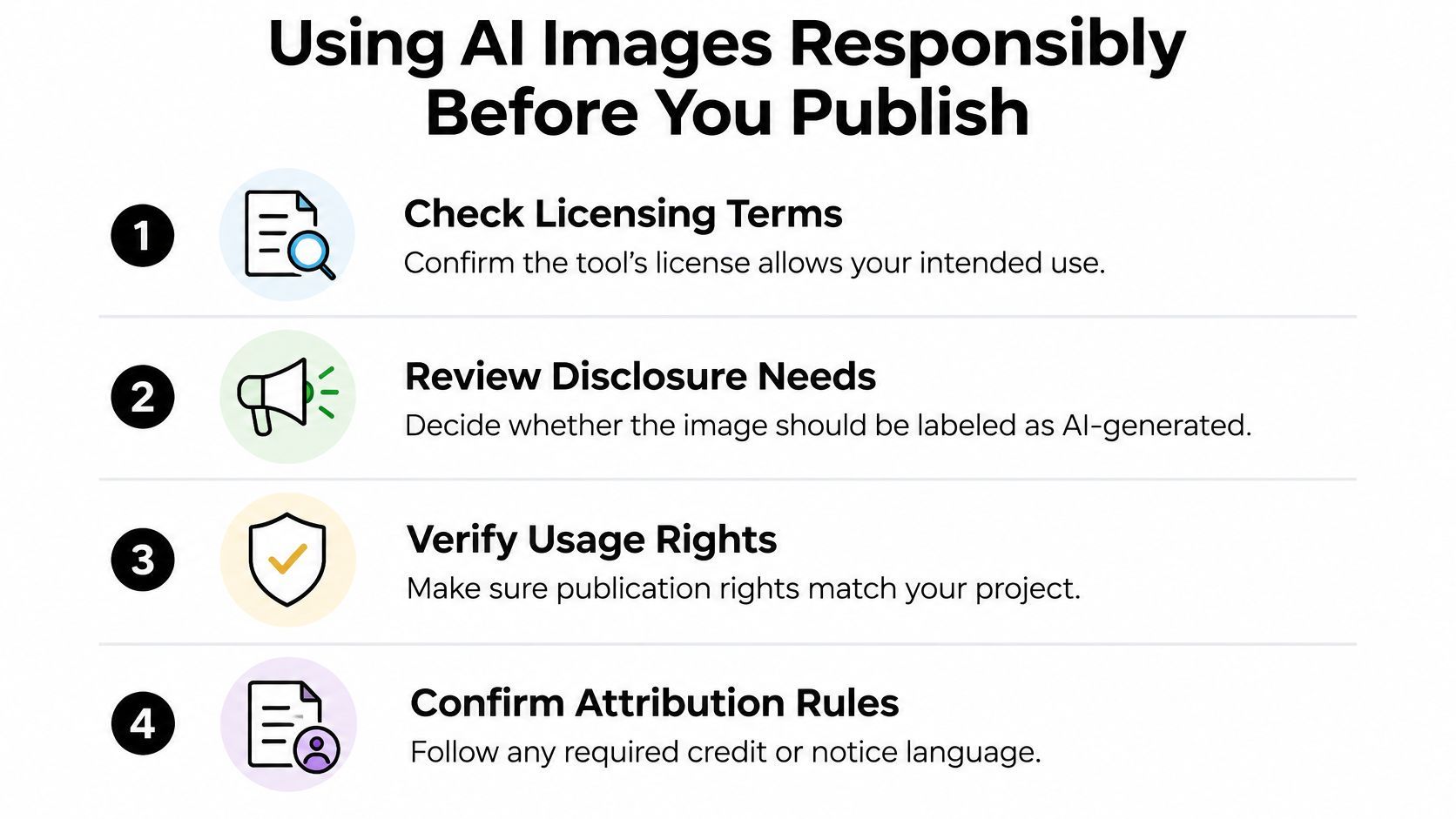
The checklist below covers the rights and disclosure decisions to record before approval.
Make disclosure understandable
An invisible marker and a visible disclosure serve different purposes. When viewers could mistake a synthetic scene for documentary evidence, prefer a clear viewer-facing label rather than relying solely on information they may never inspect.
- Check licensing terms: Confirm that your intended commercial or editorial use fits the tool's current terms.
- Review third-party material: Check permissions for uploaded photographs, recognizable people, logos, and other reference assets.
- Choose disclosure language: Use an accurate description, such as “AI-generated illustration,” when it fits the image.
- Record the decision: Keep the approval and any required attribution with the project.
This isn't a universal legal clearance process. Escalate uncertain rights, sensitive likenesses, or regulated advertising claims to an appropriate reviewer.
Publication standard: A viewer should be able to understand what the image represents without needing access to your production notes.
Complete the accessibility pass before release. Write alt text that explains the image's relevant content and purpose, rather than merely identifying it as AI-generated. For text overlays, use strong contrast and inspect readability over the actual background.
If the visual communicates an important claim, make sure the surrounding text communicates it too. Don't make essential information depend entirely on someone seeing the picture.
Bringing AI Images Into Video and Ad Projects
Start with a specific example: an illustrated desk scene for a short ad about a planning app. The still's job is to establish the workday setting, while the narration and overlay explain the offer.
Don't ask the generated image to act as a finished screenshot, testimonial, and headline simultaneously. Keep the background illustrative, then add approved interface assets and editable text during production.
Build the scene around the message
Write the narration before assembling the visual sequence. Mark where the opening problem, product explanation, and call to action belong, then assign the generated still to the moment it supports.
In ShortGenius, place the approved image into the video project as a scene or background and pair it with a natural voiceover. Listen for pacing and pronunciation before trimming the scene to the spoken line.
- Apply the brand kit: Use the approved colors and styling for overlays rather than trying to reproduce them inside the generated pixels.
- Add captions deliberately: Check their placement against the subject and the reserved text area.
- Test a preset effect: Try camera movement or a scroll-stopper treatment only if it supports the message.
- Replace weak scenes: Use scene swaps when an image doesn't work in context instead of decorating around the problem.
Motion should have a purpose. A restrained move toward a relevant object may help direct attention; an elaborate effect can distract from a straightforward offer.
Adapt the edit before scheduling
Use resizing to prepare versions for TikTok, YouTube, Instagram, Facebook, and X, then inspect each version. Don't approve them solely because the software produced the requested shape.
Check whether the subject remains visible, captions fit, and the call to action appears when the narration reaches it. Watch with sound, then without sound, to evaluate whether the message remains understandable.
| Deliverable | Final review question |
|---|---|
| Opening scene | Does the image establish the intended problem? |
| Thumbnail | Is the focal point clear at a small display size? |
| Ad variation | Does the visual support the specific offer? |
| Channel-specific export | Did resizing damage the composition or text placement? |
Organize related versions into a themed series and use auto-scheduling only after reviewing the finished exports. Fast trims, voice swaps, and scene replacements make useful revision tools, but approval should happen on the version viewers will encounter.
A generated still becomes production-ready when the image, narration, typography, and publishing context work together.
Quick Tips and Your Next Step
The most useful mindset is to treat generation as part of production, not a separate creative lottery. Define what the asset must accomplish, make deliberate changes, and approve it in the context where people will see it.
Keep these reminders beside your next project:
- Write like a shot list: Name the subject, framing, light, and intended use. Replace decorative adjectives with visible instructions.
- Revise with a hypothesis: Identify the problem before changing a setting. Keep the candidate that solves it, not the newest result.
- Keep the production record: Retain the original and the approval details so you can trace the published asset back to its creation.
- Review meaning as well as appearance: A polished image still needs representation, accessibility, rights, and disclosure checks.
- Test the full handoff: Evaluate the asset inside the ad, video, or post rather than approving it in the generator's preview alone.
Choose an asset with a real deadline
Pick an upcoming post or ad that already has an audience, message, and destination. Write its visual brief, generate a candidate, and carry that candidate through the complete editing and review process.
For an additional campaign-oriented resource, consult Zemith's guide to AI image creation for marketing campaigns. Use it alongside your own brief, not as a reason to keep collecting prompt formulas instead of finishing an asset.
Your next step is concrete: choose the post, write the structured prompt, and create a publishable draft today. Judge success by whether the finished visual communicates the intended message and is ready for review, not by how impressive it looks in isolation.
ShortGenius brings image generation together with scriptwriting, video assembly, voiceovers, captions, and scheduling for AI video and ad production. Visit ShortGenius (AI Video / AI Ad Generator) and use your next post's brief to turn a generated still into a reviewed, captioned video ready to schedule.