How to Make Product Demo Videos with AI That Convert

Discover how to make product demo videos with AI using a modern workflow. Learn scripting, visual generation, editing, and optimization for compelling demos.
Making a product demo video with AI is all about using a platform to automatically spin up scripts, visuals, and voiceovers from a simple text prompt. It's a game-changer, letting you create polished, on-brand videos that actually convert in minutes—not weeks. You get to sidestep the painful production cycles and steep costs that come with traditional video creation.
A Whole New Playbook for Product Demos
Let’s be honest: the old way of making product demos is broken. The painfully long production timelines, the eye-watering agency fees, and the one-size-fits-all videos just don't cut it anymore. We live in a world that craves speed and personalization. If it takes you a month to get a single video out the door, you’ve already lost.
This guide walks you through a completely new workflow for creating product demo videos with AI. This isn’t just about trimming a few hours off your schedule; it’s a fundamental shift in strategy. The core idea is simple: ditch the slow, manual slog for a rapid, data-driven process where you can test tons of creative ideas without breaking a sweat.
Why AI Isn't Just a "Nice-to-Have" Anymore
Modern marketing is all about agility. You need to be able to A/B test different hooks on TikTok, spin up unique ad creative for Instagram Reels, and keep your YouTube content fresh. Trying to do all that manually is a recipe for burnout. AI-powered platforms completely change the math by taking on the grunt work.
This new process is a clean, powerful flow that takes you from a raw idea straight to a full-blown campaign.
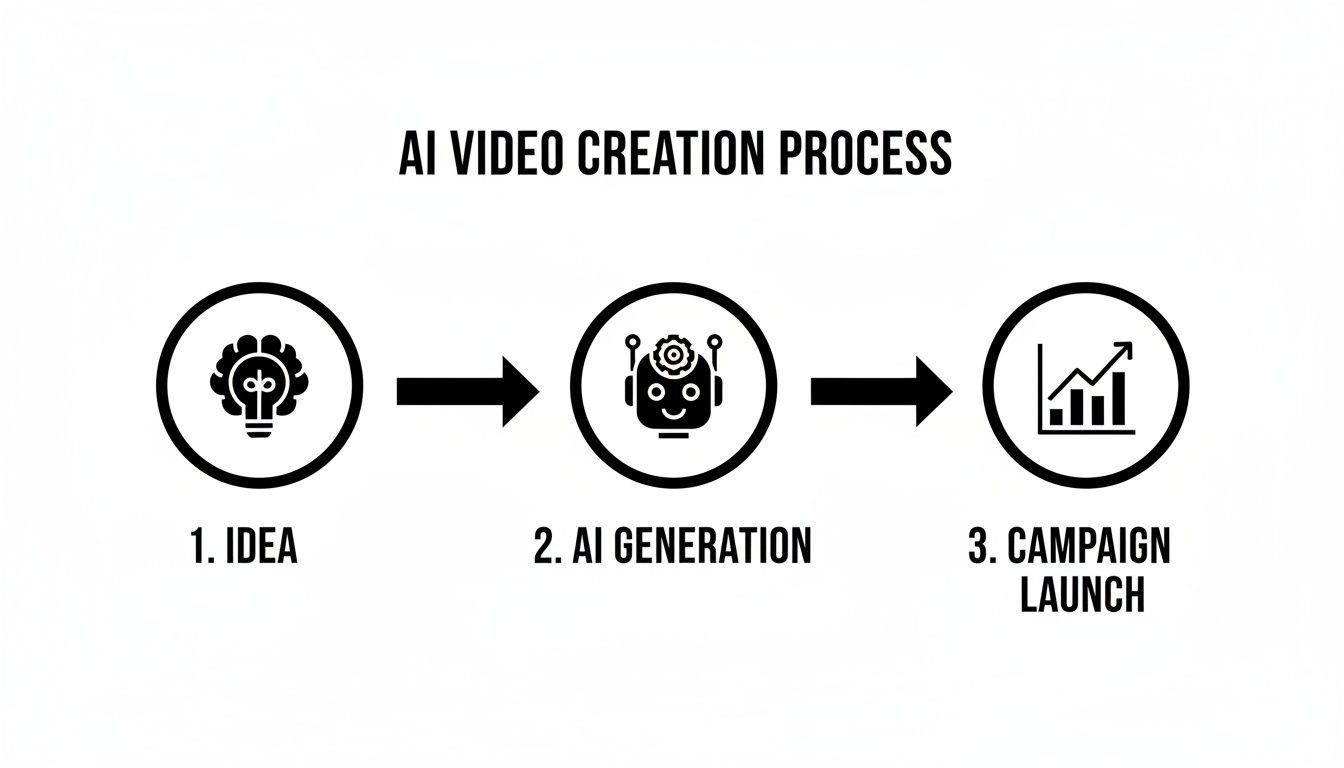
The flowchart above shows exactly how AI becomes the engine that turns a simple concept into a measurable marketing campaign, making the whole production process seamless. That efficiency is your new competitive edge.
The Modern AI-Powered Workflow
Forget wrestling with complex software or needing specialized technical skills. The new playbook is built around your strategic input. You bring the core message, and the AI builds the video around it.
Here’s what that looks like in practice:
- Automated Scripting: Generate scripts that hit on real customer pain points and frame your product as the clear solution.
- Instant Visuals: Create everything from UGC-style scenes and screen recordings to polished product shots, all from text descriptions.
- Natural Voiceovers: Add a human-sounding narrator in different languages and tones without ever touching a microphone.
- Rapid Iteration: Churn out multiple versions of a single video to find out what actually connects with your audience.
The goal is no longer to spend a month creating one "perfect" demo. It's about quickly producing dozens of good ones to see what truly moves the needle. This iterative, test-and-learn approach is where AI gives you an almost unfair marketing advantage.
For a great deep-dive on the nuts and bolts, check out this practical guide on how to make videos with AI. Throughout this article, we’ll break down each stage of this modern workflow, giving you actionable steps and real-world examples to get you started right away.
From Core Idea to AI-Ready Script
Every great AI-generated video starts with a smart, human-led strategy, not fancy tech. Before you even think about writing a prompt, you’ve got to lay the groundwork. This is where you give your AI the focused direction it needs to create a demo that actually converts, not just one that looks slick.
Think of your AI tool as a hyper-efficient intern—brilliant, but it takes everything you say literally. Give it a vague command like, “make a video for my app,” and you’ll get something bland and forgettable. The real power comes from feeding it specific, strategic inputs that guide the whole process.

Pinpoint Your Single Most Important Goal
First things first: what is the one action you want someone to take after watching your video? Seriously, just one. Trying to cram every single feature and benefit into a 30-second spot is the fastest way to overwhelm your audience and kill your message.
Instead, pick a single, compelling goal. Your primary objective could be anything from:
- Driving sign-ups for a specific free trial.
- Getting people to download your mobile app.
- Announcing a new integration to your current users.
- Highlighting that one key feature that blows your competitors out of the water.
When you nail down one clear goal, everything else falls into place, from your opening hook to the final call to action. That kind of focus is the secret to making product demo videos with AI that actually move the needle.
Focus on One Feature and One Pain Point
With your goal set, zoom in on the specific feature that gets the job done. But here’s the key: connect that feature directly to a real, nagging pain point your audience deals with every single day. People don’t buy features; they buy solutions to their headaches.
Your script needs to tell a simple, relatable story. A framework I always come back to is the classic Problem-Agitate-Solution (PAS) model. You start by stating a problem they know all too well, agitate it by reminding them how frustrating it is, and then ride in with your product as the perfect solution.
Your AI script prompt shouldn't just list your product's specs. It needs to tell the story of your customer's struggle and frame your product as the hero that saves the day. That’s how you create an emotional connection that gets people to act.
Crafting a High-Impact AI Script Brief
Now it's time to translate that strategy into a brief the AI can actually work with. This is your chance to turn a general idea into a targeted set of instructions.
Just look at the difference:
- Weak Prompt: "Write a script for my project management app."
- Strong Prompt: "Generate a 30-second UGC-style script for a project management app. The audience is freelance designers buried in client feedback. Start with the hook: 'Tired of endless email chains?' Show how our visual feedback tool clears up the confusion. End with the CTA: 'Try our visual feedback tool for free today.'"
The strong prompt gives the AI all the necessary ingredients:
- Video Style: UGC (User-Generated Content) feels authentic.
- Target Audience: Freelance designers have very specific frustrations.
- The Hook: A question that immediately grabs their attention.
- The Solution: Names the exact feature to showcase.
- Call-to-Action (CTA): A clear, easy next step.
This level of detail gives the AI a solid foundation to build upon. If you want to go deeper on turning these ideas into a full-blown narrative, our guide on the script-to-video creation process breaks it down even further. Honestly, spending the extra time on a detailed brief is the most important part of this whole workflow, making sure your final video is perfectly wired to hit your goals from the get-go.
Generating Engaging Visuals and Voice with AI
Alright, you've got a solid, AI-ready script in hand. Now comes the fun part: bringing it all to life. This is where you hand over your text and let the AI tools work their magic, transforming your plan into a dynamic video with compelling visuals and audio. You really don't need to be a video pro anymore to get professional-looking results.
The whole process is surprisingly direct. You feed the platform your script, and the AI starts generating scenes, recording a voiceover, and even suggesting effects to tie it all together. This completely changes the game for production timelines. In fact, by 2025, AI tools are on track to slash typical video production time by about two-thirds. This means teams can go from a simple idea to a finished video in a matter of hours, not weeks.
To really understand how this works, it helps to see what you put in and what you get out. Here’s a quick breakdown of the kind of assets AI can create based on your inputs.
AI Content Generation Inputs and Outputs
| Input Type | Example Input | Generated AI Output |
|---|---|---|
| Script Text | "Our app simplifies team collaboration, making it easy to track project deadlines." | A full voiceover narrating the script with natural inflection. |
| Scene Prompt | "A team of diverse professionals collaborating around a modern conference table, looking engaged." | A stock-style video clip or animated scene matching the description. |
| Product Screenshot | An uploaded image of your software's main dashboard. | An animated screen recording that zooms in on key features, with added visual highlights. |
| Brand Colors/Logo | Your company's hex codes and logo file. | Branded text overlays, transitions, and an outro screen. |
This input-output loop is the core of the AI creation process, allowing you to quickly assemble a video piece by piece without needing a massive asset library of your own.
Crafting Authentic AI-Generated Scenes
The first order of business is translating your script's story into visuals. The best AI video generators give you a ton of stylistic options, so you can pick something that matches your brand and feels right for the platform you’re posting on.
You can direct the AI to create a few different kinds of scenes:
- UGC-Style Footage: This is gold for creating relatable ads on TikTok or Instagram. A simple prompt like "a busy freelancer working from a coffee shop" or "a customer excitedly unboxing a product" can produce clips that feel totally genuine.
- Crisp Screen Recordings: For a product demo, clarity is everything. You can upload your own screen captures or have the AI generate clean, animated versions that walk through key features without any distracting on-screen clutter.
- Polished Product Visuals: Need a slick shot of your product in action? AI can generate studio-quality visuals, placing your app or physical product in different settings to show off its benefits.
The real trick is to mix and match these styles. A little variety goes a long way in keeping your audience hooked. Our guide on how to generate videos with AI from text dives even deeper into mastering this part of the process.
Creating a Natural and Persuasive AI Voiceover
A great voiceover can make or break your demo video. We're long past the days of robotic, monotone AI voices; today’s text-to-speech tech is incredibly good, producing narration that sounds warm, engaging, and almost indistinguishable from a human.
When you generate the voiceover, dial in on three key things to match your brand’s personality:
- Tone: Are you going for energetic and upbeat, or calm and authoritative? Pick a voice that fits your brand. A B2B SaaS tool might want a confident, professional tone, while a new consumer app could use a friendlier, more casual one.
- Pace: The narration speed sets the rhythm. A slightly faster pace creates excitement, while a slower, more deliberate cadence is perfect for explaining complex features clearly.
- Accent: Trying to connect with a global audience? Many tools offer a huge range of accents (US, UK, Australian) and languages, letting you create localized demos with just a few clicks.
Pro Tip: Don't just paste your entire script into the voiceover tool at once. Break it down sentence by sentence. This gives you granular control to tweak the pacing and add pauses, making the final delivery sound much more natural and conversational.
Elevating Your Demo with Dynamic Effects
Once your core scenes and voiceover are locked in, it's time to add that final layer of polish. Most AI video platforms have built-in libraries of effects designed to grab and hold attention—which is crucial when you're fighting for eyeballs on a crowded social feed.
Think about adding elements like:
- Scroll Stoppers: These are eye-catching animations or bold text overlays in the first 1-3 seconds that make people stop scrolling.
- Dynamic Camera Movements: You can bring static images or screen recordings to life with subtle pans, zooms, and other effects that create a sense of motion.
- Animated Text and Captions: Highlighting key benefits with on-screen text not only reinforces your message but also makes your video accessible to people watching with the sound off.
Using these built-in effects is a fast way to make your AI-generated demo look like it came from a professional agency, ensuring it’s not just informative but genuinely captivating.
Bringing It All Together: Editing and Branding Your AI Demo
You've got the AI-generated visuals and a crisp voiceover. Now comes the fun part: turning those raw assets into a polished, on-brand product demo that’s ready to convert. This isn't about getting bogged down in tedious, frame-by-frame manual editing. Instead, we'll use AI to make quick, smart refinements that ensure speed and consistency.
Think of this as the final polish before your video meets the world. We’ll be tightening up the pacing, stamping your brand all over it, and adding essentials like captions to make sure it looks professional and feels cohesive.
Fine-Tuning the Pace and Flow with AI Editors
Even with a flawless script, the timing can make or break your video. If the flow is off, viewers will drop off. Thankfully, modern AI video platforms come with intuitive, timeline-based editors that let you easily dial in the pacing of your demo. You don’t need to be a video pro; most of the work is simple drag-and-drop.
Here's a quick checklist to tighten up your video’s rhythm:
- Trim the Fat: Snip out any dead air or awkward pauses at the start and end of each scene. Keep the energy high from the first second.
- Sync Visuals to Voice: Make sure your on-screen action perfectly matches the narration. When the voiceover mentions a feature, that's the exact moment the visual should appear.
- Adjust Scene Length: Some moments need an extra beat to really land with the viewer, while others can be quick cuts to keep things moving. A snappy, engaging rhythm is what you're after.
These seemingly small tweaks have a huge impact on watch time. A well-paced video just feels more professional and holds attention. If you're hunting for the right tool, our breakdown of the best AI video editing software is a great place to start.
Apply Your Brand Identity in Seconds
Brand consistency is everything. It’s what builds trust and makes your content immediately recognizable in a crowded feed. AI tools have made this incredibly easy with brand kits—basically, a preset template that stores your company's entire visual DNA.
A brand kit is a lifesaver. It holds your logos, color palettes, and specific fonts. Once you've set it up, you can apply your brand identity to any video with a single click.
This feature saves a massive amount of time. Forget manually adding logos or fussing with hex codes for every single text overlay. The AI handles it all, ensuring every demo you produce—from a quick TikTok to an in-depth YouTube tutorial—looks and feels uniquely yours.
The Real Magic: A/B Testing and Rapid Iteration
Here’s where making product demos with AI really shines: the ability to test and iterate at a speed that was once impossible. You're no longer stuck with one "final" version of your video.
With AI, A/B testing becomes second nature. You can spin up multiple variations of your demo to see what actually works with your audience.
- Test Your Hooks: Try a few different opening lines or visuals to see which one stops the scroll in those crucial first three seconds.
- Experiment with CTAs: Does a "Learn More" button work better than "Sign Up Free"? Test different calls-to-action to find out what drives more clicks.
- Swap Out Visuals: Pit a UGC-style scene against a sleek screen recording to see which one performs better.
This rapid feedback loop gives you the data you need to make smarter marketing decisions. This isn't just a neat trick; it's a fundamental shift. Industry summaries estimate that by 2025, around 50% of small businesses will have adopted AI video tools precisely because they need this kind of data-backed agility to compete.
One-Click Resizing for Every Social Platform
Finally, your polished demo needs to be ready for every channel your audience uses. A 16:9 landscape video for YouTube is going to look terrible in a 9:16 Instagram Story.
AI video editors solve this with one-click resizing. The platform automatically reformats your entire video for different aspect ratios, intelligently reframing the action so nothing important gets cropped out. You create one master demo and can instantly adapt it for every platform, maximizing your reach without ever having to start over from scratch.
Publishing and Optimizing for Peak Performance
So, you’ve used AI to create a fantastic product demo. That's a huge win, but hitting the export button is really just the beginning. The true value comes from what you do next—how you get it in front of the right people and learn from their reactions.
This is where AI's incredible speed becomes your secret weapon. It’s not about making one perfect video; it’s about building a system of constant, rapid improvement. This "publish, analyze, iterate" cycle is what truly separates the campaigns that soar from those that get lost in the noise.
Automating Your Publishing Schedule
We all know consistency is king on social media, but who has the time to manually post everywhere? This is where AI-powered scheduling tools come in. They handle the grunt work of posting, freeing you up to maintain a steady presence where your audience lives.
Once your demo video is polished, don't just throw it out there. Timing is everything. Do a little research to find the best time to upload your videos on YouTube to make sure it lands when your audience is most active and ready to watch.
Putting your publishing on autopilot means you can shift your focus to what really matters: figuring out what works. Instead of getting tangled up in posting logistics, you can invest that time in understanding your audience.
Tracking the Metrics That Actually Matter
With your videos out in the wild, it's time to put on your data detective hat. It's easy to get distracted by vanity metrics like view counts, but those don't tell the whole story. You need to focus on the numbers that show whether your demo is actually doing its job.
These are the core metrics I watch like a hawk:
- Watch Time: Are people sticking around? A big drop-off in the first three seconds is a classic sign your intro isn't grabbing them.
- Click-Through Rate (CTR): How many viewers are actually clicking your call-to-action? A low CTR could mean your offer isn't strong enough or the CTA itself is buried or unclear.
- Conversion Rate: This is the bottom line. How many viewers signed up, bought the product, or took the final step? This is your ultimate measure of success.
The goal isn't just to get views; it's to get action. These metrics cut through the noise and give you an unbiased report card on your video's performance, turning marketing from a guessing game into a science.
Creating a Powerful Performance Feedback Loop
This is where the real magic happens. When you dig into the data, you can start connecting the dots. Maybe you find that demos starting with a pain point have a 20% higher watch time. Or perhaps a specific UGC-style clip doubles your conversion rate.
That data is your roadmap for what to do next. Take those winning ingredients and plug them right back into your AI video generator to spin up new, smarter variations.
You end up with an incredibly effective cycle:
- Publish a few different AI-generated video concepts.
- Analyze the data to see which hooks, visuals, and CTAs get the best results.
- Iterate by using AI to create new demos built around those proven elements.
This data-driven loop allows you to continuously sharpen your creative and improve your return on ad spend (ROAS). You’re no longer just making videos—you're building a self-improving system. And the audience is ready for it. Recent consumer research shows that 65% of consumers are open to AI-generated videos from brands, and that number climbs to 78% for millennials. This trend is only growing, showing a clear appetite for the kind of content you can now create at scale.
Got Questions About Making Videos with AI?
Diving into AI video creation for the first time can feel a bit like stepping into the unknown. It's totally normal to have questions, especially when your marketing results hang in the balance. Let's tackle some of the most common concerns I hear and get you feeling confident enough to start today.
Will My Videos Look Robotic or Fake?
This is probably the number one hesitation I see from marketers, and it's a fair point. We've all seen those early AI attempts that were just… clunky. But the tech has taken a massive leap forward, and fast. Modern AI video tools are now surprisingly good at creating natural, authentic content that actually connects with people.
The real magic isn't just in the AI, though—it's in your creative direction. You're still the strategist here. Many of the best platforms today are brilliant at generating realistic UGC-style (user-generated content) scenes. They nail that genuine, creator-made vibe that works so well on platforms like TikTok and Instagram.
And the voiceovers? They've gotten scary good. You have a massive library of voices to pick from, so you can find the perfect tone, pace, and personality to match your brand. The goal was never for AI to replace human creativity; it's here to automate the tedious, time-sucking parts of production so you can focus on the big picture.
How Much Technical Skill Do I Really Need?
Honestly, almost none. That’s one of the best parts. These platforms were built with marketers, founders, and creators in mind—not professional video editors who live in complex software. If you can write a clear sentence, you have all the skills you need to get rolling.
The whole process is designed to be dead simple:
- You write, it creates: You guide the AI with simple text prompts to generate scripts, scenes, and voiceovers.
- Simple controls: Think drag-and-drop timelines and easy-to-understand menus for adding music or your brand colors.
- No intimidating software: You can officially forget about the steep learning curve of tools like After Effects or Premiere Pro.
The AI does all the heavy technical lifting, letting you concentrate on your message and strategy.
Can I Use My Own Product Images and Clips?
Absolutely. In fact, you should. The most powerful approach is often a hybrid one, where you mix your own unique assets with AI-generated content. This keeps your brand's specific look and feel front and center.
Most of today's AI video platforms are built for this. You can easily upload:
- Your company logos
- Specific product photos and screenshots
- Screen recordings of your software in action
- Existing B-roll or customer testimonial clips
From there, the AI can help you weave a compelling story around those assets. It can create a snappy intro, add a professional voiceover, generate animated captions, and apply slick effects to make your existing content pop. It's truly the best of both worlds: you get total brand consistency plus the incredible speed of AI.
By blending your authentic brand assets with AI-generated scenes and effects, you create a final product that is both uniquely yours and produced at a scale that would be impossible with traditional methods.
How Do I Make Sure My AI Demo Videos Actually Convert?
This is the million-dollar question, isn't it? A pretty video is nice, but a video that drives results is what pays the bills. High conversion rates are born from a solid strategy, not just a fancy tool. Your success depends entirely on how you guide the AI.
First off, your script is everything. It needs to hit on your audience’s biggest pain points and position your product as the clear solution. This all starts with a hook that grabs their attention within the first three seconds. If you lose them there, they're gone for good.
Next, focus on clarity over complexity. Don't just list a dozen features. Show exactly how your product solves a real problem for someone. Tell a simple, relatable story of transformation.
Finally—and this is the most critical part—you have to use AI's speed to test everything. This is your unfair advantage.
- Create multiple versions with different hooks.
- Test various calls-to-action to see what gets clicks.
- Experiment with different visual styles or voiceovers.
Let the data be your guide. When you find what resonates, double down on it. Use the AI to quickly iterate on your winners. This rapid, data-driven cycle is what turns good demos into high-converting workhorses, and it's the core of making product demo videos with AI successfully.
Ready to stop spending weeks on video production and start creating high-performing ads in minutes? With ShortGenius, you can generate scripts, scenes, voiceovers, and endless creative variations from a single prompt. Start building your next winning campaign today.