How to Get an AI to Write a Script That Works

Learn how to get an AI to write a script for short-form video and ads. Master prompt templates, iterative refinement, and scene mapping for better results.
Most advice about how to get an AI to write a script starts with a magic prompt. Add a hook, a target audience, a call to action, and the finished video script will appear. In production, that approach usually creates fluent filler, rushed pacing, generic dialogue, and visual directions nobody can shoot.
AI becomes useful when you stop treating it like a vending machine and start treating it like a junior writer inside a controlled production process. Give it structured context, approve the story beats before drafting, separate narration from visual execution, and use an independent review pass to catch defects. The objective isn't raw generation speed. It's a script that fits the platform, supports its claims, sounds intentional, and still carries a recognizable human point of view.
Why One-Shot Prompts Fail at Scriptwriting
A one-line idea gives an AI almost none of the information it needs to make production decisions. “Write a short video about sustainable clothing” doesn't define the viewer, platform, runtime, voice, visual resources, commercial objective, level of expertise, or acceptable claims. The model has to guess all of those variables, and its guesses tend to produce familiar patterns rather than a distinctive, shootable concept.
The deeper problem is that locally plausible writing isn't the same as coherent storytelling. A sentence can sound natural while weakening the scene, repeating information, changing the character's motivation, or making the payoff arrive too late. A Stanford comparison generated 500 synthetic screenplay segments and evaluated them against 500 real screenplay segments, finding that plausible text alone didn't guarantee a compelling or coherent script. The strongest non-monotonic method only marginally exceeded baseline systems on most automated measures, including BERTScore. The Stanford report on screenplay generation makes the practical lesson clear: an AI can produce convincing local prose while missing the larger dramatic job.
The draft is not the deliverable
A professional script has several simultaneous constraints:
- Narrative movement: Each scene should introduce, develop, or resolve an idea.
- Performance fit: Spoken language must sound natural aloud, not merely read well on a screen.
- Production reality: A suggested shot must be possible with the available people, locations, props, and footage.
- Platform pacing: The opening, information density, captions, and ending must suit the viewing environment.
- Commercial clarity: The viewer should understand what to do next without receiving a pile of competing messages.
One-shot prompting asks the model to solve all of those problems at once. That makes failure difficult to diagnose because you can't tell whether the weak result came from a vague premise, a poor structure, an impossible shot list, or an unsuitable tone.
Practical rule: Use the first generation to expose decisions, not to avoid making them.
Ask for an outline before asking for polished dialogue. Review the hook, sequence, proof, payoff, and call to action while changes are still cheap. Once the structure works, expand it into narration and production instructions. That mindset shift is the foundation of reliable AI scriptwriting.
Building Context and Few-Shot Prompt Templates
AI does not produce a usable script because the opening prompt sounds clever. It produces one when the brief defines the audience, production limits, and review rules before generation begins. Build a context block that tells the model where the script will run, what it must achieve, and which decisions remain with the creator.
Use fields such as:
- Audience: Describe the viewer's problem, knowledge level, motivation, and likely objection.
- Platform: Name the destination, aspect ratio, caption treatment, delivery format, and viewing context.
- Runtime: Set the target duration and require a realistic spoken-word budget.
- Objective: Select one primary outcome, such as education, lead generation, product consideration, or direct sale.
- Voice: Specify sentence length, energy, vocabulary, humor, emotional temperature, and words to avoid.
- Story inputs: Provide the setting, characters, conflict, product facts, available proof, and desired resolution.
- Boundaries: List prohibited claims, unavailable footage, legal restrictions, brand terminology, and topics requiring human review.
- Output schema: Define the fields the model must return, including timecode, narration, on-screen text, shot direction, transition, and audio.
The final two fields save production time. If the model does not know that you lack a studio, actors, or licensed stock footage, it can write an attractive scene that cannot be produced. If it does not know the required format, someone must later convert a block of prose into a shooting document.
Examples anchor the requested voice
Add a short example showing the exact scene format you want. Pair one narration line with an on-screen caption and a specific visual. If the brand has an established voice, provide an original sample that demonstrates rhythm and restraint. State clearly that the example is a reference for format and tone, not text to copy.
This method is few-shot prompting. OpenAI's GPT-3 research found that examples in a prompt improved performance on several tasks without additional model training. On TriviaQA, accuracy increased from 64.3% with no examples to 71.2% with several examples, showing how demonstrations clarify the requested output. The original GPT-3 research did not evaluate screenplay quality, so apply the principle to script formatting rather than treating the result as proof of narrative quality.
A reusable instruction can read:
You are a short-form video writer and production planner. Use the context below. First return a beat sheet, not a full script. Every beat must include its purpose, approximate timing, narration intent, visual opportunity, and transition. Do not invent product facts. Mark unsupported claims for review. Provide three different hooks with distinct angles.
First return a beat sheet. Review whether the hook, sequence, proof, payoff, and call to action earn their place. Only then request polished dialogue and production detail.
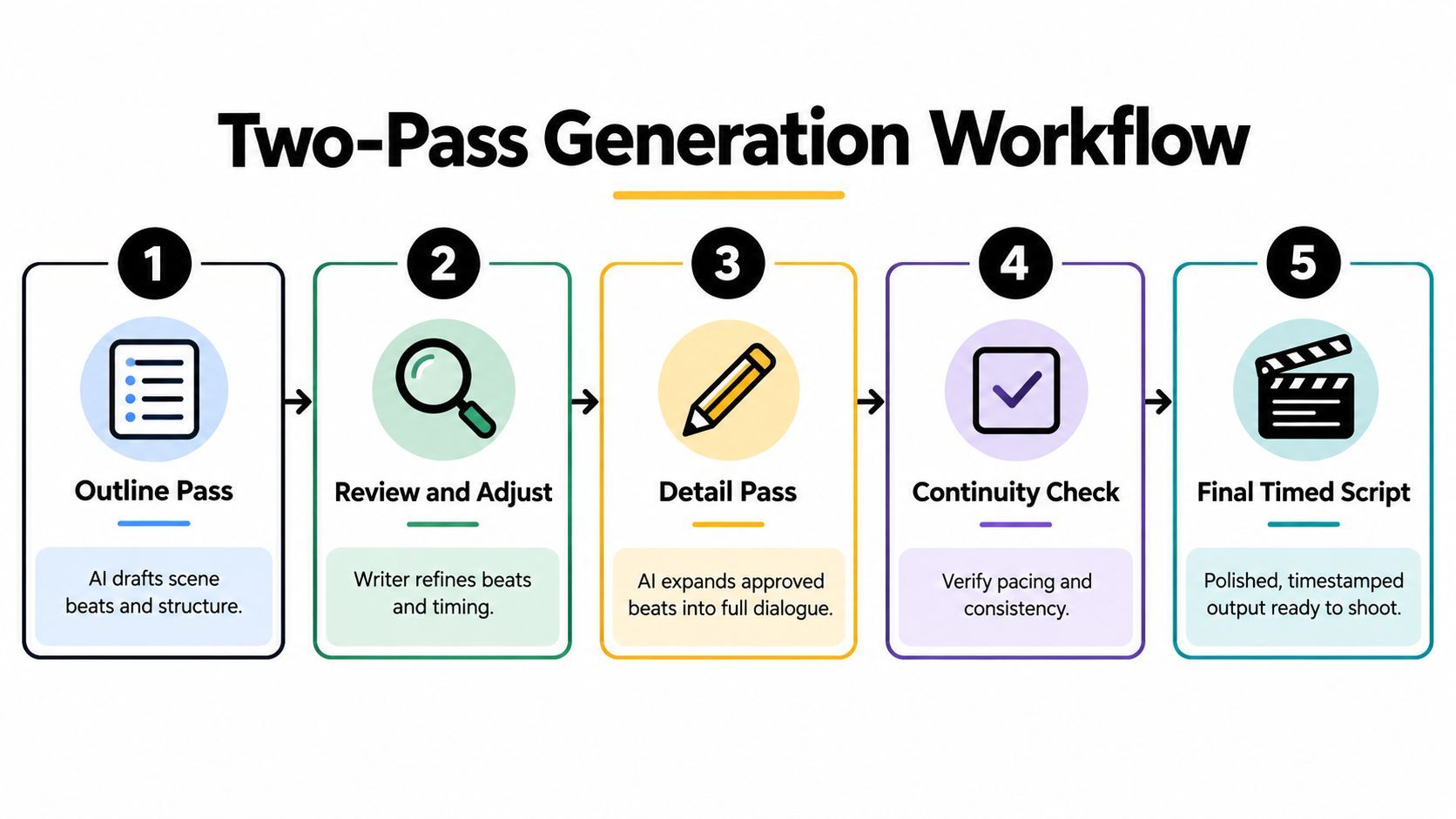
Keep examples short and purposeful. One can establish formatting, another can establish voice, and a third can show the visual specificity required. If you are evaluating script tools, an AI video creation platform can help assemble structured ideas into scenes, while the creator still approves the underlying beats, claims, and pacing.
Executing a Two-Pass Generation Workflow
Don't ask for the final timed script until the narrative has survived a review. The two-pass workflow separates story architecture from language and production detail, which gives you a smaller, more manageable decision at each stage.
Pass one creates the beat sheet
Feed the model your approved context block and request a beat sheet. Each beat should answer five questions:
- Hook: What creates immediate curiosity or identifies the viewer's problem?
- Information sequence: What must the viewer understand first, second, and third?
- Proof: Which demonstration, example, source claim, or visual makes the point credible?
- Payoff: What changes for the viewer after watching?
- Call to action: What single next step should the viewer take?
Require the AI to present the beats in a table with a purpose, timing range, core message, and risk note. At this stage, remove redundant ideas, reject unsupported claims, adjust the order, and rewrite any beat that depends on unavailable footage. A weak beat sheet can't be rescued by more polished wording.
Instruction-following research separates format compliance, content constraints, logical sequencing, and multi-step execution rather than treating quality as one vague score. That supports the production logic behind this workflow: the instruction-following evaluation research shows why a structured outline makes success easier to test before expansion.
Pass two expands approved beats
Once you approve the beat sheet, send it back with a strict instruction to preserve the sequence. Ask the model to expand each beat into:
- Timed narration
- On-screen text
- Shot or b-roll direction
- Camera movement or framing
- Transition
- Music and sound cue
- Fact status or review flag
Tell it not to add new claims, characters, benefits, or plot turns. Ask it to identify any beat whose narration exceeds the available time rather than compressing the ending without flagging it. This preserves the editorial decisions you made in pass one while allowing the AI to handle repetitive drafting work.
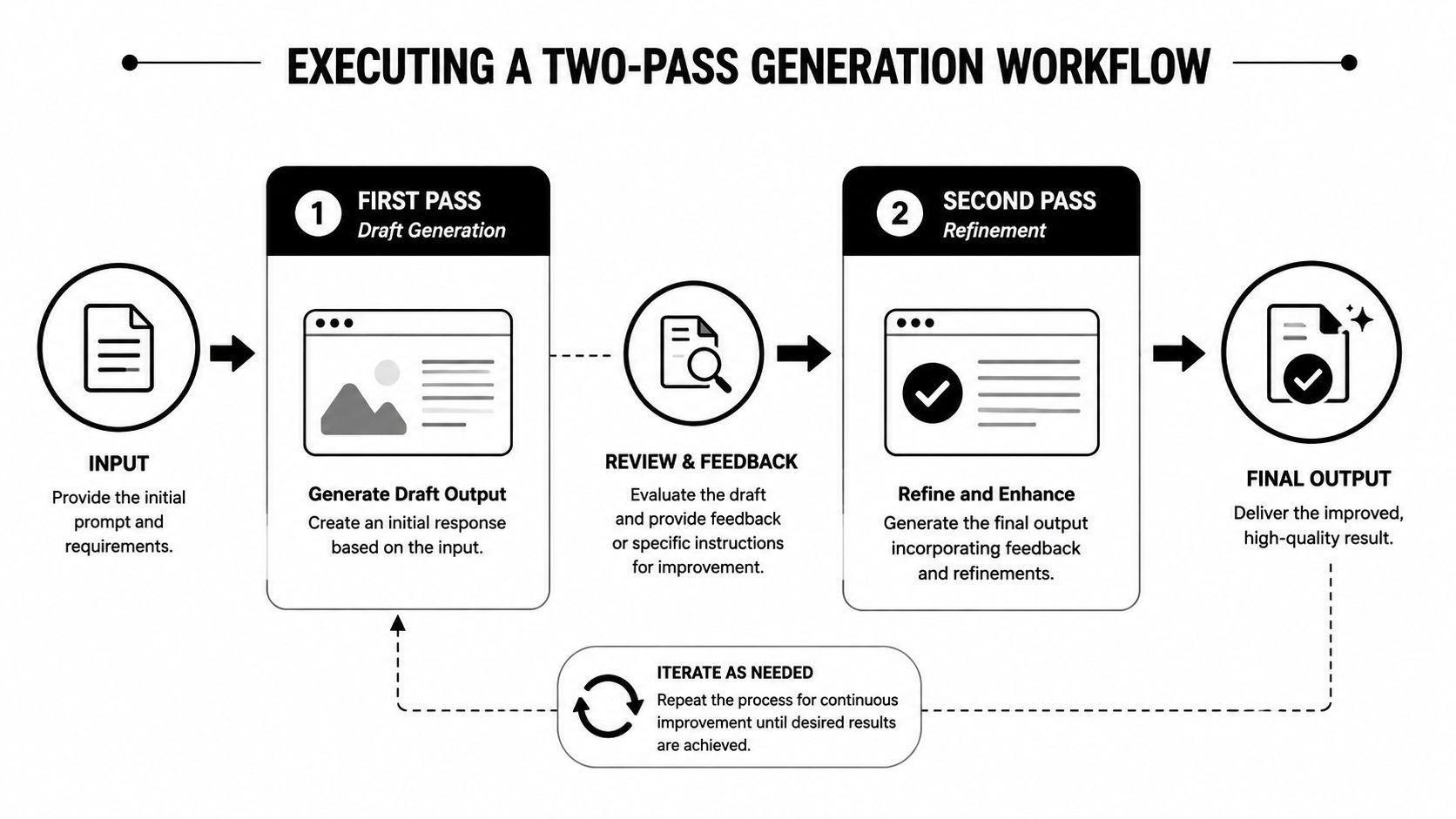
The result should be a timed working document, not a block of marketing copy. For further practical guidance on how to write video scripts, compare the advice against your own production constraints. Generic formulas can help you start, but your approved beat sheet should control the final version.
Mapping Scenes and Visual Directions
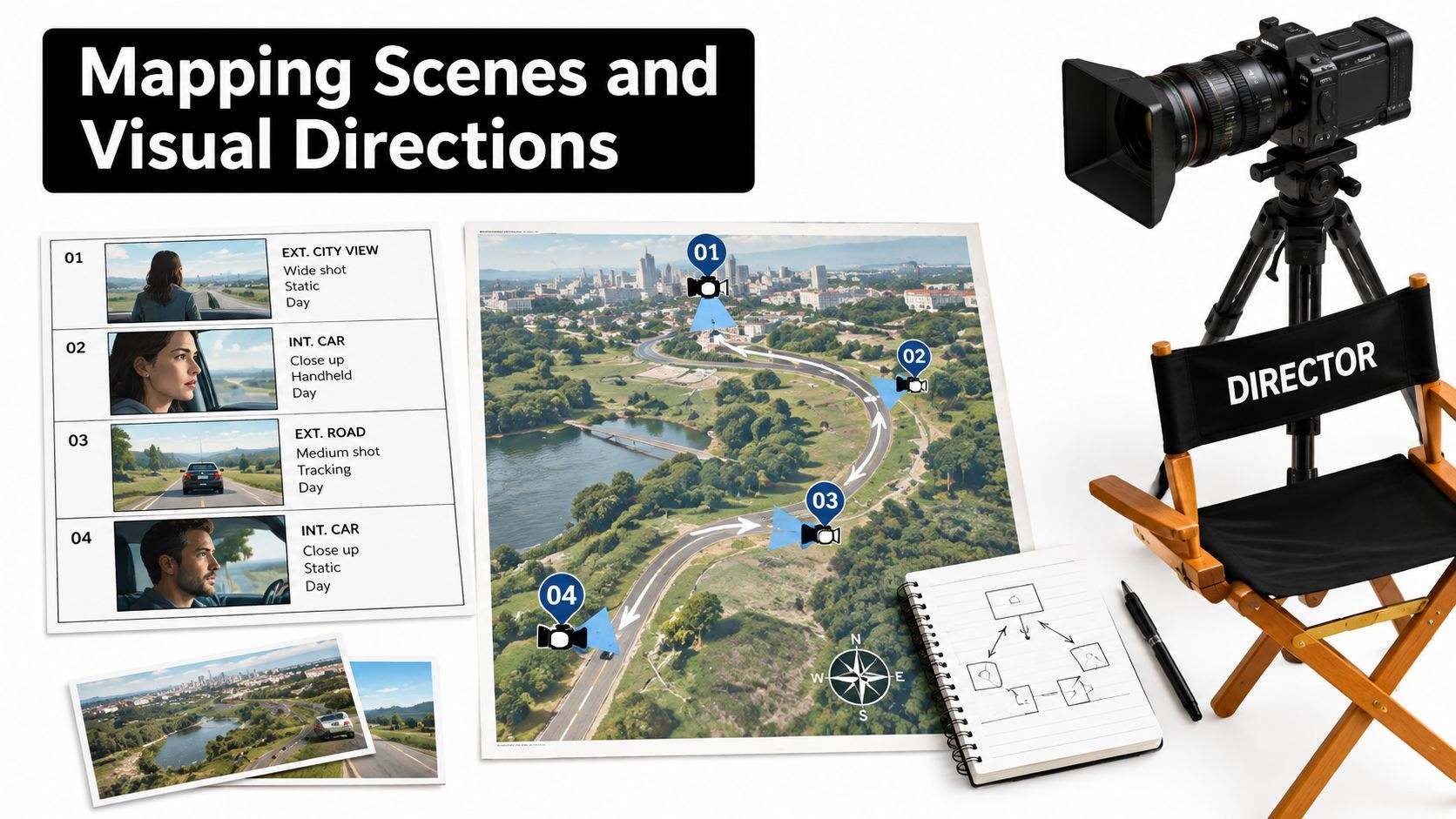
A script isn't ready because the words sound good. It becomes usable when a director, editor, or creator can tell what appears on screen while each line is spoken. The prompt should force the model to connect every spoken idea to an executable visual decision.
Start by defining the visual inventory. Tell the AI whether it can use talking-head footage, product close-ups, screen recordings, animation, stock clips, generated imagery, captions, or existing brand assets. Include restrictions such as a single location, vertical framing, no actors, or no access to a particular product angle. The more concrete the inventory, the less likely the model is to recommend a cinematic shot you can't produce.
Pair each line with an action
Use a dual-column structure when a human editor will read the script. Put time and narration on the left, then visual execution on the right. For tool-based workflows, request structured fields instead, because consistent labels make it easier to swap scenes, voices, captions, or media without rewriting the entire document.
A useful visual prompt says:
For every narration line, provide one primary visual action. Specify subject, framing, movement, setting, and on-screen text. Avoid abstract directions such as “show success” or “make it engaging.” If a visual depends on an asset not listed in the inventory, mark it as unavailable.
“Show the customer succeeding” is not a shot. “Medium vertical shot of the customer checking the completed dashboard, then a close-up of the highlighted result” gives the editor something to build.
Design for the actual platform
Platform-specific pacing isn't a decorative adjustment added after writing. It changes the order and density of information. A short-form feed needs an opening visual that communicates tension or relevance immediately, while an educational explainer may need a clear question before the demonstration. A product ad may need the offer and audience problem visible in the same early sequence.
Use the first moments to establish a curiosity gap, a surprising contrast, a visible result, or a direct problem statement. Then alternate visual changes with meaningful information. Fast cuts without new information create noise, while static narration over unrelated footage makes the viewer work too hard.
Ask the model to flag every scene that lacks a concrete visual, repeats the previous shot, or places important text where interface controls may obscure it. Have a human editor confirm that captions are readable, claims remain visible long enough to understand, and the proposed transitions match the footage rather than compensating for its absence.
Implementing Independent Critique and Revision
“Make this script better” is a weak revision instruction because it gives the model no definition of better. It also invites the same system that created the draft to defend its existing choices. A stronger workflow sends the draft to an independent critic, whether that's a separate AI conversation, a rule-based check, or a human editor, and asks for failures against explicit tests.
Research comparing language models with human writers identifies generation followed by independent critique and revision as a more reliable quality-control pattern than unrestricted self-editing. The process uses repeated generations and detailed human rubrics to reduce the chance that one lucky sample determines the verdict. The creative-writing evaluation research supports a practical editorial separation between drafting and judging.
Give the critic pass and fail tests
Use a checklist like this:
- Opening: Does the first sentence create a clear curiosity gap or state a relevant problem?
- Progression: Does every scene advance one idea rather than repeat the previous one?
- Timing: Does the spoken copy fit the assigned word budget when read naturally?
- Visuals: Can a creator execute every shot with the listed resources?
- Claims: Is each factual statement supported, clearly framed as an opinion, or marked for review?
- Continuity: Do character names, product details, tone, and visual logic remain consistent?
- Ending: Does the script contain one unambiguous action instead of several competing requests?
Ask for a defect list, not a rewritten script. Require the critic to identify the scene, explain the failure briefly, and propose a line-level replacement only where a replacement is necessary. Then send those defects to the writing model with an instruction to change nothing else.
Editorial discipline: Fix diagnosed defects, not every sentence the model can find a reason to rewrite.
Compare openings before committing
The opening carries disproportionate responsibility, so generate at least three materially different hooks. One might lead with a problem, another with a demonstration, and another with a counterintuitive claim. Score each against clarity, originality, audience fit, factual accuracy, narrative direction, and platform suitability.
Don't let the critic reward polished clichés. A hook can be grammatically sharp and still say nothing. If you use voice dictation to capture a more natural first-person delivery, a resource on advanced dictation refinement may help you clean the transcript without sanding away the spoken quality. The final choice should reflect the creator's intent, not the model's preference for familiar phrasing.
Track acceptance in a way your team can understand. Record whether the first draft passed hard constraints, how many factual issues appeared, whether a human approved the script, and how many revision rounds were needed. Those checks turn “it feels better” into a repeatable production standard.
Preserving Human Authorship and Copyright
The fastest workflow isn't automatically the safest or most distinctive. If the AI makes the expressive choices, invents the language, selects the structure, and receives only a superficial approval, the final script may sound polished while contributing little that clearly belongs to the creator.
The U.S. Copyright Office's 2025 analysis states that prompts alone generally don't provide enough human control to make the user the author of an AI output. Protection depends on perceptible human expression, creative arrangement, or substantial modification, as explained in the Copyright Office analysis. This isn't a reason to avoid every AI-assisted workflow. It is a reason to document where your creative decisions enter the process.
Build an authorship record
Keep the original brief, source material, approved beat sheet, rejected alternatives, revision notes, and final script version. Write original character perspectives, brand language, examples, and points of view into the brief before generation. Then make deliberate structural and line-level changes after the draft arrives.
Those changes should do more than correct spelling. Reorder the argument, replace generic transitions, sharpen the central observation, add an original example, remove claims you can't support, and shape the ending around your actual relationship with the audience. Your version history should show that the final work reflects meaningful editorial judgment.
Protect voice while using assistance
AI tends to smooth unusual phrasing into familiar patterns. That can improve clarity, but it can also remove the details that make a creator recognizable. Keep a short voice guide with preferred rhythms, recurring concepts, prohibited clichés, product terminology, and examples of lines that sound like the brand.
Review disclosure requirements before publishing or delivering work to a client. Platform, client, or legal rules may require you to label or disclose AI involvement. A practical tip from AI Video Detector is to treat provenance as part of the workflow rather than an afterthought.
The most defensible process is AI draft plus human authorship. Let the system accelerate outlining, variation, formatting, and mechanical transformations. Keep research judgment, tone, claims, narrative priorities, and final expression under human control.
ShortGenius (AI Video / AI Ad Generator) turns an approved brief or prompt into a scene-by-scene video workflow with scriptwriting, image generation, video assembly, voiceovers, captions, resizing, and editing tools. Use the structured two-pass method here, then visit ShortGenius (AI Video / AI Ad Generator) to turn the reviewed script into platform-ready video and ad assets.