How to Create Video Ads for Instagram That Convert

Learn how to create video ads for Instagram with this practical 2026 guide covering formats, specs, scripts, editing, and scheduling workflows that drive
You've got a product to sell, access to Meta Ads Manager, and a blank video timeline. The campaign is ready to go, but the footage you already have looks cramped in Reels, the opening takes too long to explain the offer, or you're not sure whether a short cut can make the case for buying. The fix usually isn't one clever edit. It's a production system that turns one clear concept into versions built for different placements, viewing conditions, and campaign goals.
Instagram's video roots go back to June 20, 2013, when the platform introduced 15-second video sharing, a shift from its original photo-only format that helped establish the compact, mobile-first storytelling style still useful in video ads today (history and creative guidance for Instagram video). The enduring lesson isn't that every ad must be 15 seconds. It's that the idea needs to register quickly, and every cut should earn its place.
Where Most Instagram Video Ads Fall Short
A common production chain starts with a polished horizontal video, then ends with someone dragging the crop box until the export looks vaguely vertical. The product gets cut off, the subtitles shrink, and the logo sits behind an interface overlay. The file is technically ready, but the creative was never composed for the screen where people will see it.
Other failures happen before the edit. A slow logo animation uses the opening to introduce the brand instead of giving viewers a reason to keep watching. The hook arrives several seconds late. Captions land beneath a username or control, and the call to action appears only after the most important visual has passed. These aren't cosmetic defects. They make the offer harder to understand at the moment a viewer decides whether to stay or swipe.
Instagram's original short-video format makes a useful creative principle clear: make the central promise visible early. Show the product solving a problem, demonstrate the result, or open on a human moment that makes the benefit legible. Branding still matters, but it doesn't need to hold the door open while the message waits outside.
Practical rule: If a viewer needs the voiceover, the caption, and a second viewing to understand the offer, simplify the opening before adding more polish.
The most useful references are often ads that solve the same attention problem in a different category. For ideas on how brands frame products and build social-first creative, compare top mattress social campaigns. Borrow the structural lesson, not somebody else's exact script or look.
Treat each weak point as a production decision to solve: placement determines framing, the opening determines whether the offer registers, captions protect comprehension, and the CTA makes the next step obvious. Once those choices are made together, video production becomes repeatable instead of a scramble at the end of the campaign.
Picking the Right Placement and Format
Choose placements before you shoot. Feed, Reels, Stories, and Explore present video in different contexts, and each changes how the viewer encounters the creative. The right cut isn't just the one that fits the upload box. It's the one that keeps the product, message, and action readable in the space available.
Current creative guidance recommends a 4:5 canvas at 1080 × 1350 pixels for Feed and a 9:16 canvas at 1080 × 1920 pixels for Stories and Reels (Instagram video format guidance). Build for those shapes rather than expecting a single export to survive every crop. Keep the subject, captions, logo, and CTA away from edges where cropping or interface elements can crowd them.
| Placement | Canvas | Viewer intent | Design around |
|---|---|---|---|
| Feed | 4:5 | Browsing posts and deciding whether to pause | A clear subject, readable text, and a strong opening frame |
| Reels | 9:16 | Watching a full-screen stream of discovery content | Immediate visual action and text clear of interface controls |
| Stories | 9:16 | Moving through brief, full-screen updates | A fast message, clean framing, and an obvious next step |
| Explore | Adapt to the placement preview | Discovering content beyond followed accounts | A visual that reads without relying on surrounding context |
Feed viewers may give a product demo a little room to unfold, but a slow start can still lose them. Reels and Stories demand vertical-first composition: a wide shot cropped down can leave the subject squeezed into the middle and empty space doing no work. For Explore, check the actual preview and make sure the creative makes sense on its own.
A placement is a production constraint, not a checkbox. It affects camera framing, subtitle position, and what the opening can show.
For an additional category-specific example of planning Instagram creative, see GolfRep's Instagram advertising playbook. Then set up at least two deliberate masters for a typical campaign: a Feed version and a vertical Stories/Reels version. They can share a concept, footage, and offer, but recompose each cut so the product and text remain prominent rather than just cropping one file twice.
Writing a Script That Hooks in Three Seconds
A product ad opens with someone struggling to finish a familiar task. The next shot shows the product solving it. That sequence gives the viewer a reason to stay before the voiceover explains anything. Aim to make the hook readable in the first 1–3 seconds, with a short line of text if the action needs context.

Write a concept that can survive different cuts. The opening, demonstration, proof, and close should work as separate modules, so changing the hook doesn't force you to rewrite the whole ad. Keep the central promise consistent across versions.
For a short product ad, use these five beats:
- Hook: Open on a visible problem, desired result, or product demonstration. Choose an image that earns attention from the intended buyer, rather than a surprise unrelated to the offer.
- Need: Show what the viewer wants to change. If the opening already makes the frustration clear, keep this beat brief instead of explaining it again.
- Demo: Show the product doing the work. Give a complicated action enough time to be understood; compressing it too far can make the benefit harder to believe.
- Proof: Include a specific detail, customer reaction, or visible result that supports the promise. Use only evidence you can substantiate, and avoid repeating the demo with a broader claim.
- Brand and CTA: Make the brand recognizable and ask for one action that matches the campaign goal, such as visiting a product page or sending a message.
Skip the logo animation and slow establishing shot.
Before recording, pair each script line with what the camera should show. Flag any sentence that needs narration to explain an otherwise meaningless image. The sound-off-first video production guidance provides context for making that visual check. Then mark which beats can be shortened for a simple offer and which need room for a more involved product. This gives the editor usable options without sacrificing the core promise.
When testing an opening, keep the demonstration, proof, and CTA stable so you can isolate the effect of the hook.
For an example of assembling short-form footage into a finished ad, view this walkthrough:
Designing for Sound On and Sound Off
A viewer watches your demo on mute. The product is visible, but the offer lives entirely in the voiceover. That cut needs another pass before it runs.
A Verizon Media and Publicis study found that 92% of surveyed U.S. consumers watch mobile video with sound off, while captions increased ad recall by 8%, memory quality by 10%, and brand linkage by 13% (study on mobile video engagement and retention). Build the core message into visible action and text, then give audio a supporting role.
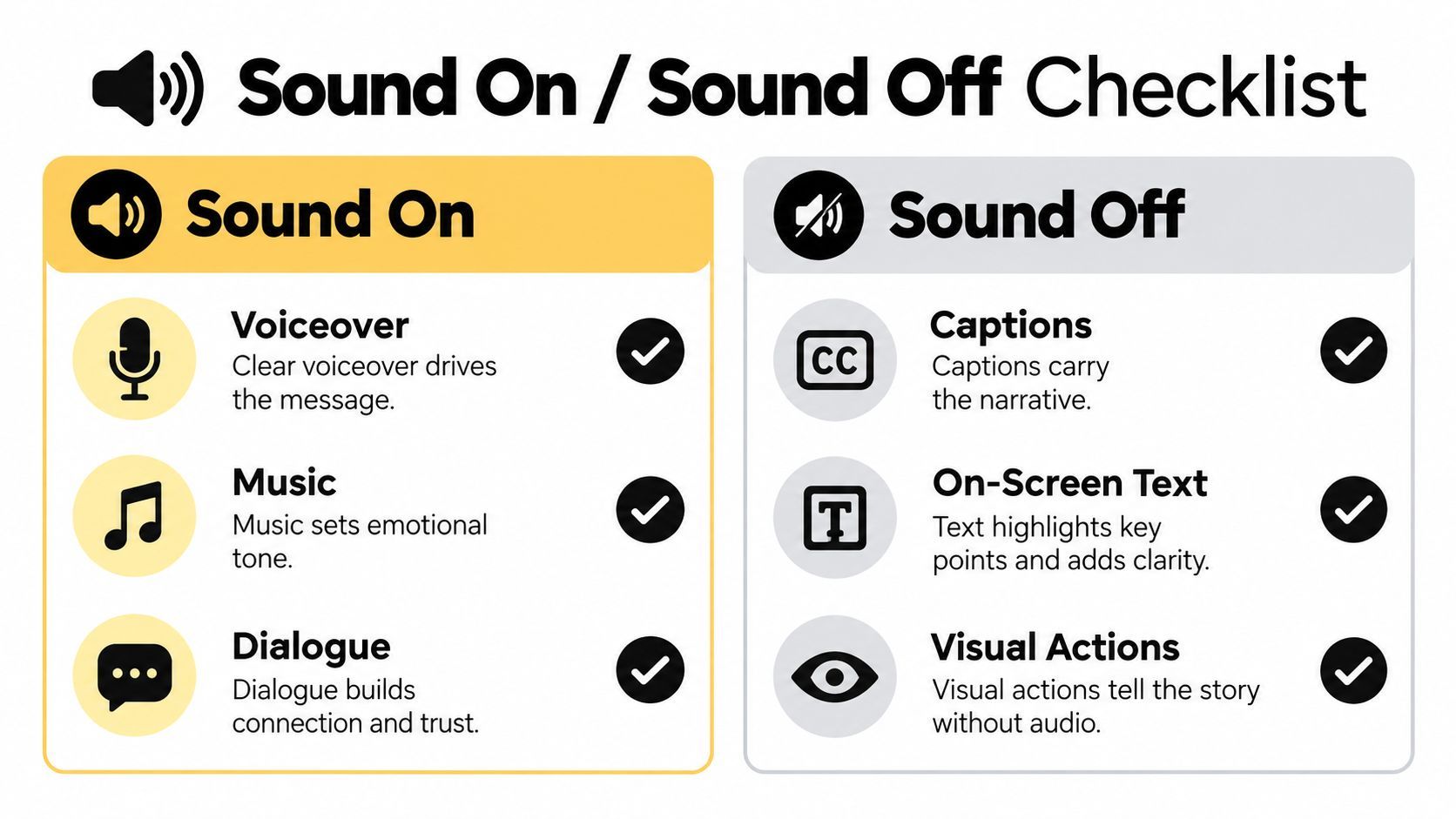
Treat listening modes as modules within the same concept. Keep the offer, demonstration, and CTA consistent across versions. Use captions to carry spoken meaning and on-screen text to emphasize the offer. Narration can add personality or explain a product detail; music can establish mood. If audio introduces a claim that matters to the decision, give that claim a visible counterpart.
Text density is the trade-off. Full captions preserve dialogue, but stacking them with headlines and a CTA can crowd the product. Shorten the spoken line or stagger the text rather than shrinking everything to fit.
Auto-captions need an editorial pass.
Check product names, timing, and line breaks in the rendered video. Burned-in captions give you control over styling, but require another check in each placement-specific cut because the interface and available space can change.
Review each version before exporting:
- Safe placement: Keep the offer, subtitles, and CTA clear of top and bottom controls.
- Readable contrast: Check text over moving footage after compression. Add a backing when the background makes it hard to read.
- Meaning without audio: Watch muted and confirm that the offer and requested action remain clear.
- Added value with audio: Check that narration contributes detail and that music leaves dialogue intelligible.
Keep the visual edit stable when comparing audio treatments so the result is easier to interpret. Aim for one idea that works in both modes, without requiring viewers to enable sound to understand why the ad matters.
Producing and Editing the Master Cut
A vertical master gives you a solid starting point for Stories and Reels. Create it at 9:16 and 1080 × 1920, then export in a compatible format such as MP4 or MOV with H.264 video compression and AAC audio. These delivery choices matter, but they won't rescue a weak composition. Frame the product, hands, faces, and essential text so the edit can be adapted without losing the point.
Capture footage with alternate crops in mind. Leave breathing room around the main subject, avoid placing product details tight against the edge, and record key demonstrations from angles that can work in both vertical and Feed compositions. If a scene only works in one aspect ratio, shoot a separate version instead of expecting reframing to fix it.
From the master, create a 4:5 Feed cut by recomposing the footage and checking each shot, not by applying a blind crop. A square version may help with other placements, but it shouldn't displace the primary formats when Feed, Reels, and Stories are the campaign focus. Make alternate lengths by trimming repeated setup and pauses, while preserving enough time in longer edits for the product demonstration and proof to land.
Keep a clear production handoff for every version:
- Placement: Label each export by where it will run, such as Feed or Reels and Stories.
- Captions: Check the wording, timing, contrast, and position in every crop.
- Branding: Apply the same typography, color, and logo treatment without covering the demonstration.
- CTA: Confirm that the closing action remains visible and relevant in each cut.
A brand kit can speed up consistent styling across versions, but the edit still needs human review. For additional practical guidance on preparing social video footage, see Advisor Momentum social video tips. Tools such as ShortGenius (AI Video / AI Ad Generator) can help assemble scripts, visuals, voiceovers, captions, and resized cuts; whichever workflow you use, preview each export in its intended placement before scheduling it.
Matching Length to Funnel Stage
There's no single runtime that wins every job. A short cut can make a message easy to finish, while a longer one can leave room to demonstrate a product, address an objection, or explain why a higher-consideration offer is worth acting on. Choose length based on what the viewer needs to understand and what the campaign is trying to achieve.
The findings point in different directions because the metrics describe different outcomes. A 2025 Instagram analysis found that 60–90-second videos generated the strongest average performance, while separate data reports an 82% completion rate for videos under 15 seconds (Instagram trends analysis). Completion rate alone doesn't tell you whether a viewer was persuaded to click or buy. A longer demonstration may lose some viewers before the end and still attract more qualified actions.
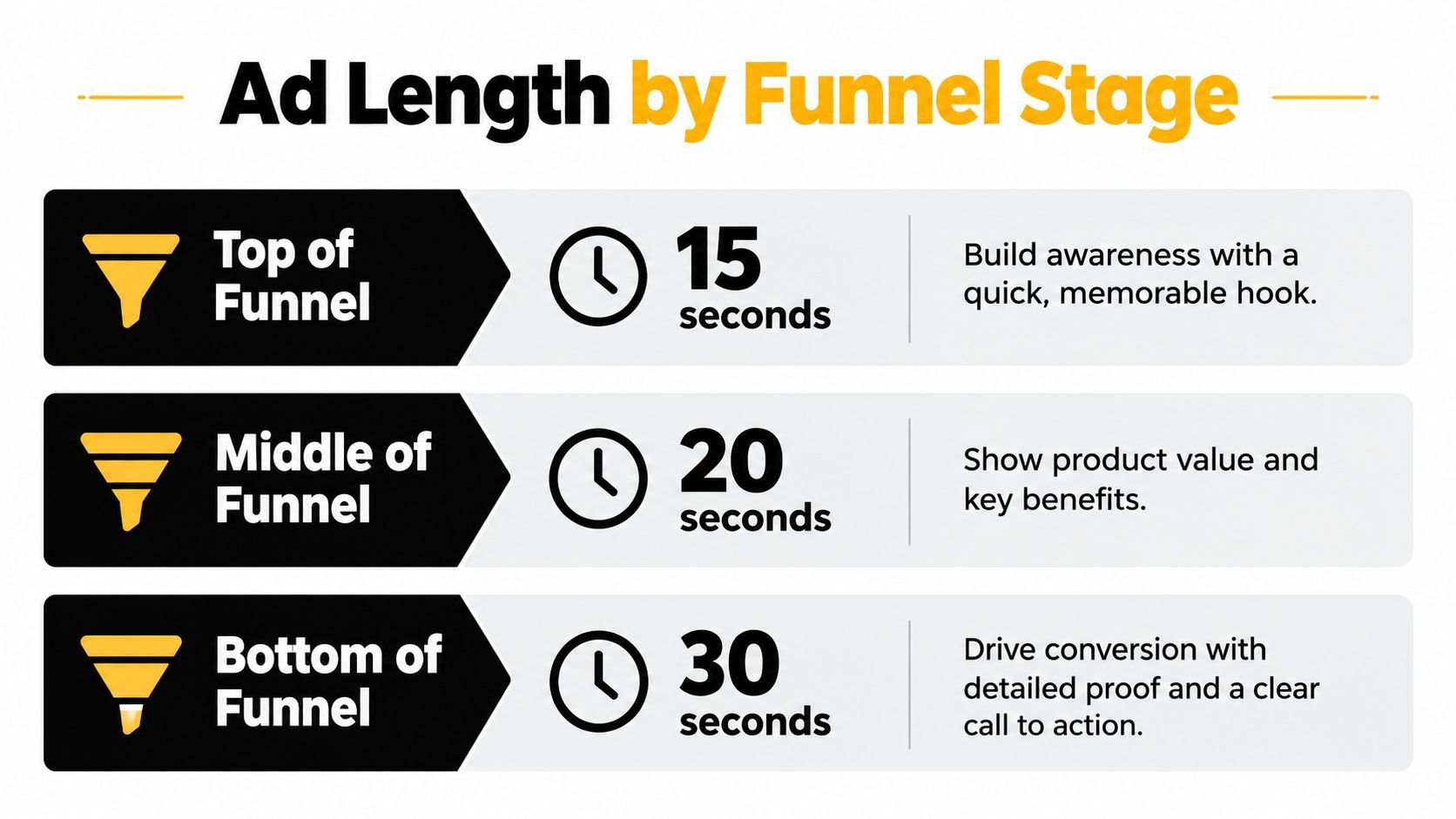
Use the funnel as a starting point, not a rulebook. Awareness creative usually benefits from a quick, memorable hook. Consideration may require a clearer product demonstration. Conversion creative can take longer when the buyer needs proof, context, or answers to common objections. If the product is simple and familiar, padding the ad with explanation can weaken it; if the decision is complex, compressing everything into a fast cut can leave important questions unanswered.
A clean length test compares the same concept at 6, 15, 30, and 60 seconds. Keep the audience, offer, opening visual, and CTA consistent, then compare the results across:
- Early attention: Thumb-stop behavior and three-second views.
- Viewing depth: Average watch time and completion.
- Intent: Click-through rate.
- Business outcome: Conversion rate and cost per desired action.
Don't crown the shortest cut because it has the highest completion, or the longest because it holds attention. Let the campaign objective decide which trade-off is valuable.
Testing Variants and Scheduling the Campaign
Treat each cut as a test, not a verdict. Keep the audience, budget logic, attribution window, landing page, and optimization event consistent across comparisons. Change one major creative variable at a time, such as the opening visual, first-line claim, presenter, proof type, CTA, or editing pace. If you change the audience and the creative together, you won't know which change drove the result.
Read metrics in context. Start with three-second views and hold rate, then look at completion and click-through before checking the downstream result that matters, such as cost per acquisition. Available benchmark reporting cites a 29.2% average watch-through rate for 15-second Instagram video creative, alongside an 8% ad-recall lift and 10% memory-quality lift for captioned mobile ads (Instagram video ad examples and benchmarks). Treat those figures as reference points, not guarantees for your audience or offer.
A high view count isn't a win if the people watching aren't taking the action the campaign needs.
Don't declare a winner before the comparison has enough delivery to be meaningful. Also watch for creative fatigue: when a familiar opening stops earning attention, refresh the hook or first visual before rebuilding the entire campaign. Keep the underlying offer and landing page stable when you're trying to learn what the creative change did.
Close the loop with a practical publishing routine:
- Prepare the set: Name and check each placement, sound, and length variant before upload.
- Schedule together: Put the approved versions into one calendar block so the campaign launches consistently.
- Reuse deliberately: Adapt a strong concept for TikTok, YouTube Shorts, or Facebook with a placement-specific resize and preview, rather than posting a mismatched crop.
- Refresh selectively: Change the hook first when performance weakens; retain parts of the ad that are still doing their job.
ShortGenius helps creators and marketing teams turn product ideas into video ads with scriptwriting, video assembly, voiceovers, captions, resizing, and brand-kit tools. Build placement-specific versions and test them as a coordinated set by visiting ShortGenius (AI Video / AI Ad Generator).