How to Create a YouTube Short: A Full Guide

Learn how to create a YouTube Short from planning to publishing. This guide covers scripting, editing, and optimization that boost reach.
Shorts live or die on the opening swipe. YouTube's own analytics surface a viewed versus swiped away metric, which tells you the platform is judging your video almost immediately, not after a leisurely build-up. That is why learning how to create a YouTube Short is really learning how to design for a fast, mobile-first retention test.
That shift matters because Shorts are a distinct format, not just a shorter export. YouTube defines Shorts as vertical videos and provides a built-in creation flow in the app and YouTube Studio, with Shorts built for a swipe-based feed and official guidance placing the format at up to 60 seconds in the original help documentation (YouTube Help). Independent industry reporting in 2026 estimates that around 70% of channels uploading each month are posting Shorts, and average viewer retention for Shorts is reported at 73%, compared with 52% for long-form YouTube videos (inbeat agency). Those numbers point to the same practical truth, creators who respect the format's pacing win more often than creators who just shrink long videos.
Why YouTube Shorts Demand a Different Production Mindset
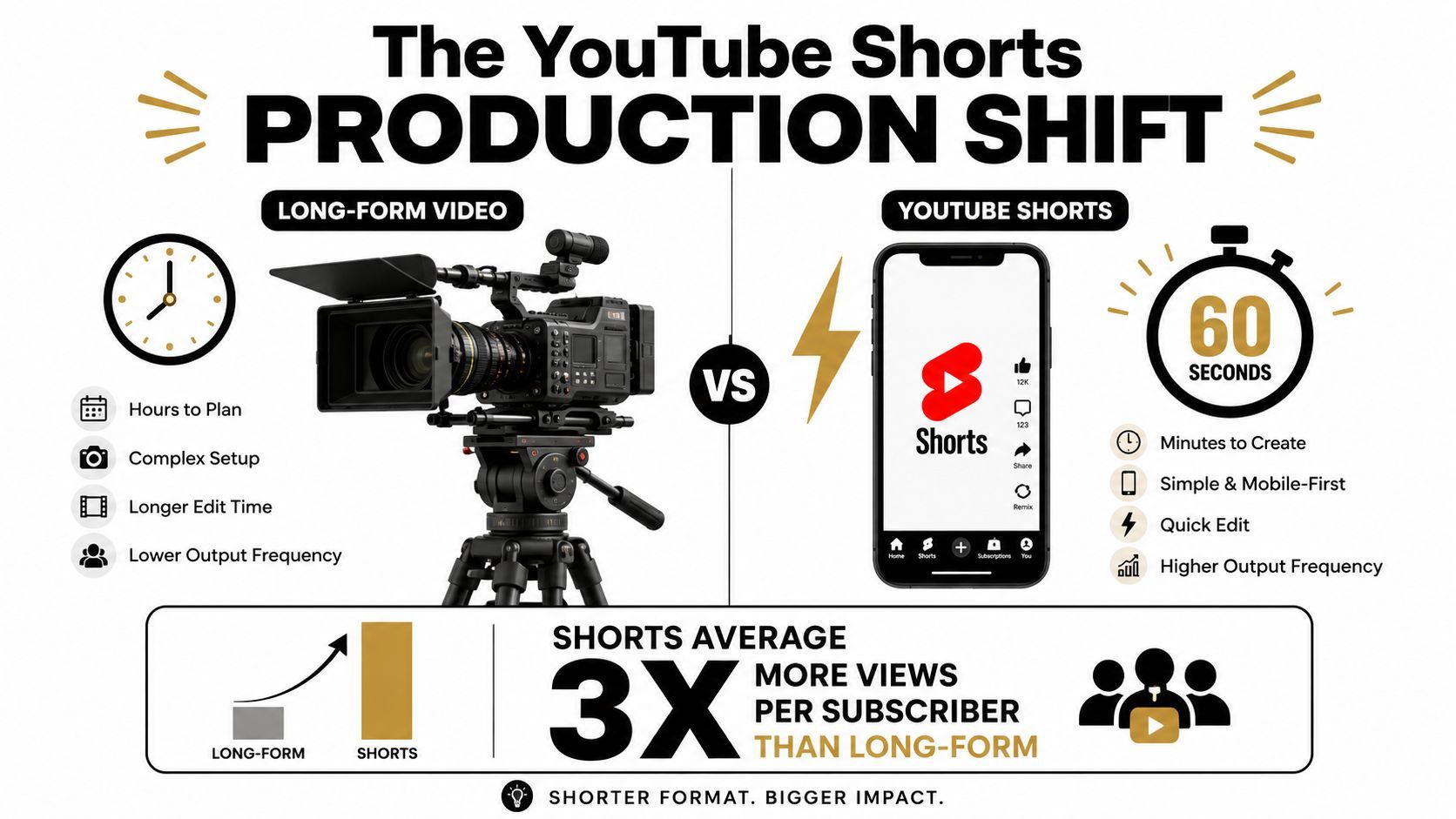
A strong Short starts with a different assumption, the viewer is already deciding whether to leave. That's why the first three seconds aren't an intro, they're the whole argument for staying. YouTube's Shorts-specific analytics reinforce that reality with the viewed versus swiped away signal, which makes early retention a core success metric rather than a vanity number (YouTube Help).
Vertical first, not adapted later
The production decision comes before the edit. YouTube defines Shorts as vertical videos, surfaced as a dedicated short-form format in the Shorts feed, so the native shape of the clip has to be vertical from the start (YouTube Help). If you shoot horizontal and hope the upload will fix it, you'll usually end up with a clip that feels cramped, cropped, or visually soft.
That's also why the workflow feels different from long-form. You're not building a narrative that earns attention over minutes. You're designing a single retention event that has to communicate value immediately.
Practical rule: if the opening frame doesn't show the topic, the emotion, or the payoff, the swipe rate will punish you before the edit gets a chance to help.
Success is measured differently
Shorts creation is a feedback loop. YouTube's analytics surface Shorts feed impressions, comments, remixes, and viewed versus swiped away, which means every upload becomes a small test of hook quality, pacing, and clarity (YouTube Help). That is a very different mindset from posting a polished clip and hoping it finds an audience.
The key trade-off is simple. Long-form can tolerate a slower runway because the viewer has opted into a longer commitment. Shorts depend on whether the opening moment earns trust fast enough to stop the next swipe.
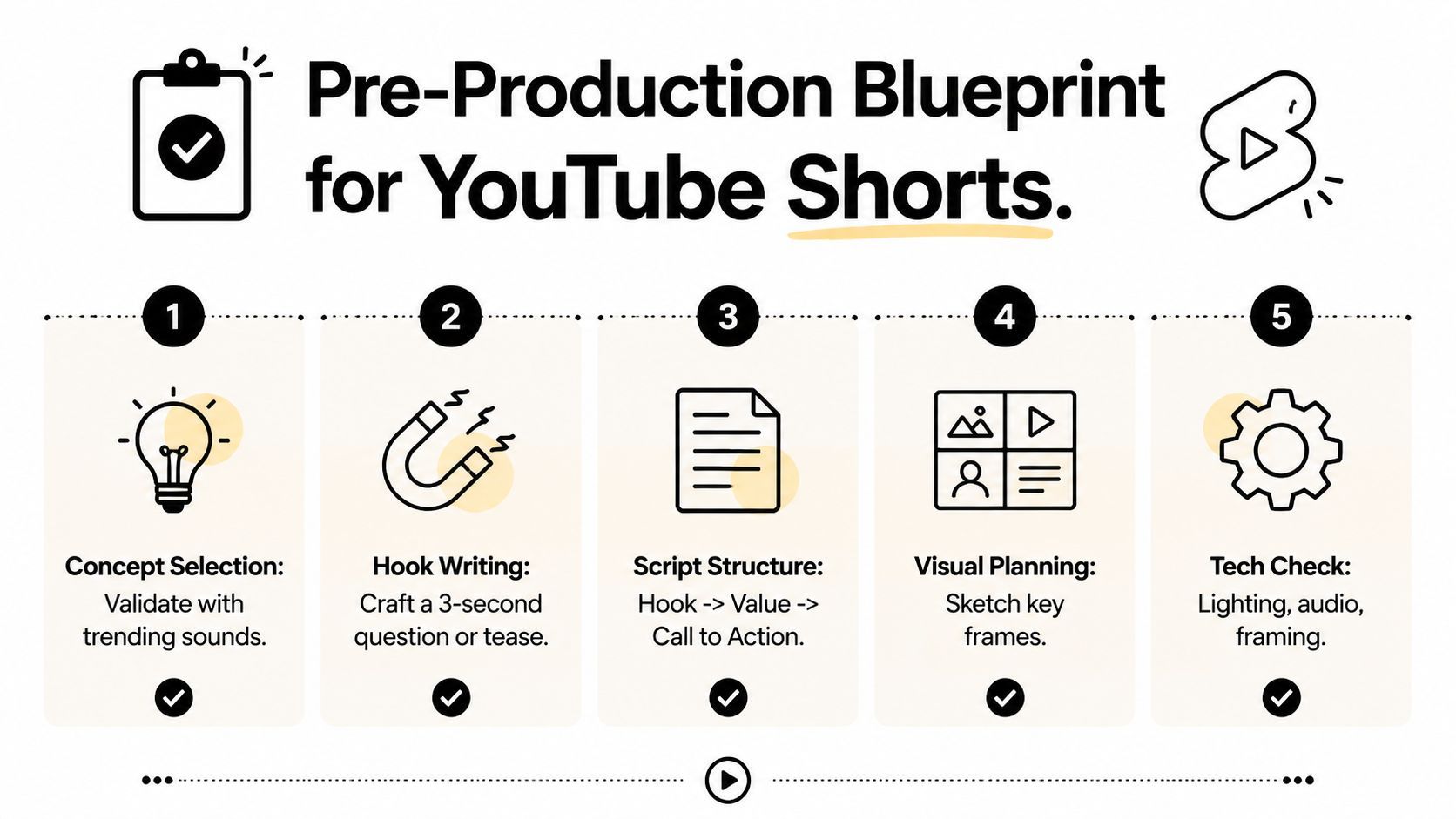
Planning Your Short Before You Hit Record
The best Shorts usually win before the camera turns on. The concept has to be narrow enough to resolve quickly, but sharp enough that a viewer feels something is missing if they swipe away. That means choosing ideas with built-in tension, curiosity, surprise, utility, or a very clear before-and-after.
Start with a hook that earns the first glance
A hook is not just a sentence, it's the first promise. Open loops work well because they create unfinished mental business. Pattern interrupts work when the first frame or first line breaks the expected rhythm of the feed. Bold claims can work too, but only when the payoff is delivered on screen.
For practical scripting, a hook can take a few common forms:
- Question hook: “Why do most Shorts lose viewers in the first second?”
- Tease hook: “This is the edit choice that keeps people watching.”
- Pattern interrupt: start with the finished result, then rewind to the process.
- Direct value hook: “Here's the fastest way to turn one clip into a Short.”
Those aren't formulas to repeat mindlessly. They're filters for whether the idea is strong enough to survive a swipe-based feed. If the hook reads like a normal intro, it probably won't hold attention.
Build the script around one idea
A Short is not the place for a five-point lecture. The stronger structure is usually hook, value, close, with each beat doing one job and no filler between them. If the clip is instructional, the value section should move in clean steps. If it's experiential, the middle should stay visually active so the viewer never feels the momentum flatten.
This is also where AI script tools can save time without flattening judgment. They're useful for generating multiple hook angles, testing alternate openings, and rephrasing a concept until it sounds tighter. For creators who want a dedicated starting point, create viral YouTube Shorts scripts is a useful example of how a script generator can compress the blank-page phase into something workable fast.
A good Short script doesn't sound long. It sounds inevitable, like every line had to be there.
Use pre-production to kill weak ideas early
Most bad Shorts aren't ruined in editing. They're weak from the first planning pass. If the idea doesn't produce instant curiosity, a clean visual payoff, or a useful takeaway, it'll usually drag through production and still underperform.
A useful pre-record check is brutally simple:
- Can the idea be understood in one sentence?
- Does the opening create a reason to keep watching?
- Can the visual change in the first few seconds?
- Does the ending reward the opening promise?
If one of those answers is no, the concept needs work before it costs you time in shoot and edit.
Shooting and Editing for Maximum Retention
Vertical framing changes the way every shot lands. The screen is small, interface elements live on the edges, and the viewer isn't sitting back to admire composition, they're scanning for meaning. That's why the frame has to stay clean, centered, and easy to read at a glance.
Frame for the mobile screen
Keep your subject where the eye lands first. Avoid burying key details near the bottom or right edge, where UI overlays can crowd the frame. If there's text on screen, make sure it doesn't compete with faces, product details, or the main action.
Lighting and audio matter more than camera complexity here. A simple, well-lit vertical shot usually beats a fancy setup that feels cluttered on a phone. The edit can't rescue a frame that already looks busy.
Cut on motion, not just on time
Pacing is the difference between a clip that breathes and a clip that stalls. Many strong Shorts keep visual movement alive with scene changes, B-roll, zooms, and on-screen text before attention drops. The point isn't to cut for the sake of cutting, it's to avoid long static stretches that give the swipe too much time to win.
AI assembly tools can help with the time-consuming parts. A platform like ShortGenius can compress planning, scene assembly, captions, and voiceover work into a much shorter turnaround, which is useful when you're testing multiple hooks from the same idea. The part that still needs a human is judgment, what's the strongest opening, which moment deserves the first frame, and whether the clip earns the payoff it promises.
Make captions do real work
Captions are not decoration. They help viewers who prefer to watch without sound, clarify fast dialogue, and keep the message readable when the visual changes quickly. Place text where it supports the frame instead of covering the subject, and keep the wording short enough that it can be processed instantly.
If you want a working workflow for assembling the script, visuals, and voiceover in one pass, it can help to separate the “idea drafting” stage from the “assembly” stage. That's where tools and templates save time, because they remove friction without deciding the creative point for you.
Uploading and Optimizing for the Shorts Feed
A great Short still needs a careful upload. The title, description, visibility choice, and metadata all affect how the clip enters YouTube's discovery loop. YouTube's own analytics tools then show whether the clip is getting attention and whether people are sticking with it or swiping away (YouTube Help).
Write for search and the swipe feed
A Short title has to work in two places at once. It should tell the viewer what the clip is, but it also needs enough clarity to help search and browsing. The best titles are usually compact, specific, and directly tied to the hook.
Descriptions and hashtags should support the topic, not clutter it. Use them to reinforce what the Short is about and to make the clip easier to categorize, especially if the content fits a recurring series or niche.
For creators who also want a public-facing gallery or portfolio view, showcase videos on own.page is a practical reference point for organizing clips in a way that's easier to present outside the platform itself.
Read the analytics like a loop, not a report
The most useful numbers are the ones that tell you what to change next. Viewed versus swiped away tells you whether the opening is strong enough. Shorts feed impressions show whether the platform is testing the clip broadly enough to matter. Views, comments, and remixes help reveal whether the idea is not just watched, but worth reacting to (YouTube Help).
That feedback loop is the main advantage of Shorts. You're not guessing forever, you're adjusting hooks, captions, scene length, and opening frames based on actual viewer behavior.
Batch the publishing workflow
Scheduling tools help creators stay consistent without living inside the upload screen. Buffer's Shorts workflow supports automatic publishing or notification publishing, and it also notes that Shorts can be scheduled with portrait or square video, with portrait recommended for mobile viewing (Buffer). That matters if your team is trying to move one editing session into several platform outputs instead of treating every post as a one-off.
The practical win is consistency. When the production, metadata, and scheduling steps sit inside a repeatable workflow, creators can spend more time improving the actual Short and less time redoing the mechanics of publishing.
Repurposing Long-Form Content Into High-Performing Shorts
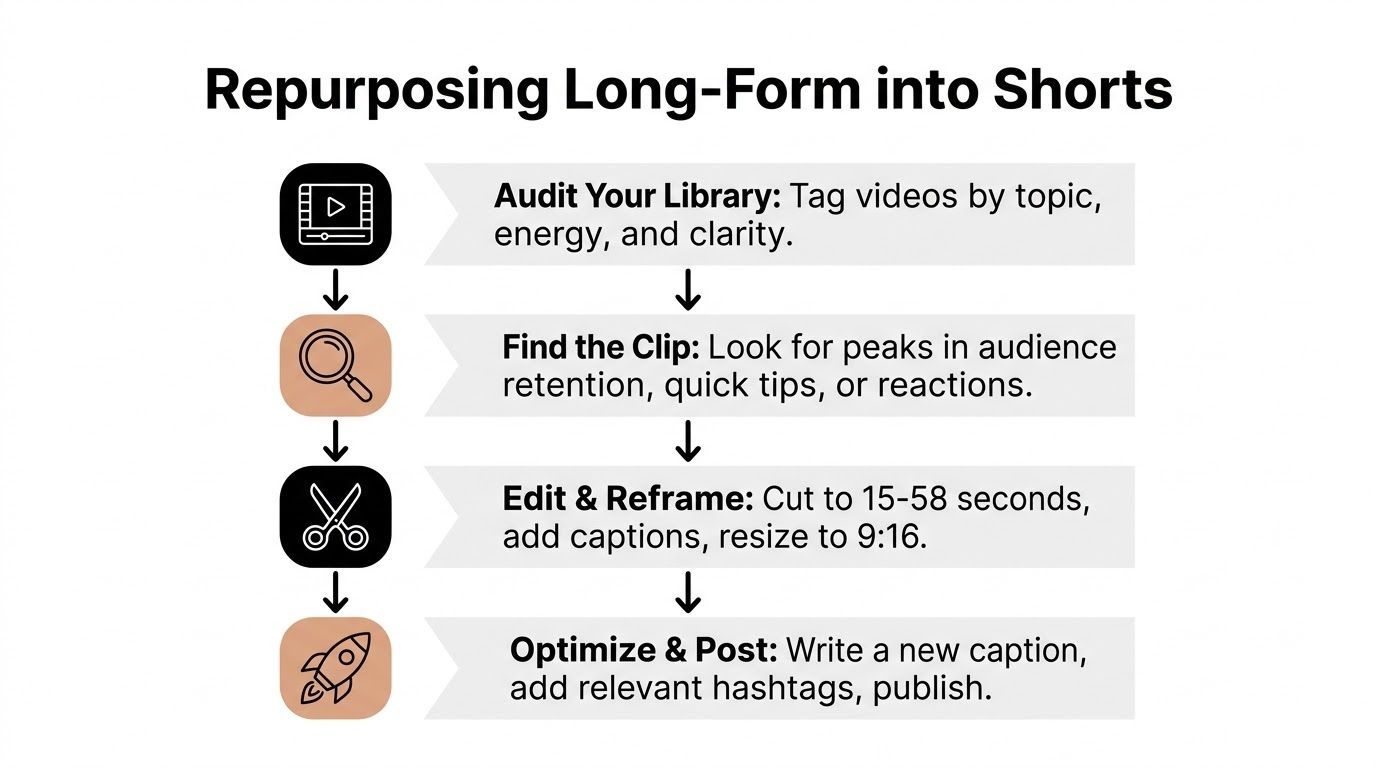
Long-form libraries are full of short-form material that never got the chance to be clipped properly. The trick is not trimming at random. It's finding moments with a clean emotional peak, a useful answer, or a visual beat that can stand on its own.
Find the segment that already has tension
The best repurposed Short usually starts at a moment where something is already happening. A clean reaction, a sharp answer, a useful tip, or a turning point in the conversation can all work. If the clip needs too much setup from the original video, it probably isn't a good Short yet.
The source footage still needs format work. YouTube Studio won't convert horizontal 16:9 footage into full vertical 9:16 for you, so a proper vertical crop requires an external editor before upload (Hollyland). That's a useful constraint to remember because the repurposed clip has to feel native to the feed, not like a screenshot of a longer episode.
Rebuild the clip so it stands alone
A repurposed Short should not feel like a missing piece of a longer video. Add context only where it's needed, then move quickly to the payoff. Reframe the visual so the subject fills the vertical space, add captions where they help clarity, and choose an ending that feels complete without dragging the original video's full arc along with it.
Creators who need a faster workflow often combine clipping with automated assembly. That's where tools can identify strong moments, create vertical crops, and apply captions or motion effects without turning the process into a full manual rebuild. For a broader look at content recycling workflows, Kraken Socials content tips are a useful reference point.
Repurposing works best when the Short feels intentional, not extracted.
Publish as a new asset, not a leftover
The final mistake is treating a repurposed clip like a scrap. Give it a new title, new metadata, and a clean opening frame. The audience should feel like they found a standalone Short that happens to come from a larger body of work, not a clipped fragment that's waiting for context it will never get.
Common Mistakes and a Quick-Launch Checklist
A lot of Shorts fail for predictable reasons, and the frustrating part is that the fixes are usually obvious in hindsight. I've seen solid ideas die because the opening was too soft, the caption text was hard to read, or the creator posted and never checked whether viewers were swiping away immediately.
The mistakes that hurt the fastest
Weak hooks are the most common problem. The clip starts with an apology, a long setup, or a title that sounds more like a blog headline than a visual promise. The fix is to start with the value, the tension, or the payoff, then earn the rest.
Ignoring the swipe metric is the second mistake. If people are leaving immediately, the issue is usually the opening frame, the first line, or the pacing of the first few seconds. Treat that as a creative signal, not a platform mystery.
Poor captions and no clear CTA are usually simpler to solve. Captions should support readability, not decorate the screen, and the ending should either close the loop or give the viewer a reason to act.
A quick launch checklist
Before posting, run through this once:
- Strong first frame: does the opening instantly communicate the topic or payoff?
- Text on screen: is the key message readable on a phone?
- Trending audio or fitting sound: does the audio support the pace and tone?
- Clean crop: does the vertical frame keep the subject centered?
- Clear end: does the Short loop naturally or point to the next action?
If one of those feels shaky, fix it before publishing. Short-form rewards fast iteration, but only when the starting point is strong enough to learn from.
The creators who improve fastest don't post more randomly. They post with a tighter process, then use the next upload to make one specific part better than the last.
If you want to turn that workflow into something faster, try ShortGenius (AI Video / AI Ad Generator) for script drafting, scene assembly, captions, and scheduling in one place. It fits this exact retention-first workflow, so you can spend less time stitching pieces together and more time refining the first three seconds that decide whether a Short gets watched.