Master Your Format for Video Script and Go Viral

Unlock viral potential with the right format for video script. Learn to structure scripts for TikTok, YouTube, and AI tools for maximum engagement.
A proper format for a video script isn't just about fancy formatting—it's the simple document that turns a great idea into a clear plan. The most effective approach, and the one most pros use, is a two-column layout. This splits what your audience sees from what they hear, making the whole production process feel much more organized and efficient.
Why a Solid Script Format Is Your Creative Roadmap
Have you ever had a killer video idea that just fell apart once you tried to organize it? You end up with a messy document, and filming feels like a chore. I’ve been there, and so have countless other creators. This is exactly why a structured format for a video script is such a game-changer.
Think of it less as a set of rigid rules and more as a blueprint that guides you from that first spark of an idea all the way to the final export.
The best format I've found is also the simplest: the two-column script. It immediately brings clarity to your project and helps everyone involved visualize the final video before a single frame is even shot.
The Two-Column Script Format At A Glance
The two-column script is the industry standard for a reason. It's intuitive, flexible, and perfectly suited for the fast pace of short-form video. Here’s a quick breakdown of its core components.
| Element | What It Includes | Why It Matters |
|---|---|---|
| Visuals (The "Video" Column) | Scene descriptions, camera angles, on-screen text, graphics, and B-roll cues. | This column is your shot list. It ensures you capture every visual element needed to tell your story effectively and avoid "I wish I'd filmed that" moments. |
| Audio (The "Audio" Column) | Dialogue, voice-over narration, sound effects (SFX), and music cues. | This keeps your spoken content perfectly synced with the visuals, ensuring your message lands with maximum impact. |
| Timing/Duration | Estimated time for each scene or line. | Pacing is everything in short-form video. This helps you keep your video tight, engaging, and within platform-specific time limits. |
Ultimately, this simple structure is the key to keeping your production on track from start to finish.
Unlocking Efficiency and Collaboration
When you separate what people see from what they hear, you can strategically plan every shot, piece of B-roll, and bit of on-screen text to perfectly match your narration. This one small change prevents so many common production headaches and guarantees your final video feels polished and cohesive.
This simple bit of organization makes a huge difference, whether you're a solo creator or part of a bigger team.
- For Creators: It’s a lifesaver. You can easily spot visual gaps in your script before you start shooting, making sure you get all the footage you need in one go.
- For Teams: It becomes a shared language. Writers, videographers, and editors are all looking at the same plan, which cuts down on confusion and rework.
- For AI Tools: It provides the structured input that AI video generators like ShortGenius need to accurately build scenes, generate voiceovers, and add effects.
The power of this kind of organization is driving a huge shift in the industry. In fact, the global script writing software market is projected to hit $0.71 billion by 2035. This shows a growing understanding that a good script format is the bedrock of modern video production. You can discover more about this market trend and how it’s affecting creators.
A well-structured script does more than just organize your thoughts—it transforms them into a practical, actionable plan that saves time, money, and creative energy.
At the end of the day, getting comfortable with a basic script format will improve your entire workflow. It lays the foundation for creating content that connects and is the first real step toward making your videos more efficient and impactful.
Building the Core Components of a Powerful Video Script
A great video script is so much more than dialogue. Think of it as a production blueprint—a detailed map that guides every single visual and audio element. When you get the format for your video script right, you're ensuring your creative vision gets translated perfectly, whether you're working with a human editor or an AI.
Every piece of a script has a job to do. When they all work together, you get a video that feels polished and coherent. Let's break down exactly what those pieces are and how to use them.
Setting the Stage with Scene Headings
Everything starts with the scene heading. This is a quick, one-line signpost that tells everyone where and when the action is happening. For short-form video, these are usually pretty simple.
A heading like INT. KITCHEN - DAY does a ton of work in just a few words. It establishes that we're inside, in a kitchen, during the day. That simple line informs the lighting, the props, and the overall mood of the shot.
Similarly, EXT. CITY PARK - SUNSET instantly tells your team (or the AI) to pull visuals of an outdoor park bathed in that warm, golden-hour light. These headings provide the essential context for everything that follows.
A clear scene heading is the quickest way to establish context. It’s the first instruction that anchors your visual narrative and ensures everyone is on the same page from the very beginning.
Using them consistently gives your script a clean, scannable structure, which is a lifesaver during a fast-paced shoot or when you're generating dozens of video variations with AI.
Directing the Action with Visual and Audio Cues
Once you've set the location, you need to describe what's actually happening in the scene. That's where visual cues and audio cues come into play. These are your director's notes, written right into the script, that control what the audience sees and hears.
Visual cues are all about directing the camera and on-screen elements. I use them to specify:
- Camera Movements: Things like CRASH ZOOM on the product or SLOW PAN across the desk.
- On-Screen Text: Simple notes such as TEXT OVERLAY: "Limited Time Offer!"
- B-Roll Footage: Describing extra shots, like B-ROLL of a customer smiling while using the app.
At the same time, audio cues manage everything from sound effects to the narrator's tone. I typically write these in all caps or place them in brackets to make them stand out from the dialogue.
For example:
- Sound Effects (SFX):
[SOUND of a cash register 'cha-ching'] - Music:
[Upbeat, energetic synth pop begins] - Narration Tone:
(Spoken in an excited, urgent tone)
Combining these cues gives you total creative control. A line in your script might look like this: VISUAL: CLOSE UP on a laptop screen showing the ShortGenius interface. AUDIO: [Gentle keyboard typing SFX].
This kind of detail is what separates a generic video from a high-performing one. For anyone using AI tools, these precise commands are especially critical. An AI can’t read your mind, but it can execute clear instructions flawlessly. You can see how this works by experimenting with an AI ad generator and noticing how it interprets specific script commands. A well-formatted script is your best tool for getting the exact video you envisioned, saving you countless hours in edits and preventing costly reshoots.
Adapting Your Script Format for TikTok, Reels, and YouTube
You can't just take a script meant for a 10-minute YouTube deep-dive and expect it to work for a 15-second TikTok. I've seen so many creators miss the mark here; your format for your video script absolutely has to change to match the platform's unique rhythm and what its audience expects.
What kills it on Reels might completely fall flat on YouTube Shorts. A video packed with fast cuts and on-screen text could be perfect for Instagram, while a more narrative-driven approach often performs better on YouTube. This isn't just about following best practices—it's about survival. You have to tailor your script to grab and hold attention.
TikTok and Reels Format: Quick Cuts and Immediate Hooks
When you're scripting for TikTok and Instagram Reels, your very first line is your hook. You have less than three seconds to stop someone from scrolling, so the entire format needs to be built for speed and clarity. Think in terms of rapid-fire cuts, pop-up text, and audio that hits at just the right moment.
The audio column in your script becomes particularly important. You need to time everything to the second, which is why knowing the nuts and bolts of things like how to do voiceover on TikTok is so critical.
Here’s a practical format I use that works wonders:
- Time (Seconds): Break your script down second by second. For a 15-second video, this gives you incredible control over the pacing.
- Visuals: Get super specific with every visual beat. I’m talking notes like QUICK ZOOM, TEXT POP-UP: "You won't believe this!", or MATCH CUT to next scene.
- Audio: Write out your voiceover or dialogue to be as tight as possible. Note every single sound effect (SFX) and music cue so they land exactly with the visuals.
This micro-managed approach is what makes every second count, boosting impact and making people want to watch it again. It's also the secret to creating powerful, platform-native AI-generated UGC-style ads that don't feel like ads at all.
YouTube Shorts Format: Mini-Stories That Satisfy
YouTube Shorts are still, well, short, but they tend to reward a more complete story. Viewers on YouTube are a bit more conditioned for a narrative—even if it’s just 45 seconds long—with a clear beginning, middle, and end.
Your script format should reflect that structure. Instead of mapping everything second-by-second, you can start thinking in terms of "beats" or mini-scenes.
For YouTube Shorts, the real goal is to create a satisfying loop. The end should connect back to the beginning in a clever way, encouraging people to watch it one more time. Your last line is just as important as your first.
No matter the platform, every script boils down to a few core components. This diagram lays them out perfectly.
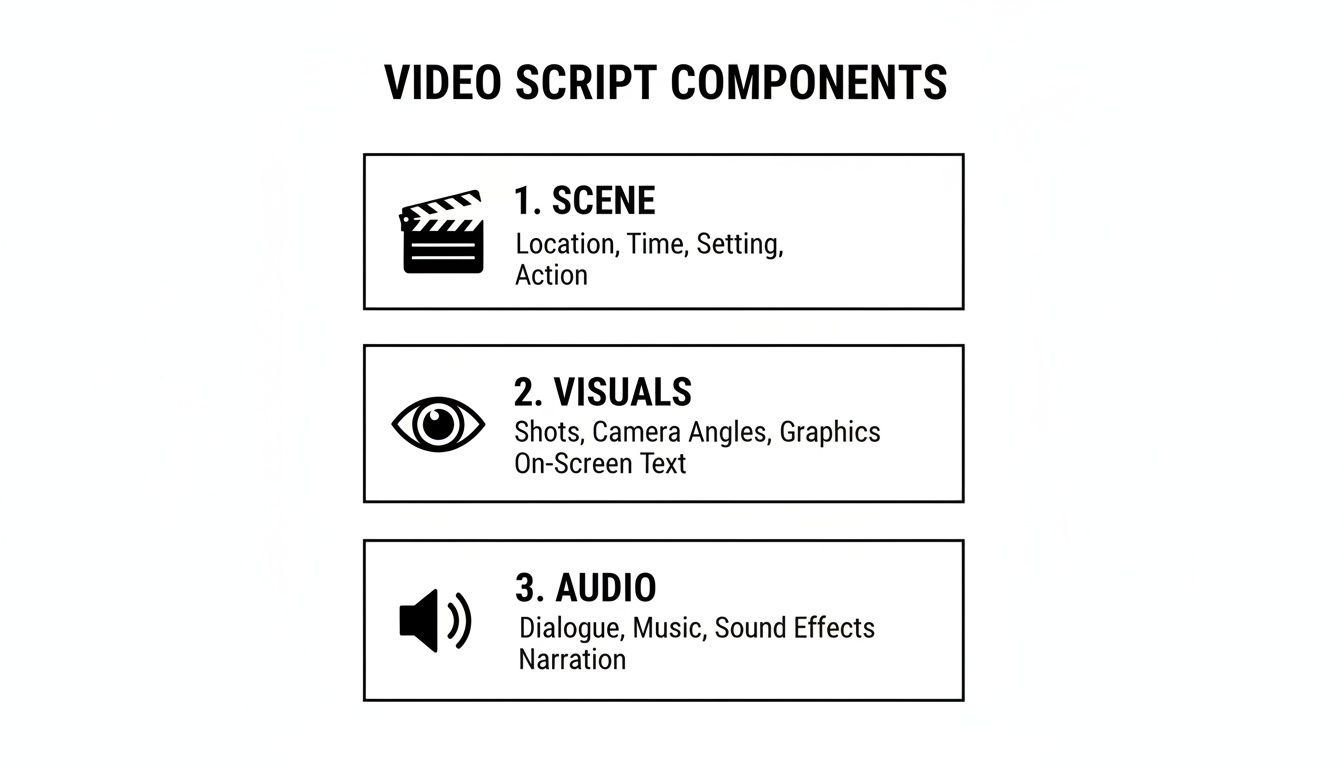
Think of this as your blueprint. You're always defining the scene, the visuals, and the audio, but how you detail them changes with the platform.
Long-Form YouTube Format: Timestamps for Easy Editing
For your standard, longer YouTube videos (think 5 minutes or more), the script's main job shifts to being an organizational powerhouse for a much bigger project. Using estimated timestamps is an absolute lifesaver during the edit.
I always break my long-form scripts into logical chunks with clear subheadings—Intro, Point 1, Point 2, Demo, Conclusion, etc. Then, I assign a rough timestamp like [00:30] or [02:15] to each section. This gives the editor a clear roadmap to navigate the raw footage and assemble the final cut way more efficiently.
Don't underestimate the global demand for this kind of platform-specific content. In India, for example, video revenues hit an incredible USD 8.8 billion in 2023, largely driven by YouTube and Meta. This just shows how crucial it is for creators to adapt their script formats to connect with audiences everywhere. You can dive deeper and read the full research on these market trends to see just how big the opportunity is.
Bringing Your Script to Life With AI
This is where the magic really happens—connecting your perfectly structured script to a powerful AI. Think of it less as handing over creative control and more as giving your vision a massive speed boost. When you feed a script into a tool like ShortGenius, it doesn't just guess what you want. It reads your script as a direct set of commands.
I've found this process to be a game-changer. Once your script is done, you simply upload it, and the AI gets to work, executing each instruction with total precision. It’s a workflow that genuinely shaves hours off every single project.
From Text to Video Instantaneously
A well-formatted script is like a universal language that both you and the AI can understand. Every element you've mapped out is translated into a specific action for the video generator.
Here’s how it breaks down in practice:
SCENE:This simple tag is your instruction to create a new visual sequence. If your script saysSCENE: A busy coffee shop, the AI immediately starts generating or sourcing footage that brings that exact setting to life.- Dialogue/VO: Any text you’ve marked as narration is automatically converted into a clean, natural-sounding voiceover. You just pick the voice style you want, and the AI handles the rest.
[Visual Cues]: Those little notes in brackets are your secret weapon. Writing something like[Close-up on hands typing on a laptop]gives the AI a direct order for its shot selection, making sure the visuals perfectly sync with what’s happening in the narrative.
This direct translation turns your script from a simple document into a dynamic production brief. It completely cuts out the guesswork and gets you from a blank slate to a solid first draft in minutes, not days. If you want to dive deeper into the possibilities, we have a detailed guide on text-to-video generation.
The biggest thing to remember is that structure gives you control. The more organized your script is, the more precise the AI-generated video will be. The AI is there to follow your lead, turning your clear instructions into a polished video.
Unlocking Advanced AI Features
A great script format does more than just help the AI assemble your video; it unlocks some seriously advanced features that can maintain brand consistency and add creative flair. When the AI understands the structure, it can apply complex commands across the entire project without you having to lift a finger.
For instance, you can include a command to apply your brand kit—your logos, color palettes, and fonts—and the AI will execute it flawlessly in every single scene. It can also interpret stylistic notes. Want a "dreamy, soft-focus" filter for a particular sequence? Or maybe you need the entire video to have a "fast-paced, kinetic" editing style? Just put it in the script.
Here’s a look at how the ShortGenius interface lays out these elements for the AI to interpret.
You can see how the visual and audio components are clearly separated. This clean input is what allows the AI to process each command distinctly and generate a video that’s a perfect match for your script's intent. To help get your scripts in this shape, you might consider using an AI writing assistant designed to refine video content.
Getting this process down is becoming more and more important. With writers' employment projected to hit 151,300 by 2032, tools that boost productivity are essential. AI is answering that call, helping creators produce more content from a single, well-formatted script. By mastering the format, you’re no longer just writing a script—you’re programming a video.
Insider Tips for Writing Scripts That Go Viral

Having a solid format for a video script is your foundation, but it’s the creative strategy that actually racks up the views. Once you’ve moved past columns and cues, it's time to dig into the techniques that can make a script genuinely unmissable. These are the tricks of the trade that top creators have been using for years to get their content to pop off.
First things first: you have to write for the ear, not the eye. On social media, people are listening while they scroll, multitask, or do chores. Your script needs to sound like someone is talking to them, not like they're reading a blog post.
Try reading your lines out loud as you’re writing. Do you sound like a real person, or a robot? If it feels clunky, simplify it. Use contractions ("you're," "it's"), ask your audience questions, and keep your sentences short. This conversational style feels far more personal and authentic, which is how you build a real connection.
Jolt Viewers with Pattern Interrupts
Audience attention on platforms like TikTok and Instagram is incredibly fleeting. A single boring second is all it takes for someone to swipe away. This is where the pattern interrupt comes in—it’s a slick move designed to break a viewer's expectations and keep them hooked.
Think of it as a scripted surprise that resets their attention. It’s an unexpected visual or audio jab that you write directly into your script to keep things interesting.
Here are a few I’ve seen work wonders:
- A sudden
CRASH ZOOMon your face. This is perfect for driving home a key point or landing a punchline. - An abrupt switch to a black-and-white filter for a single line. The visual shift instantly makes the dialogue feel more dramatic or serious.
- Dropping in a relevant, funny meme or GIF. It’s a great way to break the fourth wall and get a quick laugh.
These little jolts make your videos feel more dynamic and less predictable. That unpredictability is exactly what keeps people watching all the way through.
Scripting for Infinite Loops and Spontaneity
Ever find yourself watching the same 15-second video three times in a row? That's the magic of an infinite loop. It's a clever trick where the end of the video flows seamlessly back to the beginning, which can massively boost your watch time. Scripting this takes some real planning.
Your final line of dialogue needs to be a natural lead-in to your first. For instance, a video starting with "You'll never believe this trick..." could end with a quick cut right after "And that’s why..." The abrupt ending makes people want to rewatch to catch what they missed.
The secret to a great loop is making the visual and audio transition feel both surprising and inevitable. A perfectly executed loop can double or even triple your average watch duration as viewers get caught in the cycle.
But here’s the thing—not everything should be planned down to the last word. You can also script for spontaneity. For an unboxing video, for example, you wouldn’t script every "ooh" and "ahh." Instead, your script would have key talking points or features you need to highlight.
This approach gives you a solid structure while leaving room for those genuine, in-the-moment reactions that people love. The blend of a planned message and your authentic emotion is a killer combination. It ensures you hit all your marks while creating something that feels real, relatable, and—most importantly—shareable.
Common Script Formatting Questions Answered
Once you get into the rhythm of writing scripts, a few common questions always seem to surface. It’s one thing to have a template, but it's another to know how to adapt it on the fly. Let's walk through some of the practical questions I hear most often.
A big one is whether you should just use a traditional screenplay format, like you'd see for a movie. Honestly? Don't do it. That format is built for feature films with complex production teams and is way too bulky for a 30-second TikTok or a 2-minute YouTube Short. It’s cluttered with elements that just don't apply to short-form video, making the whole process slower than it needs to be. The two-column A/V (Audio/Visual) script is your best friend here—it's fast, flexible, and perfectly suited for the rapid pace of online content.
Ad Scripts Versus Explainer Scripts
So, sticking with the two-column format, how does your approach change when you’re writing a quick ad versus a more detailed explainer video? It really comes down to how you handle the timing.
- For a 30-second ad: You need to be thinking in seconds. Every visual cue and line of narration should be tightly planned, often corresponding to just 1-3 seconds of screen time. The goal is a rapid-fire sequence of hooks and visuals that grab attention instantly. Your script has to be incredibly precise.
- For a 2-minute explainer: You have a bit more breathing room. Instead of obsessing over every second, you can plan in larger chunks or "beats." For instance, you might map out your script with sections like Intro (0:00-0:15), The Core Problem (0:15-0:45), and Our Solution (0:45-1:30). This keeps you organized without getting bogged down in tiny details.
The fundamental two-column structure works beautifully for both, but you adjust the granularity of your timing to match the video's purpose.
The Biggest Mistake to Avoid
If there’s one trap I see new creators fall into over and over, it’s writing the entire voiceover first and only then thinking about the visuals. They'll polish a perfect monologue and then scramble to find B-roll or stock footage that vaguely fits. This almost always results in a boring video where the visuals feel completely disconnected from what’s being said.
The secret is to build your audio and visual columns at the same time. A great video is a conversation between what you see and what you hear. Let the ideas for visuals spark new lines of narration, and let your narration inspire a specific shot.
When you develop both sides of the script together, you force yourself to think like a video creator from the very beginning. You’re not just writing a podcast and throwing some pictures over it; you're crafting a cohesive, engaging experience. This simple change in workflow will make a massive difference in how your final videos turn out.
Ready to turn your perfectly formatted scripts into stunning videos in minutes? ShortGenius uses AI to read your script and generate a complete video with scenes, voiceovers, and effects automatically. Start creating faster and smarter with your first project.