Master Your Female Voice Emulator: AI Realism 2026

Unlock the power of a female voice emulator. Explore TTS tech, achieve emotional realism, and get tips for creating stunning AI voiceovers in 2026.
You've got the visuals cut. The hook lands in the first three seconds. The script says exactly what you want. Then the project stalls on the last mile: the voiceover.
Maybe you don't want to record your own voice today. Maybe your room isn't quiet. Maybe the brand needs a warmer tone, a younger tone, a more polished tone, or a female narrator who sounds natural and available on demand. That's where a female voice emulator stops being a novelty and starts becoming a working tool.
A lot of creators get pulled into the wrong category first. Search interest often comes from live use cases. Data shows that 68% of “female voice emulator” queries come from gamers and streamers seeking real-time solutions, while many of the strongest advances are more useful for content production, according to Voicemod's discussion of girl voice changer use cases. That mismatch confuses creators who need polished narration for videos, ads, courses, and product explainers.
The practical question isn't just “Can AI sound female?” It's “Can it sound right for this script, this audience, and this moment?” That's the difference between a voice that fills space and a voice that helps sell, teach, reassure, or entertain.
The Search for the Perfect Voiceover
A solo creator finishes editing a skincare ad at midnight. The visuals are clean. The copy is strong. But the voice still sounds wrong. One option feels too synthetic. Another sounds upbeat when the product needs calm authority. Hiring talent for a quick revision may not fit the deadline. Recording it yourself may not fit the brand.
That's the bottleneck a female voice emulator solves. It gives you on-demand narration without forcing you to choose between speed and polish. For creators, that matters because voiceover isn't a finishing touch. It shapes trust, pacing, and emotional tone.
Why creators get stuck
The struggle isn't because the tools are missing. It's because the category is messy.
A search for a female voice emulator can throw you into three very different worlds:
- Live voice changing for gaming, Discord, and streaming
- Text-to-speech for prerecorded videos, ads, and courses
- Voice cloning for matching a specific speaker identity
If you make videos, ads, or learning content, you usually want the second or third category, not the first. Live tools chase speed. Production tools chase control.
The best voice for a video isn't always the most realistic voice in general. It's the one that matches the script's intent.
The real job of the voice
A good AI voiceover doesn't just pronounce words correctly. It handles the invisible work:
- Pacing: slowing down before a key claim
- Emphasis: lifting the right product benefit
- Mood: sounding reassuring, playful, urgent, or reflective
- Consistency: keeping your channel or campaign recognizable
That's why creators who treat voice as a creative direction problem usually get better results than creators who treat it as a checkbox. A female voice emulator can save time, but its bigger value is flexibility. You can audition different tones quickly and keep refining until the voice fits the message.
What Exactly Is a Female Voice Emulator
A female voice emulator is software that generates or transforms speech so the output sounds like a female voice. But that broad label hides important differences. If you pick the wrong type, the results can sound disappointing even when the tool itself is good.
Three categories that people mix up
Think of voice tools like camera gear. A webcam, a cinema camera, and a live streaming rig all capture video, but they serve different jobs. Voice tools work the same way.
Text-to-speech
Text-to-speech, or TTS, takes written text and turns it into spoken audio.
This is the most useful format for content creators making:
- YouTube narration
- social ads
- product explainers
- training modules
- audiobooks
- podcast-style intros
You write the script, choose a voice, then shape delivery with punctuation, pauses, and style controls. TTS is usually the strongest option when you need clean audio and repeatable output.
Voice cloning
Voice cloning learns the sound and speaking style of a specific person. The goal isn't just “a female voice.” It's “this female voice.”
That matters when a brand wants the same narrator across campaigns, or when a creator wants continuity without rerecording every revision. It can be powerful, but it also raises consent and ownership issues, which matter a lot if the cloned voice belongs to a real person.
Real-time voice changing
Real-time voice changing transforms your voice as you speak.
This is common in:
- livestreams
- online games
- virtual events
- social chat apps
It's less about perfect studio quality and more about low delay. If the system takes too long to process, conversation falls apart. That speed requirement often reduces realism.
A simple mental model
Use this shortcut when choosing a female voice emulator:
| Need | Best fit |
|---|---|
| I have a script and want polished narration | Text-to-speech |
| I need one recognizable speaker identity | Voice cloning |
| I'm talking live and need instant conversion | Real-time voice changing |
What creators usually need
For video and ad production, most creators don't need a live transformer. They need a voice they can direct.
That means asking questions like:
- Does it handle short punchy lines?
- Can it sound warm without sounding sleepy?
- Will it keep the same tone across multiple versions of an ad?
- Can I revise a sentence without rerecording the entire piece?
A female voice emulator becomes valuable when it acts less like a gimmick and more like a voice actor who's always available, easy to brief, and fast to iterate with.
How Modern AI Voices Are Built
Modern AI voices sound dramatically better than older synthetic speech because the system no longer treats speech like a stiff sequence of separate sounds. It models voice more like a flowing performance.
In simple terms, the software learns patterns from large amounts of recorded speech and text. Then it uses those patterns to predict how a line should sound when spoken naturally. That includes pronunciation, timing, melody, and the tiny shifts that make a voice feel human instead of mechanical.
From robot speech to believable speech
Early speech systems were limited by the tools available at the time. According to Wikipedia's history of speech synthesis, the first general female synthesized voice was created in 1990 by Ann Syrdal at AT&T Bell Laboratories, after earlier systems had largely produced male-sounding outputs. The same history notes that WaveNet arrived in 2016, showing how deep learning could model raw waveforms and leading to the high-fidelity female voice emulation people recognize today.
That history matters because it explains a common reaction creators still have: “Why did AI voices suddenly get so much better?” The answer is that the old systems weren't just less polished. They were built on a much narrower understanding of speech.
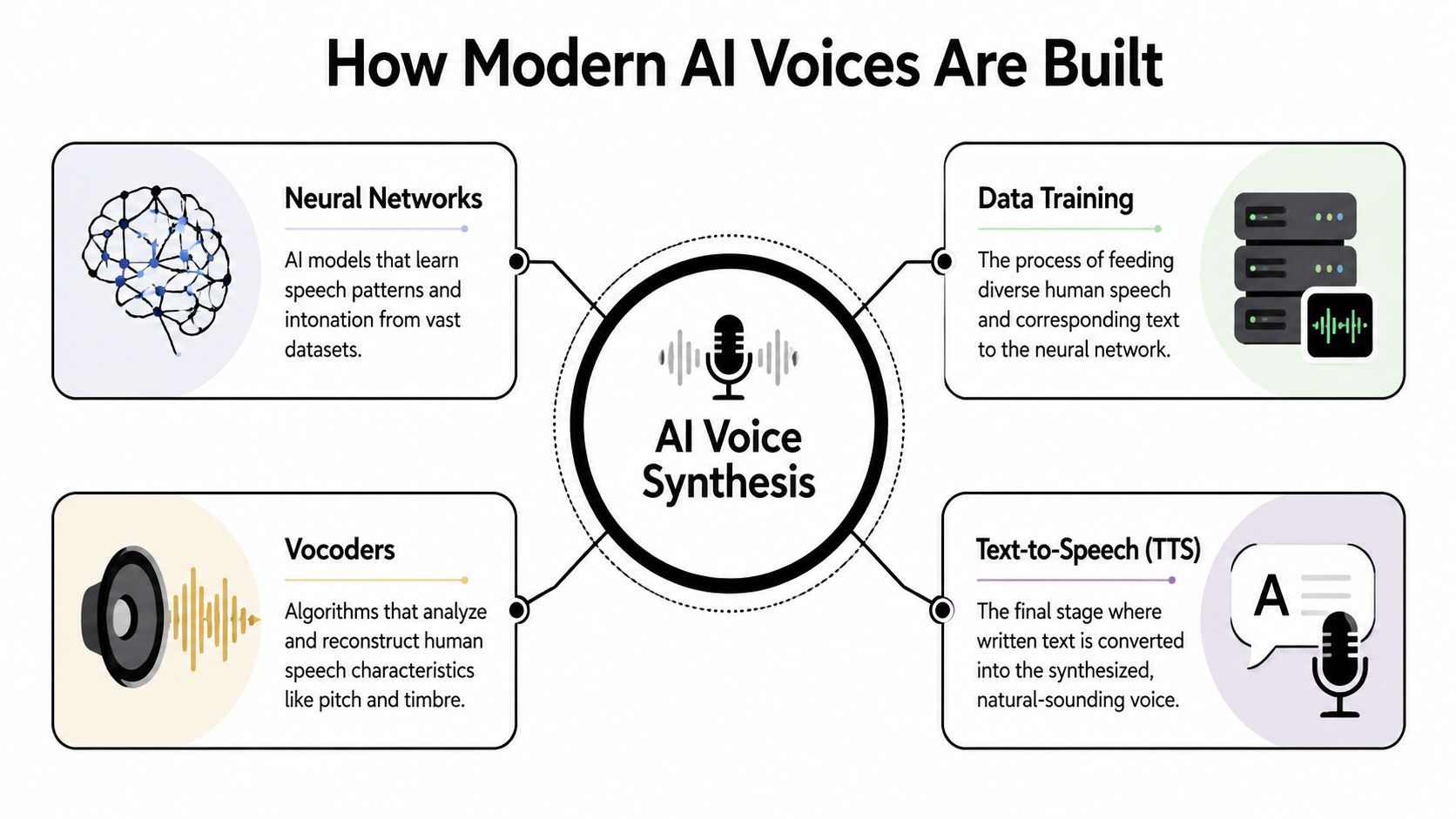
The four moving parts
Here's a plain-language way to think about the stack behind a modern female voice emulator.
Neural networks
A neural network is the pattern learner. It studies many examples of speech and starts recognizing how written language maps to natural delivery. It doesn't “understand” emotion the way a human actor does, but it can learn regularities in cadence, emphasis, and phrasing.
Data training
The model needs examples. Lots of them.
If the training material includes varied speakers, tones, sentence types, and recording conditions, the final voice tends to sound more flexible. If the material is narrow, the output may sound repetitive or awkward in unfamiliar contexts.
Vocoders
A vocoder handles the sound-building part. It reconstructs audio characteristics such as pitch and timbre. If the neural network is the composer, the vocoder is the instrument builder.
Older vocoder methods often produced that metallic, buzzy quality people associate with classic synthetic speech. Better systems reconstruct more detailed acoustic textures.
Text-to-speech synthesis
The final stage turns your typed script into a spoken waveform. At this point, all the earlier layers meet your actual project.
Practical rule: If a voice sounds flat, the problem may not be your script alone. It may be the model's limits in prosody, training data, or audio reconstruction.
Why this matters for creators
You don't need to build a neural net to use a female voice emulator well. But understanding the basics helps you judge what you're hearing.
If a voice handles product names well but stumbles on conversational phrasing, that points to one type of weakness. If it sounds smooth on long narration but awkward on fast ad copy, that points to another. Once you know the stack, you stop thinking “AI voice quality is random” and start hearing what the system can and can't do.
Key Factors for Quality and Realism
You test two female voice presets on the same 15 second ad. One sounds like a creator who understands the product. The other sounds like a customer service menu reading polished copy. That gap is what quality sounds like in practice, and creators can learn to spot it fast.
A strong female voice emulator does more than sound higher or softer. It needs to behave like a real speaker under pressure. That means it should carry emphasis, handle tricky wording, and stay believable across different kinds of lines.
What realism actually sounds like
Start with pitch. Pitch is the perceived highness or lowness of a voice, but realism does not come from pushing the voice upward. Real female speech usually moves. It rises to signal contrast, dips to show certainty, and shifts slightly across a sentence the way a camera changes focus to guide your eye.
Then listen for prosody. Prosody is the timing, stress, and melody of speech. It tells the listener what matters. A flat prosody pattern can make even good copy sound lifeless because every phrase arrives with the same weight, like a video editor cutting every shot to the same length no matter what the scene needs.
Next comes timbre. Timbre is the texture or color of the voice. Two voices can hit the same pitch and still feel completely different. One may sound airy and youthful. Another may sound grounded and reassuring. For creators, timbre often shapes brand fit more than gender match does.
One more factor gets overlooked. Consistency matters. If the first sentence sounds warm and the next suddenly turns brittle or synthetic, the illusion breaks.
A fast listening checklist
Use this table when comparing tools or testing voice presets.
| Factor | Description | What to Listen For |
|---|---|---|
| Pitch | The high or low quality of the voice | Natural rise and fall, not a constant lifted tone |
| Prosody | The rhythm, stress, and melody of speech | Pauses that feel intentional, emphasis on meaning, varied sentence shape |
| Timbre | The tonal texture or color of the voice | Smoothness, breathiness, resonance, and whether it feels human |
| Pronunciation | How clearly words and names are spoken | Clean handling of brand terms, acronyms, and uncommon words |
| Pacing | The speed and spacing of delivery | Room to absorb key phrases, no rushed endings |
| Stability | Consistency across lines | Similar tone from sentence to sentence without random shifts |
A quick test helps. Play the sample once for correctness, then once with your eyes off the screen. On the second listen, ask a simpler question. Would this voice make you trust the speaker, or merely understand the words?
Specialized models sound better for a reason
Some systems sound better because they are tuned for a narrower job. A broad model may handle many situations passably. A specialized model often sounds more convincing inside its intended range, the way a prime lens can produce a stronger image than an all purpose zoom in the right conditions.
A useful example appears in the YouTube discussion of female AI voice model ranges and real-time performance, which notes that the Soul Female AI voice model is optimized for a B2 to G#4 pitch range. That kind of tuning matters because voices usually sound most natural inside boundaries they were built to handle.
The same source notes that some real-time emulators can fall to a 10% gender pass rate during intensive use like gaming (https://www.youtube.com/watch?v=X4XbzruCMrM&vl=en). For creators, the practical lesson is straightforward. A system forced to respond instantly often sacrifices detail, stability, and nuance.
Why real-time and production tools feel different
Real-time voice changing prioritizes speed. Production voice generation prioritizes finish.
That tradeoff shows up in predictable ways:
- robotic edges on held vowels
- awkward transitions between words
- less expressive delivery in fast conversational lines
- audible artifacts when the system is under load
For live streaming or roleplay, those limits may be acceptable. For a paid ad, product demo, or brand explainer, they are easier to hear and harder to excuse.
Production-grade tools have more time to render cleaner audio, preserve subtle vocal texture, and let you revise a single sentence until it sounds right. That matters because realism is not only about passing as female. It is about sounding intentional.
How to test a voice before you commit
Skip placeholder copy. Test the voice with scripts that create pressure.
Use three short lines:
- A punchy ad line with contrast, such as a problem followed by a solution.
- A warm explanatory line that should sound trustworthy, not overly excited.
- A difficult line with a product name, number, acronym, or unusual phrasing.
Listen for where the illusion breaks. Does the pacing rush at the end? Does the product name sound guessed rather than known? Does the emphasis land on the wrong word and change the meaning?
The best voice is not the one that sounds female in a vacuum. It is the one that still sounds human when your actual script asks for clarity, control, and a believable point of view.
Beyond Accuracy Achieving Emotional Authenticity
You are finishing a product ad at midnight. The script is correct. The audio is clean. The voice sounds female. Yet the line that should feel reassuring lands like a voicemail menu. That is the central challenge with AI voice work.
Creators making ads, explainers, and training videos usually need more than gender accuracy. They need a voice that can sound warm in one sentence, dry in the next, and subtly confident when the offer appears. According to ElevenLabs' discussion of female voice changer limitations, 55% of users prioritize emotional range over simple gender accuracy, and only 12% of female voice tools currently offer reliable emotional modulation. That gap helps explain why a technically correct voice can still miss the point of the script.

What “emotion” means in practice
Emotional authenticity is usually small, not theatrical. It lives in pacing, emphasis, and restraint.
A female voice emulator for a skincare tutorial might need calm reassurance. The same tool in a software ad might need smart skepticism, like a friend who has seen too many bad dashboards and is relieved this one finally makes sense. A training module may need patience above all else. The voice should guide, not perform.
That is why the target emotion should be specific. “Sound better” gives the model almost nothing to work with. “Sound warm, patient, and slightly upbeat” is usable direction.
For creators, the useful distinctions often look like this:
- warm instead of flat
- confident instead of pushy
- playful instead of goofy
- concerned instead of dramatic
- sarcastic instead of rude
Sarcasm is a good example of where many tools fail. The words may be right, but the stress lands on the wrong syllable or the pause comes too late. Human listeners catch that instantly, the same way they can hear when an actor reads a joke without understanding it.
How to direct an AI voice better
A strong result usually starts with script direction, not model swapping. AI voices respond to text the way musicians respond to sheet music. If the markings are vague, the performance will be vague too.
Use punctuation to shape delivery
Punctuation acts like timing cues.
- Commas add a short breath.
- Periods make the line firmer.
- Ellipses slow the thought and can suggest hesitation or irony.
- Question marks add lift, curiosity, or disbelief.
- Exclamation points raise energy, but overuse makes the read feel synthetic.
Compare these versions:
- We fixed the issue, and your team can launch today.
- We fixed the issue. Your team can launch today.
The second line usually sounds more certain because the pause creates a clean handoff from problem solved to next action.
Write for the ear
AI voice tools expose sentences that were written for the eye. A sentence can look polished on a page and still sound tangled when spoken.
Use shorter clauses. Move the important word near the end of the sentence if you want it to carry weight. Cut stacked modifiers that force the model to drag through the line. If a phrase feels hard to say out loud, rewrite it before blaming the voice.
One quick test helps. Read the sentence once in a neutral tone. Then read it as if you were explaining it to one person on a video call. If the second version sounds more natural, your script needs more spoken language and less article language.
Add light performance cues
Some generators respond to bracketed cues, and some ignore them. Either way, the exercise improves the copy because it forces you to define the mood.
Examples:
- (warm) We made this easier for small teams.
- (dry, amused) Because clearly, you needed another dashboard.
- (gentle urgency) You should back this up today.
Warmth tends to come from softer pacing and less punch on the final word. Sarcasm often needs a tiny pause before the reveal. Urgency works better when it sounds controlled, not shouted. Those details matter more than just choosing a female voice preset.
A practical workflow for nuance
When a read feels flat, use a staged approach instead of regenerating the whole script five times and hoping for luck.
- Choose one emotion. Pick a clear target such as reassuring, skeptical, playful, or calm.
- Mark the turning point in the sentence. Find the word where the feeling should shift or intensify.
- Adjust punctuation first. A comma or period often changes the read more than a new voice model.
- Rewrite one line at a time. Isolate the weak sentence so you can hear what changed.
- Compare takes with the sound off in your head. Ask what the audience should feel at that exact moment, then listen for whether the audio creates that feeling.
That process sounds simple because it is. It also works. The best AI voiceovers feel directed, and direction is how you move from a voice that merely sounds female to one that sounds believable, persuasive, and emotionally right for the scene.
Use Cases and Important Ethical Guardrails
A female voice emulator is useful because it compresses production time. But the wider value is consistency. It lets a creator produce more versions, test more angles, and keep a recognizable sound across content types.
The technology is flexible enough for many creative jobs, but the same flexibility creates responsibility. The most professional users build ethical guardrails into the workflow from the start.
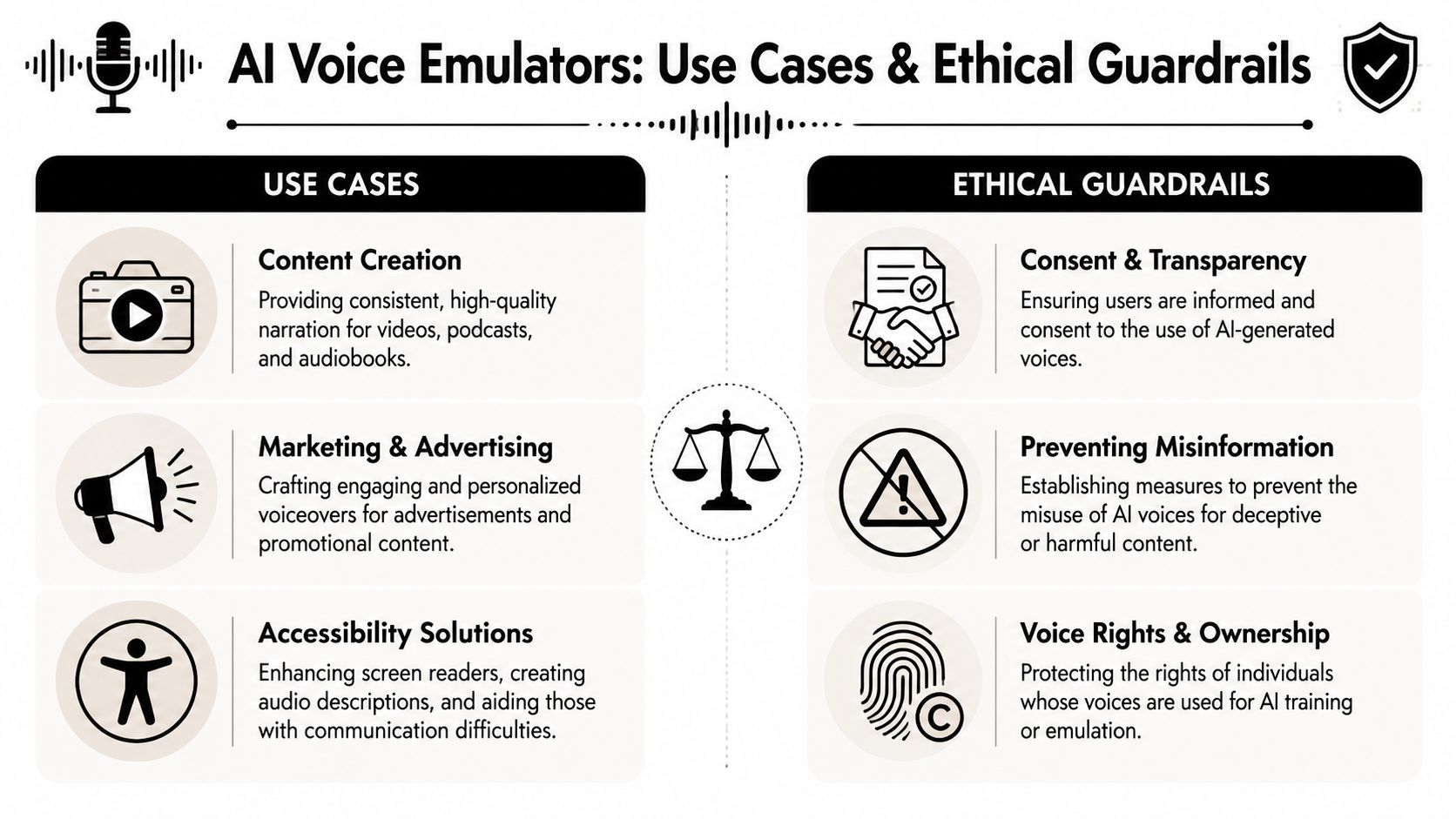
Where creators use it well
A female voice emulator fits naturally into several production settings:
- Content creation: You can keep narration consistent across tutorials, list videos, explainers, and serialized channel content.
- Marketing and advertising: Teams can test multiple hooks, offers, and audience variants without booking fresh recording sessions each time.
- Accessibility support: Audio descriptions, screen-reader style content, and alternative learning formats become easier to produce at scale.
For educators, the payoff is clarity and repeatability. For marketers, it's iteration speed. For creators, it often means finally shipping the video instead of sitting on a near-finished draft for days.
The guardrails matter
Voice tools can save time and broaden creative options. They can also damage trust if used carelessly.
Consent and cloning
If you clone or closely imitate a real person's voice, consent isn't optional. A voice is part of identity. Treat it that way.
Transparency with audiences
If an AI-generated voice plays a major role in your content, clear disclosure is often the safer professional move. Audiences don't usually object to responsible use. They object to feeling misled.
A short video discussion on the broader implications of AI voice tools adds useful context:
Avoiding stereotypes
A female voice emulator shouldn't become a shortcut for clichéd character design. “Female” is not a personality. If your script assumes every female voice should sound soft, submissive, bubbly, or maternal, the problem isn't the model. It's the brief.
Professional voice direction starts with respect. Choose tone based on message and audience, not stereotype.
Rights and ownership
If a platform trains on voices or allows custom voice creation, users should understand what rights apply. Read the terms. Know who owns the resulting voice assets and what uses are allowed.
Good creators don't see these guardrails as friction. They see them as brand protection. Trust takes a long time to build and a very short time to lose.
Create Flawless Voiceovers with ShortGenius
When you want everything in one place, the workflow matters as much as the voice quality. You don't just need audio. You need script drafting, visual assembly, revision speed, and a clean way to test different reads against the same scene.
That's where ShortGenius becomes practical for creators producing videos and ads at volume. You can move from idea to script, from script to voiceover, and from voiceover to edited video without bouncing across a pile of separate tools.
A simple workflow that matches real production
Start with the script. If your draft is rough, generate variations until the pacing feels speakable, not just readable. Then choose a premium female voice that matches the job. For an ad, that might mean crisp and energetic. For education content, it may mean calm and grounded.
Once you hear the voice against the video, swap and compare. That matters because some voices sound strong alone but don't sit well with fast cuts, captions, or background music. ShortGenius makes that kind of auditioning easier inside the same production flow.
Why this setup helps
The main advantage is speed without chaos.
You can:
- generate or refine scripts before recording
- pair natural voiceovers with video scenes quickly
- swap voices and pacing without rebuilding the whole project
- keep output consistent across a series, campaign, or channel
For creators trying to publish regularly, that kind of integrated workflow removes the old bottleneck from the opening problem. You don't need to chase a separate writer, editor, voice tool, and scheduler every time a line changes.
If you want a faster way to create polished ads, videos, and voice-driven content, try ShortGenius (AI Video / AI Ad Generator). It brings scripting, visuals, editing, and natural voiceovers into one workflow so you can produce more, revise faster, and keep your brand voice consistent.