Master Ecommerce Video Ads: 2026 Guide for Conversions

Create high-performing ecommerce video ads that convert. Our 2026 guide covers strategy, AI production, platform specs, and scaling.
Video ad spend keeps rising, but the primary pressure on ecommerce teams is operational. More brands are producing more video, across more placements, with shorter shelf lives for each concept. That raises the bar for everyone competing for the same customer attention.
For a DTC brand, ecommerce video ads now sit inside a full system. Strategy sets the angle. Production turns that angle into multiple assets fast enough to test. Measurement decides what earns more budget. Refresh cycles keep winners from burning out after a few weeks of delivery.
This is usually where teams get stuck.
The problem is rarely a lack of creative ideas. It is the gap between a strong concept and a repeatable workflow that can produce hooks, cutdowns, aspect ratios, creator-style edits, product demos, and retargeting variants without turning every launch into a production bottleneck.
Strong brands treat video as an operating discipline. They build around briefs, scripting, modular shoots, post-production templates, naming conventions, testing cadence, and clear success metrics. Modern AI tools can remove a lot of the old friction in scripting, versioning, editing, and creative refresh, but the tool only helps if the workflow is built to support scale.
Why Ecommerce Video Ads Are Non-Negotiable in 2026
A shopper can scroll past your ad in a second. In that window, video can show product, context, and proof at the same time. A static image usually cannot.
That shift matters because ecommerce buyers now expect to inspect a product before they trust it. They want to see scale, texture, application, setup, speed, before-and-after, and whether the result looks believable in real use. Video reduces that uncertainty early, before the click, and keeps reducing it on the product page after the click.
Video carries more of the selling job
For DTC teams, video is no longer just a paid social asset. It now does work across prospecting, retargeting, PDPs, landing pages, email, and post-purchase education. The format changes by placement, but the job stays the same. Show the product clearly, answer the next objection, and give the customer enough confidence to keep moving.
The practical advantage is speed of understanding. A skincare demo can show texture and routine in a few seconds. An apparel try-on can answer fit questions faster than a size chart. A home goods clip can show assembly, footprint, and cleanup without asking the customer to read three blocks of copy.
Buyer behavior changed. Production has to catch up.
Customers do not move through a neat funnel anymore. They see a creator clip, visit the site later, get retargeted with a testimonial, compare on the PDP, then convert after a final reminder in email or paid social. If the video system breaks at any point, performance drops with it.
That is why the challenge is operational, not just creative. Brands need enough footage, enough variations, and enough editing speed to match how buyers encounter the product. One polished launch asset does not cover that job.
A practical plan usually includes:
- Coverage across the journey: separate assets for acquisition, retargeting, PDP support, and offer-driven refreshes
- Variants by angle: different hooks for pain point, outcome, proof, comparison, and creator-style delivery
- A refresh cadence: new intros, cuts, captions, and offers before frequency climbs and results soften
Practical rule: Treat every ecommerce video ad as one asset inside a working system. The winner is rarely the prettiest edit. It is the concept your team can produce, measure, and refresh fast enough to keep scaling.
The New Rules of High-Performing Video Ads
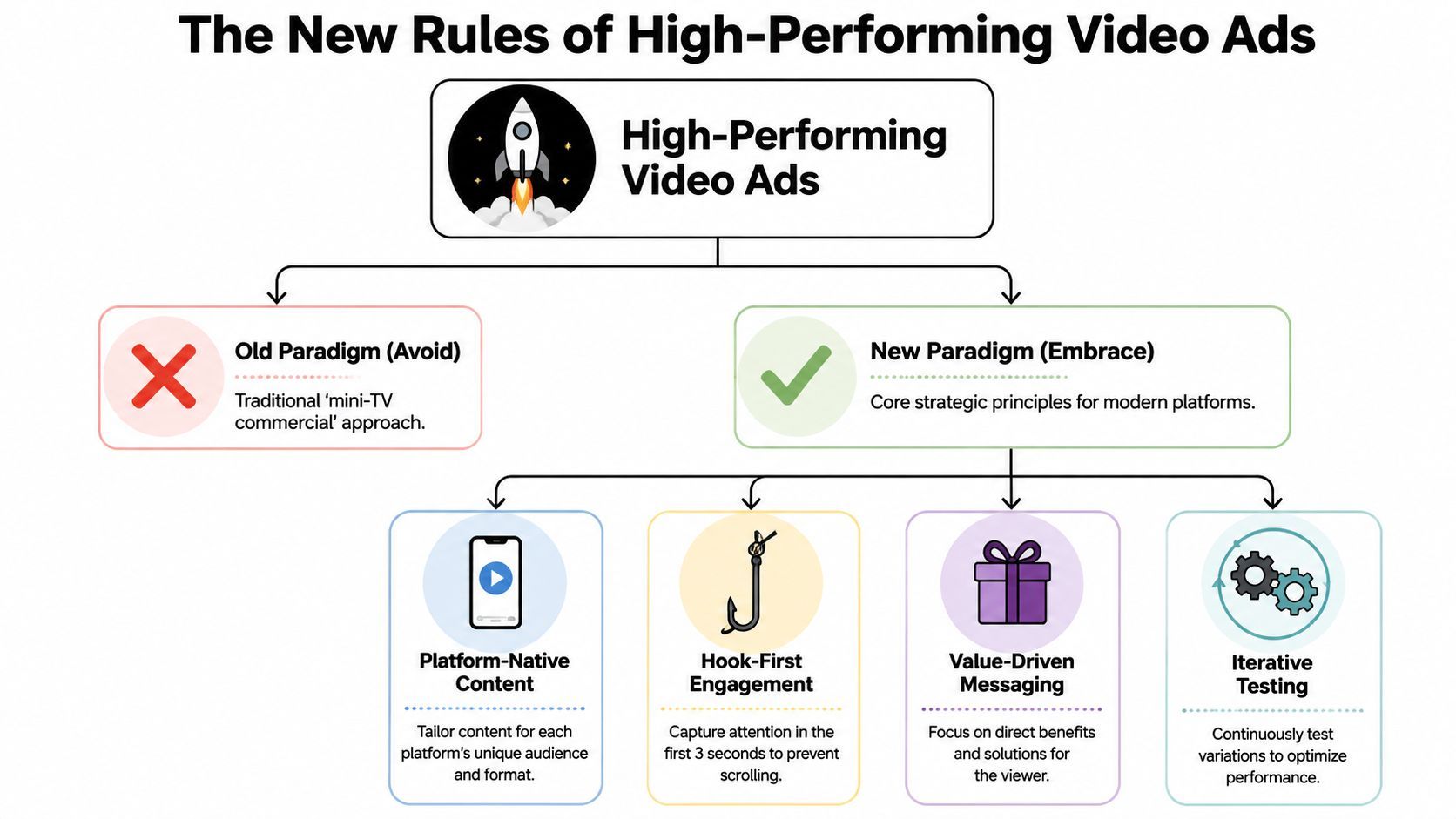
Most weak ecommerce video ads come from an outdated assumption. Teams still build them like mini TV commercials. They spend too much time on cinematic setup, delayed reveals, and polished storytelling that only works if a viewer has already decided to pay attention.
That isn't how feeds work.
The first seconds decide everything
Platform and creator guidance consistently push the same principle. Performance is heavily shaped by the first 1 to 2 seconds, and one expert rule says that if viewers can't tell what the product is by second one, the ad is already late, as discussed in Zeely's guide to ecommerce video ad examples.
That shifts the opening structure dramatically. Instead of easing into the story, strong ads open with the product, the problem, or the proof.
What replaces the old polished master edit
The better model is a modular creative system. Zeely's breakdown points toward exactly that. Build a bank of assets such as demo clips, unboxings, tutorials, comparisons, and detail shots, then test multiple hooks for each angle instead of banking on one finished hero cut.
This is what that looks like in practice:
- Hook modules: Problem-first openers, proof shots, outcome-first countdowns, or direct product reveal.
- Body modules: Demo, objection handling, explanation, social proof style narration, before-and-after framing.
- Close modules: Offer, CTA, urgency framing, PDP prompt, or creator-style recommendation.
This approach does two things. First, it raises testing speed. Second, it makes fatigue easier to manage because you can swap the opening, pacing, or proof segment without rebuilding the entire ad.
What usually works and what usually doesn't
A strong ecommerce video ad usually does the following:
- Shows the product immediately: The viewer shouldn't need context to identify what they're looking at.
- Earns interest with evidence: Texture, motion, reaction, result, or comparison tends to beat abstract lifestyle imagery.
- Uses platform-native pacing: Faster cuts, visible captions, and direct framing often outperform slower brand-film pacing.
What tends to underperform:
- Slow intros: Logo stings, mood shots, and delayed reveals waste the most valuable seconds.
- Overwritten scripts: If the copy sounds like a landing page paragraph, it usually won't survive the scroll.
- Single-version campaigns: One ad angle can't carry a serious testing program for long.
A great ecommerce video ad doesn't feel like a compressed brand film. It feels like the shortest believable path from attention to trust.
Video Ad Formats and Platform Specifications
Creative quality isn't enough if the file gets rejected, mangled in transcoding, or delivered in the wrong shape. Many teams lose efficiency due to these issues. The ad concept is sound, but the exported asset isn't built for the placement.
For ecommerce video ads across YouTube, social placements, CTV, and streaming inventory, technical requirements shape the production plan from the start.
Why one source edit rarely works everywhere
Major placements have different constraints. Google-supported YouTube formats require 1280×720 horizontal, 720×1280 vertical, or 480×480 square assets. CTV buyers commonly ask for constant frame rates around 23.976 to 30 fps, with some placements allowing 6 to 30 second lengths and bitrate floors as high as 6 to 15 Mbps depending on inventory, according to Mountain's breakdown of CTV ad specs.
That matters because platforms don't preserve your source file exactly. They transcode it. If your original export is weak, compressed, or framed poorly, the final delivered version can look soft, cropped, or unstable.
Social Video Ad Spec Cheat Sheet 2026
| Platform | Aspect Ratio (Rec.) | Resolution (Min.) | Max Length | File Type |
|---|---|---|---|---|
| Instagram Reels | 9:16 | Platform dependent | Platform dependent | MP4 or MOV commonly used |
| TikTok | 9:16 | Platform dependent | Platform dependent | MP4 or MOV commonly used |
| YouTube Shorts | 9:16 | 720×1280 often used in practice | Platform dependent | MP4 commonly used |
| YouTube in-feed or horizontal video | 16:9 | 1280×720 | Platform dependent | MP4 commonly used |
| Square feed placements | 1:1 | 480×480 often accepted in some ecosystems | Platform dependent | MP4 or MOV commonly used |
For Instagram-specific planning, keep a reference handy for Correct Instagram video resolutions. It's useful when you're briefing editors and want fewer last-minute resize mistakes.
A safer production workflow
Instead of asking an editor to “make one ad that works everywhere,” use this handoff:
- Choose the master composition first. Decide whether the original shoot is framed for vertical, horizontal, or both.
- Cut platform variants intentionally. Don't auto-crop the same timeline and hope the message survives.
- Export duration cutdowns early. If you need shorter and longer versions, build them as separate edits, not as afterthought trims.
- Protect text zones. Captions, offers, and product labels need safe placement for vertical and square versions.
- Review post-transcode samples. Watch how the ad looks after upload, not only in your edit software.
Specs affect performance, not just compliance
A bad resize changes meaning. A weak bitrate can make product texture disappear. A cropped subtitle can remove the key promise. These aren't design issues. They're conversion issues.
The brands that operationalize this well usually keep one creative brief and multiple delivery templates. That prevents the common failure mode where the concept is approved once, but the actual ad quality degrades as it spreads across placements.
Winning Creative Strategies and Ad Templates
Templates help when they preserve psychology, not when they turn your brand into a clone. The useful way to think about templates is this. Each one is a repeatable persuasion pattern with room for different products, tones, and visual styles.

I'll use a fictional DTC brand called Northline Home to make the examples concrete. Assume it sells a compact countertop ice maker.
Problem and solution
This is still one of the strongest structures for direct response because it mirrors how buyers talk to themselves. They don't start with brand story. They start with friction.
A Northline version might open with a person filling trays, spilling water, and digging through an empty freezer before guests arrive. Then the ad cuts immediately to the product producing ice on the counter.
Why it works:
- It names pain fast: The viewer recognizes the situation before they evaluate the product.
- It frames the product as relief: The item isn't just shown. It's shown solving a very specific annoyance.
- It gives the script direction: Every line can now answer “why this is easier.”
A rough flow:
- Hook with the inconvenience
- Show the product in use
- Add one or two operational benefits
- End with a direct CTA tied to the use case
Unboxing and first impressions
This format works because it borrows trust from real-world product discovery. Viewers get to inspect the item with the creator instead of being sold by a polished brand voice.
For Northline Home, the ad starts with the box opening on a kitchen counter. The creator touches the materials, comments on the footprint, plugs it in, and reacts to the first batch.
This is also where competitor research gets practical. Reviewing ScrapeCreators' Meta Ad Library insights can help teams spot recurring hooks, offer framing, and visual structures across the category before they script their own variants.
Hyper-satisfying demo
Some products win because the usage footage is naturally watchable. Cleaning tools, kitchen gadgets, organizers, beauty tools, and transformation products often fit here.
A Northline version would lean into close-up visuals. Water goes in. Ice forms. Cubes drop. Glass fills. Drink pours. No heavy narration needed.
Field note: If the product has a visible output, don't hide it behind too much talking. Let the mechanism do the persuasion.
This kind of ad is especially useful for top-of-funnel and retargeting because it can stop the scroll without requiring much explanation.
A short example breakdown:
| Scene | Purpose |
|---|---|
| Close-up of empty glass | Create anticipation |
| Product running on counter | Establish function |
| Ice dropping into basket | Deliver proof |
| Drink assembly | Show outcome |
| Product shot with CTA | Close the loop |
A useful reference for pacing and visual direction is below.
UGC-style recommendation
This format works when the purchase needs reassurance more than spectacle. It sounds like a friend recommending a product after using it in normal life.
For Northline, the creator might say they bought it for hosting, ended up using it daily, and now don't want to go back to trays or store-bought bags. The script doesn't need to be dramatic. It needs to sound observed.
Three guardrails improve this style:
- Keep imperfections that support credibility: Minor pauses and natural phrasing can help.
- Avoid generic praise: “I love this” is weak. “It fits beside my coffee machine and I stopped running out when people come over” is stronger.
- Show the product while claims are made: Don't separate testimony from evidence.
The best creative teams don't pick one template. They build a rotation. Problem-solution, unboxing, demo, and recommendation each answer different buyer questions, and together they create a stronger testing slate than one polished concept ever could.
Modern Production Workflows from Script to Scale
Creative fatigue shows up faster than it can be replaced. The bottleneck usually is not ideation. It is the production system between a new angle and a live ad.
Traditional production was built for a few polished assets per quarter. Ecommerce teams need a repeatable way to ship new hooks, offers, cutdowns, aspect ratios, and audience variants every week without turning the creative team into a ticket queue.
The question to solve is operational. How does the team move from brief to testable ads fast enough to keep learning, while still protecting message quality and brand trust?
Old workflow versus modern workflow
The old path creates drag because too many decisions happen late, after footage is locked and the media team already needs variants. A modern workflow pushes more decisions upstream and keeps assets modular from the start.
Traditional production usually looks like this:
- Brief once: The team writes one concept and tries to predict the winner before testing.
- Shoot heavily: Production captures a large volume of footage in one expensive session.
- Edit late: Hook, pacing, and claim decisions get forced into post.
- Resize at the end: Platform fit becomes cleanup work.
- Refresh slowly: By the time fatigue shows up, replacements are still in review.
A stronger system changes the order of work:
- Build a message bank first: Pull objections, reviews, founder language, and competitor gaps into one source document.
- Write in modules: Separate hooks, proof points, product shots, social proof, and CTAs so they can be recombined.
- Produce for variation: Capture scenes that support multiple openings, voiceovers, and offers.
- Version early: Plan vertical, square, and feed-safe edits before the first export.
- Refresh on a cadence: Replace weak opens, stale offers, and low-retention scenes every week.
That shift matters because ad performance rarely depends on one perfect edit. It depends on how many credible tests the team can launch before the market moves on.
Where AI-assisted production helps
AI is most useful when the constraint is throughput. It shortens the time between insight and execution, especially for early concept testing, variant creation, captioning, voiceover swaps, and placement-specific resizing.
As discussed by Practical Ecommerce, faceless and AI-generated video workflows are now realistic for ecommerce teams, but performance still depends on credibility, differentiation, and policy-safe execution. That is the right frame. AI is not the strategy. It is production infrastructure.
Used well, AI-assisted workflows reduce waiting, handoffs, and repetitive editing work. Teams can generate several hooks from one product brief, test different voiceover styles, assemble scenes around one core message, and publish channel-specific variants without rebuilding each ad from scratch.
Tools like AI video ad production workflow software package scripting, asset generation, voiceovers, editing, resizing, and publishing into one system. For lean teams, that matters less as a novelty and more as a way to remove production lag between a winning insight and the next test.
Where human-led content still matters
Scale alone does not win. Some ads need a person on camera because the buyer is reading for sincerity, not polish.
Human-led content tends to outperform synthetic or faceless formats in a few predictable situations:
- Trust-sensitive categories: Beauty, wellness, baby, food, and other categories with stronger authenticity expectations often benefit from a visible user or founder.
- Experience-led selling: If the claim depends on what changed in daily use, a real person usually delivers that proof better than a generated narrator.
- Crowded creative environments: When feeds are full of similar motion templates and stock-style edits, a specific human perspective can separate the brand from the category average.
The practical answer is usually a mixed system, not a pure one.
| Need | Better Fit |
|---|---|
| Fast concept testing | AI-assisted faceless variants |
| Educational explainer ads | Hybrid workflow |
| High-trust recommendation content | Human-led UGC |
| Retargeting cutdowns and offer swaps | AI-assisted production |
Strong teams decide which parts of the ad need human credibility and which parts can be standardized for speed.
The production system that scales
The teams that keep improving performance do not treat video production as a campaign event. They run it like an operating cadence.
A simple weekly workflow works:
- Pull fresh objections, reviews, support tickets, and creator notes into a central script bank.
- Turn each angle into multiple hooks, opening lines, and claim structures.
- Build several ad versions from the same asset set, rather than producing one finished piece at a time.
- Publish by placement, audience, and offer so results are easier to compare.
- Tag every winner, loser, and reusable scene in a searchable library.
That last step gets ignored too often. Without a usable archive, teams keep paying to relearn the same lessons, reshoot the same proof, and rewrite claims that already worked.
The goal is not more content. The goal is faster learning per production hour. Once a team has that system in place, creative volume stops feeling chaotic and starts compounding.
Measuring What Matters Beyond the Click
Many marketing teams can tell you which ad got the lowest CPC or the highest CTR. Fewer can tell you whether the video created demand, supported another touchpoint, or harvested shoppers who were already on the way to buying.
That's the measurement gap that keeps a lot of ecommerce video programs shallow.
According to Vidlo's analysis of ecommerce video ad gaps, public guidance often focuses on hooks, formats, and creative best practices but underexplains how to know whether video is driving incremental sales versus merely capturing demand already created elsewhere. That problem gets worse because video now appears across paid social, PDPs, emails, and landing pages.
Last click hides too much
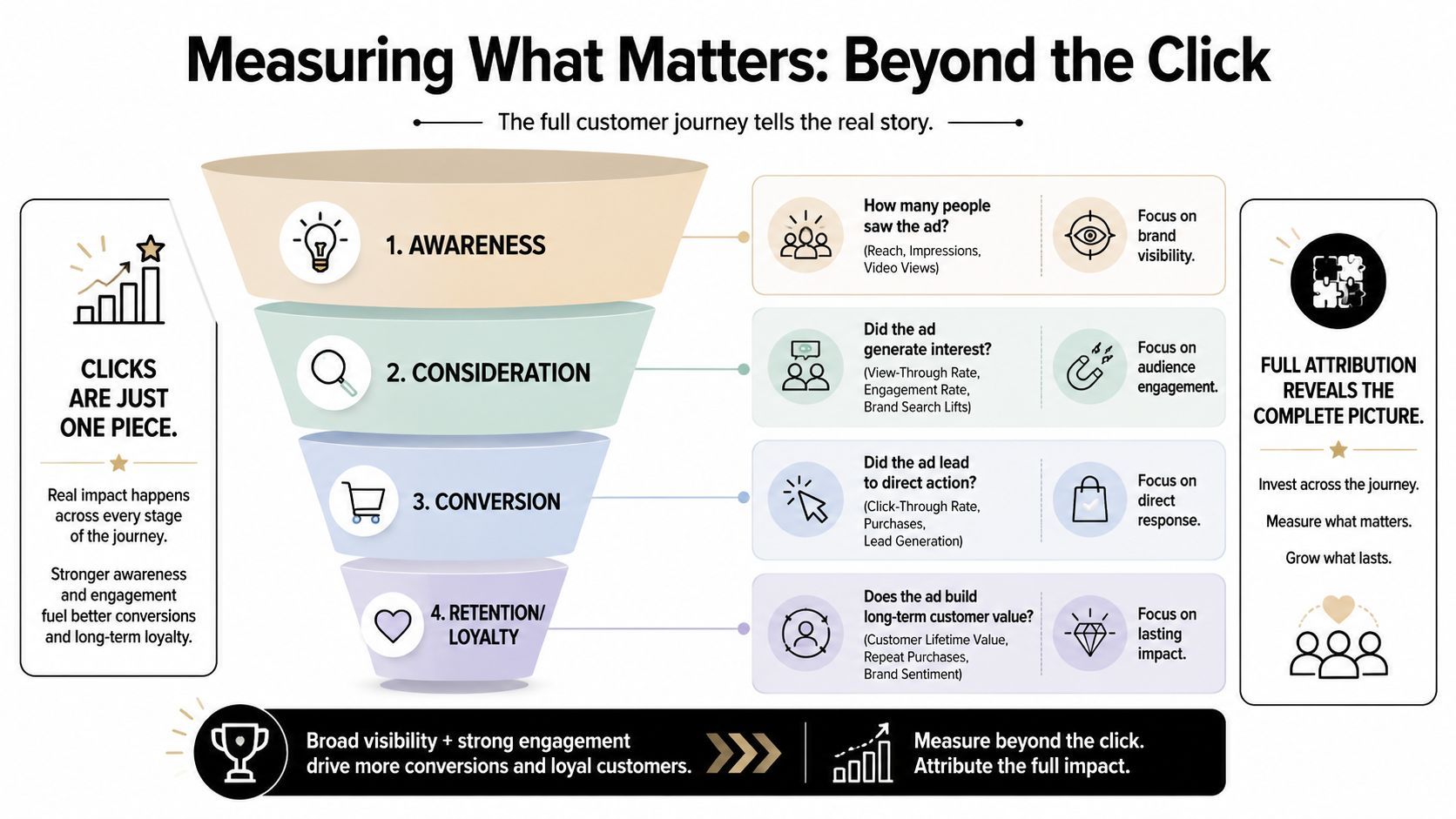
If you judge ecommerce video ads only by last-click purchase reporting, you miss a large part of their job. Some videos introduce the product. Others warm the buyer up. Some make the branded search click easier to convert later. A few capture the purchase directly.
Those roles shouldn't be measured identically.
A more useful scorecard
Use a layered scorecard instead of one headline metric.
Awareness metrics
These don't prove revenue on their own, but they tell you whether the creative earned attention.
- Reach and impressions: Useful for distribution context.
- Video views and hold rate: Helpful for comparing hooks.
- Thumb-stop behavior: A directional read on whether the opening visual did its job.
Consideration signals
A lot of video impact starts to show before purchase.
- View-through behavior: Useful when clicks understate influence.
- Landing page quality: Watch bounce patterns, time on page, and downstream session behavior qualitatively.
- Assisted conversions: Look for paths where video touched the buyer before another channel closed the sale.
Conversion metrics
Direct response still matters. It just shouldn't operate alone.
| Metric | What it tells you | Common mistake |
|---|---|---|
| CTR | Whether the ad prompts action | Treating high CTR as proof of incrementality |
| Purchase rate | Whether traffic converts | Ignoring contribution from earlier exposures |
| CPA or ROAS | Whether direct response is efficient | Pausing useful assistive creative too early |
Creative fatigue is a measurement problem too
It is common for fatigue to be noticed too late. This often involves waiting for obvious efficiency decline, then scrambling for replacements. A better habit is to review performance by creative theme, hook style, and audience exposure pattern.
Watch for signs like:
- Stable spend with weaker engagement
- Falling hold quality on once-strong hooks
- One audience segment declining faster than another
- Retargeting assets outperforming prospecting assets on the wrong job
Measurement lens: Ask not only “Did this ad convert?” Ask “Where in the journey did this ad do useful work?”
How to evaluate incrementality more honestly
You won't get perfect attribution. You can still make better decisions.
Use these questions in weekly review:
- Did branded search behavior rise after new video creative launched?
- Did product page conversion improve when video was added to the PDP?
- Are some videos earning weak last-click results but showing strong assisted conversion patterns?
- Are you comparing ads by audience and role, or lumping everything into one report?
That moves the conversation from vanity metrics toward business impact. For a brand manager, that's usually the difference between “video seems important” and “video earns budget.”
Distribution and Scaling Your Video Ad Strategy
Scaling ecommerce video ads isn't the same as raising spend on yesterday's winner. Budget can amplify a good ad for a while, but scale usually breaks when distribution outruns creative freshness.
The stronger approach is to scale the system around the ad.
Start with role-based distribution
A single ad can live in multiple places, but it shouldn't behave the same way in each one. The best use of a video often depends on where the customer sees it.
One practical split looks like this:
- Paid social prospecting: Fast hooks, clear problem framing, bold proof.
- Retargeting: Objection handling, product detail, social proof style creative.
- Product pages: Silent-friendly demos, close-ups, setup flow, feature explanation.
- Email and SMS: Short clips that reinforce urgency, product use, or launch context.
- Landing pages: Videos that reduce uncertainty before the user scrolls into copy blocks.
That gives the same product a broader selling surface without forcing one creative to do every job.
Scale by variant families, not random edits
When an ad works, don't just duplicate it. Expand it along controlled dimensions.
A clean way to do this is to build variant families:
- Same angle, new hook
- Same hook, new creator or voice
- Same proof sequence, different offer close
- Same body, different first-frame visual
- Same edit, platform-specific crop and caption treatment
This keeps learning intact. If you change everything at once, you won't know what moved the result.
A simple budget logic for creative testing
You don't need a complex framework to manage this well. You need discipline.
Use three buckets:
- Exploration for net-new concepts and hooks
- Validation for promising variations that need more delivery
- Scaling for proven assets that still show healthy behavior
The mistake many teams make is skipping the middle bucket. They either kill ideas too early or overfund them before they're stable enough to trust.
Build a creative library people can actually use
If assets aren't organized, scaling turns into rework. Keep a library that tags:
- hook type
- product angle
- audience
- creator or voice style
- placement
- offer version
- status as active, fatigue-watch, reusable, or retired
That lets the team answer practical questions quickly. Which demo shots still look current? Which creator intros are stale? Which comparison sequences can be repurposed for a new offer?
Distribution is part of refresh strategy
A video doesn't always need replacement because the concept failed. Sometimes it just needs a new context. A strong PDP demo may not work as cold traffic creative. A good retargeting explainer may become useful in email after launch week.
Teams that scale well move assets across channels with intention. They don't assume paid social is the only place a video can earn its keep.
From Ad Hoc Videos to a Scalable Ad Engine
Creative fatigue shows up faster than teams can produce replacements. The brands that keep performance stable are usually the ones with a production system, not the ones chasing bigger one-off shoots.
A scalable ad engine runs on operating rules. Every winning ad should leave behind reusable parts: the hook, proof sequence, product demo, offer frame, CTA, and platform-specific cuts. That changes how the team works day to day. Editors are not rebuilding from scratch. Media buyers are not waiting on a full reshoot to test a new angle. Creative strategy turns into an asset pipeline with clear inputs, version control, and refresh triggers tied to spend, frequency, hold rate, and CPA movement.
This is the part many guides skip. Scale breaks when ownership is fuzzy. One team writes briefs, another edits, a freelancer handles creator footage, and nobody owns naming conventions, approvals, or performance tagging. Then a winning concept stalls because the raw files are buried, the voiceover version is outdated, or no one can tell which cut drove assisted conversions.
The better model is simple. Build around reusable components, a shared taxonomy, and a refresh cadence the team can sustain every week. If production capacity is low, reduce variables and increase speed. If spend is rising, invest in more source footage and more edit paths before results flatten. The trade-off is straightforward: a smaller number of well-structured concepts usually beats a larger pile of disconnected videos.
If you want one system for scripting, asset generation, editing, resizing, voiceovers, captions, and publishing, ShortGenius (AI Video / AI Ad Generator) gives ecommerce teams a practical way to compress that workflow.