Creative Asset Management: Workflows, Tools, & KPIs

Learn creative asset management: a practical guide to workflows, governance, tools, and KPIs for scaling content effectively.
You probably know the moment. A social manager needs the latest product video for Instagram. The designer swears it's in the shared drive. The paid media lead has a different cut in Slack. Someone downloads final_v4_revised_USE_THIS.mp4, posts it, and then legal notices the old disclaimer.
That isn't a storage problem alone. It's an operations problem.
Creative asset management is the system that keeps content usable, approved, searchable, and connected to business outcomes. When it's done well, your team stops treating assets like loose files and starts treating them like working parts in a production line. That matters more now because the broader digital asset management market is projected to grow from $6.23 billion in 2025 to $14.51 billion by 2031, at a projected 15.4% CAGR, according to MarketsandMarkets' DAM market projection. Teams aren't investing in this space because folders got fashionable. They're doing it because content volume, channel count, and approval complexity keep rising.
A good CAM setup feels less like a messy garage and more like a digital workshop. Every tool has a place. Every item has a label. Everyone knows which version is approved. And when someone asks, “Do we already have a vertical video for this campaign?”, the answer takes seconds, not half a day.
What Is Creative Asset Management Really
Creative asset management is often explained as organizing files. That's true, but it's too small.
A better definition is this: creative asset management is the operating system for how your team requests, creates, reviews, stores, finds, reuses, and evaluates creative work. It includes the files, but also the rules, statuses, approvals, and context around those files.
Storage holds files. CAM manages decisions
A shared drive can store a logo. It can't reliably tell your team which logo is approved for paid ads in France, which one has expired usage rights, or which resized version performed best in a campaign.
That's the key difference.
Cloud storage is like renting a warehouse. Creative asset management is like running a stocked workshop with inventory labels, work orders, quality checks, and a front desk that knows where everything is.
Here's what that looks like in plain terms:
- A request comes in clearly: The team gets a structured brief instead of a vague message like “Need some social graphics by Friday.”
- Work moves to the right people: Video tasks go to video specialists. Copy review goes to brand or legal when needed.
- Everyone sees status: No one has to ask whether the asset is in draft, review, approved, published, or retired.
- Approved versions stay visible: Teams stop pulling old files by accident.
- Performance gets attached to the asset: The team can see whether a creative variation was worth repeating.
Practical rule: If your team can store assets but can't confidently answer who approved them, where they're being used, or whether they worked, you don't have creative asset management yet.
CAM is really about reducing friction
Many creative departments don't notice how much energy they lose to small delays. Searching folders. Recreating a banner that already exists. Chasing approval in email. Asking whether a file is current. Re-exporting the wrong aspect ratio. Those tiny interruptions stack up fast.
Creative asset management removes that drag by creating a shared system. It gives marketers, designers, editors, freelancers, and stakeholders one place to work from. It also protects brand consistency, because the system itself makes approved assets easier to use than outdated ones.
That's why CAM matters. Not because organizing files is satisfying, though it can be. It matters because faster retrieval, clearer review, and cleaner reuse all improve execution. Your team ships more confidently, with less rework and fewer brand mistakes.
The Four Pillars of Modern Creative Asset Management
Most CAM systems become easier to understand when you stop thinking about software menus and start thinking about how a real workshop runs.
In a well-run workshop, you need a central tool chest, a way to organize parts, a process for people to work together, and systems that reduce repetitive labor. Creative asset management works the same way.
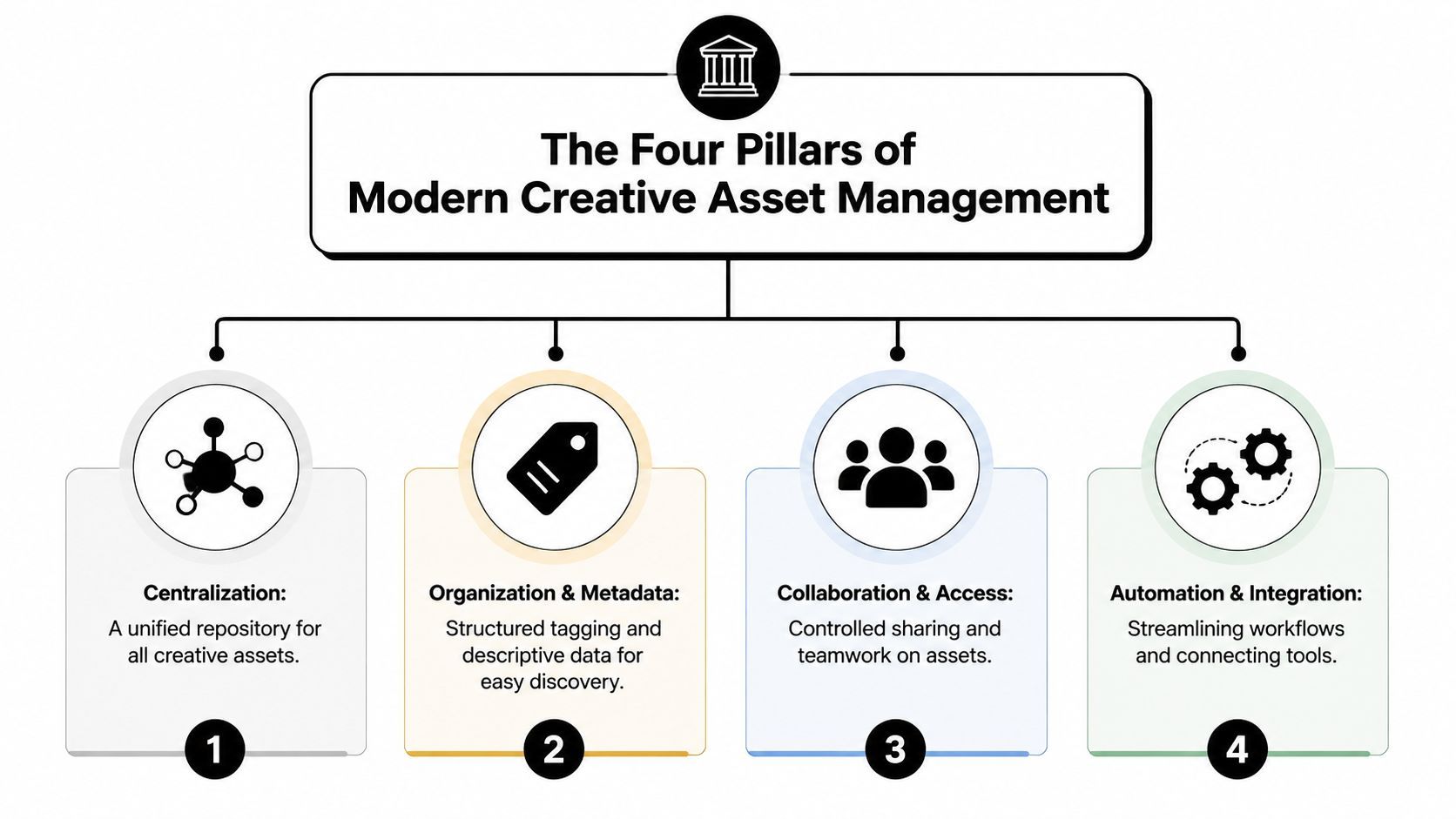
Centralization and access
Start with one source of truth.
If assets live across desktop folders, cloud drives, chat apps, and email attachments, your team doesn't have a library. It has a scavenger hunt. Centralization means the approved working files, exports, brand templates, and campaign assets live in one managed environment.
Intake is also an essential component. A scalable CAM setup incorporates centralized intake, automated workflow assignment, real-time visibility dashboards, and integrated review and approval with time-stamped audit trails, which monday.com describes as core CAM pillars. Those pillars matter because they reduce search time and speed approvals by removing version confusion.
A central library doesn't just store. It routes.
Organization and metadata
A workshop without labels still turns into chaos. The same thing happens in CAM when teams rely only on folders.
Metadata is key to organizing. Tags, campaign names, channels, usage rights, audience labels, and approval status turn assets from static files into searchable inventory. Without metadata, your team has to remember where something lives. With metadata, they can search by what it is, where it's allowed, and when it was used.
Useful organization answers practical questions like:
- What is it
- Who can use it
- Where is it approved
- Which version replaced it
- When does it expire
Collaboration and governance
A workshop also needs rules. Not harsh rules. Useful ones.
People need to know who can edit, who can approve, who can publish, and who only needs view access. Good collaboration in CAM means stakeholders comment on the asset itself, not in ten disconnected messages. Governance means the system keeps a record of what changed and who signed off.
A CAM platform should make the right action obvious. Review here. Approve here. Publish this version. Archive that one.
When teams skip this structure, they usually feel it as review fatigue. The work slows because no one trusts the process.
Automation and analytics
This is the part many teams underuse.
Automation handles repetitive work such as routing files, applying status changes, triggering approval requests, or moving finished assets into the right library. Analytics tells you whether the system is helping.
Think of automation as the workshop conveyor and analytics as the production board on the wall. One keeps work moving. The other tells you where bottlenecks keep showing up.
A mature CAM practice doesn't stop at “we found the file.” It asks:
- How long did this asset take to produce
- How many revision rounds did it need
- Was it reused
- Did this creative variant perform better than the previous one
Those four pillars work together. Centralization without metadata becomes a giant junk drawer. Metadata without collaboration becomes a tidy archive no one trusts. Collaboration without automation becomes admin-heavy. Automation without analytics just speeds up a process you might not have designed well.
Designing Your Asset Governance and Taxonomy
The fastest way to break a CAM system is to overbuild it. Teams create deep folder trees, long tag lists, and naming rules no one can remember. Then people ignore the system and go back to asking in Slack.
Good governance is simpler than it sounds. It means deciding how assets are named, tagged, approved, accessed, and retired so anyone on the team can follow the same logic.
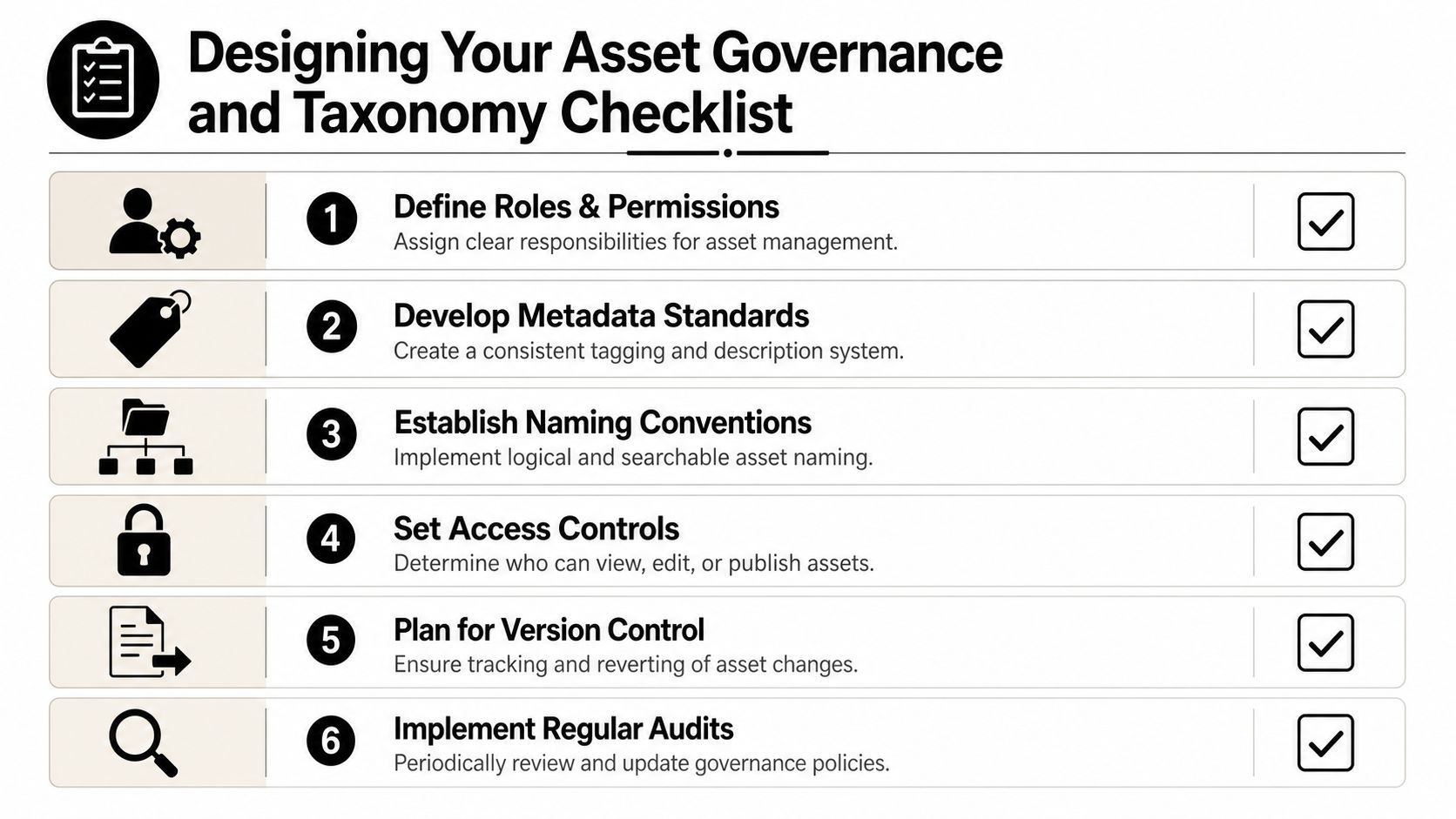
Build your taxonomy around search behavior
People don't search the way systems are often organized. They rarely think, “Let me open Folder 4, then Campaigns, then Regional, then Q3, then Exports.” They search by campaign name, asset type, channel, product line, or whether the asset is approved.
That's why effective retrievability depends on a hierarchical metadata taxonomy anchored in user search behavior, with standardized naming such as Campaign_ProductLine_Channel_Version, according to Storyteq's guidance on metadata management. The same guidance recommends marking superseded versions rather than deleting them, so teams keep a clear revision timeline.
If you've ever worked with audio catalogs, this logic will feel familiar. A helpful parallel is Mogul's guide to understanding music metadata, which shows how structured fields make creative work searchable, attributable, and usable downstream.
A simple starter schema
You don't need fifty metadata fields. You need the ones people use.
A practical starter set looks like this:
| Field | Why it matters |
|---|---|
| Asset type | Separates video, image, source file, copy deck, thumbnail, logo |
| Campaign | Groups related creative across channels |
| Product or offer | Helps teams find reusable material by business line |
| Channel | Distinguishes TikTok, YouTube, Instagram, email, paid social |
| Audience | Supports targeting and repurposing |
| Approval status | Tells teams whether the file is draft or approved |
| Usage rights | Prevents misuse of licensed or restricted assets |
| Expiration date | Flags assets that should no longer run |
| Owner | Shows who maintains the asset |
| Version relationship | Links drafts, masters, cuts, and exports |
You can add fields later. Don't start with a museum catalog if your team still names files new new final.
Name files like you expect strangers to read them
Naming conventions work best when they're boring.
Use a formula your team can apply without asking. For example:
- Campaign_ProductLine_Channel_Version
- 2026-02_SpringLaunch_UGCAd_IGStory_V03
- BrandRefresh_CoreLogo_Web_Approved
A few rules keep this usable:
- Keep terms stable: Don't switch between
IG,Instagram, andInsta. - Use version labels consistently:
V01,V02,V03is cleaner thanfinal,final2,final-actual. - Mark status in metadata, not only in filename: Filenames travel, but system status should remain the main signal.
- Never delete superseded work casually: Archive it or mark it as replaced.
Operational advice: Consistency beats cleverness. A naming system everyone follows is better than a perfect one no one remembers.
Governance should answer permissions too
Taxonomy helps people find things. Governance also decides who can do what with them.
Set rules for:
- View access: Who can browse approved assets
- Edit rights: Who can change source files or metadata
- Approval authority: Who can sign off brand, legal, or campaign use
- Publishing rights: Who can push assets live
- Archive control: Who retires outdated content
When these boundaries are fuzzy, teams either overprotect everything or publish too freely. Both create friction.
Managing the Full Creative Asset Lifecycle
An asset's problems usually start long before it reaches the library.
Take a common example. The team needs a short video ad for a product launch. The creative brief starts in a message thread. A copywriter drafts the hook in a doc. A designer makes thumbnail concepts. An editor exports several cuts. Feedback arrives in comments, chat, and email. Then the paid team needs a square version, a vertical version, and a caption-safe variation. Weeks later, no one knows which file was used.
That's why CAM has to manage the full lifecycle, not just the storage shelf.
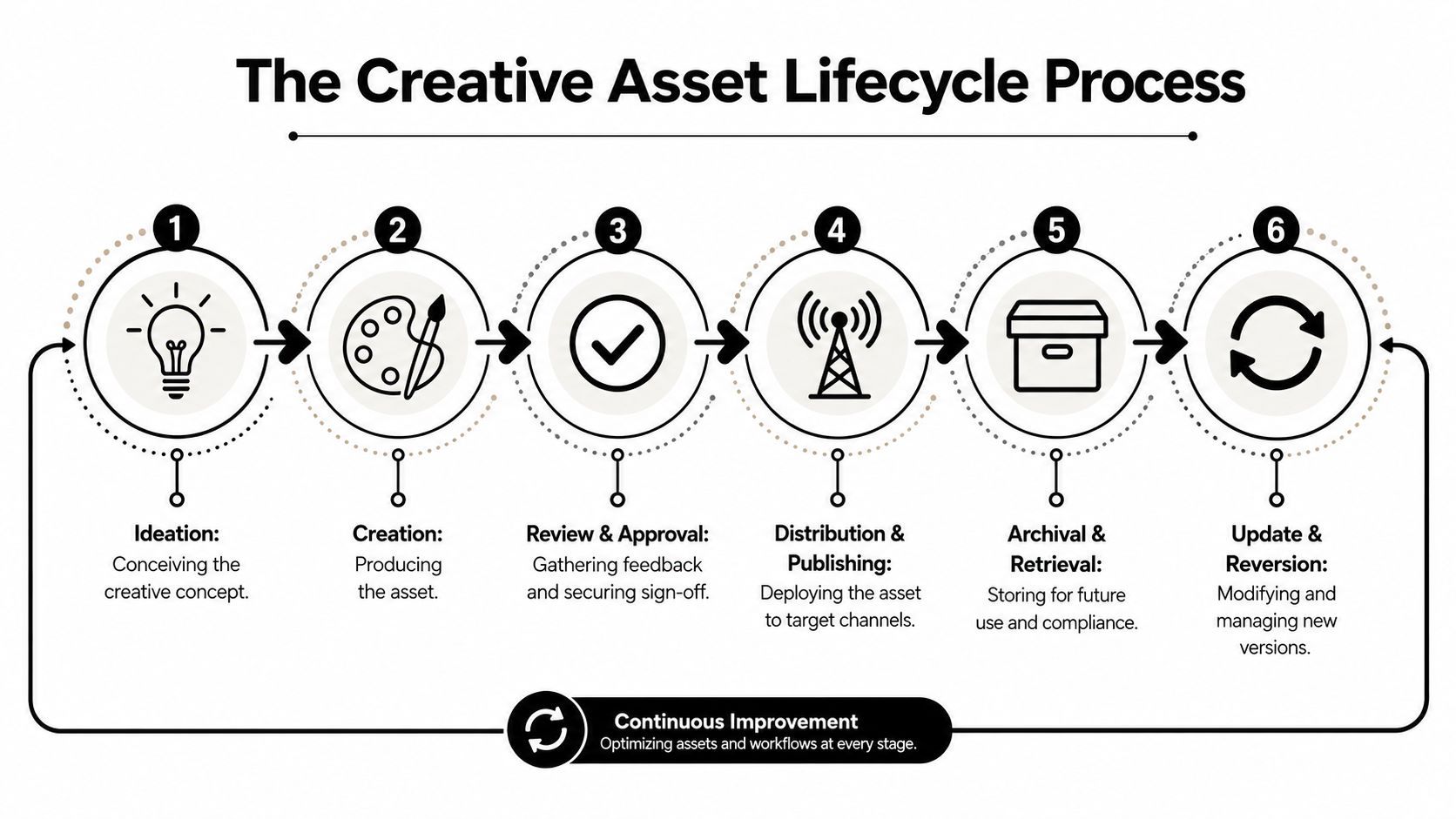
From idea to approved asset
The lifecycle begins with a clear intake. The request needs purpose, audience, deadline, channel, deliverables, and required approvals. If the brief is vague, the confusion gets exported downstream.
Then comes creation. This stage includes source files, rough cuts, scripts, thumbnails, captions, and design variants. The main CAM job here is to keep those parts connected instead of scattered across tools.
Review and approval is where many teams lose momentum. Feedback arrives late or contradicts earlier comments. Version names become a mess. The cure isn't more meetings. It's a visible status path such as draft, in review, changes requested, approved, published, archived.
Here's a quick visual explanation of the lifecycle in practice:
Distribution, reuse, and archive
Once approved, the asset moves into distribution. That means correct exports by channel, correct rights, and correct version selection. A CAM system should make the approved version easiest to access and the retired version hard to misuse.
After publication, the asset enters active use. Teams may duplicate it into other formats, localize it, cut it into shorter clips, or repurpose it into paid social. In these scenarios, lifecycle thinking saves enormous time. If the source, usage terms, and approval history are all attached, reuse becomes safe instead of risky.
Eventually, the asset should be archived or updated. Archiving doesn't mean throwing it away. It means clearly marking that it's no longer active while keeping it retrievable for reference, compliance, or derivative work.
Non-designers need a safe lane
One of the most practical CAM questions is how non-designers can create brand-safe materials without pulling the creative team into every request. According to Frontify's creative asset management guide, only 22% of organizations report that non-designers can independently produce approved assets, even though 68% of marketing budgets are spent on content that should be reusable.
That gap explains why self-service templating matters so much.
A good template doesn't just speed things up. It sets boundaries. It locks fonts, colors, layout rules, logo treatment, and character limits while still giving a sales rep, regional marketer, or account manager room to swap product text, local details, or a call to action.
Give non-designers a fenced field, not an empty canvas.
When teams do that well, designers stop acting as file dispatchers. They spend more time on concept and quality, and less time resizing the same asset for the fifth request of the week.
Automating Your Workflow with Integrations
A CAM system loses a lot of value when it sits alone.
If your team still downloads from one app, uploads to another, copies status into a project board, then manually schedules posts elsewhere, the library may be organized, but the workflow is still fragmented. Real operational speed comes from integration.
Why connected systems matter
Creative work moves through several layers. Someone creates a script. Another person builds visuals. An editor assembles a video. A reviewer signs off. A social lead publishes it. If those steps happen in disconnected tools with no shared context, people become the integration layer.
That's expensive in time and attention.
A connected CAM setup should link at least these categories:
- Creation tools: Design apps, video editors, AI generation tools, voice tools
- Work management tools: Systems for briefs, ownership, deadlines, and approvals
- Distribution tools: Social schedulers, publishing workflows, ad platforms
- Reporting environments: Places where campaign results can be tied back to the asset
Automation should remove handoffs, not hide them
Automation works best on repeatable moments. File intake, status changes, review routing, export naming, approval notifications, and handoff to publishing are all strong candidates.
A useful comparison comes from localization workflows. If you've seen how teams handle multilingual product updates, you know how easy it is to create rework by moving files manually. TranslateBot's piece on automating Django .po file translations is a good example of the same principle in another domain: structured assets plus automation reduce repeated manual steps and help teams maintain consistency.
That logic maps directly to creative operations. The more often your team repeats a task, the more you should ask whether the system can carry it.
Here's what modern workflow tooling often looks like in practice:
Signs your workflow needs tighter integration
You don't need a technical audit to spot friction. Look for these symptoms:
- Teams re-upload the same file repeatedly: That usually means the system lacks a durable source of truth.
- Approvals happen outside the asset record: Comments in email and chat are hard to trace later.
- Published assets aren't linked back to source files: Reuse becomes guesswork.
- Performance data lives far away from the creative version: The team can't learn which variant deserves another iteration.
- People ask for status updates manually: That's often a sign your workflow lacks shared visibility.
A connected CAM workflow doesn't mean every tool disappears into one giant platform. It means the tools hand information to each other cleanly. The file, version, approval state, owner, and publication context should travel together.
That's what turns a library into a working system.
CAM in Action for Creators Teams and Brands
Creative asset management doesn't look identical for every team. A solo creator needs speed and retrieval. An agency needs clean client separation. An in-house team needs approvals and reuse. An e-commerce brand needs fast asset variation across products and channels.
The core idea stays the same. The implementation changes with the job.
Four common operating models
A solo creator often starts with a very personal system. Desktop folders, a notes app, a few templates, maybe cloud backup. That works until output grows. Then the friction shows up as duplicate intros, lost thumbnails, inconsistent title cards, and no clear archive of what already shipped.
An in-house marketing team usually hits a different wall. Too many stakeholders touch the same campaign. Brand, product marketing, legal, paid media, and regional teams all need access, but not all need editing rights. CAM helps by separating creators, approvers, and users while keeping everyone in one searchable structure.
Agencies face multi-client complexity. The challenge isn't just file organization. It's preventing brand crossover, tracking client approvals, and letting account teams find the right export without touching source work they shouldn't edit.
E-commerce brands tend to struggle with scale and variation. One product launch may need images, short-form videos, seasonal versions, marketplace assets, paid ad cuts, and localized updates. CAM helps them treat those outputs as related families instead of isolated files.
The best CAM system is the one that matches your production reality. Not the one with the longest feature list.
Creative Asset Management Needs by Team Type
| User Type | Primary Challenge | Key CAM Solution | Success KPI |
|---|---|---|---|
| Solo creator | Finding old assets and reusing winning formats | Lightweight library, consistent naming, reusable templates | Faster content turnaround |
| In-house marketing team | Cross-functional review and brand consistency | Role-based access, approvals, approved asset hub | Fewer revision loops |
| Creative agency | Managing multiple clients without confusion | Client-separated libraries, audit trails, controlled sharing | Smoother approvals |
| E-commerce brand | Producing many variations across channels | Metadata-rich catalogs, variant tracking, rapid reuse | Shorter launch cycles |
What changes in day-to-day use
A creator may need only a few statuses and a strong naming system. An agency may need client-by-client permissions and approval logs. A brand team may care most about template control for regional marketers. The same principles apply, but the pressure points differ.
If you want to see how modern creation and publishing workflows are being packaged for fast-moving content teams, ShortGenius is one example of how teams are trying to bring asset creation, organization, and distribution closer together.
The important part isn't adopting someone else's exact setup. It's recognizing your own repeated bottlenecks and designing the CAM system around them.
Measuring Success and Migrating Your Assets
A CAM system isn't successful because people say it feels organized. It's successful when your team works faster, reuses more, and can connect creative work to outcomes.
That last point matters because many teams still stop at storage. According to Focal's analysis of creative asset management, only 7% of marketing teams tie creative versions to campaign ROI metrics. This leaves many teams unable to say which specific version worked.
The KPIs that matter
You don't need dozens of metrics. Start with a short set that shows operational and business value.
Consider tracking:
- Time saved per asset request: Measure how long it takes someone to find and deliver an approved asset.
- Asset reuse rate: Track whether teams are repurposing existing work instead of recreating it.
- Revision cycle count: Count how many rounds happen before approval.
- Time to market: Measure the span from request to published asset.
- Approval turnaround: Watch how long files sit waiting for sign-off.
- Creative-to-performance linkage: Record which asset version was used in which campaign so performance review is possible later.
Not every team will start with campaign ROI linkage on day one. That's fine. But the system should be designed so you can get there. If versions and campaign use aren't connected, performance analysis stays fuzzy.
A migration checklist that won't overwhelm your team
Moving from shared drives and scattered folders into a structured CAM setup can feel bigger than it is. Don't migrate everything at once. Migrate intentionally.
A practical path looks like this:
-
Audit what you have
List active assets, evergreen assets, outdated files, duplicate libraries, and high-risk content like licensed media or legal-sensitive creative. -
Define your new taxonomy
Decide on core metadata fields, naming rules, statuses, and permissions before moving files. -
Choose a pilot library
Start with one campaign type, one brand, or one content stream. Don't begin with the whole company archive. -
Map lifecycle statuses
Agree on what counts as draft, review-ready, approved, published, archived, and superseded. -
Migrate in phases
Move the most used and most valuable assets first. Old clutter can wait or be retired. -
Train by role
Designers, marketers, reviewers, and publishers need different instructions. Show each group how the system helps them directly. -
Review search failures and workflow friction
If people still can't find assets, the answer is usually metadata cleanup or permission tuning, not more folders.
Start with the assets people ask for every week. Early wins create adoption faster than a massive backfill project.
What good adoption looks like
You'll know the migration is working when requests become more specific, approvals happen inside the system, and fewer people ask “Where is the latest version?” The goal isn't perfect order. The goal is reliable flow.
A mature creative asset management practice gives your team two advantages at once. It creates operational calm, and it creates performance visibility. That combination is what turns content from a pile of deliverables into a reusable business asset.
If your team wants one place to create, organize, and publish short-form content without stitching together multiple tools, ShortGenius (AI Video / AI Ad Generator) is built for that workflow. It helps creators and marketing teams turn ideas into videos and ads, keep assets in a unified library, and move from production to multi-channel publishing with less manual work.