How to Create Marketing Videos with AI: A Complete Workflow

Learn how to create marketing videos with AI from ideation to publishing. Discover workflows, brand consistency tips, and metrics that drive real results.
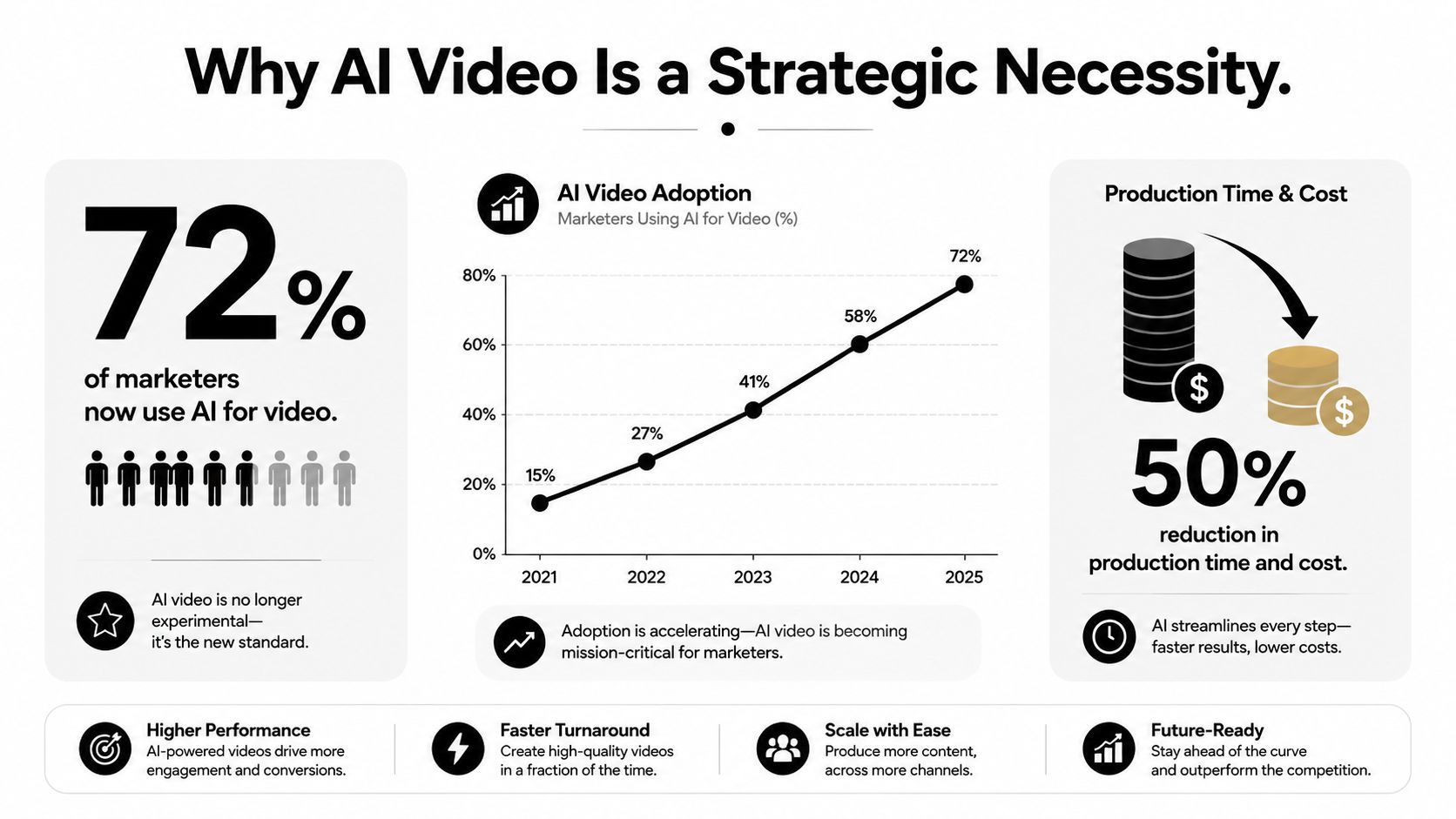
AI video is no longer an experiment reserved for creative teams. A 2025 industry report found that 63% of video marketers used AI tools to create or edit videos, up from 51% the previous year, while professional production adoption rose from 18% in 2023 to 41% in 2025. The same report found that 82% of marketers said video delivered good ROI, and estimated AI-driven production costs had fallen from about $4,500 to $400 per finished minute (Genra AI's industry data).
The strategic question has changed. Teams don't need to prove that AI can generate a video. They need to connect briefs, scripts, brand rules, approvals, variants, publishing, and measurement without creating another disconnected production island. That operational layer determines whether AI saves time or produces more work to review.
Why AI Video Production Is Now a Strategic Necessity
The economics make continued experimentation difficult to justify. A separate 2026 market summary estimated the global AI video generation market at $18.6 billion, up from $5.1 billion in 2023, with a projected 34.2% CAGR over that period. It also estimated that SMB AI video adoption reached 54% in 2026, compared with 22% in 2024, and that AI video represented 11% of digital marketing spend in 2026 (Morphed's AI video marketing statistics).
Those figures don't mean every brand should automate every creative decision. They mean the production baseline is moving. A team that still treats each social video as a custom project, with separate research, scripting, editing, resizing, approval, and upload steps, will struggle to match competitors that have turned those activities into a repeatable system.
Generation isn't the main bottleneck
The uncomfortable finding is that many organizations have already bought the generation layer without connecting it to the rest of marketing. A 2026 survey of more than 300 senior marketers found that 99% said their AI tools operated in silos, 62% cited fragmented data as the main blocker, and only 34% were increasing automation investment (Kaltura's 2026 marketing survey).
That explains why “create marketing videos with AI” often produces disappointing results. A marketer generates a promising draft, downloads it, sends it through email for comments, rebuilds it in another editor, exports several aspect ratios, and manually uploads each version. AI accelerated one step while leaving the surrounding process fragmented.
A mature operation treats the video as a structured campaign asset. The brief carries audience, objective, offer, claim restrictions, brand voice, destination channel, and approval status from the first prompt to the final export. Reviewers comment on the same working asset, approved elements remain reusable, and performance data informs the next creative brief.
Operational rule: If your AI video tool can't preserve context from idea to publication, it isn't a production system yet. It's a fast drafting utility.
Building an End-to-End AI Video Production Pipeline
A production pipeline starts with a single creative brief, not a blank prompt. Record the audience, funnel stage, customer problem, desired action, proof points, product details, prohibited claims, visual direction, target channels, and required formats. Keep that brief attached to every draft, review, export, and publication record.
1. Research and ideation
Use AI to organize customer language from supplied material, identify recurring objections, and turn a campaign objective into several creative angles. The strategist still decides whether each angle serves the campaign, meets legal requirements, and fits the audience.
Label approved concepts by purpose, such as “education,” “product demonstration,” “comparison,” or “retention.” The labels reduce repeated ideation and give performance reports a useful creative dimension.
2. Script generation and review
Generate alternatives for the hook, body, proof, and CTA. Give the system constraints for speaking style, sentence length, visual beats, on-screen text, and product language that must remain unchanged.
Review the script before creating visuals or audio. Check factual claims, pronunciation, offer details, inclusions, exclusions, and whether the opening earns attention without overstating the product. Record the reviewer's decision beside the script so rejected claims do not return in a later variation.
3. Asset creation
Choose scenes that prove or clarify the narration. A product demonstration may require screen captures, interface close-ups, hands using the product, and a final CTA frame. A thought-leadership clip may need a speaker, supporting text, diagrams, and cutaways instead of decorative stock footage.
Organize source files by campaign, owner, rights, and usage status. Approved logos, product images, voice files, and background treatments should remain reusable inputs, rather than being trapped inside an old export.
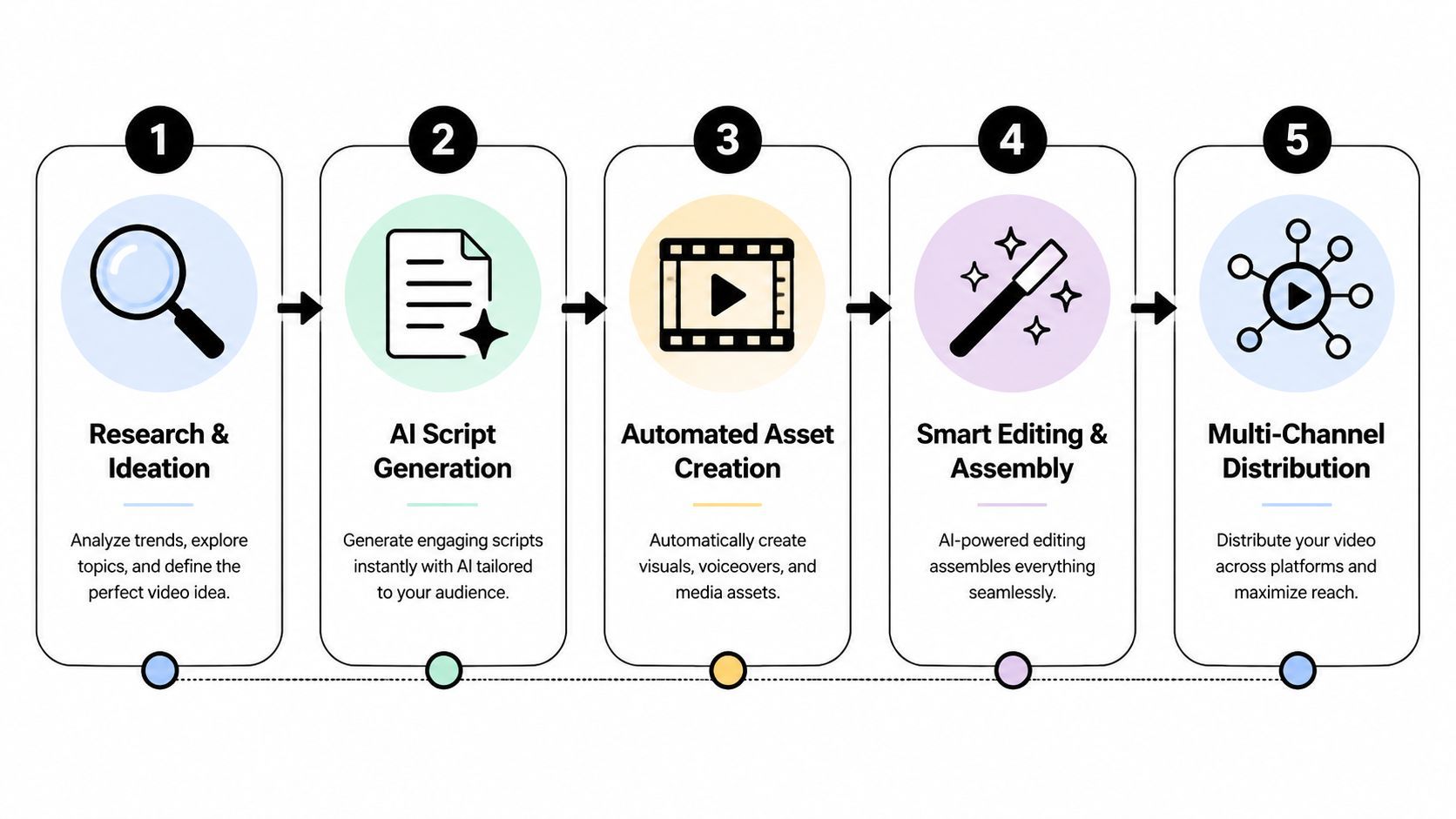
4. Voice, editing, and assembly
Choose narration for the audience and brand character, not novelty. Check pacing against the visual sequence, then use captions, scene changes, and emphasis text for viewers watching without sound.
Treat the first assembly as a rough cut. Inspect the opening, transitions, pronunciation, text legibility, product accuracy, and audio balance before polishing. Teams comparing tools can review this guide to the best AI video generator in 2026, while judging each option by its review and handoff workflow as well as its visual output.
5. Approval and distribution
Set explicit statuses: draft, editorial review, brand review, legal review where required, approved, scheduled, and published. Assign an owner to each status and define the reason a reviewer can reject an asset. Connect approved versions to their channel specifications, captions, thumbnails, and publishing records.
A unified platform such as ShortGenius can connect scripting, image generation, video assembly, voiceovers, editing, resizing, brand kits, project organization, and social scheduling in one workspace. The operational requirement is continuity: the published asset should remain connected to its brief, feedback, source files, approval history, and distribution plan.
Maintaining Brand Consistency at Scale
Brand consistency is the hardest part of scaling AI video, because generation systems are designed to vary output. Without controls, the same brand can produce one video with a restrained editorial voice, another with exaggerated sales language, and a third with colors or typography that don't belong anywhere in the identity system.
The fix isn't asking the model to “make it on brand” and hoping it interprets that correctly. Build a reusable system that separates locked elements from experimental elements.
Lock the identity, vary the expression
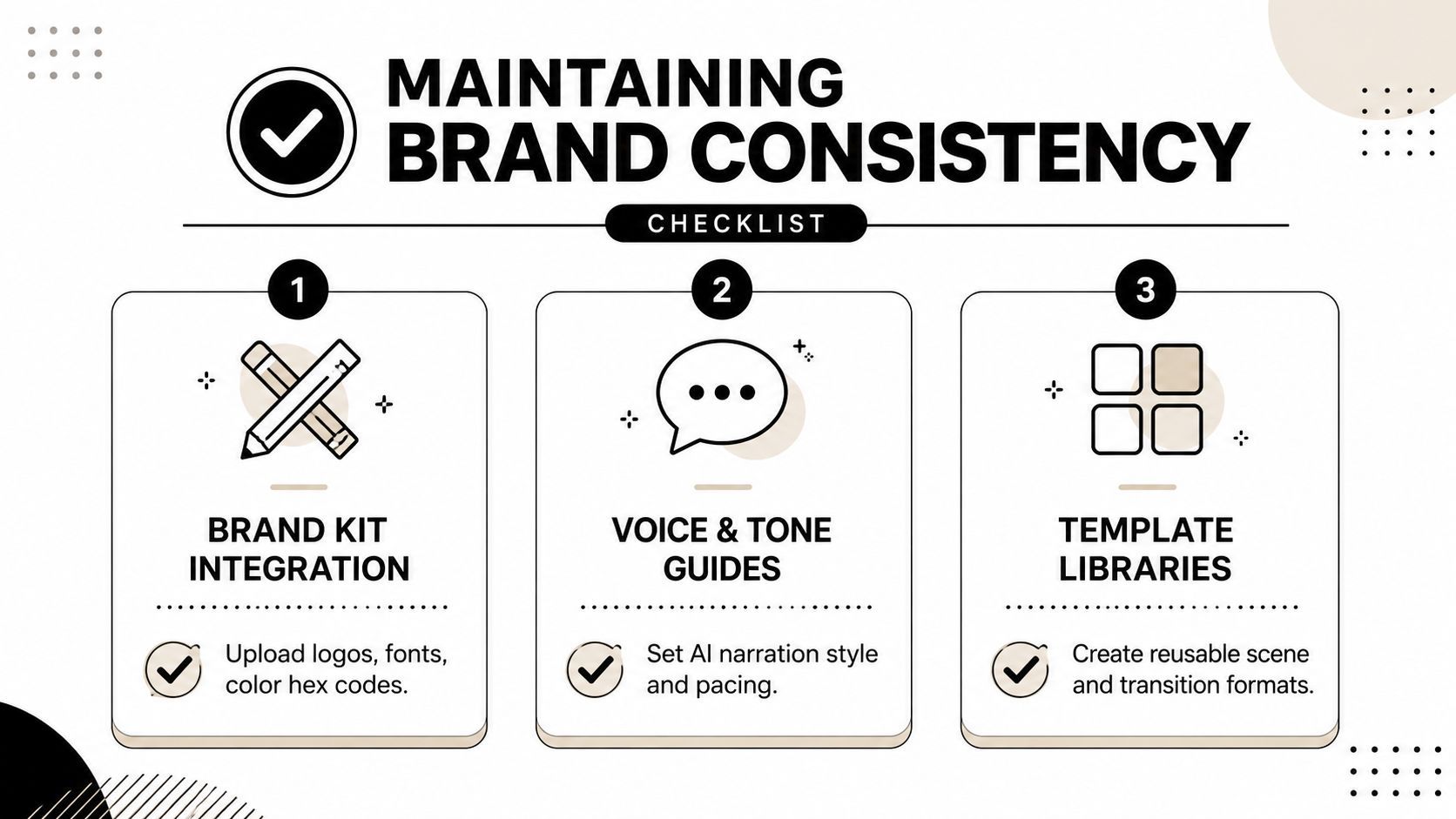
A practical brand kit should include approved logos, color hex codes, fonts, safe-space rules, product imagery, subtitle styling, and examples of acceptable layouts. Add a voice guide with vocabulary to use, language to avoid, sentence rhythm, pronunciation notes, and rules for claims.
Lock the elements that viewers use to recognize the brand:
- Logo treatment: Define placement, scale, animation, and clear space.
- Typography: Restrict font choices and specify hierarchy for headlines, captions, and CTAs.
- Color system: Use approved colors for backgrounds, highlights, buttons, and emphasis.
- Narration style: Document energy, pace, warmth, authority, and pronunciation.
- Claims language: List approved product descriptions and phrases that require review.
Allow variation in hooks, scene order, examples, background footage, and CTA framing. This gives creative teams room to test without letting every generation become a new interpretation of the brand.
Templates should encode decisions
Templates aren't just visual decoration. They should capture the production logic for recurring series. A product tip template might reserve space for a title, demonstration, proof point, and CTA. A customer education format might use a question, explanation, example, and next step.
Save preset camera movements, transitions, caption behavior, sound treatments, and end cards. The team should be able to duplicate a proven structure and change the content without rebuilding the edit from scratch.
Approval must happen before export
Reviewing only the final MP4 is inefficient. Add approval gates at the script, rough-cut, and final-render stages. Script review catches unsupported claims early, brand review catches tone and visual drift, and final review checks captions, framing, audio, and channel-specific details.
The cost of skipping these gates appears later, when a team has to correct multiple variants individually. AI reduces the cost of making changes only when the source structure remains editable and the approval decision is visible to everyone working on the campaign.
Personalization Versus Generic Scale
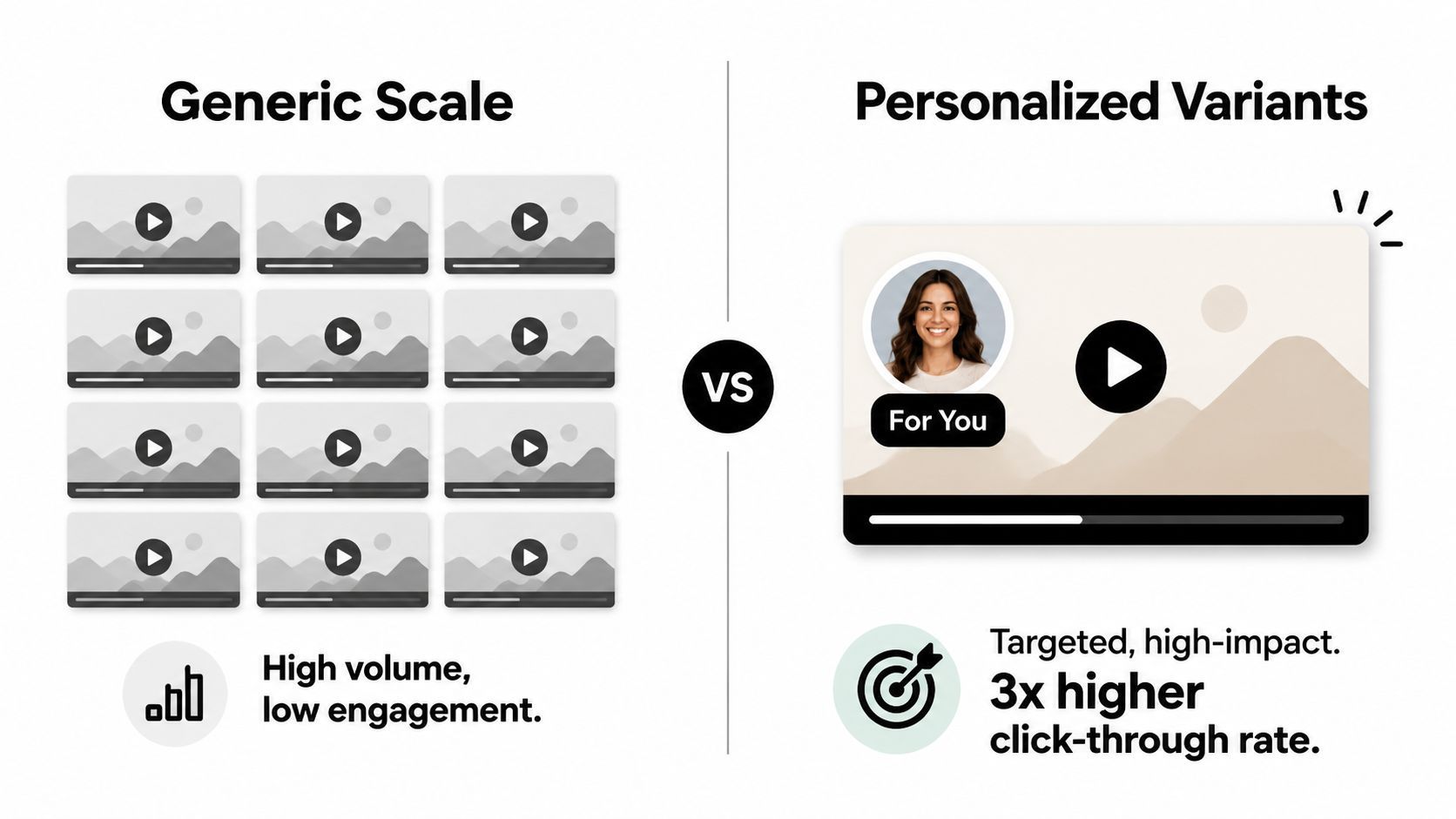
Generic production and personalized production solve different problems. A generic video is efficient when the audience shares the same need, the offer is simple, and the campaign requires broad awareness. Personalized variants become more valuable when audience context changes the hook, proof, product use case, or CTA.
Controlled research points strongly toward tailoring rather than assuming that AI generation alone creates the lift. In a study of generative AI personalized video ads, the AI variant increased engagement by 6 to 9 percentage points over baselines, while an MIT-reported study of 21,000 consumers found personalized video ads produced CTRs 9.4% higher than personalized image ads and 6.5% higher than generic video (the SSRN study).
Personalization is a modular design problem
Don't generate an entirely new video for every audience unless the differences justify the production and review effort. Build a stable core and swap the parts that influence relevance:
| Video element | Useful variation |
|---|---|
| Hook | Role, pain point, category, or use case |
| Proof | Industry example, feature, outcome, or objection |
| Scene order | Problem-first for cold audiences, demonstration-first for informed viewers |
| Offer | Trial, consultation, bundle, or product-specific CTA |
| Voice and pacing | Technical, conversational, concise, or instructional |
This structure lets teams test a meaningful audience input rather than merely testing different AI aesthetics. The control cell should remain generic, and the personalized version should change only the variables connected to the audience hypothesis.
Choose the approach by objective
Use generic scale when the objective is broad reach, the message has little segmentation value, or the team lacks enough reliable audience data to create relevant variants. Use personalization when the product has distinct use cases, the audience contains clear segments, or the campaign depends on matching an objection with specific proof.
The common failure is generic volume without a control cell. A team may publish many AI videos, see flat results, and conclude that video or AI doesn't work. Without audience-specific inputs and a comparable generic control, that test can't reveal whether tailoring created incremental value.
Testing discipline: Personalize the variables that explain relevance, then hold the rest of the production system steady. Otherwise, you're measuring creative noise instead of audience fit.
Navigating Trust and Disclosure in AI Video
A more human-looking AI video isn't automatically a more trustworthy video. Consumers increasingly recognize synthetic signals, and the cues are often visible in performance rather than resolution. A 2026 consumer study reported that 83% of respondents had watched a video they suspected was AI-generated; the most common giveaways were robotic gestures at 67%, unnatural voices at 55%, and a lack of emotional tone at 51% (Animoto's 2026 industry coverage).
The instinctive response is to hide every trace of AI. That can be the wrong objective. If the audience notices an artificial voice, stiff movement, or emotionally empty delivery after the brand tried to present it as fully human, the problem becomes one of perceived deception rather than production quality.
Decide where human presence matters
Human review should shape the parts audiences use to judge intent and credibility. That may mean recording a real founder for the opening, using genuine product footage, adding a customer's approved voice, or keeping a human-written insight at the center of the script.
AI can still generate supporting scenes, variations, captions, transitions, and alternate cuts. The most effective workflow is often hybrid, with automation handling repetitive assembly and a person deciding whether the finished piece feels accurate, appropriate, and emotionally coherent.
Treat disclosure as a positioning choice
IAB reporting cited in the same coverage found that more than half of consumers wanted advertisers to disclose when an ad was fully AI-generated or used AI video or images, while nearly half wanted disclosure for AI voices or avatars. Disclosure expectations may vary by market, product category, and how prominently synthetic elements appear, so teams should establish a policy rather than make ad hoc decisions.
A simple policy can classify assets as real footage, AI-assisted, or fully synthetic. Require explicit disclosure for synthetic people, voices, testimonials, or scenes that could reasonably be mistaken for documentary evidence. Transparency doesn't require a distracting disclaimer in every frame. It requires a clear choice about what the audience needs to know.
Distribution and Performance Measurement
A finished video becomes a marketing asset only when it reaches the right audience, in the right format, and generates feedback the team can use. Put distribution in the brief. A vertical short, professional feed video, and landing-page explainer need different openings, captions, pacing, framing, and calls to action.
Create one master concept, then produce channel-specific versions instead of posting one export everywhere. Keep the core message consistent while adapting the first frame, subtitle density, aspect ratio, CTA, and destination URL. Connect these versions to the same approval record and brand kit, so distribution does not create a silo outside the production workflow.
Measure the stage, not just the view
Views show reach. They do not show whether the creative moved people toward the intended action. Match each metric to the funnel job:
- Awareness: Reach, completed views, and audience retention patterns.
- Consideration: Meaningful engagement, clicks, landing-page behavior, and content progression.
- Conversion: Attributed actions, qualified leads, purchases, or booked conversations.
- Retention: Onboarding completion, support deflection, feature adoption, referrals, or repeat engagement.
Video is often used for top- and mid-funnel activity, while post-purchase communication receives less attention. Use that gap to plan onboarding clips, customer education, product updates, renewal guidance, and advocacy content.
For YouTube teams, promotion should support a retention-focused content strategy paired with channel-specific KPIs. A resource such as get more views on YouTube can complement distribution planning, but additional exposure will not replace a defined audience, strong retention, and a measurable next action. Feed performance back into the approved master concept, then update hooks, cuts, and channel versions from evidence rather than creating disconnected experiments.
Your AI Video Implementation Checklist
Use the first month to fix the workflow before increasing output.
For solo creators
- Define one repeatable format: Choose a series structure with a fixed opening, body, caption style, and CTA.
- Create a personal brand kit: Store fonts, colors, voice guidance, logos, and approved visual references.
- Review every export: Check claims, captions, pronunciation, pacing, and framing before publishing.
- Track useful signals: Record retention patterns, clicks, comments, and conversions, not views alone.
For small marketing teams
- Centralize the brief: Require audience, objective, offer, claims, channels, and owner fields.
- Add approval statuses: Separate script review, brand review, and final publishing approval.
- Build modular variants: Change hooks, proof points, scene order, and CTAs against a generic control.
- Close the feedback loop: Store performance outcomes with the original concept and variant details.
For agencies
- Separate client systems: Keep brand kits, templates, approvals, permissions, and assets isolated by account.
- Standardize handoffs: Give strategists, editors, reviewers, and publishers clear responsibilities.
- Audit AI disclosure: Document when synthetic voices, avatars, or visuals require client or audience notice.
- Select for integration: Evaluate whether a tool connects creation, review, resizing, scheduling, and reporting.
Start with one campaign, one approval path, and one repeatable series. Once the team can trace a published video back to its brief and forward to its performance data, scale the system instead of merely increasing generation volume.
ShortGenius (AI Video / AI Ad Generator) connects scriptwriting, image and video creation, natural voiceovers, editing, brand kits, resizing, project organization, and scheduling across TikTok, YouTube, Instagram, Facebook, and X. Visit ShortGenius (AI Video / AI Ad Generator) to build an AI-assisted video workflow that keeps production, approvals, and distribution in one place.