Content Repurposing Tool: Multiply Your Output in 2026

Multiply your content output & save time. A powerful content repurposing tool scales your brand. Discover your 2026 guide to make the best choice.
You spent days producing a webinar, podcast episode, or flagship blog post. Launch week looked promising. A few comments came in, the team shared it, maybe sales linked it once or twice, and then the asset slid into the archive with everything else.
That cycle drains content teams because the work is heavy at the front end and the shelf life is short. Content teams aren't struggling with ideas. They're struggling with extraction. They have valuable raw material, but no reliable system for turning one strong asset into a stream of platform-ready pieces.
A good content repurposing tool changes that. Not because it magically makes mediocre content useful, but because it helps you stop treating every channel as a blank page. One webinar becomes clips, posts, emails, article angles, ad concepts, and follow-up assets. The job shifts from constant reinvention to structured adaptation.
The Content Creator's Dilemma
A familiar pattern shows up in almost every content operation.
Someone records a solid interview. A strategist outlines a strong article. A founder finally gets through a long-form webinar that says something worth sharing. The team publishes it, promotes it for a few days, and then moves on because the calendar is already demanding the next thing.
That's the content treadmill. It doesn't happen because teams are careless. It happens because manual repurposing feels like extra work layered on top of publishing, not part of publishing itself.
The cost isn't only lost reach. It's wasted editorial effort. A detailed blog post often contains several argument threads, usable quotes, short-form hooks, visual explainers, and audience questions. A webinar usually has moments that would work as short clips, social posts, newsletter sections, and sales enablement content. But if nobody has the time to mine those pieces out, the asset gets used once.
Strong source content rarely has a one-format problem. It has a workflow problem.
That's why repurposing deserves to be treated as strategy, not cleanup. Done well, it gives a good asset a second life, then a third, then a tenth. The point isn't to flood every channel with duplicates. The point is to adapt one core idea into formats that fit how people consume content in different places.
Teams that make this shift stop asking, "What do we need to create today?" and start asking, "What do we already have that can travel further?" That's a much healthier operating model.
What Are Content Repurposing Tools Really
A content repurposing tool is easiest to understand as a content kitchen.
Your source asset is the main ingredient. That might be a webinar, a podcast recording, a white paper, a blog post, or a customer case study. The tool's job is to help you prepare that ingredient into multiple finished dishes for different channels. One source becomes short clips, quote cards, article drafts, email copy, social posts, and more.
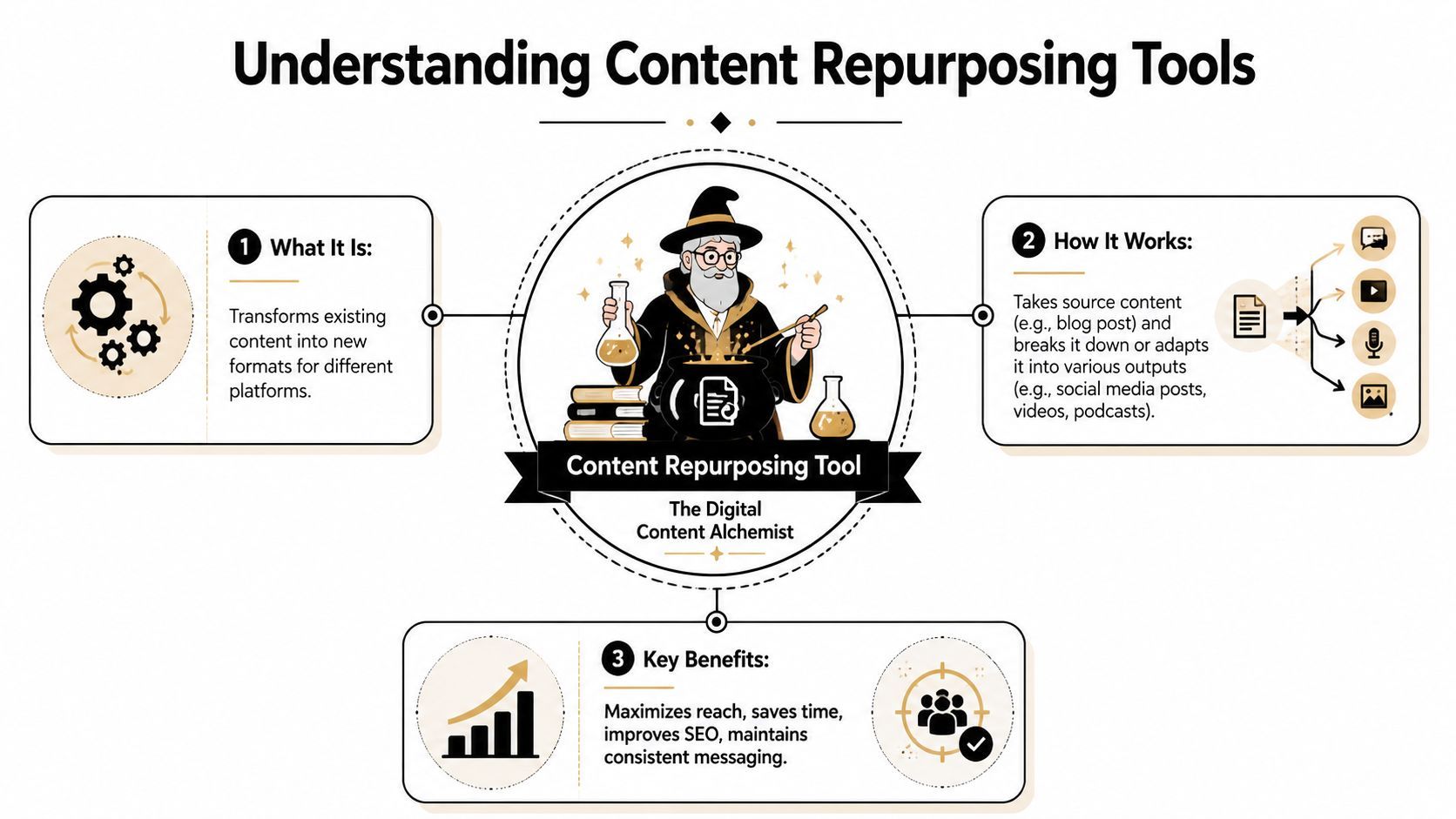
The shift from publishing to atomization
The important concept is atomization. Instead of treating a piece of content as one finished object, the tool breaks it into smaller usable parts. In a webinar, those parts might be key takeaways, emotional beats, memorable lines, practical examples, or objection-handling moments. In a blog post, they might be frameworks, stats, examples, or step-by-step sections.
That changes the workflow from linear to modular. You no longer create, publish, and forget. You create, extract, adapt, and redistribute.
A 2026 roundup cited by Intentsify's content repurposing strategies article reports that 94% of marketers already repurpose content across different mediums and channels, based on a survey of 48 marketers by Referral Rock. That matters because it shows repurposing isn't some niche creator hack anymore. It's part of mainstream marketing operations.
What a tool actually does
At the practical level, a content repurposing tool usually helps with three things:
- Ingesting source material so you're not copying and pasting everything by hand.
- Identifying useful atoms such as clips, quotes, sections, hooks, or summaries.
- Rebuilding those atoms into channel-specific outputs that match the format and cadence of each platform.
Practical rule: If a tool only helps you rewrite text, it's useful. If it helps you ingest, extract, adapt, and publish, it's operational.
The strongest tools don't just save time. They teach teams to see content differently. A single asset stops being a one-time deliverable and starts acting like a source library.
Core Capabilities That Define a Great Tool
A weak tool gives you paraphrased output and extra cleanup work. A strong one reduces friction at every stage, from finding the source material to packaging finished assets for multiple channels.
Ingestion matters more than most teams think
The first test is simple. Can the tool accept the kinds of content your team produces?
If your workflow starts with articles, reports, decks, and white papers, you need URL and PDF ingestion. If you publish podcasts, interviews, webinars, or training sessions, you need audio and video ingestion with usable transcripts. If the tool makes you manually reassemble source material before it can help, you're already losing time.
Technical benchmarks cited in Jasper's repurposing content guide note that URL and PDF ingestion significantly improve a tool's ability to transform text-based assets into formats like videos, infographics, and social posts. The same guidance says tools using atomization achieve 20 to 25% higher engagement than tools that only summarize.
That gap makes sense in practice. Summaries flatten the asset. Atomization extracts the parts that can stand alone.
Analysis is where the real value shows up
Once the source is inside the system, the tool has to do more than condense it. It needs to recognize structure.
For video, that means identifying moments with tension, clarity, novelty, or emotional lift. For text, it means spotting frameworks, quotable passages, instructional sequences, and ideas that can become standalone posts or scripts.
Look for tools that can do things like:
- Find high-signal moments from long-form video instead of just chopping it into equal sections.
- Pull usable claims and frameworks from text without stripping away meaning.
- Group related ideas so one asset can support a campaign, not just a single post.
- Preserve context so the repurposed piece still sounds coherent on its own.
Output flexibility separates helpers from platforms
The last capability is transformation. A useful content repurposing tool doesn't stop at extraction. It helps you rebuild outputs in forms that fit the platform.
Here's a practical comparison:
| Capability | Basic tool | Strong tool |
|---|---|---|
| Source intake | Manual paste | URL, PDF, audio, video |
| Processing | Summary | Atom extraction and restructuring |
| Outputs | One or two text variations | Clips, scripts, posts, visuals, captions |
| Formatting | Minimal | Platform-native sizing and packaging |
| Workflow fit | Standalone | Supports review, branding, and distribution |
A lot of teams overvalue generation and undervalue packaging. But packaging is where production slows down. Captions, aspect ratios, brand consistency, thumbnails, and export formats create bottlenecks fast.
If your editors still need to do all the resizing, re-captioning, and formatting by hand, the tool isn't really solving the production problem.
How to Evaluate and Choose the Right Tool
Most buyers compare tools by feature list. That's not enough. The better question is: Where does your current workflow break?
Some teams have plenty of source material but can't turn it into usable outputs fast enough. Others can generate output but can't keep brand standards tight. Large teams often have a more basic problem. They can't even find the right source assets because content is scattered across drives, decks, transcripts, emails, and old webinars.
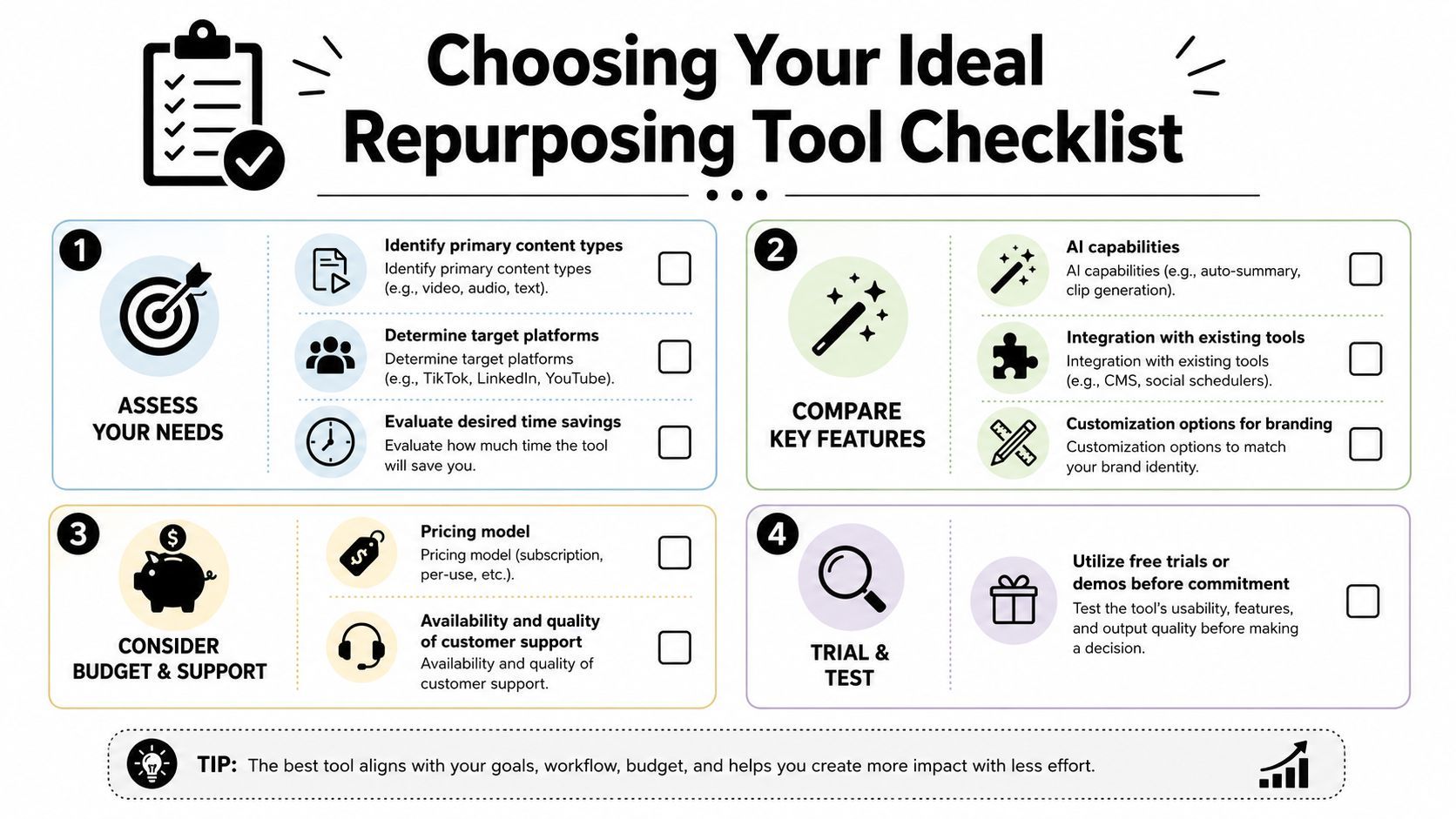
Start with the bottleneck, not the demo
A polished product demo can hide operational weaknesses. Before evaluating vendors, answer these questions internally:
- What is your source format mix? Video-first teams need different tooling than blog-first teams.
- Where does work currently stall? At sourcing, clipping, writing, approvals, design, or scheduling?
- Who owns the process? A solo creator can tolerate more manual review than a distributed content team.
- What has to stay on-brand? Captions, templates, tone, intros, CTAs, and visual identity all need different controls.
- What does success look like? Faster production, broader distribution, less editorial drift, or cleaner analytics?
Don't ignore governance and discoverability
This is the part most tool roundups skip.
Coverage usually focuses on what a platform can create. The harder operational issue is how teams find the right material to repurpose in the first place. Dropbox Dash's discussion of AI content repurposing tools highlights this governance and discoverability gap, arguing that the best repurposing stack may start with a search-and-organization layer first, then add AI generation on top.
That's especially true for agencies and in-house teams with years of scattered assets. If your best webinar is buried in an old folder, or your strongest founder interview lives in a transcript nobody tagged, an excellent generator won't help much.
The wrong stack creates content from whatever is easy to access. The right stack creates content from whatever is worth reusing.
A practical evaluation checklist
Use this when comparing any content repurposing tool:
- Input coverage: Can it handle the formats you already publish, not just the formats you wish you published?
- Extraction quality: Does it identify meaningful moments, or does it produce generic fragments?
- Brand controls: Can you apply voice rules, visual templates, captions, and recurring series elements?
- Workflow fit: Does it support reviews, approvals, exports, and publishing in a way your team can maintain?
- Discovery support: Can you locate old assets, tag them, and build a reusable content library?
- Measurement: Can you compare repurposed outputs against source assets and channels in a useful way?
The best choice isn't the tool with the longest feature page. It's the one that removes your most expensive bottleneck.
From Blog to Viral Clips The Repurposing Workflow in Action
Monday morning, the team needs clips for LinkedIn, Instagram, and YouTube Shorts. The webinar from last week has the raw material, but nobody wants to spend half a day scrubbing footage, cutting variants, writing captions, and exporting formats one by one. That is the point where repurposing either becomes a system or stays a good intention.
A working setup changes the economics. One strong source asset can produce multiple usable outputs in a single pass, but only if the team can find the right moments, package them for each channel, and measure whether the derivative content outperforms the original in reach or engagement. That operational piece gets missed in a lot of tool comparisons.
A tool like ShortGenius for AI video repurposing and publishing is designed to bring clipping, editing, formatting, and distribution into one environment, which matters more than any single feature.

Step one is choosing the right source asset
The workflow starts before editing.
Take a recorded webinar. It may contain three or four moments worth distributing: a clear explanation of a common problem, a strong objection-handling answer, a practical example, and a closing CTA that can work as a promotional clip. If those moments are buried inside 45 minutes of rambling setup, weak audio, or slide-dependent context, the output will be limited no matter which tool you use.
That is why good repurposing starts with asset selection and moment extraction. Editors should spend their time reviewing promising segments, not searching blindly through timelines.
As noted earlier, strong tools can surface likely highlights automatically. The practical benefit is speed, but the strategic benefit is consistency. Teams can review ranked moments against the same standard every time: standalone clarity, strong opening, useful takeaway, and channel fit.
Step two is packaging for each channel
Once the usable clips are identified, the work becomes a packaging decision instead of a scavenger hunt.
A practical sequence looks like this:
- Review suggested moments and keep the ones that make sense without extra explanation.
- Trim the opening so the first seconds earn attention quickly.
- Add captions and visual identity so the clip is readable and on-brand.
- Format by channel for vertical, square, or widescreen placement.
- Write channel-specific copy instead of posting the same caption everywhere.
- Publish and track performance against the original asset and by platform.
If you also publish long-form video or interviews, it helps to repurpose your video podcast with the same logic. Treat each episode as a content library. One recording can support clips, quote posts, email copy, article sections, and paid creative tests when the source material is organized well.
A short product walkthrough can help make that workflow more concrete:
What works and what breaks
The best results usually come from source material with clear structure. Educational webinars, customer interviews with specific answers, opinionated commentary, and Q&A sessions with real tension tend to produce clips that hold up on their own.
Messy inputs still create messy outputs. I see the same failure points over and over: vague talking points, long intros, poor audio, and excerpts that only make sense if the viewer has already seen the slides. AI speeds up selection and editing. It does not supply substance that was never there.
Formats that usually repurpose well:
- Evergreen explanations tied to recurring customer questions
- Clear points of view that create contrast or debate
- Short teaching segments with one idea per clip
- Answers with a strong first sentence that can stand alone in feed
Formats that usually underperform:
- Context-heavy excerpts that need too much setup
- Generic advice that sounds polished but says little
- Clips pushed to every platform unchanged
- Outputs published without review or performance tracking
Repurposing works best when the team knows two things: where the best source assets live, and which derivative formats produce returns. Without that, the workflow stays busy but hard to justify.
Integrating a Repurposing Tool into Your Workflow
Buying software doesn't create a repurposing system. Teams need a repeatable operating model around it.

Audit the content you already own
Start with your archive. Pull together old webinars, blog posts, case studies, newsletters, podcast episodes, decks, and training sessions. Then sort them by usefulness, not recency.
Look for assets that are evergreen, opinionated, or already proven to resonate. Independent practitioner guidance summarized by Digital Applied's repurposing guide says one strong source asset can become 10+ formats, and systematic repurposing can expand distribution reach by 3 to 5x. The important point isn't the maximum output count. It's the operational shift from ad hoc editing to a structured pipeline.
Build a cadence, not a rescue plan
Repurposing works best when it's planned at the moment the source asset is created.
A simple team cadence might look like this:
- Source owner: Identifies the pillar asset for the week or month.
- Repurposing operator: Extracts clips, posts, and derivative formats.
- Editor or strategist: Reviews for clarity, brand fit, and duplication risk.
- Publisher: Schedules and tracks distribution by channel.
That setup prevents the common failure mode where repurposing becomes a leftover task nobody owns.
Measure more than output volume
A team can publish more and still learn nothing.
Track whether repurposed content expands reach into new formats or channels, whether certain source assets consistently produce stronger derivatives, and whether the effort is reducing time lost to blank-page creation. Public guidance still leaves open questions around incremental lift and audience fatigue, so teams need their own measurement discipline.
A practical dashboard should include:
- Source-to-output mapping: Which pillar asset generated which posts, clips, or emails.
- Channel response: Which formats worked on LinkedIn, Shorts, Reels, or email.
- Reuse quality: Which assets continue to produce usable material over time.
- Editorial efficiency: Whether the process reduces manual production bottlenecks.
The mature workflow doesn't ask, "How much did we publish?" It asks, "Which source assets keep paying us back?"
The Future Is Efficient Content Creation
The important change isn't that AI can make more assets. It's that teams can finally organize content like a system instead of a sequence of isolated campaigns.
That matters beyond social media. The same mindset shows up in adjacent workflows. A team turning a report into short videos is solving a similar production problem as an author reusing concepts across launch materials, or a publisher using book cover design tools to turn one creative direction into multiple usable assets. Different output, same principle. Start with a strong source, then adapt intelligently.
A content repurposing tool earns its place when it helps you escape one-off production. The strongest setups make source discovery easier, extraction faster, formatting lighter, and review more consistent. They don't remove strategy. They give strategy room to operate.
For creators, marketers, and agencies, the sustainable model is clear. Fewer blank pages. Better use of existing work. More channel-native output from assets that already proved they were worth making.
If you want to build that kind of system, ShortGenius (AI Video / AI Ad Generator) is worth exploring for teams that need one workflow for scripting, video creation, editing, resizing, captions, brand kits, and multi-channel scheduling. It fits best when your repurposing engine depends on turning long-form ideas into a steady stream of short-form video and ad assets without stitching together separate tools.