Can You Schedule TikTok Videos: Full 2026 Guide

Discover how can you schedule tiktok videos in 2026. Use native tools or third-party apps to save time & post consistently. Get started today!
Yes, you can schedule TikTok videos, and TikTok's native scheduler supports posts from 15 minutes to 10 days ahead for Business Accounts. If you're tired of posting in a rush, scheduling turns TikTok from a daily scramble into a repeatable growth system that protects your time.
If you're asking this, you're probably in one of two situations. You're either posting manually from your phone whenever you remember, or you've tried to schedule before and hit some annoying wall like the feature not showing up, the wrong account type, or a tool that only sends a reminder instead of publishing the post.
That's the part most guides skip. Scheduling on TikTok is possible, but the method matters. The difference between native scheduling, third-party auto-publishing, and push-notification workflows changes how much time you save and how reliable your publishing is.
The Answer Is Yes Now Let's Make It Work for You
The practical answer to “can you schedule TikTok videos” is yes. But the better question is whether your current workflow makes scheduling useful, or whether it just moves the chaos to a different screen.
Most creators don't have a posting problem. They have a workflow problem. They script late, film late, write captions late, and then publish at the last minute. That usually leads to weak hooks, rushed covers, forgotten hashtags, and inconsistent timing.
Scheduling fixes that only when you treat it as part of a system.
What scheduling actually changes
A good scheduling workflow does three things:
- Protects consistency: You stop relying on memory and motivation to publish.
- Improves content quality: You have time to write captions, choose covers, and review the post before it goes live.
- Gives you room for trend content: When your evergreen posts are already queued, you can react faster to what's happening now.
TikTok itself made native scheduling a lot more practical when it officially launched its desktop Video Scheduler on February 14, 2024, with a scheduling window from 15 minutes to 10 days for Business Accounts through the desktop web interface, as described in TikTok's Video Scheduler announcement.
Practical rule: Schedule your predictable content. Post your reactive content manually.
That split works well in real content teams. Tutorials, product explainers, testimonials, educational clips, and recurring series are ideal for scheduling. Fast trend responses, event reactions, and creator-led commentary often work better live.
The two real paths
You've got two usable options:
- TikTok's native scheduler for simple, short-range planning.
- Third-party tools for broader calendar control, team workflows, and in some cases true auto-publishing beyond the native window.
Both can work. The right choice depends on your account type, whether you need auto-publishing, and whether you create everything manually or use AI tools in your production flow.
How to Use TikTok's Native Video Scheduler
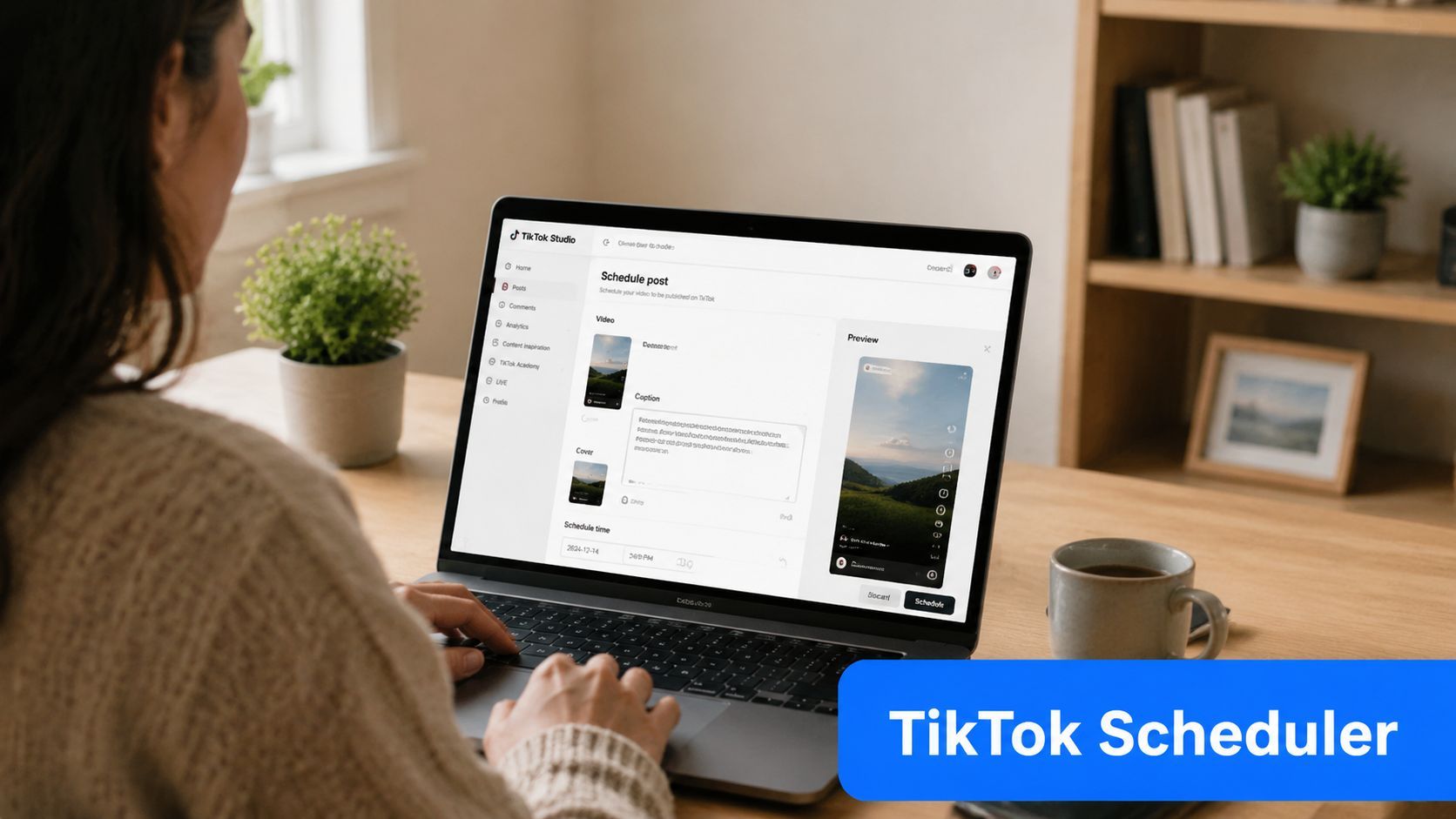
Native scheduling is the cleanest place to start if you want a simple workflow and you're posting directly inside TikTok Studio on desktop.
Start with the account and device requirements
A common hurdle arises. To schedule natively, you must use a Creator or Business account via the desktop web interface. TikTok Studio scheduling isn't available in the native mobile app, and attempting it there fails because the scheduling controls are not present, as outlined in the verified account and device requirements in Fact 3.
If you're on the wrong device, the limits also change. TikTok Studio allows scheduling up to 10 days ahead for mobile browser users but up to 30 days for desktop users, and that mismatch causes failed scheduling attempts when people pick a date outside the allowed window for their device, according to Fact 3.
For niche organizations that need a more role-based posting process, this guide to scheduling church TikTok is useful because it shows how scheduling fits a real content calendar instead of just showing button clicks.
The workflow inside TikTok Studio
Once your account type is correct and you're on desktop, the process is straightforward:
- Upload the video file in TikTok Studio.
- Add your metadata including caption, hashtags, and cover image.
- Scroll to Settings and find the Schedule video toggle.
- Choose the date and time you want.
- Confirm the post and review it in your scheduled content list.
The toggle matters more than it should. A lot of first attempts fail because users upload everything correctly and then miss that one switch.
If you don't see a scheduling option, stop checking your caption field and check your account type and device first.
That saves more time than most troubleshooting threads.
What native scheduling is good at
Native scheduling works best when your plan is short range and uncomplicated. It's a strong fit for:
- Weekly series: Tips, recaps, explainers, or recurring episodes.
- Short campaign bursts: Product drops, launches, or event countdowns.
- Single-account publishing: One creator, one brand voice, minimal approvals.
It's less useful when you need longer runway planning, multi-channel publishing, or asset handoff between tools.
A quick walkthrough helps if you want to see the desktop flow before setting up your own queue.
The native trade-off
The native tool is convenient because it lives where you publish. The trade-off is that it's still a platform feature, not a full planning system.
You don't get the same flexibility you'd expect from a dedicated scheduler. If your process includes approvals, repurposing, AI-generated drafts, or maintaining metadata across several posts at once, native scheduling starts to feel narrow very quickly.
Level Up with Third-Party Scheduling Tools
Third-party schedulers are where TikTok posting becomes operational instead of reactive. They're useful when you want a real calendar, reusable workflows, and less friction between creating a post and getting it published.
The first thing to understand is the biggest point of confusion in this space: not every scheduled TikTok is auto-published.
Auto-publishing vs push notifications
For personal TikTok accounts, many third-party tools don't truly publish the post for you. They send a reminder to your phone and prompt you to finish posting manually. That's a major misunderstanding for the large share of individual creators using personal accounts, and it's one of the clearest gaps in scheduling advice, as noted in Fact 5.
If you want a hands-off queue, check whether the tool supports true auto-publishing for your account setup. Don't assume “schedule” means “publish automatically.”
Some tools are planners. Some are publishers. Those are not the same thing.
That distinction matters even more if you manage content for clients or try to post while traveling, in meetings, or offline.
Native scheduler vs third-party tools
| Feature | TikTok Native Scheduler | Third-Party Tools (e.g., ShortGenius) |
|---|---|---|
| Account requirement | Creator or Business account on desktop | Varies by tool and account connection |
| Publishing style | Native scheduling inside TikTok Studio | Can be auto-publish or push-notification based |
| Scheduling range | Limited native window | Often better for extended planning |
| Workflow control | Basic | Better for content calendars and repeatable systems |
| Metadata handling | Manual entry during upload | Often easier to manage across drafts and batches |
| Team use | Limited | Better fit for approvals and shared workflows |
| Multi-platform support | No | Often yes |
That's why serious creators and teams often move beyond the native scheduler after the first few weeks. The issue usually isn't that TikTok's tool is broken. It's that the native tool doesn't cover the full production process.
Where integrated AI workflows help
A tool like ShortGenius fits naturally into the stack. It combines AI video creation with scheduling, which matters if you're generating scripts, scenes, voiceovers, or creative variations and don't want to lose captions, hashtags, or cover setup when moving the asset into a separate posting tool.
That workflow gap is getting more obvious as AI-created short-form content becomes more common. The pain point isn't only making the video. It's preserving the metadata and packaging from draft to scheduled post so the final upload still looks intentional.
When third-party tools are the better choice
Use a third-party scheduler if your process includes any of these:
- Longer planning windows: You want to map campaigns beyond TikTok's native short-range setup.
- Cross-platform publishing: You're adapting the same video for TikTok, Reels, Shorts, and other channels.
- Approval steps: A client, manager, or brand lead has to review copy or creative before posts go live.
- AI-assisted production: Your videos are generated or assembled in a workflow where metadata can get lost during export and upload.
- High post volume: You're batching enough content that manual setup inside TikTok becomes a bottleneck.
The catch is simple. Third-party software gives you more flexibility, but you have to verify what the connection does for your account. If it only reminds you to publish, you still need a human available at the scheduled time.
That's not always bad. Push-notification publishing can still be useful when you need to add native music, stickers, or a final tweak in the app. But it's not the same as true automation, and you should plan around that difference.
Build a Content Batching Workflow That Works
Scheduling gets easy when the hard decisions happen before upload day.
Creators who struggle with scheduling usually aren't failing inside the scheduler. They're opening the scheduler before they've decided what the post is, what the caption says, what the cover should be, and which version is final. That creates friction at the worst possible moment.
Batch by pillar, not by random idea
The simplest way to keep TikTok sustainable is to work from a few repeatable content pillars. For most creators and brands, that means a mix like education, proof, personality, and promotion.
A practical batching session often looks like this:
- Teach something: Quick lessons, how-tos, or myth-busting clips.
- Show evidence: Results, before-and-after examples, demos, or customer reactions.
- Build familiarity: Behind-the-scenes clips, founder takes, process videos.
- Create a conversion path: Offers, product use cases, FAQs, objections.
You don't need a giant monthly strategy deck. You need a short list of repeatable formats that your audience recognizes and you can produce without reinventing your process every time.
Separate filming from packaging
One of the biggest time savers is splitting production into stages.
Film several videos in one block. Then, in a separate session, write captions, choose covers, and prepare hashtags. When you combine creative recording and admin work in one sitting, quality usually drops on both sides.
Batch energy-intensive work together. Film when you have energy. Package when you have focus.
Keep your metadata in one working document before you upload anything. That gives you a clean place to test hooks, save alternate captions, and avoid rewriting from scratch in the scheduler.
Build an asset pack for every post
Before you schedule, each post should have:
- A final exported video
- A caption draft
- A hashtag set
- A cover image or chosen frame
- Any notes about comments, Duets, or Stitches
That last part gets missed often. Brands and agencies especially need a habit around post settings so they don't accidentally publish with the wrong interaction options turned on.
If you create custom audio or want original sound that matches a repeatable format, tools like generate TikTok music with AI can help you build a more consistent creative pipeline without scrambling for a last-minute track.
The goal isn't to become rigid. It's to make scheduling the final click, not the place where your whole content process begins.
Best Practices for Timing Captions and Hashtags
A scheduled post only helps if it goes live when people are likely to watch and if the packaging gives them a reason to stop scrolling.
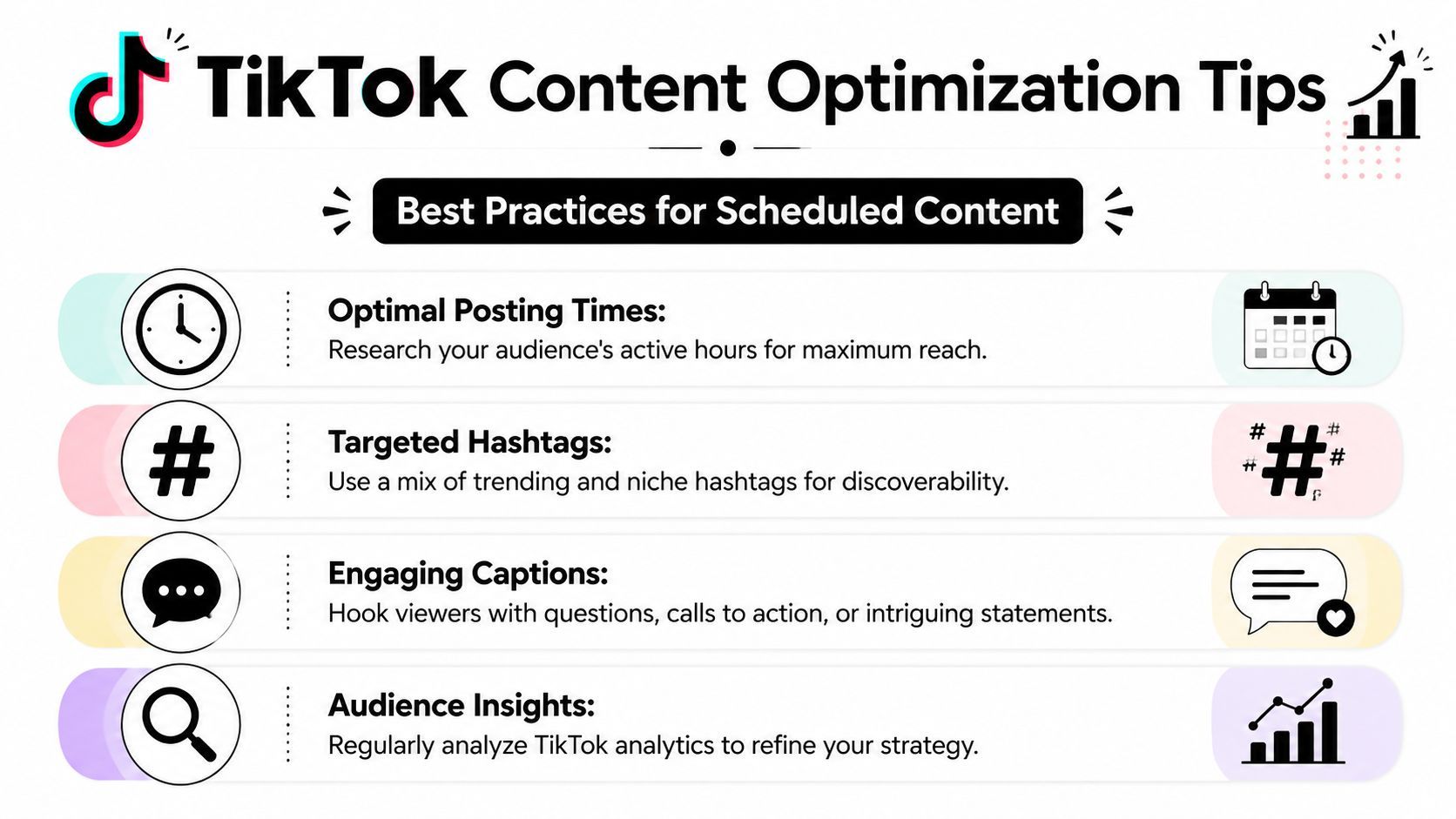
Global TikTok usage patterns show peak engagement between 5 PM and 9 PM on weekdays, and creators who schedule for the 7 PM to 9 PM weekend window can see up to 25% higher initial engagement, aligned with average user screen time of 95 minutes per day, according to the verified engagement timing data in Fact 2.
Start with timing, then refine
Those windows are useful defaults, not universal laws. A finance creator, local service business, gaming channel, and church media team won't all perform best at the same exact hour.
Use broad timing guidance first, then tighten based on your own analytics. Look for patterns in three areas:
- Strong starts: Which posts get early views and comments fastest
- Audience rhythm: Whether your viewers respond better after work, after school, or on weekends
- Content type by time: Educational content often performs differently from entertainment or offers
If you're posting explainers, downtime after work or school often gives that format more room to land.
Write captions that do one job well
TikTok captions don't need to do everything. They need to support the video.
Strong scheduled posts usually use one of these caption jobs:
- Create curiosity: Open a loop the video closes.
- Direct attention: Tell viewers what to notice or listen for.
- Invite response: Ask a simple opinion, choice, or experience-based question.
- Add context: Clarify who the video is for or why it matters.
Avoid writing captions that repeat the whole spoken script. If the video already explains the point, the caption should add tension, framing, or a prompt.
A good TikTok caption doesn't summarize the video. It gives the viewer a reason to engage with it.
Use hashtags and covers intentionally
Hashtags help most when they describe the content clearly and place it in the right niche. A mixed set usually works better than stuffing every trending tag you can find.
Keep your hashtag logic simple:
- Broad discovery tags to connect with the general topic
- Niche tags that match the specific audience
- Series or branded tags if you run recurring formats
Your cover matters too, especially for profile visits and returning viewers. Pick a frame that makes sense without sound and without motion. If someone lands on your profile grid, they should understand the topic fast.
Timing gets the post in front of people. Captions, hashtags, and covers help the right people decide it's worth watching.
Troubleshooting Common TikTok Scheduling Problems
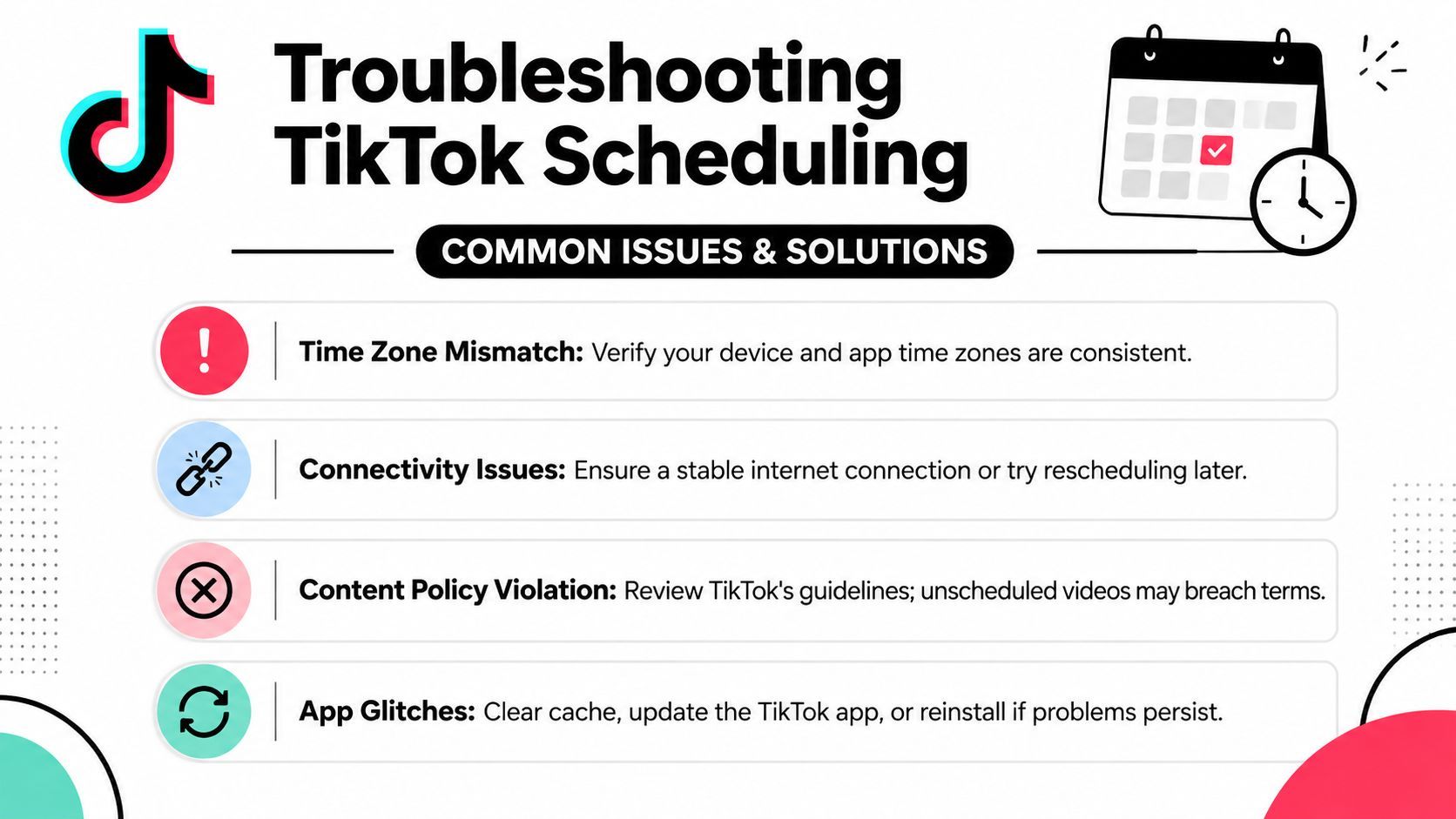
The most frustrating TikTok scheduling issues usually aren't random. They come from a few repeatable mistakes.
One of the biggest is timing precision. TikTok's scheduler has a 15-minute execution window tolerance, so a post scheduled for a specific time may publish a little before or after it. That delay is one reason creators report “missed” timing on sensitive promotions, and another common failure is overlooking the Schedule video toggle during setup, as documented in Fact 4.
Fix the problems before they happen
Use this checklist before you queue a post:
- Set earlier for sensitive timing: If the post supports a launch, promo, or event, give yourself buffer instead of aiming at the exact minute.
- Confirm the toggle: Make sure “Schedule video” is enabled before leaving the upload screen.
- Check video quality: TikTok requires at least 720p and recommends 1080p, so poor exports can trigger upload problems.
- Review privacy and interaction settings: Comments, Duets, and Stitches may not match your intended brand setup if you rush through the final screen.
What works in practice
If a post absolutely must appear at a precise moment, native scheduling may not be the right method. Use a workflow that gives you tighter control, or publish manually when the exact minute matters.
If uploads keep failing, look at the file itself before blaming the scheduler. Resolution problems, unfinished exports, and missing final checks waste more time than the scheduling interface ever does.
Most TikTok scheduling frustration comes from treating publishing like a button instead of a process. Once you clean up the workflow around the post, the scheduler becomes reliable enough for everyday content.
If you want one place to create videos, keep captions and other metadata organized, and schedule posts without bouncing between disconnected tools, ShortGenius (AI Video / AI Ad Generator) is built for that kind of workflow. It's a practical fit for creators and teams who want AI-assisted production and publishing in the same system, especially when consistency matters more than last-minute posting.