Bullet Time Effects: The Short-Form Creator Guide

Learn how to create bullet time effects for short-form video. Discover AI tools, camera rigs, and creative use cases that stop the scroll instantly.
Bullet time is a camera-orbit effect that creates the illusion of frozen time through sequential photography, not simple slow motion. The classic version used 120 still-camera setups plus 2 film cameras, proving that the effect's visual impact has always depended on viewpoint changes as much as playback speed.
That's the counterintuitive part of bullet time effects: the subject may barely move, yet the shot feels dynamic because the camera appears to travel through a suspended moment. The technique became globally recognizable through The Matrix in 1999, but its underlying idea is far older than digital cinema. Eadweard Muybridge's 1878 horse-motion studies are often cited as an early precursor because multiple still cameras recorded sequential views from a fixed position.
For a solo creator, the useful question isn't whether you can reproduce a Hollywood rig. It's whether your scene has a strong enough action, silhouette, and change in perspective to justify the effect. A clean jump, product reveal, punch, splash, or thrown object can stop a viewer mid-scroll. A crowded room with overlapping bodies and reflective surfaces can turn the same idea into a distorted, distracting sequence.
Understanding Bullet Time Effects in Modern Content
The visual language of bullet time was established by The Matrix. In the film's signature action sequence, the world appears to pause around Neo while the viewpoint sweeps around him. The production reportedly used 120 still-camera setups plus 2 film cameras, a scale that helped make the frozen-world, moving-camera look a mainstream cinematic reference. The documented history of bullet time explains why audiences associate the term so strongly with that film.
The effect works because it creates two sensations at once. The action appears suspended, while the viewer gains access to a viewpoint that ordinary camera movement couldn't provide during a fast event. That contradiction creates a powerful hook for short-form video, where a visual idea must communicate before the viewer has context.
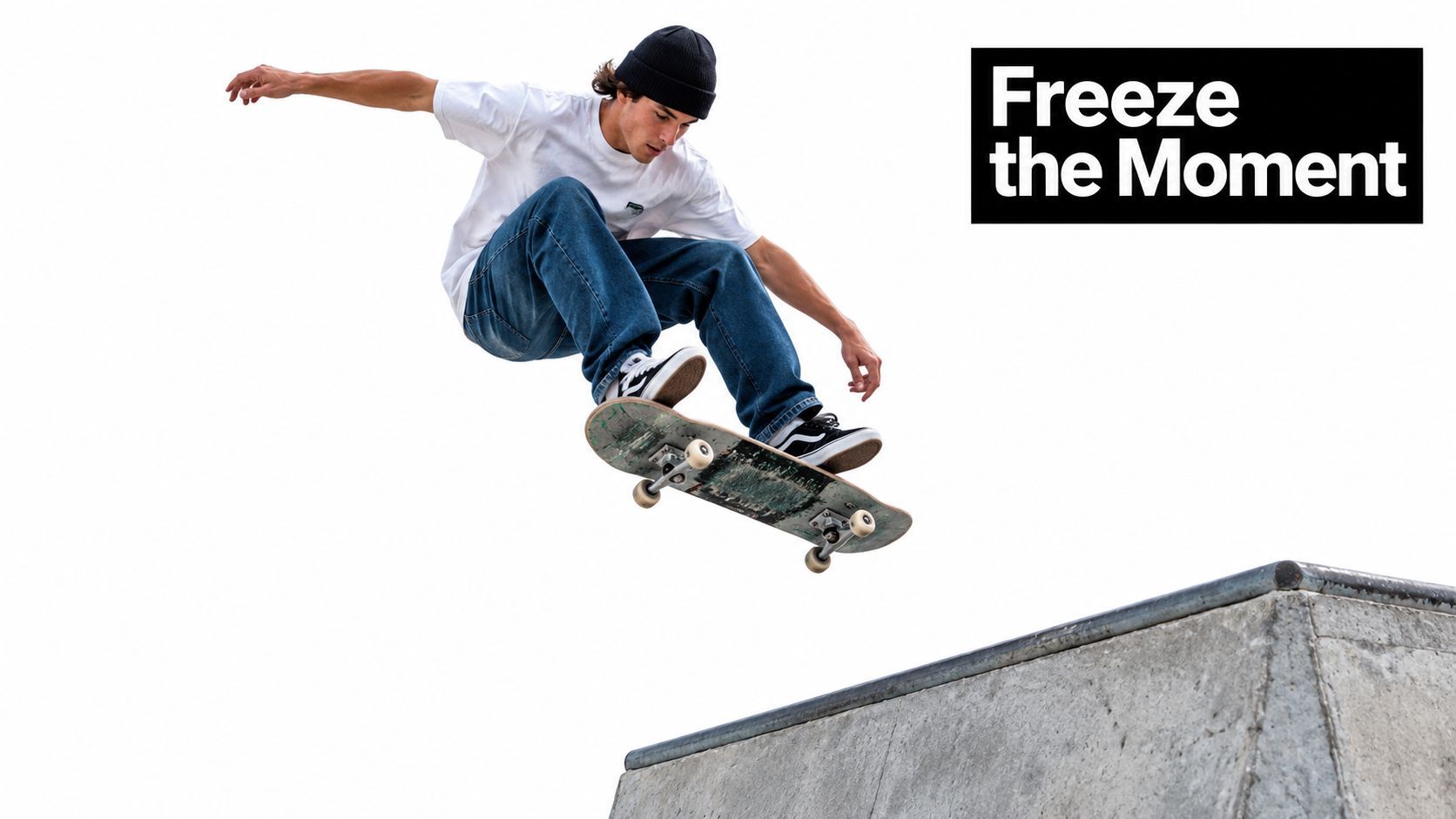
Why the effect earns attention
A skateboarder frozen above a ramp gives you a clear subject, a readable silhouette, and a moment with a natural beginning and end. The orbit adds information, showing the shape of the trick from a changing viewpoint instead of asking the viewer to watch the same action play at a slower speed.
That distinction makes the technique useful beyond action films:
- Product launches: Hold a product in a visually important pose while the viewpoint reveals its form.
- Educational hooks: Freeze a physical process at the moment when cause and effect become easiest to understand.
- Sports and performance: Show body position, object trajectory, or impact from several angles.
- Fashion and lifestyle: Turn a pose, outfit, or object interaction into a compact visual reveal.
Practical rule: Use bullet time when the changing viewpoint adds meaning. If the orbit only decorates an otherwise ordinary shot, slow motion or a conventional camera move will usually communicate more clearly.
Modern creators can also combine the effect with generated transitions, stylized camera movement, and compositing. A resource such as RemotionAI cinematic effects can help you compare related visual treatments before committing to a particular production method. The decision should still begin with the action and the intended viewer response, not with the novelty of the tool.
How the Frozen Camera Orbit Works
A traditional setup places still cameras along a ring or arc around the subject. Each camera records the action from a slightly different horizontal position, and the editor plays those frames in sequence. The viewer interprets the changing viewpoints as camera movement, even though each individual camera remains fixed.
The original Matrix effect used more than 100 still cameras arranged in a circle around the actor, aimed inward and sequenced to create a 360-degree view, as described in this academic discussion of the film's camera array. The dense arrangement matters because each camera supplies a nearby viewpoint. If the gap between frames is too large, the orbit appears to jump rather than glide.
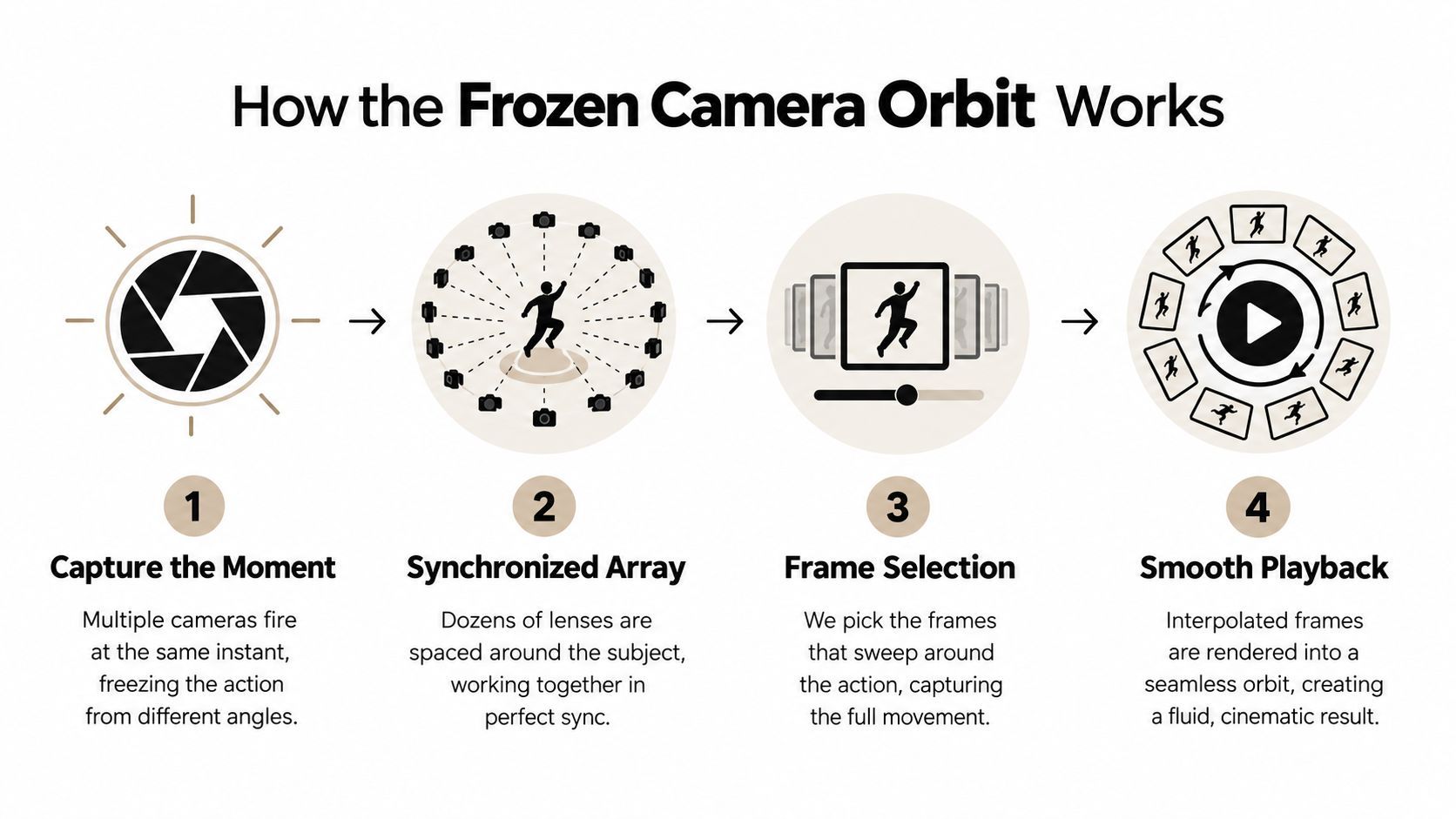
The four technical decisions
Capture the moment. Decide which instant should appear suspended. The subject needs to hold a readable pose, or the action needs to progress in a controlled way across the camera sequence.
Build the viewpoint path. Place cameras around the action on an arc, a partial ring, or another planned path. A full orbit isn't mandatory. A shorter sweep can be more effective when the subject has one important front or side profile.
Synchronize the frames. The cameras must record the intended moment closely enough that the subject doesn't visibly jump between viewpoints. Synchronization becomes especially important when hair, hands, loose clothing, water, or debris move independently.
Play the viewpoints as motion. Select the frames that create the cleanest sweep, then adjust timing, interpolation, stabilization, and transitions. The final result should feel like one camera traveling through space, not a slideshow of related photographs.
Camera count, spacing, and synchronization control the apparent smoothness. Adobe Research's CamSwarm prototype reported that the technique works with as few as two cameras, showing that a large array isn't a prerequisite for the underlying idea, although a sparse setup gives you fewer viewpoints to work with. Adobe's description of the CamSwarm prototype is useful for understanding that trade-off.
Hardware Rigs Versus AI-Assisted Workflows
A physical rig produces real optical evidence from multiple viewpoints, giving you dependable perspective, lighting, background, and subject detail. That evidence is the main advantage when the shot must hold up under close inspection.
The trade-off is production overhead. Cameras need matching exposure, lens alignment, focus, timing, mounting, and file management. The performer must also repeat the action in the correct position. A compact rig can become difficult when cameras do not match or when an obstruction appears from one angle.
AI-assisted workflows make a different compromise. They infer missing viewpoints from a photograph, short clip, or limited set of inputs instead of recording every angle. Recent approaches, including 4D Gaussian splatting research described in this overview of AI-generated bullet time, are moving toward interactive orbiting views and near-real-time reconstruction. For a solo creator, that makes testing concepts faster, though the result depends heavily on the source material and reconstruction quality.
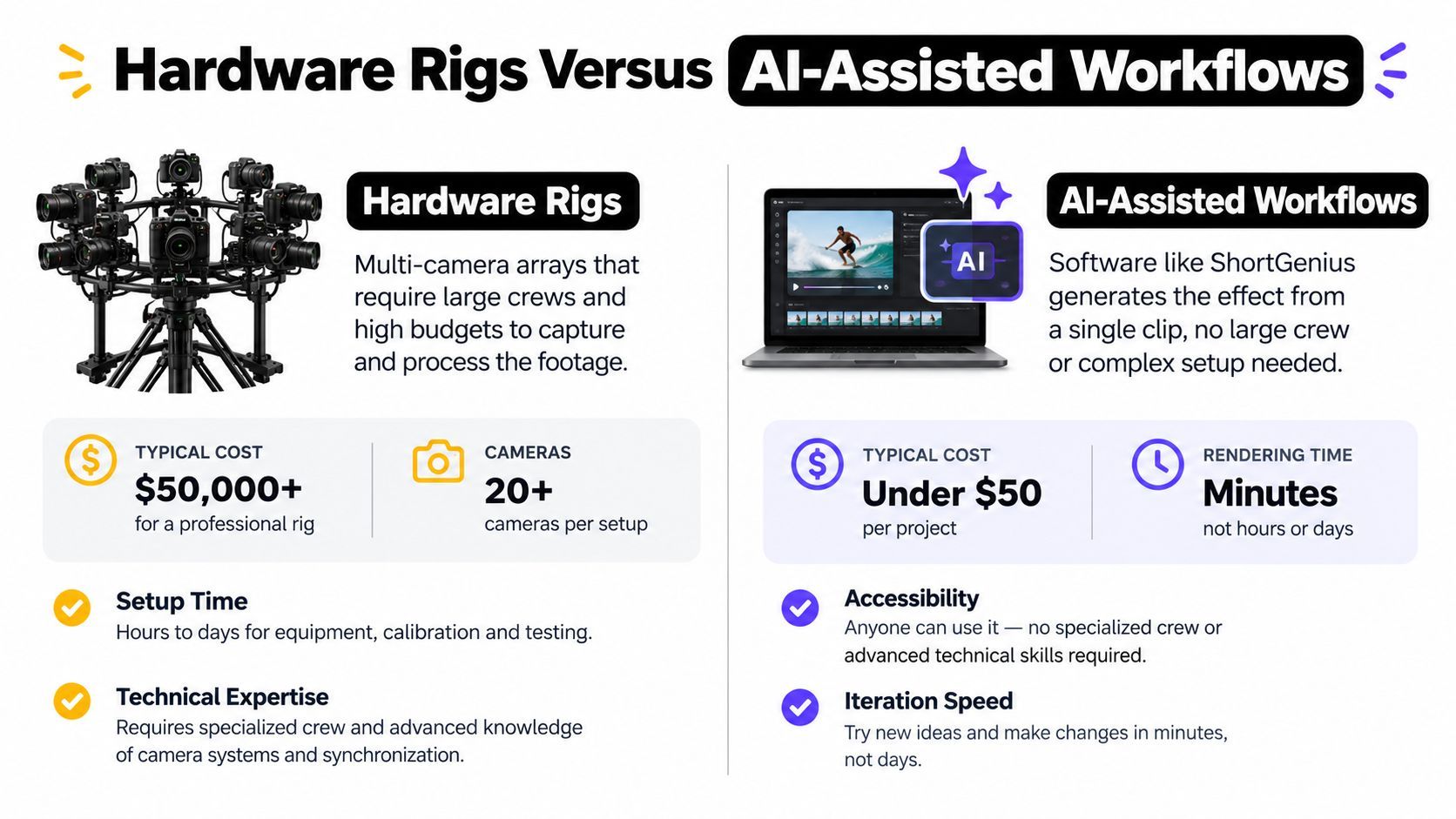
Choosing by production constraint
| Constraint | Hardware rig | AI-assisted workflow |
|---|---|---|
| Viewpoint accuracy | Captures real angles and physical parallax | Estimates angles that were not directly recorded |
| Setup demand | Requires synchronized cameras, mounting, and controlled capture | Requires strong source footage and careful prompting or processing |
| Iteration | Repeating the shot may require rebuilding the setup | Testing variations is usually faster |
| Complex subjects | Can preserve real details when capture is well controlled | May struggle with occlusion, reflections, hair, and overlapping forms |
| Best fit | High-value shots where physical realism is essential | Concept tests, social clips, product ideas, and rapid revisions |
Choose the workflow around the detail that cannot fail. A client product shot with precise geometry benefits from real camera viewpoints and physical parallax. A campaign concept with several possible hooks may benefit from AI, allowing you to test the orbit before committing time and equipment to a rig.
A small rig can combine both methods. A few synchronized cameras provide genuine viewpoints for a short sweep, while software fills selected gaps or handles editing. This setup retains some capture authenticity without the cost and operating burden of a full camera array. It also gives you a practical fallback when the AI reconstruction breaks around reflections, fine hair, or overlapping forms.
Selecting the Right Scenes and Actions
Scene choice often determines whether a bullet time effect looks deliberate or broken. Select an action the viewer can recognize immediately, then test whether the subject remains readable as the viewpoint changes. A strong silhouette, a distinct focal point, and clear separation from the surroundings give both a camera rig and an AI workflow better material to work with.
Jumps, punches, splashes, and thrown objects are reliable candidates because each creates a clear event in space. A jump freezes a recognizable body shape. A punch provides a strong directional pose. A splash creates an obvious outline, though individual droplets require inspection. A thrown object can anchor the orbit when its path is clear and the background does not contain similar shapes. Cluttered backgrounds give reconstruction systems less usable information and increase cleanup, as noted in this discussion of AI bullet time workflows.
Good candidates
Build product shots around a controlled background and a reveal that depends on viewpoint. An orbit around a bottle, shoe, device, or package should expose thickness, surface finish, or construction that a front-facing shot conceals. A rig records those angles physically, which helps when exact geometry matters. AI can test the idea faster, but it needs simple edges and consistent surfaces to avoid inventing detail.
Keep the action compact enough to inspect frame by frame. If the subject changes shape rapidly, use a decisive pose rather than a long sequence of movement. The more information the effect must reconstruct between frames, the more likely a limited-budget workflow will need manual cleanup.
Risky candidates
Busy environments create competing edges. Furniture, signs, crowds, foliage, and patterned walls can blur the boundary between foreground and background. A rig can capture those relationships when the cameras are synchronized and the scene stays controlled. AI-generated viewpoints may stretch, duplicate, or melt the same details because the source footage does not show their hidden sides.
Reflections and transparent materials add a separate source of ambiguity. A mirror, glossy package, window, or wet surface can display a viewpoint that conflicts with the inferred camera position. Hair, fingers, loose fabric, and fast-moving objects also need frame-by-frame inspection. Thin or irregular shapes reveal small reconstruction errors quickly.
The cleaner the visual separation, the more freedom you have to stylize the orbit.
Before recording or generating the shot, answer three questions:
- What is frozen? Identify the pose or action that deserves attention.
- What is moving around it? Define the camera path and the intended perspective change.
- What must remain stable? Mark key edges, product features, and background references.
If any answer is unclear, simplify the scene first. A restrained orbit around one legible action usually looks more professional than an ambitious sweep through a visually dense environment.
Creating Bullet Time with ShortGenius and AI Tools
A convincing AI bullet time shot begins with source design, not a button. Choose a short clip or still image with a clear subject, stable lighting, and enough surrounding context for the system to infer depth. A clean source reduces correction work as the viewpoint moves.
Platforms such as ShortGenius combine script planning, image generation, video assembly, voiceover, and editing in one workspace. That matters because bullet time usually supports a larger short-form edit. You may need an opening hook, an action shot, captions, music, a product frame, and versions for different aspect ratios. An AI workflow can handle those surrounding tasks, while a physical rig offers more dependable geometry when the shot itself must remain accurate.

A practical AI workflow
Start with the action. Write a one-sentence brief: “Freeze the skateboarder at the peak of the jump while the viewpoint sweeps from front to side.” The instruction defines the subject, the selected moment, and the camera movement.
Prepare the source. Use an image or clip where the subject is not blocked by another object. Crop with intent, remove distracting background detail where possible, and make the focal point large enough to inspect.
Generate a restrained move. Request a short orbit instead of a full rotation. A limited viewpoint change is easier to keep coherent when the source includes hands, hair, wheels, water, or reflective surfaces. AI saves setup time, but it cannot reliably reconstruct every hidden surface.
Review the edges. Inspect the face, fingers, shoes, product corners, text, and background lines. These areas expose reconstruction errors quickly. Compare the first, middle, and final frames rather than judging only the opening image.
Finish as an edit. Trim the lead-in, place the frozen moment on the beat, add captions, and export for the intended destination. The orbit should clarify the message, not postpone it.
AI tools can produce several treatments from one concept. Test a clean product orbit, a stylized camera path, and a freeze-frame transition while keeping the same hook. An AI-powered short video studio suits creators who want to test related short-form edits without building a complete rig.
The following video provides a visual reference for the pacing and style of generated short-form work:
Scrub through the complete orbit before approving it. If the shot begins well but loses the subject's shape later, shorten the sweep, simplify the background, or use a source with a clearer silhouette. That trade-off is often worthwhile for solo creators, while a rig remains the better choice when repeatable camera geometry matters more than fast experimentation.
Common Pitfalls and Troubleshooting Tips
The most common mistake is treating bullet time as a speed setting. Slowing a clip can emphasize motion, but it doesn't create a changing viewpoint. If the camera stays in one position, the result is slow motion, a freeze frame, or a speed ramp rather than a true camera-orbit effect.
Physical rigs introduce a different class of problems. Mismatched exposure makes the sequence flicker. Inconsistent focus changes the sharpness as the viewpoint moves. Poor timing causes the subject to jump between frames, while uneven camera spacing makes the orbit accelerate and decelerate without intention.
Fix the source before fixing the effect
When a rigged sequence looks unstable, inspect the capture order:
- Check the subject first. Confirm that the action reaches the intended pose across the camera sequence.
- Check camera consistency. Match exposure, white balance, focus, and lens characteristics before stitching.
- Check the path. Make sure the cameras follow a deliberate arc rather than an uneven approximation.
- Check frame selection. Remove viewpoints that contain blur, obstruction, or a distracting shift.
- Check the transition. Use interpolation carefully. It can smooth a move, but it can't restore detail that was never captured.
AI workflows need a different review process. Look for face drift, changing logos, duplicated limbs, warped fingers, unstable text, and background objects that change shape as the virtual camera moves. Reflections can reveal an impossible viewpoint, and transparent objects can expose missing depth.
Review rule: Watch once for the overall hook, then watch again with the sound off and inspect the edges. A strong idea can still fail because one visible artifact breaks the illusion.
Short-form delivery creates another trap. A creator may spend too long showing the effect before revealing the product, lesson, or punchline. Put the most legible moment early, then let the orbit add detail. Captions should remain readable throughout, so avoid placing critical text over parts of the frame that distort or change perspective.
Use this final checklist before publishing:
- Subject clarity: Can a viewer identify the frozen action immediately?
- Orbit logic: Does the viewpoint move with a consistent visual intention?
- Temporal feel: Does the shot look suspended rather than merely slowed down?
- Artifact control: Do faces, hands, edges, text, and reflections remain stable?
- Message timing: Does the effect support the hook instead of replacing it?
- Version control: Have you checked the crop, captions, and readability in the intended format?
Choose a physical rig when real parallax and reliable geometry matter more than speed. Choose AI when you need rapid exploration, a lightweight setup, or several creative directions from limited source material. If neither option produces a clean subject and a meaningful viewpoint change, simplify the action before increasing the technical ambition.
ShortGenius (AI Video / AI Ad Generator) combines scriptwriting, image generation, video assembly, voiceovers, editing, and publishing workflows for creators building short-form content. Use it to test bullet time concepts, develop supporting scenes, and turn a strong visual hook into versions for multiple channels by visiting ShortGenius (AI Video / AI Ad Generator).