Best Time Post TikTok: Your Data Guide 2026

Discover the best time post TikTok using real data & analytics. Find your ideal 2026 posting windows & automate scheduling for growth.
Most advice about the best time post TikTok gets this backward. It acts like there's one magic hour for every creator, then treats copied schedules like strategy. In practice, timing only works when it matches your audience, your content format, and the way your account already performs in analytics.
That's why generic “post at 9 a.m.” posts disappoint so often. The advantage comes from a repeatable method, not a borrowed clock time. Observe, test, iterate, automate is the framework that holds up when you're managing real accounts with different niches, regions, and publishing rhythms.
Why Universal Best Times Fail Most Creators
A universal posting time sounds useful until you look at how TikTok behaves. A creator with a mostly U.K. audience, a brand account selling to U.S. shoppers, and an entertainment page built on late-night browsing won't peak in the same window. Even if they all post at the same hour, the audience's habits, intent, and timezone spread change the result.
The biggest mistake is treating timing like a platform-wide constant. It isn't. What matters more is whether your followers are active, whether your video format fits their mood, and whether your audience is likely to give the post early attention after it goes live.
Practical rule: use broad timing research as a starting point, then let your own follower activity decide the final schedule.
That's the difference between theory and repeatable performance. The generic advice can point you toward likely windows, but it can't know when your audience scrolls, saves, or ignores content. A beauty creator, a SaaS educator, and an ecommerce brand may all see different best times even when they're using the same platform.
The cleanest approach is simple. Observe what TikTok shows in your own analytics, test a few time bands instead of one hard-coded hour, iterate based on results, and automate once a pattern holds. That keeps you from overfitting to someone else's audience and lets your schedule evolve with your channel.
What the Largest TikTok Timing Studies Show
The strongest research does not point to one fixed hour. It points to clusters, and those clusters are what I watch first before I trust any schedule.
Buffer's 2026 analysis covered 7.1 million TikTok posts and found the strongest posting window was Sunday at 9:00 a.m. local time, with other high-performing slots including Monday at 1:00 p.m. and Friday evenings. Buffer's 2026 TikTok timing analysis also recommends checking TikTok's Followers → Most active times view, because it shows when your own audience was active over the past 7 days. That matters more than a generic chart, because the same hour can behave differently once your follower base is concentrated in one region or built around a specific routine.
Hootsuite's 2025 study, based on 1 million social posts, found strong TikTok engagement windows at Thursday morning, 6 to 9 a.m., and Saturday midday, 10 a.m. to 6 p.m. Hootsuite's TikTok timing study points to a clear pattern, the stronger slots cluster around morning and midday activity periods. That is one reason a simple “post at lunch” rule keeps missing for real accounts. Different audiences come online for different reasons, and the same window can work well for one niche while underperforming for another.
Influencer Marketing Hub's 2026 roundup adds a different angle. It notes that entertainment content can peak at times that diverge from broader averages, including 4 to 6 p.m., 7 to 8 p.m., and even 11 p.m. on Wednesdays. Their point is the one most listicles miss, the best time depends on which format and which goal you're posting for. Their roundup of TikTok timing guidance also reflects the growing recommendation to keep testing instead of freezing a schedule.
| Study | Sample Size | Top Posting Windows | Key Insight |
|---|---|---|---|
| Buffer | 7.1 million TikTok posts | Sunday at 9:00 a.m., Monday at 1:00 p.m., Friday evenings | Strong signal points to a few repeatable windows, especially around weekends and lunch-to-afternoon timing. |
| Hootsuite | 1 million social posts | Thursday morning, 6 to 9 a.m., Saturday midday, 10 a.m. to 6 p.m. | Strong results cluster around morning and midday activity periods. |
| Influencer Marketing Hub | Not quantified in the verified data | Entertainment peaks at 4 to 6 p.m., 7 to 8 p.m., and 11 p.m. on Wednesdays | Best time varies by content type and audience intent, not just by platform averages. |
For a broader social calendar comparison, the guide to Friday Instagram posting strategy is a useful contrast point. It shows how another platform can have a very different timing pattern even on the same weekday.
Bottom line: the studies agree on one thing, timing matters. They disagree on the exact hour, which is your cue to test locally instead of copying a universal chart.
Finding Your Audience Activity Data in TikTok Analytics
TikTok already gives you the first data point you need. Open your profile, go into TikTok Studio, tap the Analytics card, then switch to Followers and find Most active times. That chart shows when your followers were active on the app over the past 7 days, which is more useful than any generic posting chart because it reflects your actual audience behavior.
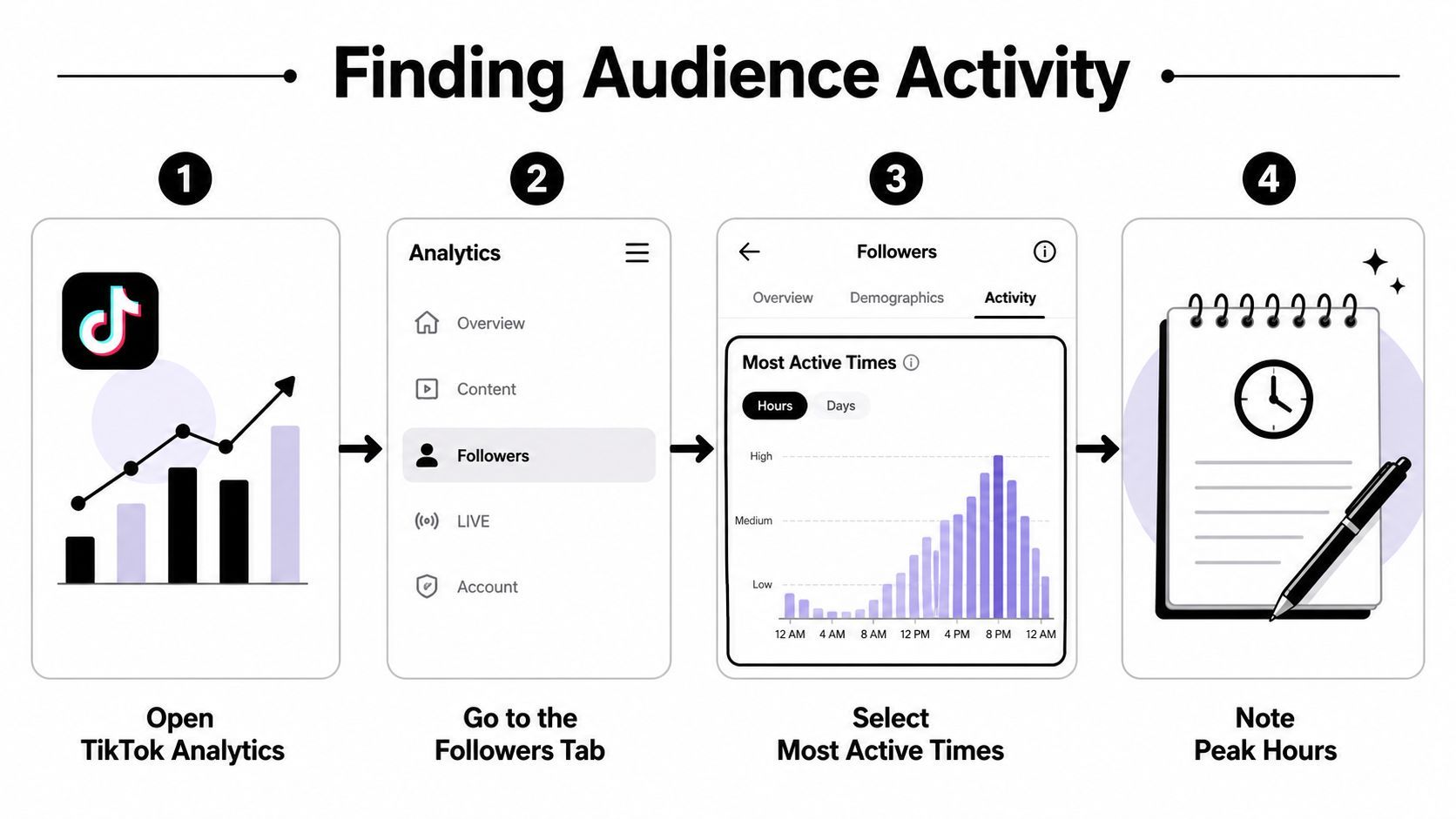
The chart is only helpful if you read it correctly. A taller bar doesn't mean “post only at that exact minute,” it means your audience is more likely to be available around that period. I usually read it as a window, not a pin, then I post a little earlier so the video has time to circulate when the audience starts logging in.
How to read the chart without overthinking it
Look for repeated peaks across multiple days, not one isolated spike. If Monday and Thursday both show activity around the same hour, that's a stronger signal than a random burst on a single day. If the chart looks noisy, the account may be too small yet for the data to be stable, so you'll need more testing before you trust it.
Timezone handling matters just as much. If your audience is concentrated in one region, post in that region's local time. If your followers are spread out, prioritize the largest audience cluster first, then test a second slot that serves the next biggest region.
Practical rule: follower activity is your most direct scheduling signal, but it's still a short lookback window, so treat it as recent behavior, not a permanent truth.
If your account is still small, pair TikTok analytics with direct observation. Watch when competitor posts seem to get early traction, note which formats appear at which times, and compare that against the broad research windows above. That won't replace your own analytics, but it gives you a reasonable starting map until your follower data is strong enough to guide decisions on its own.
Building a Posting Time A/B Testing Framework
A real A/B test on TikTok starts with controlling everything except time. Keep the topic, editing style, caption style, and format as consistent as possible, then change only the publishing window. If you change the hook, the sound, the length, and the timing at once, you won't know what drove the result.
Pick two windows that make sense together
The cleanest comparisons usually pit morning versus evening or weekday versus weekend. That mirrors the research patterns already covered, and it keeps the test practical. For example, one account might test a Thursday morning slot against a Saturday midday slot, while another compares a lunch window against a Friday evening publish time.
A useful test needs enough data to avoid false wins. If a post gets a slightly better response because the topic happened to be stronger, that's not a timing victory. Wait until each slot has been used repeatedly before you decide it's a winner.
Track the right metrics
TikTok's own analytics gives you the core numbers to watch. I'd prioritize early views, engagement quality, and follower growth from the post, then compare them against the baseline for that account. If a time slot gets slightly fewer views but materially better engagement quality, that can still be the better slot for the account's actual goal.
Use a simple spreadsheet with columns for posting time, day, format, topic, and outcome. Don't overcomplicate it with twenty fields. The goal is to identify a pattern you can trust, not build a research paper.
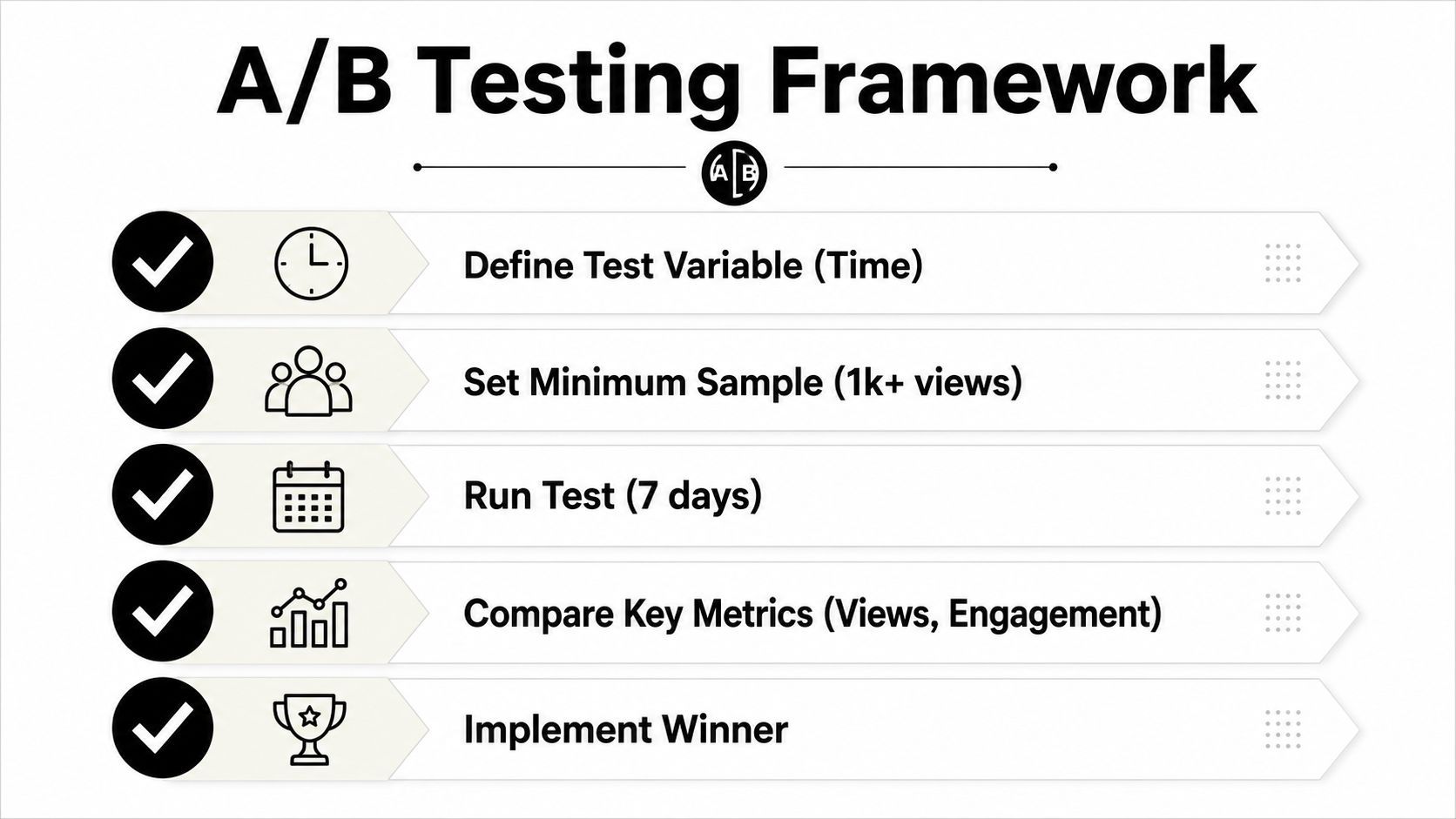
A practical testing rhythm looks like this.
- Define the variable. Keep the content format fixed and change only the posting time.
- Choose two time bands. Use one morning or midday slot and one evening slot.
- Run the test consistently. Publish the same style of content across a stable testing period.
- Compare the outcome. Look at early views, engagement, and follower response.
- Lock the winner. Keep the stronger slot in rotation until new data suggests a shift.
If you can't explain why a post won, you probably tested too many variables at once.
That's the mistake I see most often. Creators get impatient, move the time, change the topic, then call it optimization. Real timing work is slower, but it produces schedules you can confidently defend.
Adjusting Timing for Content Type and Audience Timezones
Not all TikToks are consumed the same way. Entertainment content, educational clips, product demos, and trend-based posts each meet the viewer in a different mood. That's why a schedule that works for a comedy account can miss completely on a brand account built around tutorials or shopping intent.
Match the format to the viewer's mindset
Entertainment content often performs better when people are winding down, which lines up with the stronger evening windows noted in the research roundup. Educational content often benefits from more focused, daytime attention, especially when the audience is in a work or learning rhythm. Product showcases sit somewhere in between, because they rely on both curiosity and the willingness to click through.
I've seen this repeatedly across accounts. A video that introduces a concept can do well in a morning slot when viewers are receptive to quick learning. The same account's lighter, more entertaining post may land better later in the day when people are scrolling for a break.
Build around timezone concentration, not timezone perfection
If your audience sits mostly in one country, schedule for that country first. If your followers are split across regions, choose the largest overlap window rather than trying to satisfy everyone. A creator with a global audience should think in layers, primary region first, secondary region second, and everything else as a bonus.
For accounts with mixed content, use content buckets. Educational posts can go into one timing lane, entertainment into another, and product-led content into a third. That keeps the calendar aligned with audience intent instead of forcing every post into a single slot.
A simple split can look like this.
- Entertainment: prioritize evening or late-night tests where leisure scrolling is highest.
- Educational: test weekday morning or midday windows when attention is more deliberate.
- Live or timely posts: publish at the announced moment, then support with reminders.
- Global audiences: choose the strongest overlap between your main regions instead of chasing every timezone.
If you're selling through TikTok, timing also affects how efficiently viewers move into shopping behavior. For a useful companion reference on that side of the funnel, optimizing TikTok Shop performance is worth reviewing alongside your publishing calendar.
The main idea is simple. Stop asking for one best time. Build a few content-specific time lanes, then let the format tell you which lane deserves more attention.
Automating Your TikTok Schedule with ShortGenius
Once you have timing data, the next problem is staying on schedule. A posting window only matters if the team can hit it consistently, because a good test loses value fast when posts go out late or get skipped.
Turn the winning slots into a repeatable workflow
Use the slots that performed best to build a fixed publishing routine, then batch production around that routine. With ShortGenius, you can keep ideas in themed series, prepare scripts and assets in one place, and queue posts for the times your own tests have already supported. That changes scheduling from a daily scramble into a process the team can repeat.
That setup also helps if you publish across multiple channels. If your TikTok timing tests point to a reliable cadence, you can carry the same production rhythm into YouTube, Instagram, Facebook, and X without rebuilding the workflow each time. The goal is not to post everywhere at once. It is to keep the planning layer organized so timing decisions stay deliberate.
Keep testing even after automation is in place
Automation should hold the schedule, not lock the strategy in place. Audience behavior changes, seasonality shifts, and trends move faster than most manual calendars. Reviewing timing every quarter is a practical habit, because it keeps your schedule tied to current behavior instead of last quarter's pattern.
If your team produces a lot of video, a tool that brings scripting, editing, scheduling, and brand consistency into one place reduces drift. That matters for teams that need a clean handoff between content creation and publishing, especially when the posting plan depends on test results that need to be followed closely.
The part many teams miss is simple. Automation only works after the testing discipline is already in place. If you do not know which slots deserve protection, scheduling software just helps you publish the wrong timing faster.
If you use TikTok to drive commerce, content velocity and timing discipline matter even more. The workflow that works for a creator page can be adapted for product launches, creator-led ads, and multi-channel campaigns, but only if the publishing process stays centralized and easy to repeat. For teams comparing tooling, optimizing TikTok Shop performance is a useful reference alongside your publishing calendar.
If you are ready to turn your TikTok timing tests into a real publishing system, visit ShortGenius and build a workflow around the slots your own data proves are working. You will be able to create, schedule, and refine short-form content without guessing at the clock every day.