Automate Content Creation: A Proven Workflow for 2026

Learn to automate content creation with a workflow covering ideation, drafting, video assembly, and multi-channel publishing.
AI-assisted content creation is already mainstream in major markets, with a 2026 report estimating that 38% of business web content published now involves AI assistance at some stage, up from 14% in 2024 and 26% in 2025. The same report estimates monthly AI-assisted pages rose from 82 million to 312 million in two years, while the average cost of a 2,000-word article fell from $480 to $268 in the same report. That shift changes the question. The problem isn't whether teams can generate content faster, it's whether they can keep the approvals, brand rules, and channel-specific versions under control once volume goes up.
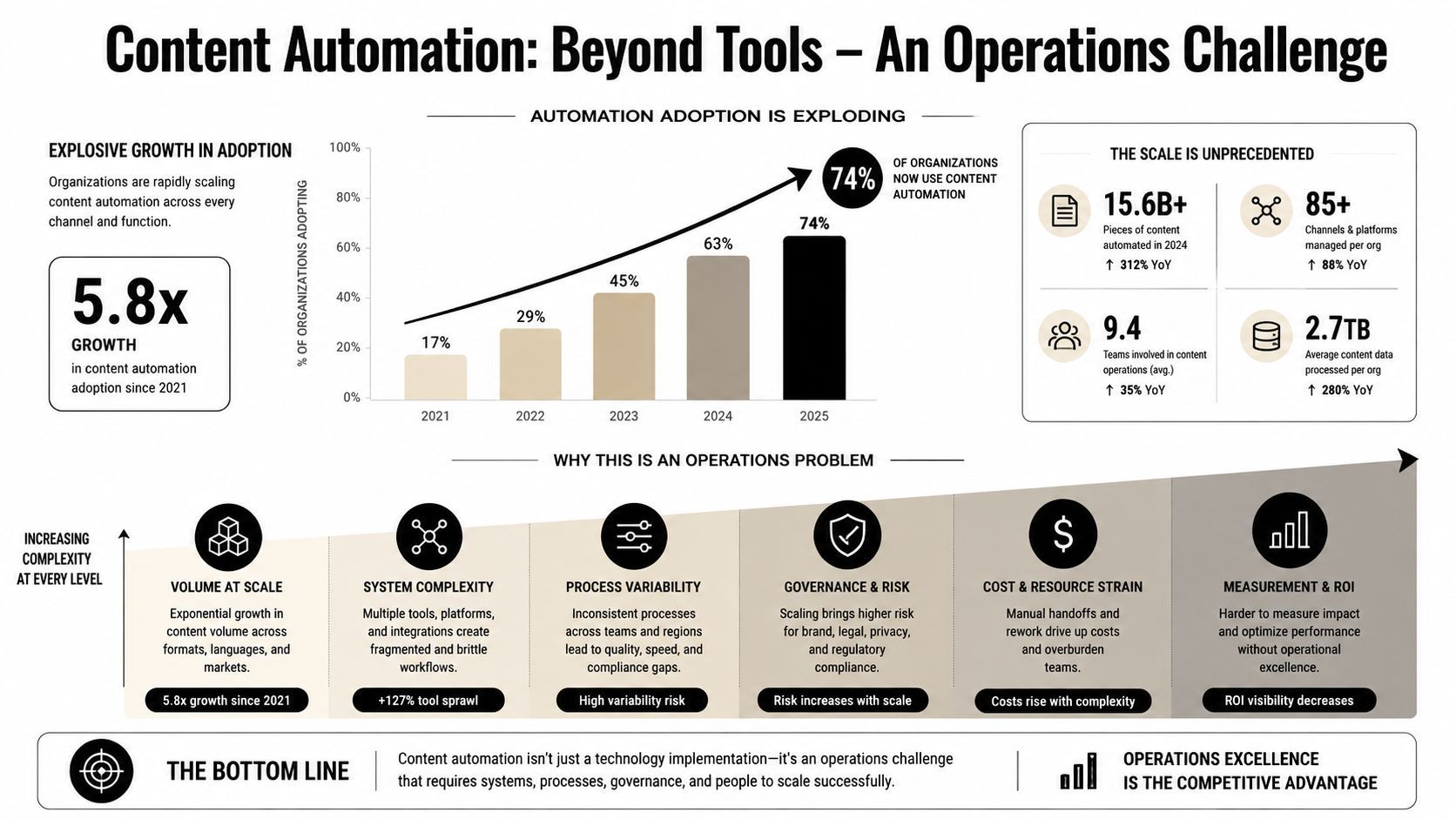
Why Content Automation Is an Operations Problem
Many teams still treat content automation like a model decision or a prompt-writing exercise. It is an operations problem because production runs through a chain of handoffs, and every handoff creates room for quality to drift, facts to slip, or approval to stall. Once output needs to move across blog, social, and video formats, the work is less about generation and more about keeping the workflow controlled.
Adoption changed the failure mode
The adoption numbers make that clear. Ahrefs reported in 2025 that 87% of respondents use AI to help create content, and companies using AI publish 42% more content each month than those that do not, with a median of 17 articles versus 12 according to Ahrefs. The same study found that 97% of companies edit and review AI content, while only 4% publish purely AI-generated work Ahrefs. The operational signal is simple. Teams are not replacing human review, they are building hybrid production systems with more checkpoints, more versioning, and more chances for inconsistency.
Once that hybrid system exists, the bottleneck moves. The draft is rarely the only problem. Failures usually show up in the review queue, the CMS handoff, the social rewrite, or the final approval state that should have blocked publication.
Practical rule: if content breaks after the draft is “good enough,” the problem is usually workflow design, not generation quality.
The pipeline matters more than the prompt
A reliable setup looks like a staged workflow, not one giant request. The useful pattern is ideation, research, draft generation, human review, asset creation, then publishing, with each stage passing structured inputs to the next instead of relying on a single prompt as described in this automation workflow guide. That structure matters because fixed fields, like title, audience, tone, required sections, and key data points, give downstream systems something they can check.
The teams that scale cleanly separate generation, editing, and approval. The teams that struggle try to collapse those into one step, then spend the next two weeks cleaning up edge cases that should have been caught earlier.
That separation matters even more in multi-channel output. A blog draft can survive a messy sentence or a weak transition. A video script, a LinkedIn post, and an email teaser all need different checks, different approvals, and different rules for what counts as ready to ship. If the governance layer is weak, automation just makes mistakes faster and distributes them farther.
Mapping Your Current Process Before Automating
Before any AI tool enters the stack, map the work as it happens. A clean SOP is useful, but it rarely shows where handoffs stall, where approvals pile up, or where a draft looks finished and still fails in review. The fastest first win is usually the slowest handoff with a clear output, because that is where automation can remove delay without creating new cleanup work.
Time the work, not the idea of the work
Start with a plain log. Use one row per handoff, and capture the person or system, the input, the output, and the waiting time. The point is to find where the process slows down, not where the team feels busiest.
A practical timing sheet looks like this:
- Stage name: Topic selection, outline review, draft revision, asset creation, CMS upload.
- Owner: Who hands it off and who receives it.
- Start time and finish time: Record both, even if the step feels fast.
- Waiting reason: Review queue, missing source, design lag, legal check.
- Output quality: Checkable, unclear, incomplete, approved.
The first automation target is the step with the clearest input and the most predictable output, not the one that sounds the most impressive.
Automate in parallel before you switch
Keep the manual process running beside the automated one until the outputs match your quality bar and the edge cases are visible. That parallel run exposes formatting drift, approval misses, and odd content shapes that only show up in live production.
People often find they need an approval layer and workflow logic before they need a more ambitious prompt. A well-structured prompt can produce a draft that looks usable quickly, but it still needs SEO checks, factual review, and sign-off before publication as recommended in content automation guidance. The question is whether the team can route that draft safely to the next step.
The same logic applies outside text. In game-ready 3D asset creation with Sculpty, structured inputs make downstream output easier to control, which is why the governance layer matters as much as the generation layer. For teams shipping blogs, short-form video, and social copy at the same time, the approval path is what keeps the channels aligned when the automation starts moving faster than manual review.
Building a Staged Pipeline From Ideation to Draft
Reliable automation starts with structured inputs, not clever language. If the brief is loose, the system improvises and the editorial team ends up cleaning up the result. If the brief is fixed, the pipeline can move from topic selection to draft with fewer surprises and clearer review points.
Lock the brief fields first
A good brief has machine-checkable fields that reduce drift before generation starts. At minimum, define title, target audience, tone, required sections, and key data points to cite. Those fields are useful for humans, and they also act as constraints that keep downstream output from wandering.
A sample brief template usually includes:
- Working title: The headline or topic frame.
- Audience: Who the piece is for, and who it is not for.
- Tone: Direct, technical, conversational, or editorial.
- Angle: The specific argument or perspective.
- Required sections: The exact sections the draft must contain.
- Source notes: Which facts need to appear and where they're allowed to appear.
- Approval rule: Who signs off before the draft moves on.
Treat each stage as its own automation node
The biggest mistake is building one large generator and hoping it behaves like a production line. It does not. A stronger pipeline starts with topic keywords, turns them into 5 to 10 content angles, sends a fact-checked outline into long-form drafting, then pauses for human approval before any asset creation begins. That staged approach is often the difference between drafts that are easy to review and drafts that create more work downstream.
Operational insight: the more expensive the downstream channel, the earlier the approval gate should sit.
That is why content teams and media businesses move from drafting tools to hybrid human-AI systems instead of trying to remove people entirely. The human role changes, but it does not disappear. People still own claims, voice, and the final publish decision, while automation handles the repetitive structure and the approval layer keeps multi-format output consistent across channels.
Automating Video Assembly and Voiceover Generation
Short-form video raises the stakes because every content decision becomes visible at once. Script, scene pacing, voice tone, captions, and format all have to land together, or the whole thing feels off. That's why video automation works best when it assembles content from a structured brief rather than trying to invent the whole piece in one pass.
A blog outline can become a vertical video, but only if the handoffs are clean
A practical workflow starts with the blog outline, not the finished article. The outline feeds a script step, the script feeds scene generation, the scene list feeds voiceover, and the finished sequence gets captions and aspect ratio formatting before it enters the scheduler. That is the same staged logic used in blog automation, just with more moving parts.
In practice, that means one team member still needs to review pronunciation, brand terms, and the pacing of the first few seconds. That review gate matters because voiceover is often where an otherwise solid assembly step becomes unusable.
Keep the controls, don't flatten the creative choices
Preset libraries help here, especially for camera movement, scene transitions, and visual emphasis. They're useful because they standardize the reusable parts of production without forcing every video to look identical. If you're working across a CMS and a scheduling stack, a major win is not the tool that creates the video, it's the handoff that lets the draft move cleanly into publish-ready formats.
One platform option in this category is ShortGenius (AI Video / AI Ad Generator), which combines scriptwriting, image generation, video assembly, voiceovers, editing, and scheduling in one workflow. That kind of tool is useful when you need the assembly process to stay inside one approval path instead of bouncing between disconnected apps.
The practical test is simple. If the video can be generated quickly but still needs a human to catch tone, pronunciation, or caption issues, the pipeline is working. If those errors make it to publication, the pipeline is missing a review gate.
Governance for Multi-Channel Distribution
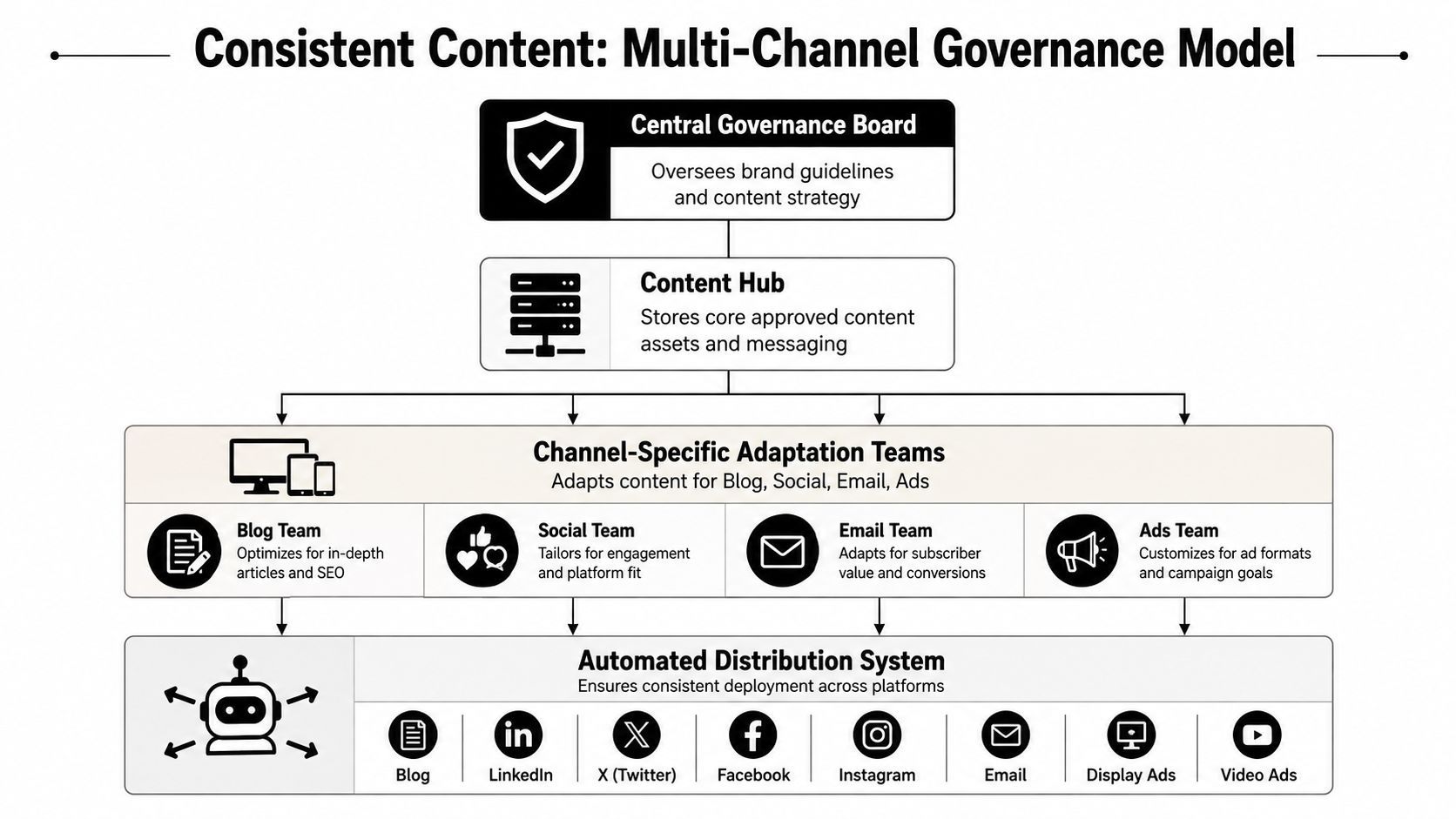
The hardest part of automation is not generation. It is keeping blog, social, email, and ad versions aligned without letting each channel become its own editorial universe. Once source content starts getting repurposed, the main risk shifts from speed to consistency, and governance has to carry that load.
Central rules beat local improvisation
The cleanest structure is a central content hub that stores approved source assets, brand guidelines, and message hierarchy. From there, channel-specific teams or automations adapt the content for blog, social, email, and ads. That central layer matters because every variant starts from the same factual backbone before it gets formatted for a different platform.
Without that hub, each channel makes its own calls. Tone shifts. Claims get softened in one place and sharpened in another. A social variant can flatten a nuanced argument, while an ad version can push too hard and lose brand judgment.
A practical setup is to keep the source truth in one place, then treat every downstream format as a controlled derivative, not a fresh draft. That keeps essential elements intact, especially product names, compliance language, and claim boundaries.
Approval states need to block bad outputs, not just slow them down
The review system should separate drafts, approved assets, and publish-ready content. If a piece has not passed the right checkpoint, automation should stop. Many teams say they have review in place, then leave the publishing path open enough for unverified content to slip through.
A useful approval workflow is:
- Source approval: Validate the core message and claims once.
- Channel adaptation review: Check tone and compliance by platform.
- Final publish approval: Confirm the version that goes live.
- Exception handling: Route anything ambiguous back to a human instead of forcing a publish.
Multi-format automation guidance keeps landing on the same operational point, human checkpoints, centralized brand rules, and workflow testing are what keep scale from turning into brand drift Ampcome. That is the governance layer that matters. It does not make automation slower, it makes the output usable across channels.
Common Pitfalls and How to Avoid Them
The three failures I see most often are predictable. Teams skip review, they over-automate nuance, or they wait too long to measure quality until the volume makes the problem expensive. None of those problems comes from the model itself. They come from how the workflow is designed, and from weak approval layers that let inconsistent output move too far before anyone catches it.
When the pipeline starts breaking
If the content looks fine in outline form but falls apart after SEO optimization, the prompt is usually not the core issue. The review layer is. If the content is factually thin, human ownership of claims was probably pushed too far downstream. If the brand voice changes from channel to channel, the adaptation rules are too loose.
Practical rule: if the team cannot explain who approves what, the automation is too loose to trust.
The fix is usually straightforward. Add a human gate where judgment matters, and tighten the brief fields where the system keeps drifting. More prompt text rarely solves a governance gap. It usually just hides it for a while.
What to check before scaling output
Run a simple troubleshooting pass before you expand volume:
- Check review ownership: Confirm a named person signs off before publish.
- Check claim handling: Make sure arguable statements are reviewed, not auto-rewritten.
- Check channel rules: Verify each format has its own adaptation standard.
- Check measurement timing: Review quality metrics before scale hides the drift.
A strong draft is still not the same thing as a publishable asset, as noted earlier in the automation examples Awesomic. Teams that keep that line clear avoid the most common failure, publishing something that looked efficient and then cost more to fix than it saved to create. The true test is whether the approval path can hold up when one brief turns into blog, video, ad, and social output without the message shifting under pressure.