Your Guide to the AI Video Quality Enhancer in 2026

Discover how an AI video quality enhancer can transform your footage. Learn to upscale, denoise, and refine videos for professional results on any platform.
An AI video quality enhancer is a bit like having a professional post-production crew in your computer. It uses artificial intelligence to automatically clean up and sharpen your videos, fixing common issues to give your footage that polished, high-end look.
What Is an AI Video Quality Enhancer?
Picture this: you capture the perfect moment for a TikTok or YouTube Short, but the lighting wasn't great. Now the clip is grainy, a little blurry, and just looks unprofessional. In the past, you’d have to either live with it or spend hours wrestling with complicated editing software.
This is where an AI video quality enhancer changes the game.
Instead of just slapping a generic filter over your entire video, these tools analyze your footage frame by frame. The AI intelligently identifies specific problems—like pixelation, digital noise, or softness—and then reconstructs the missing details to create a much sharper and more vibrant final product.
Why High-Quality Video Is Non-Negotiable
On platforms like YouTube, Instagram, and TikTok, video quality isn't just a nice-to-have; it's everything. Poor-quality content can make your brand seem amateurish and cause viewers to scroll right past. Great video, on the other hand, grabs attention and signals professionalism, keeping your audience hooked.
An AI video quality enhancer levels the playing field. It gives creators the ability to produce stunning results without needing a Hollywood-grade camera or years of editing experience. This makes high-quality video accessible to everyone, from social media managers to small business owners.
The demand for these capabilities is surging, and the market growth reflects this shift in content creation.
The Video Enhancing AI Tool market was valued at USD 131 million in early 2024 and is projected to hit USD 175 million by year's end. This growth is driven by deep learning breakthroughs that make professional enhancements accessible to creators on platforms like ShortGenius, who can now polish videos for social media in minutes.
This incredible growth is all about meeting the needs of creators who require crisp, engaging content without the high cost or steep learning curve. You can explore more about this trend and find the complete analysis in the video enhancing AI tool market research.
What Problems Do AI Enhancers Solve?
These tools are designed to fix a whole host of common issues that can ruin a good video. By understanding exactly what they target, you can see just how valuable an AI video quality enhancer can be in your workflow.
Here are the main problems AI enhancement is built to solve:
- Low Resolution: It can intelligently upscale video from a lower resolution (like 720p) to full HD (1080p) or even 4K, making it look sharp on modern screens.
- Digital Noise and Grain: Footage shot in low light often suffers from a distracting grainy texture. AI is fantastic at removing this noise while keeping the important details intact.
- Blurriness and Lack of Sharpness: The AI can sharpen edges and bring out textures, making a slightly soft or out-of-focus shot appear much clearer.
- Compression Artifacts: When videos are compressed for the web, they can get blocky or distorted. AI can smooth these artifacts out and restore a clean, natural look.
- Dull or Inaccurate Colors: Many enhancers also include automated color correction. The AI analyzes the video and adjusts brightness, contrast, and saturation to make the colors pop.
At the end of the day, an AI video quality enhancer closes the gap between the footage you have and the professional quality you need. It's no longer about compromising on quality; it's about unlocking your content's full potential with the click of a button.
How AI Transforms Your Video Footage
Think of an AI video quality enhancer as a team of digital restoration experts, all working together on your footage. Instead of just slapping a generic filter over your entire video, these tools dive in and analyze it frame by frame. They diagnose specific issues—like blurriness, grain, or choppy motion—and apply precise fixes just where they're needed.
It's less like automation and more like intelligent recreation. Imagine your original video is a rough pencil sketch. The AI looks at that sketch, figures out what you were trying to create, and then meticulously redraws it with sharper lines, richer colors, and smoother movement. It essentially fills in the visual gaps left by your camera, tricky lighting, or a less-than-perfect environment.
The Core AI Enhancement Techniques
So, how does the AI actually pull this off? It’s not just one single trick. It's a combination of powerful processes working in harmony. Each one is designed to solve a specific, common video problem that frustrates creators every day.
Here are the main players:
-
AI Upscaling (Super Resolution): You can't just stretch a low-resolution video to fit a 4K screen and expect it to look good—you get a blurry, pixelated mess. AI upscaling, or super resolution, is much smarter. It analyzes the existing pixels and then intelligently generates new ones to fill in the gaps, adding plausible detail it learned from millions of other high-quality videos. It’s not stretching the image; it's rebuilding it.
-
AI Denoising: We've all seen it: that grainy, distracting "noise" that creeps into videos shot in low light. An AI denoiser acts like a digital cleaning crew, carefully identifying and removing that visual static. The best part is that it does this while preserving the important details in your shot, leaving you with a clean, crisp image.
-
AI Frame Interpolation: Ever watched a video that felt jerky or stuttered? That’s usually due to a low frame rate. Frame interpolation is the art of creating new, artificial frames and inserting them between the existing ones. The AI studies the motion between two frames and generates a new one that logically fits in the middle, creating buttery-smooth motion.
When combined, these techniques can take a grainy smartphone clip and give it a cinematic feel. They can breathe new life into old, compressed files so they look sharp on modern screens.
Core AI Video Enhancement Techniques Explained
To see how this works in the real world, it helps to connect the technique directly to the problem it solves. This table breaks down what each process does and when you'd want to use it.
| AI Technique | What It Does | Best For |
|---|---|---|
| AI Upscaling | Intelligently increases video resolution (e.g., from 720p to 4K). | Reviving old footage, making mobile clips look sharp on large screens, or using low-res stock assets. |
| AI Denoising | Removes visual grain and noise from footage. | Fixing videos shot in low-light conditions, cleaning up webcam recordings, or improving night-time shots. |
| Frame Interpolation | Creates new frames to increase the frame rate and smooth motion. | Making action sequences or slow-motion shots look fluid, or converting 24fps video to a smoother 60fps. |
This isn't just a gimmick; it's a fundamental shift in video production. Businesses are taking notice, with spending on AI video tools jumping by 45% year-over-year in 2023. The impact is tangible, too. AI-driven noise reduction can recover up to 40% of lost details in low-light footage—a game-changer for the many coaches and educators shooting on their phones.
The skills needed to master real estate video editing, for example, are now heavily influenced by these AI advancements, where clarity and detail are everything.
What makes an AI video enhancer so powerful is its ability to blend these techniques on the fly. It becomes a seamless part of a modern creator's workflow, especially when paired with other generative tools. For instance, you could use an AI to generate a scene from a simple text prompt and then immediately run it through an enhancer to upscale it to 4K.
You can see this in action by learning more about creating stunning visuals from image-to-video models. In the end, these tools give you the freedom to focus on telling a great story, knowing that the technical side of things can be polished with incredible precision.
It’s one thing to talk about technology, but the real proof is seeing an AI video quality enhancer save the day for actual creators. Theory is great, but let's get into the nitty-gritty of how people are using these tools to solve frustrating, everyday problems and get real, measurable wins.
These aren't just made-up scenarios; they're stories from the trenches. We’ll look at an e-commerce brand, a social media manager, and a lifestyle influencer—each was stuck with a content problem that was holding them back, and each used AI to turn things around.
Case Study 1: The E-Commerce Brand
Imagine an online shop that sells beautiful handcrafted goods. They had a bunch of old product demos, filmed years ago on phones that are now ancient history. The videos were grainy, low-res, and just looked dated—totally unusable for today's high-stakes ad campaigns on Instagram or TikTok, where quality is everything.
The Problem: The brand desperately needed high-performing video ads but didn't have the budget to reshoot everything. All that old footage was just sitting there, a completely wasted asset.
The AI Solution: Instead of starting from scratch, they ran the old 720p videos through an AI video quality enhancer. The tool intelligently upscaled the footage to a clean 1080p. It also applied a denoising filter that scrubbed away the grainy texture and even tweaked the colors to make the products pop and match their modern branding.
The payoff was huge: a 40% increase in click-through rates on their social media ads compared to their old static image campaigns. They saved thousands of dollars on production and turned forgotten files into their best-performing sales tool.
Case Study 2: The Social Media Manager
A marketing agency was building a testimonial campaign for a client. They had a goldmine of user-generated content (UGC) from happy customers, but the quality was all over the place. Some clips were too dark, others were shaky, and most were horribly compressed by social media apps.
Trying to stitch this messy collection into a single, professional-looking reel was a nightmare. The poor quality actually made the authentic testimonials feel less credible and made the brand look cheap.
The AI Solution: The social media manager used an AI video quality enhancer as a pre-processing step. The tool automatically stabilized the shaky shots, brightened the dark ones, and smoothed out the blocky compression artifacts. Suddenly, they had a library of polished, consistent clips ready for editing.
- Improved Viewer Retention: The final, polished video saw a 65% increase in average watch time. It was just easier and more pleasant to watch.
- Boosted Engagement: The testimonial reel earned double the shares of any previous UGC campaign because the professional look gave it a much higher perceived value.
This is all possible because of a few core AI functions working in concert.
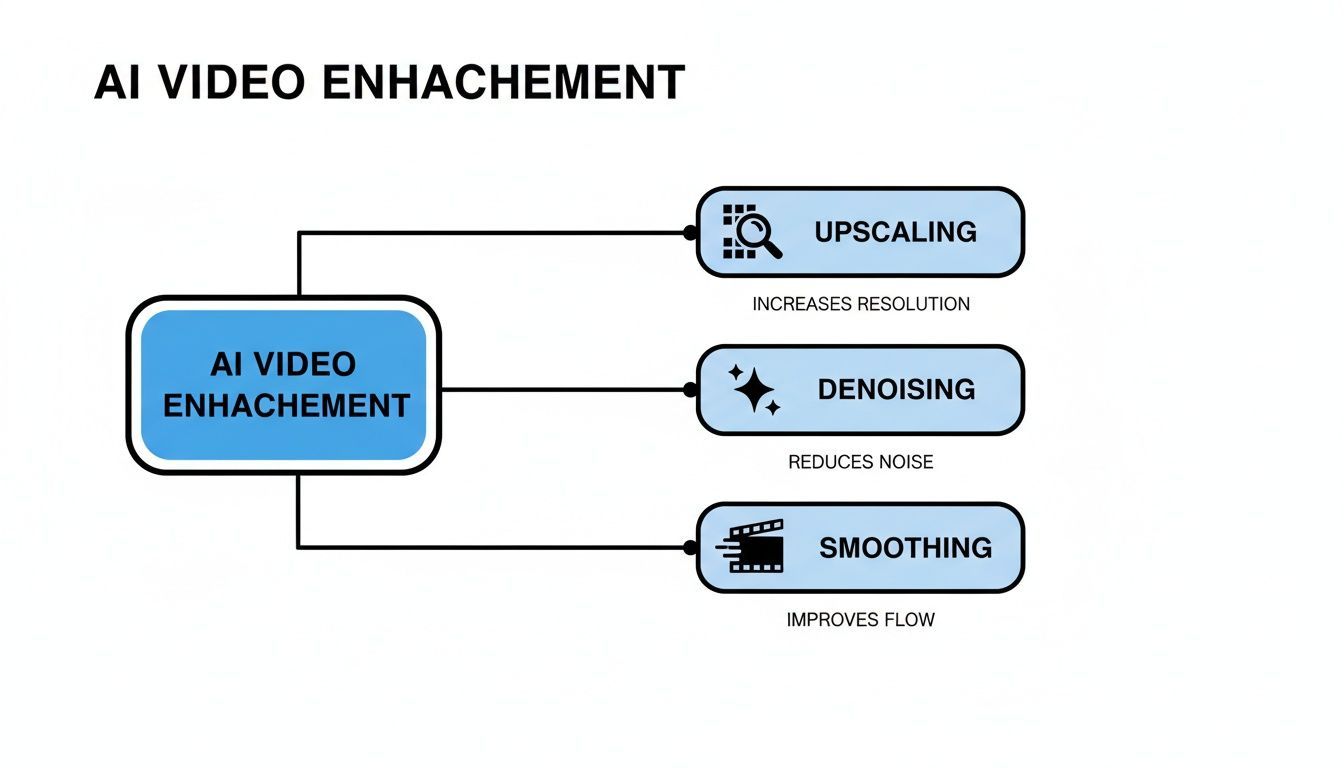
As you can see, the combination of upscaling, denoising, and smoothing is what delivers that comprehensive jump in quality.
Case Study 3: The Lifestyle Influencer
Here's a familiar one. A travel influencer scored an invite to an exclusive, dimly lit evening event. She was capturing amazing, one-of-a-kind moments, but only on her phone. The final clips were a noisy, blurry mess and looked completely unusable for her meticulously curated feed. She thought the opportunity was lost.
The Problem: Her most unique content was trapped in low-light footage that fell way below her brand standards. Posting it was out of the question.
The AI Solution: She turned to an integrated tool like ShortGenius, which has a powerful AI video quality enhancer built right in. The platform’s denoising algorithm went to work on the grainy footage, while its upscaler brought back the sharpness and detail. She was able to completely rescue the clips, editing them into a slick "get ready with me" video that became her most-viewed post of the month.
These stories aren’t isolated incidents; they’re part of a massive shift in content creation. The AI Video Generation & Editing Software market is projected to grow from USD 3.67 billion in 2026 to an incredible USD 24.89 billion by 2036. This explosive growth is fueled by tools that boost quality, save creators time, and fit right into their workflow. For ShortGenius users, that means turning any video into a crisp HD 1080p final product—the gold standard for social media. You can read the full research about these market projections to dig deeper into the data.
The Measurable Benefits of Upgrading Your Video
Using an AI video quality enhancer does a lot more than just make your footage prettier. It delivers real, measurable results that can directly affect your brand's performance and, ultimately, your bottom line. Think of sharper, cleaner video not as a cosmetic touch-up, but as a powerful tool for influencing how your audience behaves.
When someone stumbles upon your video, you have just a few seconds to grab their attention. High-quality visuals immediately signal that your content is professional and worth watching, which is exactly what makes people stick around. This directly boosts viewer retention—a critical metric that social media algorithms love to see when deciding whether to show your content to more people.
Driving Engagement and Conversions
Better video quality completely changes how people react to your content, especially when it comes to marketing and sales. A crisp, clear product demo or a polished ad builds instant trust, making your brand and your offer feel far more credible.
Put yourself in the viewer's shoes for a moment. Would you trust a grainy, pixelated ad? It feels amateurish and a little sketchy. A sharp, vibrant video, on the other hand, projects confidence and authority. That's why it gets higher click-through rates. When your visuals look professional, your brand feels professional.
Turning a blurry product demo into a clean 1080p clip with an AI enhancer can be a game-changer. We've seen brands boost click-through rates on their social ads by as much as 40% after simply upgrading their video assets. The link between quality and action is undeniable.
Polishing your videos is a core part of any solid marketing strategy. For a deeper dive into how you can put these ideas into practice, this guide to video marketing for small business is a fantastic resource.
Maximizing ROI and Brand Perception
Beyond just getting more clicks, using an AI video enhancer brings some serious financial and brand-level advantages. It helps you sidestep two of the biggest headaches in video production: expensive reshoots and painfully slow manual editing.
- Cost Savings: Instead of dropping thousands to re-film a scene because of bad lighting or a low-res camera, you can salvage the footage you already have for a tiny fraction of the cost. This is a lifesaver for user-generated content or old archival clips.
- Time Efficiency: A skilled editor might spend hours trying to manually fix noise, correct color, and sharpen a single clip. An AI tool gets it done in minutes. This frees up your team to focus on creative ideas instead of getting bogged down in technical fixes.
This kind of efficiency changes the game for creators. Platforms like ShortGenius build these powerful enhancement tools right into the workflow, meaning you no longer need a massive budget or a dedicated post-production team to get pro-level results.
By consistently putting out high-quality video, you're building a stronger brand. Every sharp video you share reinforces the idea that your brand is reliable, detail-oriented, and professional. Over time, that perception builds real loyalty and makes your audience far more likely to trust your message, engage with your content, and become customers. These benefits aren't just on the surface—they're a fundamental part of any winning content strategy.
Putting AI Enhancement Into Your Workflow
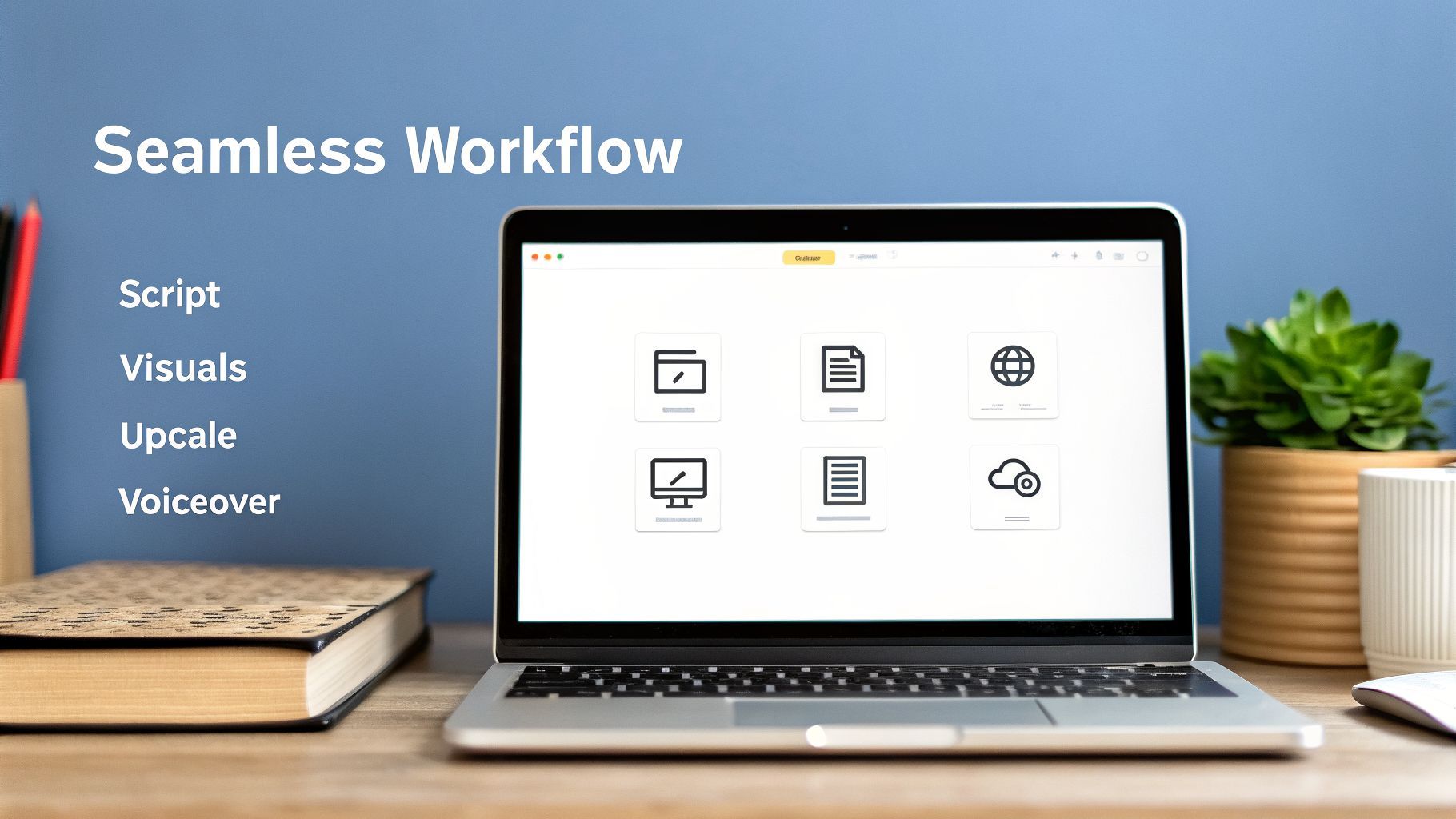
To get real results from an AI video quality enhancer, you need to stop thinking of it as a final touch-up tool. Its true power is unlocked when it’s woven directly into your creative process from the very beginning, working behind the scenes rather than being just another box to check.
The old way of making videos—cobbling together scripts, visuals, and edits from a half-dozen different apps—is quickly becoming obsolete. A modern, AI-driven workflow brings everything into one cohesive space. This is where you see the biggest gains, shaving hours off your production time.
The Modern Creator's Workflow
Picture this: you start with an idea, and an AI helps you draft a killer script. Then, it pulls or generates the perfect visuals to bring that script to life. If any of those clips are grainy or low-res, the system automatically upscales them on the spot. You finish by adding your branding, a crisp voiceover, and hitting publish. All from a single dashboard.
This isn't some far-off concept; it's exactly how creators are building content on platforms like ShortGenius. The entire process is designed as a smooth, continuous loop instead of a clunky, multi-step chore.
Here’s a breakdown of what that looks like:
- AI Scripting: It all starts with a script built for short-form video, with a strong hook and tight pacing.
- AI Visual Creation: The platform then finds or creates clips and images that align with your script, either from a massive stock library or by generating new ones from scratch.
- Automatic Quality Enhancement: This is the game-changer. As assets are added to your project, the built-in AI video quality enhancer goes to work, automatically fixing low-resolution footage and clearing up noise.
- Brand and Voice Application: With a click, you can apply your brand kit (logos, fonts, colors) and generate a clear AI voiceover.
- One-Click Publishing: The finished, polished video is then ready to schedule across TikTok, Instagram, and YouTube Shorts.
This integrated approach means you can finally say goodbye to the tedious cycle of exporting and importing files between different programs—a process that not only wastes time but can also degrade your video's quality.
The Power of a Unified Ecosystem
Working inside a unified system like ShortGenius offers benefits that go well beyond just saving time. It fundamentally lowers the barrier to entry, allowing solo creators and small teams to focus on their creative ideas instead of getting bogged down by technical hurdles.
This shift helps explain the explosive growth in the AI Video Generator market. Valued at USD 788.5 million in 2025, the market is expected to skyrocket to USD 3,441.6 million by 2033. This surge is fueled by accessible tools that turn simple scripts into professional-grade videos in a fraction of the time. You can discover more insights about this booming market on The Business Research Company.
For creators, an integrated workflow isn't just about speed—it's about consistency. When your branding, voice, and quality standards are baked into the system, every video you produce reinforces your brand identity and builds trust with your audience.
An integrated enhancer becomes an essential utility, almost like spell-check for your visuals. For example, if you generate a custom thumbnail or an in-video graphic that isn't quite sharp enough, you can instantly improve its clarity and detail with built-in tools. You can explore the capabilities of AI-powered image editing to get a better sense of how this works.
By keeping everything under one roof, you remove the friction that stifles creativity. You can go from a simple idea to a high-quality video ready for multiple platforms in minutes, not days. That's the speed and consistency you need to keep your audience hooked with a constant stream of great content.
Choosing the Right AI Enhancement Tool
With so many AI video enhancers out there, it's easy to get lost. The truth is, not all tools are built the same. What a professional VFX artist needs is worlds away from what a social media manager is looking for. Making the right call means matching a tool's capabilities to your actual workflow and what you’re trying to create.
You’ll find plenty of standalone apps that do one thing really well, like upscaling or noise reduction. These are handy for a quick, specific fix. But if you need to do more than one thing, your workflow can get messy fast. You end up exporting from one program and importing into another, which kills your momentum and can even reduce your video's quality with each transfer.
The alternative is an integrated platform like ShortGenius, which builds these enhancement features right into the content creation process. It’s a much smoother experience. You can go from script to visuals to final polish all in one spot, without ever having to jump between different apps.
Key Factors to Evaluate
When you're weighing your options, it's best to zero in on the features that will actually make a difference in your day-to-day work. Here’s a practical checklist to help you find the right fit.
- Processing Speed and Output Quality: How fast can the tool turn around your video, and does the result look real? Some enhancers give footage an unnatural, "plastic" sheen, so always look at before-and-after examples.
- Integration with Your Workflow: Is it a standalone app, a plugin for your favorite editor, or an all-in-one system? A unified platform can save you a surprising amount of time.
- Supported Resolutions and Formats: Make sure the tool can handle your source footage. Check if it supports everything from old 480p clips to modern 4K video and common formats like MP4 and MOV.
- Ease of Use: How intuitive is the interface? A tool with a steep learning curve means you’re spending more time reading manuals than creating.
- Pricing Model: Is it a one-time purchase, a monthly subscription, or a credit-based system? Compare the cost against the features you’ll actually use.
The Importance of Temporal Consistency
There’s one critical feature that often gets overlooked: temporal consistency. In simple terms, this is the AI's ability to apply changes smoothly across every single frame. When a tool lacks this, the result is a distracting, jittery effect where details seem to flicker, shift, or "boil" from one frame to the next.
The need for smooth, stable enhancement is huge. Technologies built for this, like ControlNet for Video, hit 1 million downloads in just six months. Creative studios and agencies actively seek out this capability because it eliminates hours of manual cleanup, delivering a much better return on their investment. You can learn more about the trends shaping the AI video software market in this detailed report.
This is an area where platforms like ShortGenius really shine. They use models specifically trained to produce consistent output. By offering preset camera movements and effects, they also help you experiment quickly without introducing that dreaded visual noise. This is especially important when you’re building short-form content by stitching multiple clips together.
Ultimately, picking the right tool isn't about finding the one with the most bells and whistles. It's about finding the one that makes your job easier. For creators who need to produce and publish content fast, integrated solutions are often the clear winner—especially if you also want to explore text-to-video creation models.
Got Questions About AI Video Enhancement? We’ve Got Answers.
It’s smart to ask questions before diving into new tech. When it comes to something as important as your video quality, you want to be sure. Let’s tackle some of the most common questions I hear from creators about using an AI video quality enhancer.
Will AI Make My Videos Look Unnatural or "Fake"?
I get this question all the time, and it’s a good one. We’ve all seen that weird, plastic-y, over-sharpened look, and nobody wants that. The good news is, modern AI enhancers have come a long way.
They don't just slap a generic filter on top of your footage. Think of the AI as a digital restoration artist. It meticulously analyzes your video frame by frame to clean up noise, sharpen blurry edges, and even intelligently add detail that was lost during compression. Most importantly, quality platforms give you control, letting you adjust the intensity to find that perfect sweet spot. The goal isn't to create something artificial; it's to make your video look like it was shot on a much better camera.
Do I Need to Be a Tech Wizard to Use These Tools?
Absolutely not. While professional-grade editing suites can feel like learning to fly a helicopter, the newest generation of AI video tools is designed for everyone. The whole point is to make powerful results accessible.
Platforms like ShortGenius build enhancement right into a simple workflow. There's no complex software to install or technical jargon to decipher. It’s usually as straightforward as uploading your clip, flipping a switch, and letting the AI do the heavy lifting for you.
Can AI Really Save a Video From My Old Phone?
AI can pull off some pretty amazing rescues, but it helps to know its limits. It's fantastic at taking grainy, low-light footage from an older phone and making it look crisp and clear. It can upscale a 720p video to a sharp 1080p or 4K and scrub away that distracting digital noise.
An AI video quality enhancer can often be the difference between unusable footage and a high-performing social media post. However, it can't perform miracles. It won’t be able to fix a shot that was completely out of focus or recover details from a clip that's totally blown out with white light.
Isn't AI Video Enhancement Super Expensive?
The cost can be all over the map. You’ll find standalone apps with a one-time purchase, while others run on subscriptions or pay-as-you-go credits.
Honestly, the best bang for your buck usually comes from all-in-one platforms. When enhancement is bundled with other must-have tools—like a scriptwriter, an AI voice generator, and a social media scheduler—you end up saving a lot compared to paying for five or six different services separately.
Ready to see how an integrated AI video quality enhancer can elevate your content? ShortGenius combines powerful enhancement with a full suite of creation tools, letting you produce and publish professional-grade videos in minutes. Get started with ShortGenius today!