AI Video Production Workflow: End-to-End Pipeline Guide

Build a complete AI video production workflow from script to publishing. Learn automation strategies, tool selection, and best practices for modern creators.
In a 2024 survey, 90% of video creators said AI tools increased their productivity. The practical answer is to connect specialized AI tools into a controlled pipeline, not expect one generator to handle every creative and operational task.
That distinction matters because productivity gains rarely come from pressing one button. They come from removing repetitive handoffs, standardizing inputs, reviewing outputs at the right moments, and sending approved assets into the next stage without losing context. A reliable AI video production workflow behaves less like a magic prompt and more like a small digital production team.
Why Modern Creators Are Abandoning Linear Workflows
Traditional video production moves in a straight line. Someone writes a script, another person records it, an editor assembles the footage, a designer adds captions, and a publisher adapts the final file for each channel. Every revision sends work backward through the chain. A change to the opening line can affect the voiceover, timing, captions, visual sequence, and export.
AI adoption has changed where the friction appears. In a 2024 survey summarized by Kapwing, 90% of video creators reported that AI tools increased their productivity, while 69% had used AI in video production during the previous six months. The most common use was AI-powered subtitling and transcription, reported by 66% of respondents, followed by scriptwriting, brainstorming, audio editing, and voiceover.
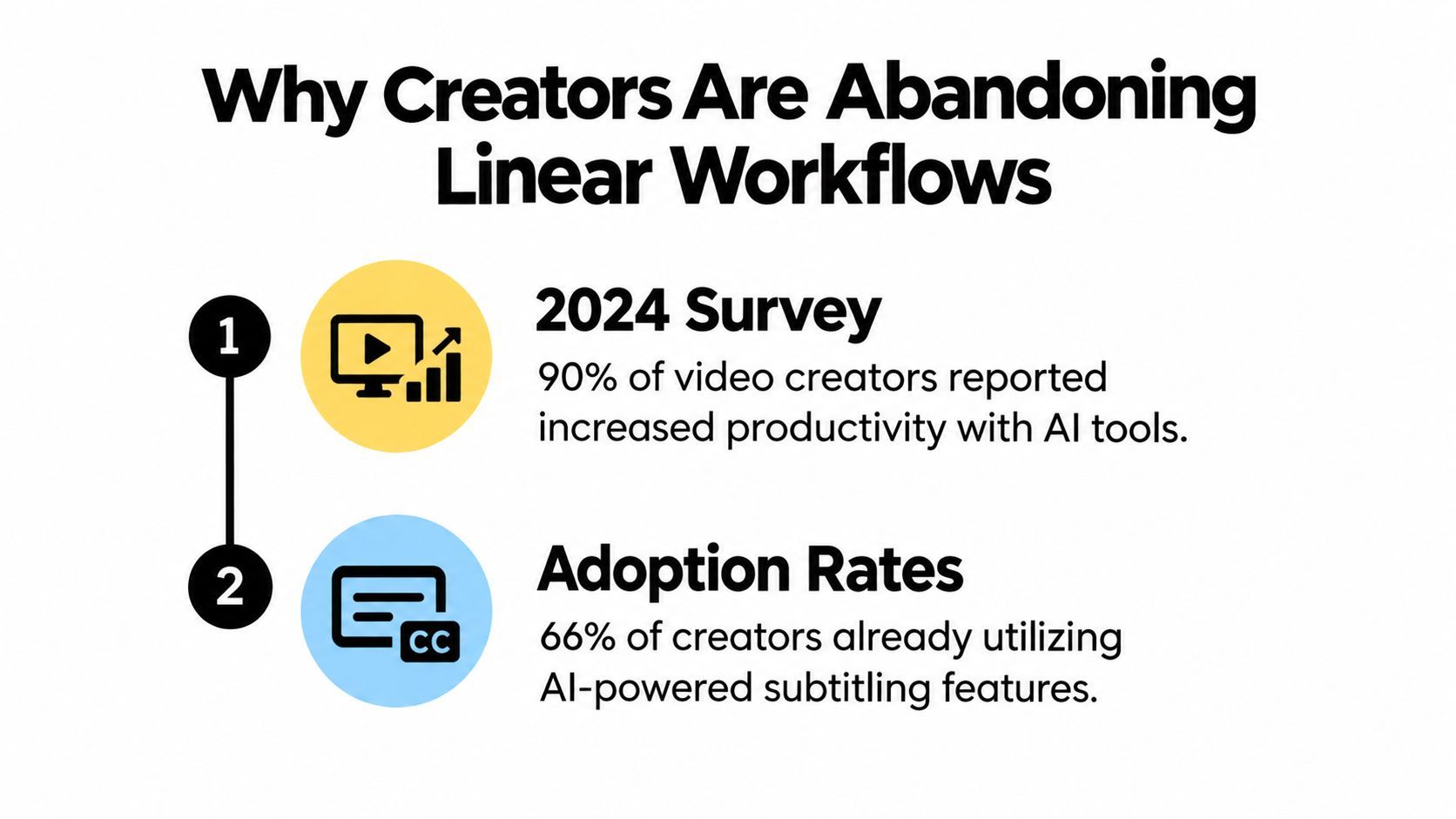
That adoption pattern reveals what works. Creators aren't beginning by replacing an entire production with one generated clip. They're automating narrow, repetitive tasks first, especially transcription, captioning, script refinement, audio cleanup, and narration. Human direction still determines the topic, point of view, visual taste, and final approval.
The production unit is becoming modular
A modern workflow treats each stage as a service with a defined input and output. The script stage produces a structured narration and shot plan. The asset stage produces approved images or clips tied to those shots. The audio stage produces a voice track with timing information. The assembly stage combines those materials according to rules.
This modular design makes changes cheaper. You can replace a voice without regenerating the visuals, revise a scene without rewriting the entire script, or create a new aspect ratio from the same approved project. It also prevents tool paralysis, because every tool has a clear job.
A global survey of 515 manager-level and senior business decision-makers, conducted in August and September 2024, found that media and entertainment organizations commonly collaborated with content-production partners to build or integrate generative AI systems in-house, as summarized by Sigma DAX's media and entertainment analysis. The operational lesson is straightforward. Scalable teams focus on orchestration, integration, control, and repeatability, not on finding one universal model.
Building Your Modular AI Video Pipeline
Creators report productivity gains from AI, but those gains come from pipeline design rather than single-click generation. Map the handoffs first, then choose software around the decisions and files each stage must receive.
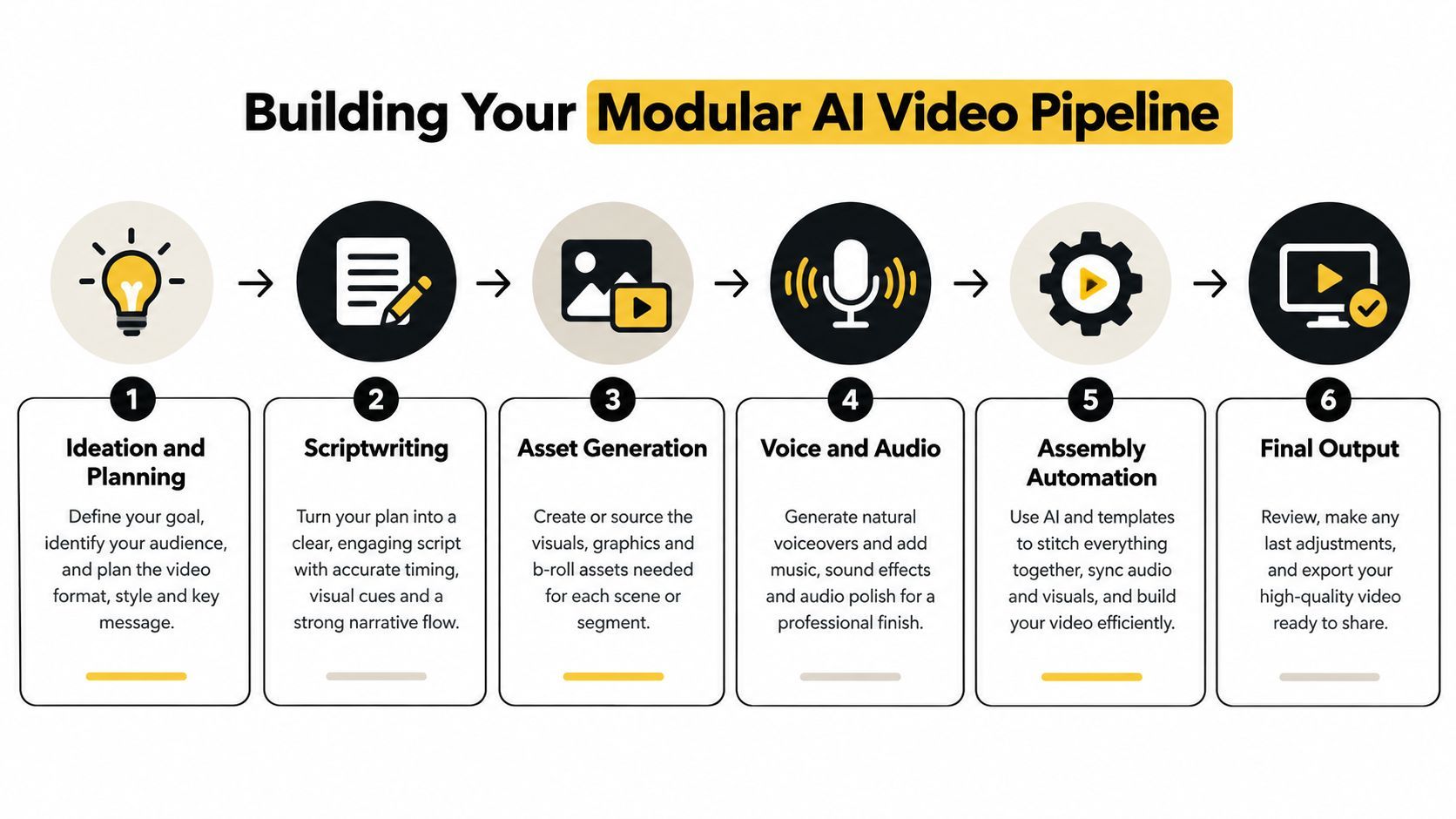
Six stages and their handoffs
-
Ideation and planning define the audience, offer, channel, angle, and desired action. The handoff is a content brief with usable decisions, not a vague topic.
-
Scriptwriting converts that brief into narration, scene intent, on-screen text, and rough timing. Keep spoken words separate from visual instructions so downstream tools do not treat production notes as dialogue.
-
Asset generation creates or sources the ingredients for each shot. Record the scene number, prompt, reference image, intended duration, aspect ratio, and approval status with every asset.
-
Voice and audio produce narration, music, sound effects, and timing. Generate the voice track early, so the editor cuts visuals to actual pacing instead of an estimated script length.
-
Assembly automation combines clips, voice, captions, transitions, overlays, and brand settings. Templates and rules handle repeatable work, while a person can replace a weak scene before export.
-
Final output creates channel-specific versions, checks playback, and sends approved files to publishing and measurement systems.
Give every handoff a visible state, such as draft, needs review, approved, or rejected. Without that state, teams lose track of which image, voice file, or export is authoritative. A reliable pipeline also records failures, including missing assets, mismatched durations, unsupported formats, and captions that exceed the design limit.
Sprello's guide to AI creative workflows explains this architecture for teams connecting multiple creative tools instead of operating one isolated generator. For creators seeking a more unified production environment, ShortGenius connects writing, visual creation, voiceover, editing, and publishing within one workflow. The operational trade-off is clear: fewer handoffs can reduce setup work, while modular tools give teams more control over individual stages.
Design for volume changes
Build for repeated production from the first project. Store reusable brand instructions, voice preferences, caption styles, visual references, and export presets separately from project-specific files. A seasonal campaign can then increase output without forcing the team to rebuild its process.
Keep the original ingredients together: script, prompt, source asset, voice file, caption file, and final export. If a platform changes its format requirements or a client requests a new version, regenerate the affected stage instead of rebuilding the entire video. That file discipline is what turns a collection of AI tools into a production system.
Scripting Strategies That Actually Scale
A script should give every downstream tool enough structure to do its job. A generic paragraph might be acceptable for a human writer, but it gives an image model, voice engine, caption system, and editor too much room to interpret the project differently.
Use a script schema with separate fields for:
- Hook: the opening claim, question, or tension.
- Narration: the exact spoken words.
- Visual direction: what the viewer should see, without mixing in dialogue.
- On-screen text: short phrases that support comprehension.
- Audio direction: voice tone, music mood, and sound cues.
- Approval notes: claims, products, people, or rights-sensitive elements requiring review.
This structure turns prompting into an iterative production process. The first request should establish the audience, objective, tone, format, forbidden claims, and desired outcome. The second pass should challenge weak assumptions, identify unsupported statements, and remove generic language. The third pass should convert the approved idea into timed scenes.
Use prompts as production templates
For a recurring series, keep a stable system prompt or template that defines the brand voice. Add variable fields for topic, audience segment, offer, evidence, and call to action. This is more dependable than asking a model to “sound like the previous video,” because the model receives explicit constraints instead of a loose comparison.
Short-form hooks need compression. Ask for a clear tension and a fast route to the payoff. Explanatory videos need hierarchy, transitions, and enough context for the viewer to understand why the recommendation matters. The same prompt should not serve both formats.
A practical revision loop looks like this:
- Generate several angles from the same brief.
- Select one angle using audience and business criteria.
- Expand it into scenes and narration.
- Verify every factual claim and named entity.
- Read the script aloud with the intended voice.
- Approve the text before generating expensive visual assets.
Protect series consistency
Create a style sheet for recurring characters, presenters, products, and phrases. Record pronunciation guidance, preferred terminology, sentence rhythm, and the level of technical detail expected by the audience. Store examples of approved scripts as references, but don't rely on examples alone. Rules are easier to maintain than an expanding pile of old outputs.
The goal isn't a perfect first draft. It's a predictable first draft that enters review with the right structure, tone, and production metadata already attached.
Generating Visual Assets with Purpose
Visual generation works best when each shot has a defined job. A talking-head explanation, product demonstration, atmospheric b-roll clip, and animated statistic shouldn't use the same generation strategy just because the same model can produce all of them.
Use a simple decision rule:
- Choose recorded or licensed footage when exact product details, human credibility, or legal certainty matters.
- Choose generated imagery when you need controlled concepts, backgrounds, thumbnails, or stylized scenes.
- Choose generated video when motion itself communicates the idea and small visual variation won't undermine the message.
- Choose a hybrid approach when a real product, person, or interface must remain accurate while the surrounding environment can be synthetic.

Build the ingredients before motion
Randomly generating complete scenes often produces inconsistent faces, clothing, lighting, object geometry, and camera position. A more controlled method creates the ingredients first: reference images, character views, product angles, key frames, and a storyboard. The video model then animates an approved visual foundation instead of inventing every detail at once.
For recurring subjects, define a reference pack. Include the preferred framing, lighting, color palette, wardrobe, environment, and negative instructions. For products, provide clean views and specify which features must never change. For branded motion graphics, use a reusable layout rather than asking a model to recreate typography inside a moving scene.
Camera direction should be explicit. “Slow push-in toward the subject” gives an editor or motion model a usable instruction. “Make it cinematic” doesn't. Specify whether the scene needs a locked frame, lateral movement, overhead view, handheld energy, or a transition-friendly composition.
The following demonstration shows how an asset can move from a generated concept toward a finished short-form production:
Keep a reusable asset library organized by purpose rather than by generation tool. A folder for product close-ups, another for neutral backgrounds, and another for approved character references is more useful than a folder named after the model that created them. The tool may change. The production need remains.
Voice, Audio, and Assembly Automation
Audio determines whether a generated video feels intentional. A visually strong sequence with uneven pronunciation, abrupt pauses, clipped words, or music competing with narration still feels unfinished.
Choose a voice according to the job. A tutorial may need calm precision, an advertisement may need controlled urgency, and a founder-led message may require a human recording to preserve personal credibility. Synthetic voices are useful when pronunciation, licensing, and audience expectations are clear, but they still need listening review. Check names, product terms, emphasis, pauses, and the emotional match between the read and the visuals.
Treat the timeline as structured data
A repeatable assembly process can use a scene record containing:
- scene identifier
- approved visual asset
- narration segment
- start and end timing
- caption text
- transition rule
- music state
- brand overlay
- review status
That data lets an automation layer assemble a first cut without hiding the creative decisions. It also makes targeted regeneration possible. If scene five fails, replace scene five rather than rebuilding the entire project.
Captioning belongs early in the process, not at the end. Captions affect line breaks, safe areas, pacing, and visual hierarchy. Generate them from the approved narration, then review names, punctuation, timing, and contrast. Burned-in captions should remain legible after resizing for smaller screens.
Add quality gates before export
Use a gate after audio generation, another after assembly, and a final gate after channel formatting. A gate can check whether every scene has an asset, whether narration duration matches the timeline, whether captions stay inside the safe area, and whether the export uses the requested dimensions and frame rate.
Codec selection belongs at delivery, not in the creative stage. A peer-reviewed codec benchmark found that AV1 generally delivered the strongest compression quality among the tested codecs, while SVT-AV1 produced higher quality than tested real-time AV1 implementations but required approximately seven times longer encoding. Use fast H.264 or hardware AV1 for previews and rapid publishing, then queue slower encoding for archives or bandwidth-sensitive versions when playback compatibility is confirmed.
Multi-Channel Distribution Without Repetition Fatigue
Publishing the same master file everywhere is efficient only until the audience notices that every channel receives an identical experience. Distribution should reuse the underlying idea while adapting the opening, pacing, captions, framing, and call to action for each platform.
TikTok often benefits from an immediate visual or verbal interruption. YouTube Shorts can support a clearer explanatory arc. Instagram Reels may need strong visual polish and a clean caption treatment. Facebook can accommodate more context in the accompanying post, while X may reward a sharper claim that works with a concise text introduction.
The production system should create variants from one approved source project, not duplicate the entire project manually. Keep the core narration and evidence stable, then vary the elements that affect platform fit:
- Opening frame: Change the first visual or line to match the channel's browsing behavior.
- Caption layout: Adjust line length, placement, and emphasis for the interface.
- Pacing: Remove pauses or add breathing room where the audience needs more explanation.
- Aspect ratio: Recompose important subjects instead of just cropping the master.
- Call to action: Match the available interaction, whether that means a comment, profile visit, click, or save.
A single render can produce several files, but automation shouldn't remove editorial judgment. A crop that preserves a person may cut the product. A caption position that works on one platform may overlap interface elements on another. Preview every major variant.
Measure the content system
Track performance by concept, hook, audience, platform, and production version. Don't judge the workflow only by views. Record which ideas generate meaningful actions, which openings hold attention, which captions are understood, and which variants require repeated manual correction.
For delivery efficiency, compare codecs at matched perceptual quality rather than bitrate alone. Independent testing found that AV1 achieved roughly 55% lower bitrate than H.264 at comparable VMAF quality on average, with results varying by content type, as described in this codec comparison using real content. A VMAF quality gate can catch artifacts introduced by resizing, caption burning, or fast scene changes, especially around small text and high-contrast edges.
Quality Control in the Age of Fast Generation
Faster generation doesn't remove editorial work. It creates more output that can look plausible enough to pass a casual glance while still containing a false claim, a mispronounced name, an inaccessible caption, or a visual detail that damages trust.
Marketers surveyed by Animoto reported that 90% considered editable AI output essential, 95% required brand reflection, and 99% said brand personality had to remain visible, according to the evidence summarized in the research on credibility and AI-generated video. Those requirements describe a workflow problem, not a prompting problem. Teams need approval checkpoints that make quality visible before publishing.
Use a risk-based review
Review every video for factual claims, but reserve deeper approval for content with higher consequences. A product promise, health statement, financial explanation, regulated claim, or named individual should receive source verification and human sign-off. A decorative background can use a lighter review path if it contains no meaningful factual or rights-sensitive content.
A practical checklist includes:
- Claims: Verify dates, names, product capabilities, and comparative language against approved sources.
- Language: Ask native speakers to review translation, idiom, pronunciation, and cultural context.
- Rights: Confirm permission for voices, likenesses, music, stock footage, logos, and reference images.
- Accessibility: Check caption accuracy, timing, contrast, reading speed, and meaningful audio description where required.
- Brand safety: Look for unintended symbols, stereotypes, unsafe behavior, visual glitches, and unsuitable generated details.
- Authenticity: Confirm that material AI assistance is disclosed when audience expectations or platform rules make it relevant.
Disclosure isn't automatically harmful. A study of 787 TikTok videos from 30 creators, using data collected between November 2024 and April 2025, found that perceived inauthenticity reduced likes and shares, while AI-label disclosure moderated that negative relationship positively, as reported in the study on AI disclosure and audience response. The right approach depends on whether AI created a voice, actor, scene, script, or minor production assist. State the material involvement clearly, preserve human accountability, and test audience trust rather than hiding behind vague wording.
Your First 30 Days Building an AI Video Workflow
A small, complete pipeline teaches more than a large collection of disconnected experiments. Start with one repeatable content format, one audience, and one approval path. The aim is to learn where work stalls.
Week one
Document the current process from idea to published file. Mark every manual handoff, repeated correction, missing input, and approval delay. Then choose the first automation target. Captioning, script formatting, voiceover, or resizing is often easier to stabilize than fully generated visual storytelling.
Create a project template with folders or records for the brief, script, assets, audio, captions, exports, and review notes. Decide who can approve each stage, even if one person holds every role.
Week two
Produce a complete pilot from a real brief. Keep the concept commercially useful, but limit the visual ambition. Generate the script, create a small set of assets, produce narration, assemble the draft, add captions, and export one channel version.
Don't optimize for speed yet. Record where the tool misunderstood the prompt, where an asset lacked consistency, and where a human had to repair the output. Those observations are the requirements for the next version.
Week three
Convert successful decisions into reusable rules. Save approved voice settings, caption layouts, scene templates, brand colors, visual references, and export presets. Add a review checklist for claims, pronunciation, rights, accessibility, and brand fit.
Run a second production using the same structure but a different topic. If the team must invent new instructions every time, the workflow isn't modular yet. If only the content changes while the production logic stays stable, you're building the right foundation.
Week four
Create channel variants and compare the manual effort with the previous process. Review not only the finished videos, but also the number of corrections, rejected assets, regenerated scenes, and approval rounds. The baseline should describe time and friction qualitatively if you don't have reliable historical measurement.
At the end of the month, automate only the handoffs that have become predictable. Keep creative selection, factual review, rights decisions, and sensitive localization under human control. A reliable AI video production workflow grows through controlled repetition, not through adding more tools.
ShortGenius (AI Video / AI Ad Generator) combines scriptwriting, AI actor casting, voiceover generation, b-roll sourcing, captions, editing, and aspect-ratio exports in one production process. Visit ShortGenius (AI Video / AI Ad Generator) to turn an approved idea into editable, multi-channel video drafts while keeping the key review and publishing steps in one workspace.