AI Video Advertising: The 2026 Playbook for Modern Brands

Master AI video advertising in 2026 with this practical guide. Learn workflows, KPIs, platform tips, and how ShortGenius scales production fast.
You're probably living the same weekly scramble most performance teams are now stuck in. The brief lands, the ad account wants fresh creative, and the platform mix keeps widening, TikTok wants native hooks, YouTube wants Shorts and in-stream cuts, Meta wants variants that can be tested fast, and CTV needs something polished enough to hold attention without wasting budget.
That pressure isn't theoretical. Digital video advertising spend is expected to make up 58% of total TV and video ad spend in 2025, with digital video projected to grow 14% to $72 billion that year and connected TV spend projected to grow 13% to $26.6 billion according to Marketing Brew's reporting on IAB data. When the spend shifts this hard toward digital, creative bottlenecks stop being a nuisance and start becoming a performance problem.
The practical answer is not “make more ads” in the abstract. It's to build a workflow that can generate, review, localize, test, and ship video creative without turning every launch into a production crisis. That's what AI video advertising is really about, and the teams getting value from it are the ones treating it as an operating system, not a novelty.
The Moment Traditional Video Production Breaks
The breaking point usually shows up in plain language. A social media manager opens Monday's brief and sees ten TikTok variants, three YouTube Shorts, a CTV cut, and a request for localized versions by Friday. The designer can handle a beautiful hero edit, but the pipeline can't keep up with the pace of platform demand, and every revision costs time that the auction won't wait for.
That's why AI video advertising has moved from a side experiment to a production necessity. When budgets keep shifting toward digital video, the team that can turn one idea into many platform-ready assets usually wins the next test cycle, not because the creative is magically better, but because it reaches the market while the audience is still warm.
What breaks first
The first thing to fail is usually versioning. One concept needs different hooks, aspect ratios, voiceovers, and subtitles, but the old workflow still treats each edit like a bespoke project. That's fine when you're launching one polished brand film, and it's a mess when the media team needs fresh angles every week.
A second failure point is approval latency. Legal wants claim checks, brand wants tone consistency, and the media buyer wants the new cut live before fatigue drags down results. AI doesn't remove those checkpoints, but it does make them manageable by compressing the parts that used to consume the most hours.
Practical rule: if your team can't create a new variant in the time it takes the old one to cool off in the ad account, your production system is already the bottleneck.
The right way to think about this category is simple. AI video advertising gives marketers a way to keep pace with platform demand while preserving human control over claims, brand voice, and final approval. That's the bridge between the Monday brief and the Friday launch.
What AI Video Advertising Actually Means
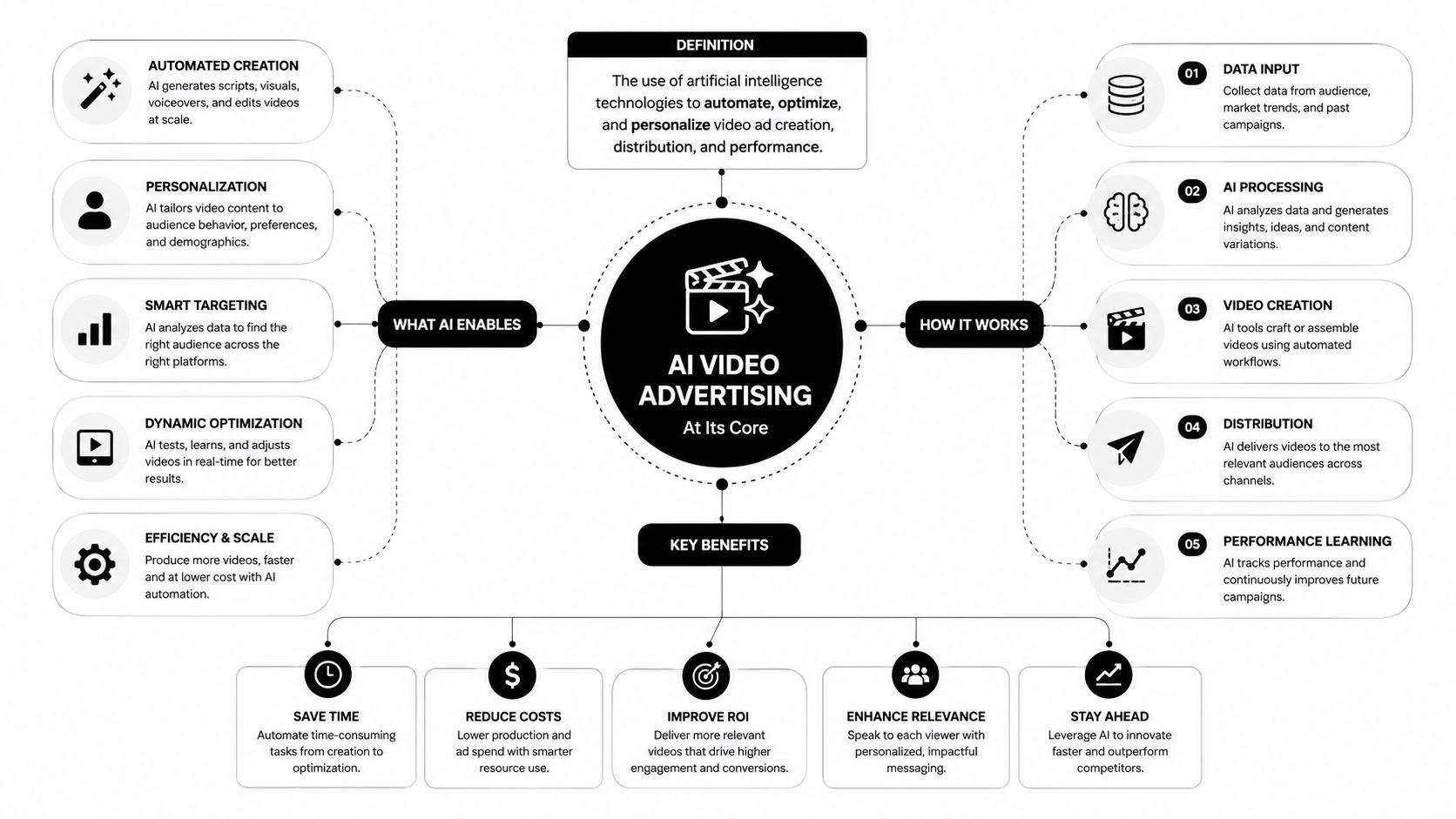
At the simplest level, AI video advertising means using generative systems to help create the parts of a video ad, scripts, scenes, visual variants, voiceovers, captions, and edits. In practice, that can range from assisted workflows, where a human still drives every choice, to more autonomous flows, where a brief goes in and a finished ad comes out with only light human cleanup.
A useful restaurant analogy helps here. Large language models are the recipe writers, image and video engines are the line cooks, voice models are the waitstaff carrying the message to the table, and the editing layer is the expediter making sure the plates arrive in the right order. If any one of those jobs fails, the final asset still looks unfinished.
Assisted AI versus autonomous AI
Many teams I see use both. Assisted AI is best for teams that already have a strong creative point of view and need acceleration, not replacement. Autonomous AI is useful when the job is repetitive, like generating a batch of local variants or turning a product image into a family of short-form cuts.
The strategic shift is already visible in market behavior. According to the IAB's 2025 Digital Video Ad Spend Report, 22% of video ad creative was built or enhanced with generative AI in 2024, and that share is projected to rise to 39% by 2026 per the IAB report cited by eMarketer. That's not a fringe usage pattern. It's a sign that generative systems are becoming part of the standard creative stack.
The important nuance is that AI isn't replacing judgment. It's replacing slow repetition. If you're using it well, the human role moves upstream into positioning, claim discipline, and taste, while the machine handles the bulk work of variation and assembly.
The Five Technologies Powering Modern AI Ad Workflows
An AI video ad stack gets easier to manage once the team stops treating it as one big creative tool. Under the hood, five separate jobs do the work, and teams that can spot each layer's failure point diagnose performance issues faster than teams that only buy software and hope the output holds up.
The core stack
-
Large language models: These turn briefs into scripts, hooks, angle variations, and CTA language. Marketers feel the speed immediately, but the trade-off is control, because weak prompting can produce copy that sounds fine and still performs poorly.
-
Image generation engines: These create thumbnails, visual concepts, and B-roll style assets. They help when you need visual variety fast, but quality control matters because some outputs look polished on their own and weak inside a brand system.
-
Video generation models: These assemble scenes, motion, and transitions. The ad starts to feel like a real commercial instead of a stack of frames, but scene realism and pacing still vary, so human review remains part of the workflow.
-
Voice synthesis: This adds narration, dialogue, or product explanation. Strong voiceover can make a simple cut feel more convincing, while clunky synthetic audio can hurt trust right away.
-
Orchestration and scheduling: This layer keeps files, versions, captions, and publish timing from turning into chaos. It is less glamorous than generation, but it separates a repeatable workflow from a pile of disconnected assets.
The economics explain why this stack keeps spreading. Industry reporting says AI video production can be 60–80% cheaper than traditional production, and current systems can turn a single product image or brief into multi-scene, voiceover-ready variants and localize them into many languages with synced motion as reported by Kling. That cost structure changes the working model, because it makes audience-specific versions easier to produce without multiplying the old production burden.
A weak layer shows up fast in results. A strong script with poor voice sounds off. A polished visual concept with bad orchestration becomes hard to publish at scale. A team that knows which layer is breaking can fix CTR and CPA issues with less guessing and fewer wasted iterations.
Why unified platforms keep winning
Point solutions look flexible at first, then the week disappears into handoffs. Unified platforms keep gaining ground because the problem is not creation by itself, it is moving from concept to publishable asset without bouncing between five tabs, five logins, and five approval states. That matters across TikTok, Meta, YouTube, and CTV, where speed helps, but governance, version control, and clean handoff logic keep the work usable once the ads are live.
From Creative Brief to Live Ad in Five Stages
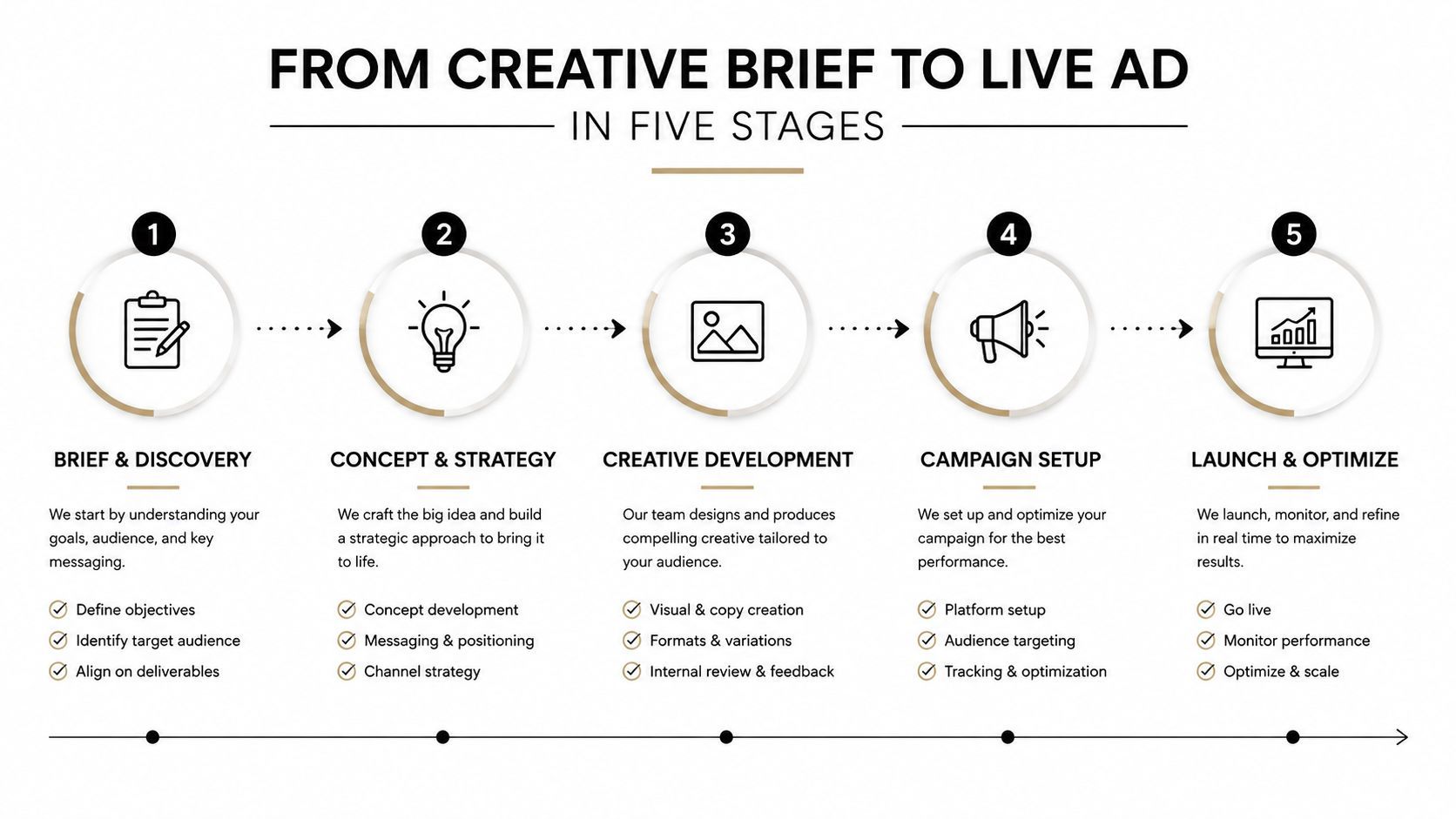
The workflow gets much easier when you stop treating it like a blank page problem and start treating it like a production line. A strong brief should feed directly into scripting, production, distribution, and measurement, with humans stepping in at the points where judgment matters.
Stage 1, parse the brief
The best briefs for AI aren't literary. They're structured. Feed the system the product, audience, angle, offer, and policy constraints, then let it extract hooks and creative directions rather than forcing your team to rewrite the same summary twenty times.
Stage 2, generate script variants
An LLM earns its keep here. It should produce several script options that a creative lead can sharpen, not a single polished script that no one wants to touch. The point is to reduce blank-page time, not eliminate editorial judgment.
Stage 3, build the ad
Production is where image-to-video assembly, scene swaps, and voiceover selection come together. If the product has a hero shot, a demo angle, or a testimonial frame, AI can turn those raw materials into multiple versions quickly, which is especially useful when you need a short-form cut and a more restrained CTV version from the same source assets.
Stage 4, prepare distribution
Resize for vertical, square, and widescreen. Add captions. Generate platform-specific export sets. The handoff breaks down when teams leave formatting to the final hour, because each platform punishes bad framing in its own way.
Stage 5, measure and iterate
Performance feeds the next brief. The point isn't just to launch fast, it's to learn faster. That's why AI has moved into core production. The IAB's 2025 Video Ad Spend & Strategy report says 86% of buyers are already using or planning to use generative AI to build video ad creative per IAB reporting. The workflow is no longer experimental, it's operational.
Strategic Use Cases and the KPIs That Prove They Work
Not every AI video use case deserves the same budget. The point is to match the workflow to the metric, then let the KPI decide whether the creative deserves more scale.
| Use Case | Primary KPI | Why It Fits AI |
|---|---|---|
| Dynamic creative optimization | CTR, hook rate | AI can spin multiple angles and scene orders quickly, which makes testing easier |
| Localization | CPA, hold rate | AI can adapt language and motion faster than manual versioning |
| UGC-style remixes | Thumbstop rate, CTR | AI helps brands produce creator-style variants without building every asset from scratch |
| CTV adaptations | Hold rate, incrementality lift | AI can reframe shorter social concepts into cleaner, more brand-safe long-form cuts |
The strongest evidence for performance comes from personalization. A 2025 MIT study found AI-generated personalized video ads produced higher CTRs than personalized image ads and generic videos, with a 9.4 percentage point lift versus personalized images and a 6.5 percentage point lift versus generic videos, while also cutting production costs by about 90% according to MIT's report. That doesn't mean every brand should personalize everything. It means the economics of trying more specific creative have changed.
What to test first
Start where variance matters most. If the audience responds differently by use case, language, category, or offer, AI is worth testing. If the message is highly regulated or the product needs careful demonstration, AI can still help, but the human review layer gets heavier.
My rule: if the KPI is vague, the workflow will drift. Tie every AI ad test to one primary metric before the first render goes out.
The other lesson is discipline. Google and Amazon-style guidance in the market keeps pushing teams to hold AI creative to the same bar as any other asset, which is the right standard. Novelty doesn't pay, incrementality does.
How ShortGenius Compresses This Workflow in Practice
A weekly AI ad program only works when the workflow is tight enough to repeat. In ShortGenius, a team can start from a product image and a brief, generate script angles, build scenes, add voiceover, apply the brand kit, then resize and caption for TikTok, YouTube Shorts, and Instagram Reels before scheduling the batch in one place.
That matters because the cost of AI video is coordination, not generation alone. When the writer, editor, designer, and media buyer stay inside one system, less time gets burned on file handoffs and version chasing. More of the day goes to choices that affect CTR and CPA, like hook strength, offer framing, pacing, and whether the first three seconds earn attention.
A cleaner workflow also makes governance easier to enforce. If one team member updates a claim, a visual rule, or a brand cue, the change can carry through the next set of variants without manually rebuilding every asset. That reduces the chance of one good ad being followed by a batch that looks off-brand or drifts away from the approved message.
What the compressed workflow removes
- No manual resizing loop: one source asset can be adapted into multiple formats without rebuilding every cut.
- No scheduler handoff: publishing does not need to happen in another tool or another tab.
- No separate voiceover path: narration can be layered into the same production flow instead of exported and reimported.
- No brand drift across variants: themed series structure and brand kit application keep dozens of versions from feeling disconnected.
- No broken review chain: draft, approval, and publish steps stay in one workflow instead of scattering comments across tools.
The useful part is not just speed. It is control. If you are producing every week, the platform has to hold the same tone across the full batch, not just ship one strong ad and nine awkward cousins. That is where a coordinated system matters more than a pile of point tools, especially if you also need to hand off assets to an ai fashion model video generator workflow or keep creative aligned across channels without resetting the whole process each time.
Common Pitfalls and the Governance Layer Most Teams Skip
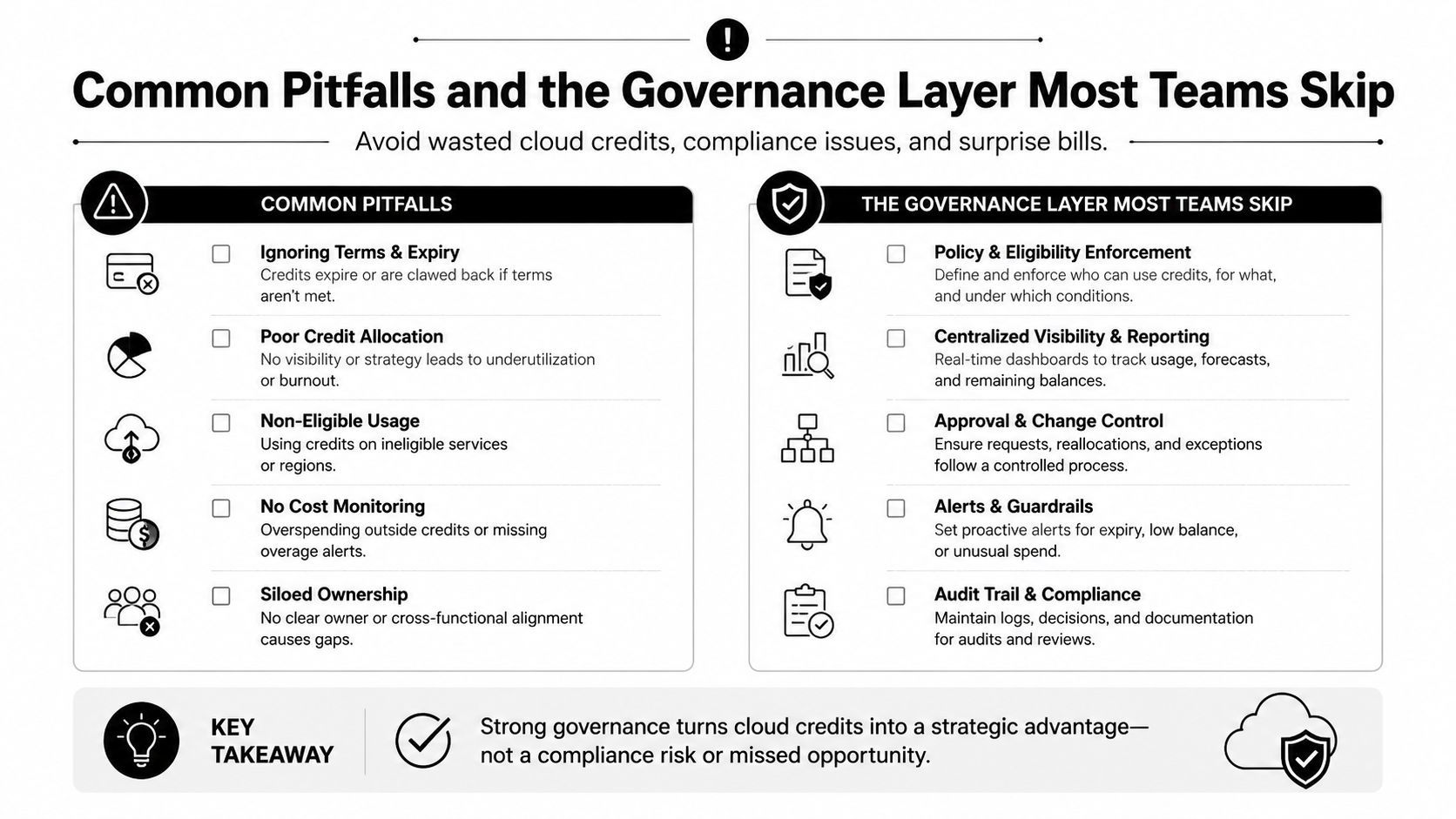
Cheaper and faster doesn't automatically mean better. Once teams scale output, the failures change shape, and the bad ones are harder to notice because they get buried under volume.
The first risk is claim drift. A script generator can produce phrasing that sounds confident but doesn't match the approved product claim. The second is tone drift, where a brand that normally sounds clean and direct suddenly starts sounding like a template factory. Bias and transparency issues show up too, especially when teams lean on stock-like visual patterns and never audit what the machine is learning to repeat.
What governance needs to cover
The IAB said in 2025 that nearly 90% of advertisers will use generative AI to build video ads, and its responsible-AI guidance stresses human review, bias testing, continuous monitoring, and audit-ready records because trust, fairness, privacy, and ethics matter at scale per the IAB's guidance. That should not live in a policy doc no one opens. It should be part of the production checklist.
A practical governance list looks like this:
- Claim verification: every product promise gets checked before export.
- Prompt and model notes: keep enough documentation to explain how the asset was made.
- Brand-safety review: inspect scenes, copy, and voice for tone and context issues.
- Privacy and consent checks: don't personalize in ways that feel invasive or unsupported.
- Variant kill-switches: cut any version that underperforms or creates risk.
For a more tactical look at creator-style output, the ai fashion model video generator example is useful because it shows how quickly a polished visual format can be produced, and why approval rules matter even more when speed improves.
The MIT result matters here too. Strong performance from personalized AI video doesn't prove that every variant should ship. It proves that the category deserves disciplined testing, not blind enthusiasm.
Platform Tips and Your 30-60-90 Day Rollout Plan
Each platform rewards a different kind of AI creative, so the rollout should follow the channel instead of forcing one master edit across everything. The goal is not to make one asset do every job. The goal is to get the right hook, pacing, and format in front of the right audience, then measure what affects CTR and CPA.
Platform-specific moves
For TikTok, open with a native-feeling hook in the first second. Scroll stoppers matter more than polish, and the cut should feel like it belongs in-feed rather than like it escaped from a brand trailer.
For Meta, build square and vertical variants from the same scene set, then let the system compare them. The faster you isolate the visual that carries the message, the faster you stop paying for weak framing.
For YouTube, treat Shorts and in-stream as separate jobs. Shorts can absorb faster motion and tighter hooks, while longer placements need cleaner pacing and audio that survives a skip-prone environment.
For CTV, prioritize brand-safe motion and clear audio. Viewers are not casually tapping past the ad, so the creative has to feel credible the moment it lands.
The rollout plan
Days 1 to 30: Set up the workflow, define naming conventions, create the first baseline ad set, and lock the approval path. Start with repeatable production, not perfect personalization. That gives the team a stable reference point for every later test.
Days 31 to 60: Add dynamic creative optimization, build localization variants, and begin separating platform-specific cuts from master assets. Production teams that scale AI ad output need this stage to see which creative patterns hold up once variation increases. The account starts revealing which ideas deserve more spend and which ones should be retired.
Days 61 to 90: Formalize governance, connect measurement to incrementality, and rewrite briefs around what moved CTR or CPA. At that point, the workflow should feel less like a campaign scramble and more like an operating rhythm. The team has enough signal to make trade-offs between speed, brand control, and performance without guessing.
Five things to do this week
- Lock one brief template so every test starts with the same inputs.
- Pick one KPI per variant family and stop measuring everything at once.
- Build one master asset plus three channel cuts instead of one universal edit.
- Create a claim review step before any export leaves the team.
- Set a kill threshold so weak variants do not linger out of inertia.
If you want a production system that can handle that kind of cadence, ShortGenius (AI Video / AI Ad Generator) gives teams a place to write, generate, edit, localize, and schedule video ads in one workflow. Use it when the bottleneck is no longer ideas, it is turning those ideas into approved, publishable assets without slowing the whole account down.