AI UGC Video Generator: A Guide to Fast Content Creation

Discover how an AI UGC video generator can transform your content workflow. Learn to create authentic-style videos in minutes for ads, social media, and more.
You're probably dealing with the same problem most paid social teams face right now. Creative demand keeps going up, but your production capacity doesn't. You need fresh videos for new hooks, new offers, new audiences, new placements, and new markets. But every round of production still means scripts, briefs, creator outreach, approvals, edits, captions, revisions, and another delay when one small change forces a re-export.
That's why the AI UGC video generator category matters. Not because it's novel, but because it changes the operating model. Instead of treating video as a scarce asset you protect, you can treat it as something you generate, test, cut, localize, and replace quickly. For performance teams, that shift is bigger than the tech itself.
The End of the Content Treadmill
A familiar cycle plays out inside a lot of marketing teams. One creator ad works, so everyone wants more variations. Then the bottlenecks show up. The creator is unavailable, legal needs another approval, the editor is backed up, and the paid team is waiting on a new version with a different opening line.
By the time the revised video is ready, the market has moved on. The winning angle is stale, comments have changed, and the media buyer is already asking for three more variants.
That's the treadmill. You're always producing, but you still feel behind.
Why the old workflow breaks under volume
Traditional UGC-style production works when you need a few strong assets. It breaks when your strategy depends on continuous testing. Once you need multiple hooks, audience-specific messaging, and market-level localization, every manual step becomes expensive in time and coordination.
The bigger problem isn't only cost. It's speed of learning. If creative testing slows down, campaign learning slows down with it.
Practical rule: The limiting factor in paid social usually isn't ad account setup. It's how quickly the team can turn a new hypothesis into a usable creative variation.
That's where an AI UGC video generator changes the workflow. It compresses the path from idea to output. Instead of booking talent and building a mini production process for every new angle, the team can generate UGC-style ads directly from scripts and templates, then review and iterate quickly.
Why this is bigger than a niche tool
This isn't a side trend. The broader AI video category is expanding fast enough that many organizations should treat it as a mainstream production layer, not an experiment. One market projection estimated the AI video generation market would reach $18.6 billion by 2026, up from $5.1 billion in 2023, according to Ngram's review of the AI video generator market for marketing.
For marketers, the useful takeaway isn't the headline number itself. It's what that growth signals. Script-to-video automation, synthetic presenters, and rapid creative testing are moving into normal budget discussions. Teams that need content velocity are no longer waiting for this category to mature. They're building around it.
What Is an AI UGC Video Generator
An AI UGC video generator doesn't find real customer footage. It creates videos that look and feel like user-generated content.
That distinction matters.
Real UGC comes from actual customers or creators filming themselves. AI UGC is synthetic. The tool recreates the style that performs well on short-form platforms: direct-to-camera delivery, casual framing, testimonial pacing, product-first language, native captions, and fast hooks.

Think of it as a digital creator layer
The easiest way to understand the category is to think of it as a digital creator layer sitting on top of your ad workflow. You provide a script, pick a presenter style, choose voice and layout options, and the system assembles something that resembles a creator-made social ad.
The value isn't that it perfectly replaces human creators in every context. It doesn't. The value is that it gives teams a fast way to produce creator-style videos without running the whole creator production process every time.
A good output usually imitates a few recognizable patterns:
- Selfie-style framing that feels native to TikTok, Reels, and Shorts
- Direct response language that gets to the problem quickly
- On-screen captions that support sound-off viewing
- Short-form pacing built for scrolling behavior
- Simple product storytelling instead of polished brand-film structure
What it is not
It's not documentary footage, and it's not true customer advocacy. If your strategy depends on real lived experience, niche credibility, or community trust, synthetic UGC can miss the mark.
That's why the best teams don't ask, “Can AI replace creators?” They ask a more useful question: “Which parts of our creative pipeline need real humans, and which parts should be generated for speed?”
A quick comparison helps:
| Format | Best use | Main limitation |
|---|---|---|
| Real creator UGC | Trust-heavy stories, nuanced demos, community credibility | Slow to scale |
| AI UGC | Fast testing, localization, hook variation, offer iteration | Can feel synthetic if poorly directed |
| Edited brand video | Premium launches, higher production control | Often too slow and expensive for broad testing |
Real creators are strongest when the message needs lived credibility. AI UGC is strongest when the team needs more shots on goal.
In practice, that means an AI UGC video generator is less a replacement for all creator work and more a force multiplier for performance creative. It lets you test style, message, offer, and format before you commit more budget or production time.
How AI UGC Generators Actually Work
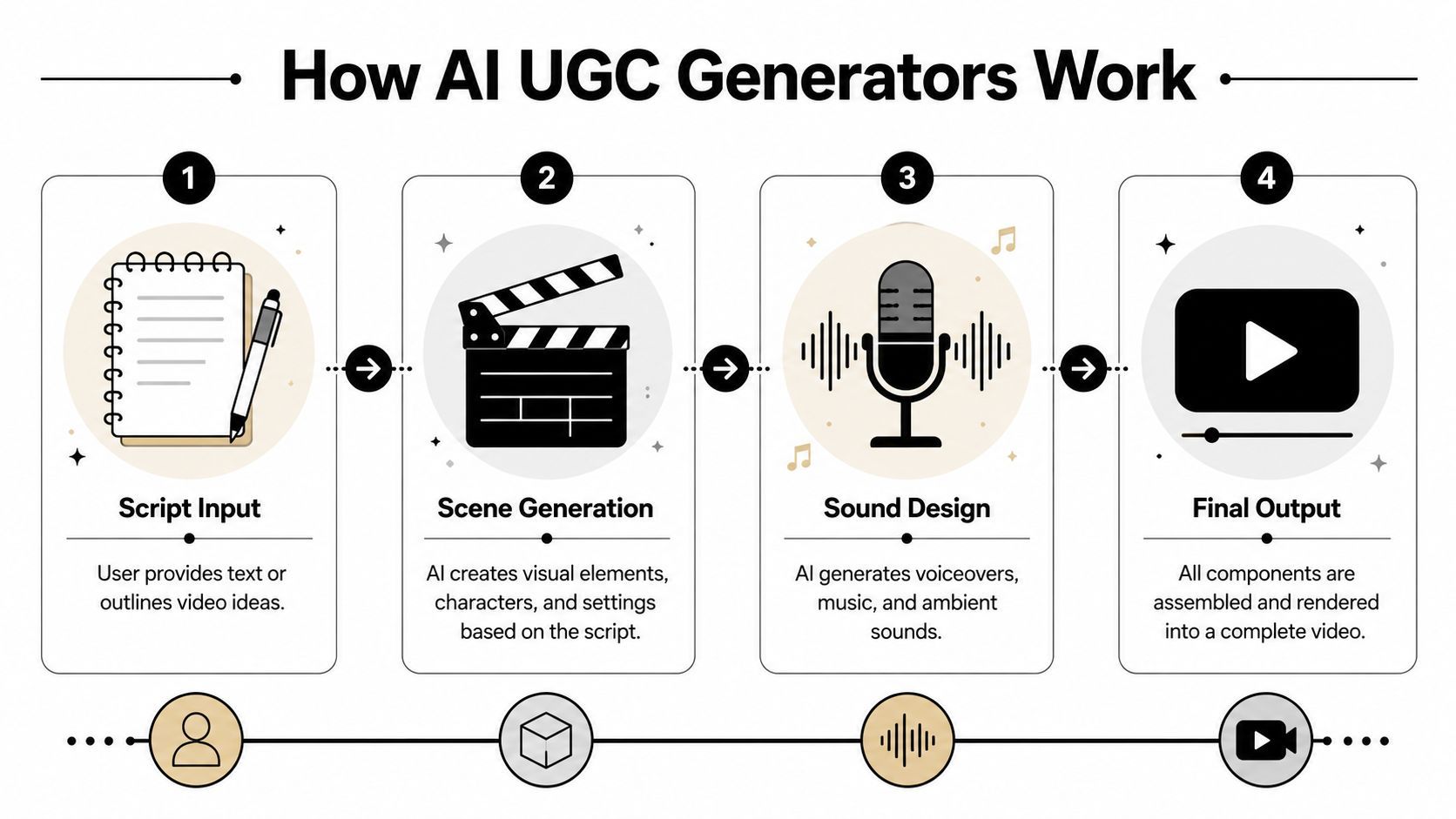
It's common to imagine one model doing everything. That isn't how these systems usually work. The better tools operate as a pipeline. One layer handles the script, another handles the presenter or scene, another handles voice, and another assembles the final asset.
That architecture matters because output quality depends on coordination, not just one flashy feature. Hive Social's breakdown of AI UGC video generators describes the category as a multi-stage pipeline combining script generation, avatar or render selection, and asset assembly. In practice, that's why some tools feel smooth and others feel stitched together.
The script layer
Everything starts with the script, even when the platform helps write it. This layer usually takes your prompt, product details, offer, or landing page input and turns it into short-form ad copy.
The strong tools don't just produce words. They shape the cadence for a creator-style read. That means shorter sentences, clearer hooks, stronger first lines, and a structure that fits paid social rather than blog copy.
Bad systems generate scripts that sound polished but unusable. They over-explain. They miss natural pauses. They write like a homepage instead of a person speaking to a camera.
The presenter and scene layer
Once the script exists, the system needs a face, a setting, and some visual logic. Depending on the platform, that may mean an AI avatar, a synthetic spokesperson, or a composited scene that mimics creator-style footage.
This is the layer often prioritized, but it's only one part of the result. An impressive avatar can still fail if the motion is stiff, the pacing is wrong, or the eye line feels off.
What usually separates usable output from weak output is control:
- Avatar choice that matches category expectations
- Background options that don't distract from the message
- Brand alignment through captions, overlays, and tone
- Motion realism that doesn't break audience trust
The sound and assembly layer
Then the platform adds voice, timing, captions, and exported layouts. At this stage, the ad either feels native or obviously artificial.
Voice matters more than many teams expect. Slightly unnatural stress patterns, robotic rhythm, or poor pause placement can ruin an otherwise decent visual. The same goes for caption timing and scene transitions.
The best-looking avatar won't save a weak delivery. In short-form ads, pacing does a lot of the selling.
A simple view of the process looks like this:
| Stage | What happens | What to watch |
|---|---|---|
| Script | Prompt becomes short ad copy | Hook strength and natural language |
| Presenter | Avatar and scene are selected | Fit with audience and product |
| Voice | Narration is generated | Tone, pacing, pronunciation |
| Assembly | Captions, layouts, exports | Native feel and brand consistency |
That's why teams shouldn't evaluate an AI UGC video generator on one demo clip alone. The key test is orchestration. Can it keep language, voice, motion, and branding aligned across many variations without adding manual cleanup every time?
Key Features and Benefits for Marketers
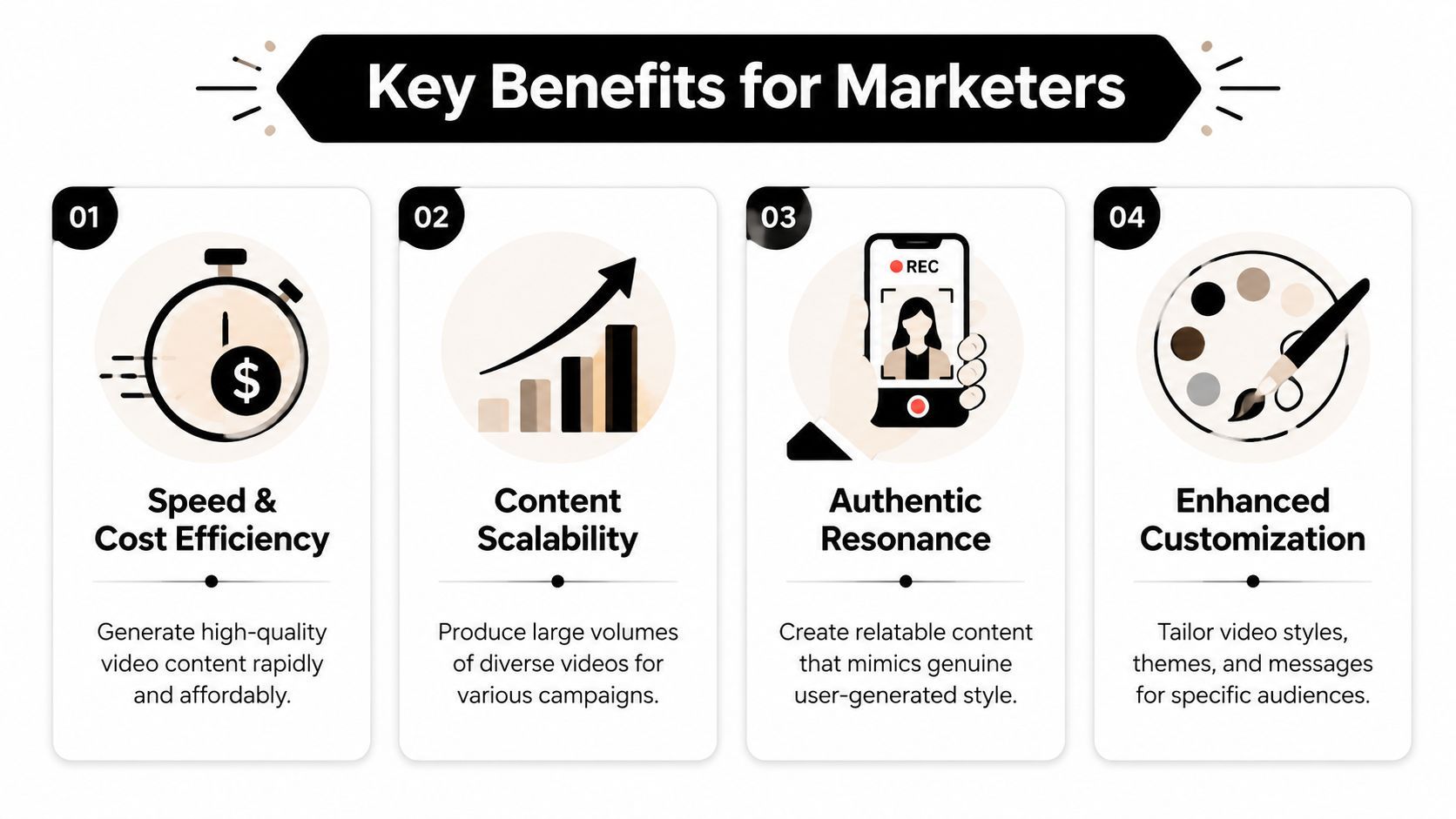
Most feature lists miss the point. Marketers don't buy an AI UGC video generator because it has avatars, templates, or voice settings. They buy it because those features remove production friction and increase testing capacity.
The category has already standardized around short-form ad use cases. MakeUGC's product overview highlights examples like full UGC-style videos generated in 2 minutes, along with package structures such as 20 monthly videos, 120 AI avatars, support for over 30 languages, and 15-second, 30-second, and 60-second formats. That combination tells you what the market is optimizing for: not long-form storytelling, but repeatable ad production for social channels.
Speed changes the economics of testing
The first win is obvious. You can move from concept to draft much faster than with a filmed workflow. But the deeper advantage is what that speed makes possible.
When creative can be generated in minutes, you stop overprotecting each asset. You can test a sharper hook, a different spokesperson style, a stronger CTA, or a niche audience angle without treating each variation like a mini production investment.
That changes team behavior. Media buyers ask for more variants because the cost of asking drops. Creative strategists get more freedom to test hypotheses. Editors spend less time rebuilding near-identical versions by hand.
Scale without rebuilding the whole team
Avatar libraries and multilingual voice options matter because they let one team support more campaigns without expanding operational overhead.
Here's how those features map to practical outcomes:
- Avatar variety helps the team match different audience expectations and product categories.
- Multiple languages make localization easier when you want to adapt existing concepts for new markets.
- Short-form presets reduce rework because the output already fits common ad lengths.
- High-volume plans support continuous testing instead of one-off creative bursts.
A compact view:
| Feature | Why marketers care |
|---|---|
| Avatar libraries | Faster concept matching for different audiences |
| Language support | Easier localization and market expansion |
| Short ad formats | Better fit for paid social inventory |
| Fast generation | More variants per campaign cycle |
What works and what doesn't
What works is using AI UGC for creative breadth. Generate more angles, more hooks, and more message versions than you could justify with manual production.
What doesn't work is assuming more output automatically means better output. Teams still need a point of view. If the scripts are generic, the videos will be generic too.
Field note: AI lowers the cost of variation. It doesn't lower the need for judgment.
The strongest operators use these tools to widen the top of the funnel for creative testing. They generate more ideas, kill weak concepts faster, and put human effort where it matters most: the winners.
Your First AI UGC Video in Five Steps
The fastest way to get value from an AI UGC video generator is to stop treating it like magic software and start treating it like a production system. The tool can generate the video, but you still need to make the right creative decisions upstream.
A simple workflow is enough to get a useful first asset into market.
Step 1. Start with the hook, not the script
Most weak AI ads fail in the first line. Teams dump product information into the prompt, get a neat script back, and then wonder why the video feels flat.
Start with one clear angle:
- Problem-first if the product solves something urgent
- Outcome-first if the transformation is obvious
- Objection-first if skepticism is the main blocker
- Demo-first if the product is visually compelling
Write the hook in plain speech. If it sounds like a landing page headline, rework it until it sounds like something a person would say on camera.
Step 2. Prompt for structure, not just copy
Don't ask the tool to “make a UGC ad.” Give it a role and constraints. Ask for a short creator-style script with a specific tone, audience, and CTA. Tell it whether you want testimonial energy, product demo energy, or straight response energy.
The better your input, the less cleanup you'll need later.
A useful prompt usually includes:
- Audience you want to reach
- Core pain point or desire
- Offer or product claim stated plainly
- Desired style such as casual, assertive, or demo-led
- Call to action for the final line
Step 3. Cast the right digital presenter
Many teams chase realism and lose the plot. The best avatar isn't necessarily the most human-looking one. It's the one that feels plausible for the message and platform.
If you're selling a simple consumer product, a clean, direct presenter usually works better than a highly dramatic one. If you're running broad social traffic, trust often comes from delivery and fit, not from perfect photorealism.
Review these choices before generating:
- Avatar fit with age, tone, and category
- Voice style that matches the script rhythm
- Background that supports the ad without stealing focus
- Caption style for mobile-first viewing
Step 4. Assemble for native placement
The technical flexibility of the category is particularly valuable. Some platforms claim a full script-to-video workflow in about 2 minutes and support 15-, 30-, and 60-second exports plus 9:16, 1:1, and 16:9 formats, according to this YouTube overview of AI UGC workflow speed and export formats. For paid teams, that means you can adapt one concept across placements without rebuilding the asset from scratch.
Native formatting matters because each placement has different viewing behavior. A vertical feed ad needs a different feel than a square placement or a horizontal embed.
Before export, check these basics:
| Element | What good looks like |
|---|---|
| Opening frames | Hook appears immediately |
| Captions | Readable on mobile, timed to speech |
| Branding | Visible but not overpowering |
| CTA | Clear and placed before drop-off |
| Format | Matched to intended placement |
A quick walkthrough helps if you want to see how these systems are used in practice:
Step 5. Review like a media buyer, not a video editor
The first review pass shouldn't focus on polish. Focus on conversion risk.
Ask:
- Does the first line stop the scroll?
- Does the delivery feel believable enough?
- Is the value proposition clear without sound context?
- Would this format fit the feed it's entering?
Then export multiple variants, not one final masterpiece. Change the first line, swap the CTA, test another voice, or shorten the body. The whole point of the workflow is that you're no longer forced into a one-shot creative decision.
Choosing a Tool and Mastering Best Practices
Picking the right AI UGC video generator isn't only about output quality. It's about operational fit. A tool can look impressive in a demo and still create headaches if it doesn't support your review process, brand controls, or distribution workflow.
Start with a practical checklist.
What to evaluate before committing
Look for the basics first, then the less obvious factors that affect day-to-day use.
- Avatar quality and range so you're not stuck with one visual style
- Voice and language options if you localize or run cross-market campaigns
- Editing controls for captions, trims, overlays, and swaps
- Brand alignment features such as reusable styles and templates
- Export flexibility for platform-native placements
- Workflow fit with your existing approval and publishing process
If your team also needs better handoff and presentation once videos are ready, it's worth looking at resources on creating polished client video experiences. Distribution and review are often the hidden bottleneck after creation gets faster.
Governance matters more as realism improves
This is where most articles stop too early. Speed is only half the job. Governance matters because synthetic creator-style media can blur what viewers think they're seeing.
ShortGenius's guide to UGC video generators points to a real operational gap around provenance, consent, and platform disclosure rules. That's the right concern. If your ad uses an AI spokesperson or cloned voice, you need clear internal rules for permissions, disclosure, and recordkeeping.
A few practical standards help:
- Document rights clearly for any likeness, voice, or synthetic persona used in ads.
- Create a disclosure policy by channel and market, then review it with legal or compliance stakeholders.
- Keep source records for scripts, assets, permissions, and final exports.
- Avoid ambiguity when the synthetic nature of the content could mislead viewers.
Teams usually focus on generation speed first. The mature teams also build a paper trail.
Don't optimize for realism alone
A common mistake is chasing the most human-looking output and assuming that will convert better. In practice, what converts is often the version that matches audience expectations on the platform.
Some categories benefit from a looser, more obviously social feel. Others need more polish. If the face warps, the pacing feels monotone, or the voice lands awkwardly, realism becomes a liability instead of a strength.
Test for believability in context, not beauty in isolation. That means comparing hooks, presenter styles, pacing, and CTA delivery against actual ad outcomes, not just internal creative opinions.
The winning standard is simple. Use AI UGC where it improves testing velocity and learning speed. Use real creators where trust, authority, or lived experience carry the message.
If you want one platform that brings scripting, video assembly, voice, editing, resizing, and multi-channel publishing into a single workflow, ShortGenius (AI Video / AI Ad Generator) is built for exactly that. It helps creators and marketing teams turn ideas into short-form videos and ads in minutes, then adapt and publish them without bouncing between separate tools.