AI That Can Watch Videos: How It Works and Why Creators Care

Discover how AI that can watch videos understands scenes, actions, and context. Learn core techniques, creator use cases, and practical adoption tips.
The popular advice is simple: upload a video, ask an AI what happened, and trust the answer. That advice is useful for a quick experiment, but it breaks down in real creator workflows. AI that can watch videos may identify a person, a product, or a spoken topic, yet still miss when an action occurred, how many times it happened, or whether a later scene changes the meaning of an earlier one.
The practical question isn't whether a model can process video. Modern systems can. The better question is whether the system can extract the right evidence from the right moments, do it quickly enough to fit your production process, and show where its answer came from. That distinction separates an impressive demo from dependable video intelligence.
Why Watching a Video Is Harder Than It Looks
A single image gives an AI a snapshot. A video gives it a moving record in which meaning depends on order, duration, repetition, sound, and context. Recognizing a cup on a table is relatively straightforward. Determining whether someone picked up that cup before or after another person entered the room requires the model to connect observations across time.
That distinction matters for creators. A system might label a cooking video as “pasta recipe” while missing the exact moment when the sauce changes texture. It might generate a fluent summary while omitting the warning that appears briefly on screen. It might identify a person in several frames without understanding whether that person performed the action the viewer cares about.
A sequence is more than a collection of frames
Video understanding requires several abilities working together:
- Temporal reasoning: The model must preserve event order and distinguish a brief action from a sustained activity.
- Context retention: It must remember details introduced earlier, sometimes across many scenes.
- Object and action tracking: It needs to follow items, people, and changes as the camera moves or the scene cuts.
- Multi-evidence integration: It may need to combine separate clues before answering a question.
Long-form benchmarks make this challenge concrete. LongVideoBench evaluates 3,763 web-collected videos with subtitles and inputs reaching one hour, while LVBench contains 20,061 manually annotated question-answer pairs from 100 movies, as documented by the NeurIPS 2024 LongVideoBench and LVBench materials. These tests don't reward a model merely for spotting a recognizable frame. They test whether it can retrieve and combine information distributed across a longer narrative.
Practical rule: Treat a generated answer as a searchable draft until you can verify the relevant timestamp.
The problem becomes harder when one answer depends on multiple non-overlapping moments. HERBench was designed so each question requires at least three distinct cues from separate video segments, with 26,806 five-way multiple-choice questions across 12 compositional tasks (CVPR 2026 HERBench paper). For a creator, that could resemble checking whether a tutorial introduced a tool, demonstrated the correct setting, and showed the final result.
The right mental model is therefore not “image recognition plus time.” It's a system that must sample, index, remember, retrieve, and reason over a moving stream of evidence. That's why headline demos can look polished while fine-grained analysis still needs human review.
How Video Understanding AI Actually Works
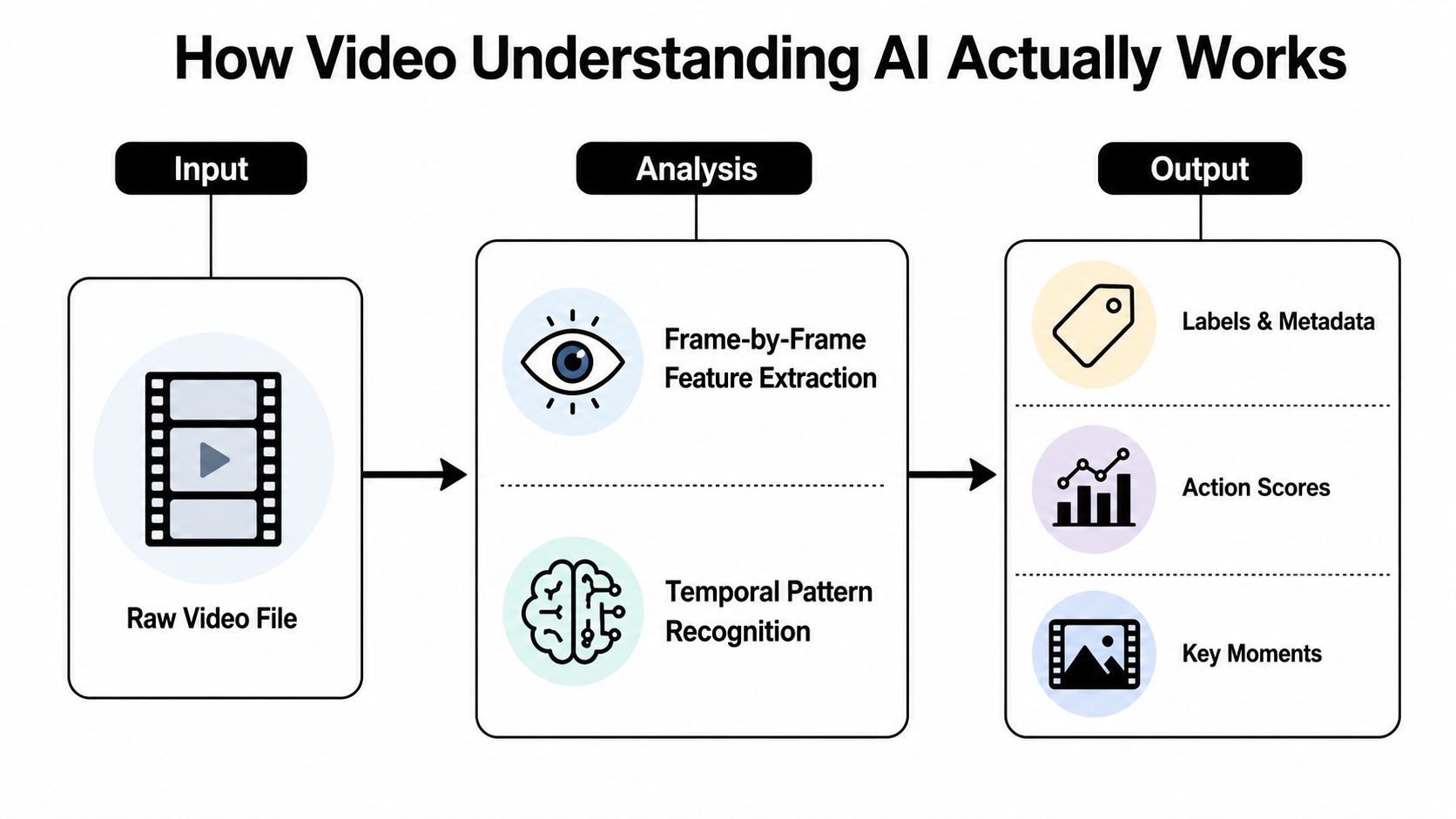
Most video AI systems turn a raw file into smaller pieces that a model can process. The exact architecture varies, but the workflow usually has three connected layers: visual analysis, temporal modeling, and multimodal interpretation.
First, the system examines visual slices
A video contains far more visual information than a model can usually process in one uninterrupted pass. The system samples frames or short clips, converts visual regions into machine-readable representations, and looks for features such as faces, objects, text, gestures, camera movement, and scene boundaries.
A useful analogy is skimming a book. Looking at selected pages can reveal the broad plot, but it can also miss the sentence that explains a character's motivation. Dense sampling provides more detail, but it raises processing cost and latency. Sparse sampling is faster, but it creates blind spots when an important action happens between selected frames.
Many modern systems divide frames into smaller visual patches, then represent those patches as tokens. Attention mechanisms help the model assign more weight to relevant regions or moments. In a product video, attention might focus on the package, a hand opening it, or text displayed in an overlay instead of treating every pixel as equally important.
Next, it connects moments into events
Frame-level recognition answers questions such as “What is visible now?” Temporal modeling asks “What changed, what happened first, and what lasted?” The model compares information across frames and clips to identify movement, transitions, repetitions, and relationships.
That process supports tasks such as scene segmentation, action classification, and key-moment retrieval. It also exposes a core weakness. If the system samples too little or fails to retain earlier information, it may recognize each individual moment without understanding the sequence.
Finally, it combines video with language and sound
Video-language systems can align visual content with speech, subtitles, labels, and written prompts. Audio can clarify an action that looks ambiguous, while text can identify a product or explain an instruction that isn't visually obvious.
The field's evaluation standards have become more detailed as these capabilities have expanded. CaReBench includes 1,000 high-quality video-caption pairs with manual spatial and temporal annotations, while VDC uses over 1,000 carefully annotated structured captions. These benchmarks evaluate retrieval and dense captioning, not only broad scene labels, as described in the CaReBench research paper.
VCapsBench increases the evaluation burden with 5,677 videos, 109,796 question-answer pairs, and annotations across 21 fine-grained dimensions, according to the VCapsBench paper. CapRiCorn-1K includes 1,000 videos ranging from 15 seconds to 600 seconds, with video-only and audio-video variants in the same source. These benchmarks show why “watching” now includes scene detail, camera behavior, audio alignment, event order, and production context.
What AI Can Actually Do with Your Videos Today
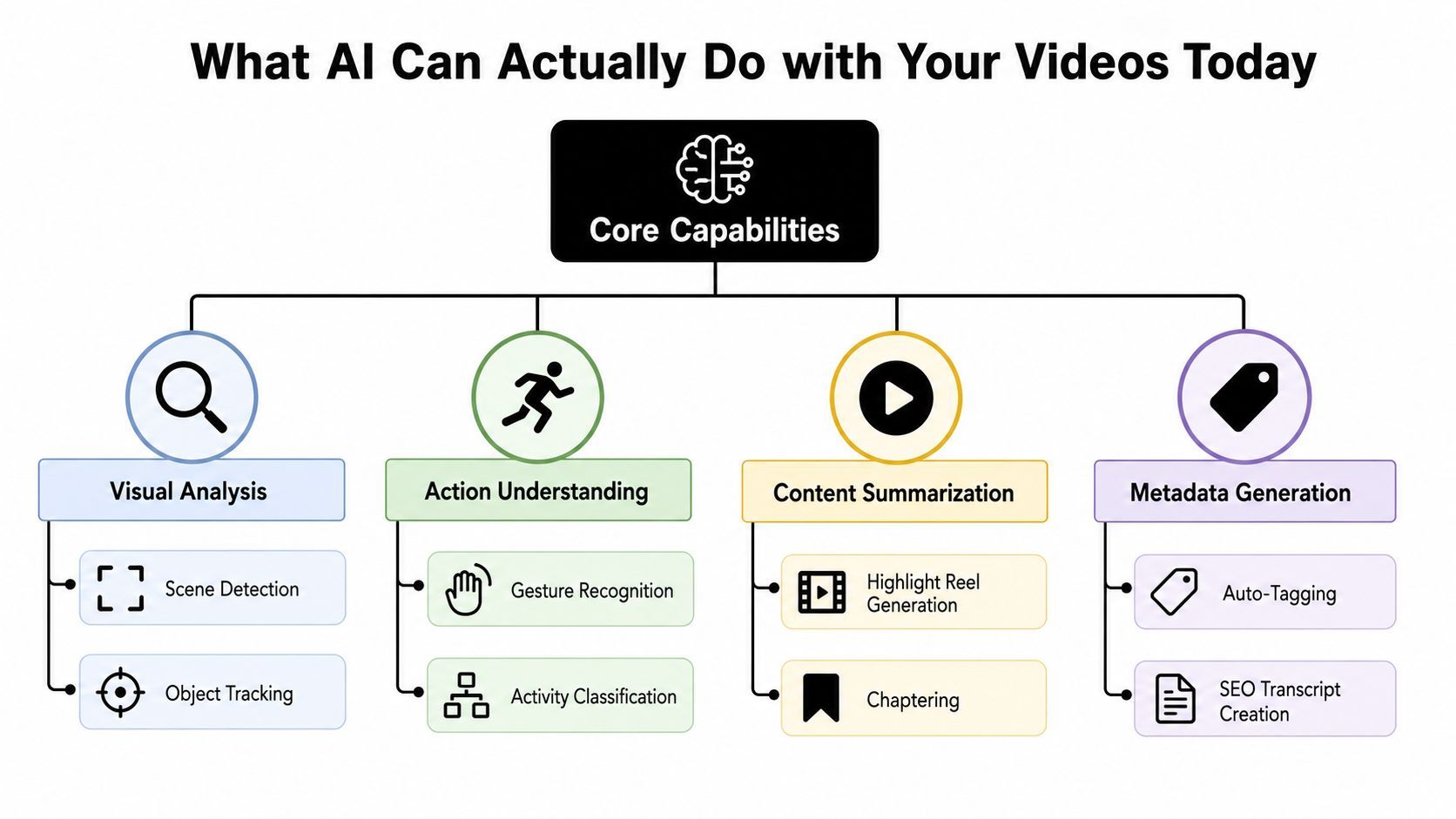
Video AI is already useful when you assign it tasks with clear boundaries. The strongest applications usually produce structured outputs, such as timestamps, captions, labels, transcripts, or candidate clips. They don't require the model to understand every subtle implication in a long narrative.
The practical building blocks
Scene detection can separate an interview into questions, answers, demonstrations, and transitions. A creator can use those boundaries to draft chapters or find sections for repurposing. The output is a rough map, not a finished editorial decision.
Object tracking can locate a product, person, logo, or on-screen element across a sequence. It helps organize footage and identify candidate shots, though fast movement, occlusion, reflections, and unusual camera angles can still confuse the system.
Action understanding supports gesture recognition and activity classification. A sports editor might search for a particular play, while a tutorial producer might locate moments where a presenter performs a step. These outputs are most useful when the action vocabulary is specific and the footage is reasonably clear.
Captioning and description turn visual and spoken content into searchable language. That can support accessibility, transcript cleanup, metadata generation, and SEO preparation. A transcript can tell you what was said, but it won't automatically prove that every visual claim is accurate.
Search is often more valuable than summarization
A fluent summary sounds impressive, but a timestamped search result can save more production time. Ask for moments containing a particular product, gesture, phrase, transition, or visual state, then inspect the returned clips yourself.
Highlight extraction works in a similar way. The AI can propose moments based on speech, action, pace, or scene changes. An editor still decides whether the moment has a strong hook, makes sense without context, and fits the intended audience.
The same components support content scaling. Teams researching brand video scaling with AI can think of video understanding as the indexing layer that makes a growing library usable. It helps connect source footage to scripts, clips, ad variations, captions, and publishing decisions.
A sensible division of labor is clear: let AI find, label, transcribe, and assemble candidates. Keep human judgment for claims, narrative meaning, brand safety, and final selection.
Creator Workflows Transformed by Video AI
The clearest gains appear when video AI handles repetitive discovery before a creator makes an editorial decision. The workflow doesn't remove the creative role. It changes where that role begins.
Rough cuts from a large recording
A creator starts with a long interview containing pauses, repeated answers, camera resets, and several usable ideas. Manually, the editor watches the recording, logs timestamps, transcribes key passages, and builds a first sequence.
A video-understanding pipeline can identify scene boundaries, align speech with timestamps, remove obvious dead air, and group sections by topic. The creator then reviews the candidate segments, checks the wording, and shapes the narrative. The result is not “AI edited the perfect episode.” It's a searchable rough cut that gives the editor a better starting point.
Highlights from action-heavy footage
Gaming, sports, and event creators often need to locate moments defined by combinations of signals. A highlight may involve a particular action, a reaction from the audience, a spoken phrase, and a sudden change in pace.
AI can rank candidate moments by combining those signals, then assemble a review reel. The editor checks whether the clip has enough context, whether the timing feels natural, and whether the selected moment supports the intended platform format. This approach is safer than asking a model to publish every automatically selected highlight.
Moderation before publication
For teams producing frequent social content, a first-pass review can flag visible text, risky imagery, profanity, or scenes requiring manual attention. The system should create a review queue with evidence and timestamps rather than blocking or approving content automatically.
That distinction matters for sponsorship and brand work. A creator can pair content review with an AI creator sponsorship database to organize campaign research, then use video AI to check whether each deliverable includes the required product appearance or spoken mention. The AI can assist with verification, but a person should make the final compliance decision.
From one idea to many versions
A unified creation workflow can begin with a script or blog post, split the text into scenes, generate visuals, add voiceover and captions, and prepare platform-specific edits. Tools such as ShortGenius fit this pattern by bringing scripting, asset generation, assembly, voice, captions, resizing, and publishing operations into one workspace.
The useful template is:
- Ingest: Add the recording, script, product page, or source article.
- Analyze: Extract scenes, topics, speakers, objects, and candidate moments.
- Draft: Build clips, captions, hooks, or ad variants.
- Review: Verify claims, timing, rights, and brand requirements.
- Publish: Export or schedule the approved versions.
Creators gain the most when they keep the review step visible. Automation should reduce searching and repetition, not hide decisions that affect trust.
Choosing Your Integration Approach
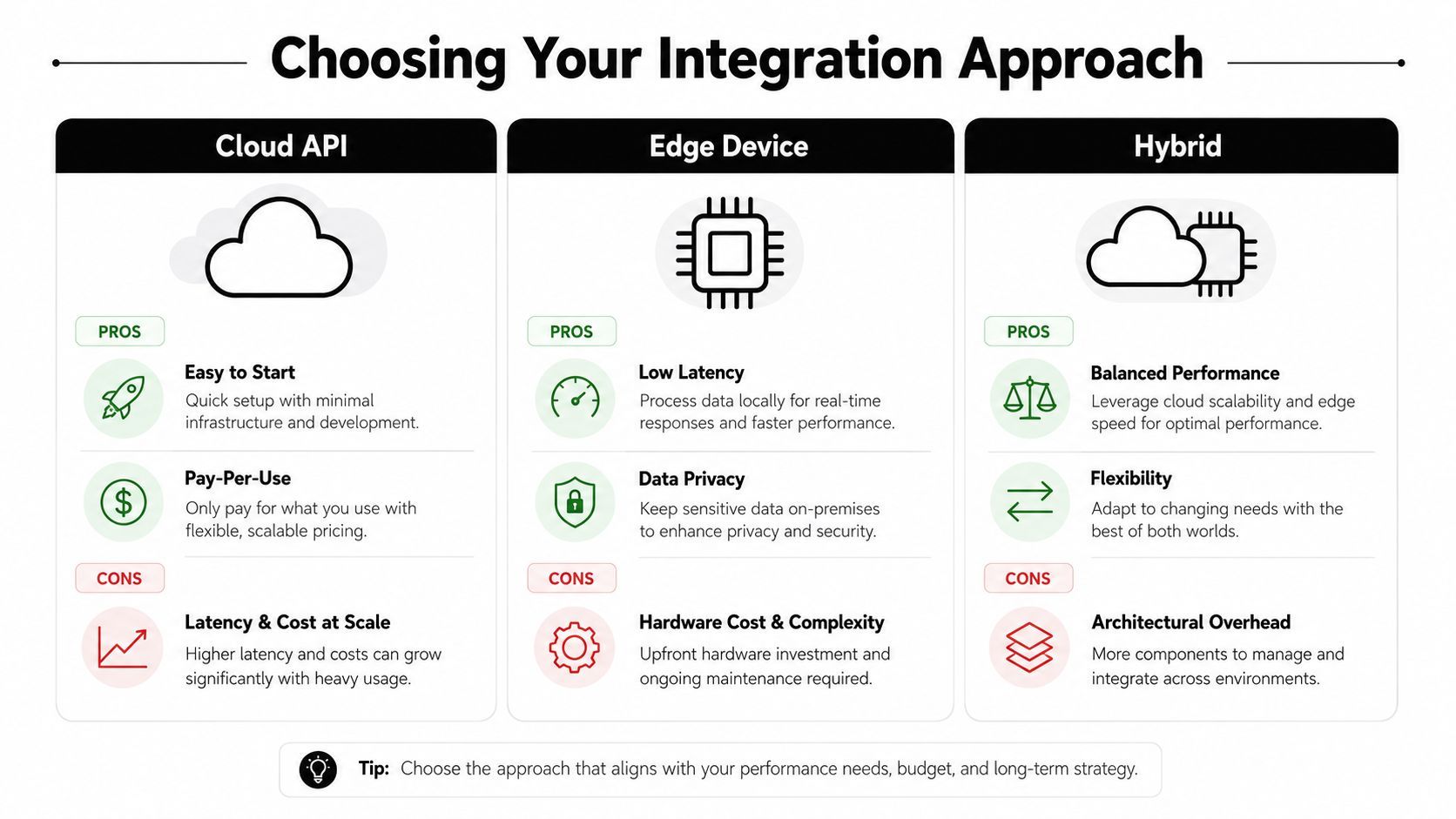
The right deployment depends less on the model's marketing label and more on the shape of your workload. A solo creator reviewing occasional uploads has different needs from an agency indexing a large archive or a brand monitoring fresh footage continuously.
Cloud APIs suit fast experiments
A cloud API is usually the simplest starting point. You upload a file, send a prompt or analysis request, and receive captions, labels, timestamps, or answers without managing model infrastructure. That convenience works well for prototypes, batch tagging, and workflows where the video can leave your environment.
The trade-offs are latency, usage cost, upload time, and data governance. A cloud-first design also needs retry handling, file-size management, result storage, and a plan for reviewing uncertain outputs.
Local inference prioritizes control
Running models locally can keep sensitive footage inside your own environment and reduce dependence on an external service. It may suit private training material, unreleased campaigns, or teams with specialized models and predictable hardware access.
Local processing adds operational work. You need compatible hardware, model storage, updates, monitoring, and a way to handle demand spikes. Smaller models may respond quickly but offer less reasoning depth, while larger models can increase resource requirements.
Hybrid systems split the workload
A hybrid pipeline can use local tools for ingestion, redaction, or initial frame selection, then send only relevant segments to a cloud model. It can also reserve high-quality analysis for difficult clips while handling routine metadata locally.
Adaptive temporal search makes this design especially attractive. Stanford's T* approach improved GPT-4o's LongVideoBench accuracy from 47.1% to 51.9% using only 8 frames, while reporting 30.3 TFLOPs of compute and latency falling from more than 30 seconds to 10.4 seconds, according to Stanford's T* research. The result supports a practical principle: retrieve likely evidence before asking a powerful model to reason over it.
| Workload | Sensible starting point | Main question |
|---|---|---|
| Occasional creator uploads | Cloud API or integrated tool | Can I test the workflow without infrastructure work? |
| Sensitive internal footage | Local or hybrid | Which content must stay private? |
| Large searchable archive | Hybrid batch pipeline | Can I index once and reuse the results? |
| Fast interactive review | Selective retrieval with cloud or local inference | What latency can the editor tolerate? |
Choose batch processing when results can arrive later. Use real-time analysis only when the workflow depends on immediate feedback.
Where Video AI Still Falls Short
The gap between a convincing summary and dependable analysis is most visible in narrow questions. A model may describe the overall topic correctly while failing on the detail that determines whether an editor, advertiser, or compliance reviewer can trust the result.
Fine-grained counting remains a notable weakness. Allen AI reports that no tested model reached 40% accuracy on video counting, as summarized in the NAACL 2025 discussion of fine-grained VideoQA limitations. That doesn't mean counting is impossible. It means creators shouldn't assume that a confident answer about repeated objects, appearances, or actions is reliable without checking the footage.
Long videos create memory problems
A model can lose track of information when relevant evidence is separated by many scenes. Sampling a few frames may miss the only moment that shows a change, while processing every frame can create cost and latency problems. Subtitles help, but spoken words don't replace visual verification.
This affects tutorials, reviews, documentaries, and ads. If an instruction depends on a setting shown briefly, a later result may look correct even though the process contained an error. AI can flag likely steps, but it shouldn't be the sole authority for technical or safety-sensitive validation.
Multiple clues can defeat a fluent model
HERBench's multi-evidence design exposes another failure mode. A question may require the system to combine separate observations rather than match one recognizable signal. Increasing the context window doesn't automatically solve evidence selection, event order, or causal interpretation.
Bias adds a separate concern. Models can interpret people, accents, gestures, environments, and cultural references unevenly. Content moderation systems may overflag harmless material or miss context-dependent risk, so creators should use them to prioritize human review rather than replace it.
Privacy needs equal attention. Before sending footage to a cloud service, check retention policies, access controls, consent requirements, and whether the file contains private conversations or unreleased material. Keep timestamps, confidence indicators, and source clips with the output so a reviewer can audit the decision.
A video AI answer without an evidence trail is a suggestion, not a record.
Getting Started with Video AI in Your Workflow
Start with tasks where mistakes are inconvenient rather than dangerous. Captions, transcripts, basic tags, and searchable scene descriptions give you useful feedback without handing the system final editorial authority.
Begin with an audit
Collect a small group of representative videos, including clean interviews, fast edits, screen recordings, and footage with background noise. Ask the system to produce captions, scene boundaries, topic labels, and timestamps. Compare the output with your own notes.
Track practical signals rather than chasing a grand automation claim:
- Search usefulness: Can you find a known moment quickly?
- Caption cleanup: How much manual correction remains?
- Review burden: Does the output reduce browsing time?
- Failure visibility: Does the tool show uncertainty or evidence?
Add editing assistance
Once the metadata is useful, test scene-based rough cuts and highlight suggestions. Give the system narrow instructions, such as finding every segment where a product is demonstrated or grouping clips by a defined topic. Review every candidate before publication.
A platform such as ShortGenius (AI Video / AI Ad Generator) can support a broader workflow by turning prompts, scripts, or blog content into assembled videos with visuals, voiceover, captions, music, transitions, resizing, and publishing tools. That makes it suitable for testing how video understanding connects with creation, rather than treating analysis as an isolated task.
Scale only after the evidence works
Connect an API or batch process to your library once you know which outputs you use. Store timestamps and transcripts alongside the original files, and keep a human approval step for claims, sponsorship requirements, moderation, and regulated content.
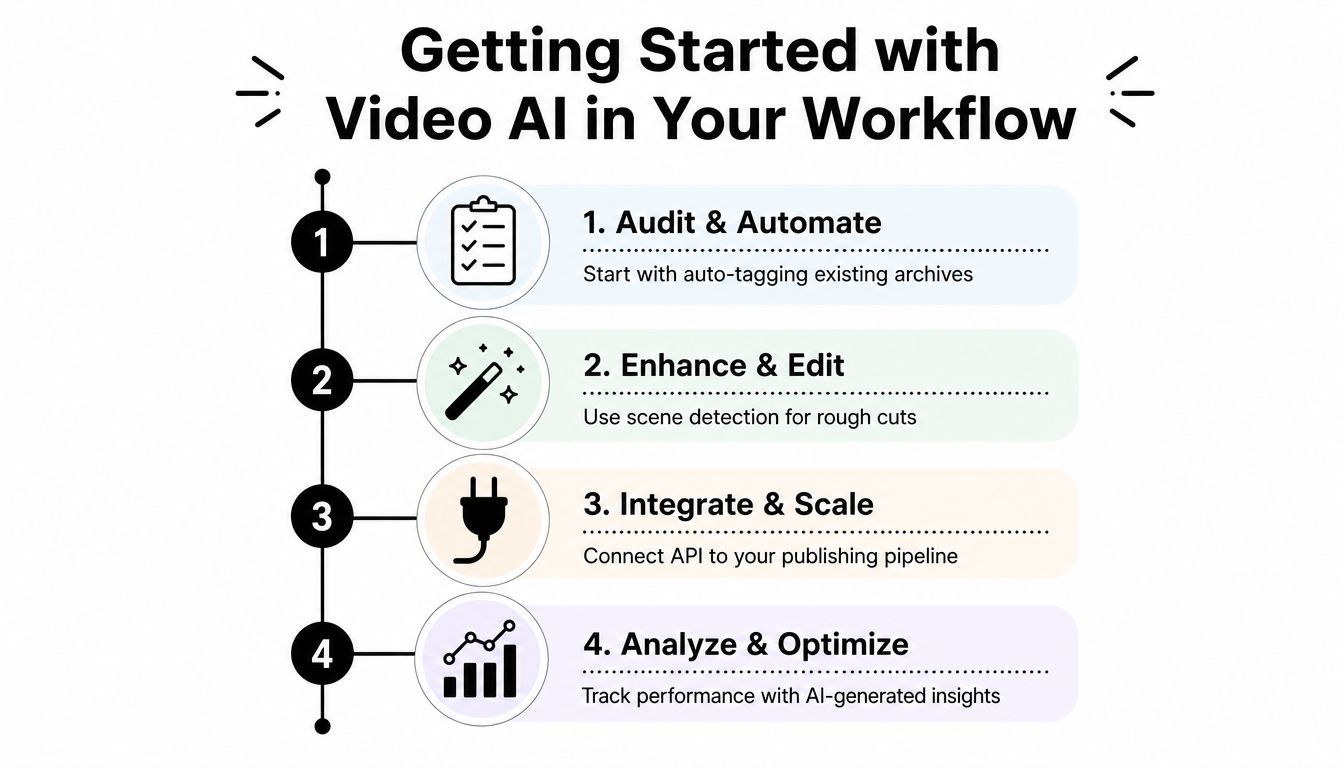
A simple adoption path looks like this:
- Audit and automate: Tag existing footage and test transcript quality.
- Enhance and edit: Use scene detection to draft rough cuts.
- Integrate and scale: Connect approved outputs to your publishing process.
- Analyze and optimize: Compare AI suggestions with audience and editorial decisions.
Give each stage a clear review period, then decide whether the saved effort justifies more integration. The winning workflow isn't the one with the most automation. It's the one that helps you find better evidence, make faster decisions, and preserve human control where accuracy matters.
ShortGenius (AI Video / AI Ad Generator) helps creators turn prompts, scripts, blog posts, and product ideas into videos and ads with scenes, visuals, voiceovers, captions, edits, resizing, and publishing workflows in one place. Visit ShortGenius (AI Video / AI Ad Generator) to connect video AI with a repeatable production process and start testing your first workflow.