Your Guide to AI Social Media Content Creation

Master AI social media content creation. This guide provides actionable strategies to generate, edit, and distribute high-quality social content at scale.
Let's be honest: the social media content treadmill is exhausting. The pressure to churn out high-quality posts, day after day, is immense. This is where AI social media content creation comes in—it’s all about using artificial intelligence to help you produce everything from scripts and images to complete videos, getting you from a raw idea to a polished post in a fraction of the time.
How AI Is Changing Social Media Content
Think about the old way of making a single, high-quality video. It was a marathon of brainstorming, scripting, shooting, and editing. That entire manual process is slow, expensive, and nearly impossible to scale, which is a huge problem for anyone trying to stay top-of-mind with their audience. This is exactly where AI is stepping in, not as a replacement for creativity, but as an incredibly powerful assistant.
AI tools handle the tedious, repetitive parts of the job. This frees you up to focus on the big picture—your strategy, your message, and adding that final creative touch that only a human can. What we're seeing is a fundamental shift from a slow, step-by-step assembly line to a far more dynamic and efficient system.
The Core Advantages of an AI Workflow
Bringing AI into your content process isn't just a theoretical upgrade; it delivers tangible benefits that solve the biggest headaches in modern social media marketing.
- Unmatched Speed: You can go from a simple idea to a full video draft in minutes. Seriously. AI generates scripts, finds or creates visuals, and can even produce a voiceover almost instantly.
- Effortless Brand Consistency: Imagine applying your brand’s specific fonts, colors, and logo to every single post with just one click. AI makes that happen, ensuring your content always looks and feels like you.
- Massive Scalability: Need to create a dozen different versions of a video for A/B testing or for different platforms? AI can do it without you having to multiply your effort. This is how you finally achieve a consistent posting schedule without burning out.
By automating the grunt work, AI allows teams to stop focusing on tedious production tasks and start investing their energy in high-level strategy, audience engagement, and genuine creative work. The goal isn't just to make more content; it's to make smarter content.
Tools like ShortGenius are designed to bring all these pieces together. Inside one platform, you can generate a script, create AI-powered visuals, and assemble a draft video without bouncing between different apps. This integrated approach is why so many are making the switch. It's not just about speed—it's about building a more strategic and sustainable engine for growth.
Building Your Strategy with AI-Driven Insights
It’s tempting to jump right into creating content with AI, but that’s a recipe for a lot of noise and zero impact. A successful ai social media content creation process doesn't start with the tools; it starts with a deep, strategic understanding of your audience.
Before you ever ask an AI to write a script, you need to know exactly who you're talking to. The real power of AI here is its ability to act as your research partner, helping you move past vague assumptions and build genuinely insightful audience personas. This groundwork is what makes every video, image, and caption you generate actually hit the mark.
Uncovering Audience Insights with AI Prompts
Think of your language model as a super-fast market researcher. You can give it the context about your business and then ask it to explore the digital world where your ideal customers hang out. This isn't about guessing what they want; it's about using AI to discover it.
The key is getting specific. The more detailed your instructions, the more nuanced and useful the AI's analysis will be.
Here's a prompt I've adapted for this kind of work. Feel free to use it as a starting point:
Act as a senior market research analyst. I'm launching a subscription box of eco-friendly cleaning supplies for millennial parents living in cities.
Your task is to develop three distinct audience personas based on that target market. For each persona, please detail:
- Their biggest daily struggles with keeping a home clean and safe for kids.
- What really motivates them to buy sustainable products over cheaper alternatives.
- Which social media platforms they use most and what kind of content they actually stop to watch.
- The top questions or doubts they'd have before committing to our subscription.
A prompt like this pushes the AI beyond simple demographics. It forces it to think about the psychographics—the fears, desires, and questions that influence how people behave online and what they decide to buy. You get the raw material for a strategy that connects.
This process transforms the old way of making content. Instead of a slow, linear production line, you create a strategic, repeatable cycle.
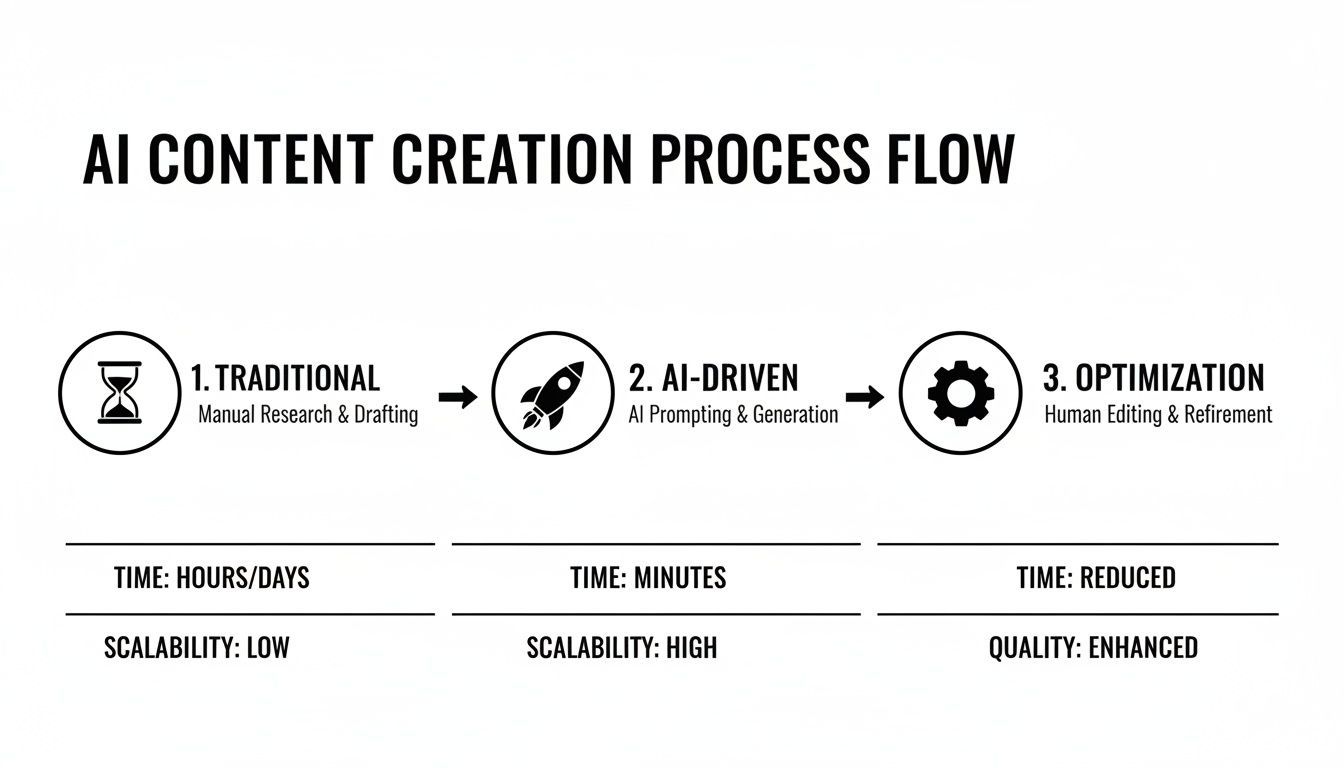
The big shift is putting the strategy first. This lets you produce content faster and at a much larger scale, all while optimizing as you go.
From Personas to Actionable Content Pillars
With your AI-generated personas in hand, it's time to turn that research into a concrete plan. This is where you establish your content pillars—the main themes your brand will own. These pillars are the guardrails for your entire content workflow.
Your pillars should be a direct answer to the challenges and interests you just uncovered. For our eco-friendly cleaning brand, that might look something like this:
- Kid-Safe Cleaning: Focused on tips, tricks, and tutorials for creating a non-toxic home environment.
- Sustainable Living: Broader content that helps families reduce their overall household waste and carbon footprint.
- Product Transparency: Behind-the-scenes looks at our ingredients, ethical sourcing, and business practices.
These pillars become the building blocks for every prompt you write from here on out. When you need to generate video ideas or ad scripts, you'll instruct the AI to create something specifically for one of these themes.
This simple framework stops you from just making random content and helps you build a cohesive brand that people trust. For example, if you’re creating paid ads, you can lean on AI to generate compelling UGC-style ads that feel authentic and convert well. By laying this strategic groundwork first, you set your AI tools up to build a library of content that doesn't just get views, but builds a real community.
Generating Scripts and Visuals That Stop the Scroll

Alright, you've got your strategic pillars locked in. Now for the fun part—turning those ideas into scripts and visuals that actually make people stop scrolling. This is where ai social media content creation really starts to shine, acting as a creative co-pilot to generate the raw materials you need for truly engaging content.
This isn't just a niche trick anymore; it's rapidly becoming the new standard. In fact, it's predicted that by 2026, a massive 25% of all branded social media posts will be AI-generated. That shift makes perfect sense when you consider that AI recommendations already dictate over 80% of what users see on their feeds, as detailed in a recent industry report. To keep up, you need a high volume of quality content, and AI is the key to producing it.
The real goal here isn't just about speed. It’s about starting with a much better first draft, generated in seconds.
Crafting High-Impact Scripts with AI
Every great social video starts with a solid script, and AI is fantastic for getting you past that intimidating blank page. The magic, I've found, is all in the prompt. If you give a generic prompt, you'll get generic, uninspired content.
So, instead of just asking for "a video script about sustainable cleaning," you need to give the AI some structure. A framework I lean on constantly for short-form video is PAIN-AGITATE-SOLUTION (PAS). It works wonders because it hooks the viewer right away by tapping into a problem they already have.
Let's use our eco-friendly cleaning brand as an example, focusing on the "Kid-Safe Cleaning" pillar. Here's a prompt that will deliver:
Prompt: "Write a 30-second TikTok video script using the PAIN-AGITATE-SOLUTION framework. The topic is the hidden dangers of conventional cleaning products for families with young children.
Pain: Start with the common fear parents have about toddlers touching and licking surfaces. Agitate: Mention the harsh chemicals and unpronounceable ingredients in typical sprays. Solution: Introduce our all-natural, plant-based cleaning subscription as the worry-free answer.
The tone should be empathetic and reassuring. End with a clear call-to-action to learn more."
See the difference? This detailed brief gives the AI everything it needs: the framework, the audience's emotional state, the specific points to cover, the tone, and the length. What you get back is a draft that's about 90% of the way there, just waiting for a quick human polish.
To make this even easier, here are some ready-to-use prompts I've developed for different scenarios.
AI Content Generation Prompts for Social Media
This table gives you a starting point for generating various types of social media content. Feel free to copy and adapt these templates to fit your own brand and audience.
| Content Type | Platform | Example Prompt Template |
|---|---|---|
| Explainer Video | Instagram Reels | "Create a 45-second script for an Instagram Reel explaining [Complex Topic] in simple terms. Use a friendly, knowledgeable tone. Break it down into 3 easy-to-understand points. Start with a hook like, 'Here's something you probably didn't know about [Topic].'" |
| Behind-the-Scenes | TikTok | "Write a short, casual script for a TikTok showing a 'day in the life' of a [Your Job Title]. The tone should be authentic and fun. Include a voiceover that mentions the most surprising part of the job and end with a question to drive comments." |
| Product Showcase | YouTube Shorts | "Generate a 30-second YouTube Shorts script showcasing the top 3 features of our new [Product Name]. Use the AIDA (Attention, Interest, Desire, Action) model. The tone should be exciting and benefit-driven. End with a CTA to 'Shop the link in the description!'" |
| Myth-Busting | "Draft a professional yet engaging script for a 60-second LinkedIn video debunking a common myth about [Industry/Topic]. Start with 'You might have heard that [Myth]... but is it true?' Present 2-3 facts to disprove it. The tone should be authoritative and helpful." |
Think of these as your creative launchpad. The more specific details you add about your product, audience, and brand voice, the better your results will be.
Prompting AI for Eye-Catching Visuals
With a script in hand, you need visuals to match. This is where AI image and video generators essentially become your personal production studio. Suddenly, you can create custom scenes, product mockups, or abstract backgrounds that would have once cost a fortune in photoshoots or stock footage licenses.
The key to getting great visuals from an AI is learning to "paint a picture" with your words. Layered, descriptive prompts are everything.
Tips for Better Visual Prompts:
- Be Specific with Subjects: Don't just ask for "a clean kitchen." Instead, try "a bright, sun-drenched Scandinavian kitchen with white cabinets, a marble island, and a happy toddler playing safely on the light wood floor."
- Define the Style: Add keywords that guide the look. Think "photorealistic," "cinematic lighting," "4K detail," "vibrant color palette," or "shot on a Sony A7III."
- Set the Mood: Use evocative words to nail the feeling. Does the image need to be "serene," "energetic," "nostalgic," or "futuristic"?
For example, e-commerce brands can use an AI Ghost Mannequin Generator to create professional-looking product photos without the hassle and cost of hiring models. It's the same principle—specificity gets you the polished result you need.
You can also use AI to explore text-to-image models that turn your descriptions into high-quality visual assets. This helps you build a library of on-brand, custom content that nobody else has.
Unifying Script and Visuals in One Workflow
The real game-changer is when you bring scriptwriting and visual creation together on one platform. Modern tools like ShortGenius are designed specifically for this unified workflow. You can generate your script, and then immediately prompt the AI to find or create video clips and images that align with each scene or line of dialogue.
This integrated approach is the heart of modern ai social media content creation. It collapses the time between ideation, scripting, and visual production from days or weeks into just a few minutes.
This completely removes the friction of jumping between a text editor, a stock footage library, and an image generator. Everything happens in one streamlined process, letting you build a complete draft video in a single session. This is exactly how top creators and brands manage to stay so consistent across multiple platforms without getting burned out.
Assembling and Polishing Your AI-Generated Video

You’ve prompted your way to a solid script and a folder full of custom visuals. Great start. But those raw assets are just ingredients—now it’s time to cook. This is where your ai social media content creation process moves from generation to true craftsmanship, turning a collection of clips into a polished, professional video.
Honestly, this is where I see a lot of people get stuck. They have all the right pieces but can't quite assemble them into a final product that feels cohesive. It’s the editing, the timing, and the tiny finishing touches that make a story compelling and stop the scroll.
Fine-Tuning Your Video's Pace and Flow
First things first, let's stitch those clips together and nail the pacing. Even if you generated visuals directly from a script, the raw timing is rarely perfect right out of the box. Thankfully, modern AI video editors, like the ones built into ShortGenius, make this part surprisingly intuitive.
You can usually trim clips with simple drag-and-drop handles instead of messing with complex timelines. Think about every single cut. Is a scene dragging on? Snip it. Does a jump feel too jarring? Tweak the clip lengths on either side to smooth it out. You're trying to match the video's rhythm to the energy of your script—quick cuts for an exciting reveal, and longer, more deliberate shots for an emotional story.
The real trick is to make an AI-generated video that doesn't feel AI-generated at all. It should feel like a human thoughtfully put it together, with every single frame serving the story. In this step, you are that thoughtful human editor.
This shift toward creative automation is happening fast. Projections show it will account for 23.5% of the entire AI in social media market by 2026. It's not just hype; a recent survey found that 40.5% of social media pros are already using AI for visual creation because it smashes old production bottlenecks. For a deeper dive into this market trend, you can check out the full industry report.
Adding Natural-Sounding Voice and Captions
A silent video is a wasted opportunity on social media. The next move is to add a voiceover and captions, which can massively boost accessibility and how long people stick around to watch.
AI voice generation has thankfully moved beyond the old monotone, robotic voices. With the right tools, you can pick from a library of natural-sounding voices or even clone your own to keep your brand's sound perfectly consistent.
A few tips I've learned for getting AI voiceovers right:
- Match the Tone: It sounds obvious, but pick a voice that fits the mood. You wouldn't use a serious, deep voice for a fun, upbeat promo.
- Punctuation is Your Friend: The AI uses your punctuation to guide its pacing and inflection. Commas create small pauses, and periods create full stops. Use them intentionally.
- Listen and Revise: Always play the full voiceover back. If a word sounds weird, try rephrasing the sentence or even using phonetic spelling in the editor to fix the pronunciation.
Once the voice is locked in, generating captions is usually just a one-click affair. The AI transcribes the audio with impressive accuracy. Don't ever skip this. So many people watch with the sound off, and captions are the only way to make sure your message still gets through.
Applying Brand Identity and Dynamic Effects
This is how you make the video unmistakably yours. Any good AI video platform should have a brand kit feature. This is a huge time-saver where you can preload your brand’s assets.
With a simple click, you can instantly:
- Add your logo as a watermark.
- Apply your specific brand color palette to text overlays.
- Set all text to use your designated brand fonts.
Beyond branding, you can add a final layer of polish with AI-powered effects. Look for subtle camera movements like a slow pan or zoom, and use clean transitions that add energy without being distracting. Many tools offer a range of AI text-to-video capabilities that handle scene generation and these finishing touches all in one place.
The Final Human Review
No matter how good the tech gets, the last step in my workflow is always a human one. This is your final chance to be the quality control expert and catch anything the AI might have missed.
Watch the entire video one last time, but try to see it from your audience's perspective. Does the story flow logically? Is the tone right? Are there any weird visual glitches or awkward audio moments? This final sanity check is absolutely crucial. It’s the human touch that ensures the video is something you’re proud to put your brand’s name on.
Automating Your Content Scheduling and Distribution

You've just put the finishing touches on a fantastic video, but your job isn't quite done. Honestly, the most creative content in the world won't make a dent if it doesn't get in front of the right people at the right time. This is where your AI-assisted process really shines—automating the final, crucial step of scheduling and distribution.
Think of it as the grand finale. All the work you've put into creating something great pays off here, ensuring you get maximum impact without being chained to your desk. This is how you finally get ahead and build a consistent presence that feels effortless.
Nail Your Multi-Platform Strategy
Manually resizing a single video for every social platform is one of the most soul-crushing tasks a creator faces. That perfect YouTube Short needs a different crop for Instagram Reels, which needs another tweak for TikTok. It used to be a mind-numbing cycle of re-editing.
Thankfully, AI-powered tools have pretty much solved this. With intelligent resizing features, a platform like ShortGenius can take your master video and automatically reframe it for vertical, square, or horizontal formats in a single click. The AI is smart enough to keep the main action centered, so you don't have to worry about awkward framing or cut-off text.
Just that one feature can give you back hours every single week. It means you can produce a whole content series and have it ready to go for every channel, all at once.
Build Your Content Calendar on Autopilot
Consistency is everything on social media, and an automated content calendar is your secret weapon. Instead of frantically trying to come up with a post each day, you can build out a deep library of content and schedule it weeks, or even months, ahead of time.
Let’s say you’re running a "Myth-Busting Mondays" video series. Here’s what that looks like with an AI scheduler:
- You can batch-produce all four of the month's videos in one afternoon.
- Then, you can auto-schedule each one to publish every Monday at the peak time for your audience.
- Finally, you can walk away and focus on your next big idea, knowing your content is being posted for you.
This simple shift moves you from being reactive to proactive. You’re no longer a slave to the daily grind; you're the architect of a thoughtful, long-term content strategy.
AI schedulers don’t just post for you; they empower you to build a reliable content engine. This ensures your audience always has something new to look forward to, which is crucial for building loyalty and engagement over time.
To really get this part of your workflow dialed in, you'll want to explore the different social media management tools available. Finding the right one can tie your entire creation and distribution process together seamlessly.
Hit the Perfect Posting Times, Every Time
When you post is almost as important as what you post. Every platform has its own unique rush hour, and AI helps you catch that wave without having to obsessively check analytics. Most modern scheduling tools can analyze your audience's past behavior and tell you the absolute best times to publish.
Your LinkedIn audience, for instance, might be scrolling most on Tuesday mornings, while your TikTok followers come alive late on Friday nights. An AI-powered scheduler pinpoints these golden windows for you and automatically drops your content right when it will get the most attention. It’s a data-driven approach that takes the guesswork out of maximizing your reach.
This isn’t just a niche trick anymore; it’s becoming standard practice. AI adoption among social media marketers has skyrocketed by nearly 180% since 2023. A massive 89% now rely on it for content creation, driven by the need to keep up in a world where short-form video delivers the highest ROI at 41%. To stay competitive, an AI-assisted workflow is no longer optional. You can discover further social media insights to see just how fast things are changing.
Ultimately, bringing AI into your scheduling and distribution closes the loop on a truly modern content strategy. It puts your polished videos on a direct path to your audience, guaranteeing that every piece of content you create works as hard for your brand as you do.
Answering Your Questions About AI Content Creation
Whenever a new technology shows up, it's natural to have questions. When it comes to using AI for your social media content, I see the same valid concerns pop up again and again. Let's get them out in the open so you can start creating with confidence.
Most of the hesitation boils down to one thing: fear of losing that human spark. That's a real concern, and it helps to be crystal clear about what AI is for—and what it isn't.
Will AI Make My Brand Sound Like a Robot?
This is the big one, and I get it. No one wants their feed to sound generic or lose the personality they’ve worked so hard to build. The trick is to shift your mindset. AI isn't here to replace you; it’s here to be your ultimate creative assistant.
Think of it this way: AI handles the grunt work. It can brainstorm a dozen script ideas in seconds, mock up visuals, or outline an entire month of content. Your job is to be the editor-in-chief, the one who provides the final polish and personality. It’s a partnership. In fact, a recent study showed that 78.4% of marketers heavily edit AI-generated copy to make sure it perfectly matches their brand voice.
Your authenticity isn't lost when you use AI. It's actually secured by your final review. Let the tool get you 90% of the way, then step in with your unique perspective to nail that final 10% that makes it yours.
How Can I Get Started If I'm on a Tight Budget?
You absolutely don't need a massive budget to tap into the power of AI. The market is flooded with great tools, and many, including ShortGenius, have free trials or affordable plans perfect for solo creators and small teams.
The smartest way to start is to find your biggest time-suck and aim AI directly at it.
- Hate staring at a blank page for scripts? A free AI writer is your best friend.
- Spend hours digging through stock video sites? Let an AI image or video generator take a shot first.
Focus on proving the value to yourself on a small scale. When you see how many hours you get back each week, reinvesting in a more comprehensive platform that does it all becomes a no-brainer. The ROI usually speaks for itself pretty quickly.
What Are the Biggest Mistakes to Avoid?
I see creators make a few common mistakes when they first jump in. The biggest trap by far is hitting "generate" and then "publish" without any human review. This "set it and forget it" approach is how you end up with bland, factually incorrect, or off-brand content.
Another major misstep is expecting AI to create your entire strategy. An AI is fantastic at executing a plan, but it can't tell you who your audience is or what your core message should be. You still need to do that foundational human work first.
Finally, don't feed the AI lazy, generic prompts. The quality of your output is directly tied to the quality of your input. Be specific. Give it context. Tell it the tone, the audience, and the goal. Treat your AI less like a magic button and more like a talented intern who needs a really good brief.
Ready to see how an AI-powered workflow can transform your content process without sacrificing authenticity? With ShortGenius, you can go from an idea to a polished, ready-to-publish video in minutes. Start creating for free today!