AI Social Media Caption Generator: Create Performing Posts

Learn to use an AI social media caption generator to create high-performing posts. Our guide covers effective prompting, editing, and seamless workflows.
You've got the asset ready. The Reel is exported, the TikTok cut is trimmed, the carousel is approved, and the post is due in ten minutes. Then the slowest part of the workflow shows up again: the caption.
That's where teams still often lose time. Not because they can't write, but because switching from visual production to platform-specific copy drains momentum. One post needs a punchy TikTok hook, another needs a cleaner LinkedIn angle, and the Instagram version can't sound like either of them.
An AI social media caption generator fixes the blank-page problem fast. After the generative AI shift that accelerated after 2022, these tools moved from novelty to standard workflow. ChatGPT launched publicly in November 2022 and was reported as reaching 100 million monthly active users in two months, the fastest-growing consumer application in history at the time, which helped make AI caption generation commercially viable across social tools and marketing platforms according to this industry analysis.
The catch is simple. Often, users employ these tools badly. They ask for “an engaging caption,” get generic output, then decide AI captions don't work. In practice, they do work when you treat them as part of a full production system: draft, adapt, edit, test, and publish. If you want a broader view of how teams automate social media content with AI, it helps to look at caption generation as one layer in a larger publishing stack, not a one-click trick.
From Blank Slate to Viral Post in Seconds
A caption bottleneck usually looks small from the outside. It's just a few lines of text. In reality, it's where strategy, timing, brand voice, and platform fit all collide.
A creator posts a gym clip on TikTok. A brand manager needs the same asset repackaged for Instagram. A consultant wants the idea rewritten for LinkedIn without sounding like recycled creator slang. The content exists, but the words that frame it still need work.
That's why an AI social media caption generator became useful so quickly. It doesn't just spit out text. It gives you multiple angles in seconds, which is what matters when you're choosing between education, story, controversy, humor, or a direct CTA.
What changed in day-to-day work
Before modern AI caption tools, the usual process was manual: write one version, trim it, tweak it for each platform, then second-guess the hook. Now tools built into platforms like Hootsuite and Canva can take a short prompt, tone, audience, and keywords, then return several usable drafts right away.
That changes the job. You spend less time inventing first drafts and more time judging which angle fits the post.
Don't ask AI to “write the caption.” Ask it to produce options that let you choose a strategy.
Where teams still get stuck
The common failure mode isn't the tool. It's the input. If you only enter a topic like “new product launch,” you'll usually get flat copy that sounds like everyone else's feed.
What works better is giving the system enough context to make decisions:
- Post type. Product demo, testimonial, trend reaction, tutorial, founder post
- Audience. New prospects, existing customers, creators, recruiters, local buyers
- Desired action. Comment, save, click, share, watch to the end
- Voice. Dry, playful, polished, blunt, expert-led
Once you work this way, the caption step stops feeling like writing from scratch and starts feeling like selecting and refining strong candidates.
Crafting the Perfect AI Caption Prompt
The prompt is where output quality is won or lost. Most weak captions start with weak instructions.
Hootsuite's recommended workflow is straightforward: specify the platform first, then add a description, keywords, and tone. It also notes that keywords help platforms categorize content for search and discovery surfaces, which means the caption isn't just copy. It's part of content packaging and visibility strategy in Hootsuite's caption generator guidance.
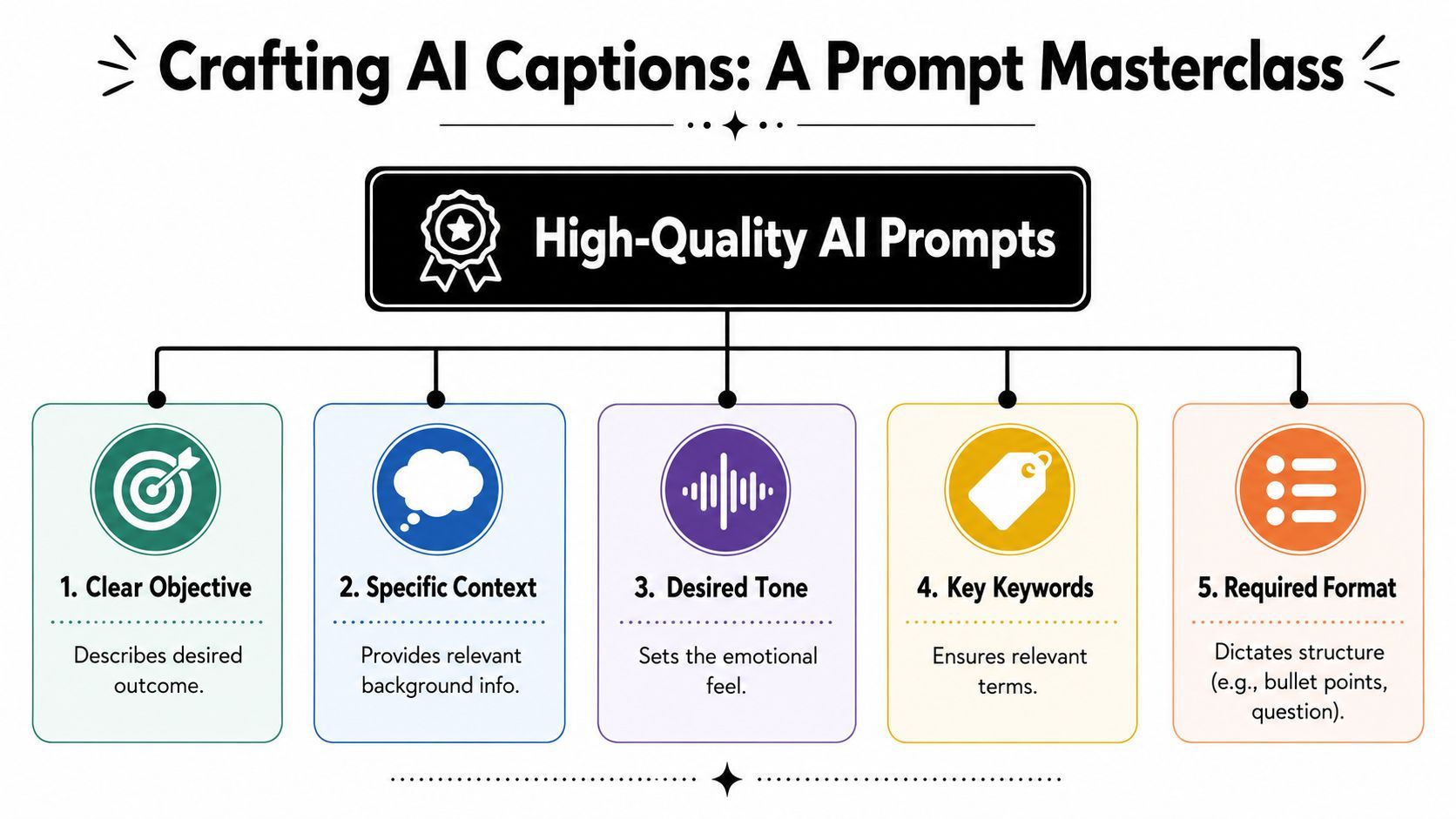
The five inputs that actually matter
A usable prompt usually needs five parts.
-
Platform Tell the tool where the caption will live first. Instagram, LinkedIn, TikTok, X, and Facebook reward different pacing, formatting, and tone.
-
Post description Give a compact summary of what the audience is seeing. One or two lines is enough if they're specific.
-
Keywords Add the core topic terms you want reflected in the caption. This helps the tool stay on subject and avoid vague filler.
-
Tone Choose how the caption should sound. “Professional but direct” gets better output than “good.”
-
CTA Be explicit about what the reader should do next. If you leave this out, the tool often defaults to generic engagement bait.
Bad prompt versus strong prompt
Weak prompt
- Write an Instagram caption for my video about content marketing
That usually creates broad, forgettable copy.
Stronger prompt
- Write an Instagram caption for a short-form video showing how a solo creator batches one week of content in one afternoon. Audience is small business owners and creators. Tone is practical and confident. Include the keywords content batching, short-form video, creator workflow. End with a CTA asking people to comment “BATCH” if they want the process.
The second version gives the model enough constraints to produce something usable.
Here's a useful way to consider this:
| Prompt element | Weak input | Better input |
|---|---|---|
| Platform | social media | |
| Topic | product launch | tutorial on using our dashboard for faster reporting |
| Tone | engaging | expert, concise, no hype |
| Keywords | none | reporting workflow, analytics, weekly dashboard |
| CTA | none | ask readers to share their biggest reporting bottleneck |
Use a repeatable prompt shell
If you're managing multiple accounts, build one standard prompt template and swap the variables:
Write a caption for [platform].
Post description: [what the content shows].
Audience: [who it's for].
Goal: [engagement, click, save, lead, share].
Tone: [voice style].
Keywords: [terms].
CTA: [desired action].
Constraints: [length, no emojis, include question, avoid buzzwords].
If LinkedIn is a major channel for you, this guide on how to write LinkedIn content with AI is a useful companion because LinkedIn prompts usually need sharper opinion, cleaner formatting, and less social fluff than consumer platforms.
A quick walkthrough helps if you want to see prompt refinement in motion:
Practical rule: if the first output sounds generic, don't edit the caption first. Improve the prompt first.
Adapting AI Captions for Every Platform
A strong core idea can travel across channels. The caption shouldn't.
The mistake is copying the same draft into Instagram, TikTok, LinkedIn, and X with minor edits. Each platform has its own reading behavior. The same message needs a different frame.
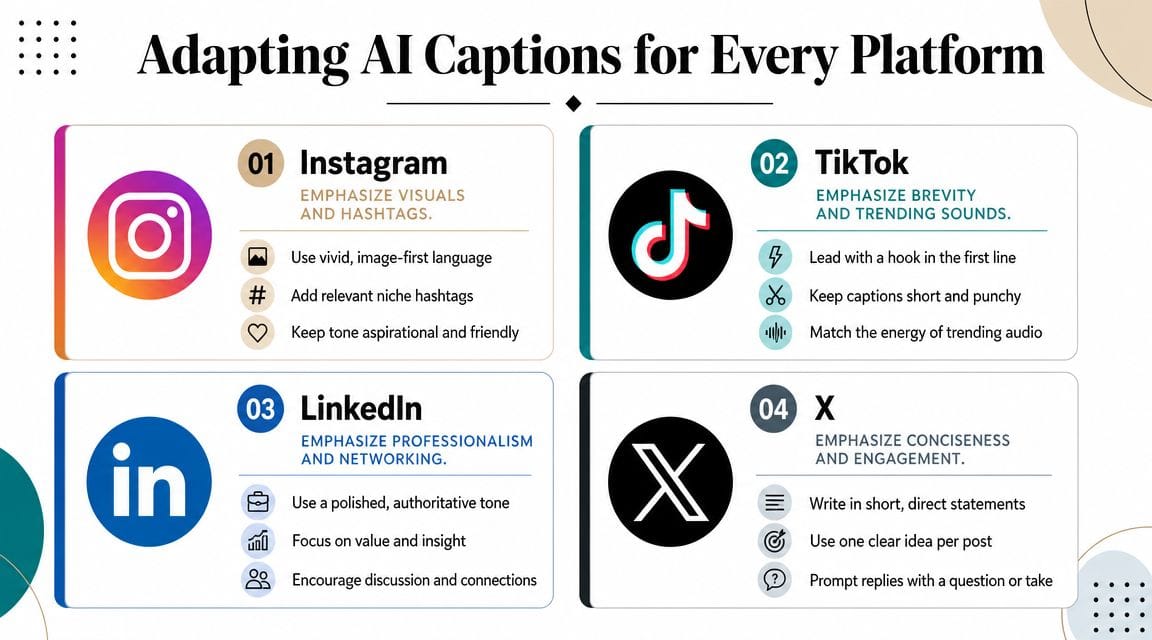
Instagram captions still benefit from narrative shape. Even short captions usually work better when they move from hook to detail to CTA.
Use AI to generate:
- Story-led openings that connect the post to a feeling or moment
- Benefit-focused middle lines that explain why the content matters
- Soft CTAs such as save this, send this, or tell me which one you'd choose
Prompt modifier:
- “Write for Instagram. Lead with a relatable hook. Use natural conversational language. Include hashtags only if they feel relevant.”
TikTok
TikTok captions need less polish and more immediacy. They support the video, not compete with it.
What usually works:
- shorter phrasing
- stronger first line
- language that sounds current without trying too hard
- cues that reinforce the payoff in the video
Prompt modifier:
- “Write for TikTok. Keep it brief. Start with a curiosity hook. Make it sound native to short-form video. No corporate language.”
LinkedIn punishes lazy repurposing. If your AI caption sounds like an Instagram post wearing a blazer, it won't land.
The best LinkedIn adaptations usually have:
- a clear business angle
- a point of view
- one practical takeaway
- cleaner formatting with line breaks
Try prompts like:
- “Rewrite this for LinkedIn as a professional insight for marketers.”
- “Turn this creator tip into a post for managers responsible for content operations.”
- “Keep the tone informed and direct. Avoid hype words.”
The fastest way to make an AI caption worse is to chase platform sameness. Native always beats uniform.
X
X works best when the caption acts like a sharp opinion, a compact observation, or a conversation starter. Long explanation usually loses energy unless the post is intentionally thread-shaped.
Prompt modifier:
- “Write for X. Keep it concise. Lead with a strong statement or question. Make it reply-friendly.”
One idea adapted four ways
Say your content is a video about batch-recording short-form content.
| Platform | Better angle |
|---|---|
| “I stopped filming every day and started batching one afternoon a week. My content got more consistent, and my weekdays got easier.” | |
| TikTok | “Still filming every day? Batch it once and save yourself the chaos.” |
| “Content consistency usually isn't a creativity problem. It's a workflow problem. Batching solved that for our production calendar.” | |
| X | “Most content inconsistency comes from bad workflow, not lack of ideas.” |
The underlying message is the same. The packaging changes.
A simple adaptation habit
When AI gives you one good master draft, don't ask for “versions.” Ask for reframes:
- For Instagram make it more personal
- For TikTok make it punchier
- For LinkedIn make it more insight-driven
- For X make it more debatable
That one word shift produces better outputs because the model changes the communication style, not just the formatting.
The Human Touch Your AI Draft Needs
The draft is where speed happens. The edit is where trust is protected.
Canva highlights a tension many marketers ignore: 54% of consumers say they are more likely to trust a brand if it is transparent about using AI, while 44% say they are less likely to trust brands that use AI without disclosure in Canva's AI caption generator discussion. That's why posting raw AI output is risky. Not because the wording is always bad, but because generic wording signals distance, and distance weakens credibility.

What to edit every time
I don't treat AI captions as publish-ready. I treat them as structured raw material.
Run every draft through this filter:
- Replace generic hooks. If the caption opens with something bland like “Excited to share,” rewrite the first line with a stronger opinion, tension, or concrete moment.
- Add brand language. Insert words your brand consistently uses. If your team never says “achieve your potential,” don't let the caption say it either.
- Check claims. Remove any statement that sounds too absolute, too polished, or too convenient unless you know it's accurate.
- Tighten the CTA. “Let us know your thoughts below” is filler. Ask for a specific response.
- Match the asset. The caption should sound like it belongs to the video, image, or carousel. If the visual is blunt and fast, the copy shouldn't read like a newsletter.
The easiest way to make AI sound human
Specificity beats polish.
A line like “This workflow changed how we approach content creation” is clean but forgettable. A line like “We stopped writing captions after the video was finished and started building them during production” sounds lived-in. It gives the audience something they can picture.
If a caption could sit under any post in your niche, it isn't edited enough.
A quick edit framework
Use this before publishing:
| Check | Question to ask |
|---|---|
| Voice | Would this sound normal if a real person on the team said it out loud? |
| Proof | Is there any claim here that needs trimming or verification? |
| Specificity | Does the post mention a real scenario, tension, or takeaway? |
| CTA | Are we asking for one clear next action? |
| Trust | Does this feel helpful, or does it feel manufactured? |
That final pass usually takes less time than writing from scratch, but it's what stops the caption from sounding outsourced to a machine.
Build a Seamless Caption Generation Workflow
You finish a short-form video, export it, open a caption tool, and realize the original angle is already fuzzy. The draft comes back generic because the system is guessing from scraps. That is the point where caption quality usually drops.
The fix is operational. Build captions inside the content workflow, not after it.
Build the caption while the post is taking shape
Captions get stronger when the AI has the same context the editor and strategist have. That means the brief should travel with the asset from the start.
A practical setup looks like this:
- Set the outcome first. Decide whether the post is meant to drive comments, clicks, saves, or product interest.
- Lock the audience before drafting. A founder audience, creator audience, and buyer audience usually need different hooks.
- Generate angles during production. Draft a few caption directions while the script and edit are still in progress. Educational, opinionated, story-led, and CTA-first are usually enough.
- Review the caption beside the asset. The opening line should match the pace and promise of the video or carousel.
That last step matters more than teams expect. A strong caption can still underperform if it sells a different experience than the post delivers.
Use tools that keep context attached to the asset
For short-form teams, the cleanest workflow is one system for scripting, production, and publishing. ShortGenius for AI video creation and scheduling fits that model. Script, voiceover, edit, and caption work stay tied to the same brief, which cuts down on context loss and handoff mistakes.
I use this approach because it solves a real production problem. If the caption tool only sees a finished export and a vague prompt, it produces safe copy. If it sees the script angle, target platform, and publishing goal, the draft is usually closer to usable on the first pass.
If you want the bigger system to hold together, it helps to master your content lifecycle with AI so captions inherit the same strategy as the script, creative, and distribution plan.
The workflow I'd give a content team
Use a simple sequence and keep each step tied to the same brief.
| Step | What happens |
|---|---|
| Content brief | Define audience, offer, platform, hook angle, and desired action |
| Asset production | Build the video or visual using that brief as the source of truth |
| AI caption drafting | Generate 3 to 5 caption options for different angles or CTAs |
| Editorial pass | Choose one version, trim weak lines, and align it with the asset |
| Scheduling | Assign the right caption version to each platform and publish slot |
This workflow is faster than writing captions at the end, but speed is not the main benefit. The primary gain is consistency. The caption sounds like it belongs to the post because it came from the same system that produced the post.
Measure and Optimize Your AI-Powered Captions
A caption generator saves time. It doesn't guarantee performance. You still need a feedback loop.
The easiest way to improve is to test one variable at a time. Don't compare two completely different captions and guess what caused the result. Compare one deliberate difference.
Smart A/B tests to run
Try testing pairs like these:
- Hook style. Question versus statement
- CTA type. Direct ask versus softer invitation
- Angle. Personal story versus tactical takeaway
- Tone. Casual versus expert-led
- Length. Tight caption versus fuller explanation
What to look at
Match the metric to the purpose of the post.
- Engagement quality for community posts. Look at comment depth, saves, and shares.
- Click behavior for traffic posts. Watch which caption framing drives more outbound action.
- Sentiment for brand-led posts. Read replies and comment tone, not just totals.
- Retention signals for video-linked posts. If the hook in the caption mismatches the video, the post often feels disjointed.
A high-performing caption doesn't just attract attention. It attracts the right action.
Keep a running swipe file of winners by platform. Tag them by hook style, CTA, topic, and tone. After a few posting cycles, patterns show up. You'll learn which prompts create usable drafts, which edits make them sound human, and which caption structures consistently fit your audience.
If you want caption generation to happen inside the same system as scripting, editing, and publishing, ShortGenius (AI Video / AI Ad Generator) is built for that workflow. It lets creators and teams move from idea to video to multi-platform post creation in one place, which makes it easier to keep captions aligned with the actual asset instead of writing them as an afterthought.