Unlock the ai short video generator for viral content

Discover how an ai short video generator can accelerate content creation, boost engagement, and grow your social media presence.
An AI short video generator is a tool that takes a simple text prompt and automatically creates a complete, ready-to-post short video for platforms like TikTok, Instagram Reels, and YouTube Shorts. It’s like having an entire production team on standby, ready to turn your ideas into polished videos in minutes, not days.
The New Way to Create Viral Content
For years, creating high-quality video felt like a major roadblock for most people. It meant dealing with expensive cameras, complex editing software, and a huge time commitment. AI short video generators are completely flipping that script.
Now, instead of a drawn-out, multi-day production process, you can create a professional-looking video in the time it takes to drink your morning coffee. This technology essentially acts as an automated video studio. You feed it a simple idea—a single line of text is often enough—and it handles the rest, pulling together relevant visuals, adding a voiceover, and generating captions.
To see just how much the process has changed, let's compare the old way with the new.
Traditional vs AI Short Video Production At a Glance
This table provides a high-level comparison of the resources required for traditional video production versus using an AI-powered generator, highlighting the dramatic improvements in cost and time.
| Metric | Traditional Production | AI-Powered Generation |
|---|---|---|
| Time | Days to weeks | Minutes to hours |
| Cost | $1,000s per video | $0 to $100s per month |
| Skill Level | High (editing, filming) | Low (basic prompting) |
| Team Size | Multiple people | One person |
The difference is staggering. What once required a team and a significant budget is now accessible to anyone with an idea.
Putting Professional Video in Everyone's Hands
This isn't just about making things faster; it's about making professional-grade video accessible to everyone. These tools level the playing field, so you don't need a film degree or a huge budget to compete for eyeballs on social media.
Imagine having an automated studio that takes a simple idea or a line of text and transforms it into a polished, engaging video for TikTok, Reels, or Shorts in minutes. This is the new reality for content creation.
For a solo creator, this means finally escaping the burnout of trying to post fresh content every single day. For a social media manager, it’s the power to A/B test dozens of ad concepts without blowing the entire quarterly budget. This is why AI generators are quickly becoming a must-have tool for anyone trying to keep up with the relentless demand for short-form video. The content these tools produce is a form of synthetic media—digital content created or modified by artificial intelligence.
A Market That's Exploding
This rapid adoption is lighting a fire under the market. The global AI video generator market was valued at around $717 million in 2025 and is projected to climb to between $847 million and $1.04 billion by the end of 2026.
This growth is fueled by one simple fact: short-form video works. In fact, short videos now account for 67% of all AI-generated content, a testament to their power on social platforms. These numbers aren't just abstract figures; they signal a fundamental shift in how we create and consume content online. Learning to use an AI short video generator is no longer a niche skill—it's becoming essential for marketers, creators, and business owners who want to stay relevant.
How AI Short Video Generators Bring Ideas to Life
At first glance, an AI short video generator can feel like magic. You type in an idea, and a few minutes later, a fully edited video appears. But what’s really happening under the hood? It’s less about magic and more like having an entire automated production crew at your command.
Think of it this way: each part of the video creation process is handled by a specialized AI, all working together seamlessly. You don't need to know the technical details to get a great result, but understanding the workflow shows just how powerful these tools are.
It all begins with your prompt. When you provide a simple instruction, like "a 30-second video about the benefits of drinking water," you're essentially handing over a creative brief to your AI team. That single sentence sets off a surprisingly sophisticated chain of events.
The AI Scriptwriter and Storyteller
So, what happens first? Your prompt is passed to the AI Scriptwriter. This part of the system is built on a Large Language Model (LLM)—the same technology that powers the most advanced AI chatbots. The LLM doesn't just read your prompt; it understands the core concept and then crafts a script that’s punchy and perfect for a short-form video.
It breaks the main idea down into a compelling narrative with short, memorable lines. For our water example, it might write, "Did you know that staying hydrated can supercharge your energy levels?" followed by, "It's also the secret to clear, glowing skin." This script forms the narrative backbone for everything that follows.
The AI Cinematographer and Set Designer
Once the script is locked in, the AI Cinematographer and Set Designer get to work. These "roles" are played by generative AI models that specialize in creating visuals from text. They analyze the script, line by line, and start producing the actual scenes for your video.
For the line about energy, the AI might generate a clip of someone looking vibrant and active. For the part about skin, it could create a shot of a person with a healthy, radiant complexion. These creative decisions are based on the AI’s analysis of countless images and videos, allowing it to pick or create the perfect visual to match the script's message.
At its core, an AI short video generator is a system that brilliantly orchestrates three key AI technologies: natural language processing for the script, generative models for the visuals, and text-to-speech for the narration. The platform itself acts as the director, making sure every AI "crew member" hits their cues perfectly.
This diagram gives you a clear picture of how a simple idea is transformed into a polished, shareable video.
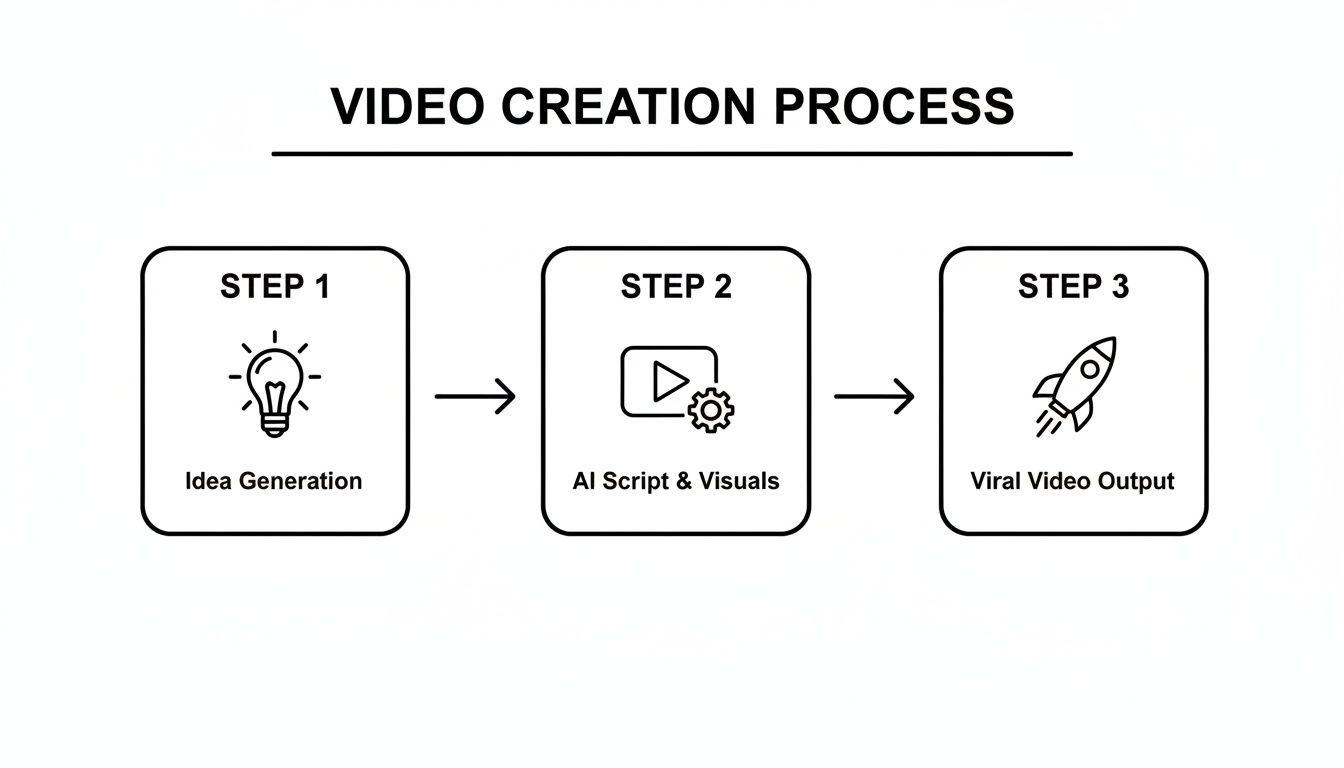
As you can see, the process flows from your initial concept through the powerful AI engine and results in a compelling video ready to go viral.
The AI Narrator and Final Assembly
The final touch is the voiceover, handled by the AI Narrator. Using advanced text-to-speech (TTS) technology, this component turns the written script into a natural-sounding voice. Most tools let you choose from a library of voices, accents, and tones, so you can find one that fits your brand perfectly.
With all the raw materials ready, the platform begins the final assembly:
- Scene Creation: The generated video clips and images are laid out on a timeline in the correct order.
- Voiceover Sync: The AI narration is perfectly timed to match the visuals on screen.
- Captioning: Captions are automatically generated from the script. This is a huge deal, since many people watch social media videos with the sound off.
- Music and Effects: A fitting background music track is added to set the mood and drive the video's pace.
This whole automated workflow is what makes an AI short video generator such a game-changer. A platform like ShortGenius brings all these steps under one roof, letting you go from a fleeting thought to a finished video in minutes—a process that would have taken a human team days of work.
Essential Features of Top AI Video Tools
 Let's be honest—not all AI video tools are built the same. While dozens of platforms can spit out a basic video, the truly great ones have a set of features that make a real difference. These are the functions that turn a fun novelty into a serious tool for growing your brand.
Knowing what to look for is the key to picking a platform that actually saves you time and gets you results. So, what separates the best from the rest?
Automated Script-to-Video Creation
At its heart, a great AI video generator should take your raw ideas and spin them into a nearly-finished video. This is the magic of it all. You give it a blog post, a simple prompt, or a few bullet points, and the AI does the initial heavy lifting of scripting and finding the right visuals.
For instance, you could just type "create a 30-second TikTok about the benefits of cold brew coffee." The AI then gets to work, writing a script and sourcing clips—maybe a shot of coffee being poured or someone smiling with energy—before piecing it all together. To get a better feel for how this works under the hood, you can explore the basics of text-to-video technology. This one feature is an absolute game-changer for getting projects off the ground fast.
Hyper-Realistic AI Voices
Nothing screams "AI-generated" like a robotic, monotone voiceover. That's why top-tier tools come packed with hyper-realistic AI voices that are genuinely difficult to distinguish from a human. Having a library of different genders, accents, and tones lets you find the perfect voice to match your brand's vibe.
These advanced text-to-speech systems can even handle pacing and inflection, adding emphasis just where you need it. It’s like having a voice actor on call 24/7, minus the scheduling headaches and high costs.
The real power of an AI short video generator lies not just in automation, but in its ability to produce content that feels authentic and high-quality. Features like realistic voices and automated captions are what make the final product feel professional, not machine-generated.
Auto-Generated Captions and Subtitles
Think about how you scroll through social media—most of the time, your sound is off. This makes captions an absolute must-have. The best AI tools automatically transcribe the audio and sync captions to your video, saving you from the mind-numbing task of typing and timing them yourself.
This isn't just about convenience. It’s about engagement and accessibility. Videos with clear captions get watched longer and their message sticks. Look for a platform that also lets you easily tweak the font, color, and positioning to keep everything on-brand.
Brand Kit Integration
Building a recognizable brand means staying consistent. A premium AI short video generator makes this effortless with a brand kit feature. This is where you upload your logo, primary colors, and custom fonts one time.
From then on, the AI can automatically add your logo as a watermark, use your brand colors for text, and apply your specific fonts to every video. It’s a simple feature that ensures every piece of content looks and feels like it came from you, without you having to manually adjust every single detail.
Significant Time and Cost Reduction
When you add up all these features, the impact on your wallet and your watch is enormous. Traditional video production is famous for being a black hole for time and money. The efficiency gains from AI, however, are just staggering.
Recent data shows AI can slash video production costs by an incredible 91%, bringing the average cost per minute down from $4,500 to just $400. What's more, the time it takes to produce a 60-second marketing video can shrink from 13 days to an unbelievable 27 minutes.
This kind of efficiency gives you the freedom to produce more content, experiment with new ideas, and jump on trends the moment they happen. To see where these tools fit in the broader creative landscape, it's worth checking out roundups of the best AI tools for content creators. When you’re ready to choose, make sure the platform you pick has the core features that deliver these incredible benefits.
Who Really Needs an AI Video Generator?
You might think this kind of advanced tech is only for video pros or huge corporations. But in reality, an ai short video generator is a game-changer for anyone who has something to say but lacks the time, budget, or crew to say it with video.
The common thread isn't technical skill; it's the need to create great-looking short videos consistently, without getting bogged down by the usual production headaches. From one-person shops to entire marketing departments, the people finding an edge with these tools are surprisingly diverse.
The Solo Creator and Influencer
If you’re a solo creator, you know the grind. You’re expected to churn out fresh content for TikTok and Reels every single day. You’re the writer, the talent, the editor, and the promoter—all rolled into one. It’s a recipe for burnout.
An AI generator acts like a creative partner, automating the most draining parts of the job.
- Smash Through Creative Block: Staring at a blank screen? Just feed the AI a simple idea, and it can spit back a complete video concept you can run with.
- Multiply Your Output: Instead of spending a whole afternoon editing a single 30-second clip, you can generate several in the same amount of time. Your feed stays active, and your audience stays engaged.
- Keep a Consistent Rhythm: The algorithms favor consistency. An AI tool makes it ridiculously easy to stick to a regular posting schedule, which is vital for growth.
For the solo creator, this isn't just about saving a few hours. It's about getting your creative spark back and building a sustainable presence.
The Social Media Manager and Marketing Team
Now, picture a social media manager trying to juggle multiple campaigns and keep the brand’s channels from going stale. Their biggest hurdles are often a tight budget and the relentless demand for new ad creatives.
This is where an AI video tool really shines. A marketing team can spin up dozens of ad variations to test different hooks, visuals, or calls to action, all without booking a single expensive video shoot. You can see just how effective this is when creating powerful AI UGC ads that truly connect with people. This power to test and learn at speed is a massive competitive advantage.
For marketers, an AI short video generator is a force multiplier. It allows them to experiment at scale, find what resonates with their audience faster, and stretch their marketing budget further than ever before.
The data backs this up. Small businesses and freelancers have been quick to adopt these platforms, making up 46% and 61% of new sign-ups, respectively. These nimble players are leveling the playing field, with 31% of AI videos being product demos. A huge 43% of the time, they're starting with just a simple text prompt. You can dig into more of this data in a report about AI video generation statistics.
The Online Educator and Coach
Finally, let’s talk about the online coach or educator putting together a new course. They know video is the best way to teach, but the thought of producing hours of polished instructional content is just daunting.
With an AI platform, they can instantly repurpose all their written materials—scripts, blog posts, and lesson outlines—into compelling videos. This opens up a world of possibilities:
- Turn Text into Lessons: An entire text-based module can become a dynamic video lecture complete with visuals, voice-over, and captions.
- Generate Quick Promos: They can create snappy, shareable videos for social media to market their course and attract new students.
- Update Content with Ease: When a topic needs a refresh, they can simply edit the script and regenerate the video in minutes. No more reshooting an entire lesson for a small change.
For educators, this technology makes professional course creation more accessible than ever, ultimately giving their students a much better learning experience.
Creating Your First AI Video from Start to Finish
 Alright, enough with the theory. Let's get our hands dirty and see what an AI short video generator can actually do. The best way to understand the magic is to walk through the creation process from beginning to end.
For this example, we’ll aim to create a calming, 30-second social media video. Our only starting point is a simple idea, which we’ll give to the AI as a text prompt.
Prompt: "A 30-second video on the benefits of morning meditation for reducing stress."
Believe it or not, that single sentence is all the creative direction the AI needs to get to work.
Step 1: Generate the Script and Scenes
First, the AI unpacks your prompt to understand the core message: meditation for stress relief. It then writes a concise script and, more importantly, breaks it down into individual scenes. A platform like ShortGenius doesn't just stop at the text; it immediately starts matching each line with a fitting visual from a stock library or by generating entirely new AI clips.
Here’s how that plays out with our prompt:
- Scene 1 Script: "Start your day with calm."
- AI Visual: The tool finds or creates a clip of a serene sunrise over a quiet lake.
- Scene 2 Script: "Just a few minutes of meditation can melt away stress."
- AI Visual: It generates a shot of a person sitting peacefully, eyes closed, in a sunlit room.
- Scene 3 Script: "Find your focus and embrace a peaceful mindset."
- AI Visual: The AI produces a close-up of a calm face, which then transitions to a gentle ripple in water.
In a matter of seconds, you have a complete storyboard. The script is written and the visuals are already in place, giving you a solid foundation for your video.
Step 2: Select a Voice and Generate Audio
Now that your video has a structure, it’s time to give it a voice. This is where you pick an AI-generated narrator that fits the mood. For our meditation video, a calm, soothing, and gentle voice is the obvious choice.
The best generators offer a huge library of lifelike voices with different accents, genders, and emotional tones. You just listen to a few samples, click the one you like, and the AI instantly generates a professional-sounding voiceover, perfectly timed to the scenes it just created. No microphone or recording studio needed.
The real magic is realizing you can change the entire video's feel just by switching the voice. A high-energy, confident voice could make a product demo feel exciting, while a warm, friendly voice makes an explainer video more welcoming.
And if you already have your own photos or video clips, most tools let you use those instead. You can see how platforms transform existing assets by learning more about image-to-video AI models.
Step 3: Apply Branding and Final Touches
Your video is almost done, but it doesn't feel like your video yet. This last step is all about branding. If you've set up a brand kit, you can apply your company's look and feel with a single click.
- Add Your Logo: Place your logo as a small, non-intrusive watermark in one of the corners.
- Generate Captions: The AI can generate subtitles instantly and style them with your brand's font and colors—a must-have for people watching on social media with the sound off.
- Add a Call to Action: End with a simple text overlay encouraging viewers to "Follow for more wellness tips" or visit your website.
Once you’ve added these final touches, give the video a quick preview. Need to tweak something? You can swap out a scene or adjust the timing of a caption right there on the platform.
When you're happy with it, you just export the final video. Many platforms will even let you schedule it to post directly to your social media accounts. The whole workflow, from a single sentence to a fully branded video, is finished in minutes.
Choosing the Right Tool and Measuring Success
The market for AI video tools is booming, and trying to pick the right one can feel like a real challenge. With so many options popping up, it's easy to get distracted by flashy demos. But a smart decision comes down to focusing on what will actually help you create great content, consistently.
First things first, look at the fundamental quality of what the tool produces. Does the AI short video generator create visuals that are genuinely compelling, or are they just blurry and generic? Pay close attention to the AI voices, too. Do they sound natural and engaging, or are you stuck with a robotic narrator that will have viewers tuning out in seconds? A tool is only as good as the content it helps you make.
Key Criteria for Evaluating an AI Video Generator
Beyond the basics, a few key factors will tell you if a tool is the right fit for your workflow. Creative control is a huge one. How easy is it to swap out scenes, tweak the script, or adjust the timing? The best platforms feel like a creative partner, not a rigid black box that forces you into a corner.
Of course, ease of use is just as important. The whole point of using AI is to save time and effort, so the interface needs to be intuitive. You should be able to go from a simple idea to a finished video without needing to study a manual for hours. Finally, take a hard look at the pricing. Does it make sense for how much you plan to use it? You want a plan that offers real value, not one that locks you into expensive features you’ll never touch.
The best tool isn't the one with the longest feature list. It's the one that hits the sweet spot between high-quality output, creative freedom, a user-friendly design, and fair pricing. It should fuel your creativity, not get in its way.
It also helps to know what's happening in the broader market. Right now, North America is the dominant player, holding a massive 41% market share. This is mostly thanks to widespread adoption by businesses and a high concentration of AI developers. However, the Asia-Pacific region is the one to watch—it's the fastest-growing market, expanding at an incredible 23.8% CAGR. You can dig deeper into these trends with the latest AI video generation statistics.
Measuring Your Return on Investment
Once you’ve settled on a platform, your work isn't done. Now you have to prove it was worth it. Just making videos isn’t enough; you need to track your return on investment (ROI) with real data. This is how you justify the expense and show your team or stakeholders the tangible impact the tool is having.
To get a clear picture of your success, start tracking a few key performance indicators (KPIs). These numbers are the proof you need to show the tool is working.
Meaningful KPIs to Track:
- Cost-Per-Video: This is a simple but powerful one. Divide your monthly subscription cost by the number of videos you create. When you compare that number to what you would have spent on traditional production or freelancers, the savings often speak for themselves.
- Time Saved Per Week: Think about all the hours you used to sink into scripting, finding clips, editing, and adding captions. Putting a number on that—for example, "10 hours saved weekly"—makes the efficiency gains impossible to ignore.
- Engagement Rate Lift: Keep an eye on your metrics like likes, comments, shares, and average watch time. When you see these numbers go up on the videos you’re creating with the new tool, it’s a direct sign that you're making better content that your audience loves.
By focusing on these practical criteria and measurable results, you can confidently pick the right AI short video generator for your needs and prove its value. This approach turns the tool from a line item on an expense report into a powerful engine for your growth.
Common Questions About AI Short Video Generators
It’s completely normal to have a few questions when you first hear about AI creating videos. Many people I talk to are skeptical. They worry about where the content comes from, how much say they actually get in the final product, and whether they need a technical degree just to get started. Let's clear the air on these common concerns.
The biggest question is usually about originality and copyright. Can you really use what an ai short video generator spits out? The short answer is yes, as long as you use a reputable platform. The best tools are trained on massive libraries of licensed and public domain media, so they aren't just scraping random videos from the web. This means the visuals, script, and voiceover it synthesizes for you are a unique combination, protecting you from copyright strikes.
How Much Creative Control Do I Have?
That brings us to another big question: the balance between automation and your own creative vision. While the AI does the heavy lifting on the first draft, you’re always in the director's chair. A solid platform will let you easily swap out scenes, rewrite the script, audition different AI voices, and adjust the timing down to the millisecond.
You have the power to override any suggestion the AI makes. This is where the magic really happens—it’s a collaboration between AI speed and human intuition that helps you get the final video exactly right.
What Is the Learning Curve?
Honestly, the learning curve on most of these platforms is surprisingly flat. They’re built for efficiency, not for engineers. If you can type a sentence or copy and paste a link, you have all the skills you need to generate your first video in a matter of minutes.
Think of an AI short video generator not as a replacement for your creativity, but as an amplifier for it. It's like having a tireless assistant who handles all the tedious parts, freeing you up to focus on the story and the big picture.
The future of video is clearly tied to AI. The market for AI video generation is projected to hit an incredible $3.44 billion by 2030, and some experts predict that 90% of all online video will soon involve AI in some part of its production. Getting comfortable with these tools now is a smart move, and you can find out more about these AI video statistics to see where things are headed.
Ready to see for yourself? ShortGenius offers that perfect blend of AI efficiency and creative freedom, letting you produce professional-quality videos in minutes. Give it a try for free and see just how easy it is to bring your ideas to life. Create your first video with ShortGenius today!