AI Product Video Generator: A Creator's Guide for 2026

Discover how an AI product video generator can transform your content. This guide explains how they work, key features, and best practices for creating videos.
You've got a product to promote, a launch date coming up, and a list of formats to fill. One clip for the product page. Another for Instagram Reels. A tighter cut for paid social. Maybe a silent version with captions, plus a voiceover version for YouTube. The hard part isn't only making one good video. It's making a whole set of usable videos without turning every campaign into a mini film production.
That's why the AI product video generator has become so interesting to creative teams. It changes the job from “organize a shoot, wait on edits, request revisions” to “build a repeatable system for ideas, assets, versions, and publishing.” If you've only seen AI video as a prompt box that spits out a flashy demo, you're missing the bigger shift.
The category is also bigger than many people assume. The global AI video generator market was valued at USD 415 million in 2022 and is projected to reach USD 2,172 million by 2032, with an estimated CAGR of 18.5%, according to Market.us research on the AI video generator market. That projected growth matters because it signals that AI video is no longer a fringe experiment. Teams are building real workflows around it.
The End of the Endless Video Production Cycle
A familiar product video process usually starts with good intentions. Someone writes a brief. Someone else asks for product photos. Then the team realizes the hero angle is missing, the label reflection looks off, and the only lifestyle footage doesn't match the current campaign. By the time a rough cut arrives, the market moment has already moved.
That cycle is frustrating because every delay compounds. The designer waits on the copy. The editor waits on the assets. The marketer waits on approvals. If you need three versions for three channels, the work often triples instead of scaling smoothly.
Why the old workflow breaks down
Traditional production is still great for flagship brand pieces. But most product marketing doesn't live in that world. It lives in weekly launches, seasonal variants, creator briefs, ad testing, and constant platform changes. A skincare brand might need a clean demo for a product page, a punchier social cut with fast captions, and a tighter ad version that opens with the problem instead of the product.
That's where an AI product video generator changes the game. It doesn't just make a clip faster. It compresses several roles into one workflow. Script drafting, scene planning, visual generation, voiceover, captioning, and resizing can happen in a single session instead of across multiple tools and handoffs.
The real breakthrough isn't “AI can make a video.” It's “AI can keep a campaign moving when the asset list, channels, and deadlines keep changing.”
What creators actually gain
The biggest relief is operational. You can test an idea before committing to a full production path. You can turn one product concept into multiple hooks. You can update a feature callout without rebuilding the whole edit from scratch.
For creative professionals, that creates a useful shift in mindset:
- Less time chasing assets: You spend more time shaping the story.
- Less friction between versions: Vertical, square, and horizontal cuts stop feeling like separate projects.
- More room to experiment: A new concept doesn't require a new shoot every time.
An AI product video generator works best when you treat it as a production system, not a novelty effect. That's the difference between making one interesting clip and building a repeatable content engine.
How AI Product Video Generators Actually Work
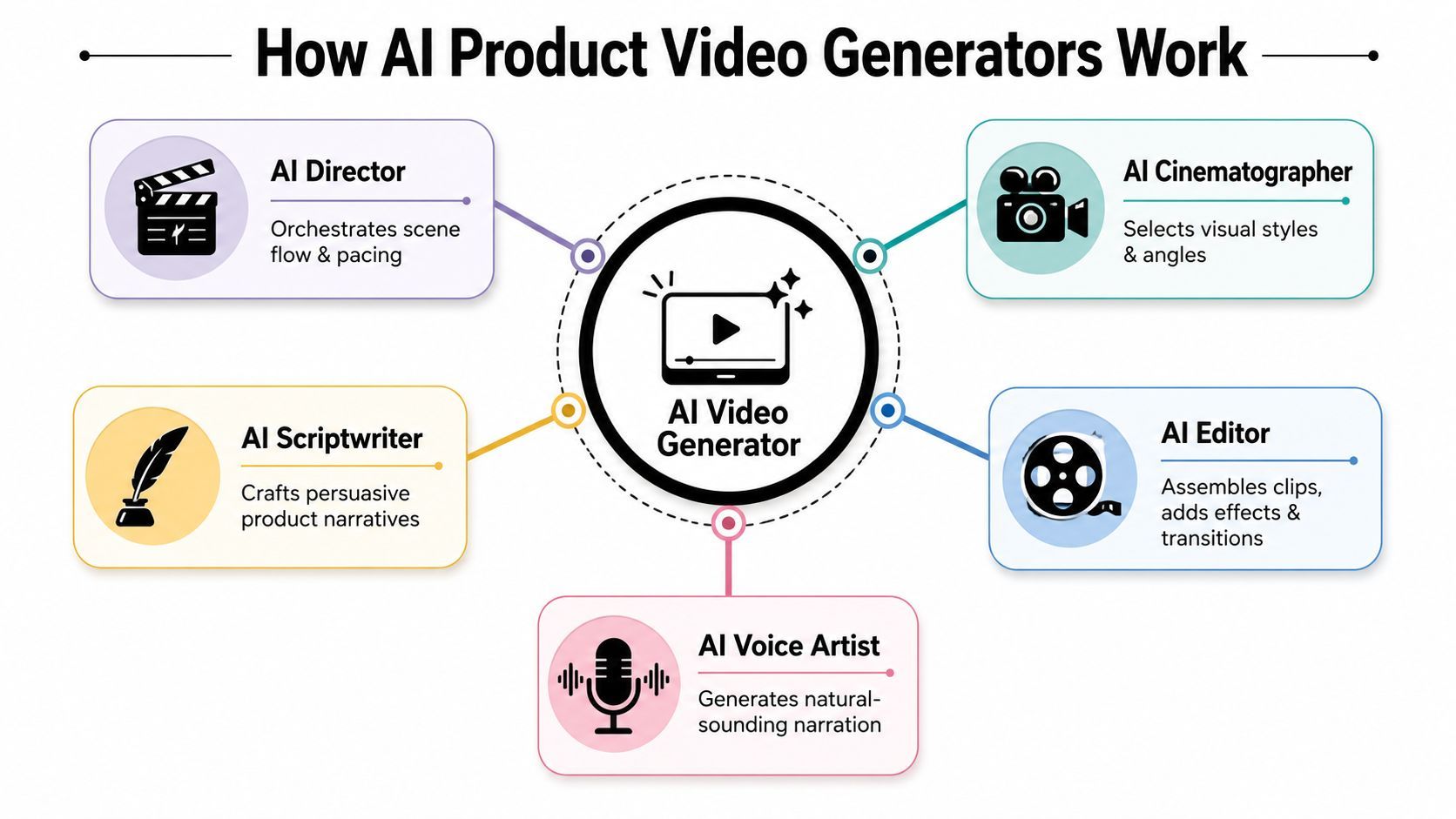
The easiest way to understand an AI product video generator is to think of it as a digital film crew. Not a magical black box. A crew.
One part acts like a scriptwriter. Another behaves like a director, deciding scene flow and pacing. Another handles visual generation or asset selection. Another voices the script. Another assembles everything into a finished edit.
The inputs you give it
Most tools start from one or more of these inputs:
- A text prompt: “Create a premium product video for a matte black water bottle with close-up detail shots and a clean studio style.”
- A product image: Often used when you want the AI to animate or reinterpret a real product.
- A product page or URL: Useful when the tool can pull copy, features, and structure from existing content.
- A script draft: Best when your messaging already exists and you want the system to build visuals around it.
Each input tells the model something different. A prompt gives direction. An image gives visual grounding. A script gives message control. A URL gives product context and feature language.
What happens after the input
Once the system has enough context, it usually moves through a sequence like this:
-
Planning the narrative
The tool identifies the main product promise, supporting benefits, and a likely structure. That might become a hook, feature sequence, proof moment, and call to action. -
Generating or selecting scenes
Depending on the platform, it may create scenes from prompts, animate stills, or pair your script with existing media. -
Adding voice and text
The system can produce narration, captions, headline overlays, and timing suggestions. -
Editing the first cut
It assembles transitions, pacing, scene order, and music into a draft that you can refine.
A lot of confusion comes from the terms text-to-video and image-to-video.
| Mode | Best for | What you should expect |
|---|---|---|
| Text-to-video | Early concepting, ad ideas, storyboarding | More creative flexibility, less control over exact product details |
| Image-to-video | Product showcases, hero shots, SKU-based content | Better grounding in the real product, but still needs review for accuracy |
Where people overestimate the tech
The AI can do a surprising amount of assembly work. But it still needs clear direction. If your input is vague, the result is usually vague too. If your product positioning is muddled, the video won't fix that.
Practical rule: Treat the first AI draft like a fast rough cut, not a final master.
That mindset also helps when you connect AI video to the rest of your commerce stack. Teams exploring automation often pair video workflows with systems that develop AI bots for e-commerce growth, so product content, customer interactions, and campaign operations support each other instead of living in separate silos.
The useful mental model is simple. You're not replacing creative judgment. You're giving routine production tasks to software so you can spend your energy on message, brand feel, and performance.
The Strategic Advantages for Brands and Creators
The strongest case for an AI product video generator isn't that it looks futuristic. It's that it fits the pressure modern teams are already under. More channels, more variants, shorter campaign cycles, and less patience for bloated production timelines.
That pressure is why adoption has moved into the mainstream. One industry source reports that 78% of B2B marketing teams use AI-generated video in at least one campaign per quarter, and that AI-created product demo videos can improve conversion rates by up to 40%, according to Coherent Market Insights coverage of AI video maker trends. Even if your work isn't in B2B, those figures matter because they connect AI video to actual workflow use and commercial results.
Speed changes the kind of ideas you can test
In a conventional workflow, every new angle can feel expensive. A new hook means a new brief. A new cut means another editing request. AI lowers that friction.
That changes behavior. Teams test more openings, compare product benefit framing, and adapt the same core idea across multiple placements. A creator can take one serum bottle and try a luxury beauty treatment angle, a routine-focused angle, and a problem-solution angle without rebuilding from zero.
Scale stops being a separate project
One polished video isn't enough for most brands. You need families of videos. Different lengths. Different intros. Different subtitles. Different placements.
An AI product video generator helps because scale becomes part of the initial workflow, not an afterthought. When your scenes, script, and voice live in an editable system, versioning gets easier.
Cost moves from production-heavy to decision-heavy
The savings aren't only about equipment or crew. They also come from fewer dead ends. You can validate a direction earlier. You can see whether a concept works before investing in a high-effort production pass.
That doesn't eliminate human work. It changes where human work matters most.
- Creative judgment still matters: Someone still has to decide what story is worth telling.
- Brand review still matters: Product accuracy and tone need oversight.
- Performance thinking matters more: Since versioning is easier, teams need better decision-making about what to test.
If your current bottleneck is “we can't produce enough content,” AI helps with production. If your bottleneck is “we don't know which message wins,” AI helps you learn faster.
For creators and brands, that's the key advantage. Faster output is useful. Faster learning is better.
Must-Have Features in a Modern Generator
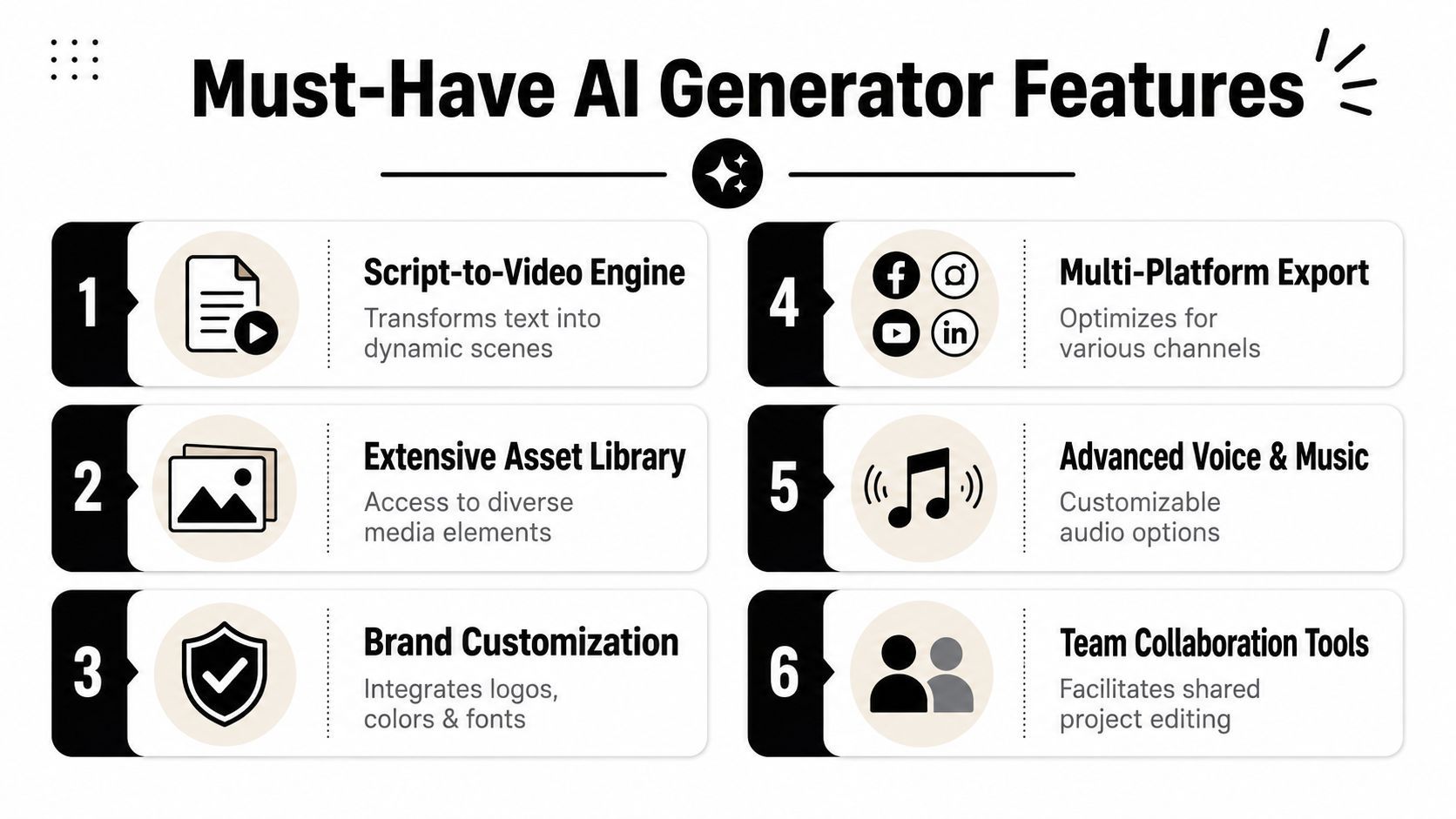
Not every AI product video generator is built for serious work. Some are fine for experiments, trend clips, or mood-board style visuals. Others are much better suited to brand content that has to survive revisions, approvals, and multi-channel publishing.
If you're evaluating tools, don't start with the flashiest demo. Start with the workflow pressure points that slow your team down today.
Features that remove bottlenecks
The strongest platforms tend to solve several problems in one place.
-
Unified creation workspace
If the script lives in one app, visuals in another, and voice in a third, revisions get messy fast. A better setup keeps writing, scenes, narration, and editing connected. -
Brand controls
You want logo placement, fonts, color direction, and recurring styling to stay consistent. Without that, every video feels like a one-off. -
Scene-level editing
You should be able to swap a shot, trim a section, rewrite a line, or replace a voice without rebuilding the whole piece. -
Format adaptation
The tool should help you prepare content for vertical, square, and horizontal outputs in a practical way.
Features that matter once volume increases
A lot of tools look strong at first and then get painful once you produce more than a handful of videos per week.
Here's a cleaner way to judge them:
| Capability | Why it matters in real use |
|---|---|
| Template and preset support | Helps teams keep recurring formats consistent |
| Asset library access | Speeds up fills, cutaways, and supporting visuals |
| Caption and text tools | Critical for silent viewing and platform-native style |
| Voice and music flexibility | Lets you adapt tone without re-editing the whole video |
| Team collaboration | Makes approvals and revisions less chaotic |
| Export and publishing options | Reduces the last-mile friction after editing |
The hidden question to ask
Ask this before you choose a platform: Will this tool reduce revisions, or create new ones?
That question usually reveals everything. A tool can generate impressive drafts but still fail in daily use if it can't hold brand rules, version cleanly, or make small changes quickly.
Choose for the fourth video and the fortieth video, not just the first one.
The novelty layer gets attention. The operational layer creates value. Modern generators need both.
Your Workflow From Idea to Published Video
A strong workflow starts before the first generated shot. Say you need one product story to do three jobs this week: stop a scroll on paid social, explain the offer on a landing page, and give your email campaign a short visual hook. If you build each video from scratch, production drags. If you build one flexible system, each version gets easier.
That is the practical shift. An AI product video generator earns its place when it helps you move from idea to approved, channel-ready variations without losing the brand in the process.
A key challenge in this category is production readiness for paid media at scale. Recent creator and platform coverage points to a shift away from one-off novelty clips and toward campaign libraries that support iteration, consistency, and distribution across formats, as discussed in this creator walkthrough on operational AI video workflows.
Start with the campaign job
Begin with the job the video needs to do, not with visuals.
That distinction sounds small, but it changes the output. A prompt like "make a product video" gives the model too much room to guess. A brief like "create a 15-second retargeting ad for people who already visited the product page" gives it direction, pace, and message priorities.
A few common starting points:
- Launch video: Introduce the product and establish the value proposition.
- Benefit-first ad: Open with the problem or desired outcome.
- Feature explainer: Focus on one mechanism, use case, or differentiator.
- Retargeting cut: Assume product awareness and move quickly to proof or offer.
Once the campaign job is clear, the script gets easier.
Build one core script with branches
The best product videos are usually modular. Hook. Product intro. Benefits. Proof. Call to action.
That structure works like a set of interchangeable blocks. You can swap the hook for TikTok, keep the proof section for a product page, and shorten the close for a paid placement with tighter time limits. The point is not speed alone. It is controlled variation.
Platforms built for both creation and distribution, such as ShortGenius for AI video and publishing workflows, are useful here because the same system can carry your draft into edits, exports, and publishing prep.
Generate visuals with references the model can follow
AI video tools are fast, but they still need guidance. Product photos, packaging shots, brand colors, typography rules, and example scenes all act like a creative brief the model can see.
Be specific with prompts and references. "Matte black bottle, centered white label, soft window light, clean bathroom shelf" gives the generator far more usable direction than "premium skincare ad." One describes the product truth. The other describes a mood.
Then review the output with two questions in mind. Does it persuade? Does it stay accurate?
Use a simple checklist:
- Is the product shape correct?
- Are labels, finishes, and materials consistent?
- Does the pacing match the campaign goal?
- Would this look at home next to the rest of the brand's creative?
A beautiful shot that gets the bottle wrong still creates extra work.
Turn one concept into a channel set
The workflow begins to deliver time savings. One approved concept can produce a small library of assets instead of one final file.
A DTC coffee brand is a good example. The core message might be "faster mornings, better flavor." From there, the team can create a six-second paid social cut with a hard hook, a 20-second landing-page version that explains the brewer, and a subtitle-led feed version that feels more creator-driven. Same campaign. Different jobs.
That is why version planning should happen early, before the final polish pass.
Adapt the edit to platform behavior
Each channel has its own viewing habits. People on a product page often give you more attention than people in a social feed. Paid placements also need room for testing different hooks, lengths, and text treatments.
Refinement usually includes three layers:
-
Opening rewrite for each placement
TikTok and Reels often need a faster first beat than a site video. -
Caption treatment
Readable on-screen text often carries the message when sound is off. -
Length adjustment
A landing-page explainer and a six-second ad should not share the same pacing.
To see how these kinds of edits and outputs come together, this walkthrough is useful:
Publish with naming, versioning, and reuse in mind
Publishing is not the moment you click export. Publishing is the system around the file.
Name versions clearly by campaign angle, audience, format, and hook. Keep your winners easy to find. Save the intros that improve hold rate. Save the proof sections that convert on product pages. Over time, your generator stops being a one-off production tool and starts acting more like a content operating system.
That is the bigger advantage. You are not just making videos faster. You are building a repeatable path from idea to distribution, with brand fidelity and paid media readiness built into the process.
Best Practices for High-Impact Product Videos
A strong product video usually comes from a repeatable process, not a lucky prompt. The teams getting reliable results treat an AI product video generator like a production system. They feed it better references, review outputs against brand rules, and create versions for specific channels and campaign goals.
One place this matters most is brand-accurate product fidelity. If your bottle shape shifts between shots or your label changes color, viewers notice fast. The problem is not only visual polish. It is trust. Creator tutorials show people using design sheets, multiple references, and iterative generations to keep details like logos, materials, reflections, and labels consistent across shots, which suggests this still needs human review rather than being a fully solved feature, as shown in this creator tutorial on maintaining product consistency in AI video.
The habits that improve results
-
Build a product design sheet
Include clean reference images, close-ups of branding, material notes, packaging details, and any visual rules your team cannot afford to lose. This gives the model a stable source of truth. -
Prompt for consistency, not only style
A useful prompt sounds more like art direction than hype. “Same bottle shape, same label placement, same cap finish across all shots” gives the system a clearer job than a pile of cinematic adjectives. -
Generate in stages
Start by locking the product look. Then develop camera movement, scene changes, and alternate cuts from the strongest visual base. It works like approving a product photo before filming the commercial. -
Design with distribution in mind
A video that works on a product page may fail in paid social if the value takes too long to appear. Build each version for the placement, the audience, and the testing plan from the start. -
Keep reusable parts
Save strong hooks, proof moments, captions, and CTAs as modular pieces. Over time, your generator becomes more than a clip maker. It becomes a library you can reuse across launches, retargeting ads, and creator-style variations.
A product video loses momentum fast when the opening is vague or the product itself feels inconsistent.
A simple quality filter
Before publishing, ask four questions:
| Check | What to look for |
|---|---|
| Accuracy | Does the product still match the real SKU, packaging, and finish? |
| Clarity | Can a viewer understand the offer and key benefit within seconds? |
| Platform fit | Does the pacing, text treatment, and framing suit the channel? |
| Testability | Can your team swap the hook, CTA, or proof point without rebuilding the whole video? |
Strong AI-assisted product videos do not come from pressing one button harder. They come from giving the system better inputs, reviewing with genuine brand standards, and building versions with intent.
If you want a faster way to turn product ideas into finished ads and videos, ShortGenius (AI Video / AI Ad Generator) brings scripting, visuals, voiceovers, editing, and publishing into one workflow. It's built for creators and teams who need to go from concept to multi-channel output without juggling a stack of disconnected tools.