10 AI Image Generation Prompts That Work

Explore 10 ai image generation prompts with practical examples for style, composition, branding, thumbnails, products, and multi-platform content.
Over four in five people had used AI to generate images by 2024, and the strongest AI image generation prompts don't win because they're the longest. They work because they define a production goal, then layer in the subject, visual treatment, composition, constraints, and platform requirements.
“Add more adjectives” is still the most popular advice in prompt writing. It's also one of the least reliable ways to improve a production asset. A string of words such as “beautiful, cinematic, stunning, professional, highly detailed” may influence mood, but it doesn't tell an image model what the asset must accomplish.
The better approach is to treat every prompt as a creative brief. Start with the job, describe the subject, establish the style, control the layout, state what must be avoided, and create variations by changing one meaningful variable at a time. That method is more useful for a product ad than an isolated art prompt, and it carries across thumbnails, recurring characters, storyboards, text-safe layouts, branded series, and platform-specific publishing.
Prompt-driven image creation has already moved from novelty to workflow. Research associated with the Pick-a-Pic and Stable Diffusion prompt datasets documented 968,965 user rankings from 66,798 prompts and 6,394 users, alongside a related dataset containing 14 million generated images and 1.8 million unique prompts. The practical question isn't whether you can generate an image. It's whether you can generate the right asset repeatedly, edit it efficiently, and publish it in the format your audience needs.
1. Detailed Descriptive Prompts With Art Style Parameters
A detailed descriptive prompt is useful when the asset needs a recognizable visual treatment across a series. Start with one sentence that names the production job, such as “Create a vertical opening frame for a science explainer about ocean pressure.” Then add the subject, setting, lighting, camera position, color treatment, and intended mood.
A usable structure might look like this:
Create a vertical cinematic opening frame for a short educational video about ocean pressure, showing a research submarine descending above a deep blue trench, dramatic shafts of light from the surface, wide-angle composition, the submarine placed in the lower third, cool navy and teal palette, realistic documentary photography, clear negative space in the upper third, no logos, no extra vehicles, no distorted instruments.
That prompt does more than describe a picture. It establishes a thumbnail or intro job, controls hierarchy, and protects space for later editing. “Inspired by [artist or photographer]” can help guide a visual direction, but it shouldn't replace concrete instructions about light, lens feel, framing, or subject placement.
Test the treatment, not the entire brief
Keep the submarine, trench, placement, and negative space fixed. Change only “realistic documentary photography” to “editorial ink illustration” or “premium 3D animation still.” The comparison then tells you which visual treatment fits the channel, rather than mixing a new subject and new style in every attempt.
Negative prompts can remove predictable distractions, but they aren't a substitute for positive composition. For video intros, generate a small set of angles around the same scene, such as wide establishing, medium subject, and close detail. That gives an editor options without sacrificing continuity.
Adobe's 2024 survey found that Gen Z averaged 17 words per prompt while Gen X averaged 20.1 words, and it reported that more than four in five people had used AI to generate images. The lesson isn't to target a word count. It's to make every phrase carry a production instruction. TikTok openings that boost watch time can help you connect the opening frame to the first seconds of the finished video.
2. Character and Avatar Generation Prompts
Character prompts solve a continuity problem. A recurring animated teacher, beauty avatar, brand mascot, or fictional host needs to look like the same person from scene to scene, even when the pose, setting, and expression change.
Write a character brief before writing episode prompts. Include stable traits such as face shape, hairstyle, skin tone, clothing silhouette, signature accessory, age presentation, and overall attitude. Keep those details in a reusable block, then append the scene-specific action.
Build the identity before the episode
For example:
- Identity: Friendly animated science teacher, oval face, short dark curls, round green glasses, mustard cardigan, navy shirt, small silver star pin.
- Expression: Curious and encouraging, natural smile, attentive eyes.
- Scene: Standing beside a transparent model of a volcano in a bright classroom, one hand pointing to the lava chamber.
- Framing: Medium shot, subject facing slightly toward the empty side of the frame for captions.
- Exclusions: No extra fingers, no changed glasses, no alternate clothing, no text inside the image.
Generate a character sheet first, with front, profile, seated, pointing, surprised, and explaining poses. A sheet gives you a visual reference library and exposes unstable traits before you build a full series. When a model supports reference images or image editing, use the same source identity and describe only the intended change.
Don't rely on “the same character as before” as the sole continuity instruction. It's weaker than repeating the distinctive identity block, and it can fail when images are generated in separate sessions. Short batches make comparison easier, so test a few outputs, inspect facial structure and clothing, and revise the brief before producing the next episode.
For fashion-focused content, a dedicated AI fashion model generator can be useful when the recurring persona needs to present multiple outfits. The production principle remains the same: preserve identity, vary one wardrobe or setting variable, and check whether the model changed anything that was supposed to stay fixed.
3. Product Showcase and Lifestyle Image Prompts
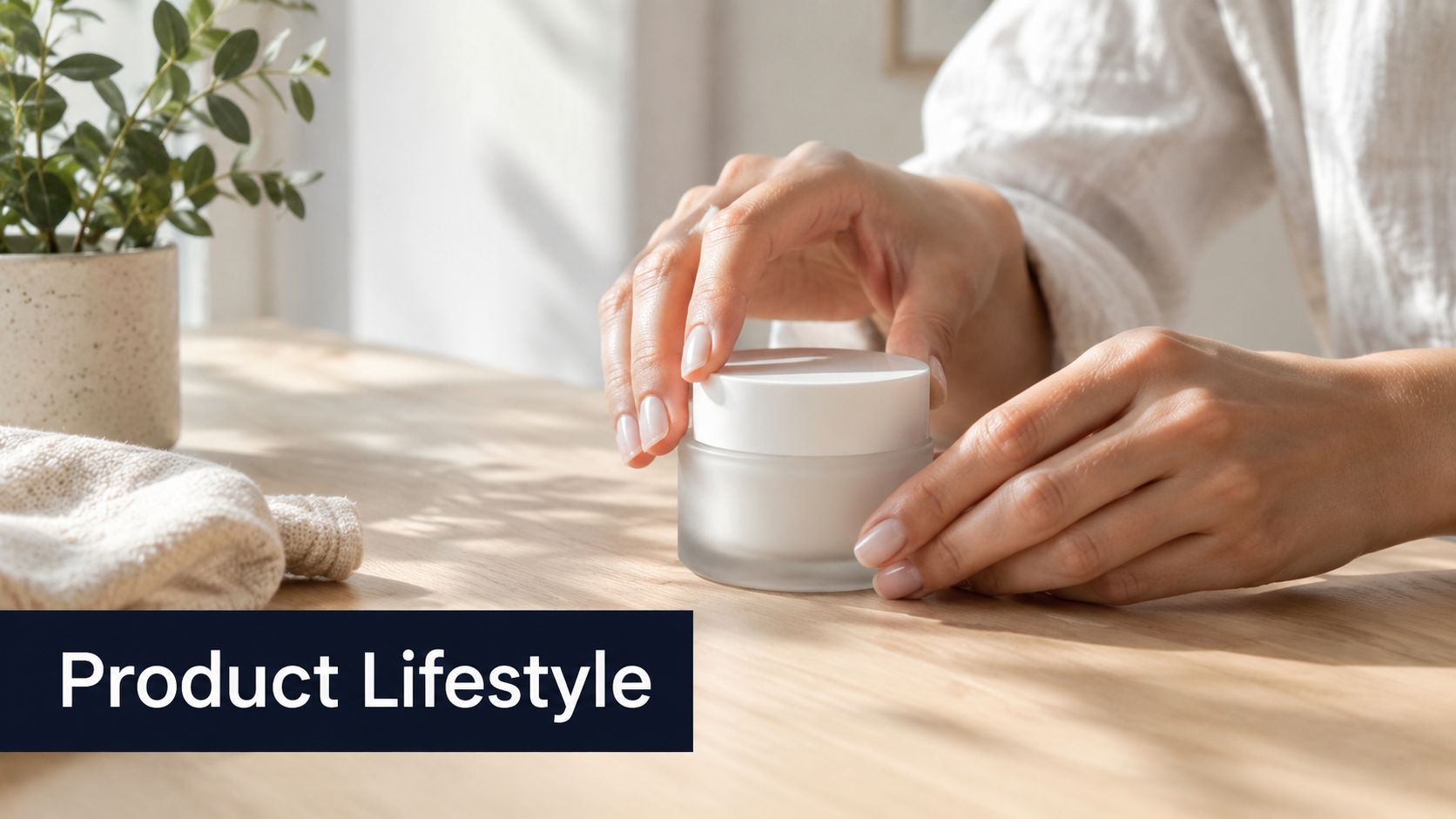
Product prompts should protect the product before they decorate the scene. A skincare jar, shoe, drink can, or tech accessory needs accurate shape, packaging, proportions, label placement, and material cues. Lifestyle context comes after that foundation.
Start with a product-only description:
“Small cylindrical glass skincare cream jar with a matte ivory lid, pale green cream visible inside, minimal black label, centered on a light wooden table.”
Then add the use case:
“An adult hand opens the jar beside a folded white towel and a ceramic water glass, soft morning window light, quiet bathroom-inspired setting, premium lifestyle photography, realistic skin and glass reflections, product fully visible, no altered label text.”
Separate product truth from campaign variation
Create one controlled family of scenes:
- Environment: Light wooden table, bathroom shelf, travel pouch.
- Action: Opening the jar, applying cream, placing it beside a towel.
- Audience cue: Minimal skincare routine, premium self-care, practical morning routine.
- Camera treatment: Clean product photography, candid lifestyle photography, soft editorial close-up.
Change one group at a time. If you alter the environment, hand position, lighting, and camera treatment simultaneously, you won't know why the jar became distorted or lost visual prominence. AI image generation prompts often fail in commerce because the scene becomes more persuasive than the item being sold.
Use actual captions, logos, and final brand elements in an editing stage rather than trusting generated packaging text. ShortGenius can bring the selected product images into a broader AI video and ad creation workflow, where teams can apply a brand kit, assemble scenes, add captions, and prepare variations without rebuilding each asset manually. Generate backgrounds and scenarios in batches, but approve every output for label accuracy, hand anatomy, and claims compliance before publication.
4. Trending Audio-Visual Scene Prompts
Trend-led prompts are useful when speed and cultural fit matter, but copying a trend can make a brand look interchangeable. Describe the visual behavior behind the trend, then connect it to your own subject and audience.
Instead of writing “make it viral,” specify the scene:
“Vertical short-form opening for a late-night café review, handheld street-photography energy, quick push-in toward a steaming cup, flash-lit candid atmosphere, saturated red and amber highlights, imperfect framing, subject entering from the side, clear center area for the creator's opening caption, no visible brand logos.”
This gives the model motion-friendly composition and a mood without pretending that an image prompt can guarantee reach. If the asset will become a video transition, ask for a beginning state and an ending state, such as a closed café door moving toward a close-up of the drink. The editor can then connect those visual states with movement or a cut.
Borrow the grammar, not the identity
Monitor the visual patterns appearing around your target platform, including color grades, camera movement references, framing habits, and recurring scene concepts. Then preserve a brand-owned element, such as a recurring palette, product shape, character, location, or caption treatment.
A small audience test can reveal whether the trend supports the message or overwhelms it. Don't build an entire month of content around a trend before checking whether viewers understand the offer, lesson, or story. Generate a few related scenes quickly, select the one that reinforces the content, and retire the rest.
Short-form production benefits from a fast handoff between image generation, editing, and distribution. Once a scene works, carry its visual descriptors into the next prompt rather than starting from a blank page. That creates a series with shared visual grammar while leaving enough room for new subjects and hooks.
5. Text-Overlay and Typography-Ready Prompts
An image designed for text isn't the same as an image that happens to contain text. The prompt must reserve a readable region, control contrast, and keep the subject away from the area where a headline or caption will appear.
Try:
“Square educational background for a post about budgeting, a neatly arranged notebook and calculator in the lower right, soft cream desk surface, muted green and charcoal palette, broad uncluttered negative space on the left for a headline, low-detail background, strong contrast between the empty text area and surrounding objects, no words, no letters, no numbers.”

Design for the final caption layer
Use position language such as “left third,” “upper left,” “lower third,” or “subject confined to the right side.” Avoid asking the image model to render the final headline unless the platform and model handle typography reliably. Generate the visual background, then add exact copy with a text editor.
Test the composition with the caption, not placeholder text. A light headline may disappear against a bright wall, while a dark headline may fail over a dense object. The prompt can request tonal separation, but the final decision belongs in the assembled design.
Platform requirements also change the safe area. A vertical short-form frame needs room for interface elements, captions, and the speaker's face. A square feed graphic has a different balance. Generate a suitable aspect ratio from the start when possible, then inspect the cropped version rather than assuming the original frame will survive resizing.
This prompt type works especially well for quote cards, educational slides, coaching content, and campaign templates. Keep the layout stable and vary the object, color accent, or subject. That makes a series feel intentional instead of producing ten unrelated backgrounds with the same slogan added afterward.
6. Thumbnail Optimization Prompts With High-Impact Elements
A thumbnail has a different job from a cinematic still. It must communicate a simple promise at a glance, retain a dominant subject, and create a clear visual question. More detail can reduce impact when the image becomes crowded at small display sizes.
Use a prompt that gives the viewer one action to read:
Video thumbnail for a laptop troubleshooting tutorial, close-up of a surprised creator pointing toward a glowing laptop error screen, bright yellow warning shape behind the device, strong red and blue contrast, face on the left and laptop on the right, clean empty space above the laptop for three-word headline, crisp studio lighting, exaggerated but believable expression, no tiny background objects, no generated text.
The facial expression is only useful when it matches the video promise. A shocked face on a calm tutorial can attract an unnecessary click and weaken trust. For product comparisons, use two clearly separated objects and a visual contrast such as light versus dark, old versus new, or damaged versus repaired.
Produce variations that answer one question
Change one of these variables per batch:
- Expression: Curious, excited, confused, concerned.
- Direction: Pointing inward, looking toward the product, holding the object.
- Contrast: Yellow and black, red and white, blue and orange.
- Composition: Face left, face right, centered subject.
A thumbnail test should compare the entire finished design, including the actual headline and any overlays. Generated text often needs replacement, and an apparently strong background can fail once the title covers the intended focal point. ShortGenius can support the handoff by combining selected imagery with text tools and the rest of a short-form production workflow.
The useful constraint is simplicity. Ask for one face, one object, one directional cue, and one area for text before adding decorative elements. If the image needs a paragraph to explain itself, the prompt is solving the wrong problem.
7. Emotion and Sentiment-Driven Scene Prompts
Emotion should be an explicit production objective, not an accidental byproduct of color words. Decide what the audience should feel after seeing the image, then express that feeling through facial behavior, distance, posture, environment, light, and color.
For a supportive mental health post:
“Quiet supportive scene for a post about asking for help, an adult sitting near a sunlit window with relaxed shoulders, a trusted friend seated nearby at a respectful distance, warm natural light, soft blue and muted green tones, open composition, calm expressions, ordinary lived-in room, no melodrama, no medical symbols, clear space on the upper right for text.”
The prompt connects the emotion to observable details. “Hopeful” alone is too abstract. A raised posture, warmer light, open body language, and a visible path through the environment communicate hope more reliably than a long list of mood adjectives.
Match emotional intensity to the message
Urgency may suit a limited-time offer, but an aggressive red palette can make a wellness message feel alarming. A calm blue scene may support reassurance, but it can weaken a launch announcement that needs energy. Treat color as one signal among several, not a universal psychological switch.
Ask whether the image respects the people it represents. Inclusive casting should be intentional, and emotional expressions should remain believable rather than exaggerated into stock-photo territory. For community content, use interaction and shared attention instead of placing several people in the same frame.
Pair the selected image with aligned copy and audio. A hopeful image with a threatening voiceover creates friction, while a serious message over a playful visual can seem careless. Generate alternatives with one emotional variable changed, then review them beside the actual script or caption. The best result is the one that strengthens the message, not necessarily the most dramatic frame.
8. Multi-Scene Sequence and Storyboard Prompts
A storyboard prompt should describe continuity, not just a collection of attractive shots. Define the character, environment, prop, action, and camera progression before separating the narrative into scene prompts.
A product unboxing sequence might follow this pattern:
- Scene one: Wide shot of the creator at a clean desk, sealed package centered on the table, morning light, product box unopened.
- Scene two: Medium shot of the same creator cutting the tape, same desk, same shirt, package held in both hands.
- Scene three: Close-up of the product emerging from the box, creator's hands visible, packaging facing camera.
- Scene four: Medium shot of the creator using the product, box placed beside the device, expression pleased but natural.
Lock continuity before adding spectacle
Repeat the stable descriptors in every scene. Keep the shirt, desk, package color, lighting direction, and character identity fixed. Vary the camera angle and action, not the entire visual world.
A single prompt that asks for a complex sequence can produce a visually impressive collage that isn't useful for editing. Separate scenes give you cleaner assets and let you reject one weak take without losing the rest. Scene groups can remain small enough to compare logically, while transition cues such as “match cut from the opening lid to the product close-up” help an editor assemble the narrative.
Research on prompt stability supports this production concern. Auth-Prompt Bench introduced 17,580 authentic prompt-image pairs and evaluates stability with mutual information, prompt entropy, and prompt energy, rather than relying only on similarity or alignment. For recurring storyboards, the practical lesson is to measure whether intent survives across generations, not just whether one frame looks good.
Once the scene group is approved, move the selected images into an editor for timing, captions, voiceover, transitions, and platform versions. A storyboard prompt is successful when it reduces assembly friction, not when it produces the most elaborate single image.
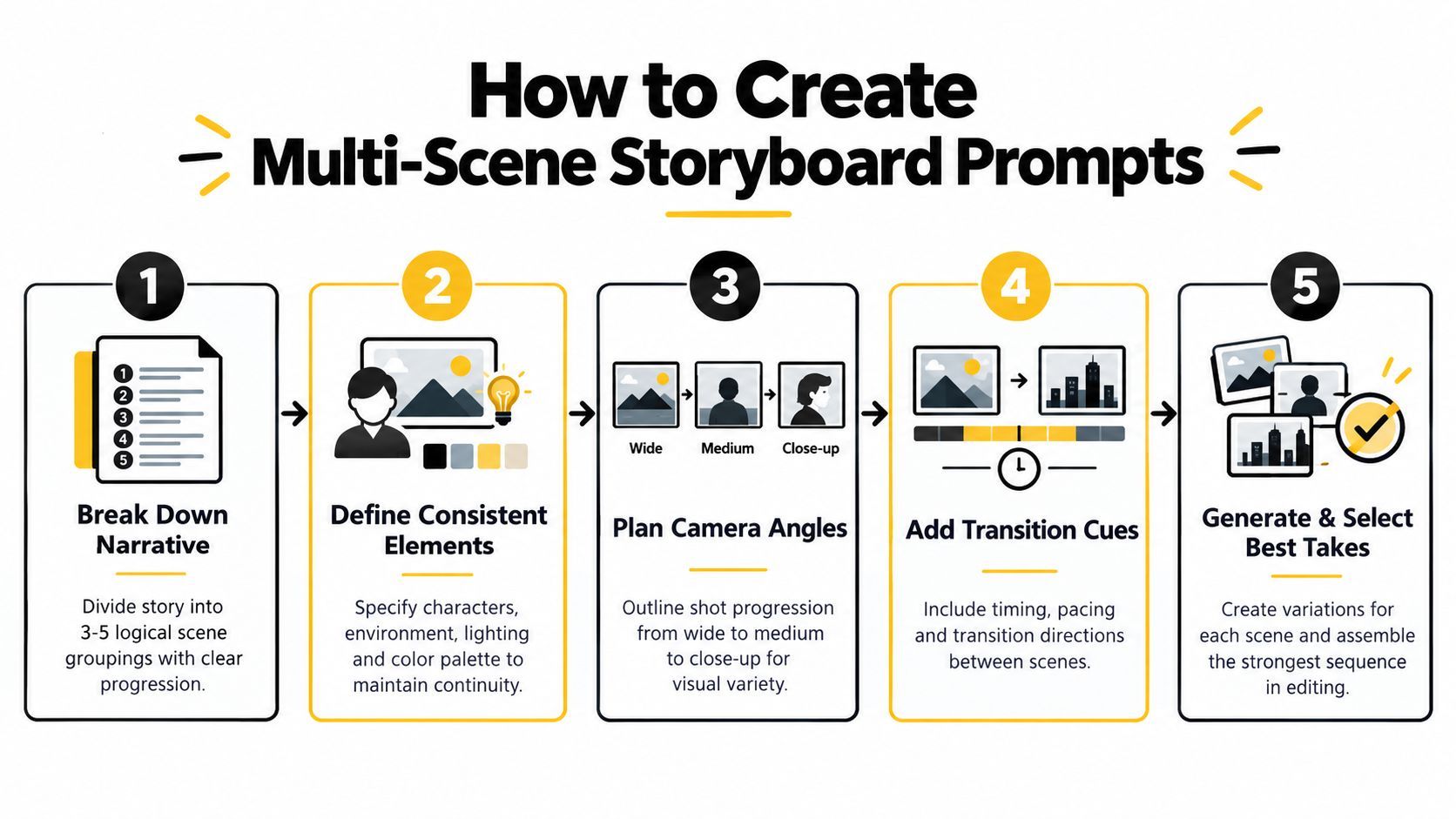
This short walkthrough shows how a sequence can move from planning into production:
9. Platform-Optimized Aspect Ratio and Dimension Prompts
Aspect ratio belongs in the production brief, not at the end of the process. A scene composed for a vertical mobile frame won't necessarily survive a square crop, and a wide YouTube visual may lose its subject when converted into a tall asset.
State the layout directly:
“Vertical 9:16 short-form scene showing a creator holding a compact microphone in the lower center, face in the upper middle, important product details away from the edges, uncluttered background, clear lower region for captions, strong central focal point, no text.”
Then create platform versions deliberately. A square feed asset needs a tighter arrangement around the center. A wide video frame can place the subject to one side and leave room for a title or presenter. A tall Pinterest-style composition may benefit from a longer visual path from top to bottom.
Treat resizing as a rescue tool
Generate the native composition whenever possible. Resizing can help with a minor adjustment, but it can't always recover a face, product, or headline area that was cropped out of the original. Inspect every final export on the target platform, including interface overlays and caption placement.
The platform-specific prompt should also state what must remain safe:
- Subject safety: Keep faces and products away from extreme edges.
- Text safety: Reserve an uncluttered area for the headline or captions.
- Crop safety: Keep the core action inside the central region.
- Series consistency: Reuse the same visual treatment across platform variants.
ShortGenius's resize tools can help make minor adjustments after selection, but the strongest workflow generates a platform-aware base first. This reduces the temptation to force one master image into every channel and then accept awkward crops.
Use the same subject and style block across formats, changing only aspect ratio, placement, and safe zones. That preserves campaign recognition while respecting how audiences encounter the asset in each feed.
10. Brand Identity and Style Guide-Aligned Prompts
Brand prompts turn a visual identity into repeatable instructions. They should define the approved palette, contrast behavior, photography or illustration treatment, spacing preference, product presentation, logo handling, and the elements that must never appear.
A baseline prompt might read:
“Create a premium wellness campaign image for a brand using warm cream, muted coral, and deep forest green, soft natural light, tactile paper and glass textures, generous negative space, calm editorial photography, restrained composition, inclusive everyday lifestyle, no neon colors, no harsh shadows, no playful candy styling, no unapproved logos, no generated claims or packaging copy.”
Don't assume a model will reproduce a color system accurately from vague terms such as “on brand.” Add visual examples or references where the tool supports them, and keep the brand brief separate from the campaign variable. The campaign can change from skincare routine to travel kit while the palette, light, and composition logic remain stable.
Make approval part of the prompt workflow
Save a baseline version, generate a controlled variation, and inspect four areas:
- Identity: Does the palette and treatment feel recognizably consistent?
- Legibility: Are any generated labels, logos, or claims safe to replace?
- Composition: Can the asset support the intended headline or product placement?
- Compliance: Does the scene introduce a visual or verbal claim the brand can't support?
Brand consistency is often more about controlling composition and editability than adding descriptive words. Research on prompt structure found that fixed and flexible structures, along with clear subject-object relationships, can produce outputs that better match expectations. A related 2025 study reported repeated prompts made up 40-50% of submissions and linked lexical similarity with visual similarity in the cited research on prompt structure and image outcomes. Repetition alone isn't a brand system. A stable visual brief plus purposeful variation is more useful.
ShortGenius can apply a saved brand kit to selected assets, helping teams add logos, colors, and consistent finishing treatments after generation. Keep the model prompt responsible for the scene and visual direction, then use the brand kit and editing stage for exact identity elements.
10-Point Comparison of AI Image Prompt Types
| Prompt Type | 🔄 Complexity | ⚡ Resources & Efficiency | ⭐ Expected Outcomes / Key Advantages | 📊 Ideal Use Cases | 💡 Key Tips |
|---|---|---|---|---|---|
| Detailed Descriptive Prompts with Art Style Parameters | High, long, technical prompts and art terminology | Moderate efficiency; may need more tokens/longer generation time but fewer iterations overall | ⭐⭐⭐ Professional, consistent, brand-aligned visuals; reduces iteration cycles | Thumbnails, ad creatives, social assets, branded series | Start with a core sentence then layer style/lighting; use negative prompts |
| Character and Avatar Generation Prompts | High, requires granular specs and reference continuity | Moderate–High; needs reference sheets or seeds and iterations for consistency | ⭐⭐⭐ Recognizable recurring characters; cost-effective vs hiring talent | Series characters, avatars, mascots, VTuber/content personas | Create detailed character briefs and expression/pose sheets upfront |
| Product Showcase and Lifestyle Image Prompts | Medium, product detail + contextual composition | High efficiency at scale; may need post-edit for labels/text accuracy | ⭐⭐ Authentic lifestyle images; scalable catalog variation; supports A/B testing | DTC product ads, Instagram/Facebook lifestyle shots, catalog imagery | Start with precise product description, then add lifestyle context and angles |
| Trending Audio-Visual Scene Prompts | Medium, needs constant trend monitoring and rapid updates | Fast to produce trend-aligned assets but requires frequent refresh | ⭐⭐ High short-term discoverability when trend-accurate; variable longevity | TikTok/Reels viral content, trend-driven campaigns, quick deployments | Monitor platform trends weekly; blend trends with brand for differentiation |
| Text-Overlay and Typography-Ready Prompts | Low–Medium, requires understanding of text-safe areas | Very efficient; reduces post-generation editing and layout work | ⭐⭐⭐ Readable, caption-ready images that integrate with text tools | Quote posts, educational slides, caption-heavy social content | Specify text-safe zones, contrast colors, and target aspect ratios |
| Thumbnail Optimization Prompts with High-Impact Elements | Medium, composition rules and expressive direction needed | High efficiency for thumbnail production; supports rapid A/B testing | ⭐⭐⭐ Optimized for CTR and viewer attention; scalable thumbnail variants | YouTube thumbnails, short-form covers, high-CTR campaigns | Research niche thumbnails, test expressions, leave space for text |
| Emotion and Sentiment-Driven Scene Prompts | Medium, emotional nuance and cultural sensitivity required | Moderate; may require audience testing and iterations | ⭐⭐ Strong emotional resonance when authentic; can boost engagement/conversions | Coaching, wellness, motivational content, emotionally-driven ads | Define target emotion, use color psychology, test with sample audiences |
| Multi-Scene Sequence and Storyboard Prompts | High, complex narrative continuity and timing cues | Lower throughput per run; longer generation and selective editing needed | ⭐⭐⭐ Cohesive visual narratives; speeds up video assembly if consistent | Tutorials, story-driven videos, product demos, educational sequences | Break into 3–5 scene groups, keep descriptors consistent, generate variations |
| Platform-Optimized Aspect Ratio and Dimension Prompts | Low–Medium, separate prompts per platform required | Very efficient for multi-channel publishing; reduces cropping/resizing waste | ⭐⭐⭐ Platform-ready compositions with fewer artifacts; better cross-post results | Multi-platform campaigns, TikTok/IG/YouTube specific assets | Specify exact aspect ratio and safe zones; batch-generate platform variants |
| Brand Identity and Style Guide-Aligned Prompts | Medium–High, requires detailed brand documentation | Moderate; upfront effort saves time and errors at scale | ⭐⭐⭐ Ensures brand consistency and compliance across assets | Agency clients, enterprise campaigns, multi-brand teams | Document exact colors/fonts, create baseline templates, use brand kit integrations |
Turn Strong Prompts Into a Repeatable System
The best prompt is rarely the one that produces one beautiful image. It's the one your team can reuse, test, revise, and carry into the next asset without losing the original intent.
Start with one business or content objective. “Create a product image” is too broad. “Create a vertical opening frame that makes a new skincare routine feel calm and achievable” gives the model and the editor a meaningful job. Then save the core subject description before experimenting with style, lighting, camera position, color, expression, or background.
Change one variable at a time. If the first version uses a warm editorial treatment, keep the product, pose, framing, and negative space fixed while testing a cooler documentary treatment. If you change everything together, the output may improve, but you won't know which decision helped. Controlled variation creates reusable knowledge rather than a pile of disconnected generations.
A practical refinement loop looks like this:
- Define the job: Name the audience, platform, and intended action.
- Lock the subject: Save the product, character, environment, or central object description.
- Set the visual treatment: Choose style, lighting, palette, lens feel, and mood.
- Control the frame: Specify aspect ratio, subject placement, safe zones, and text space.
- Add exclusions: Remove distracting objects, unapproved colors, altered labels, or unwanted text.
- Generate variations: Change one stylistic or compositional parameter at a time.
- Inspect defects: Check identity, anatomy, packaging, typography, continuity, and crop behavior.
- Adapt the winner: Prepare the selected image for captions, assembly, resizing, brand application, and distribution.
Maintain a small library of reusable templates. Store character briefs, product descriptions, brand rules, text-safe layouts, thumbnail structures, and storyboard scene groups separately. This lets a creator make a new episode or campaign variation without rewriting the entire system from memory.
Prompt stability matters especially for commercial work. Auth-Prompt Bench frames stability as whether intent transfers reliably across generations, which is a better standard for recurring brand assets than judging a single attractive result. In practice, keep a record of the prompt, model, reference image, selected output, rejected defects, and the one change made in the next test.
Model choice is part of the process too. A 2026 benchmark tested 10,000 images from 100 standardized prompts across 10 major image-generation platforms, scoring visual quality, prompt adherence, consistency, text rendering accuracy, and speed. It reported Midjourney v6.1 at 8.42/10, DALL-E 3 at 8.16/10, and a fastest-system average of 4.2 seconds per image compared with an industry mean of 14.8 seconds, as detailed in the 2026 image-generation benchmark. Those figures don't make one model right for every job. They show why teams should test the model against the actual requirement, especially when throughput, text, repeatability, or visual fidelity matters more than a general ranking.
Use ShortGenius when the selected assets need to become finished media. Its workflow can combine image generation with script planning, video assembly, captions, natural voiceovers, trim and scene edits, brand-kit application, resizing, and multi-channel scheduling. The tool is most useful after the prompt has done its job, when the challenge shifts from generating possibilities to turning approved assets into consistent output.
The same discipline also protects audiences from misleading visuals. Before publishing a photorealistic result, review whether the image could be mistaken for documentary evidence, a real product photograph, or an authentic person. Guidance on how AI Image Detector finds fakes can help teams think more carefully about provenance and disclosure, but human review remains essential.
Strong AI image generation prompts are production instructions with a testing method behind them. Define the job, preserve what must stay stable, vary what can change, and move only approved outputs into the editing and distribution workflow.
ShortGenius brings text-to-image generation, image editing, video assembly, captions, brand kits, resizing, and multi-channel scheduling into one workflow for creators and teams. Visit ShortGenius (AI Video / AI Ad Generator) to turn tested image prompts into branded videos, ads, and publish-ready content.