AI Avatar for Videos: The Complete Creator's Guide

Learn how to use an AI avatar for videos that convert. Discover workflows, costs, quality tips, and real use cases for creators and marketing teams.
Most advice about AI avatar for videos starts in the wrong place. It obsesses over realism, lip sync, and how human the face looks, then treats everything else like an afterthought. That's useful only if your goal is to impress someone for three seconds. If your goal is to ship more content, localize faster, and keep campaigns governed, the questions are different.
The market data already shows this is not a side experiment. The AI avatars market is projected to grow from USD 8.4 billion in 2026 to USD 93.4 billion by 2035, a 30.6% CAGR over the forecast period, and another estimate put the market at USD 6.3 billion in 2025 (Global Market Insights). That matters because buyers and teams are clearly paying for more than novelty. They're using avatars where speed, consistency, and localization beat the old production model.
Why AI Avatars Are More Than a Novelty
The first mistake teams make is treating avatar video like a party trick. A polished face on a screen doesn't automatically create trust, and it certainly doesn't guarantee attention. What matters is whether the format fits the message, the audience, and the distribution channel.
For practical use, AI avatar for videos works best when the message is repetitive, time-sensitive, or expensive to record traditionally. Training modules, onboarding, product updates, multilingual explainers, and scaled outreach all benefit from a format that can be recreated quickly without booking talent every time. That's where the economics become real, not theoretical.
Practical rule: use an avatar when the message is repeatable, the tone can stay controlled, and the viewer cares more about clarity than performance.
Where avatars outperform human-led production
Avatar videos tend to outperform live talent or UGC when consistency matters more than spontaneity. A brand can keep the same presenter, the same framing, and the same message across markets, without reshoots or calendar bottlenecks. That makes them especially useful for content that needs to stay current, localized, or frequently refreshed.
The adoption signals line up with that logic. One industry compilation says AI avatars appear in 1 out of 3 corporate training videos and in 44% of enterprise video communication in 2024, while companies using them can reduce talent and actor costs by up to 90% (SEO Sandwitch). The same source says avatars show up in 60% of multilingual video projects, which is exactly the kind of use case where human production becomes slow and expensive.
Where they still fall short
Avatars are weaker when the content depends on intimacy, emotional nuance, or live credibility. If the audience expects a personal apology, a high-stakes negotiation, or a story that depends on real lived experience, a synthetic presenter can feel off. The format can support the message, but it can't rescue a weak one.
The better way to think about avatar video is as a production choice with narrow strengths. It's not about replacing people. It's about deciding which jobs benefit from a digital presenter and which still need a real face and a real camera.
How AI Avatar Technology Actually Works
At a basic level, avatar generation is a controlled animation pipeline. You give the system a source image, sometimes a reference clip, and often an audio file. The model then maps facial motion to the sound and renders a talking presenter that follows the voice.
The easiest mental model is a digital puppeteer. The audio waveform acts like the cue sheet, telling the system when to open the mouth, shift the jaw, and move the face in sync with speech. The better the input, the cleaner the animation tends to be. The worse the capture, the more you see mouth drift, awkward jaw movement, or unstable edges around hair and shoulders.
A useful distinction separates image-to-video pipelines from open-ended scene generation. Avatar systems are usually designed for synchronization first, which means they care far more about alignment than cinematic freedom. That's why they're good for explainers, sales intros, and training clips, but less flexible for imaginative storyboarding or complex scene design.
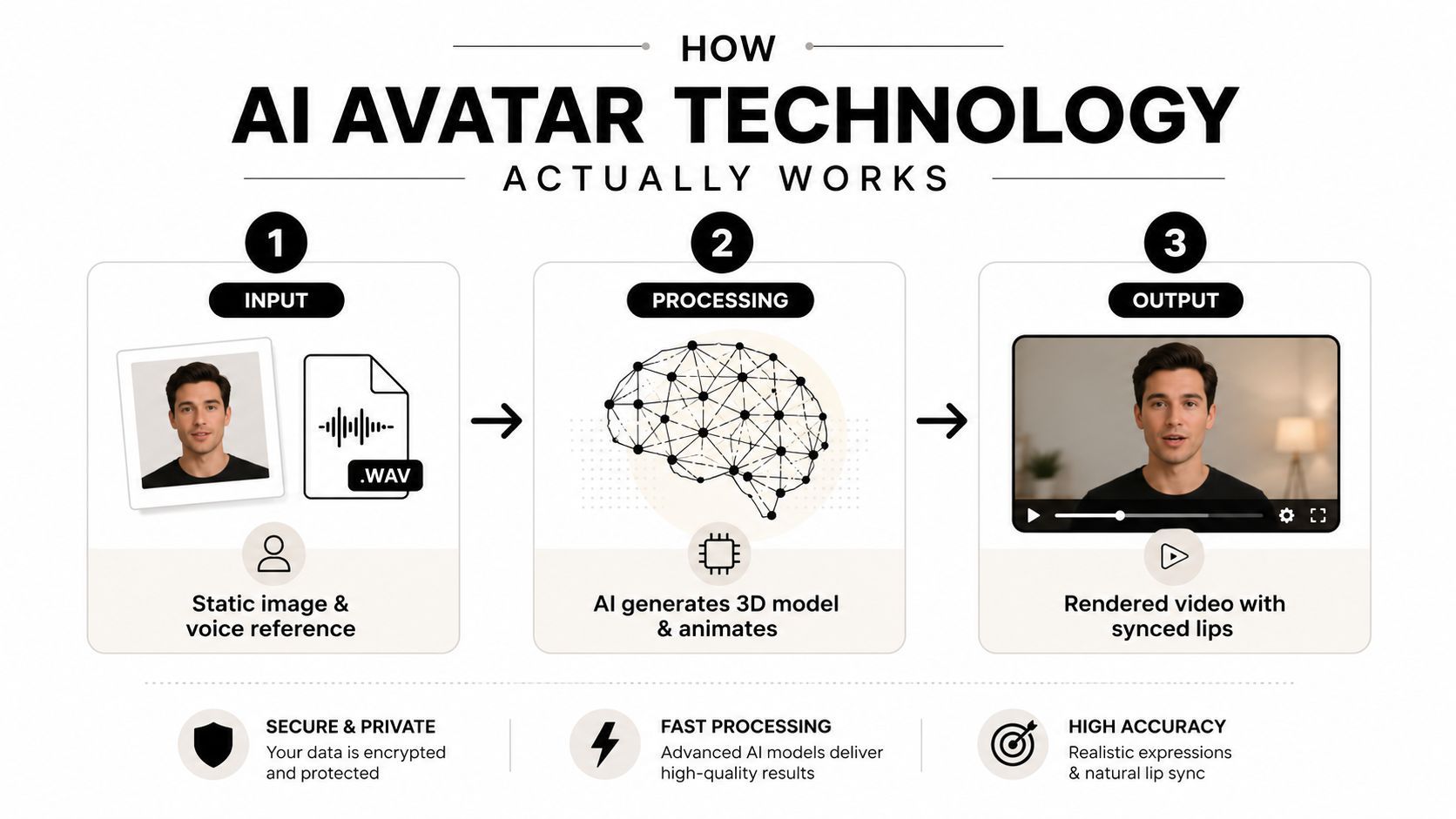
Why capture specs matter so much
Training quality is often limited before the model even starts. Microsoft's Azure AI Speech avatar guidance calls for at least 1920×1080 resolution and 25 FPS for training video, plus a green-screen setup with the actor positioned 0.5 m to 1 m from the background to reduce segmentation errors (Microsoft Docs). Those details sound fussy until you watch a bad training clip leak edge artifacts into the final render.
The reason is simple. Clean capture helps keypoints track more reliably, matting stays stable, and mouth-to-audio sync looks less synthetic. In production, that directly affects whether the final video feels usable on a landing page or too rough for public release.
Cost and format constraints shape creative choices
For audio-driven avatar generation, the model's architecture matters as much as the prompt, maybe more. Kling AI Avatar v2 Standard requires a static image and an audio file, then uses the waveform to drive facial animation timing and lip movements. Its published output cost is $0.0562 per second, so a 30-second clip is about $1.69 before editing or distribution costs (fal.ai).
That pricing makes avatar video attractive for high-volume use, but it also shows the trade-off. You gain speed and scale, while giving up some of the creative latitude you'd get from filming or fully generative scene creation. That's the decision, not whether the face looks “real enough.”
Building Your Avatar Video Production Workflow
A dependable avatar workflow looks more like a production line than a one-off creative pass. The teams that keep shipping do not begin by opening the avatar tool. They begin with the message, the audience, the channel, and the exact job the video has to do, then they build everything around that brief.
The first mistake is treating the avatar as the starting point. That usually leads to weak scripts, mismatched delivery, and a final cut that looks assembled instead of planned. In practice, the script, voice, framing, and approval path should be decided before anyone renders a frame.
A practical production sequence
A clean workflow usually moves through five decisions. The script gets written for spoken delivery, not blog-style reading. Then the avatar is selected or created, the voice is matched to the message, the scene is assembled, and the final cut is adjusted for the channel.
That sequence sounds simple, but it solves real production problems. Spoken scripts reduce awkward phrasing. A matched voice avoids the cheap feel that comes from pairing a polished face with the wrong cadence. Channel-specific edits keep the same asset usable on a landing page, in a sales deck, or as a short social clip without forcing the viewer to work harder than the message deserves.
A simple internal standard helps keep the process fast:
- Script first: write short sentences that sound natural when spoken.
- Avatar selection: choose a presenter that fits the brand tone, not just the nicest-looking face.
- Voice and pacing: test the narration speed before final render.
- Edit for platform: trim aggressively for short-form, add captions where viewers watch muted.
- Publish in series: group videos by topic so the audience sees a consistent format.
Series-based production matters because avatar work falls apart when every clip is rebuilt from scratch. Reusing the same intro structure, framing logic, and CTA placement keeps the format familiar and cuts down on unnecessary revision rounds. It also makes quality control easier, since producers can compare each new asset against a known pattern instead of judging every scene in isolation.
Where tools reduce friction
Unified platforms work best when they reduce the number of handoffs. ShortGenius, for example, combines scriptwriting, image generation, video assembly, natural voiceovers, captions, resizing, scene swaps, brand kit application, and scheduling in one place, so teams are not stitching together multiple tools for a single publish cycle (ShortGenius). That kind of stack makes sense when the goal is speed plus consistency, not one-off artistry.
A workflow only stays fast if the editing, voice, and distribution steps live close together. Once a project bounces between too many tools, the time savings disappear in exports, version checks, and approval delays. The hidden cost is not just time, it is drift, where small changes in typography, pacing, or voice treatment make the brand feel less controlled from one clip to the next.
A practical production rule is to build around templates, then vary the message. If the framing, intro hook, and CTA placement stay consistent, the team can move faster without making every video look copied. That is what makes avatar content scale as a repeatable format instead of a pile of isolated assets.
Where AI Avatars Deliver Real Business Value
The strongest business case is not that avatars look impressive on a demo screen. It is that they solve production problems more predictably than human-recorded video, UGC, or screen capture in specific workflows. The clearest value shows up where content volume, localization, and message consistency matter more than on-camera charisma.
Training, communication, and multilingual work
Enterprise teams use avatars where repetition is a feature, not a flaw. Internal training, policy updates, product walkthroughs, and market-by-market explainers all benefit from the same delivery every time, especially when teams need to update the script without reshooting talent. That is why avatar content often fits operational communication better than a polished human shoot.
The practical gain is not only lower production friction. It also removes scheduling drag, rebooking costs, and version-control problems that appear as soon as a message needs to be adapted for several departments or languages. A team can localize one approved script, keep the visual format stable, and move the revision work into the edit rather than the shoot.
ShortGenius is a useful example of that workflow in one place. Its scriptwriting, image generation, video assembly, natural voiceovers, captions, resizing, scene swaps, brand kit application, and scheduling reduce the number of handoffs a team has to manage, which matters when the goal is repeatable publishing rather than one-off creative work (ShortGenius).
Learning performance and presentation format
Format still matters. Training teams have found that avatar-led modules can hold attention when the structure is clear, the pacing is controlled, and the viewer is not asked to interpret a live speaker's improvisation. In practice, the strongest use case is not generic narration, it is guided instruction where the visual pattern stays consistent across every module.
A compact view of the value pattern looks like this:
| Use Case | Business Value |
|---|---|
| Corporate training videos | Keeps messaging consistent across repeated modules and reduces reshoot work |
| Enterprise video communication | Speeds up internal updates when leaders need the same message delivered in multiple versions |
| Multilingual video projects | Makes localization easier because the same approved format can be adapted across markets |
The output quality still has to be managed carefully. If the avatar, pacing, or lip sync looks off, the format can feel cheaper than a basic talking-head recording. That trade-off is why avatar videos work best where distribution efficiency matters more than a fully natural performance.
Where human presenters still win
Human talent still wins when a viewer needs empathy, spontaneity, or visible accountability. A founder update, a customer apology, or a sensitive sales conversation usually feels more convincing with a real person on camera. In those moments, the value is not speed, it is trust.
Avatar video should carry the repeatable layer of communication, while humans handle the moments where nuance changes the outcome. The best teams use avatars for high-volume updates, localized explainers, and standardized training, then reserve live or recorded human footage for the spots where authenticity has to do the heavy lifting.
Choosing the Right Platform and Integration Stack
A weak platform choice can trap a team in awkward export steps, uneven branding, and hidden editing work that keeps showing up after launch. The evaluation should start with the full production stack, from script to publish, because that is where avatar projects either stay efficient or turn into maintenance work.
What to compare before you commit
Output quality comes first. A low-grade render can hurt credibility faster than it saves time. Customization comes next, because avatar assets need to match brand tone instead of sitting in a generic studio frame. Integration flexibility matters just as much, since content teams usually need captions, resizing, scheduling, and asset reuse after generation.
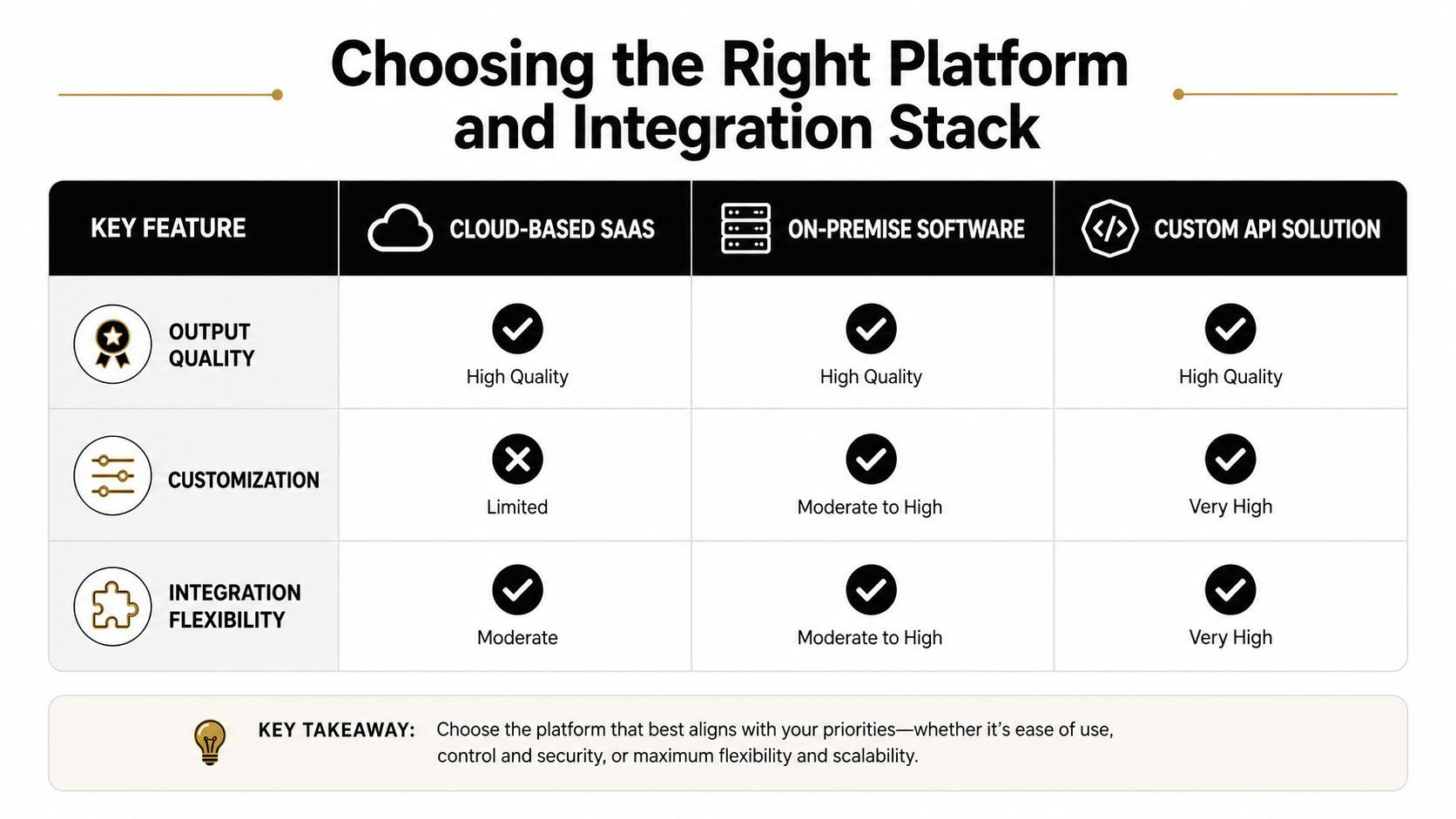
The trade-off is straightforward. Specialized avatar generators can be stronger in one narrow area, while unified platforms reduce the number of tools your team has to manage. If your workflow depends on repeated publishing, that reduction usually matters more than perfect single-feature depth.
A platform test should include more than the avatar preview. Check how the tool handles versioning, brand templates, approval handoffs, and export formats. A stack that looks polished in the demo can still create extra manual work every time a campaign needs a new cut.
The actual cost is bigger than render price
Per-second generation fees look tidy on a pricing page, but they do not show the full workload. Teams still spend time on editing, caption creation, aspect-ratio changes, approval loops, and distribution. When those steps are spread across separate tools, the time advantage can disappear quickly.
A platform like ShortGenius fits the stack discussion because it ties avatar-style presentation to scriptwriting, editing, brand kits, and scheduling in one workflow. That does not mean one platform replaces every specialist tool. It means a unified stack can keep avatar production from turning into a chain of disconnected tasks.
If you are comparing tools, ask one question after the render test. How many extra steps does it take to get the video from draft to published? That answer usually says more than the demo itself.
Governance and Disclosure for Custom Avatars
The weakest avatar guides treat governance like a legal footnote. In real production, it's a workflow discipline, and it's one of the biggest differences between a one-off test and a brand-safe program. If you're scaling avatar-led content, disclosure and rights management aren't overhead. They're part of the product.
Consent, rights, and audit trails
The core problem is simple. A custom avatar often represents a real person's likeness, voice, or brand-adjacent identity. That means your team needs permission, usage limits, and a record of how the asset can be used across campaigns and markets.
Recent policy and platform changes have made synthetic-media transparency more important, and the U.S. Federal Trade Commission has warned about deceptive AI impersonation and misuse of likenesses (FTC and platform policy context). You don't need to turn every video into a legal memo, but you do need a process that can answer basic questions later, such as who approved the avatar, what it can say, and where it can be published.
A workable disclosure checklist
A governance workflow should be boring in the best way. If the team can't trace the asset, it isn't ready for paid media. If the audience can't tell the content is synthetic when disclosure is appropriate, the risk goes up fast.
Use a simple internal checklist:
- Trademark check: confirm the avatar and surrounding assets don't create ownership conflicts.
- Public disclosure label: make the synthetic nature clear where the context requires it.
- Usage rights contract: document commercial permissions and market scope.
- Deepfake policy review: confirm the asset follows platform rules and internal standards.
Transparency isn't just a compliance move. It protects the campaign when a viewer questions who is speaking and why the video exists.
Why governance improves performance
Clear disclosure can support trust when the content is relevant and well made. The problem usually isn't that the video is synthetic. It's that the audience feels misled. Once the viewer understands the format, they can focus on the message instead of trying to diagnose the medium.
For agencies and in-house teams, the payoff is operational. A clean audit trail makes it easier to reuse avatars across campaigns, hand off assets between clients, and defend the content if a platform review or legal question comes up later. That's a serious advantage when avatar production moves from experimentation to a regular channel.
Troubleshooting Common Avatar Quality Issues
Most avatar failures are obvious before publication if someone knows what to look for. The bad clips usually don't fail because the model is unusable. They fail because the source material, voice pacing, or composition was off from the start.
The four problems that show up most often
Lip sync drift usually comes from weak audio quality or unnatural pacing. If the voice input is rushed, clipped, or poorly edited, the mouth shapes won't settle cleanly. Unnatural head motion often comes from overprocessing or a capture setup that didn't give the model enough clean reference data.
Poor background compositing is another giveaway. If the matting looks messy around shoulders, hair, or hands, the training setup probably wasn't clean enough. The Microsoft capture guidance above matters here, because resolution, frame rate, and green-screen spacing directly affect how stable the final composite looks.
If the avatar looks slightly off in the first five seconds, viewers usually spend the rest of the clip looking for mistakes instead of absorbing the message.
What to fix first
Start with the easiest causes before blaming the model. Re-record the voice with steadier pacing. Tighten the script so the avatar isn't forced to jump between fast syllables and long pauses. Then check the training source for resolution and framing problems before generating another version.
Some issues are post-production fixes, and some aren't. Bad captions, weak pacing, or awkward cuts can usually be repaired after the render. A badly trained avatar, though, often needs a new source clip or a fresh generation pass.
For a useful reference on presentation polish, the article on natural-looking AI video techniques is a practical complement to this troubleshooting mindset. The important takeaway is that “natural” is usually the result of disciplined inputs, not a lucky render.
Your Next Steps for Avatar Video Success
The right move depends on who is producing the content and why it exists. Solo creators can start with a simple template and test whether avatar-led clips hold attention without building a heavy production system. Marketing teams should pilot a branded series so the format has a repeatable structure, clear approvals, and a consistent look across campaigns. Agencies need custom avatar governance, reusable assets, and a clean handoff process across clients, or the workflow turns messy fast.
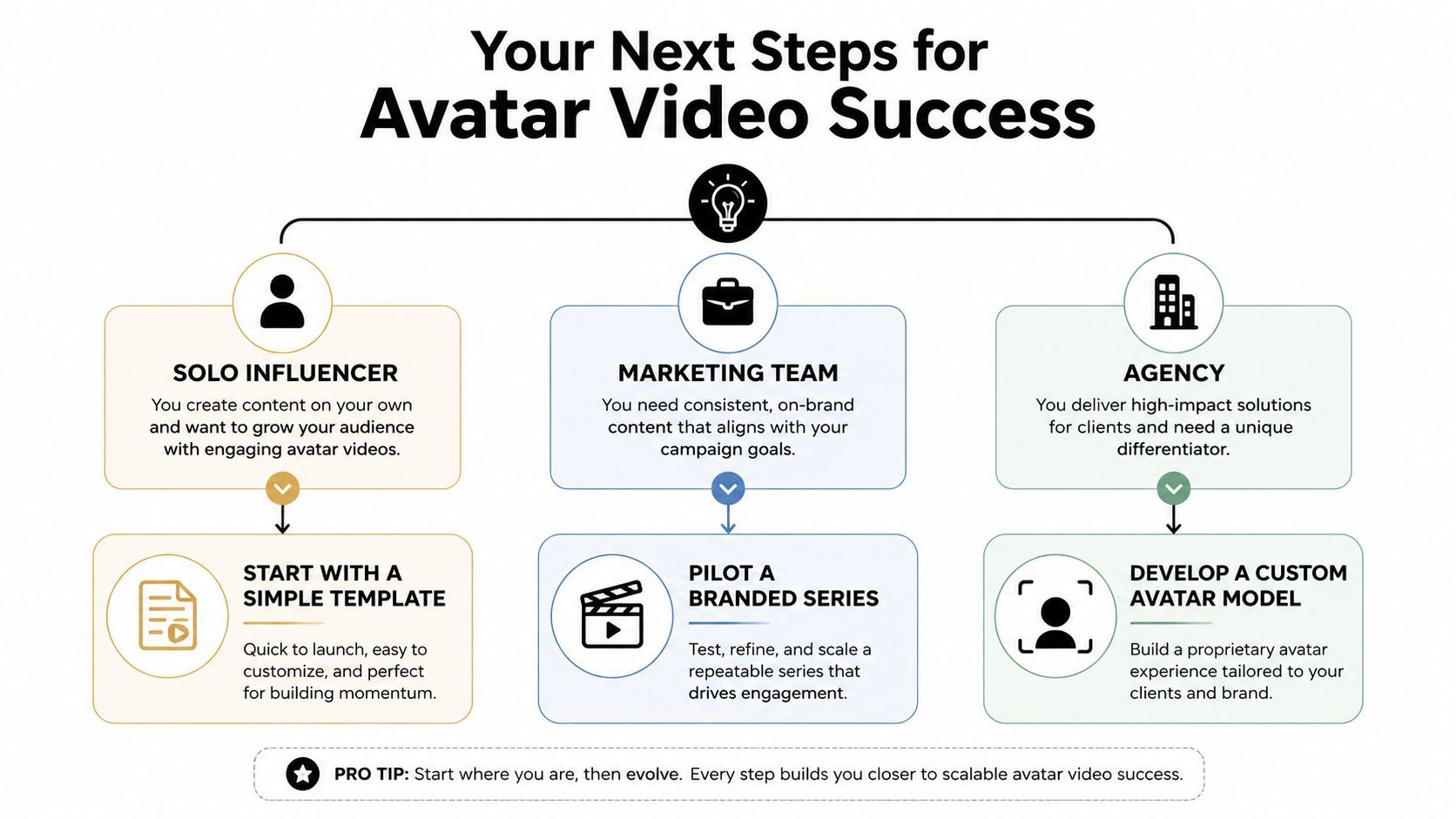
The test is not whether avatar video can be produced. It is whether it improves speed, consistency, and output without making the brand feel flat or generic. In some cases it will outperform human talent or UGC because it is faster to localize, easier to update, and simpler to keep on-message across versions. In other cases the human camera still wins because the audience needs visible trust, spontaneity, or a more lived-in delivery.
The teams that get value from avatar video treat governance as part of production, not an afterthought. That means deciding who can approve scripts, what disclosure language is required, which avatar styles are acceptable, and how often a source clip should be refreshed before the output starts to look stale. It also means checking how the workflow handles captions, exports, scheduling, and version control, because the fastest render is useless if the team cannot ship it cleanly.
If you are deciding whether the format belongs in your pipeline, use the same standard you would use for any production change. Ask whether it saves time without lowering trust, whether it can be repeated by the team that ships the work, and whether the final result still feels like the brand. ShortGenius (AI Video / AI Ad Generator) can fit into that kind of evaluation, but the better question is whether any tool matches the workflow you need.