How to Make an AI Animal Video: A Creator's Guide

Learn the complete workflow for creating a viral AI animal video. This guide covers ideation, prompting, editing, publishing, and the ethics of AI content.
You've probably seen the format already. A cat delivers a dry one-liner with perfect timing. A raccoon reacts like a sitcom character. A fox stares into the camera like it has a podcast. The clip is short, weirdly polished, and sticky enough that you watch it twice.
That's why AI animal video works. It combines three things social platforms reward: instant visual novelty, familiar emotional cues, and a character you can turn into a repeatable series. But the creators who get durable results usually aren't just prompting random talking pets. They're building a workflow, shaping a voice, editing for retention, and publishing with discipline.
A good AI animal video isn't just generated. It's directed.
The Rise of the AI Animal Kingdom
Animal content has always traveled well online because people understand it immediately. You don't need setup for a grumpy bulldog, an overconfident parrot, or a dramatic house cat. AI makes that format easier to produce at speed, but it also changes the ceiling. You're no longer limited to whatever you can film. You can create recurring characters, fictional wildlife scenes, stylized hybrids, and voice-led stories that would be expensive or impossible to shoot traditionally.
That shift matters because the broader market behind these tools is growing fast. In 2024, the global generative AI market was estimated at USD 25.86 billion, and it was projected to reach USD 66.62 billion by 2029, according to Kapwing's overview of AI video model growth. For creators, that means better models, more competition, and more access to tools that can generate animal footage inside larger text-to-video and image-to-video workflows.
The opportunity is real, but so is the change in audience expectations. Viewers have seen enough low-effort AI by now. They can forgive surreal humor. They usually won't forgive sloppiness.
What separates watchable from forgettable
The strongest animal clips usually share a few traits:
- A clear character: The animal has a point of view, not just a face.
- One idea per video: A single joke, confession, rant, or tiny scene works better than a pile of concepts.
- Controlled realism: The clip feels believable enough to hold attention, even when the premise is absurd.
- Series potential: The best videos hint at what episode two looks like.
Practical rule: Treat your AI animal like a cast member, not a prompt output.
That's also why this format has become useful beyond entertainment. Brands use animal mascots. Educators use animal characters to explain concepts. Media teams use them as recurring short-form hooks. The same skills apply across all of those use cases.
If you want consistent results, start before the prompt box.
Develop Your Animal's Personality and Story
Most bad AI animal videos fail before generation starts. The visuals might be sharp, but the concept is empty. A realistic dog saying random lines isn't a character. It's a demo.
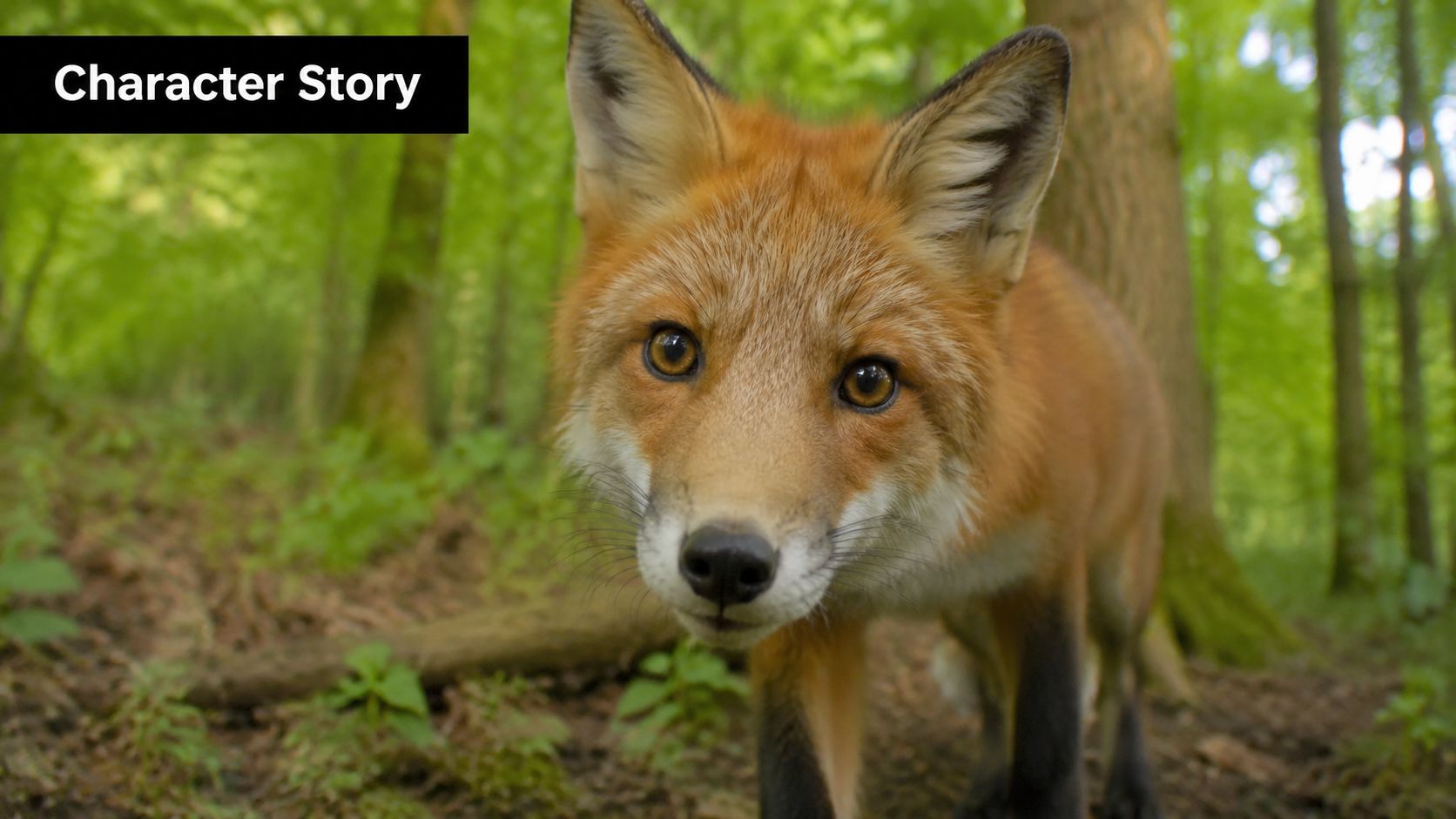
Build the persona first
Start with an animal that already carries emotional baggage in the audience's mind. Cats feel judgmental, golden retrievers feel earnest, owls feel wise, raccoons feel chaotic, capybaras feel unfazed. Lean into that instinct instead of fighting it.
Then define the character in plain language:
- Core trait: cynical, optimistic, dramatic, smug, anxious, serene
- Speaking style: clipped, poetic, overly sincere, motivational, deadpan
- Setting: suburban kitchen, therapist office, forest trail, office cubicle, luxury apartment
- Recurring conflict: ignored by humans, misunderstood genius, trying to stay calm, convinced they're famous
A useful shortcut is to describe the character as a contradiction. That creates tension fast.
Examples:
- A world-weary corgi who gives career advice
- A philosophical pigeon who comments on city life
- A luxury-minded raccoon living in obvious trash conditions
- A hyper-professional fox treating woodland life like corporate management
Write for one beat, not a full plot
Short-form animal videos usually work best when the structure is tiny. Think in beats, not acts. You want setup and payoff, or setup and reaction.
Three reliable structures:
- Observation
- “Why do humans act like opening the fridge is a personality trait?”
- Confession
- “I bark at delivery drivers because I believe in ritual.”
- Mismatch
- A majestic wolf speaks like a burned-out project manager.
Keep scripts short. If the line can't survive as a caption, it's probably too long for the format.
The audience should understand the joke before the generation quality becomes the main topic.
A simple scripting framework
Use this quick template:
- Who is speaking
- What just happened
- What do they think about it
- Why that reaction is funny or revealing
Example:
- Who: grumpy indoor cat
- What happened: owner bought an expensive cat bed
- Opinion: the cardboard box remains superior
- Why it lands: familiar human behavior meets animal certainty
That becomes:
“She spent money on a luxury cat bed. I chose the box. I need her to understand that this is about leadership.”
After you have a voice, build repeatability into it. Give the character recurring phrases, visual habits, and situations. That's what turns one good clip into a recognizable channel identity.
A good reference point for pacing and delivery style is to study existing short-form examples closely, then translate the rhythm into your own format rather than copying the joke directly.
Choose a lane early
Creators usually do better when they commit to one of these lanes for the first batch of videos:
| Lane | What it looks like |
|---|---|
| Comedy character | Talking animal with a distinct personality |
| Documentary parody | Serious narration over ridiculous animal behavior |
| Emotional storytelling | Gentle voiceover, cinematic visuals, sentimental arc |
| Education with a hook | Animal host explains facts, habits, or myths |
| Brand mascot content | Animal represents a company tone or audience persona |
The mistake is trying to blend all five at once. Pick one lane, make five videos in it, then review what felt natural.
Prompt Engineering for Lifelike Animals
Prompting gets blamed for too much and credited for too much. It won't fix a weak concept, but it absolutely decides whether your animal looks intentional or cursed.
The practical goal isn't maximum detail. It's consistency. You want the same species cues, the same lighting logic, and motion that doesn't break the illusion. That matters because top models are improving, but they still reveal themselves through common flaws like unnatural movement, lighting that doesn't match the environment, and repeating fur or feather patterns, as noted in Mootion's summary of realistic animal video generation and detection cues.
Prompt in layers
Don't write one giant blob and hope the model sorts it out. Split your prompt mentally into layers:
- Subject layer: species, age, coat, facial expression, body condition
- Environment layer: forest, living room, sidewalk cafe, veterinary office
- Camera layer: close-up, medium shot, eye-level, shallow depth of field
- Motion layer: blinking, subtle head tilt, ear flick, controlled mouth movement
- Mood layer: awkward, majestic, suspicious, calm, comedic
That approach gives you cleaner revisions. If the fur looks wrong, you change the subject layer. If the clip feels fake, you often change motion and lighting before anything else.
Use prompts that limit chaos
Here are templates that work well as starting points.
| Asset Type | Prompt Template Example |
|---|---|
| Character image | “Photorealistic red fox, alert expression, detailed fur, natural forest background, soft morning light, eye-level camera, shallow depth of field, realistic anatomy, high texture fidelity” |
| Stylized character image | “3D animated golden retriever, expressive eyebrows, warm family kitchen, soft cinematic lighting, polished animated film look, clean fur shading, friendly face, medium close-up” |
| Talking head video | “Close-up of a tabby cat sitting on a couch, subtle blinking, slight head tilt, tiny ear movement, natural breathing, mouth motion synchronized for speech, indoor lamp lighting consistent with room, stable framing” |
| Wildlife-style scene | “Snowy owl perched on a fence post at dusk, gentle feather movement in breeze, realistic lighting direction, natural posture, slow camera push-in, documentary style” |
| Voice direction | “Dry, deadpan voice with patient irritation, short pauses, understated comedy, conversational rhythm, no exaggerated announcer tone” |
What usually works
Specificity beats ornament. “Golden retriever in kitchen, soft daylight, looking guilty” usually outperforms “ultra-detailed masterpiece insanely beautiful emotional cinematic dog.” Adjective stacking often muddies the result.
For realism, include physical behavior that an animal might show:
- blink
- sniff
- ear twitch
- slow head turn
- weight shift
- short glance off-camera
For comedy, keep the body natural and let the absurdity live in the line. If both the visuals and the script are trying too hard, the result feels noisy.
Ask for subtle motion first. You can always add more energy in editing. It's much harder to rescue over-animated footage.
What usually fails
A few prompting habits create fake-looking output fast:
- Too many actions at once: running, talking, spinning, reacting, zooming camera
- Contradictory lighting: sunset subject in a room that reads like noon
- Human expression overload: animals grinning like mascots when you wanted realism
- Overdescribed fur: the model starts repeating textures instead of improving them
- Scene drift: each generation changes breed, face shape, or environment details
If you're making a series, lock a character sheet first. Write down the species, colors, framing style, environment, and vocal tone. Then reuse those anchors in every prompt.
Prompting for scripts and captions too
A lot of creators focus on visual prompts and neglect text prompts. That's a mistake. If your writing is cluttered, your final video feels cluttered.
A useful companion resource on structuring text so models handle it more cleanly is Nuwtonic's guide on how to improve AI content readability. The same principle applies to video scripts. Short lines, clear beats, and distinct instructions give you better generation and better edits.
A practical revision loop
When a clip looks almost right, don't start over blindly. Diagnose it.
- If the fur looks patterned, simplify the visual prompt.
- If lighting feels off, restate the light source and environment in one sentence.
- If movement feels robotic, reduce action verbs and ask for subtler motion.
- If lip sync feels creepy, shorten the spoken line.
- If the character loses identity, anchor the same facial and coat details every time.
That loop saves time. It also keeps you from “fixing” the wrong problem.
Assembling and Editing Your Video Masterpiece
Generation creates ingredients. Editing creates the video people finish.
The assembly stage is where tone gets locked in. A line can be funny in script form and dead on arrival in the timeline if the pause is wrong, the cut is late, or the caption lands half a beat after the joke.
Start with the voice, then cut picture to it
For talking animal formats, the voice track should usually lead the edit. Put the narration or dialogue down first, then line up the best visual moments under it. This keeps pacing human, even when the footage is synthetic.
A practical timeline order looks like this:
- Place the voiceover
- Trim dead air between phrases
- Match mouth movement shots where possible
- Add reaction cutaways
- Layer captions
- Add music beneath the voice
- Finish with sound effects only if they sharpen the joke
If you do it in reverse, you'll spend too long forcing audio into visuals that don't support it.
Cut for retention, not for completion
A lot of beginner edits leave in every usable second because generation took effort. Viewers don't care how long it took to make. They care whether the clip earns the next second.
Use these editing decisions aggressively:
- Trim pre-roll: get to the face or premise immediately
- Shorten pauses: comedic deadpan works. Empty delay usually doesn't
- Punch in digitally: a tighter crop often improves emotional clarity
- Use reaction inserts: blink, stare, head turn, silence
- End early: don't explain the joke after it lands
Captions and sound do more than decorate
Animated captions aren't optional for this format. They carry meaning when people watch muted, and they reinforce timing when people watch with sound on. Keep them legible. Highlight one or two words per line, not the entire sentence.
Music should support the scene, not announce itself. A soft documentary bed works for parody. A minimal piano cue works for mock-serious confession. Comedic boings and meme sounds can work, but only if the whole account already speaks that language.
Editing note: If the animal looks highly realistic, use restraint in sound design. Overcooked effects make the clip feel cheaper, not funnier.
Build reusable pieces
If you want volume without losing quality, save systems:
- intro card styles
- caption presets
- recurring voice settings
- branded end screens
- scene templates for recurring characters
Integrated creation platforms excel at saving a lot of friction. When scripting, voice, scene swaps, trimming, captions, and resizing live in one production flow, you spend less time exporting between apps and more time improving the actual joke or story. That's especially useful if you're making a series with recurring animals and multiple platform versions.
Publishing and Optimizing for Every Platform
A polished video can still disappear if you publish it like an afterthought. Distribution is not admin work. It's part of the creative process.
Different platforms reward different viewing behavior. The same AI animal video can feel native on one platform and awkward on another, because the crop, pacing, opening frame, or caption style doesn't match how people browse there.
Adapt the same idea, don't just repost it
The efficient move is to create one master asset, then repurpose it intentionally.
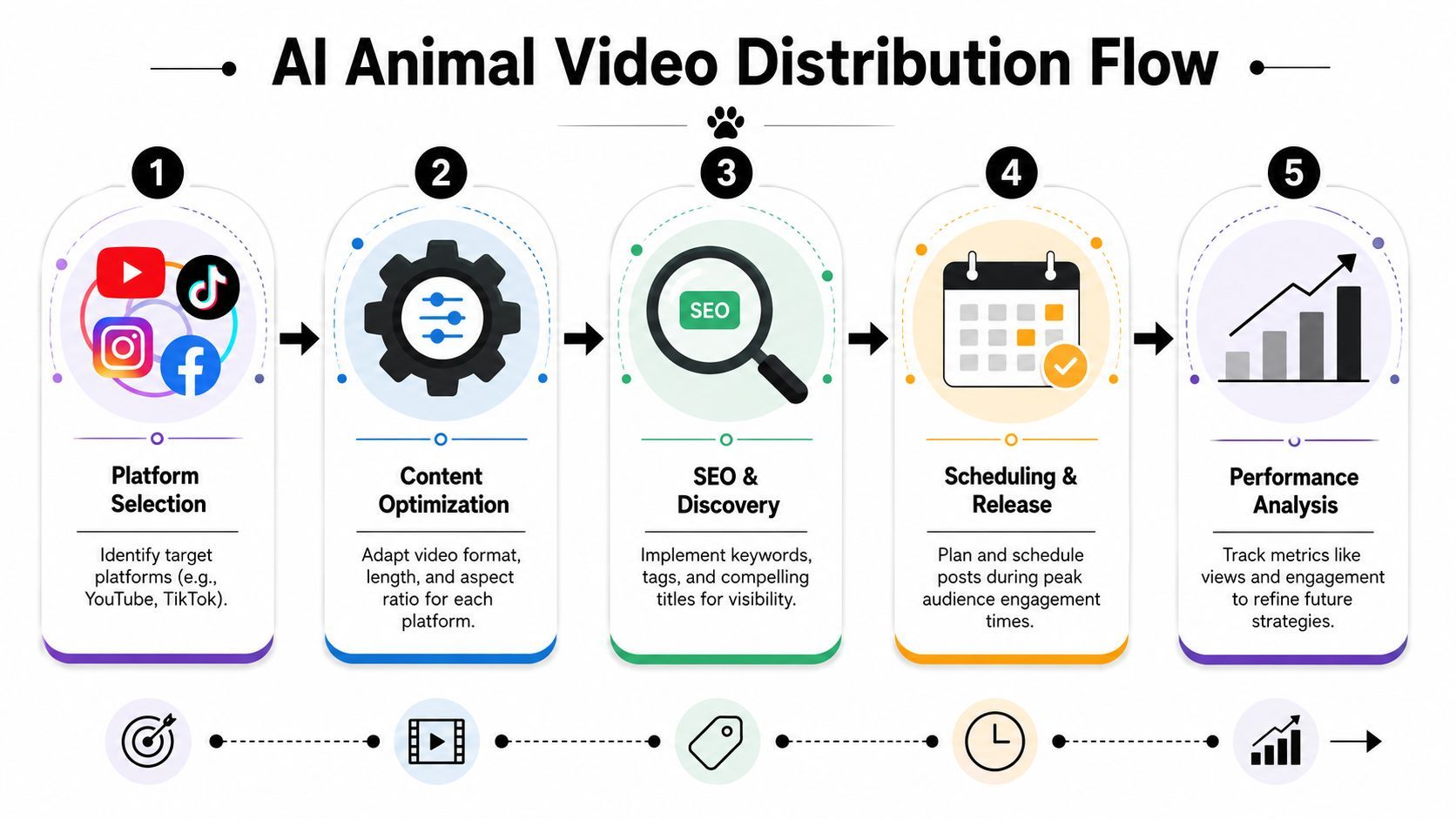
A practical adaptation workflow looks like this:
- Vertical short version: strongest hook first, larger captions, tighter cuts
- Square feed version: centered framing, shorter top and bottom text
- Widescreen version: more breathing room, useful for compilations or YouTube
- Story cutdown: one beat, one joke, one CTA
- Thumbnail-led version: stronger title treatment for platforms where clicks matter more
If you only duplicate the same file everywhere, you leave reach on the table. Framing changes perception. Caption density changes retention. Even the first half-second can decide whether a viewer interprets the clip as polished or disposable.
Packaging matters more than creators want to admit
The title, on-screen opener, and caption should all answer the same question from different angles. Who is this animal, and why should I care right now?
Strong packaging examples:
- “My cat's official review of luxury pet furniture”
- “This fox talks like your least favorite manager”
- “A raccoon explains why he's not ‘making a mess’”
Weak packaging tends to be vague:
- “Funny animal AI”
- “Wait for it”
- “You won't believe this”
Those titles don't frame the joke. They force the viewer to do interpretive work before they're invested.
If your content starts performing and you're thinking beyond views, it helps to study adjacent creator business models too. Meme operators, reaction pages, and character-led channels often face similar monetization questions. FindClout has a useful breakdown of strategies for monetizing meme pages that translates surprisingly well to serialized AI character content.
Build a repeatable publishing system
Most creators lose momentum because each upload feels like starting from scratch. A simple system fixes that:
- Batch concepts: write several animal premises in one sitting
- Batch production: generate multiple clips with the same character settings
- Batch packaging: write titles, hooks, and caption variants together
- Schedule releases: don't rely on memory or mood
- Review comments: audience phrasing often gives you the next script idea
If you want to centralize production and distribution, an AI video workflow platform that combines editing, versioning, and publishing can remove a lot of repetitive friction, especially when you're resizing and scheduling the same concept across multiple channels.
The key is consistency. Not robotic repetition. Consistent character, consistent cadence, consistent standards.
The Ethics of AI Animals and Building Trust
The easiest trap in this niche is assuming realism equals success. It doesn't. Realism without context can create confusion, especially when the video looks close enough to wildlife footage or documentary content that viewers stop asking whether it's synthetic.
That's why ethics matters here more than in many other AI formats. A talking office corgi is one thing. A hyper-realistic “wildlife encounter” presented ambiguously is another.
Realism is not authenticity
A key challenge is detection after generation. AI animal videos are getting harder to spot, and even high-quality outputs can look convincing enough that realism alone isn't a reliable signal of authenticity, which is why The Dodo's coverage highlights clear labeling and creator transparency as essential.

That should change how you publish. If your clip could plausibly be mistaken for real footage, label it. If it blends documentary aesthetics with fictional imagery, be explicit. If you're using animals in educational content, separate fact from character performance.
What responsible creators do
Good practice is straightforward:
- Label synthetic work clearly: in captions, overlays, or post descriptions
- Avoid fake rescue or wildlife claims: don't imply real events that never happened
- Don't borrow institutional credibility you haven't earned: no fake conservation framing
- Use character framing: make it obvious when the animal is a fictional persona
- Respect audience trust: once viewers feel tricked, recovery is hard
Trust compounds more slowly than views, but it lasts longer.
There's also a creative upside to transparency. When you stop trying to “pass” the video as real, you can make better work. You can be funnier, stranger, more stylized, and more original because you're no longer constrained by deception. The audience can enjoy the craft instead of arguing about whether the clip is fake.
Creators who last in this space usually understand that the point isn't to fool people. It's to entertain, tell stories, and build formats viewers want to return to.
If you want a faster way to go from animal concept to finished short-form content, ShortGenius (AI Video / AI Ad Generator) brings scripting, asset creation, voice, editing, resizing, and publishing into one workflow so you can produce AI animal videos without stitching together a pile of separate tools.