How to Make AI Videos: A Complete Guide (how to make ai videos)

Learn how to make ai videos with a practical, step-by-step workflow from scripting and generation to editing and distribution for viral social content.
So, what does it actually take to make a video with AI? At its core, you're using a single platform to handle everything: writing the script, generating a voiceover, creating the visual scenes, and stitching it all together into a polished final cut.
What's really incredible is how tools like ShortGenius have compressed a workflow that used to take weeks of effort into just a few minutes. You can literally go from a simple idea scribbled on a napkin to a published video in less time than it takes to drink a cup of coffee.
A Whole New Way to Create Video
We're in the middle of a massive shift in how video gets made. Gone are the days when you needed a studio full of expensive cameras, complicated editing software, and a whole team to produce something decent. That whole world is fading fast.
AI platforms have completely opened up the world of video creation. Now, it’s fast, affordable, and genuinely accessible to everyone, whether you're a solo creator working from your bedroom or a marketing team at a huge company. This guide is all about showing you how to do it, from start to finish.
Instead of jumping between different tools for scripting, voice recording, and editing, modern platforms bring the entire process under one roof. Think about it: you can take one core idea and spin it out into a whole series of videos, all with consistent branding, scripts, and voiceovers, right from a single dashboard.
The Old Way vs. The New AI Way
The difference between the traditional method and this new AI-powered approach is just night and day. What used to be a long, drawn-out process of pre-production, shooting, and then endless hours in post-production is now handled almost instantly.
This flowchart lays it all out, showing the old-school production pipeline right next to a modern, AI-driven workflow.
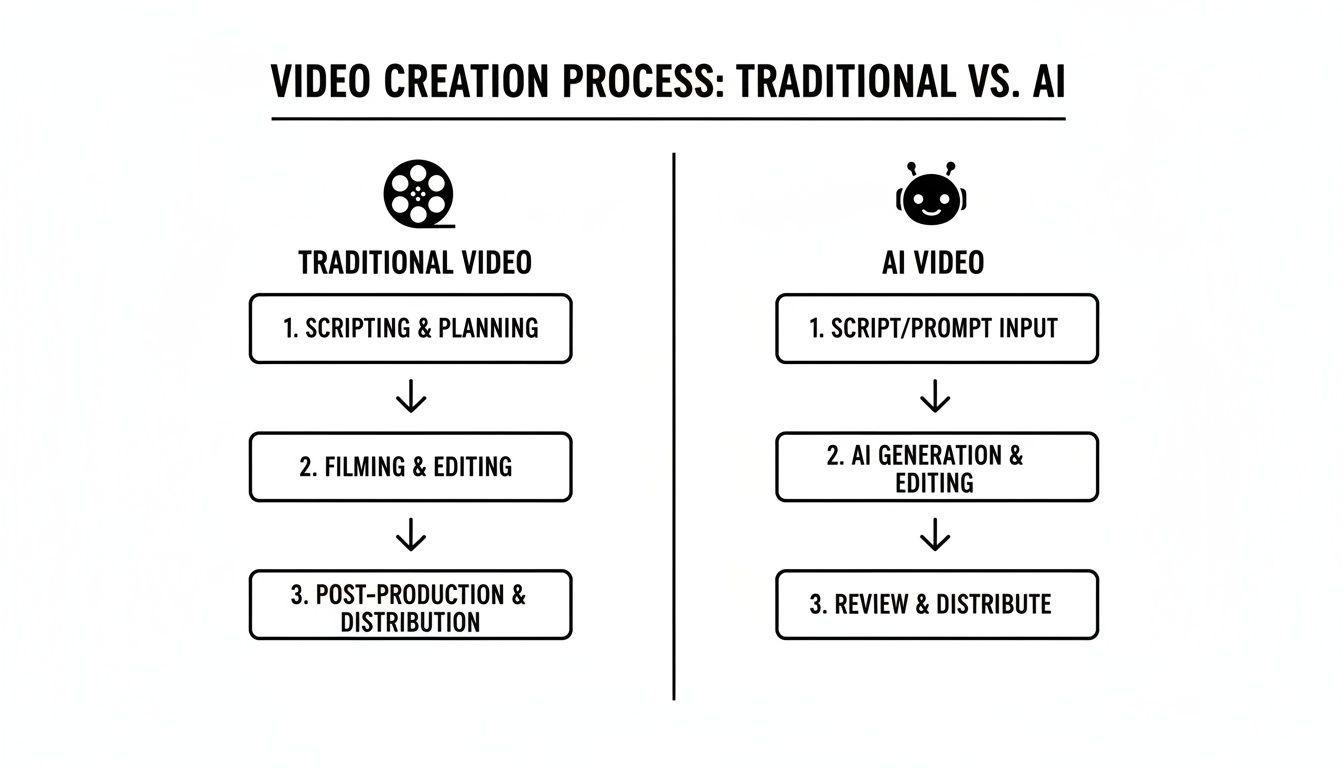
As you can see, AI just wipes out a ton of manual steps, merging them into one automated generation phase. This doesn't just save time; it cuts out so much of the complexity.
Let's break down the time commitment side-by-side to really drive the point home.
AI vs Traditional Video Workflow At a Glance
| Stage | Traditional Workflow (Hours/Days) | AI Workflow with ShortGenius (Minutes) |
|---|---|---|
| Concept & Scripting | 4-16 hours | 5-10 minutes |
| Asset Sourcing & Filming | 8-40+ hours | 2-5 minutes |
| Voiceover & Audio | 2-8 hours | 1-3 minutes |
| Editing & Post-Production | 8-24 hours | 5-15 minutes |
| Total Time Investment | 2-10 Days | 13-33 Minutes |
The table makes it clear: we're talking about a monumental leap in efficiency. What once consumed the better part of a week (or more) is now achievable in a single work session.
Why This is a Big Deal Right Now
The internet's appetite for video content is just bottomless, and honestly, AI is the only way for most creators to keep up without burning out. The market for AI video tools was valued at USD 0.43 billion in 2024 and is expected to rocket to $2.34 billion by 2030.
That explosion is being driven by platforms like TikTok, where a mind-boggling 25 million videos are uploaded every single day. Text-to-video technology is leading the charge, giving creators the power to slash their production time by as much as 90%.
While this guide gets into the practical, hands-on steps, it's helpful to understand the bigger picture. If you want to dive deeper into the strategic side of things, check out this excellent Modern Guide to Content Creation with AI.
The real magic of using AI for video isn't just about going faster. It's about efficiency. It completely removes the creative roadblocks and technical headaches, freeing you up to focus on what really matters: your ideas and your strategy.
Getting comfortable with these new tools will put you way ahead of the game. And remember, good content principles still apply. For a solid foundation that works for both traditional and AI-driven content, take a look at our guide on https://shortgenius.com/blog/content-creation-best-practices. It’ll give you a great framework for everything you create from here on out.
Planning Your First AI Video Project
It's tempting to jump right into an AI video generator and start typing prompts, but the real magic happens before you even open the tool. A little bit of upfront planning is the difference between making a cool-looking video and creating a powerful piece of content that actually works for you. Think of it as the foundation—get this right, and everything else falls into place much more easily.

This all starts by answering one simple question: why am I making this video? Your answer will shape every single creative decision down the line, from the script's tone to the final call-to-action.
Without a clear purpose, you’re basically just throwing content at a wall and hoping something sticks. A goal-oriented approach, on the other hand, lets you measure what’s working and fine-tune your strategy over time.
Define Your Primary Video Goal
So, what’s the mission? Are you trying to educate, entertain, or convert your audience? Nailing down your primary goal is the first, most critical step.
Let's look at a few real-world examples:
- Driving Sales: Imagine you run an e-commerce brand. You want to create a series of punchy TikTok ads for a new product. The goal here is direct conversion, so the videos need to be snappy, eye-catching, and end with a crystal-clear "shop now" button.
- Building a Personal Brand: A financial coach wants to become a go-to expert on YouTube. The goal is to build an audience by giving away valuable, educational content that solves real problems people have about investing.
- Boosting Engagement: A social media manager for a SaaS company needs to create relatable, funny skits for Instagram Reels. The goal is pure engagement and brand awareness—using humor to get more followers to interact.
Each goal demands a completely different video style. The sales ad needs urgency, while the educational content needs clarity and depth.
Remember, success isn't just about the view count. A video with 1,000 views that brings in 50 high-quality leads is infinitely more valuable than a viral hit with no business impact.
Using AI for Strategic Brainstorming
Once you know your "why," you can bring in AI as your creative partner. This is where a tool like ShortGenius really shines. Don’t just ask for a script right away. Instead, start by prompting for high-level concepts, hooks, and potential video themes.
Let's go back to our financial coach. A lazy prompt would be, "Write a script about investing." That’s not going to get you very far.
A much better, more strategic approach is to feed the AI specific details.
Prompt Example for Brainstorming Hooks
"Act as a YouTube content strategist. My audience is millennials who are new to investing. Generate 10 scroll-stopping video hooks for a 60-second YouTube Short that debunks a common investing myth. Focus on curiosity and addressing pain points."
See the difference? This prompt gives the AI specific context: audience, platform, format, and topic. The ideas you get back will be far more relevant and effective. You can then take the best hooks and ask the AI to flesh them out into full video concepts.
Structuring Your Ideas into a Series
One-off viral videos are exciting, but a consistent, structured approach is what truly builds a loyal audience. Planning your content in themed series or "content buckets" makes your life a whole lot easier and gives people a reason to subscribe.
For our financial coach, this could look like:
- Myth-Busting Mondays: Short, snappy videos tackling common money misconceptions.
- Ticker Teardowns: Deeper dives into specific stocks or funds.
- Beginner's Corner: Simple explainers on foundational investing concepts.
This strategy does more than just organize your calendar. It also helps the AI generate better content, faster. When you prompt for a "Myth-Busting Monday" video, the tool already has the context for the established tone and format. This is the secret to scaling your video production without burning out.
Bringing Your Video to Life: Generating AI Assets
Alright, this is where the magic really happens. You’ve got a solid plan, and now it's time to turn those ideas into the actual building blocks of your video: the script, the voice, and the visuals. Think of yourself as a director guiding an incredibly talented, lightning-fast creative team.
This isn't just about clicking "generate." It's about manufacturing each asset with a specific purpose in mind, ensuring every piece fits your brand and engages your audience.

Let's dive into how to craft these core components.
Crafting the Perfect AI Video Script
Your script is the soul of your video. It's the foundation everything else is built on. Amazing visuals can't save a weak script, so we need to get this right from the start. While platforms like ShortGenius have fantastic language models, their output is a direct reflection of your input. Garbage in, garbage out.
To get a script that actually performs, you have to be precise with your prompts. For short-form video on TikTok or Reels, those first three seconds are non-negotiable—they determine whether someone watches or keeps scrolling.
Here’s a real-world example of how to prompt for a script with a powerful hook:
- Vague Prompt:
Write a script about email marketing.(This will get you something generic and boring.) - Killer Prompt:
Create a 45-second TikTok script for small business owners. Start with a scroll-stopping hook about the #1 mistake they make in email marketing. End with a clear call-to-action to download our free guide. Keep the tone conversational and energetic.
See the difference? Giving the AI specific constraints and goals helps it produce a script that's built for engagement. If you really want to master this, we've got a deep-dive guide on using an https://shortgenius.com/blog/ai-video-script-generator that's packed with advanced techniques.
And this skill is becoming more valuable by the day. The market for AI-generated video scripts is set to explode, jumping from $2.11 billion in 2025 to $2.74 billion in 2026. This boom is happening because creators need to feed the content beast on platforms with millions of daily uploads, and AI is the only way to keep up.
Selecting a Natural and On-Brand AI Voice
With your script locked in, it's time to give it a voice. Thankfully, the days of robotic, monotone AI narration are over. Modern text-to-speech engines can produce incredibly human-like voiceovers with natural pacing and emotion.
Choosing the right voice is a branding decision. This voice becomes an audio signature for your content, so it needs to perfectly match your brand’s personality.
Ask yourself these questions when picking a voice:
- Pacing: Is your brand high-energy and quick, or more measured and authoritative?
- Tone: Are you going for friendly and relatable, or formal and professional?
- Accent: Would a specific accent connect better with your target demographic?
My Pro Tip: Don't just settle for the first voice you like. Generate the first line or two of your script with three or four different voices. Then, close your eyes and just listen. Which one feels the most authentic to your brand? That's your winner.
Generating Dynamic Scenes and Visuals
Now for the most exciting part: creating the visuals. This is where you can truly let your imagination run wild. You're no longer limited by expensive stock footage or the hassle of filming yourself.
AI video and image generators can conjure up almost any scene you can dream of. The trick is to prompt like a filmmaker, not just a writer. Don't just describe the object; describe the shot. Think about camera angles, lighting, mood, and style.
For creating quick, punchy social media clips, tools like an AI reel generator are fantastic because they're designed to produce assets in the formats that work best on those platforms.
Within a tool like ShortGenius, you can also lean on a library of presets to give your video a professional sheen with a single click. These are huge time-savers.
A Few Examples of Visual Presets:
- Camera Movements: Instantly add a "slow zoom in" to build tension or a "drone shot flyover" for a breathtaking establishing shot.
- Visual Effects: Apply a "cinematic glow" for a soft, dreamy look or a "glitch transition" to add a modern, techy vibe.
- Scroll Stoppers: These are pre-built animated text effects and visual hooks designed specifically to grab attention and stop the scroll.
Once you’ve nailed the generation of these three core assets—script, voice, and visuals—the editing process becomes infinitely smoother, and your final video will be leagues ahead of the competition.
Putting It All Together: Editing Your AI Video
You've got the script, the voiceover, and a collection of AI-generated visuals. Now for the fun part: bringing it all together into a polished video that grabs attention. This isn't about getting bogged down in a complicated timeline editor. Instead, we're focused on making a few smart, high-impact tweaks that will make your content shine. If you're using an AI-native tool like ShortGenius, this whole process is designed to be quick and painless.
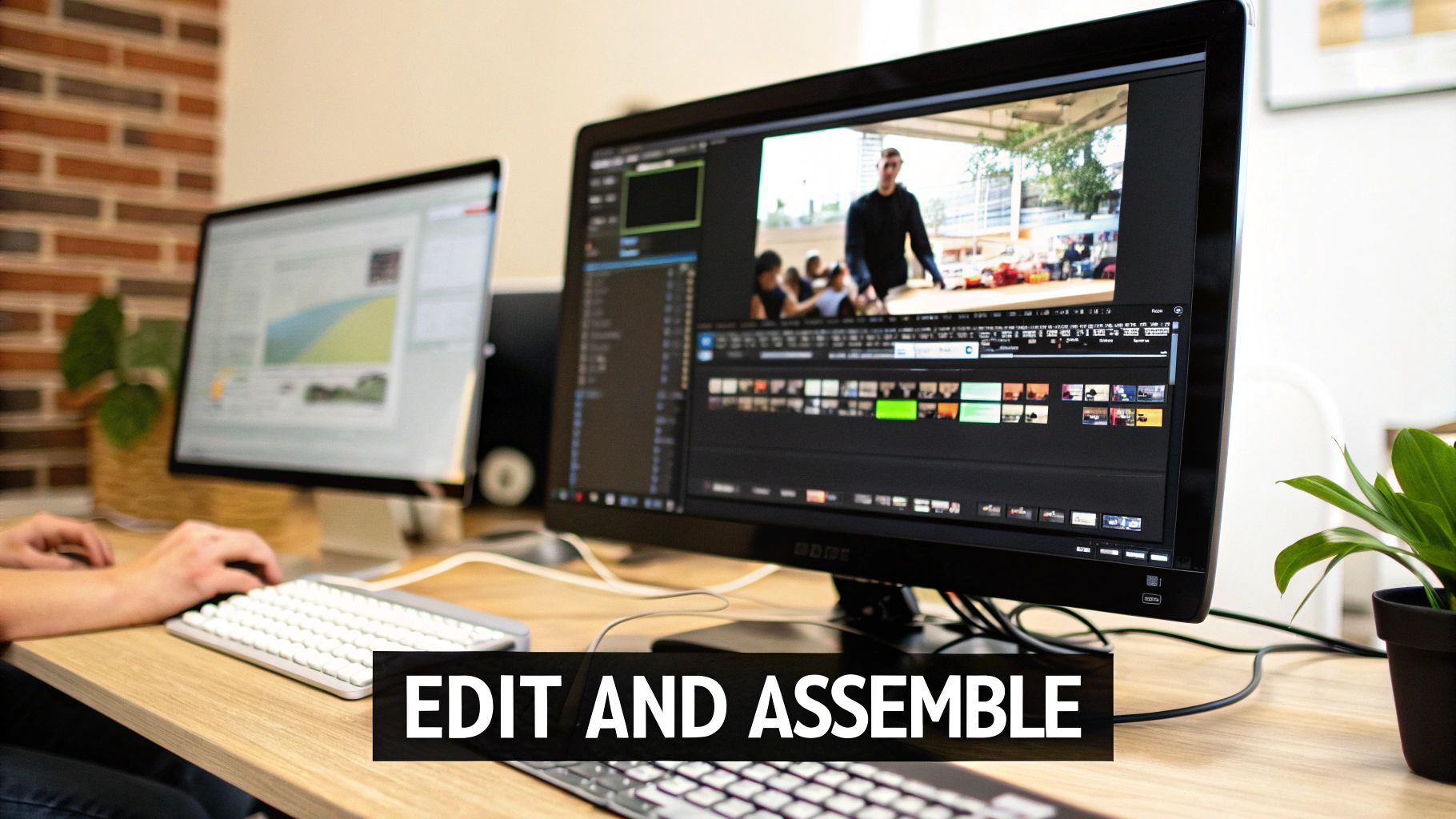
The goal here isn’t to tear down what the AI built, but to enhance it. We'll zero in on the essential post-production touches that make the biggest difference: tightening up the timing, making it accessible for everyone, and stamping it with your unique brand identity.
Get the Pacing Just Right with Quick Trims
The very first thing I always look at is the timing. For short-form video, rhythm is everything. Attention spans are brutally short, and a scene that hangs around for even a split second too long is an invitation for someone to scroll away.
You don't need a film degree to nail this. Most AI video platforms give you simple trimming tools, letting you drag the edges of a scene to shorten or extend it. It’s incredibly intuitive.
Here’s a little trick I use: I watch the full video once, just to get a feel for it. Then, on the second watch, I pause at every single cut. I ask myself, "Can this be 10% tighter?" Almost every time, the answer is yes. Shaving off those tiny fractions of a second really adds up, giving the final video a much snappier, more professional feel.
This part is all about instinct. Does the video flow? Does the energy of the scenes match the voiceover? A few small adjustments here can have a massive impact on how long people stick around.
Add Auto-Captions for a Wider Reach
Next up: captions. Honestly, this is a non-negotiable step in today's world. So many people watch videos on social media with the sound off, so without captions, your message is completely lost. They also open up your content to a much wider audience.
In a tool like ShortGenius, adding captions is literally a one-click affair. The AI listens to your voiceover, transcribes it, and syncs the text perfectly to the video. All you have to do is give it a quick once-over for accuracy.
A few pro tips for captions:
- Readability is king: Pick a clean, bold font. Make sure it has a solid outline or background so it stands out against any video scene.
- Punctuation helps: Don't get lazy with commas and periods. Good punctuation guides the reader and makes the captions easier to follow.
- Emphasize key words: Try changing the color or style of important words. It’s a simple way to add a visual pop and drive your main points home.
Lock in Your Brand With a Single Click
If you want to build a memorable brand, consistency is your best friend. People should be able to recognize your content in their feed instantly. This is where setting up a brand kit pays off big time.
Instead of manually slapping your logo, colors, and fonts on every video, you can pre-load them into a brand kit. After that, applying your entire visual identity to a new project is as simple as clicking a button.
This ensures every single video has:
- Your logo in the same place, every time.
- Your specific brand colors reflected in text and graphics.
- Your chosen brand fonts on all captions and on-screen text.
This one feature is a huge time-saver and the secret weapon for maintaining a cohesive, professional look. If you're curious about which tools handle this best, we've broken down some great options in our guide to the best AI video editing software.
Make Changes on the Fly
One of the most powerful things about an AI-first workflow is how easy it is to make changes without having to start over. If a scene just doesn't feel right, or a line in the voiceover sounds a bit off, you don't have to scrap the whole project.
Just select the element you don't like and regenerate it. Not a fan of a visual? Feed the AI a new prompt and swap it out. Want to rephrase part of the script? Just edit the text, and the AI will generate a new voice clip to match, already synced up. This kind of flexibility is what makes creating with AI so fast and lets you experiment until you’ve got it perfect.
Getting Your Content Out There for Maximum Reach
You've just created a fantastic AI video. That's a huge win, but it’s only half the battle. If that brilliant piece of content just sits on your hard drive, it's not actually doing anything for you. The final, and arguably most crucial, step is getting it in front of the right eyeballs.
This is where you move from being a creator to being a publisher. You need a distribution strategy that’s just as smart as your creation process. That means getting away from the soul-crushing task of manually uploading each video and instead, building a system that puts your content distribution on autopilot.
Put Your Publishing Schedule on Autopilot
The not-so-secret secret to winning on social media is relentless consistency. You have to show up, at the right times, every single day. That’s how you build momentum. But who really has the time to manually post to TikTok, then jump over to YouTube, then remember to upload to Instagram, all during their unique "best" times to post?
This is where integrated scheduling tools become your superpower.
With a platform like ShortGenius, you can build out a content calendar right inside your workspace. It's a simple, powerful workflow:
- Queue it all up: As you finish editing a batch of videos, just add them to your publishing queue.
- Set it and forget it: Assign each video to a specific platform—or all of them—and schedule them to go live at the perfect time.
- Go live automatically: The platform takes it from there, auto-posting your content without you having to lift a finger.
This approach is a total game-changer. It frees you from the daily grind of publishing, so you can get back to what you do best: creating the next batch of awesome content. You’re no longer just making videos; you're managing a full-blown content production line.
This drive for efficiency is exactly why the AI video generator market is projected to explode from USD 788.5 million in 2025 to over USD 3.4 billion by 2033. Businesses are adopting these tools to slash 80-90% of their production time, and automated scheduling is a massive part of that. You can dig into more insights on this growth over at Grand View Research.
Tweak Your Content for Every Single Platform
You can't just blast the same video file everywhere and expect amazing results. Each social media platform is its own little world with different rules, dimensions, and audience expectations. Taking a few moments to optimize your content for each one is absolutely essential if you want to get the best reach.
A one-size-fits-all approach just feels lazy to both the algorithm and your audience. Thankfully, AI makes this customization process incredibly simple.
Here’s what you should be adjusting:
- One-Click Resizing: That vertical 9:16 video that looks perfect on TikTok and Reels is going to look awkward as a 16:9 widescreen video on YouTube. Instead of going back to your editor, use built-in resizing tools to instantly reformat your video for any platform with a single click.
- Generate Killer Thumbnails: On platforms like YouTube, the thumbnail can be even more important than the title. Use an AI image generator to quickly create several eye-catching options. A/B test different styles to see what your audience actually clicks on.
- Write Platform-Specific Copy: Don't just copy and paste the same caption everywhere. Use AI to generate unique descriptions and hashtag sets tailored for each platform’s algorithm. A YouTube description needs to be keyword-rich and detailed, while an Instagram caption can be more about storytelling with a few key emojis.
Analyze, Learn, and Sharpen Your Strategy
Your job isn’t quite done once the video is live. The final piece of the puzzle is looking at the data. You need to see what worked, what didn't, and why. This feedback loop is what separates amateur creators from professional content strategists who see consistent growth.
Most platforms have built-in analytics that give you the raw numbers. Pay close attention to these metrics:
- Audience Retention: Where are people dropping off? This is gold. It tells you which parts of your videos are boring and which hooks are grabbing people's attention.
- Click-Through Rate (CTR): How many people who saw your thumbnail actually clicked to watch? This is a direct report card on how effective your thumbnails and titles are.
- Engagement Rate: Likes, comments, shares, and saves. These metrics tell you if your content is truly connecting with your audience on an emotional level.
Use these insights to make your next batch of AI videos even better. If you notice videos with a certain hook get way higher retention, prompt the AI to create more scripts with that exact structure. If a particular visual style gets more shares, lean into it. This data-driven approach ensures that every video you make is smarter and more effective than the last.
Common Questions About Making AI Videos
Jumping into any new tech always comes with a dose of skepticism, and AI video is no exception. It's a game-changer for creators, but it's totally normal to have questions about everything from the final quality to who actually owns what you make. Let's clear the air and tackle some of the biggest questions I hear all the time.
Can AI Videos Actually Look Good?
This is probably the number one concern I see. Can AI-generated video really stack up against a traditional shoot? The honest answer is that it's getting shockingly good, very fast. For the kind of content most of us are creating for social media, marketing, or explainers, the quality is more than just "good enough"—it's often fantastic.
The secret isn't in the tool itself, but in how you use it. A lazy, one-sentence prompt will get you a generic, soulless video. But when you get specific—describing the art style, the lighting, the camera angles, the mood—you can get some truly beautiful results. We're already at a point where the output can look professionally shot and edited, especially when you bring it all together with a good final edit.
Is AI Taking the Creativity Out of Video?
I get this one a lot, too. Does using AI mean you're just a button-pusher? Not a chance.
Think of it this way: the AI isn't the artist. It's the most advanced set of paintbrushes and cameras you've ever had. Your creativity is what guides everything.
You're still the one who:
- Comes up with the idea: The AI has no clue about your brand, your audience, or the story you want to tell. That's all you.
- Crafts the prompts: This is a creative skill in itself. Translating your vision into words the AI understands is where the magic happens.
- Curates and directs: You're the director, choosing the best shots, picking the perfect voiceover, and editing the final piece into something cohesive and compelling.
The AI is a powerful collaborator, not a replacement for your vision. It lets you execute your ideas at a speed you could only dream of before, freeing you up to focus on the big-picture strategy.
Who Owns the Copyright to This Stuff?
Okay, let's talk legal. Copyright law for AI-generated content is definitely a new frontier, and it can feel a bit confusing. The short answer usually depends on the terms of service of the specific tool you're using.
For the most part, when you create something with an AI tool, you get the rights to use it commercially. That means for your marketing, on your YouTube channel, wherever. Most platforms, including ShortGenius, grant you a full license to use the videos you create. Still, it’s always a good idea to spend five minutes reading the terms of any tool you use, just so you know exactly where you stand.
Isn't This Going to Be Expensive?
Compared to traditional video production? It's not even in the same ballpark. A traditional shoot can easily run you thousands of dollars for a single short video when you factor in cameras, lighting, actors, locations, and an editing team.
AI video completely sidesteps most of those costs. While the computation required is intense, it's all bundled into a straightforward subscription. For a solo creator or a small business, this suddenly makes high-volume video production a realistic goal. When you think about the time you save and the sheer amount of content you can produce, the return on investment is huge.
Will AI Video Generation Get Simpler to Use?
One hundred percent, yes. The user experience for these tools is getting better every single day. Things that required complicated, multi-part prompts a year ago are now being turned into simple templates and presets.
The whole industry is racing to make this technology more intuitive. The end goal is to lower the barrier so much that anyone with a good idea can bring it to life, no technical background required.
Ready to stop wondering and start creating? ShortGenius pulls everything you need—scripting, AI voices, video generation, and scheduling—into one place. Start your free trial today and get your first AI video out there in minutes!