Your Guide to AI Video Script Generators

Discover how an AI video script generator transforms video creation. This guide covers how they work, key features, and how to create your first script.
Every great video starts with a great idea, but the real challenge is often the blank page staring back at you. This is where an AI video script generator comes in. It's not about replacing creativity; it's about giving it a powerful starting point. Think of it as a collaborative partner who has studied what makes videos successful and can instantly translate your thoughts into a structured script, ready for the camera.
From Blank Page to Viral Video with AI

We've all been there—stuck in a creative rut. But in the world of video, where speed and consistency matter, writer's block isn't just frustrating; it's a genuine roadblock to connecting with your audience. An AI script generator completely removes that initial hurdle.
These tools are built to take your core message and spin it into a complete narrative. They can outline scenes, suggest dialogue, and even bake in effective calls to action. By taking care of the foundational work—the structure, the flow, the pacing—they let you jump straight to the fun part: adding your unique voice and creative flair. It transforms video creation from a grind into a genuinely exciting process.
Overcoming the Creative Hurdle
The most immediate win you'll get from an AI video script generator is sheer speed. What used to take hours of brainstorming and outlining can now be drafted in a matter of minutes. For anyone needing to publish content regularly, this is a game-changer.
-
Slash Production Time: Drastically cut down the hours between having an idea and holding a finished script.
-
Maintain Consistency: Keep a steady stream of content flowing to your channels, which is absolutely critical for building and engaging an audience.
-
Defeat Writer's Block: When you’re feeling uninspired, you can generate several different script ideas to explore new angles and get the creative juices flowing again.
The real magic of an AI script generator isn’t just about making things faster. It’s about enhancing your own creativity. It builds the solid framework, so you can focus your energy on the personal touches and unique insights that make people want to watch.
A Co-Writer for Every Creator
This kind of technology is incredibly adaptable, whether you’re a one-person creator, managing social media for a brand, or working on a large marketing team. An online store, for example, can generate a dozen scripts for product showcase videos in an afternoon. A coach can quickly create a script for an entire educational series.
The AI essentially becomes a versatile co-writer that understands different formats and tones. For creators looking to optimize their whole process, our guide on sponsored video integrations can provide some next-level strategies. Ultimately, this flexibility means the script you get is aligned with your goals and audience, making high-quality video production more achievable than ever before.
How AI Actually Writes a Video Script
So, how does an AI go from a simple prompt to a full-blown video script? It’s less about creative genius and more about incredible pattern-matching.
Think of an AI video script generator not as a director, but as a super-powered assistant that has consumed a massive library of successful video scripts, ads, social media posts, and stories. It doesn't understand emotion, but it knows which words and structures tend to create it.
The engine driving this is a Large Language Model (LLM). These complex systems are trained to recognize the relationships between words, the flow of sentences, and the beats of a good story. They've analyzed what hooks viewers in a YouTube intro, what kind of pacing keeps people watching a TikTok, and what language makes a corporate video feel professional.
Your Prompt Is the Director's Brief
When you give the AI a prompt, you're essentially handing it a creative brief. This is easily the most critical step, as your input sets the entire direction for the script.
A good prompt gives the AI guardrails. It should include:
-
The Core Topic: What's the video about? (e.g., "A 60-second explainer on our new software feature.")
-
The Target Audience: Who is this for? (e.g., "Busy project managers who've never used our product.")
-
The Desired Tone: What's the vibe? (e.g., "Upbeat, friendly, and super clear.")
-
The Goal or Call to Action: What do you want people to do? (e.g., "Get them to click the link for a free trial.")
The more detail you provide, the closer the AI gets to what you have in mind. You’re telling it which patterns and formulas from its vast training data to use.
From Data to a Draft
With your brief in hand, the AI gets to work. It starts predicting the most logical sequence of words and ideas to fulfill your request, almost like connecting the dots. It pulls from proven storytelling frameworks it has learned, like the classic problem-solution arc for a marketing video or a simple step-by-step guide for a tutorial.
The AI will piece together an intro to grab attention, a middle section that lays out the information, and an ending that wraps it all up with your call to action. You can learn more about the technical process of how AI renders visual elements in our other guides.
An AI video script generator isn't creating from personal experience. It's a master synthesizer, piecing together elements from thousands of successful examples to build a new script that fits your specific needs.
This technology is catching on fast. The text-to-video AI market is growing rapidly and is projected to hit USD 0.9 billion by 2027. This isn't just a niche tool; it's a fundamental shift in how creators and businesses are approaching video production. For more details, you can check out these findings on the AI video market.
Your Expertise Is Still the Secret Sauce
What the AI produces is a fantastic first draft. It does the heavy lifting—structuring the narrative, getting the key points down, and saving you from the intimidating blank page.
But it’s just a starting point. The AI lays the foundation, but you’re the one who adds the personality, the unique brand voice, and the specific insights that an algorithm could never replicate. The script becomes truly great when a human expert fine-tunes it.
Choosing the Right AI Script Generator
Picking the right AI video script generator feels a lot like finding the perfect creative partner. With so many tools popping up, all claiming to be the ultimate cure for writer's block, it’s easy to feel overwhelmed. The secret isn't just about finding something that spits out words; it's about finding a tool with features that genuinely improve your workflow and elevate the final video.
Let's be real: not all generators are built the same. A basic one might give you a generic, soulless script. But a really powerful tool will hand you a structured, platform-aware draft that’s already halfway to being camera-ready. It's the difference between a simple calculator and a full-blown spreadsheet—sure, both handle numbers, but only one gives you the power to build, analyze, and create something substantial.
The infographic below breaks down the three pillars that set a top-tier AI script generator apart from the rest.
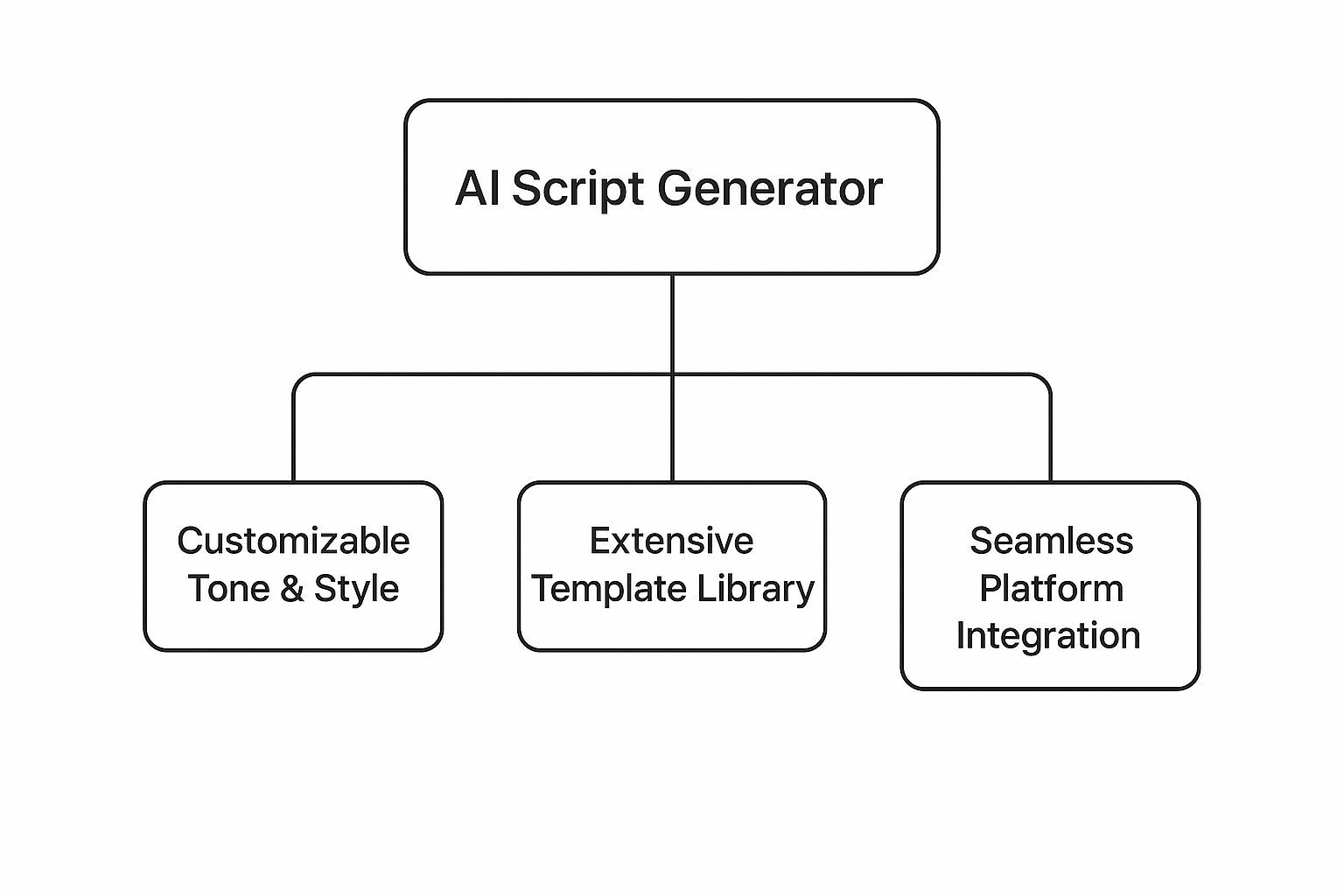
As you can see, the best tools strike a perfect balance between creative control, structural guidance, and practical integration.
To help you make sense of it all, I've created a table that breaks down the essential features you should be looking for. It's designed to help you pinpoint exactly what functionalities will make the biggest difference for your specific video creation needs.
Essential Features of Top AI Video Script Generators
Feature | What It Does | Why It Matters for You |
|---|---|---|
Customizable Tone & Style | Lets you define the specific voice, mood, and personality of the script (e.g., "witty and sarcastic" or "empathetic and professional"). | This is non-negotiable for brand consistency. It ensures the script sounds like you and not a generic robot, saving you tons of editing time. |
Extensive Template Library | Provides pre-built script structures optimized for different platforms and video types (e.g., TikTok ads, YouTube explainers, corporate training). | It’s a massive shortcut. These templates are based on proven formulas, giving you a head start with a structure that’s already designed to perform well. |
Seamless Platform Integration | Connects directly with video editors, stock footage libraries, or all-in-one content platforms, streamlining the production process. | This turns your script into an actionable blueprint. Instead of just getting a text file, you get a script that can auto-populate scenes or suggest visuals. |
Audience & Goal Specification | Allows you to input who your target audience is and what you want the video to achieve (e.g., drive sales, educate, entertain). | A script written for tech executives will be very different from one for teenagers. This feature ensures the content is relevant and effective for its intended audience. |
Collaboration Features | Enables multiple team members to comment on, edit, and approve scripts within the platform. | Crucial for agencies and marketing teams. It keeps everyone on the same page and eliminates messy email chains and version control nightmares. |
Ultimately, the right combination of these features will depend on your team's size, budget, and the types of videos you're producing. Now, let's dive a little deeper into the three most important ones.
1. You Need Control Over Tone and Style
If there’s one feature to prioritize, it’s the ability to control the tone of voice. A script for a serious corporate training video needs to sound professional and clear. A TikTok ad? It better be energetic, snappy, and maybe a little quirky.
Look for tools that go beyond generic presets like "formal" or "casual." The real magic happens when a platform lets you feed it custom instructions or, even better, analyze your existing content to learn your unique brand voice. That’s how you get an output that actually sounds human—like your brand—which dramatically cuts down on your editing workload.
For instance, you could tell the AI to write "in the style of a friendly expert breaking down a complex topic for a complete beginner." That level of nuance is what transforms the AI from a simple tool into a true creative collaborator.
2. A Solid Template Library Is a Goldmine
Don’t underestimate the power of a good template library. These aren't just lazy fill-in-the-blank documents; they are battle-tested frameworks engineered for specific video formats and goals.
A good template doesn't just save you time—it gives you a starting point built on what actually works. Think of it as having a seasoned director whispering proven storytelling formulas in your ear.
A top-notch AI script generator should offer a wide variety of templates, such as:
-
Social Media Ads: Scripts structured with a killer hook, a clear problem-solution arc, and a strong call to action, specifically for platforms like Instagram Reels or YouTube Shorts.
-
Explainer Videos: Templates that follow a logical progression, breaking down dense topics into easy-to-digest scenes or talking points.
-
Corporate and Training Videos: Frameworks built for clarity and information retention, often including cues for on-screen text or graphics.
Using a template ensures your script isn't just well-written, but also strategically sound for the platform where it will live. It’s your shortcut to creating content that truly connects with your audience.
3. Smart Integrations Make Your Life Easier
Finally, think about how the tool fits into your entire video production process. The most advanced script generators don't just hand you a text file and call it a day. They offer features that bridge the gap between writing and actually making the video.
Seamless integration with video editing software or all-in-one creation platforms is a game-changer. Imagine generating a script that automatically creates scenes in your video editor or suggests stock footage based on the dialogue. This kind of connected workflow is a clear sign of a forward-thinking tool. For teams, collaboration features like script sharing and commenting are an absolute must.
When you're comparing your options, look at the whole picture. Different tools come with various subscription tiers and feature sets, so it’s always smart to check out their pricing and feature breakdowns to find a plan that aligns with your production needs and budget. A tool that helps you go from script to final cut more efficiently will always deliver the best return on your investment.
Putting AI Scripts to Work in Your Industry

It’s one thing to talk about the tech, but where does the rubber really meet the road? An AI video script generator truly shows its worth when you see how different professions are actually using it. These tools are quickly becoming a secret weapon for anyone who needs to create great video content, and do it fast.
Think of it less as a simple writing tool and more as a specialist on your team. It handles the tedious structural work—the outlining, the pacing, the calls to action—freeing you up to focus on your core message and the creative vision. Let’s look at how people in different fields are putting these AI scripts into their day-to-day work to get some impressive results.
Marketing Teams and E-commerce Brands
If you’re in marketing, you know the content treadmill never stops. The pressure is always on to produce more, and better, video. This is where an AI script generator becomes a game-changer, letting you scale up video production without the quality taking a nosedive.
For e-commerce brands, it’s a lifesaver. Imagine launching a new skincare line. Instead of blocking out days to write unique scripts for every single product, a brand can get it done in minutes. By feeding the AI key details—product features, target audience ("millennial women interested in clean beauty"), and the right tone ("informative yet fun")—it can spit out tailored scripts for social ads, website explainers, or email campaigns. This speed means they can test different creative angles on the fly to see what really connects with customers and drives sales.
You can see how simple the process has become in this screenshot from Synthesia, a popular AI video platform.
The clean interface shows just how easy it is to pick an AI avatar, paste in a script, and generate a professional video. It's a straight line from text to a finished product.
Real Estate Agents and Small Businesses
Small business owners—especially in visual industries like real estate—are getting a huge leg up from these tools. A real estate agent, for instance, often needs to post daily property tour videos on Instagram or TikTok to stay top-of-mind. Scripting every single one from scratch is a real grind.
With an AI tool, an agent can plug in the details and get a fresh script in seconds.
-
Prompt Example: "Create a 45-second video script for a 3-bedroom modern farmhouse in Austin, TX. Highlight the open-concept kitchen, natural light, and spacious backyard. The tone should be welcoming and aspirational, targeting young families."
-
Result: A perfectly structured script pops out, complete with a hook to grab attention, bullet points on key features, and a clear call to action like, “DM me for a private showing!”
This kind of consistency helps agents build a powerful social media presence. One agent even reported a 40% boost in lead generation after adopting this strategy, simply because they could produce more high-quality videos without the extra hours.
For small businesses, an AI script generator levels the playing field. It provides access to sophisticated marketing techniques that were once only available to companies with large creative teams and budgets.
Educators and Corporate Trainers
In the worlds of education and corporate training, getting the message across clearly is everything. An AI script generator can help turn dense, complex material into learning content that’s actually engaging. A corporate trainer, for example, can take a dry policy document or a complicated software manual and transform it into a series of simple, easy-to-follow video scripts.
This makes training more accessible for everyone and helps employees actually remember what they learned.
This isn't a niche trend; it's part of a massive shift. The global AI video generator market was valued at USD 614.8 million in 2024 and is expected to rocket to USD 2,562.9 million by 2032. That’s a compound annual growth rate of nearly 20%. This explosion is being driven by industries like real estate and healthcare discovering how AI video can completely change how they connect with people. You can find more details about the growing AI video market on fortunebusinessinsights.com.
How to Write Your First AI-Powered Script

Diving into an AI video script generator for the first time can feel a little strange, but it's also incredibly exciting. The trick is to stop thinking of it as a magic button that does everything for you. Instead, view it as your new creative partner—one that’s lightning-fast and has encyclopedic knowledge.
Your job is to be the director, giving clear instructions and then polishing the AI's output until it sounds just right. This approach turns the often-dreaded task of staring at a blank page into a simple, back-and-forth workflow. You supply the core idea, and the AI builds the scaffolding.
Step 1: Define Your Goal and Audience
Before you even think about writing a prompt, you have to get crystal clear on two fundamentals: your goal and your audience. A script without a purpose is like a ship without a rudder. It might look impressive, but it’s not actually going anywhere.
First, ask yourself: what do I want the viewer to do, think, or feel after they finish watching? Are you trying to get sign-ups for a webinar? Are you explaining a tricky feature? Or maybe you just want to tell an entertaining story that gets people to remember your brand.
Next, get a sharp mental picture of your ideal viewer. Is this person a seasoned pro who gets all the industry slang, or a total newcomer who needs things spelled out? Nailing down these details gives your AI partner the context it needs to create something that actually connects.
Step 2: Craft a Powerful Prompt
This is it—the single most important part of the entire process. Think of your prompt as the creative brief you'd give a human writer. A lazy, vague prompt will get you a generic, cookie-cutter script. But a detailed, thoughtful prompt can deliver a draft that’s already 90% of the way to the finish line.
A great prompt always includes a few key ingredients:
-
Video Topic and Format: Be direct. "A 60-second TikTok ad" or "a 5-minute YouTube tutorial about changing a tire."
-
Target Audience: Tell the AI who it’s talking to. For example, "speak to small business owners who are new to digital marketing."
-
Key Talking Points: List the non-negotiable messages you have to include. Bullet points are your friend here.
-
Tone of Voice: Get specific! "Friendly" is okay, but "witty, energetic, and slightly sarcastic" is much better.
-
Call to Action (CTA): State exactly what you want viewers to do. "Click the link in our bio to download the free guide."
Prompt Example (Weak): "Write a script about our new software."
Prompt Example (Strong): "Generate a script for a 90-second explainer video about ShortGenius. The target audience is busy content creators. The tone should be upbeat and encouraging. Cover these points: 1) Overcome writer's block instantly, 2) Generate visuals and voiceovers in one place, 3) Schedule posts automatically. End with a CTA to 'Start your free trial today at ShortGenius.com.'"
Step 3: Generate and Review the First Draft
Hit "generate," and within moments, you'll have a complete draft. Now your role shifts from director to editor. Read the script from top to bottom. Does it flow well? Is it clear? Are there any factual mistakes?
The AI did the heavy lifting, but the human touch is what makes it shine. Resist the urge to just accept the first version. Look for clunky phrases you can tighten up or spots where the core message gets a little fuzzy. You’ve been given the raw clay; now it’s time to start shaping it.
This blend of AI speed and human curation is exactly why the market is set to grow to nearly USD 1.96 billion by 2030. You can dig deeper into the rise of AI video tools on grandviewresearch.com to see the full picture.
Step 4: Inject Your Unique Brand Voice
This final step is where the magic really happens. The AI gave you a solid script, but it doesn't have your personality, your stories, or your unique brand flavor. This is what separates a good script from a great one.
Here’s how to make it yours:
-
Add Personal Stories: Is there a short, relevant anecdote you can drop in to make a point more memorable?
-
Incorporate Brand-Specific Lingo: Swap out generic words for the terms your community and team actually use.
-
Refine the Hook: Go back to the first one or two lines. Rework them until they grab attention and sound like you.
-
Check the Pacing: Read the entire script out loud. Seriously. You'll instantly catch any parts that sound robotic or unnatural.
Follow these steps, and you’ll find that an AI video script generator can help you create consistently great content that connects with your audience—all while saving you a massive amount of time and brainpower.
Got Questions About AI Script Generators? Let's Clear Things Up.
Whenever a powerful new tool comes along, it’s smart to have questions. You're probably wondering about the quality of the scripts, how they fit into your current workflow, and what the real cost is. Perfectly normal. Let's tackle some of the most common concerns so you can start using these tools with confidence.
Think of this as the quick-start guide you actually want to read. Understanding these key points will help you get incredible value from your very first try.
Can AI Actually Write Scripts That Don't Sound... Robotic?
Absolutely. Modern AI script generators can produce surprisingly natural, human-like dialogue. The magic is all in the prompt you give it.
When you tell the AI you want a script that's witty, empathetic, or straight-up professional, you’re essentially giving it a personality to work with. The results often feel genuinely authentic. The best approach, though, is to see the AI's output as a fantastic first draft—not the final word. A few small tweaks to add your personal flair or brand-specific details can turn a good script into something that sounds completely like you.
Will Using an AI Script Generator Tank My Video's SEO?
Nope, not at all. Using an AI tool to write your script won't hurt your video's SEO. What search engines like Google and YouTube really care about is high-quality content that gives viewers what they're looking for. They don't care how the script was born.
As long as you’re the final checkpoint—reviewing and refining the script to make sure it's accurate, helpful, and speaks to your audience—it can perform incredibly well. In fact, you can even direct the AI to weave in your target keywords naturally, potentially giving your SEO a head start right out of the gate.
An AI script is a tool, not a shortcut around quality. Your final review is what makes the script valuable to your audience and to search engines, turning it into a powerful asset for getting discovered.
What's the Biggest Mistake People Make With These Tools?
The most common pitfall is hitting "generate" and calling it a day. Treating the first draft as the final product is a huge missed opportunity. An AI script generator is an incredible assistant, but it can't replace your unique expertise and creativity.
It doesn't know your personal stories, your brand's inside jokes, or the subtle nuances that make your content connect with people. Always, always review the output. Check for accuracy, polish it to match your brand’s voice, and sprinkle in those one-of-a-kind insights that only a human—you—can provide. That's how you turn a functional script into a truly great one.
Ready to stop staring at a blank page and start creating amazing video content in minutes? ShortGenius brings scriptwriting, video creation, and scheduling together in one simple platform. Join over 100,000+ creators and try it for free!