How Long Can YouTube Shorts Be? how long can youtube shorts be

how long can youtube shorts be: Discover data-backed strategies to pick the perfect length for maximum engagement and viral potential.
Officially, YouTube Shorts can be up to 3 minutes long. But here’s the catch, and it's a big one for creators: that limit only applies if you're using your own original audio or royalty-free music.
The moment you grab a track from YouTube's commercial music library, your Short is automatically capped at a much tighter 60 seconds.
Why the 60-Second vs. 3-Minute Limit?
This isn't an arbitrary rule. It all comes down to music licensing. YouTube has to navigate complex agreements with artists and labels, which often limit how their music can be used. This dual-limit system is their solution, and it forces you to make a strategic choice right from the start.
Using your own voiceover, a podcast clip, or a royalty-free track gives you the full 180-second canvas. This is perfect for things like:
- Quick tutorials and step-by-step guides
- Deeper explanations or Q&A segments
- Multi-part stories that need a bit more room to breathe
On the other hand, if you add a trending song to jump on a viral challenge, you're locked into that 60-second format. This works best for fast-paced skits, dance trends, and any content that needs the instant hook of a popular track.
To give you a clear picture, here's a quick breakdown of how your audio choice affects your video's maximum length.
YouTube Shorts Length At a Glance
| Audio Type Used | Maximum Video Length |
|---|---|
| Original Audio (Your own voice, sounds you recorded) | 3 Minutes |
| Royalty-Free Music (From YouTube's library or other sources) | 3 Minutes |
| Commercial Music (Popular songs from YouTube's library) | 60 Seconds |
Ultimately, this structure gives you a clear choice between using a trending sound for immediate impact or your own audio for more in-depth storytelling.
This expanded 3-minute runtime is a significant shift from the old 60-second limit. It was a direct move by YouTube to give creators more flexibility and to compete more effectively in the short-form video space. While short and snappy is still the name of the game, there's clearly a growing appetite for slightly more substantial content.
Figuring out what works for your audience is key, and experimenting with different runtimes is part of the process. You can learn more about finding the optimal lengths for YouTube Shorts to really nail your strategy.
Decoding What Makes a Video a Short
Knowing the maximum length for a YouTube Short is crucial, but it's only one piece of the puzzle. For your video to actually get picked up by the algorithm and land in the Shorts feed, it needs to check a few specific boxes. Think of it as YouTube's internal checklist for all short-form content.
Aspect Ratio is King
First up, your video has to look the part. That means it must be filmed and edited in a vertical or square format. The gold standard is a 9:16 aspect ratio (think 1080x1920 pixels), which perfectly fills up a smartphone screen. You can also use a square 1:1 aspect ratio, but for the best, most immersive experience for viewers scrolling the Shorts shelf, vertical is the way to go.
The Clock is Ticking
Next, of course, is the length. As we've discussed, your video must be under the 3-minute maximum limit. If it's even a second over, YouTube will treat it as a standard, long-form video, and it will completely miss out on the Shorts audience and algorithm.
Don't Forget the Hashtag
Finally, there’s one more signal you can send to YouTube. While it isn't technically required, adding the #Shorts hashtag to your video’s title or description is a huge help. It tells the platform's system exactly what kind of content you've uploaded, helping it get categorized and distributed correctly.
Getting these three things right—vertical format, a length under three minutes, and the #Shorts hashtag—is the fundamental formula for making sure YouTube sees your video as a Short.
This simple flowchart breaks down how your audio choice plays a direct role in the maximum length you can use.
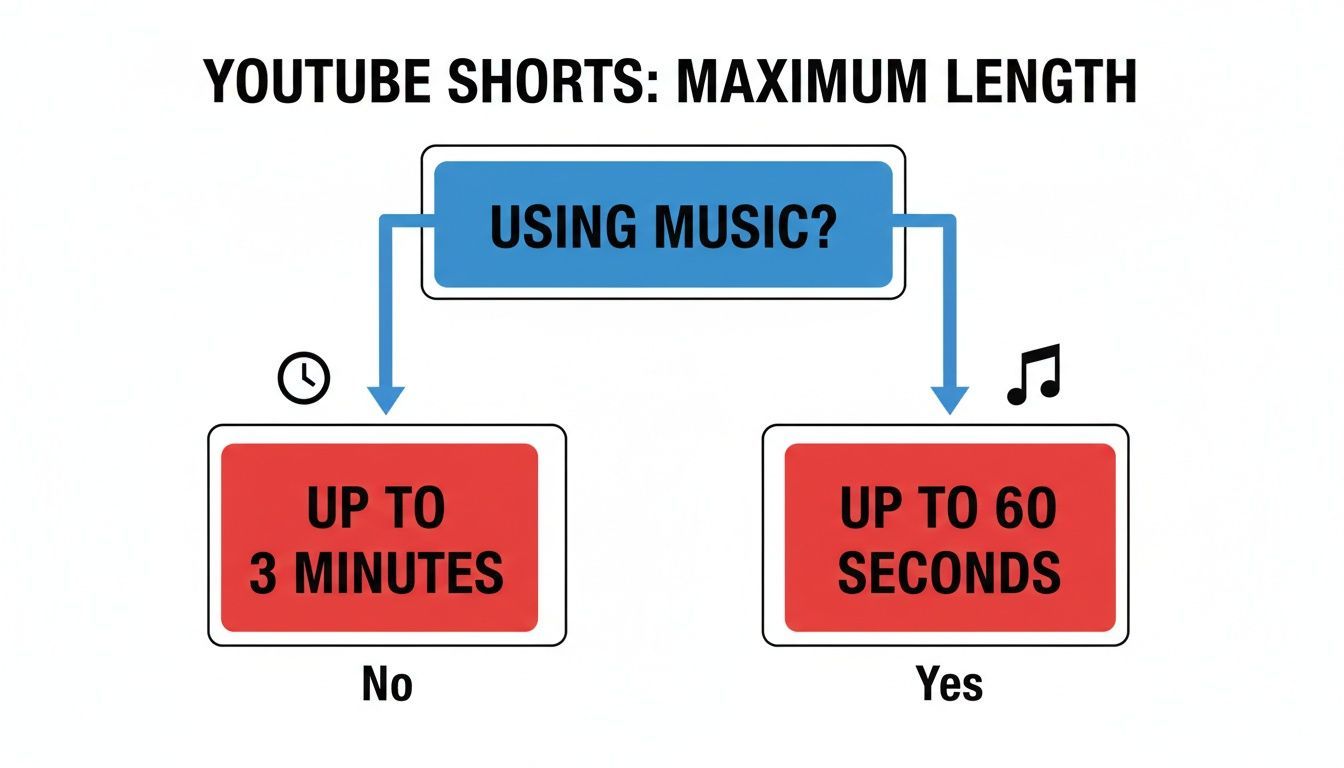
The main thing to remember is that borrowing music from YouTube's library will cap you at 60 seconds. If you want to unlock the full 3-minute potential, you'll need to use your own original audio.
The Story Behind the Shorts Time Limit
To really get why YouTube Shorts have their current time limit, you have to rewind a bit. The format didn't just pop up out of nowhere; it was YouTube's direct answer to the short-form video explosion, a trend almost single-handedly started by its biggest rival, TikTok.
When YouTube Shorts first rolled out worldwide back in 2021, the stopwatch was set at a firm 60-second maximum. This wasn't just a random number. It was a calculated move to go head-to-head with TikTok's bite-sized, addictive format.
This strict limit forced creators to become masters of micro-storytelling, cramming value, hooks, and punchlines into less than a minute. And it worked. The format absolutely blew up, hitting over 70 billion daily views by early 2024. It was obvious that both creators and viewers were ready for more.
From Rivalry to Innovation
That initial 60-second cap was great for grabbing quick attention, but it could feel like a creative straitjacket. Creators trying to film a slightly more involved tutorial or tell a story with a bit more depth often found themselves running out of time.
Meanwhile, TikTok started letting its users post longer videos, and YouTube knew it had to keep up or risk creators jumping ship. This friendly competition was the real catalyst for extending the Shorts time limit.
This change points to a bigger shift in the world of short-form video. The hook is still king, but platforms are now figuring out how to reward content that can keep people watching a little longer. It's a smart middle ground, giving creators more room to breathe without forcing them into a full-blown long-form video.
It’s a balancing act, and if you look into how platforms like TikTok pay creators, you can see the financial incentives driving these decisions. Giving creators more time allows for more complex ideas, turning Shorts from a simple gimmick into a seriously versatile tool.
Finding the Perfect Length for Your Content
Knowing the official time limits for YouTube Shorts is one thing, but figuring out the right length for your specific video is where the real magic happens. Just because you can make a 60-second or even a three-minute Short doesn't mean you always should.
Think of it like telling a joke. A quick, punchy one-liner lands perfectly in under 15 seconds. But a more complex story with a bigger payoff might need the full minute. The goal of your content should always drive its runtime.
Matching Length to Your Goal
Different video lengths are built for different jobs.
A snappy 15-30 second video is your best bet for maximizing viewer retention. It's the ideal format for quick tips, hopping on a viral trend, or landing a single, powerful message that’s easy to rewatch. This duration is often the sweet spot for hooking viewers before they even think about swiping away.
On the other hand, a 50-60 second Short gives you room for more developed storytelling. This length works great for mini-vlogs, quick product demos, or any piece of content that needs a clear beginning, middle, and end. It’s just enough time to build a connection and deliver more substantial value.
Interestingly, while shorter clips often get higher retention percentages, some studies show that Shorts in the 50-60 second range can pull in a higher average view count. You can dig into more of these statistical trends for YouTube Shorts to see how it all breaks down.
The takeaway is simple: There's no single "perfect" length. The best duration tells your story effectively and respects your viewer's time—a combination that ultimately boosts the metrics that matter.
The newer 1-3 minute format is a fantastic option for content that just couldn't be squeezed into 60 seconds, like condensed tutorials or mini-documentaries. This extended runtime opens up fresh creative possibilities and new revenue streams. For a deeper look at that, check out our guide on how much YouTube pays for views.
Optimal Shorts Length by Content Type
To make it even clearer, here’s a quick guide to help you decide on the right length for your next video.
| Content Type | Recommended Duration | Primary Goal |
|---|---|---|
| Viral Trends & Memes | Under 15 seconds | Instant engagement, high rewatchability |
| Quick Tips & How-Tos | 15–30 seconds | Deliver value quickly, boost retention |
| Storytelling & Vlogs | 45–60 seconds | Build connection, tell a complete story |
| Product Demos | 50–60 seconds | Showcase features, drive consideration |
| Condensed Tutorials | 1–3 minutes | Provide in-depth value, build authority |
Ultimately, choosing your video's length based on its purpose is how you serve your audience best and get the YouTube algorithm on your side.
Practical Tips for Making Every Second Count
Knowing the time limit for YouTube Shorts is one thing, but actually making a great Short is another. The real challenge is making every single second feel intentional, whether your video is a quick 15-second clip or a full minute. A good Short doesn't waste the viewer's time; it hooks them in and delivers value instantly.
Your first three seconds are everything. That's the tiny window you have to stop someone from scrolling past. You need to open with a powerful hook—a surprising question, a wild visual, or a bold claim that makes them need to see what happens next.
Structure Your Story for Maximum Impact
Even in a 60-second video, a simple story structure can make a huge difference. Think of it as a mini-narrative with a clear beginning, middle, and end.
- The Hook (Beginning): This is your attention-grabber.
- The Value (Middle): Get straight to the point—the core message, tip, or entertainment.
- The Payoff (End): End with a satisfying punchline, a surprising twist, or a clear call to action.
This basic framework keeps your video focused and makes it feel complete, which is key to getting people to watch all the way through.
A huge mistake I see creators make is trying to cram too much into one Short. Pick one idea and execute it perfectly. That's what makes your content memorable and shareable.
Also, and this is non-negotiable, you must use burned-in captions. So many people watch videos with the sound off, especially on their phones. Big, clear text ensures your message gets across no matter what. It’s a simple change that can have a massive impact on your retention rate.
For brands and teams trying to produce this kind of content at scale, looking into tools that create AI UGC ads can be a huge time-saver by automating things like captioning. By nailing these fundamentals, you'll be well on your way to making Shorts that truly connect with an audience.
How to Upload and Format Your Shorts Correctly
Knowing the time limit for your Short is only half the battle. One simple formatting mistake can stop your video from ever landing on the Shorts shelf, and nobody wants that. Think of these technical specs as the final pre-flight check before you hit publish.
The most important rule? Your video's dimensions are non-negotiable. It absolutely must be in a vertical format. The gold standard here is a 9:16 aspect ratio, which is what allows your video to fill a smartphone screen for that truly immersive feel. While a square 1:1 aspect ratio can also work, vertical is always the better bet.
Technical Checklist for Shorts
To make sure your video looks crisp, professional, and gets categorized correctly, just run through these key formatting rules before you upload.
- Resolution: Always aim for 1920x1080 pixels. This is standard HD for vertical video and guarantees your content looks sharp on any device.
- Hashtag: Get into the habit of including #Shorts in your video’s title or description. While YouTube's system is pretty smart, this is a clear signal that helps the algorithm categorize your content without any guesswork.
- Thumbnail: This one trips people up. Unlike regular long-form videos, you can't upload a custom thumbnail for a Short. Instead, YouTube lets you pick a single frame from the video itself during the upload process. Make sure you have plenty of eye-catching moments to choose from!
Beyond just keeping it under 60 seconds, getting the upload process right is what ensures your video actually gets seen as a Short. For a more detailed walkthrough, you can follow a comprehensive guide to posting YouTube Shorts that breaks down every single step.
Answering Your Top Questions About Shorts Length
Even when you know the rules, putting them into practice can bring up some tricky questions. Let's walk through a few of the most common scenarios creators run into when figuring out how long their YouTube Shorts can be.
What Happens If My Video Is a Second Over?
This is a hard and fast rule from YouTube. If your video is even a fraction of a second over the 60-second mark—say, 60.1 seconds—it's automatically treated as a standard, long-form video. It won’t get a spot on the Shorts shelf, and you'll miss out on the massive audience that comes with the Shorts feed. Precision is everything here.
Can I Repurpose Old Horizontal Videos for Shorts?
Absolutely, but you can't just drop it in and hope for the best. To make it work, you have to re-edit that horizontal footage into the proper 9:16 vertical aspect ratio. If you skip this step, you'll end up with ugly black bars on the top and bottom, which looks terrible on mobile and is a major red flag for the algorithm.
Think of your old long-form content as raw material. Your job is to find the most exciting vertical slice of that video and build a completely new, punchy story that feels made for Shorts.
Does Using Music From YouTube's Library Still Limit My Time?
This is a big one that trips a lot of people up. If you add a track from YouTube’s official commercial music library, your Short is automatically capped at 60 seconds. It doesn't matter if the three-minute option is available to you; licensed music brings the limit right back down.
To go beyond that 60-second mark, you have to use your own original audio or find tracks that are completely royalty-free.
Ready to create engaging Shorts in minutes? With ShortGenius, you can turn your ideas into publish-ready videos with AI-powered scripting, voiceovers, and editing. Start creating faster today.