длина youtube shorts: Определите идеальную продолжительность для большего вовлечения

Откройте для себя лучшую длину youtube shorts для вашей ниши с советами, основанными на данных, чтобы увеличить просмотры и вовлеченность.
So, what's the magic number for YouTube Shorts length? It's the question every creator asks. While you can upload a Short up to a full minute, the data consistently points to a sweet spot: 50 to 60 seconds.
This length is the perfect sweet spot. It gives you just enough runway to hook a viewer, build a little suspense or tell a quick story, and deliver a satisfying punchline or conclusion. Anything shorter can feel rushed, and you risk losing people before you’ve made your point.
Finding Your Perfect YouTube Shorts Length

It’s tempting to think shorter is always better in the fast-paced world of vertical video, but that's not what we're seeing. Millions of Shorts are under 30 seconds, yet they often get outperformed by their longer counterparts. Think of it this way: a 15-second clip is a quick jab, but a 55-second video is a full story arc. You have time to build genuine connection and keep viewers watching longer, which is a key signal to the YouTube algorithm.
This guide will walk you through how to think strategically about your video’s length, moving beyond guesswork and into a data-backed approach. We're not about one-size-fits-all rules here; we're about matching your video’s duration to your goals.
Here’s what we’ll get into:
- The Official Limits: We'll start with the hard-and-fast rules YouTube sets.
- The Engagement Goldilocks Zone: Why that 50-60 second window is so effective.
- Letting Your Content Decide: How to pick the right length for a tutorial vs. a comedy sketch.
- Editing to Keep Them Watching: Practical tips to make sure every second of your Short is working for you.
Of course, video length is just one piece of the puzzle. Understanding the bigger picture by Mastering short-form video marketing gives you the strategic foundation to make all your content perform better. Paired with great tools like those from https://shortgenius.com, you'll have everything you need to find the perfect rhythm for your channel's growth.
YouTube Shorts Length A Quick Guide
The table below breaks down the key difference between what YouTube allows and what actually works for driving views and engagement.
| Metric | Official YouTube Limit | Data-Driven Sweet Spot |
|---|---|---|
| Video Duration | Up to 60 seconds | 50-60 seconds |
| Viewer Retention Goal | Keep them on the platform | Keep them watching 100% of your video |
| Typical Use Case | Any vertical video under a minute | Storytelling, tutorials, value-packed tips |
Ultimately, the official limit is just a technical boundary. The sweet spot is where you give the algorithm—and your audience—exactly what it wants: a complete, satisfying viewing experience that encourages a re-watch.
Understanding YouTube's Official Rules on Length
Before you can figure out the perfect length for your Short, you need to know the hard-and-fast rules of the platform. Think of these as the basic dimensions of your canvas—knowing them prevents any frustrating surprises when you hit the upload button.
At its core, the rule is simple: a YouTube Short can be up to 60 seconds long. That one-minute cap is the absolute maximum, giving you a decent amount of time for a quick story, a mini-tutorial, or a funny skit.
But there's a huge catch that trips up a ton of creators, and it all comes down to the music you use.
How Audio Affects Your Maximum Length
Believe it or not, your choice of background music can slash your maximum video length from 60 seconds down to just 15. This is probably the single most important technical detail to get right.
Here's how it works:
- Using YouTube's Music: If you grab a song from YouTube's official Shorts audio library, your video is automatically capped at 15 seconds. No exceptions.
- Using Your Own Audio: If you record your own sound or use the original audio from another video, you get the full 60-second runway.
This isn't a glitch; it's a feature. The 15-second limit is tied to music licensing deals, which let you use popular, copyrighted songs for very short clips. For anything longer, YouTube expects the audio to be yours.
Getting this right is all about planning ahead. If you want to jump on a trending sound for a quick dance clip, 15 seconds is usually plenty. But if you're trying to tell a more involved story or explain something, you'll need to stick with original audio to unlock that full minute.
So, Why Is 50-60 Seconds the New Gold Standard?
You might assume that with short-form video, the shorter, the better. It feels intuitive, right? But the actual performance data tells a very different, and much more interesting, story. It turns out the sweet spot for a YouTube Short isn't some lightning-fast 15-second clip, but something much closer to the one-minute maximum. This is where we stop just playing by the rules and start driving real results.
Lots of creators get stuck making sub-30-second videos, but they're leaving a massive opportunity on the table. A video that’s 50-60 seconds long gives you the perfect amount of time to actually build a narrative. Think of it like a mini-story: you have enough runway to set the scene, introduce a conflict or an idea, and then deliver a punchline or resolution that feels earned.
This structure just works on a human level. It hooks people in because they can sense a story is unfolding, making them far more likely to stick around to see how it ends.
The Power of a Great Payoff
That extra bit of time is where the magic happens. It’s what lets you deliver real value, whether you're showing a quick-fire tutorial, telling a compelling personal story, or revealing a jaw-dropping transformation. When someone invests nearly a full minute and gets rewarded with a satisfying conclusion, you send incredibly powerful signals to the YouTube algorithm.
High completion rates are everything. A viewer who finishes a 55-second video is sending a much stronger message to YouTube than someone who flicks past a 10-second clip. It says your content isn't just a cheap gimmick to grab attention—it's genuinely valuable and satisfying.
The YouTube algorithm's main job is to keep people on the platform. A longer Short with a sky-high completion rate proves you can hold an audience's attention, making YouTube far more likely to push your video out to a much wider audience.
Even though YouTube has experimented with longer formats, the data is pretty clear. When you dig into the numbers, Shorts between 50 and 60 seconds consistently hit the highest average completion rates—a whopping 76%. This proves that if you tell a good story, viewers have no problem sticking around. You can dive deeper into the YouTube Shorts engagement statistics on awisee.com.
Compare that to the ultra-short videos. They often rely on a quick visual gag or a shocking first second. Sure, they might get a lot of initial views, but they rarely create a lasting impression or give someone a good reason to subscribe. The 50-60 second format, on the other hand, finds that perfect balance, giving you just enough time to be both memorable and impactful.
Matching Your Video Length to Your Content Type
There’s no magic number for the perfect YouTube Shorts length. Honestly, it's less about finding a one-size-fits-all duration and more about making a strategic choice based on what you're trying to achieve with your video.
Think of it like this: you wouldn't cook a delicate piece of fish for the same amount of time as a hearty stew. Each one needs just the right amount of heat for just the right amount of time to be perfect. Your content is no different. The length needs to serve the message, not get in its way.
Quick-hitting content like dance trends or viral memes feel most at home in the 15-25 second range. The whole point is to be punchy and instantly gratifying.
Aligning Duration with Your Goal
If your goal is a quick laugh or a "wow" moment from a visual gag, shorter is almost always better. You want to land the punchline before the viewer's thumb even thinks about swiping. Trying to drag a simple joke out to fill a full minute is a surefire way to kill the humor and your audience retention along with it.
But what if you're teaching something? For mini-tutorials, quick explainers, or storytelling, you'll want to lean toward the 45-60 second mark. This gives you enough breathing room to set the scene, deliver real value, and wrap things up with a satisfying conclusion. You can’t rush a good story or a helpful tip.
This chart drives the point home. It shows how different lengths tend to produce different results—shorter clips often rack up tons of initial views, while longer ones can earn much higher completion rates from a more invested audience.
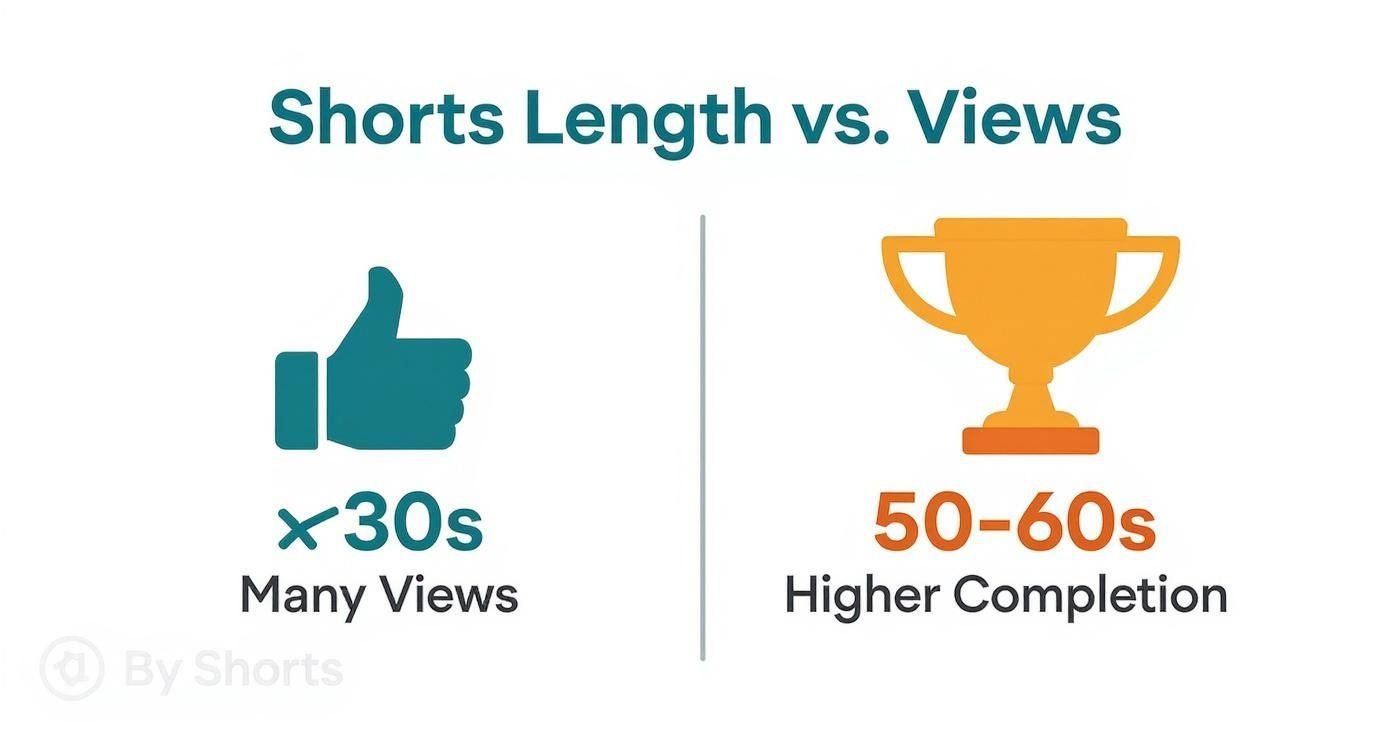
The takeaway is simple: match the length to the mission. Go short for immediate impact, and go long for deeper engagement.
Content Categories and Recommended Lengths
If you look at what's successful on the platform, you'll see that certain types of content naturally fall into specific time buckets. The data from various YouTube usage statistics backs this up. Short, snappy clips are built for trends and jokes. Longer, more thoughtful formats are made for tutorials and detailed how-to guides.
Your video's duration should serve the story you're telling. Rushing valuable content into a 15-second clip will leave viewers unsatisfied, while stretching a simple idea to 60 seconds will cause them to lose interest.
Here’s a practical breakdown to get you started:
- Entertainment & Trends (15-25 seconds): This is the sweet spot for memes, dance challenges, and funny skits. It’s all about a quick, impactful delivery.
- Education & Tutorials (45-60 seconds): Perfect for mini-lessons, quick tips, or how-to guides where you need a bit more time to walk through steps or build up a concept.
- Storytelling & Vlogs (50-60 seconds): Use the full minute to take viewers on a journey. Show a transformation, share a personal anecdote, or tell a complete story with a clear beginning, middle, and end.
Editing and Pacing: Making Every Second Count
Nailing the right length for your YouTube Short is a great start, but it’s what you do with those seconds that really matters. The goal is to stop someone mid-scroll and keep them glued to the screen, and it all starts with the first three seconds. This is your make-or-break moment.
You need a killer hook right away—a provocative question, a surprising visual, or a bold claim that grabs their attention instantly. Without that initial punch, the perfect length won’t save you. Once you have them, you have to maintain that momentum with snappy pacing. Think quick cuts, strategic zooms, and dynamic text overlays that keep the energy high. Every single frame should serve a purpose.
Telling a Story and Building a Loop
Even in a 30-second clip, your Short needs a story. It doesn't have to be complicated, just a simple arc: a beginning (your hook), a middle (the core value or action), and an end (the payoff). This structure makes the video feel complete and satisfying, which is a huge factor for retention.
Now, here’s a pro-level trick to really juice your engagement: create a seamless loop. This is where the last frame of your video flows perfectly back into the first. It’s a subtle but incredibly powerful technique that can get people to watch your Short two, three, or even four times before they even realize it.
A seamless loop is one of the best signals you can send the YouTube algorithm. When a single user watches your video multiple times, it tells YouTube your content is incredibly engaging, which can trigger a massive push to a wider audience.
Getting this right can literally double or triple your watch time from a single viewer. It’s proof that how you edit your Short is just as crucial as how long you make it.
Got Questions About Shorts Length? Let's Clear Them Up.
Even after you've mapped out your content, some practical questions about YouTube Shorts length always seem to surface. Let's tackle the most common ones so you can create with confidence.
Can a YouTube Short Really Be Longer Than 60 Seconds?
Yes, but there's a catch. Originally, Shorts were strictly a 60-second game, and that was that. YouTube has since opened things up a bit, allowing creators to upload longer videos that still get categorized as Shorts.
The big "but" here is the audio. If you pull a track from YouTube’s official Shorts music library, you’re still locked into that 60-second maximum. The only way to go beyond that minute mark is by using your own original audio or by sampling sound from another video.
So, Are Shorter or Longer Shorts Better for Views?
Ah, the million-dollar question. The honest answer is that it completely depends on what you're making. There's no magic number that works for everyone.
Quick, punchy videos under 20 seconds are perfect for jumping on trends and can rack up views fast. They’re easy to consume and share. On the flip side, we're seeing more and more data showing that well-structured Shorts between 50-60 seconds often nail much higher completion rates. The "best" length is simply the time it takes to tell your story or make your point without any fluff.
The Real Takeaway: Stop worrying about hitting a specific number. A 55-second Short that people watch all the way through is infinitely more valuable to the algorithm than a 15-second clip that people swipe away from halfway through.
How Exactly Does Length Impact the Shorts Algorithm?
At its core, the algorithm cares about two main things: keeping people watching (viewer retention) and how much time they spend doing it (watch time). Your Short's length is a huge piece of that puzzle.
Think about it from YouTube's perspective. A longer video that holds someone's attention is a massive green flag. It tells the algorithm that your content is genuinely engaging and satisfying. That’s why a 55-second Short with a 75% completion rate will almost always get pushed more than a 15-second one with a 50% completion rate. Your number one goal should be to maximize the percentage of the video people watch.
How Can I Figure Out What Length Works for My Channel?
The only way to truly know what resonates with your audience is to test it yourself. Don't guess—let the data guide you.
Here’s a simple framework to get you started:
- Pick one solid content idea.
- Create a few different versions. Edit the same concept into, say, a 20-second, a 40-second, and a 55-second cut.
- Publish them and check the results. Head over to your YouTube Analytics and pay close attention to the "Average percentage viewed" and "Viewed vs. swiped away" metrics for each one.
This little experiment will give you hard evidence about what your viewers actually prefer, helping you dial in your strategy over time.
Ready to turn your ideas into perfectly paced, high-performing Shorts in minutes? With ShortGenius, you can use AI to write scripts, generate scenes, and assemble videos with natural voiceovers, all in one place. Streamline your entire workflow and start publishing consistent, engaging content across all your channels. Create your first video for free with ShortGenius today!