YouTube Automation AI Your Guide to a Scalable Content Workflow

Discover how to use YouTube automation AI to streamline your content creation. This guide covers a complete workflow from scripting to publishing at scale.
What we're talking about when we say "YouTube automation AI" is simply using artificial intelligence to take over the repetitive, time-sucking parts of making videos. Think scriptwriting, editing, and even publishing. It’s the secret sauce that allows creators to pump out great content consistently, without the burnout that comes from doing everything by hand.
The New Reality of AI-Powered YouTube Channels
Forget what you thought you knew about YouTube automation. We've moved past clunky, disconnected tools and into an era of complete, intelligent workflows. This isn't about finding a magic "go viral" button. It's about building a smart system that frees you from the grind, so you can focus on the big picture—your content strategy and growing your community.
The real change here is in your role. You stop being a video editor and become a creative director. Instead of spending 80% of your time painstakingly trimming clips or syncing audio, you're now focused on refining ideas, writing better prompts for the AI, and analyzing what's working. This shift lets you produce high-quality videos at a pace that used to be reserved for huge media companies with teams of people. A single, well-crafted prompt can now be the starting point for an entire video series, with AI generating the first drafts of scripts, visuals, and voiceovers.
This new way of working completely shrinks the production timeline. It’s a total game-changer. This diagram really nails the difference between the old, manual slog and a modern, AI-powered system.
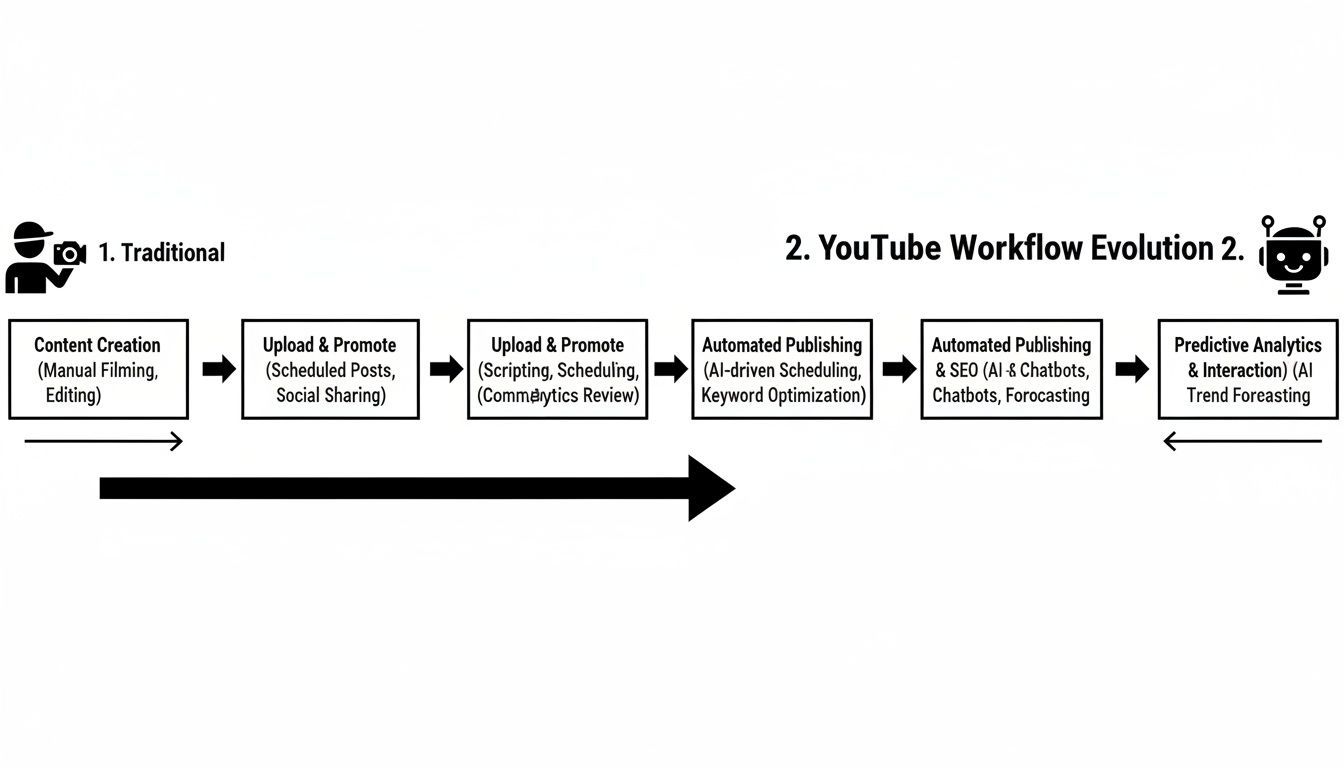
You can see how a bunch of separate, clunky steps get rolled into one smooth, AI-driven process. Less friction, faster output. It’s that simple.
Embracing a Unified Production System
To make this practical, creators are flocking to all-in-one platforms like ShortGenius. The appeal is obvious: these systems bring every part of the process—ideation, scripting, voiceover, editing, and scheduling—under one roof. No more juggling a dozen different subscriptions and wasting time moving files from one app to another.
And this isn't just a trend for the tech-savvy crowd. It’s mainstream now. A recent study found that a staggering 83% of creators are using AI somewhere in their workflow. More than half are specifically using it for video production to increase their output without burning out. If you want to dive deeper, you can explore more findings on AI's impact on content creation. This is a permanent shift in how videos get made.
Key Takeaway: Real YouTube automation doesn't replace you. It elevates you. You become the strategist, the director, while AI handles the grunt work with incredible speed and precision.
To put this into perspective, let's break down the time and effort saved. A traditional workflow is a marathon of manual tasks, each one a potential bottleneck. The AI-powered approach turns that marathon into a series of quick sprints.
Traditional vs AI-Powered YouTube Workflow
| Production Stage | Traditional Workflow (Manual) | AI-Powered Workflow (e.g., ShortGenius) |
|---|---|---|
| Ideation & Research | 4-8 hours: Brainstorming, keyword research, competitor analysis. | 30 minutes: Generate hundreds of ideas, analyze trends, and find content gaps with AI prompts. |
| Scriptwriting | 3-6 hours: Writing, revising, and fact-checking multiple drafts. | 15-20 minutes: Create a full script from a single prompt, with options for tone and style. |
| Visuals & B-Roll | 5-10 hours: Sourcing stock footage, creating graphics, or filming. | 10-15 minutes: AI generates relevant clips, images, and animations based on the script. |
| Voiceover | 1-3 hours: Recording, editing, and mastering audio. | 5 minutes: Generate a high-quality, human-like voiceover instantly. |
| Editing & Formatting | 8-15 hours: Assembling clips, adding text, captions, and music. | 20 minutes: AI handles the full assembly, then auto-reformats for Shorts, TikTok, etc. |
| Total Time (Approx.) | 21-42 hours | 1.5-2 hours |
The numbers speak for themselves. What used to take days or even a full week can now be accomplished in a single afternoon. This isn't about cutting corners; it's about reclaiming your most valuable asset—your time—to focus on what truly matters: creating content that connects with your audience.
Building Your AI-Driven Content Strategy
A great automated channel isn’t built on random video ideas. It all starts with a smart strategy. This is where you lay the foundation, using youtube automation ai as a research partner to figure out what your audience actually wants to watch—and where your competitors are dropping the ball.
Kick things off by feeding an AI tool the top five channels in your niche. Your real goal here is to dig deeper than just a surface-level glance. Don't just list their most popular videos; you need to find the hidden patterns that are making them successful.
Uncovering Hidden Content Gaps
This means getting very specific with your prompts. Generic questions get generic answers. You're after actionable intelligence.
For instance, try telling the AI to:
- Analyze the sentiment in the comments of your competitors' 10 most-viewed videos. Look for common questions or pain points that keep popping up but aren't being fully addressed.
- Identify recurring video formats like listicles, tutorials, or deep dives. Then, have it rank them by average view count so you can see what style really connects with viewers.
- Pinpoint topics they only covered once but got a ton of engagement on. That’s a massive signal of unmet demand you can swoop in and own.
This kind of deep dive gives you a data-backed plan. You stop guessing what might work and start knowing what the market is hungry for. You can build entire content series from these insights alone.
Pro Tip: Try this prompt. Ask your AI to act as a "YouTube Content Strategist." Give it your channel's niche and all the competitor insights you just gathered. Then, task it with generating a 12-video content calendar, complete with compelling titles and a short brief for each video.
From Idea to Automated Script
Once you have that content calendar, it’s time to turn those ideas into scripts. This is where prompt engineering really makes or breaks your workflow. A vague prompt will spit out a generic, unusable script. A detailed one, however, can give you a first draft that’s nearly ready to go.
Let's say you're making a video on "Three common mistakes in drone photography." The difference in your prompt is night and day.
A weak prompt: "Write a script about drone photography mistakes."
A powerful prompt:
- Role: You're an expert videographer who specializes in stunning aerial cinematography.
- Topic: Three critical but non-obvious mistakes that trip up beginner drone pilots.
- Tone: Sound authoritative but also encouraging, like a helpful mentor. Skip the overly technical jargon.
- Structure: Kick it off with a hook describing a beautiful shot getting totally ruined. Then cover the three mistakes, each with a clear example and a simple solution. Wrap up with a call-to-action asking viewers to share their own mistakes in the comments.
- Length: Aim for a tight script that works for a 60-second YouTube Short.
See the difference? That level of detail forces the AI to produce a script with a real personality and a solid structure that fits your channel's voice. You can use this same structured approach for creating scripts for other formats, too, like the ones needed for effective AI-powered UGC ads, where a killer hook and a clear problem-solution arc are everything.
Ultimately, the script is the blueprint for your entire video. A strong prompt ensures that blueprint is solid from the get-go.
Generating Visuals and Voiceovers with AI
Once you've got a solid script, it’s time to bring those words to life. This is where youtube automation ai really starts to feel like magic. You can create a polished, broadcast-quality video without ever touching a camera or a microphone.
The whole thing kicks off by feeding your script—scene by scene—into AI image and video generators. Forget about spending hours digging through stock footage libraries for a clip that’s almost right. Now, you can generate the exact visual you have in your head in just a few seconds.
The trick is to keep your visuals consistent. You want your channel to have a recognizable look and feel, right? That’s where a visual prompt template comes in. It’s basically a pre-written set of style instructions for the AI. For instance, you could specify something like, "cinematic lighting, hyperrealistic, 8k resolution, shot on a Sony A7S III camera" to ensure every image has that same high-end, cohesive vibe. You can get a better feel for this by exploring some of the advanced text-to-image models that are the engines behind these tools.
Crafting the Perfect AI Voiceover
With your visuals dialed in, the next piece of the puzzle is a great voiceover. Let's be clear: we're long past the days of clunky, robotic AI voices. Today's tech offers an incredible range of natural-sounding voices, complete with options for emotion and pacing.
Choosing the right voice is a big deal. You have to think about your audience and the type of content you're making.
- For educational videos, a clear, authoritative voice usually works best.
- If you're telling stories, you’ll want a voice with more emotional range and personality.
- News and commentary channels often benefit from a direct, professional tone.
Most of the better platforms give you a ton of control. You can speed up the delivery to match fast-paced visuals, add dramatic pauses for effect, or even shift the pitch to convey excitement. This is what separates a generic AI-generated video from something that feels genuinely professional. Understanding how all these pieces fit together is key to mastering content creation automation as a whole.
The real game-changer with modern youtube automation ai is how all these parts work together. A unified platform like ShortGenius doesn't just create visuals and voiceovers—it automatically syncs them based on your script.
This auto-syncing feature is a lifesaver. It completely cuts out the painstaking process of manually lining up audio with video clips, which is easily one of the biggest time-sinks in traditional editing. What you get is a fully assembled video, ready for the final branding and polishing touches, in a tiny fraction of the usual time. That efficiency is what a truly scalable content engine is all about.
Putting It All Together: Automated Editing and Multi-Platform Magic
Okay, you've got your voiceover and all your visual assets lined up. Traditionally, this is where the real grind of video editing would begin. But with a truly integrated YouTube automation AI workflow, this part of the process is less about tedious labor and more about creative direction.
Modern AI editing tools function like a sharp assistant editor. They can take your scenes, the voiceover track, and background music and stitch them together into a coherent, well-paced video. Think of it as supervising the edit rather than doing every single cut yourself.
These tools are smart enough to automatically snip out dead air and those awkward pauses that kill viewer engagement. They also knock out time-consuming tasks like generating and syncing captions. This is a huge deal, especially since so many people watch videos on their phones with the sound off.
Multiply Your Content, Not Your Workload
This is where the real game-changer comes in: multi-platform repurposing. The old way meant manually re-editing a single YouTube video for every other social media channel. It was a time-suck that limited how much you could post. Those days are gone.
With the right platform, you can take one long-form video and instantly slice and dice it into perfectly formatted clips for all your other channels. The AI handles the technical grunt work, freeing you up to think about the bigger picture.
- For TikTok & Reels: Your horizontal video is automatically reframed to a vertical 9:16 aspect ratio. The AI is even smart enough to track the main action and keep it centered in the frame.
- For YouTube Shorts: It pulls out a punchy, sub-60-second clip, often adding bold, dynamic captions that grab attention in the fast-scrolling Shorts feed.
- For Instagram Posts: The AI can generate a square (1:1) or vertical (4:5) version, making your content look like it was made specifically for the platform.
This is how you achieve real scale and stay consistent everywhere. A solo creator can now maintain a publishing schedule that used to require a dedicated editor. It's no surprise that nearly 33% of video feeds on YouTube now feature AI-generated content—it’s just that effective.
Keep Your Branding Consistent Without Thinking About It
Chopping up content is one thing, but it’s useless if your brand identity gets lost in the process. Your visual style needs to be recognizable everywhere. This is another massive benefit of using a unified automation platform.
A strong brand kit is your channel’s visual signature. It’s the combination of your logo, specific brand colors, and fonts that makes your content instantly recognizable to your audience, no matter where they see it.
Platforms like ShortGenius let you set up your brand kit just once. After that, you can apply it to every video format with a single click. The AI intelligently places your logo, applies your color scheme to captions, and uses your chosen fonts on every repurposed clip.
This completely removes the guesswork and saves a ton of time. You can learn more about how these powerful text-to-video AI models handle this level of complex editing and branding. The end result? Every single piece of content, whether on YouTube or TikTok, consistently reinforces who you are.
Making Your Publishing and Analytics Workflow Seamless
Getting the video made is a huge accomplishment, but it's not the finish line. A truly automated youtube automation ai system needs to handle the final—and arguably most important—steps: getting your content in front of the right eyeballs with as little manual work as possible.
This is where your content engine plugs directly into your distribution channels. The aim here is to eliminate the tedious task of uploading each video one by one. Integrated scheduling tools are your best friend, letting you plan and auto-publish content across multiple platforms from one central hub.
Think about it: you finalize a video and, in one simple action, schedule it to go live on YouTube, as a TikTok video, and as an Instagram Reel. That’s the kind of hands-off efficiency we're aiming for.
Getting Your Videos Discovered
Before you even think about scheduling, AI can give your video a massive boost in search. Forget about just guessing which titles or descriptions might work. AI tools can dig into keyword trends and see what your competitors are doing to generate metadata that’s engineered to rank.
This isn't just a vague suggestion. It's a precise process:
- Title Generation: The AI can spit out several compelling, click-worthy titles based on formulas that are proven to get people's attention.
- Description Writing: It can draft a description loaded with relevant keywords, clearly communicating your video's value to both viewers and the YouTube algorithm.
- Tag Suggestions: The system can pinpoint and recommend a mix of long-tail and short-tail tags to help your video surface in a wider range of search queries.
Taking this step seriously ensures your automated content has the best possible shot at being found, directly tying your creation efforts to real audience growth.
The real magic of YouTube automation isn't just about making videos faster; it's about building a self-sustaining loop. You publish, you measure the results, and you feed those insights right back into your next batch of content ideas.
Using AI Analytics to Close the Loop
Hitting "publish" is the beginning, not the end. The final, crucial part of this entire system is using AI to figure out what’s actually working. Modern platforms can take a mountain of performance data and boil it down into simple, actionable advice.
For example, an AI might analyze your channel and find that your videos starting with a question in the first three seconds have a 15% higher average view duration. That specific insight is pure gold.
You can immediately take that learning and update your scriptwriting prompts, telling your AI to always structure future video hooks around a compelling question. This is how your channel becomes a learning machine, constantly refining its own strategy to create more engaging and successful content over time.
Navigating Compliance and Common Pitfalls
Jumping into AI for YouTube automation is powerful, but you can't just set it and forget it. YouTube's entire system is built to reward good, original content and penalize anything that feels low-effort or inauthentic. Getting that "inauthentic" label is a fast track to demonetization.
The platform is pretty clear: you have to disclose when realistic-looking content is actually AI-generated. This is mainly aimed at deepfakes or synthetic scenes that might trick viewers. While it's less of a concern for stylized or animated videos, the core idea is simple: be transparent and always add real value.
Avoiding the Low-Value Content Trap
The single biggest mistake I see is creators churning out repetitive, soulless videos. If your entire workflow is just feeding a generic prompt to an AI and hitting "publish," you're setting yourself up for failure. This kind of "slop" content doesn't just fail to build a loyal audience; it also puts your channel at risk of getting flagged for policy violations.
Copyright infringement is another huge landmine. Just because an AI created an image or a piece of music doesn't mean you own the rights to it. You absolutely have to make sure your AI tools provide commercially licensed assets, or you could find yourself in legal hot water. It also helps to understand how to detect AI content in your own work before it goes live, so you know what you're dealing with.
Key Takeaway: The goal here isn't to replace your creativity—it's to amplify it. Let the AI do the heavy lifting like initial research, first drafts, and tedious editing. But the final quality check, the fact-checking, and the overall strategic vision? That needs to come from you.
There's a lot of talk about AI taking over jobs, but the reality is more interesting. Recent data actually showed that in the US, employment in highly automated fields grew by 1.7 percent, and wages went up too. This tells us that automation doesn't just eliminate roles; it creates new ones that shift people from grunt work to strategic oversight. You can discover more insights about on YouTube.
As a creator, your job evolves into being a director. You're the one guiding the AI, pushing it to produce more engaging work that truly connects with your audience.
Got Questions About AI on YouTube? Let's Clear Things Up.
Diving into YouTube automation AI always brings up a few big questions. I hear them all the time from creators who are curious but also a little hesitant. Most people want to know about the risk to their channel's income, how much work is really involved, and what tools actually get the job done right.
Let's tackle these head-on. Getting these answers straight is the first step to building a content machine that actually works.
"Will YouTube Demonetize My Channel If I Use AI?"
This is the big one, and the short answer is no. YouTube doesn't penalize you for how a video is made; they care about what you make. Your channel is only at risk if you're pumping out low-effort, spammy, or repetitive videos that viewers hate. It's all about the value you provide.
The trick is to use AI as a powerful assistant, not a crutch for creating junk. Focus on producing genuinely helpful or entertaining content that people want to watch. Also, keep in mind YouTube’s policy: you need to disclose when you use AI to create altered or synthetic media that looks realistic. As long as you're transparent and prioritize quality, you'll be fine.
"How Much Work Do I Still Have to Do?"
While AI does a ton of the heavy lifting, don't think you can just press a button and walk away. Your role shifts from being the hands-on creator to being the creative director or strategist.
You’re still the brain behind the operation. Your job is to:
- Map out the content strategy and figure out what your target audience actually wants.
- Write and refine the AI prompts to get scripts and visuals that match your channel's unique vibe.
- Give every single video a final quality check before it ever sees the light of day.
Think of it this way: AI is the crew, but you're the director. The most successful automated channels perfectly blend AI's raw production power with a human's strategic vision. That’s how you keep your content feeling authentic and build a real connection with your audience.
"What's the Best AI Tool for the Whole Shebang?"
Honestly, the most efficient way to do this is with a single, unified platform that handles everything from the initial idea to the final upload. Trying to stitch together five different AI tools for scripts, voiceovers, visuals, and editing just creates chaos. It completely defeats the purpose of automation by introducing new bottlenecks.
What you want is an end-to-end solution. Look for a tool that brings AI scriptwriting, voice and visual generation, editing, and scheduling all under one roof. That kind of integrated workflow is the smoothest and fastest way to seriously scale your content production without losing your mind.
Ready to build your own content engine? ShortGenius unifies every step of the YouTube automation process into one powerful platform. Start creating for free at https://shortgenius.com.