Boost Your Reach by using ai to repurpose blog posts into video ads

Learn how using ai to repurpose blog posts into video ads can save time and boost engagement with practical workflows and real-world examples.
Turning your blog posts into video ads with AI is one of the smartest moves you can make right now. It’s all about taking the static content you already have and making it dynamic and engaging for platforms like TikTok and Instagram. AI tools can automatically pull out key messages, write scripts, find visuals, and spit out a finished video, saving a ridiculous amount of time and money. It's the fastest way to get your content goldmine working for you as a lead-generating ad machine.
Why AI Is a Game-Changer for Content Repurposing
Let’s be real—your content library is an untapped goldmine. All those well-researched, high-performing blog posts are already loaded with valuable insights and solutions for your customers. But in a world dominated by short-form video, text alone struggles to grab and keep attention. This is exactly why shifting from static articles to dynamic video ads is no longer optional.
In the past, turning a blog post into a video was a massive headache. It meant hiring scriptwriters, video editors, voice talent, and designers. The whole process was so resource-heavy that producing video ads at scale was a pipe dream for most businesses.
AI completely rewrites that playbook. It acts as a force multiplier, automating the most brutal, time-sucking parts of video creation. Instead of spending weeks on one video, you can now churn out multiple ad variations from a single blog post in just a few minutes. This isn't just about moving faster; it's about gaining a huge strategic advantage.
You Can't Ignore the Rise of Short-Form Video
The demand for video isn't just a fleeting trend; it’s a fundamental change in how people consume information. Platforms like TikTok, Instagram Reels, and YouTube Shorts have trained us all to expect quick, visually punchy content. Trying to compete in that space with text-based assets is like bringing a knife to a gunfight.
Using AI to repurpose your articles lets you meet your audience where they already are, in the format they love. You can take a 2,000-word guide and break it down into a series of 60-second video ads, each one fine-tuned for a specific segment of your audience or a particular value proposition.
The real magic of AI-powered repurposing is squeezing every last drop of ROI from content you've already painstakingly created. Every blog post becomes a potential source for dozens of video assets, breathing new life into it long after it was first published.
Making High-Quality Video Production Accessible to Everyone
Maybe the biggest win here is that AI levels the playing field. You no longer need a Hollywood-sized budget or a full-time production crew to pump out professional-looking video ads. To really see how this works, you need to understand the core benefits of AI content tools that are driving this shift.
The numbers don't lie. A recent report from Wistia found that the percentage of marketers using AI in video production shot up from 18% to 41%—that's a 128% jump in just one year. This explosion is happening because content teams are under constant pressure to create more high-quality video without their budgets spiraling out of control.
To show just how significant this is, we've broken down the key gains marketers are seeing.
Impact of AI-Powered Video Repurposing
| Metric | Impact of AI Repurposing |
|---|---|
| Production Time | Reduces creation time from weeks or days to mere minutes. |
| Cost Per Video | Drastically lowers expenses by automating tasks like scriptwriting and editing. |
| Content Volume | Enables the creation of dozens of ad variations from a single source article. |
| Testing Agility | Allows for rapid A/B testing of hooks, visuals, and calls-to-action. |
| ROI on Content | Maximizes the value and extends the lifespan of existing blog content. |
Ultimately, AI tools handle the heavy lifting—from pulling scripts and generating scenes to creating voiceovers and adding captions—so any brand can compete.
This opens the door for so much more:
- Quick A/B Testing: Spin up dozens of ad variations to test different hooks, visuals, and CTAs to find out what actually works.
- Platform-Specific Content: Easily resize and reformat videos for different platforms, making sure your content feels native and performs its best everywhere.
- A Consistent Content Stream: Keep a steady flow of fresh video content on your social feeds, staying top-of-mind without burning out your team.
Your AI-Powered Blog-to-Video Workflow
Turning a solid blog post into a video ad that actually performs might sound like a huge undertaking. But with the right AI-powered workflow, it's a surprisingly straightforward and repeatable process. The best part? You're not starting from scratch. You're building on content that's already proven to resonate with your audience, which gives you a massive head start.
This isn't just about making a video for the sake of it. The goal here is to create a powerful asset that drives real business results.
Here’s a bird's-eye view of how AI takes a static blog post and transforms it into a dynamic video ad, handling the heavy lifting along the way.
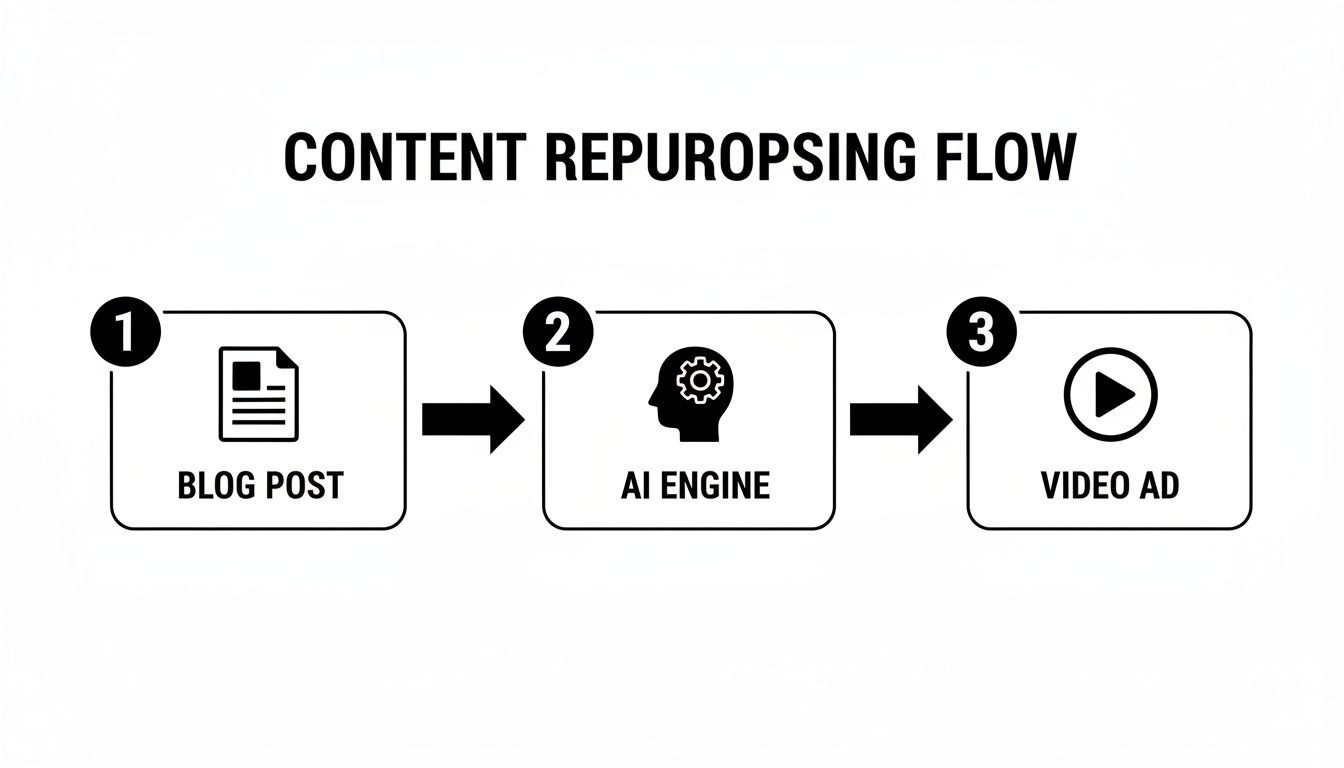
This workflow maps out a clear path from your existing text to a finished video, letting the AI tackle the most time-consuming parts.
Finding Your Source Content Gold
First things first: you have to pick the right blog post. This is probably the most critical part of the entire process, because not every article is cut out to be a video. You're hunting for content that already has some momentum or contains juicy bits that translate well to a visual, fast-paced format.
Time to audit your content library. I always look for posts that are:
- High-Performing: Dive into your analytics. Which articles are pulling in high organic traffic, keeping people on the page, or getting a ton of shares? These are your proven winners.
- Evergreen: Content like foundational guides or popular listicles that stay relevant over time will give you long-term value as a video ad.
- Narrative-Driven: Does the article tell a story, walk through a case study, or guide the reader from a problem to a solution? That's perfect material for a video script.
- Data-Rich: Posts loaded with interesting stats, infographics, or step-by-step instructions are a goldmine for visual storytelling.
Once you’ve got a shortlist, pick the one that aligns best with a current marketing campaign. That way, your repurposed video ad has a clear purpose right from the get-go.
Extracting and Rewriting the Script With AI
Okay, you've got your article. Now it's time to distill its core message into a short, punchy video script. This is where an AI tool like ShortGenius becomes your best friend. Trying to manually chop a 2,000-word article into a 60-second script is not only tedious but often leads to a clunky, unnatural result.
Instead, just feed the blog post URL into the AI. It’ll tear through the text, pinpointing the main arguments, key takeaways, and most compelling data points. From there, it generates a draft script, usually structured with a hook, a few main points, and a call-to-action (CTA).
Remember, a blog post is written to be read, but a video script is written to be heard. The AI's first draft is a fantastic starting point, but you'll want to tweak it to sound more conversational. Cut the complex sentences and ditch the jargon.
This is a great time to play around with a powerful AI ad generator to see just how fast it can turn your article into a campaign-ready script. The time saved here is huge, letting you focus on creative polishing instead of manual summarizing.
Generating Scenes and Visual Assets
With the script locked in, the AI switches hats from writer to director. It reads the script and starts storyboarding scenes. For instance, if a line says, "Our software boosts productivity by 50%," the AI might suggest a few options:
- A stock video clip of a team working efficiently in a bright office.
- An animated graphic of a bar chart quickly rising to the 50% mark.
- A clean text overlay with the statistic displayed prominently.
Platforms like ShortGenius are packed with massive libraries of licensed stock footage, images, and music, so you don't have to worry about copyright issues. The AI is smart enough to match these assets to your script, creating a narrative that flows visually. And if a suggested clip doesn't quite fit your brand's vibe, you can easily swap it out for something else.
Producing the Perfect Voiceover
Let’s be honest: bad audio can completely ruin a video ad. A robotic, monotone voiceover is an instant turn-off for viewers. Thankfully, modern AI voice generation has gotten incredibly good, offering a whole range of natural-sounding voices in different languages, accents, and tones.
Inside a tool like ShortGenius, you can usually:
- Select a Voice: Browse the library and find a voice that matches your brand's personality—energetic, authoritative, warm, you name it.
- Generate the Audio: The AI reads your script and spits out a high-quality audio file.
- Adjust Pacing and Emphasis: Many tools even let you fine-tune the timing and inflection to make sure the delivery feels authentic.
This completely eliminates the time and cost of hiring, directing, and recording voice actors. It’s a game-changer for production speed.
Final Touches: Resizing and Captions
We're almost there. The final step is all about optimizing your video for the platforms where you'll be running your ads. A one-size-fits-all approach just doesn't fly on social media.
First, focus on resizing. With a single click, you should be able to reformat your video into the ideal aspect ratios for different placements:
- 9:16 (Vertical): Essential for TikTok, Instagram Reels, and YouTube Shorts.
- 1:1 (Square): Great for Instagram and Facebook feeds.
- 16:9 (Horizontal): For standard YouTube videos and website embeds.
Next, and this is crucial, add dynamic captions. A huge percentage of social media videos are watched with the sound off. The AI can automatically transcribe the voiceover and generate animated, easy-to-read captions that pop on screen. This guarantees your message lands even without audio and helps grab attention in a crowded feed.
By following this AI-driven workflow, you can consistently and efficiently create compelling video ads that are primed for performance across all the major platforms.
Making Your AI Video Ads Actually Perform in the Wild

Creating a video with AI is a great first step, but that's all it is—a start. The real magic happens when you take that raw AI-generated asset and sharpen it into a high-performing ad that stops the scroll and gets people to act.
This is where you shift from being a content creator to a performance marketer. Your AI tool hands you the clay; it's your job to sculpt it into something that delivers real, measurable results through relentless testing and platform-specific tweaks.
You've Got Three Seconds. Go.
In the blink-and-you'll-miss-it world of social media feeds, you don't have a minute to make an impression. You have three seconds, tops. If your hook doesn't land immediately, your audience is already gone.
This is where AI can be an incredible brainstorming partner. Instead of just guessing what might work, you can use a tool like ShortGenius to spit out multiple hook variations based on your original blog post's core message.
Try testing a few different angles:
- Ask a provocative question: "Still making ads the old, slow way?"
- Drop a surprising stat: "This one tweak boosted our conversions by 47%."
- Make a bold claim: "Your blog posts are your most powerful untapped asset."
Don't just think about the words, either. Ask the AI to concept different opening visuals. Maybe it's a piece of eye-catching b-roll, a slick text animation, or a shot of someone showing a relatable emotion. The name of the game is rapid testing to see what actually stops the thumb.
Find Your Winners with Rapid A/B Testing
The biggest edge AI gives you in this process is speed. The ability to create a dozen video variations in the time it used to take to produce one is a game-changer. It unlocks methodical A/B testing at a scale that was previously out of reach for most teams.
When you're testing, focus on the elements that have the biggest impact:
- Voiceovers: Pit a male voice against a female one. See if an energetic, upbeat tone outperforms a more serious, authoritative delivery. The right voice can completely change the feel of your ad.
- Calls-to-Action (CTAs): "Learn More" is fine, but it's often boring. Test more direct CTAs like "Get Your Free Demo," "Download the Guide," or "Shop Now" to see what motivates a click.
- Music & Sound: Try out different background tracks. Does an upbeat pop song work better than a cinematic, inspiring score? What about no music at all? Sound is a powerful, and often overlooked, tool for setting the mood.
The golden rule here is to change only one thing at a time. If you change the hook, the voice, and the CTA all at once, you’ll have no clue what actually caused the change in performance. Isolate your variables to get clean, actionable data.
Adapt Your Ad for Every Platform
Throwing the same square video up on TikTok, LinkedIn, and YouTube is a surefire way to waste your ad budget. Every platform has its own unwritten rules, audience expectations, and technical specs. Your AI videos need to feel like they belong there.
For TikTok and Instagram Reels:
- Format: It’s 9:16 vertical or nothing.
- Pacing: Think fast cuts, dynamic captions, and trending audio if it fits your brand. The vibe should feel more native and less like a polished corporate ad.
- Length: Keep it tight. Under 30 seconds is usually the sweet spot.
For LinkedIn and X (formerly Twitter):
- Tone: Shift to a more professional, informative tone. Think data visualizations, expert quotes, and hard-hitting stats pulled from your article.
- Format: Square (1:1) and horizontal (16:9) formats tend to perform better in these feeds.
- Content: The focus should be on delivering tangible value and insight.
For YouTube Ads:
- Hooks: For skippable in-stream ads, the first 5 seconds are absolutely everything.
- Audio Quality: People on YouTube expect better production value, especially when it comes to sound. Muffled or noisy audio can kill your credibility, so it’s worth using the best noise reduction software for audio to ensure everything is crystal clear.
- Length: You can get away with longer ads here, even up to 60 seconds, but only if you have a compelling story to tell.
Measure What Actually Moves the Needle
Likes and views feel good, but they don't keep the lights on. To really know if your video ads are working, you have to obsess over the key performance indicators (KPIs) tied to your business goals.
These are the metrics that matter:
- View-Through Rate (VTR): What percentage of people are actually watching your video to a meaningful point (like 15 seconds or completion)? A high VTR means your creative is engaging.
- Click-Through Rate (CTR): Of the people who saw your ad, how many actually clicked the link? This tells you how compelling your offer and CTA are.
- Cost Per Click (CPC): Simple but crucial: how much are you paying for every click? The goal is always to drive this down without sacrificing traffic quality.
- Conversion Rate: This is the bottom line. What percentage of people who clicked your ad took the action you wanted them to take, like signing up or buying something?
Tracking these KPIs creates a powerful feedback loop. You’ll quickly learn which hooks keep people watching, which CTAs make them click, and which platforms send you the best customers. This data is what transforms your AI video production from a guessing game into a predictable growth engine. Understanding these metrics is key to succeeding in the creator economy—you can learn more about that in our guide on how much TikTok pays its creators.
Advanced AI Repurposing Techniques and Pro Tips
Once you get the hang of the basic workflow, it's time to start really pushing what AI can do. This is where you graduate from simply converting content to crafting a sophisticated creative strategy. Think of your AI tool less like a content machine and more like a performance-driving partner.
Here are a few of my go-to techniques for getting next-level results.
The single most powerful shift you can make is to stop thinking about creating one video from a blog post and start thinking in terms of creating dozens. A good blog post is packed with different angles, pain points, and benefits. Use your AI to spin up a unique video ad for each one, letting you micro-target different audience segments with messages that hit home.
Let’s say you have a post on "10 Ways to Improve Team Productivity." Instead of one generic video, you could create:
- Ad 1 (For Managers): This one zeroes in on the tips for better delegation and project management.
- Ad 2 (For Employees): Here, you highlight the time-saving software tricks and personal focus techniques.
- Ad 3 (Humorous Angle): A classic before-and-after showing the chaos versus the calm of implementing the tips.
This approach lets you test a massive volume of creative without burning out your team.
Enhance Scripts, Don’t Just Generate Them
A rookie mistake is taking the first AI-generated script as the final version. A much savvier move is to use AI as a script enhancement engine. Once you have a solid script pulled from your blog post, challenge the AI to rewrite it with different emotional slants.
Try feeding it prompts like:
- "Rewrite this script to create a sense of urgency and FOMO."
- "Make this script more inspirational, focusing on what the customer can become."
- "Turn this script into a funny, relatable story that dramatizes the core problem."
This process helps you uncover creative angles you probably wouldn't have thought of on your own. You're not just repurposing; you're exploring the emotional triggers that actually get people to act.
Integrate Authentic User-Generated Content
Nothing builds trust faster than seeing real people love a product. One of my favorite advanced tactics is to blend slick AI-generated video with raw snippets of user-generated content (UGC). This could be a clip from a customer testimonial, a screenshot of a glowing social media comment, or a powerful quote from a case study.
First, let the AI tool build the core video ad from your blog post. Then, you can manually drop in a short UGC clip or an overlay with a customer quote. The combination is dynamite—the AI provides the polish and structure, while the UGC injects that layer of authenticity that so much advertising lacks. You can get a much deeper look into this hybrid strategy in our guide on creating powerful AI UGC ads.
This hybrid model combines the efficiency of AI with the trust-building power of real customer voices. The AI handles 90% of the production work, while you simply drop in the high-impact social proof.
This isn't just about making better ads; it's about being more efficient with your budget. We're seeing a clear trend here. Research from The Desire Company shows that 54% of marketers are already using AI for video creation, which cuts their production costs by an average of 23%. With digital video ad spending projected to hit $62.1 billion, those savings are anything but small.
Before we move on, let's talk about where you'll be publishing these ads. Each platform has its own little quirks and best practices. Getting the specs right is crucial for performance, so here’s a quick-reference table to keep you on track.
Platform-Specific Video Ad Specifications
This table is a handy guide for optimizing your AI-generated videos for the top social platforms.
| Platform | Ideal Aspect Ratio | Recommended Length | Key Feature |
|---|---|---|---|
| TikTok | 9:16 | 15-30 seconds | Sound-on is critical; use trending audio |
| 9:16 (Reels/Stories) | 15-60 seconds | High-quality visuals and interactive elements | |
| YouTube | 16:9 (In-stream) | Skippable: <3 mins, Non-skippable: <30s | Strong hook in the first 5 seconds is a must |
| X (Twitter) | 1:1 or 16:9 | 6-15 seconds | Concise, direct messaging for a fast-paced feed |
Remember, these are just starting points. Always test what works best for your specific audience and campaign goals.
Create and Enforce Brand Consistency at Scale
When you’re pumping out dozens of video variations, keeping everything on-brand can feel like herding cats. That's why setting up a brand kit inside your AI tool isn't just a nice-to-have; it's non-negotiable for anyone serious about scaling.
Most modern platforms like ShortGenius let you pre-load all your brand's core assets:
- Logos: Ensure your logo is placed consistently in every single video.
- Color Palettes: Lock in your brand's primary and secondary colors for text, backgrounds, and graphics.
- Fonts: Upload your brand's specific fonts to maintain perfect typographical consistency.
- Templates: Create and save video structures with predefined intros, transitions, and call-to-action screens.
By building this foundation first, you empower anyone on your team—not just designers—to create on-brand video ads in minutes. It guarantees a cohesive look and feel across every single campaign, no matter how many A/B tests you're running.
Common Mistakes To Avoid With AI Video Creation

AI is an incredible assistant for creating content, but if you treat it like a "magic button," you're going to get mediocre results. The automation is fantastic, for sure, but I've seen a few common mistakes sabotage perfectly good campaigns. If you can sidestep these pitfalls, you'll be well on your way to producing ads that actually convert.
The single biggest mistake? An over-reliance on automation. It’s so tempting to let the AI generate a video and immediately hit publish, but that's a massive gamble.
Think of AI as a tool, not a creative director. It simply doesn't understand brand voice, emotional nuance, or the subtle context that makes an ad connect with a real person.
This is why a final human review is absolutely non-negotiable. You have to watch every single video from start to finish. This is your chance to catch awkward phrasing, visuals that don't quite match the script, or jarring transitions the AI might have missed. That quality control step is what separates a professional, effective ad from something that just screams "AI-generated."
Forgetting to Adapt the Script
Another classic error is just copy-pasting blog text directly into the AI and hoping for a great video script. It doesn't work that way. A blog post is written to be read, often with long sentences and dense paragraphs. A video ad script needs to be spoken. It has to be short, punchy, and conversational.
If you skip this step, you’ll end up with a robotic and unnatural voiceover every single time.
A great video ad script feels like a conversation, not a narrated essay. Always read your AI-generated script out loud. If it feels clunky or awkward to say, it will sound even worse to your audience. Rewrite it until it flows smoothly.
This one simple check can dramatically improve the impact of your ads. It makes sure your message is clear and easy to absorb in the precious few seconds you have to grab someone's attention.
Adopting a "One Size Fits All" Mentality
It’s easy to make one video and blast it across all your social channels. It’s also a lazy and ineffective strategy. The audience on TikTok has completely different expectations than the audience on LinkedIn. Posting the same 9:16 vertical video with trending audio to a professional network is going to fall flat.
Platform context is everything. Each channel has its own culture, preferred formats, and unwritten rules.
- TikTok and Instagram Reels: These platforms demand fast-paced, vertical videos that feel native and entertaining.
- LinkedIn and X (Twitter): Here, users often prefer more informative, data-driven content, which works well in square or even landscape formats.
- YouTube: This platform can support longer narratives, but you absolutely need a killer hook in the first five seconds to stop the scroll.
Take the extra few minutes in a tool like ShortGenius to resize your video, adjust the pacing, or tweak the messaging for each platform. That small effort shows you understand the environment and respect your audience, which pays off big time in ad performance. Avoiding these blunders is key to making sure your AI-powered video ad strategy delivers a real return.
Got Questions About AI Video Repurposing?
Even with a solid game plan, you're bound to have questions when you first start turning blog posts into video ads with AI. Let's tackle some of the most common ones I hear from teams making this switch.
What Are the Best Blog Posts to Turn Into Video Ads?
Honestly, not every blog post is a great candidate for a video ad. You'll want to be picky and start with content that's either already a proven performer or naturally structured for a visual medium.
I always tell people to look for these three things in their content library:
- High Organic Traffic: These are your slam dunks. If a post is already pulling in a ton of search traffic, you know the core message hits the mark. That's a great sign it will resonate in a video ad.
- Evergreen "How-To" Guides: Anything with step-by-step instructions or a list format is practically begging to be a video. They’re super easy to break down into clear, valuable scenes that hold a viewer's attention.
- Data-Heavy Articles: Do you have a post packed with juicy stats, case studies, or original research? Perfect. This is gold for creating authoritative, visually interesting ads that make people stop and think.
How Long Should My AI-Generated Video Ads Be?
There's no magic number here—it really comes down to the platform and what you're trying to achieve. An ad that kills it on YouTube could be a total dud on TikTok.
Here’s a quick cheat sheet I stick to:
- TikTok & Instagram Reels: Keep it snappy. 15-30 seconds is the sweet spot. You need a fast hook and an even faster payoff.
- YouTube In-Stream Ads: You've got a little more breathing room here, maybe 30 seconds to a full minute. But remember, those first five seconds are absolutely critical before that "Skip Ad" button pops up.
- X (Twitter) & LinkedIn Feeds: Think short and sharp. Under 30 seconds is usually best. People are scrolling fast and just want a quick hit of information.
The big takeaway is to tailor the ad's length to how people actually behave on each platform. A powerful, immediate hook will always beat a long, drawn-out explanation.
Can AI-Generated Videos Actually Match Human Quality?
This is the million-dollar question, isn't it? And the answer is... it depends. The top AI video tools today can churn out videos that look incredibly polished. In many cases, they look even better than what a small, overworked marketing team could produce manually, especially when you need to create a lot of them. AI is a beast at generating clean voiceovers, sourcing relevant stock footage, and adding slick captions in no time.
But let's be real: AI doesn't have a soul. It lacks genuine creative flair and that gut feeling for what will make an audience connect emotionally.
The winning strategy I’ve seen work time and again is a hybrid approach. Let AI do the heavy lifting—about 90% of the production, like the script draft, scene creation, and the first edit. But always have a human come in for that final polish. That last 10% is where you inject your brand's personality, fix any weird phrasing, and make sure the video truly lands with your audience.
Ready to stop letting your best blog posts just sit there? With ShortGenius, you can spin your proven content into high-performing video ads in minutes, not weeks. It’s time to start creating and testing at the speed of AI. Get started with ShortGenius today!