Your Guide to Finding the Best TikTok Audio Downloader

Discover the best TikTok audio downloader for your needs. Learn how to save TikTok sounds on any device and legally repurpose them for viral content.
Having a TikTok audio downloader in your back pocket is more than just a convenience—it's a critical tool for any creator serious about growth. Since TikTok doesn't offer a built-in "download audio" button, these tools are the only way to grab the trending sounds that define the platform's culture.
Why a TikTok Audio Downloader Is a Creator's Secret Weapon
On TikTok, audio isn't just background music; it's the very heart of what goes viral. A single sound can explode overnight, creating a tidal wave of millions of videos and launching creators into the spotlight. For smart marketers and influencers, this is a huge opportunity.
Having a way to download TikTok audio isn't just for fun. It’s a core part of a smart content strategy. Think of it as a shortcut to staying culturally relevant.
Imagine you spot a new sound that's just starting to take off. If you can quickly download it and build your next video around it, you're placing your content right in the path of an emerging trend. That simple move can massively boost your chances of getting discovered. It's this kind of agility that separates the channels that grow from the ones that get left behind.
Capitalize on Trends for Faster Content Production
The speed of social media can be overwhelming. Instead of trying to reinvent the wheel every time, using a trending sound gives you a ready-made concept for your video. This instantly speeds up your entire workflow, from brainstorming ideas to hitting "publish."
For brands, this means launching timely campaigns in a fraction of the time. For solo creators, it means keeping up a consistent posting schedule without burning out. This is a foundational tactic for success on the platform.
It's a big reason why understanding how TikTok marketing agencies operate is so insightful; they build entire campaigns around strategically using viral audio to get the most reach and engagement possible.
The Scale of TikTok Audio Culture
The obsession with remixing audio is a worldwide phenomenon, and it's all thanks to TikTok's mind-boggling scale. The app has racked up over 6.1 billion downloads globally.
To put it in perspective, a single sound like 'Beat Automotivo Tan Tan Tan Viral' by WZ Beat has been used in over 40 million videos. With a user base this massive, audio trends spread like wildfire, making a reliable downloader essential.
For a creator, a downloaded audio clip isn't just an MP3 file. It's your ticket to joining a global conversation and capturing your audience's attention.
Ultimately, any tool that helps you work with this audio is a game-changer. That's where platforms like ShortGenius come in. They let you import these sounds and use them to power AI video creation, simplifying your production from start to finish.
Choosing the Right TikTok Audio Downloader for You
With so many options out there, picking the right TikTok audio downloader can feel like a chore. But the tool you settle on really does shape your workflow, affecting everything from how fast you can work to the quality of the final MP3.
Making the right choice comes down to one thing: matching the tool's features to what you’re trying to accomplish.
Are you a social media manager who just needs one specific sound for a last-minute ad? Or are you a full-time creator building a massive library of audio clips for future videos? Your answer will point you straight to the perfect solution.
Browser-Based Online Tools
When you just need a sound right now, nothing beats a browser-based downloader for speed and simplicity. These are websites where you just paste a TikTok video link and click a button. Done. No software to install, which makes them perfect for quick one-off jobs or when you're borrowing someone else's computer.
Of course, that convenience comes with a few strings attached. A lot of these free sites are plastered with aggressive pop-up ads that can be incredibly distracting and, sometimes, a little sketchy. Privacy can also be a bit of a question mark, since you never really know what’s happening with the links you’re pasting.
Key Takeaway: Online tools are your best friend for quick, occasional downloads where you value convenience over a clean, ad-free experience or advanced features.
Dedicated Mobile and Desktop Apps
If you find yourself saving TikTok audio on a regular basis, investing in a dedicated app for your phone or computer is the way to go. These programs offer a much cleaner and more reliable experience, letting you skip the pop-up minefield altogether.
Mobile apps are perfect for grabbing sounds on the fly and saving them directly to your camera roll or files. Desktop software, however, is where the real power lies. They often pack in features you just won’t find on a website:
- Batch Downloading: The ability to queue up and download a whole list of audio files at once.
- Higher Quality Options: Some programs let you choose a higher audio bitrate for clearer sound.
- Built-in Organization: Tools to help you manage and sort your growing library of sounds.
The demand for these tools is no surprise. TikTok has become a massive engine for music discovery, turning audio clips into viral assets seemingly overnight. In fact, since 2024, TikTok's "Add to Music App" feature has led to over 1 billion track saves, which just shows how central audio is to the entire platform. If you're curious about the numbers behind the platform's growth, Backlinko has some eye-opening data on TikTok's user engagement.
This flowchart can help you visualize which approach best suits your creative strategy.
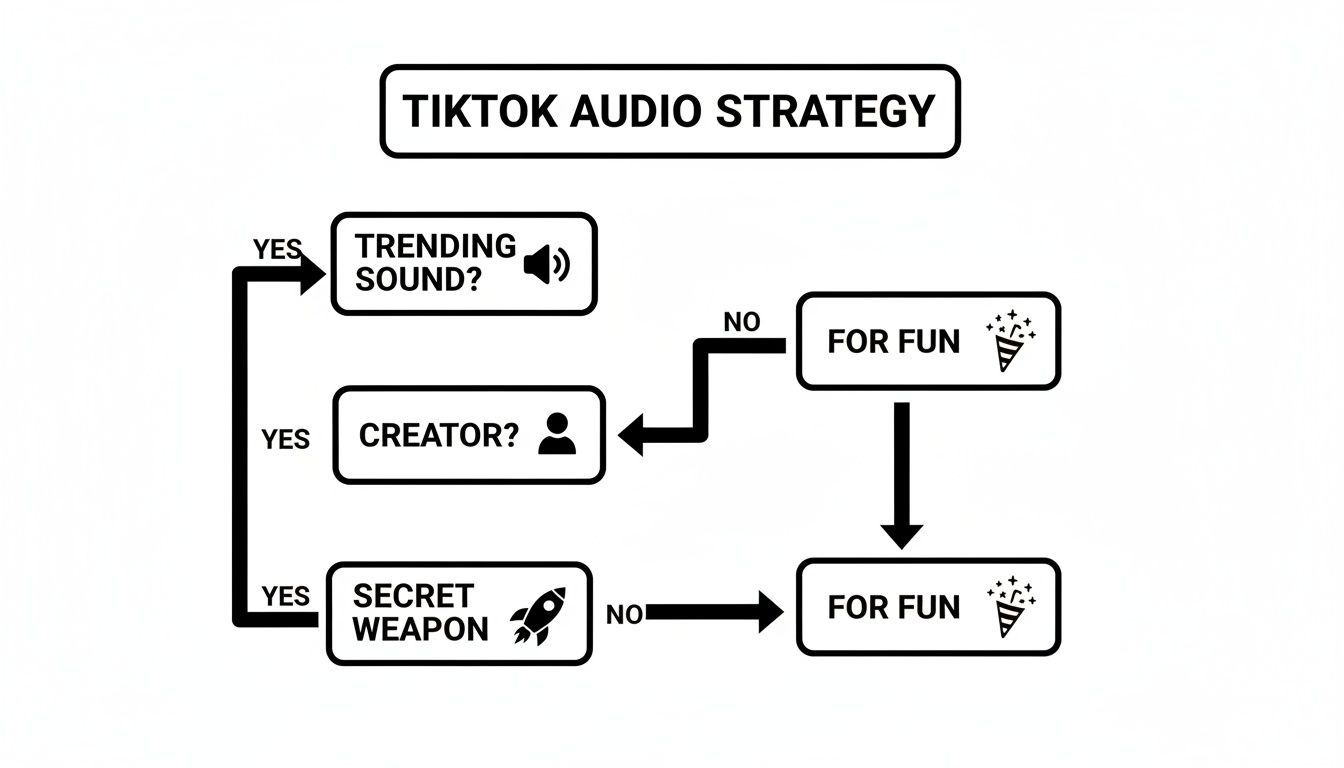
As the graphic shows, for serious creators, jumping on trending audio isn't just for fun—it's a strategic move that can give your content a serious boost.
Comparing TikTok Audio Downloader Methods
To make the decision even easier, this table breaks down the key features of different audio download methods. It’s designed to help you quickly pinpoint the best fit for your specific workflow.
| Method Type | Best For | Pros | Cons |
|---|---|---|---|
| Online Tools | Quick, one-off downloads when convenience is key. | No installation needed; fast and simple to use; works on any device with a browser. | Often cluttered with ads; potential privacy concerns; limited features and quality options. |
| Dedicated Apps | Frequent users and creators building a sound library. | Ad-free experience; higher-quality downloads; features like batch downloading and organization. | Requires installation; desktop apps aren't as portable as mobile or web options. |
| Screen Recorders | Capturing audio that can't be downloaded directly. | Works for any sound on the platform, even protected ones. | Lower audio quality; requires manual editing to trim and isolate the sound; time-consuming. |
Each method has its place, and now you have a clear picture of when to use each one.
Ultimately, the best TikTok audio downloader is the one that fits so smoothly into your creative process that you barely notice it's there. Whether it’s a simple online tool for a quick grab or a feature-packed desktop app, the goal is to get the audio you need with zero friction. That way, you can get back to what you do best: creating.
How to Download TikTok Audio on Any Device
So you've found the perfect audio clip on TikTok and need to get your hands on it. Good news—it’s much easier than you think. Whether you're at your desk mapping out your next campaign or just scrolling on your phone, there's a reliable method to grab that sound.
The trick is simply knowing which tool works best for your setup. Let's walk through the practical, no-nonsense ways to use a TikTok audio downloader so you can go from hearing a trending sound to having the MP3 file in hand, ready to go.
Downloading Audio on a Desktop
If you’re like me and do most of your creative work on a laptop or desktop, using a browser-based tool is easily the most efficient path. It means no extra software to install, keeping your entire workflow right there in your browser.
The process is incredibly direct. Start by finding the TikTok video with the sound you want to snag. On the right side of the video, you’ll see the “Share” icon (it looks like a little arrow). Give that a click, and then choose “Copy Link.”
With the link on your clipboard, pop open a new tab and head to an online TikTok audio downloader website. They pretty much all work the same way: find the field to paste the URL, drop your link in, and hit “Download” or “Convert.” The site will then do its thing and give you a link to download the audio as a clean MP3 file.
Saving Sounds on Your Phone
Pulling audio directly onto your iPhone or Android is just as simple, though the taps are a little different. The main goal here is getting the file saved somewhere you can actually find it again without a headache.
You’ll start inside the TikTok app, just like on desktop.
- Find the video and tap the “Share” icon.
- From the sharing options, select “Copy Link.”
- Now, switch over to your mobile browser (like Safari or Chrome) and navigate to an online downloader site.
- Paste in the link and start the download.
This is where the paths for iPhone and Android diverge. On an iPhone, once the MP3 is ready, you’ll likely need to use the browser's share options to "Save to Files." This will let you stash the audio in your iCloud or on your device. Android users usually have it a bit easier, as the file will typically save directly to the "Downloads" folder.
Pro Tip: I highly recommend creating a dedicated folder called "TikTok Sounds" in your phone's file manager. Every time you download a new clip, save it there. It keeps everything organized and ready for your next project, saving you from digging through a messy downloads folder later.
Using Online Tools for Quick Downloads
Online downloader websites are the universal key, working on any device that has a web browser. Their biggest draw is pure speed and accessibility—no apps to update, no software to worry about.
That said, it pays to be a little picky. While tons of these sites exist, many are bogged down with pop-up ads or have painfully slow conversion speeds. My advice? Find one or two that work well for you and bookmark them.
Of course, the real magic happens after you’ve got the MP3. Having the file is just the first step. Imagine taking that trending sound and instantly importing it into a powerful creation tool. You can learn more about how to use AI for video creation with ShortGenius and see how that simple audio clip can become the foundation for an entire video ad in minutes. It closes the gap between just having a sound and turning it into something that performs.
Using Downloaded TikTok Audio the Smart Way
Alright, so you've managed to download that killer sound from TikTok. Now what? Getting the audio file is the easy part. The real challenge is figuring out how to use it without stepping on any legal landmines. The rules can feel a bit murky, but getting a handle on them is crucial for keeping your brand out of hot water.
There’s a world of difference between using a sound for a quick video inside the TikTok app and ripping it for your own projects. When you create on TikTok, the platform has already sorted out the complex licensing deals with artists and labels. The moment you pull that audio off the platform, however, you're operating in a different world governed by copyright law.
Navigating Copyright and Commercial Use
If you're just making a video to share with a few friends, your risk is pretty low. The real danger lies in commercial use. As soon as you use that downloaded audio in any content that promotes a product, service, or business—even if it's subtle—you've crossed a line.
Imagine using a trending, copyrighted song in your company's Instagram Reel or as the background for a YouTube ad. That's a classic case of copyright infringement, and the consequences can be a real headache:
- Content Takedowns: Platforms are quick to pull down videos flagged by a DMCA notice.
- Account Strikes: Rack up enough of these, and you could see your social media accounts suspended or even permanently banned.
- Legal Trouble: While less common, rights holders can and do take legal action for damages, especially if the infringement is blatant.
This isn't just a hypothetical problem. TikTok's grip on the music industry is immense. A staggering 84% of the 2024 Billboard Global 200 hits first blew up on TikTok. If you want to see the data for yourself, Soundcamps has a great breakdown of TikTok's influence. This stat alone shows how fiercely artists and labels protect these incredibly valuable assets, which is why using a tiktok audio downloader for business requires a thoughtful strategy.
Best Practices for Staying on the Right Side of the Law
So, how do you stay creative without getting into trouble? It all comes down to being deliberate about where your audio comes from and how you plan to use it.
My rule of thumb is simple: assume every trending sound is copyrighted. Unless you have a license or explicit permission, don't use it to promote your business anywhere but on TikTok itself.
For brands, the smartest and safest bet is to use audio that’s already cleared for commercial use. A great starting point is TikTok’s own Commercial Music Library, which is full of royalty-free tracks ready-made for businesses.
Another route is to use a tool like ShortGenius, which builds licensed audio libraries right into its AI video creation tools. This is a much smoother process, letting you create professional ads with high-quality, fully licensed sound without ever having to second-guess if you're violating copyright. By sticking to legitimate sources like these for your commercial projects, you can put your energy into making great content, not worrying about legal issues.
Turn Your Downloaded Audio Into a Viral Video
So, you've used a TikTok audio downloader to snag a trending sound. Great. But that's just step one. The real work—and the real fun—begins now. It’s time to take that MP3 file and turn it into a high-energy video that actually stops the scroll.
Think of that downloaded audio as the heartbeat of your new content. It’s not just background noise; it's the creative foundation that dictates the pace, the mood, and the entire rhythm of your video. Without a solid plan, even the catchiest sound will just fizzle out. You want the visuals and audio to feel like they were made for each other.
Bringing Your Audio into the Production Workflow
With the MP3 saved to your device, your next move is importing it into your video editor or content creation platform. If you're churning out videos consistently, AI tools like ShortGenius can be a game-changer here. Instead of staring at a blank timeline, you can upload your audio and let it guide the entire creation process.
Let's say you run an e-commerce brand and you’ve just grabbed a sound that’s blowing up—perfect for your next product ad. Here’s a quick look at how you could put it to work:
- Import the Audio: First things first, upload your MP3 directly into the platform.
- Generate the Script: Let the AI draft a script that syncs up with the audio's timing and energy.
- Create the Visuals: From there, the tool can pull together scenes, stock footage, and graphics that line up with both your script and the beat of the audio.
This flips the script from a manual, time-consuming task to an efficient, proactive strategy. You can jump on a trend and have a polished video ready to go in a fraction of the time. To truly capitalize on this, it helps to understand how to promote your music on TikTok and other short-form platforms to get the most eyeballs on your new creation.
Fine-Tuning Your AI-Generated Video
The first video the AI spits out is your starting point—a solid rough cut. Now it's your turn to add the human touch. Tweak and refine every element until it perfectly reflects your brand's style. You can easily swap out scenes, tighten up the cuts so they hit the beat exactly, and apply your brand kit (colors, fonts, logos) to keep everything looking consistent.
The videos that perform best feel custom-made for the sound. This means every single visual transition, text pop-up, and on-screen effect needs to be perfectly synchronized with the audio track.
Want to take it up another notch? A professional voiceover can make all the difference. Modern text-to-speech is surprisingly good, allowing you to generate a crisp narration that adds another layer of polish. This integrated approach turns a simple audio file into a powerful marketing asset, ready to be deployed across TikTok, Reels, and YouTube Shorts.
Got Questions About TikTok Audio Downloaders?
Even with the best tools, you probably have a few questions rattling around. When you're dealing with a TikTok audio downloader, you're juggling practical, technical, and even legal stuff. Let's tackle some of the most common hangups so you can grab audio the right way.
Getting these details straight will help you make smarter choices, whether you’re just saving a funny sound for later or building it into your brand's content strategy.
Is It Actually Legal to Download Audio from TikTok?
This is the big one, and honestly, it’s a bit of a legal gray area. For personal use—like saving a track you love or using it in a video just for your friends—you’re generally in the clear. The real problems pop up when you start using that audio for commercial purposes.
If you download copyrighted music from TikTok and use it to promote a product, your business, or a service, you’re wading into risky copyright infringement territory. My advice for any brand? Play it safe. Stick to the pre-cleared tracks in TikTok's official Commercial Music Library.
Does Using a TikTok Audio Downloader Wreck the Sound Quality?
The quality of your final audio file really comes down to the tool you’re using. Most of the reputable online downloaders and apps are built to pull the audio at the highest possible quality from the original video, which typically gives you a solid MP3 file.
Where you can run into trouble is with some of the sketchier, ad-plastered websites. They often over-compress the audio to save on server costs, and you’ll definitely hear the drop in quality. It might sound tinny or muffled.
Pro Tip: Always stick with well-reviewed and trusted tools. A good downloader will give you an audio file that’s virtually indistinguishable from what you heard on TikTok.
Can I Download TikTok Audio Directly on My iPhone?
Yep, you absolutely can! It just takes a quick workaround because of how Apple locks down its file system. You won't find an app for this on the App Store, so the easiest route is to use a web-based downloader right from your Safari browser.
Just copy the TikTok video link, hop over to Safari, and paste it into the online tool. Once it processes, you’ll see a download button. Tap that, then use the "Share" icon in Safari and choose "Save to Files." This drops the MP3 right into your iPhone's Files app, ready for you to use.
What’s the Best Format for Downloaded TikTok Audio?
For 99% of cases, MP3 is the gold standard. It’s the perfect compromise, giving you great sound quality without a massive file size. More importantly, it’s compatible with pretty much every video editor and social media platform out there.
Most downloaders default to MP3 anyway, and there’s almost never a reason to hunt for another format. It just works.
Ready to turn those viral sounds into polished, high-performing videos in minutes? ShortGenius uses AI to help you create stunning ads and social content, complete with professional voiceovers and perfect visual syncing. Start creating with ShortGenius today!