Your Guide to the Modern Social Media Video Editor

Discover how a modern social media video editor transforms content creation with AI. Learn to choose the right tool and streamline your video workflow.
Ever felt like creating great social media videos requires a film degree and a supercomputer? It used to. But today, a social media video editor is the secret weapon for creators and brands who need to move fast and capture attention.
Think of it less like traditional, complex editing software and more like a specialized toolkit built for one purpose: turning your raw footage into polished, scroll-stopping videos for platforms like TikTok, Instagram Reels, and YouTube Shorts.
What Is a Social Media Video Editor Anyway?
Let's break down what these tools really are. A social media video editor is your creative hub, designed from the ground up for the fast-paced, trend-driven nature of social feeds. Its whole job is to tear down the technical barriers that once made video creation a massive headache.
Unlike the heavy-duty software made for feature films or sprawling YouTube documentaries, these editors are all about speed and impact. They're laser-focused on the features that actually matter when you only have a few seconds to make someone stop scrolling.
The Big Shift: From Desktop Behemoths to Smart Platforms
We’ve come a long way. Video editing used to mean chaining yourself to a powerful desktop, wrestling with clunky software like Adobe Premiere Pro that demanded weeks of learning. Now, the best tools are smart, often AI-powered platforms like ShortGenius that run right in your browser.
This jump from desktop to cloud has changed the game completely. You no longer need to be a technical wizard to produce professional-looking content. Instead, these platforms zero in on solving the biggest headaches for modern creators:
- The Need for Speed: Forget spending days on a single clip. Templates, presets, and AI shortcuts let you pump out content in minutes.
- Simplicity is Key: The interfaces are clean and intuitive. If you can use a social media app, you can use one of these editors.
- Staying on Trend: They come loaded with features that social audiences actually respond to, like animated captions, popular sound effects, and slick transitions.
At its heart, a social media video editor is a great equalizer. It gives everyone—from a solo influencer bootstrapping their channel to a full-blown marketing agency—the power to create videos that look and feel like they belong on the platform.
Traditional vs Social Media Video Editors
To really get the difference, let's put the old-school editors side-by-side with the new breed of social-first tools.
| Feature | Traditional Video Editor (e.g., Premiere Pro) | Social Media Video Editor (e.g., ShortGenius) |
|---|---|---|
| Primary Goal | Cinematic, long-form storytelling | Fast, engaging, and platform-native content |
| Learning Curve | Extremely steep; requires professional training | Minimal; designed for non-editors |
| Workflow Speed | Slow and methodical; hours or days per project | Rapid; minutes per video |
| Core Features | Color grading, complex audio mixing, VFX | Auto-captions, one-click resizing, brand kits |
| Output Formats | Horizontal (16:9) focus for film/TV | Vertical (9:16) focus for mobile feeds |
| Collaboration | Complex, often requires sharing large project files | Simple, cloud-based team access |
| Cost | High subscription fees and powerful hardware needed | Affordable monthly plans, browser-based |
The table makes it clear: they're two different tools for two very different jobs. One is a master craftsman's workshop for creating a masterpiece; the other is a high-tech assembly line for consistently producing brilliant content at scale.
Ultimately, these platforms are designed to solve a single, critical problem: how do you consistently create compelling videos that people will actually watch? By providing the right shortcuts—from resizing clips for every platform to adding AI voiceovers—they make great video a sustainable part of any content strategy.
Core Features That Actually Save You Time

When you're looking for a good social media video editor, it's easy to get lost in a sea of flashy effects and complicated timelines. But the best features aren't about adding more clutter; they're about solving the biggest bottlenecks in your workflow.
Think of these tools as a skilled assistant, one who handles all the tedious, repetitive tasks so you can get back to what matters—crafting a story that connects with your audience. They're the real engine behind modern content creation.
From Raw Clip To Polished Post In Minutes
The whole point is to move fast without your quality taking a hit. A modern editor makes this possible by baking in a few key functions that can shrink a multi-hour editing slog into a few quick minutes.
Here are the essentials that genuinely make a difference:
- Automated Captions: Let's be real: a huge chunk of your audience is watching with the sound off. Captions aren't just a "nice-to-have" anymore; they're critical. Automated transcription can generate accurate, easy-to-edit subtitles in seconds, making sure your message always gets through.
- One-Click Resizing: You just finished a killer video for Instagram Reels. Now you need a version for YouTube Shorts and another for a square feed post. Instead of starting over, one-click resizing intelligently reframes your video for any platform, saving you from a world of headache.
- Intuitive Trimming Tools: Social media is all about being punchy and direct. Simple drag-and-drop trimmers and split tools let you effortlessly cut out awkward pauses and dead air, so you can hook your viewers right from the start.
These core functions are the bedrock of an efficient editing process. They take what used to be complex technical hurdles and turn them into simple, satisfying clicks.
The real power of a great social media video editor lies in its ability to give you back your most valuable resource: time. By handling the repetitive, technical work, it frees you to be more strategic and creative.
Advanced Tools Powered By AI
Once you've got the basics down, AI-driven features are what really help you scale up your content production. It's no surprise that 63% of video marketers now use AI in their creation or editing process. That's a massive jump from just 51% the year before, which shows how quickly AI is becoming standard practice. You can dig into this trend in Wyzowl's latest video marketing report.
These intelligent features elevate your content with surprisingly little effort:
- AI Voiceover Generation: Need a professional-sounding narration but don't have the budget for a voice actor or recording gear? AI can generate crisp, human-like voiceovers from a simple script, complete with different languages and accents.
- Brand Kits: Building a recognizable brand is all about consistency. A brand kit lets you store your logos, specific color palettes, and fonts. From there, you can apply them to any video with a single click, ensuring a cohesive look across all your content.
- Smart Templates and Presets: Platforms like ShortGenius are packed with pre-built templates for different types of videos. These aren't just static layouts—they’re entire frameworks with pacing, transitions, and effects already dialed in. Find out more about how these AI-powered tools accelerate production and take the guesswork out of complex edits.
Who Actually Uses a Social Media Video Editor?
You might think a social media video editor is just for one type of creator, but that's not the whole picture. It’s more like a Swiss Army knife for a whole range of professionals, helping them tackle very real, high-stakes problems in their day-to-day work. From an agency trying to scale client work to a founder trying to drive sales, these tools are the quiet workhorses behind a massive amount of the content we see online.
Let's put a face to the user. Picture 'Maria,' a social media manager juggling five different client accounts. Her biggest challenge isn't creativity; it's volume. Maria needs to crank out a month's worth of unique, on-brand Instagram Reels and TikToks for each client, and she's got one afternoon to do it. A top-notch social media video editor is what makes that possible.
Creators and E-commerce Founders
Then you've got 'Tom,' an e-commerce founder trying to get his products noticed. He doesn't have the budget to hire a full-blown production crew every time he launches a new item. So what does he do? He leans on an editor to create compelling product demos, snappy video ads, and authentic customer testimonials all by himself.
This gives him the power to quickly test different creative angles, see what clicks with his audience, and actually drive sales without a huge upfront cost. In a way, the tool lets him become his own nimble, in-house video agency.
And for full-time influencers and content creators, the pressure to publish constantly is relentless. They need a steady stream of high-quality, engaging videos to hold their audience's attention and keep their channels growing. A dedicated video editor isn't a luxury for them; it's a critical part of their workflow, allowing them to edit, add captions, and schedule content from anywhere.
A social media video editor bridges the gap between professional-grade results and the need for speed and accessibility. It democratizes video creation, allowing anyone with a story to tell or a product to sell to compete for attention.
Agencies and Freelance Editors
Marketing agencies and freelance video editors are another huge part of this world. Their entire business often hinges on producing a high volume of content for their clients. For them, these platforms are all about efficiency and collaboration. Many also use specialized platforms for making videos for others to find new clients and keep projects organized.
These pros live by features like brand kits, which let them instantly apply a client's specific logos and colors. They also rely on templates to keep a consistent look and feel across an entire campaign. Being able to create in batches and schedule content right from the editor saves them countless hours of grunt work, freeing them up to focus on strategy and keeping clients happy. This efficiency isn't just a nice-to-have; it's fundamental to their bottom line.
How to Choose the Right Video Editor for Your Goals
With a sea of video editing tools out there, picking the right one can feel overwhelming. The secret isn't finding the one with the longest feature list; it’s about finding the one that perfectly fits your specific workflow and what you’re trying to achieve with your content.
Before you dive in, take a moment to ask yourself a few honest questions. Are you a one-person show churning out daily content and need speed above all else? Or are you part of a marketing team where brand consistency and collaboration are the name of the game? Your answers will point you in the right direction.
Think of it this way: a solo influencer will probably get the most value out of a huge library of pre-made templates and trending audio. On the other hand, a marketing agency will be looking for shared workspaces and lockable brand kits to keep everything on-point for their clients.
Evaluate Your Skill Level and Time Commitment
Let's be real—your current editing skill is probably the biggest factor. Some platforms are so intuitive you can pick them up in an afternoon, while others offer granular control but expect you to climb a much steeper learning curve.
Be realistic about how much time you can actually spend learning new software. If your main goal is to pump out great-looking content without getting lost in the technical weeds, a simple, clean interface is a must-have.
The best social media video editor for you is the one that removes friction from your creative process, not one that adds more complexity. It should feel like an assistant, not a puzzle.
Many people get their start on mobile-first apps like CapCut because they're dead simple and hook right into TikTok. They’re fantastic for jumping on quick trends. But as your content gets more sophisticated, you'll likely find yourself needing a more powerful, all-in-one solution.
Core Capabilities to Look For
When you start comparing different editors, some features just plain matter more than others. Keep your focus on the tools that solve actual problems and help you create better videos, faster.
Here’s a quick rundown of what to keep an eye out for:
- Ease of Use: Is the layout clean and easy to figure out? Can you do the basics—like trimming a clip or adding text—without needing a 20-minute tutorial? A great test is to sign up for a free trial and see if you can make a decent video in under 15 minutes.
- AI-Powered Functions: Look for smart features that do the boring work for you. High-quality AI voice generation can save you hours of recording and re-recording audio, and automatic captions are an absolute necessity for reaching a wider audience.
- Template and Asset Library: A good library of templates, stock video, and royalty-free music is a game-changer. It stops you from having to build every single video from the ground up.
- Branding Controls: How easy is it to upload your logos, use your specific brand fonts, and apply your color palette? For any business or agency, this is non-negotiable for keeping a professional, consistent look.
- Collaboration Features: If you're not flying solo, check for features that let your team jump into projects, leave feedback, and share files in one central spot.
Checklist for Choosing Your Video Editor
Use this checklist to evaluate and compare different social media video editors based on your unique needs.
| Evaluation Criteria | Importance (Low, Medium, High) | Notes for Your Use Case |
|---|---|---|
| User-Friendly Interface | How much time can I realistically spend learning? | |
| AI-Powered Features | Which tasks do I want to automate? (e.g., captions, voiceovers) | |
| Template & Asset Library | Do I need lots of stock footage/music, or do I have my own? | |
| Brand Kit Customization | How critical is brand consistency for my content? | |
| Collaboration Tools | Am I working alone or with a team? | |
| Mobile vs. Desktop App | Where do I do most of my work? On the go or at a desk? | |
| Export Quality & Formats | What platforms am I creating for? (e.g., 9:16 for Reels, 1:1 for ads) | |
| Pricing and Tiers | What is my monthly budget? Does the free plan offer enough value? |
By focusing on these core areas, you can confidently pick a social media video editor like ShortGenius that not only solves your problems today but also has the power to grow with you as your strategy evolves.
How AI Puts Your Content Production on Overdrive
Sure, individual features are nice. But the real game-changer is having a fully integrated AI workflow. We're moving past thinking of these platforms as simple tools and starting to see them as creative partners. They can manage the entire journey from a single idea to a published video, which is precisely where a unified social media video editor like ShortGenius comes in.
The old way was a painful, multi-app juggle. You’d write a script in one program, hunt for stock footage in another, record a voiceover in a third, and finally piece it all together in a fourth. It wasn’t just slow; it was a total drain on your creative momentum. Now, all those fragmented steps are collapsing into one smooth process.
From a Simple Idea to a Finished Draft
Imagine all you have is a basic concept, like "a 30-second video about the benefits of morning walks." With a modern AI editor, that's literally all you need to get the production line rolling.
Here's a look at how this new workflow actually plays out:
- AI Scriptwriting: You pop in your prompt, and the AI drafts a short, punchy script built for social media, often complete with scene-by-scene suggestions.
- AI Scene Generation: The platform then taps into AI image and video generators to create custom visuals that match each part of your script. Say goodbye to endlessly scrolling through stock libraries for a shot that kind of works.
- Realistic Voiceover Creation: Next, the system generates a clear, human-sounding voiceover to narrate the script, letting you pick a tone that fits your brand.
- Automatic Assembly: Finally, the AI pulls all these pieces together—the script, the custom scenes, and the voiceover—into a cohesive first draft, handling the initial pacing and transitions for you.
Within minutes, you have a solid foundation ready for your personal tweaks and creative flair. This isn't about replacing your vision; it's about bringing it to life at an incredible speed.
The Magic of a Unified System
The single biggest advantage here is having every tool you need under one roof. When your scriptwriter, asset creator, narrator, and editor all live in the same ecosystem, the whole process just flows. You're no longer wasting time exporting and importing files across five different browser tabs.
An integrated AI workflow gets rid of the technical headaches that used to stand between a great idea and a finished video. It opens the door for anyone to create professional-looking content, no matter their budget or technical background.
This unified approach lets you focus on the story, not on wrestling with the software. For instance, if you want to tweak a line in the script, the AI can generate a new voiceover clip to match it right there in the editor—instantly. It’s that kind of tight integration that turns a tedious chore into an exciting, dynamic creative session.
At the end of the day, a modern AI-powered social media video editor is your production assistant, creative director, and distribution manager all rolled into one. It’s how today’s creators and brands are managing to produce high-quality video consistently and at a scale that would have been impossible just a few years ago.
Your Step-by-Step Social Video Workflow
Knowing the features is one thing, but putting them to work is where the magic really happens. A solid, repeatable workflow is what turns a spark of an idea into a polished video that actually performs. Think of it less as a rigid set of rules and more as your creative roadmap—a process that saves you time and lets you focus on the story, not the technical headaches.
Instead of reinventing the wheel for every new post, you'll have a clear path from concept to publish. This is how you consistently create high-quality content without burning out.
Step 1: Ideation and AI-Powered Scripting
Every great video starts with a core idea. Before you touch any software, ask yourself: What am I trying to say? Who am I talking to? What do I want them to do or feel after watching?
Once you have a clear direction, you can bring in AI to do some of the heavy lifting. Platforms like ShortGenius can take a simple prompt—say, "a 30-second ad for a new eco-friendly coffee brand"—and generate a tight, compelling script. This gives you a fantastic starting point and shaves hours off the creative process.
Step 2: Generating and Sourcing Visuals
With your script locked in, it’s time to find the visuals. The old way involved endless scrolling through stock footage libraries, hoping to find the perfect clip. Today, AI-powered tools can generate custom images and video scenes that perfectly match the tone and content of your script.
This is the modern way to visualize your video creation, breaking it down into a simple, three-part flow.
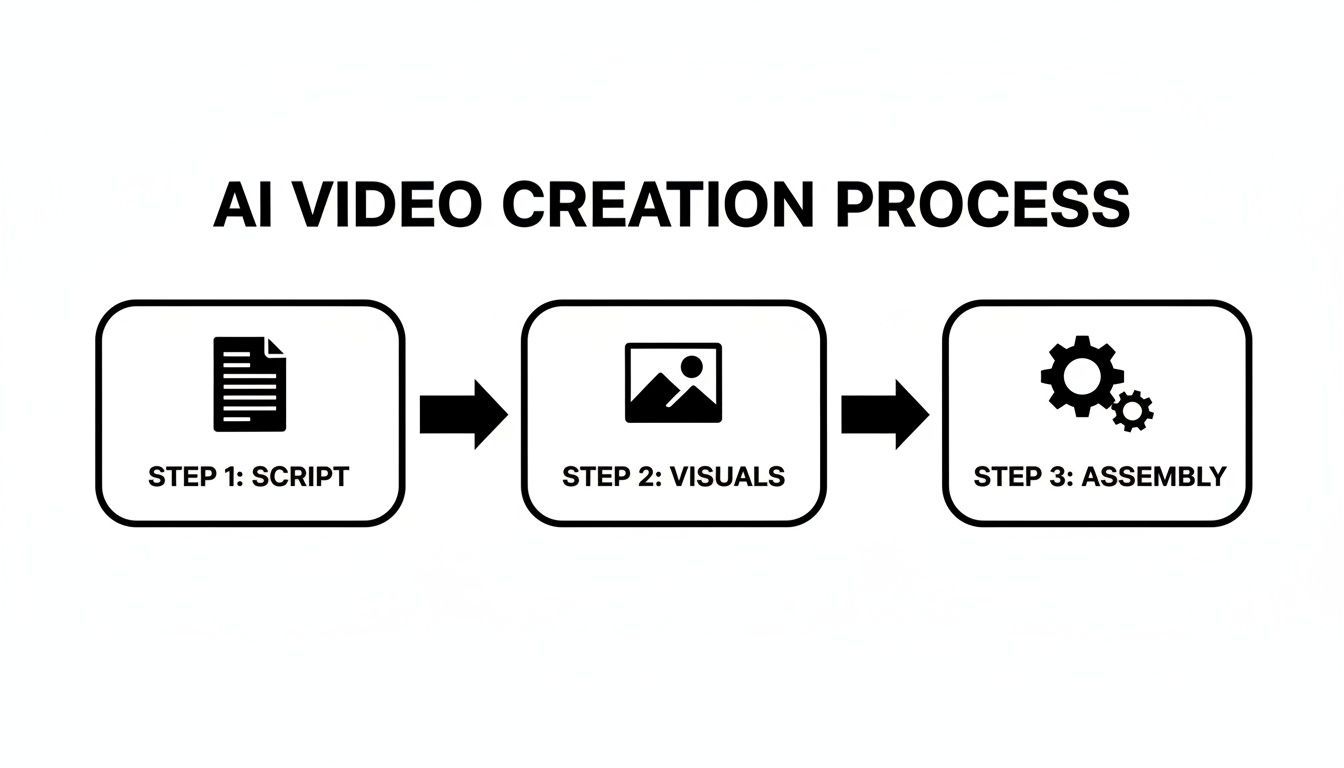
This simple progression—from script to visuals to assembly—is the engine of modern content production. To really make your content pop, mastering some professional photo editing techniques for things like your video thumbnails can also make a huge difference in click-through rates.
Step 3: Assembling and Editing Your Story
Now, it's time to put all the pieces together. Drag your AI-generated visuals, voiceover, and any other clips into your editor's timeline. Your main focus here should be on pacing and flow.
- Trim Relentlessly: Every second counts. Cut out any dead air or fluff that doesn't move the story forward.
- Add Captions: A huge number of people watch with the sound off. Captions make your video accessible and ensure your message lands.
- Incorporate Transitions: Use simple, smooth transitions to guide the viewer's eye from one scene to the next without being jarring.
Step 4: Branding and Adding Final Touches
Consistency builds brand recognition. This is where your editor’s brand kit becomes your best friend. With just a click, you can apply your logo, brand colors, and custom fonts to the entire video. Finish it off by adding a background music track that complements the mood you're trying to create.
The final touches are what separate good content from great content. This is your chance to add a layer of polish that makes your video look professional and uniquely yours.
Step 5: Publishing and Scheduling Your Content
With your masterpiece complete, it's time to get it out into the world. A great social media video editor will let you easily export your final video in all the right aspect ratios for different platforms—square for the feed, vertical for Stories or Reels, and widescreen for YouTube.
Considering that 92% of businesses report being happy with their video marketing ROI, making sure your content is properly formatted for each channel is a no-brainer.
Many platforms also have built-in scheduling tools. This allows you to plan out your content calendar and automatically publish your videos at the best times to reach your audience, wrapping up a truly efficient, end-to-end workflow.
Got Questions? We've Got Answers
A few common questions always pop up when people first start exploring video editors for social media. Let's tackle them head-on.
Do I Need a Super-Powerful Computer?
Nope! This is probably the biggest sigh of relief for most people. Modern social media video editors are almost all cloud-based, meaning they run right in your web browser. All the heavy lifting happens on their servers, not your machine, so you can create slick videos even on a standard laptop.
Who Owns the Videos I Make?
You do. 100%. Any video you create, edit, and export using these platforms is your content. You own the final product and can post it wherever you want.
How Much Is This Going to Cost Me?
Getting started is often free. Most tools offer a free plan that gives you access to the basic features—more than enough to get your feet wet and produce great content. When you're ready for more, paid plans typically unlock advanced features like AI-powered voiceovers, remove watermarks, and give you access to much larger libraries of stock footage and music. The idea is to let you start creating right away without needing a big budget.
Ready to stop juggling a dozen different apps and finally speed up your video workflow? Give ShortGenius a try and see how our all-in-one AI platform helps you turn ideas into amazing, ready-to-post content in minutes. Start creating for free!